Private Investigation Professional Website Template
Surveill is a workers' compensation investigation landing page template built for private investigation firms. It leads with a metrics wall, anchors trust through a twelve-point comparison table, and converts claims adjusters and defense attorneys through a targeted referral form. The design channels courtroom authority using navy, gold, and monospaced type throughout.
by Rocket studio
Quick summary
Surveill is a single-page investigation firm template designed for B2B referral conversion. It opens with live-style counters, moves into a detailed vendor comparison table, and closes with a sticky referral form. Every section is built to speak to claims professionals who need documented proof of competence before they hand over a case file.
Who this template is for
This template is built for private investigation firms that serve insurance and legal clients. It speaks directly to vendors who need to demonstrate operational credibility, not just list services.
- Claims adjusters and third-party administrators managing workers' compensation caseloads
- Defense attorneys who require courtroom-ready documentation on short notice
- Investigation firms pitching mid-market carriers and self-insured municipal clients
What problem this template solves
Investigation vendors often lose referrals not because of poor field work, but because their marketing fails to convey precision. Claims professionals need evidence of capability before they trust a vendor with a file.
- Generic service pages do not show capability across specific investigation types or jurisdictions
- Adjusters and attorneys need a fast, structured comparison to vet a vendor against the competition
- Standard contact forms do not capture the referral context that investigation firms actually need
What you get with this template
The template delivers a complete, single-page referral funnel built around authority signals. Every component is designed to reduce friction for a claims professional who has thirty seconds to decide whether to make a call.
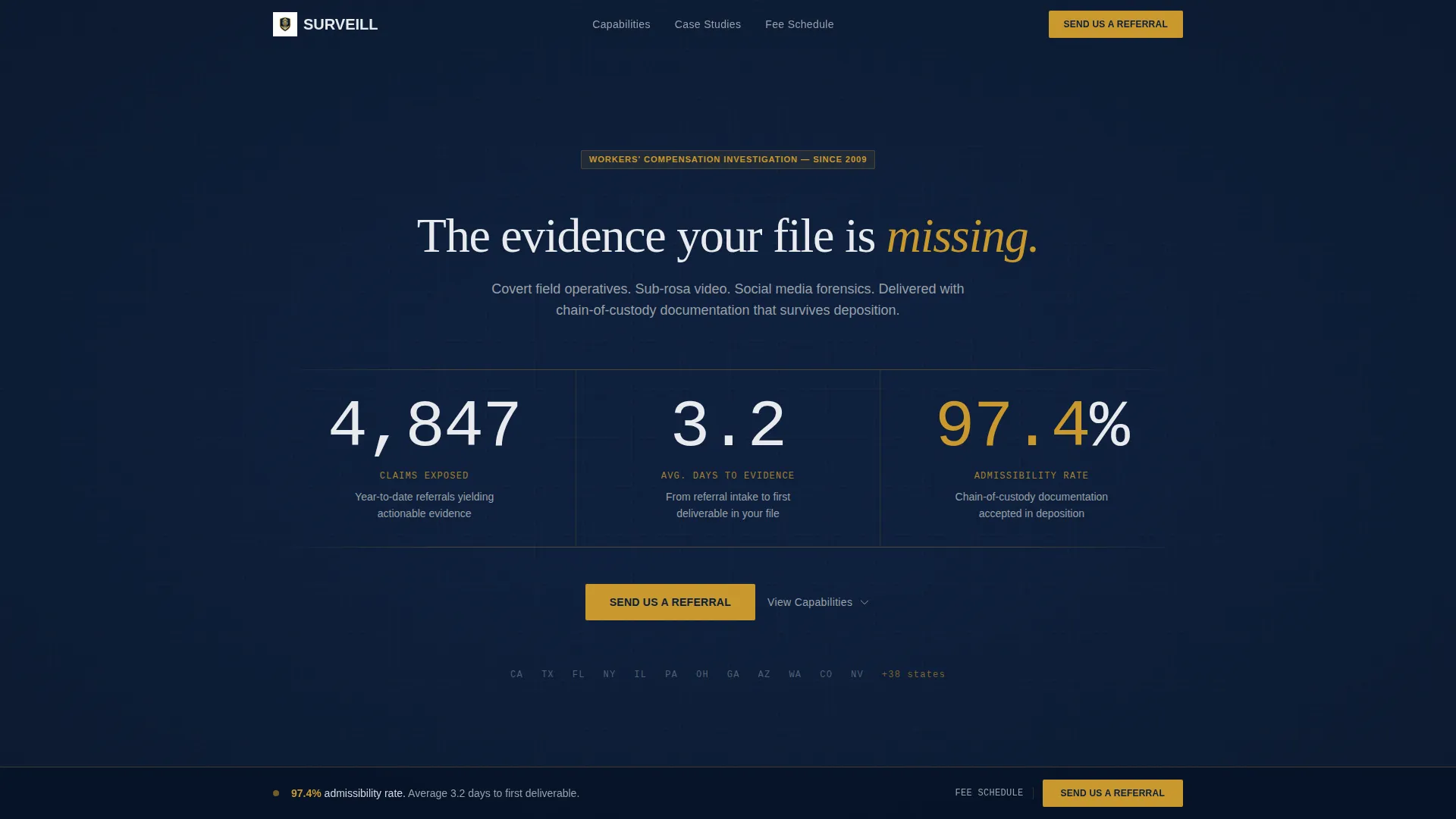
- A metrics wall header with three animated counters covering claims volume, evidence turnaround, and courtroom admissibility rate
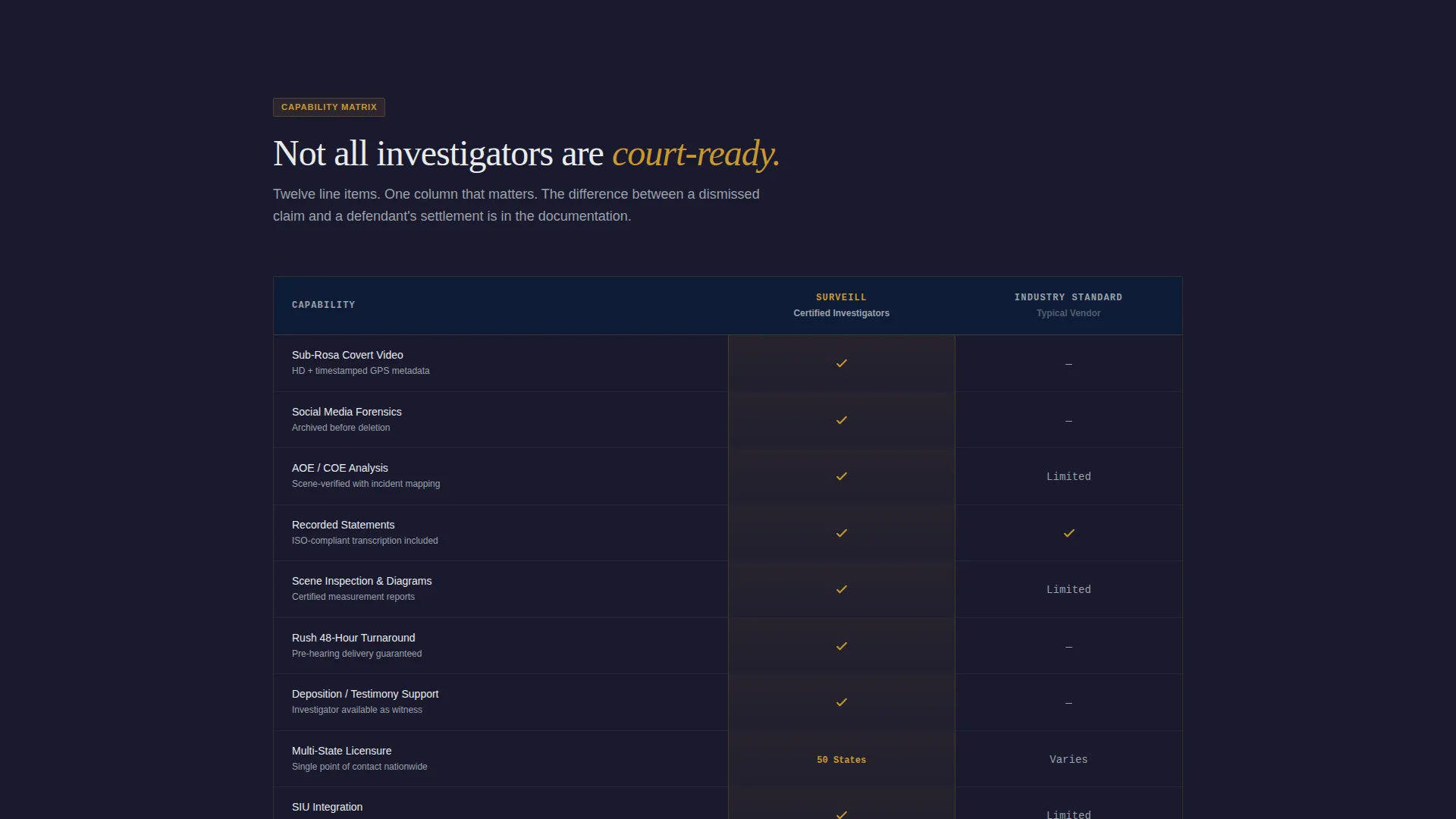
- A twelve-row vendor comparison table contrasting the firm's capabilities against industry-standard providers
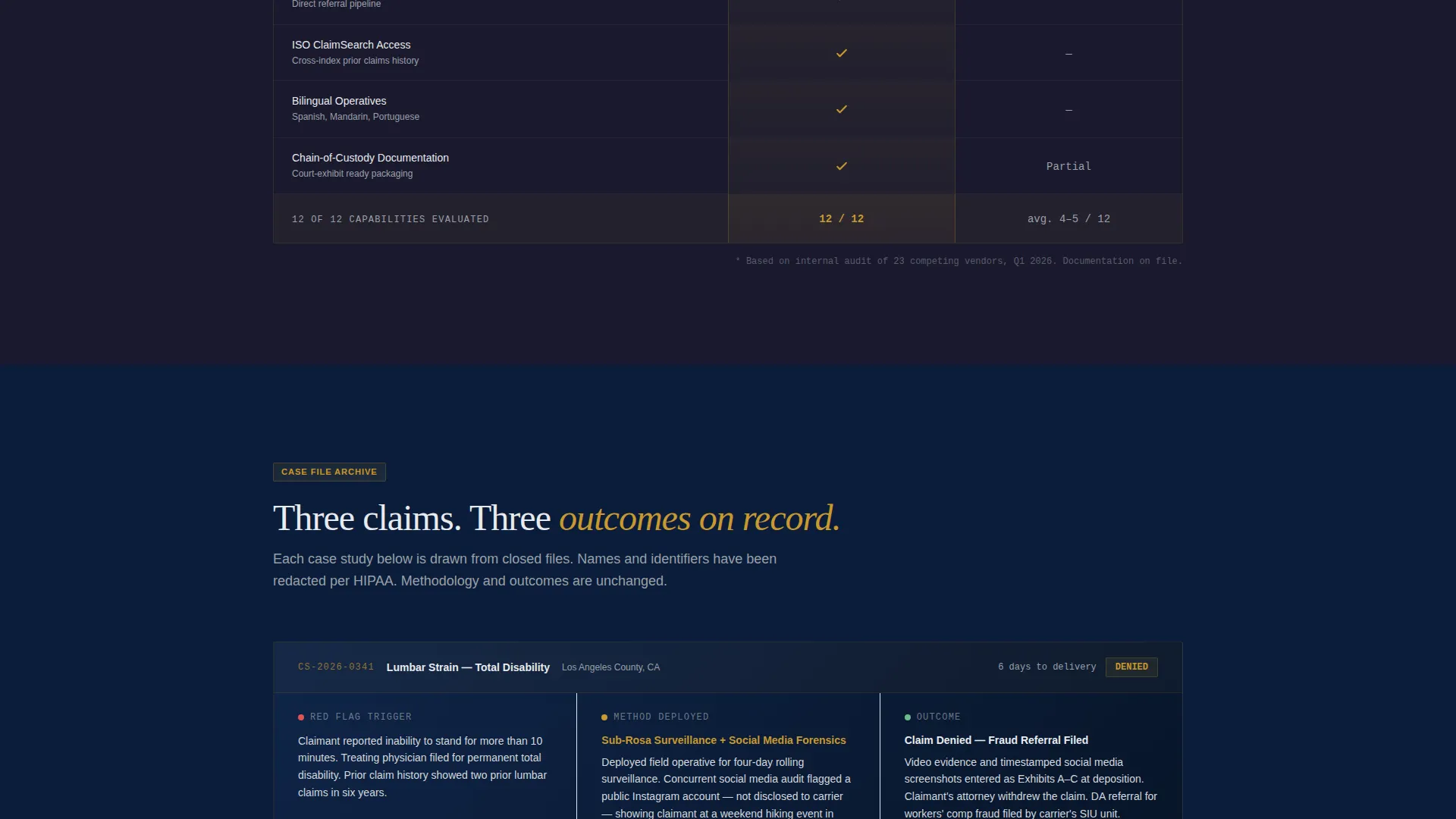
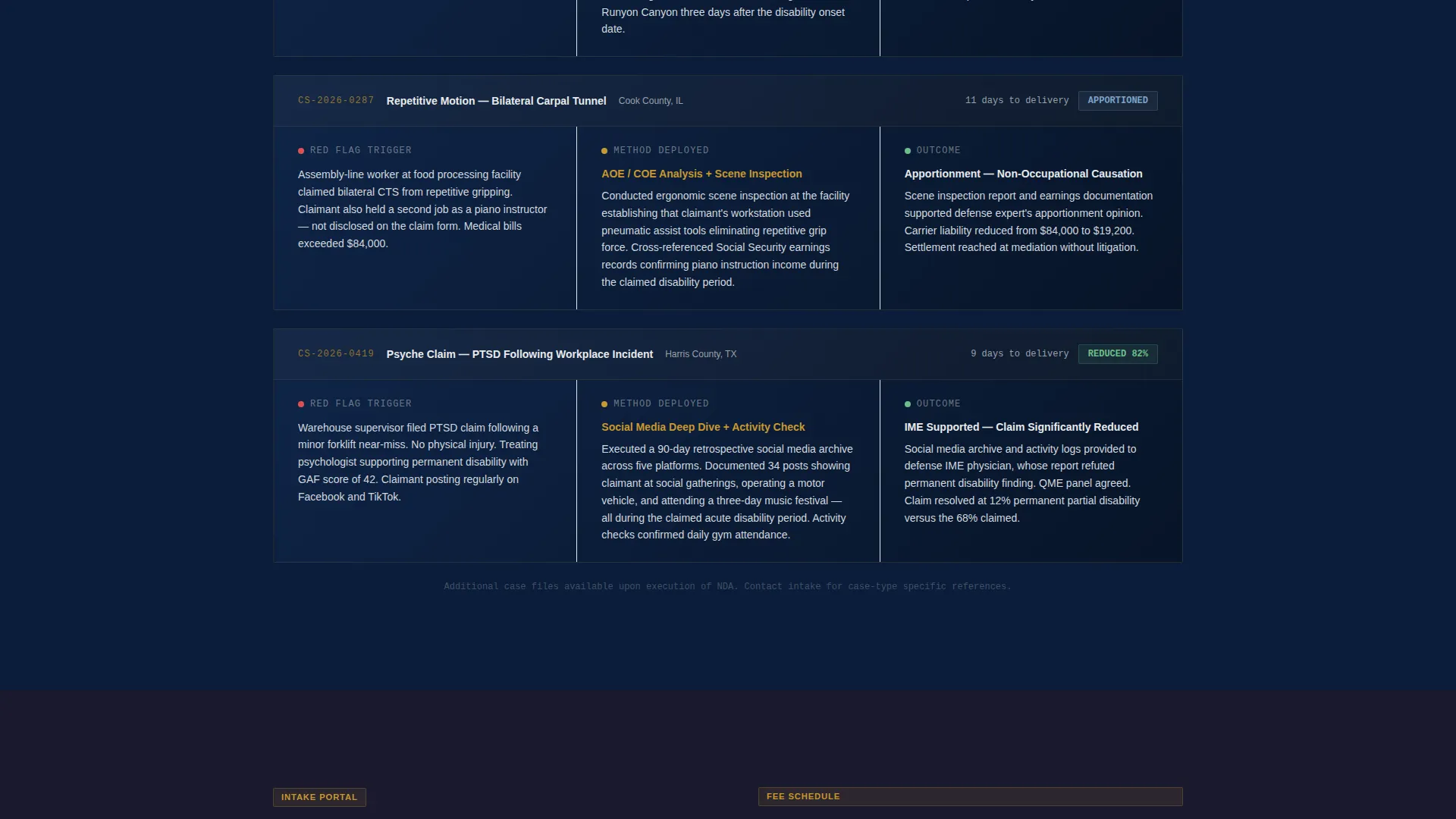
- Three case-study investigator panels structured around claim type, red flag, method, and outcome
- A sticky referral form bar capturing company name, referral volume tier, jurisdiction state, and claim description
- A gated fee schedule download triggered by a business email field
Feature list
This section outlines the core built-in components delivered with the Surveill template.
Animated Metrics Wall Header
Three oversized counters display claims exposed, average days to actionable evidence, and courtroom admissibility rate. Each counter is rendered in monospaced type against a command navy background, separated by thin gold rules. A single subhead anchors the section: "The evidence your file is missing."
Twelve-Point Vendor Comparison Table
A structured table contrasts the firm against industry-standard investigation vendors across twelve line items. Covered capabilities include sub-rosa video, social media forensics, AOE/COE analysis, recorded statements, scene inspection, rush turnaround, testimony support, multi-state licensure, SIU integration, ISO ClaimSearch access, bilingual operatives, and chain-of-custody documentation. Gold checkmarks mark the firm's capabilities; gray dashes mark gaps in competitor offerings.
Investigator Case Study Panels
Three investigator panels appear below the comparison table. Each panel is structured as a case-study narrative covering claim type, the red flag that triggered referral, the surveillance method deployed, and the documented outcome. Investigators are presented as case-study narrators, not as headshots, keeping the focus on outcomes over personality.
Sticky Referral call to action Bar
A bottom-anchored bar activates after the user scrolls past the comparison table. The primary call to action reads "Send Us a Referral." The form captures company name, referral volume tier (1 to 10, 11 to 50, or 50 or more claims per month), jurisdiction state, and a free-text field labeled "Describe the claim."
Gated Fee Schedule Download
A secondary conversion path offers a downloadable fee schedule. Access is gated behind a business email field, qualifying leads before delivery. This gives the firm a second touchpoint with prospects who are not yet ready to submit a referral.
Dossier-Style Visual Layout
The page is structured like a case file. Each section adds a layer of evidence until the cumulative weight supports a decision. No stock photography or faces appear on the page. Typography, color, and layout carry all of the authority signals.
Page sections overview
| Section | Purpose |
|---|---|
| Metrics Wall Header | Establishes firm credibility with three live-style counters |
| Vendor Comparison Table | Contrasts firm capabilities against industry-standard providers across twelve items |
| Case Study Panels | Shows real investigative outcomes through structured claim narratives |
| Sticky Referral Bar | Captures qualified referral leads after the comparison table |
| Fee Schedule Gate | Converts secondary prospects via a gated email-capture download |
Design & branding system
The visual identity uses a Corporate Precision theme built on the Navy Authority color system. The palette is designed to evoke the authority of a federal courtroom, not the approachability of a consumer brand.
- Command navy (#0B1D3A) dominates backgrounds and section dividers; redacted-black (#1A1A2E) anchors headlines; deposition-gray (#D4D8DD) carries body text and table cells
- Verdict gold (#C9982E) is reserved for calls to action, key metrics, checkmarks in the comparison table, and thin rule dividers only
- Monospaced typeface renders the counter numbers to reinforce the precision and timestamped accuracy of field evidence
Mobile & speed optimization
The template layout is designed to remain readable and functional on smaller screens. Field professionals and legal assistants often review vendor pages on mobile between appointments.
- The sticky referral bar remains accessible at the bottom of the screen across device sizes
- The comparison table is structured to scroll horizontally on narrow viewports without losing column alignment
- Section spacing and type sizing are set to maintain hierarchy and readability on phone-sized displays
How this template helps you convert
The page is built to move a skeptical B2B buyer from first impression to referral submission without requiring a sales call.
- The metrics wall establishes immediate numerical credibility before a single line of body copy is read, anchoring the firm's authority in specific, verifiable-looking figures.
- The comparison table removes the burden of vendor research from the adjuster or attorney by presenting a structured side-by-side analysis, making the choice feel already made.
- The sticky referral bar and gated fee schedule together create two conversion paths suited to buyers at different stages, capturing both ready-to-refer clients and early-stage prospects in the same scroll.
Other information about this template
This template is suited to firms operating across multiple jurisdictions, particularly those handling workers' compensation investigation at the state and municipal level. The referral volume tier field in the form acknowledges that clients range from small defense practices to large third-party administrators managing hundreds of open files.
- The template is built for single-page deployment, making it fast to launch as a campaign-specific referral page or as a primary firm landing page
- The case study narrative format is designed to mirror the documentation style familiar to claims professionals, reinforcing that the firm understands their workflow
- The fee schedule download path is designed for prospects who are evaluating vendors but are not yet ready to commit, giving the firm a warm lead to follow up on
Theme
Educational Guide
Creative direction
Transparent Process
Color system
Monochrome Steel
Style
Sidebar Companion
Direction
Click-Through
Page Sections
Animated Metrics Wall Header
Twelve-point Vendor Comparison Table
Investigator Case Study Panels
Sticky Referral Call to Action Bar
Gated Fee Schedule Download
Dossier-style Page Structure
Related questions
Who is the primary audience for this template?
Can the referral form be customized to match my firm's intake process?
Does the comparison table require manual content updates?
What makes this template different from a standard professional services page?
Is the gated fee schedule download connected to an email platform?



