Infant (0-1) Products & Reviews Website Template
Swaddle is a scroll-reveal landing page template built for infant clothing brands. It opens with an interactive week-age quiz, guides parents through fabric story sections and testimonials, and closes with a personalized bundle builder. The warm Sunset Gradient palette and progressive scroll animations create a golden-hour nursery feel that earns trust before asking for a purchase.
by Rocket studio
Quick summary
Swaddle is a single-page template designed for direct-to-consumer infant apparel brands. It centers on a three-question quiz that recommends personalized onesie bundles sized by actual weeks of age. Every scroll section layers emotional warmth on top of practical utility, moving parents and gift-givers from curiosity to confident checkout.
Who this template is for
This template is built for infant clothing founders, boutique baby brands, and anyone selling newborn apparel to parents or gift-givers. If your product deserves more than a generic shop grid, Swaddle gives it a story-first presentation.
- First-time parent brands that want to feel personal and trustworthy before asking for a sale
- Gift-focused businesses that need a shareable registry path alongside direct purchasing
- Small apparel labels that rely on emotional connection and fabric quality as their main selling points
What problem this template solves
Generic sizing labels like small, medium, and large do not match how a newborn actually grows. Parents shopping at two in the morning need quick, confident answers. This template removes sizing confusion and replaces it with a guided experience that makes every visitor feel understood.
- Eliminates the frustration of guessing between standard size charts that do not reflect real infant development
- Removes the friction for gift-givers who do not know the baby's exact size or the parent's style preference
- Replaces a cold storefront with a warm, conversation-style flow that earns trust progressively
What you get with this template
You get a fully structured, scroll-reveal landing page with five distinct content sections, a quiz mechanism, animated micro-interactions, and a gift-sharing path. Everything is ready to customize with your brand's copy, product details, and color values.
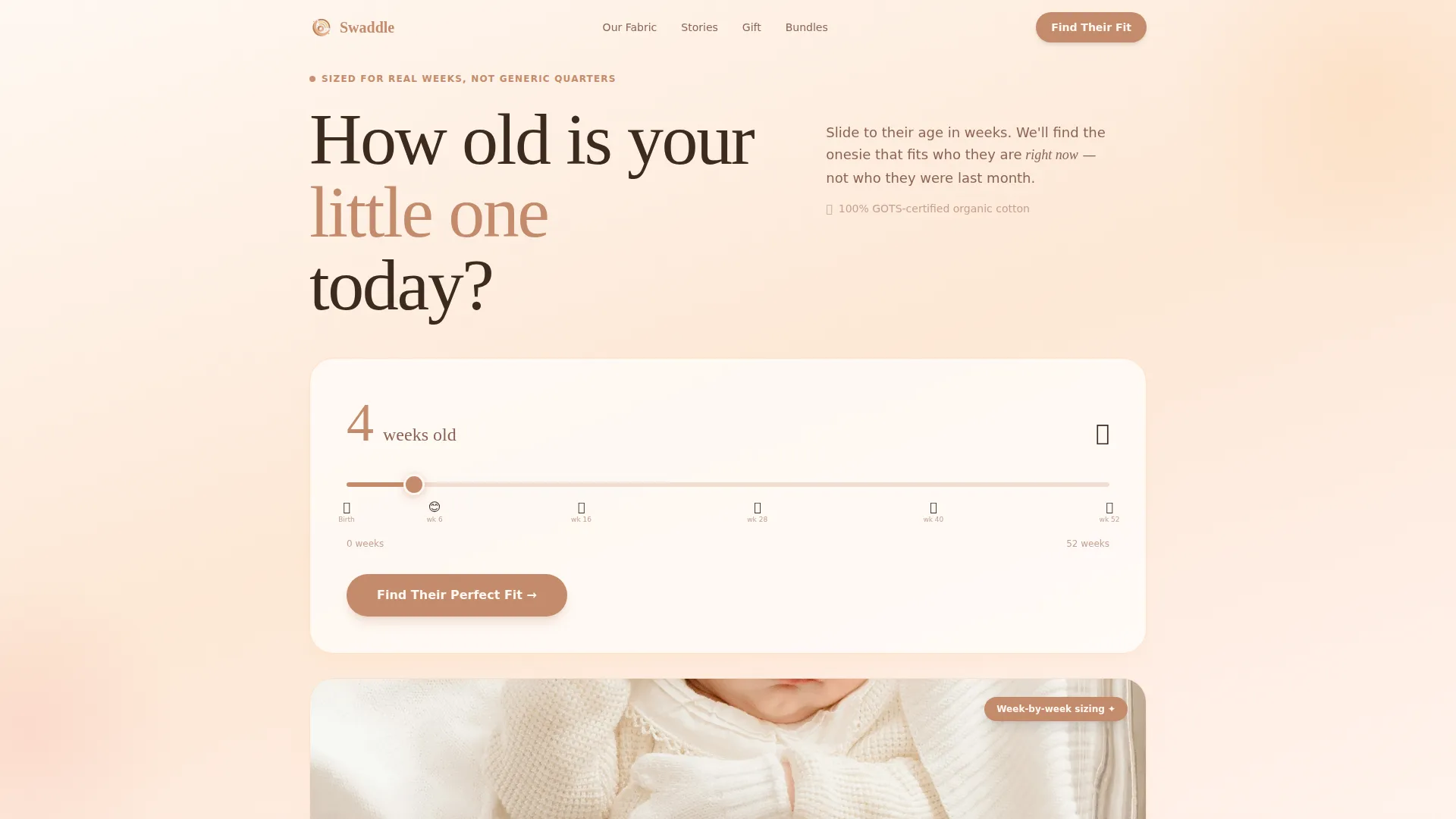
- A hero section with a week-age slider quiz and a primary "Find Their Perfect Fit" call to action
- Fabric story, testimonial, gift registry, and bundle builder sections with distinct layout treatments
- Sticky bottom call-to-action bar, hover flip cards, confetti dot animation, and auto-typing testimonial display
Feature list
A quick paragraph here: the features below reflect what the template is built to deliver based on the source brief. Each one serves a specific role in moving a visitor through the page.
Week-Age Slider Quiz
The hero opens with a horizontal slider running from 0 to 52 weeks. Tiny illustrated milestone icons mark the track. After the visitor answers, a size recommendation blooms on screen with a gentle confetti of pastel dots.
Three-Question Bundle Builder
The quiz asks about baby's age in weeks, current weight range illustrated with fruit comparisons, and style preference across minimal, playful, or heirloom options. Results surface a personalized capsule bundle with a one-click add-to-cart button.
Registry and Gift Sharing Path
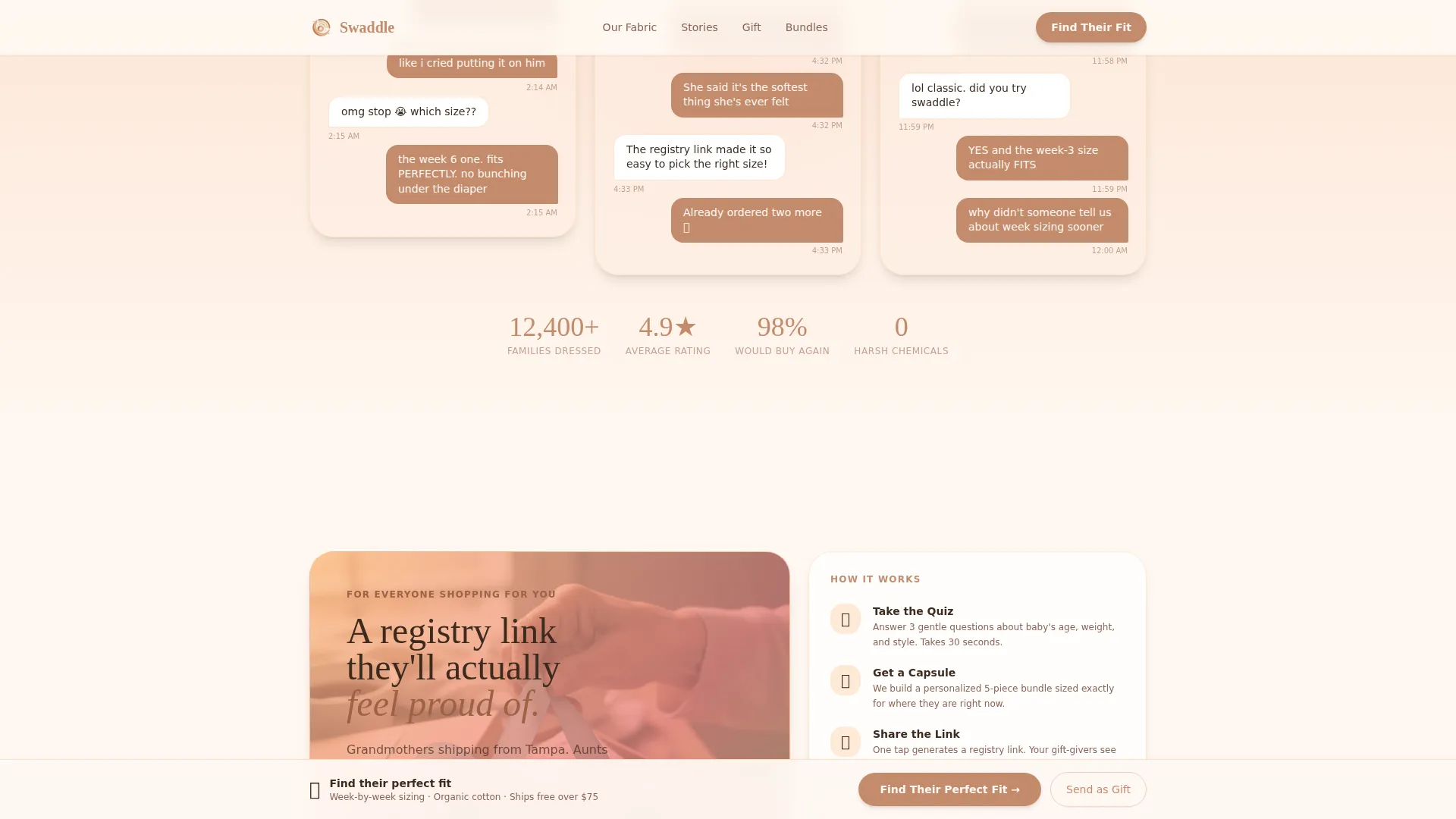
Alongside the primary purchase path, a secondary "Send This to Someone Shopping for You" option generates a shareable registry link. This serves grandmothers and baby-shower planners who need a list they feel proud to share.
Scroll-Reveal Progressive Animations
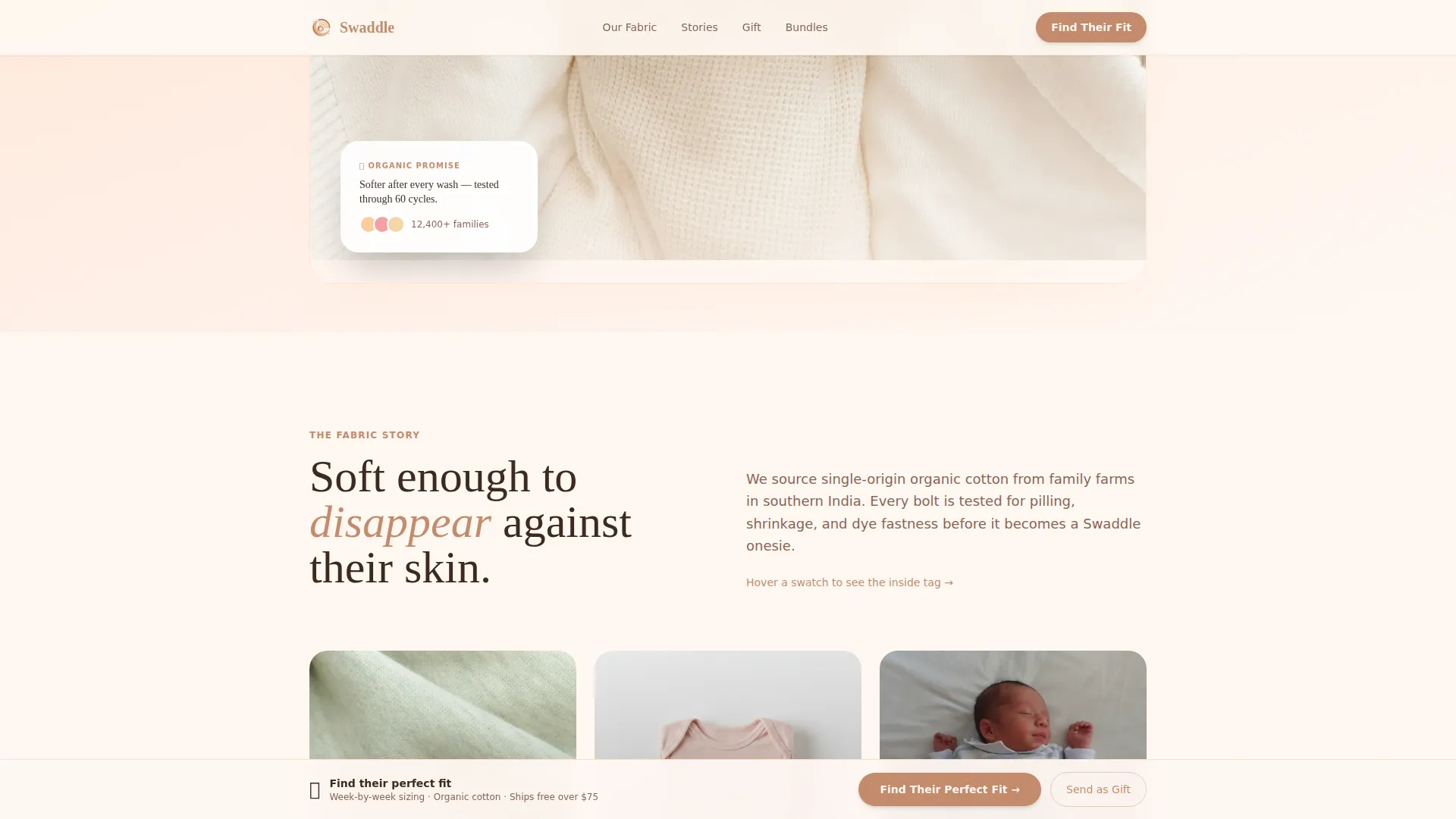
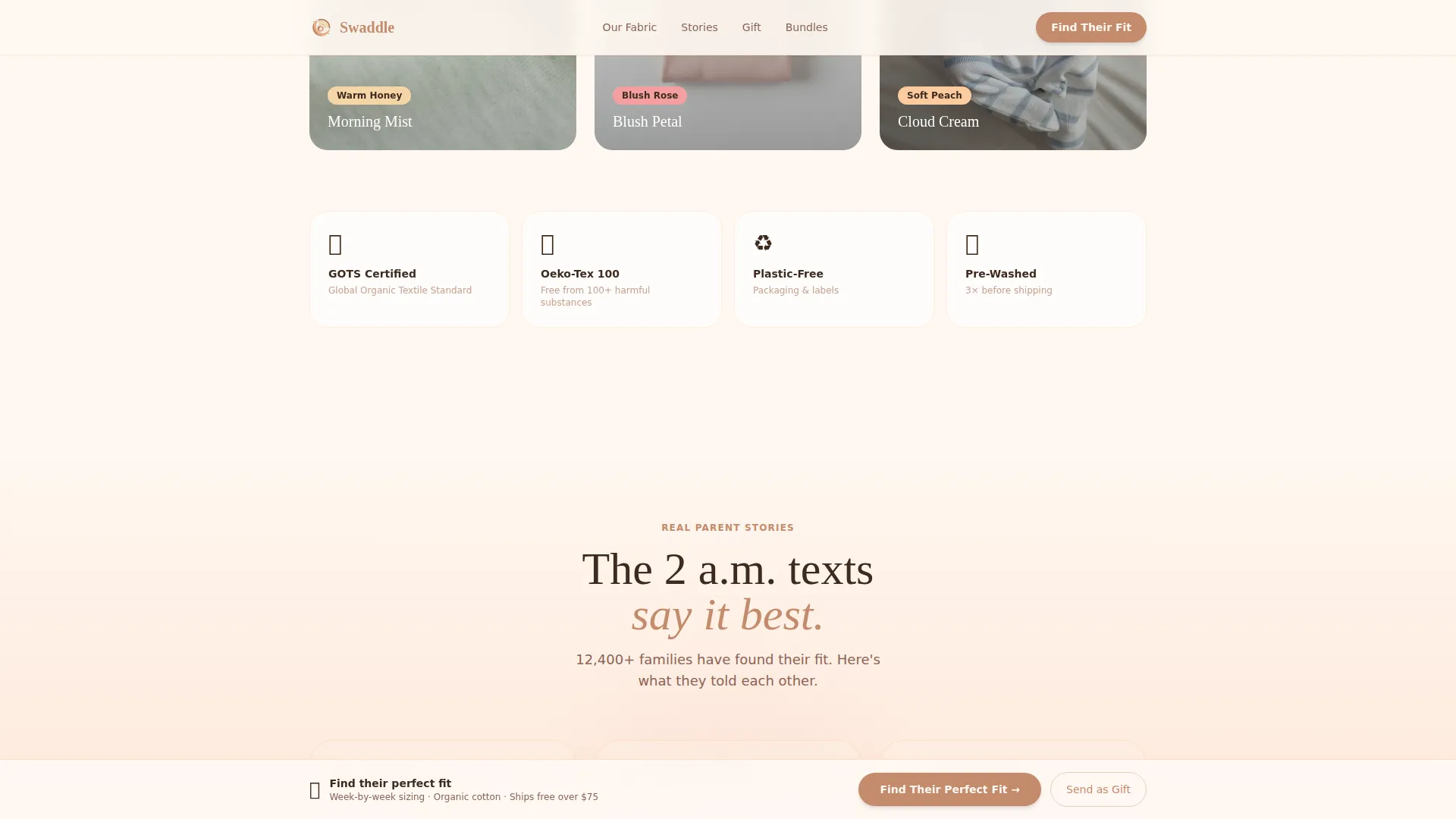
Each section enters view through reveal animations triggered by the scroll position. Fabric swatches unfold like real cloth to show texture close-ups. Hovering a onesie flips it to reveal an inner tag with a small printed message.
Auto-Typing Testimonial Display
Parent testimonials appear as text-message threads, complete with timestamps and natural phrasing. The auto-typing effect makes social proof feel immediate and personal rather than polished and distant.
Sticky Call-to-Action Bar
After the second scroll section, a sticky bottom bar resurfaces the primary call to action. It keeps the conversion path visible without interrupting the editorial reading experience.
Page sections overview
| Section | Purpose |
|---|---|
| Hero Quiz | Opens with week-age slider and primary call to action |
| Fabric Story | Unfolds organic fabric swatches with texture close-ups and inner tag flip interaction |
| Testimonials | Auto-typing text-message style parent quotes with timestamps |
| Gift and Registry | Explains sharing and gifting flow in an asymmetric bento layout |
| Bundle Builder | Delivers quiz results as a personalized capsule with pricing and add-to-cart |
| Footer | Closes with a split layout and brand tagline |
Design & branding system
The visual identity follows a Family First theme expressed through a Sunset Gradient color system. Every color choice references the sky outside a nursery window at early evening: cooling slowly, never jarring.
- Palette: soft peach (#FDCB9E), blush rose (#F4A0A0), warm honey (#F5D6A8), grounding clay (#C48B6C) for text and interactive elements, all resting on creamy linen white (#FFF8F2)
- Typography: Fraunces serif for headlines to carry warmth and roundness, DM Sans for body copy to maintain clarity
- Visual style: warm editorial with golden-hour nursery mood, unhurried pacing, and no jarring contrast shifts between sections
Mobile & speed optimization
The template is built mobile-first, recognizing that the primary buyer is often a tired parent on a phone late at night. Desktop layout enhances what the mobile experience already delivers.
- Scroll reveals use IntersectionObserver for clean entry timing on all screen sizes
- Parallax effects are driven by requestAnimationFrame to keep motion smooth during fast scrolls
- Smooth scroll behavior is set through CSS, keeping the page feel consistent from top to bottom
How this template helps you convert
The page earns the click before asking for it. Every section adds emotional context that makes the final bundle recommendation feel like a natural conclusion rather than a sales push.
- The quiz opens with a question that parents already have on their minds, creating immediate relevance and reducing the feeling of being sold to
- The fabric story and testimonial sections build product confidence through texture, certification details, and real parent voices before the bundle results appear
- The personalized bundle result with a one-click add-to-cart and a shareable registry link creates two distinct conversion paths that serve both buyers and gift-givers
Other information about this template
This template sits in the Kids and Family category, within the Infant (0 to 1) Products and Services subcategory, specifically targeting the infant clothing brand niche. It is designed as a direct-to-consumer apparel experience in English, priced in US dollars, and oriented to a US-based audience.
- The Surprise and Delight creative direction means micro-interactions reward curiosity throughout the page, not just at the conversion point
- The Quiz Starter header concept is the central structural decision: no product photos lead the page, only a question that opens a conversation
- The template style is Scroll Reveal (Progressive), meaning content enters view in sequence as the visitor moves down the page
Theme
Family First
Creative direction
Surprise & Delight
Color system
Sunset Gradient
Style
Scroll Reveal (Progressive)
Direction
Quiz/Assessment
Page Sections
Week-age Slider Quiz Hero
Three-question Bundle Recommender
Shareable Registry Link Generator
Fabric Unfold Micro-interactions
Auto-typing Testimonial Threads
Sticky Bottom Call-to-action Bar
Related questions
Can I use this template without the quiz feature?
Is there a conversion path built for gift-givers, not just parents?
What type of visuals does this template require?
Does the sticky call-to-action bar appear on mobile devices?
Can the illustrated fruit-weight comparisons be replaced with custom graphics?



