Swimming Fitness Professional Website Template
This full-width immersive landing page template is built for swimming certification programs. It combines a kinetic SVG swimmer animation, a community gallery of graduate portraits, and a five-question interactive quiz that recommends the right course tier for each visitor. The result is a high-energy, conversion-focused page that turns hesitant browsers into enrolled students.
by Rocket studio
Quick summary
This template is a single-page, full-width experience built for aquatic certification programs. It opens with an animated SVG swimmer illustration, guides visitors through a graduate community gallery, and closes with a personalized five-question quiz. Every scroll builds trust and reduces decision paralysis before the enrollment ask.
Who this template is for
This template was designed for programs that train people to teach in and around water. It speaks directly to audiences who already know they want to act but need help choosing where to start.
- Career-changers pursuing aquatic instructor credentials who want a structured path
- Active lifeguards leveling up to a full teaching qualification
- Safety-conscious parents who decided to become the competent adult in the water
What problem this template solves
Most certification program pages dump every course option on the visitor at once. The result is overwhelm, comparison paralysis, and high bounce rates before anyone clicks enroll.
- Visitors leave without enrolling because they cannot figure out which course tier fits them
- Generic program pages fail to build emotional trust with safety-driven audiences
- Static layouts cannot reflect the energy and precision that aquatic instruction demands
What you get with this template
You get a complete, ready-to-customize landing page structure with five distinct sections, a built-in quiz component, and a motion-forward visual system. Every element is grounded in the brief and designed to move a visitor from curious to committed.
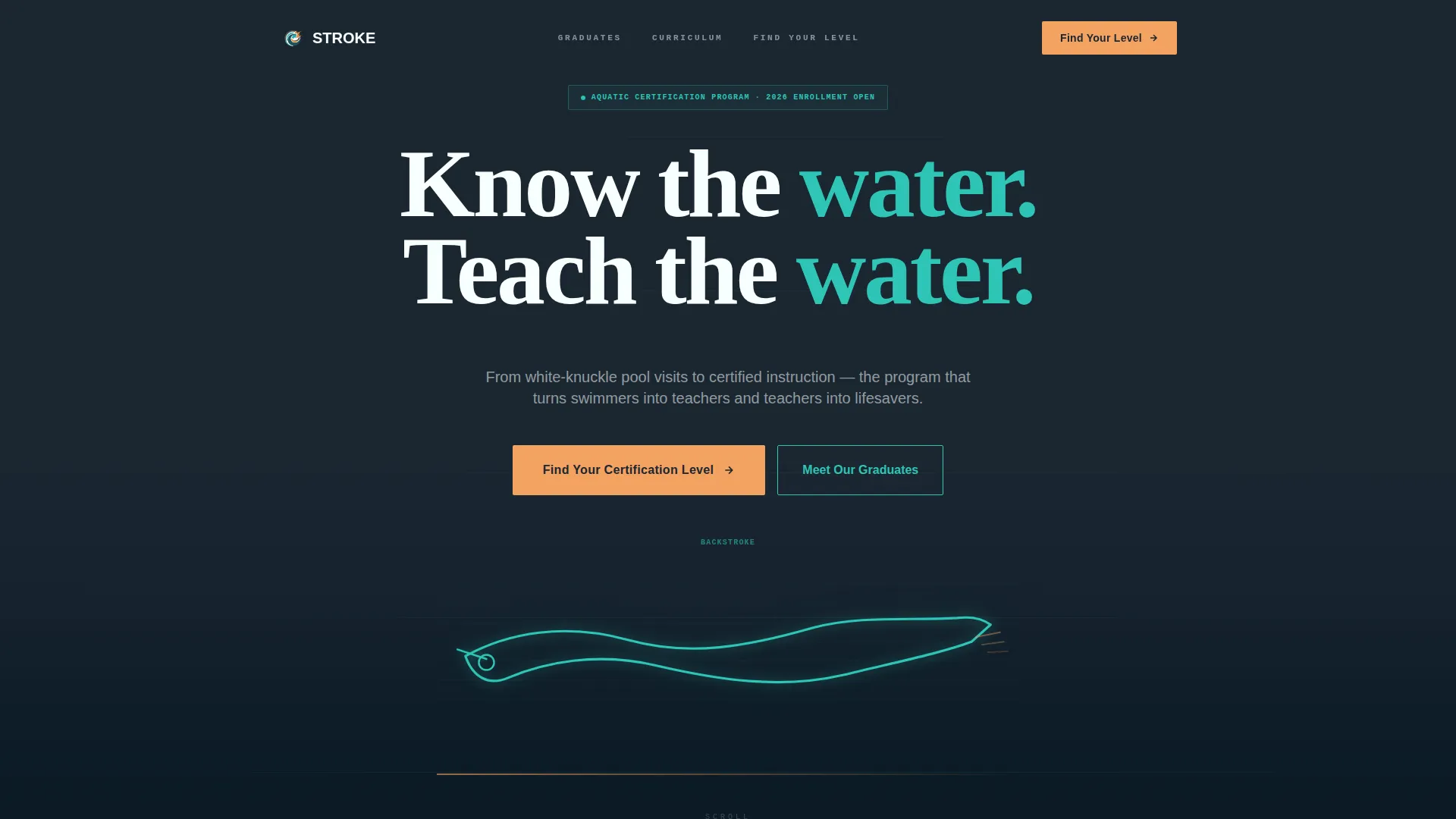
- A hero section with a looping SVG swimmer line animation and a typewriter headline
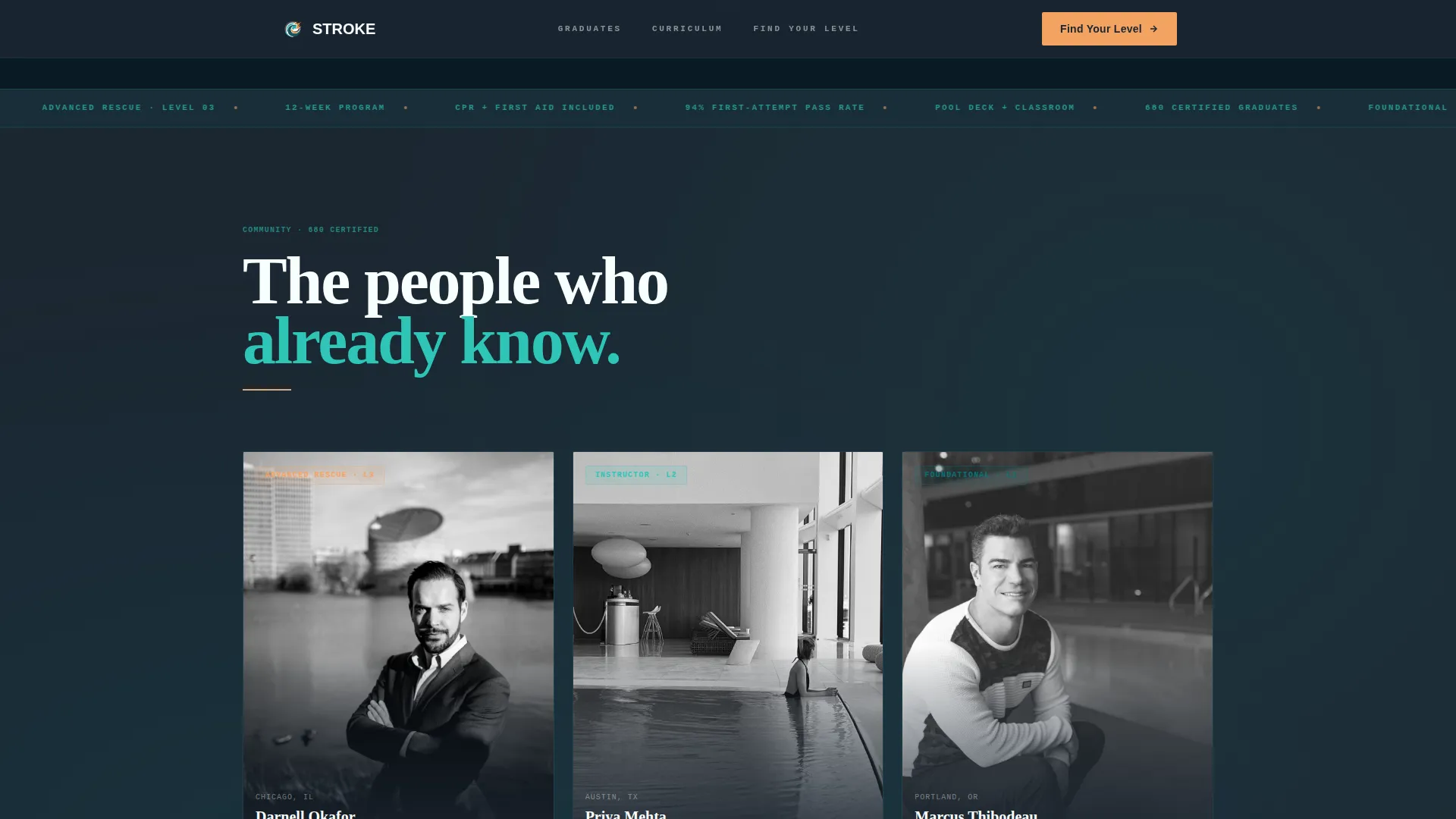
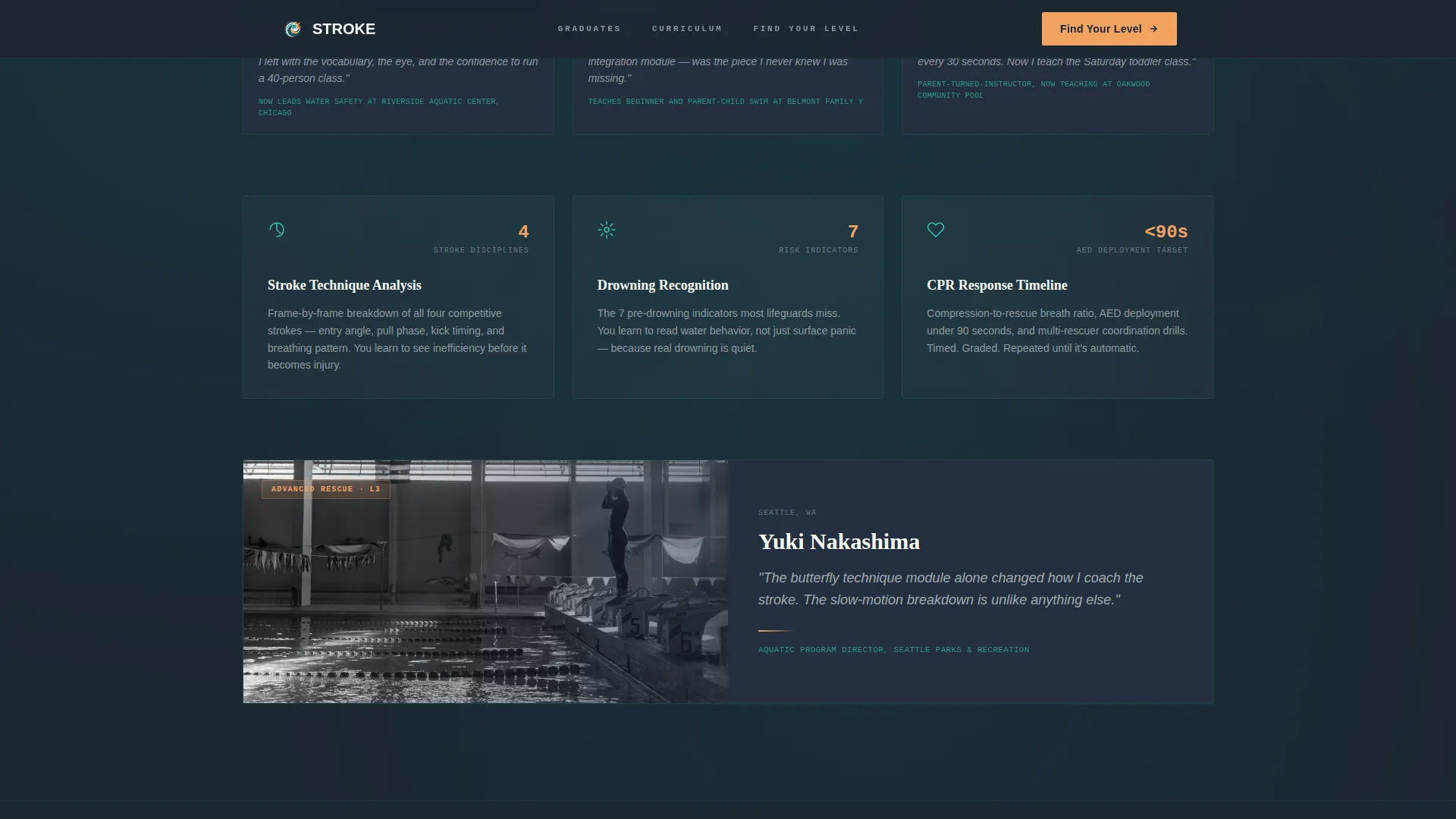
- A community gallery that alternates graduate portraits with technical skill breakdowns
- A five-question interactive level finder that outputs a personalized course recommendation card
Feature list
This section covers the functional and visual components included in the template as specified in the source brief.
Morphing SVG Swimmer Animation
The header features a fluid, looping vector animation of a swimmer rendered as a single continuous line. The line morphs through freestyle, backstroke, breaststroke, and butterfly strokes. Amber particles trail off each kick, drawn in teal against a charcoal background, creating immediate visual energy without any stock photography.
Typewriter Headline Effect
The hero headline types in one word at a time directly over the animation. This paced reveal holds attention during the critical first seconds and reinforces the sense of focused momentum the program promises.
Five-Step Interactive Quiz
The primary call to action launches a five-question assessment covering swimming ability, teaching experience, schedule preference, CPR certification status, and career goal. Each answer dynamically narrows the recommendation to one of three course tiers: Foundational, Instructor, or Advanced Rescue. The result displays as a personalized card with next-session dates and a reserve button.
Community Graduate Gallery
After the hero, the page scrolls through a living wall of certified graduates. Each entry shows a real student photo mid-lesson, their certification level badge, and a single sentence about where they teach now. The gallery alternates between human portraits and technical skill breakdowns such as animated stroke diagrams and a CPR response timeline.
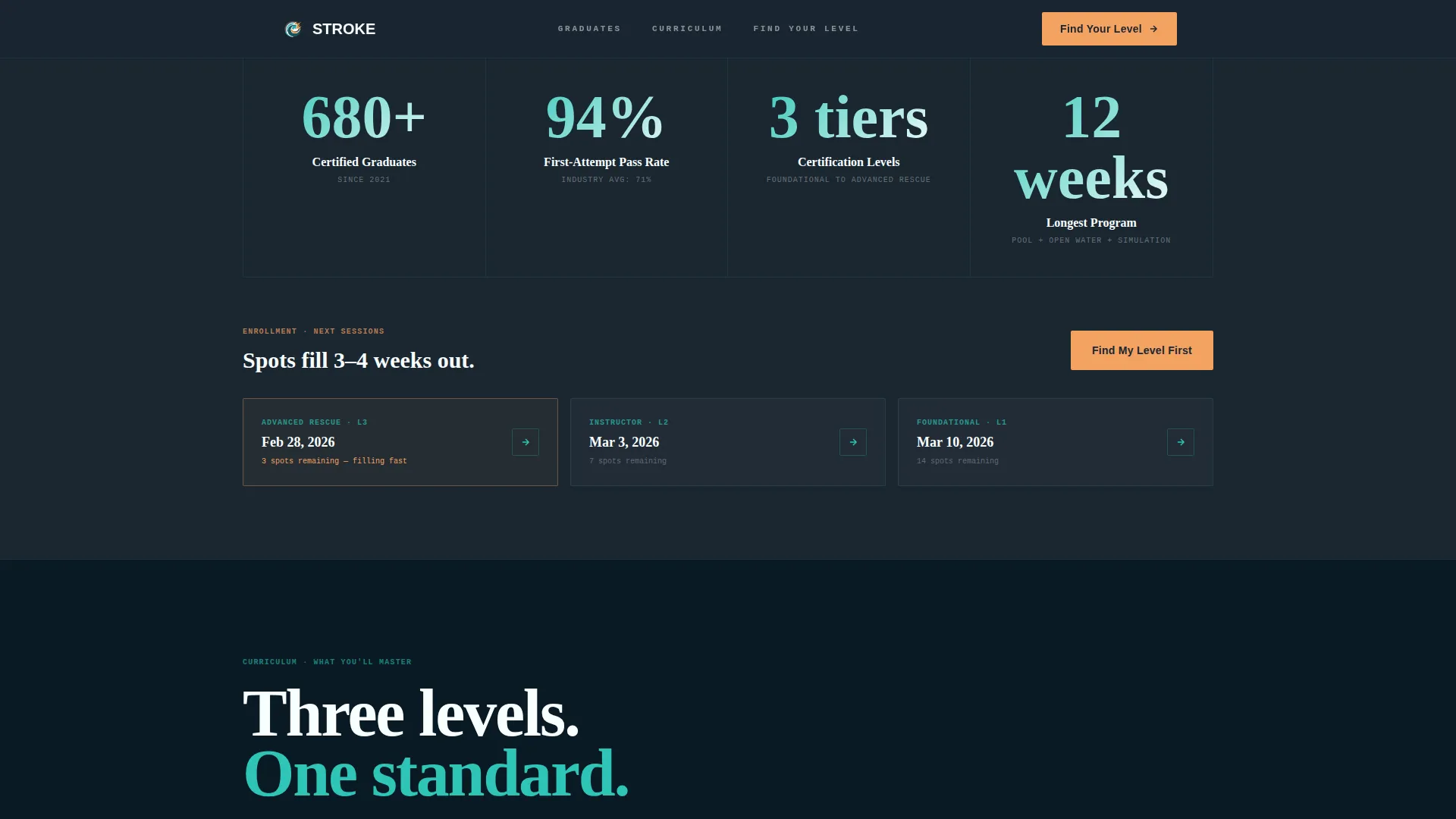
Trust Statistics Block
A dedicated section surfaces key social proof numbers including graduate count, placement rate, pass rate, and upcoming session dates. Statistics are displayed using a monospaced badge typography style that signals precision and credibility.
Course Tier Comparison
A curriculum snapshot section presents all three course tiers side by side with stroke diagrams and a course tier comparison view. Visitors can see exactly what each level covers before the quiz confirms their match.
Page sections overview
| Section | Purpose |
|---|---|
| Hero Animation | Hooks with kinetic SVG swimmer and typewriter headline |
| Graduate Gallery | Builds trust through certified graduate portraits and stories |
| Curriculum Snapshots | Shows stroke diagrams, CPR timeline, and tier comparison |
| Trust Stats Block | Displays graduate count, pass rate, and session dates |
| Quiz Assessment | Guides visitors to their recommended certification tier |
| Footer | Single-row linear footer with program links |
Design & branding system
The visual identity follows a Dynamic Motion theme built around the Teal Catalyst color system. The palette evokes the feeling of a competition pool at dawn, with deep lane-line colors anchoring the layout and one warm accent pulling the eye toward action.
- Deep lane-line teal (#0D7377) as the primary brand color, chlorine-bright aqua (#2EC4B6) as the interactive accent, and starting-block charcoal (#1B2631) as the background tone
- Timing-clock amber (#F4A261) reserved exclusively for calls to action and progress indicators throughout the quiz
- Fraunces for display headlines, DM Sans for body text, and JetBrains Mono for badges and statistics to give the layout an athletic precision feel
Mobile & speed optimization
The template is built desktop-first with a strong mobile adaptation designed for real-world pool deck use on tablets. The layout and interactive components are structured to support responsive scaling without breaking the quiz flow or gallery rhythm.
- Static informational sections are built as server components to keep initial load lean
- The quiz, animations, and gallery hover states run as client components, isolating interactivity for better rendering control
- Gallery portraits and animation assets are structured to scale cleanly from wide desktop displays down to tablet and phone viewports
How this template helps you convert
Every design and content decision in this template is aimed at one outcome: turning a curious visitor into a registered student.
- The five-question quiz replaces the overwhelming course catalog with a guided decision that ends in a personalized result card and a direct reserve button, removing the friction that kills enrollment.
- The graduate gallery alternates emotional proof with technical credibility on every scroll, so visitors build trust in both the community and the curriculum before they ever reach the quiz.
Other information about this template
This template sits at the intersection of the Wellness and Fitness category and the Swimming Fitness subcategory, with a niche focus on swimming certification courses. A few additional details are worth noting for anyone evaluating this template for their program.
- The template is localized for English language, USD pricing, MM/DD/YYYY date format, and a United States audience
- Secondary audiences include swim clubs, YMCAs, and aquatic facilities that need to recruit or showcase certified instructors
- The footer uses a linear single-row layout pattern for a clean, distraction-free close to the page
- Animation complexity is high, including SVG path morphing, scroll reveals, staggered gallery load-in, and quiz state transitions with dynamic result rendering
- The Intersection Match Score for this template's niche alignment is 13, reflecting a tightly focused use case within the aquatic instruction market
Theme
Dynamic Motion
Creative direction
Community Gallery
Color system
Teal Catalyst
Style
Full-Width Immersive
Direction
Quiz/Assessment
Page Sections
Morphing SVG Swimmer Animation
Typewriter Headline Reveal
Five-step Interactive Quiz
Community Graduate Gallery
Trust Statistics Display
Course Tier Comparison View
Related questions
Who is this landing page template designed for?
Can I customize the quiz questions and course tiers?
Does the hero section use stock photography?
What makes this template different from a standard course page?
Is this template suited for a single-tier certification program?