Golf Instructor Partnership Landing Page Template
Swing is a split-screen landing page built for golf instructors who need to attract serious B2B partners. It pairs a bold stats wall with accordion FAQ panels, a partner logo ticker, and a structured two-step inquiry form. The design uses a Charcoal and Amber palette to project authority, warmth, and professional credibility at a glance.
by Rocket studio
Quick summary
Swing is a 50/50 split-screen landing page designed for golf teaching professionals targeting B2B partnerships. It leads with animated credential metrics, a scrolling partner logo ticker, and expandable FAQ panels paired with resource previews. A two-step inquiry form and a gated program deck download give facility directors and brand contacts clear next steps.
Who this template is for
This template is built for credentialed golf instructors who want to attract institutional partners, not just individual students. If your pipeline includes facility directors, program buyers, or brand collaborators, this page speaks their language directly.
- Golf academies and resort lesson programs scouting curriculum partners
- Private club managers seeking a credentialed pro for membership programming
- Equipment and apparel brands looking for authentic instructor ambassador relationships
What problem this template solves
Most golf instructor pages are built for student booking, not B2B outreach. They bury credentials, skip proof points, and offer no clear path for a facility director or brand contact to take action. This template fixes that gap.
- Credentials and partnership history have no structured home on a generic booking page
- B2B visitors need escalating proof, not a calendar widget, to move toward contact
- There is no clear collateral download or two-step inquiry flow to qualify warm leads
What you get with this template
You get a complete single-page layout that builds trust systematically from the moment a B2B visitor lands. Every section adds a layer of evidence before presenting the partnership call to action.
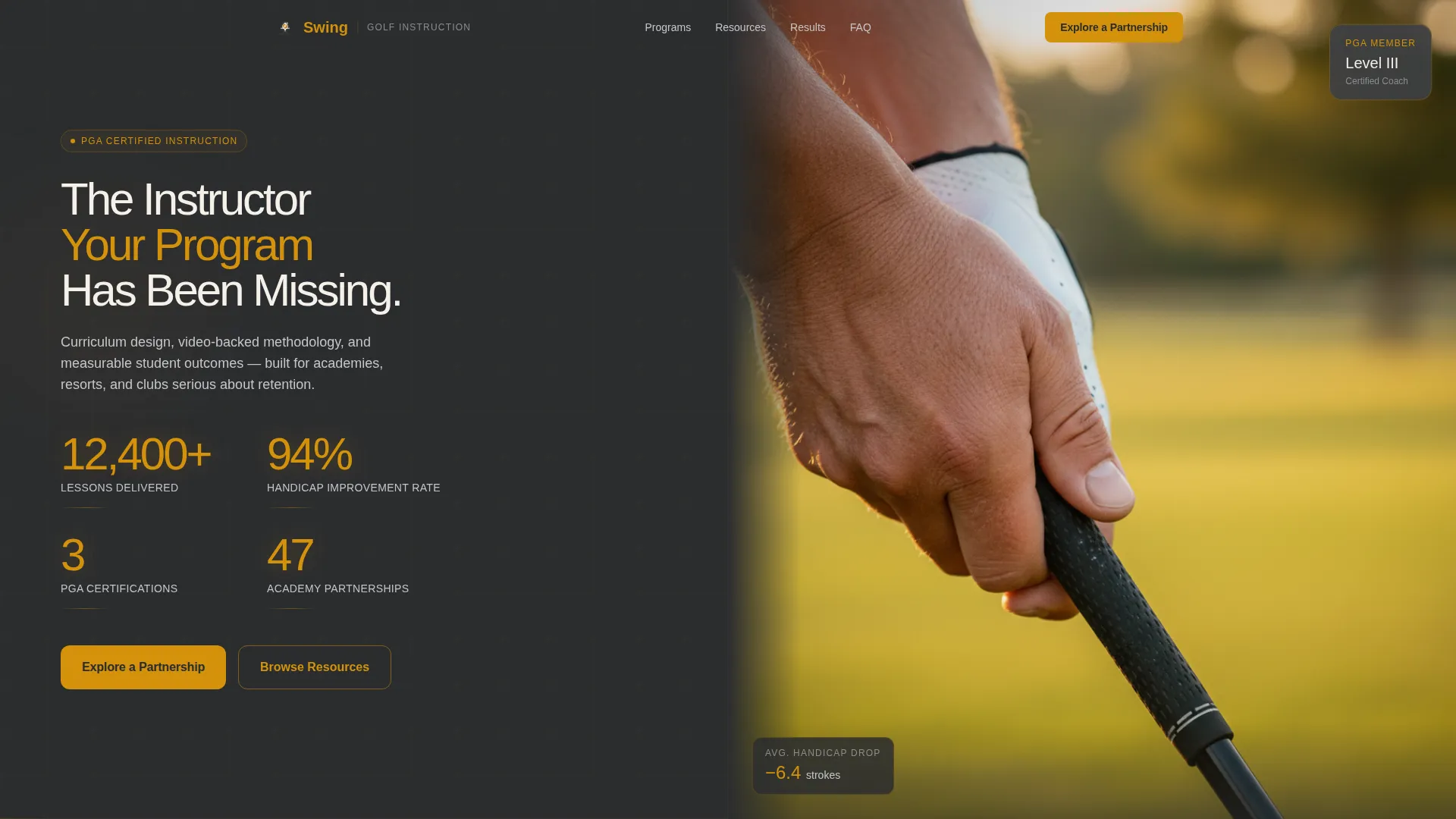
- An animated stats wall pairing bold amber numerals with a close-up grip photograph
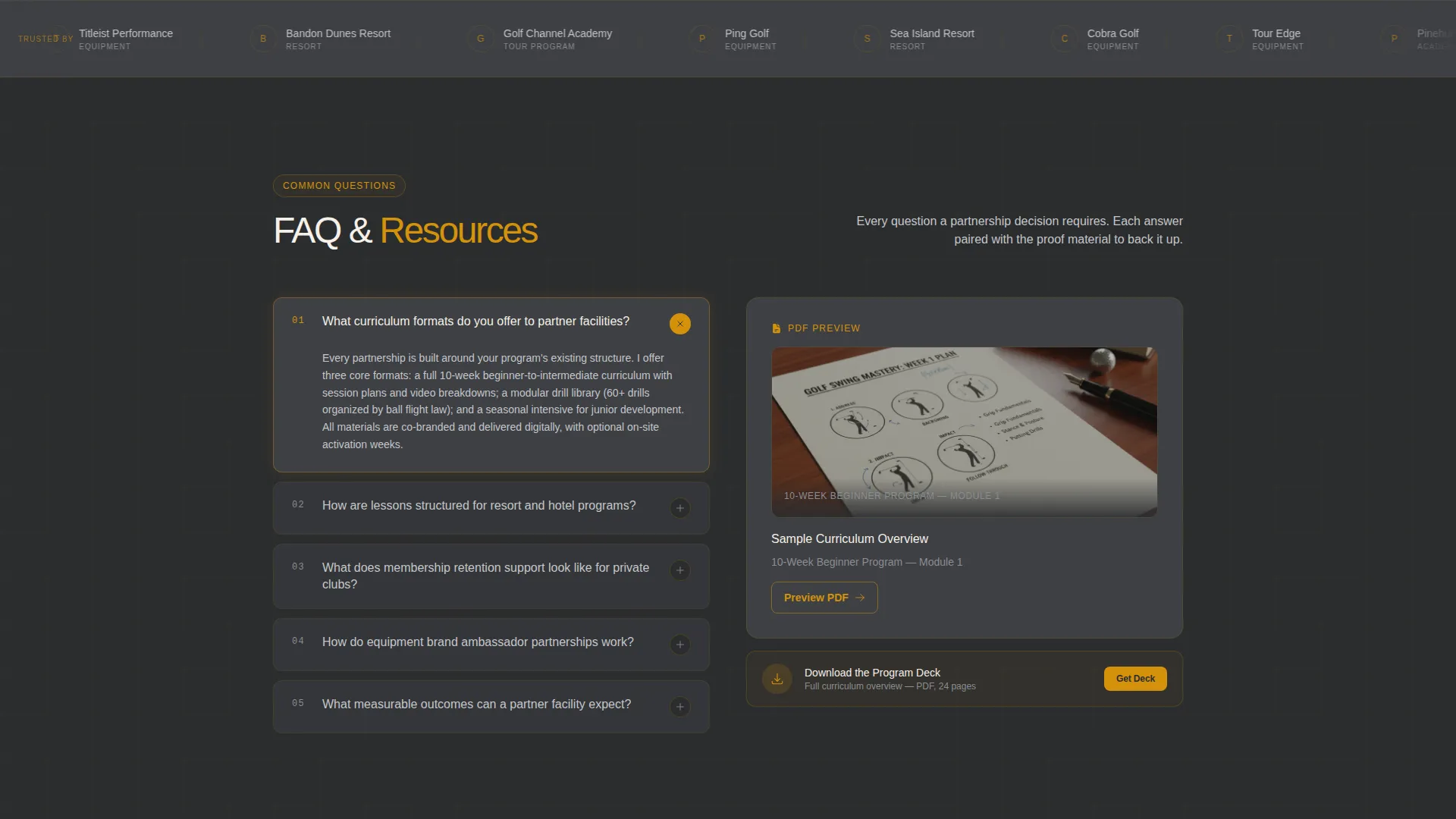
- A horizontally scrolling logo ticker establishing partner credibility below the fold
- Expandable accordion FAQ panels on the left, paired with resource previews on the right
- A pinned "Explore a Partnership" call-to-action button and a two-step inquiry form
- A secondary gated download path for the program deck, requiring a business email
Feature list
This section covers the core built-in components that make Swing work as a partnership-conversion landing page.
Animated Stats Wall Header
The header splits into two equal panels. The left stacks bold amber numerals on deep charcoal, counting upward on load to reflect metrics like lessons delivered, student improvement rates, certifications, and academy partnerships. The right holds a high-contrast grip photograph in warm amber light. Together they establish authority before a visitor reads a single line.
Scrolling Partner Logo Ticker
A horizontal ticker glides slowly on a charcoal background immediately below the fold. It displays partner academy, resort, equipment brand, and tour-affiliated program logos. The ticker runs on a continuous loop, reinforcing institutional credibility passively while the visitor begins to read.
Split-Screen FAQ Accordion with Resource Previews
Each content row splits the screen in half. The left panel holds a FAQ question in white text on graphite, which expands into a full answer on click. The right panel shows a paired resource preview: a drill video thumbnail, a downloadable swing-analysis document mockup, or a sample lesson-plan calendar view.
Two-Step Partnership Inquiry Form
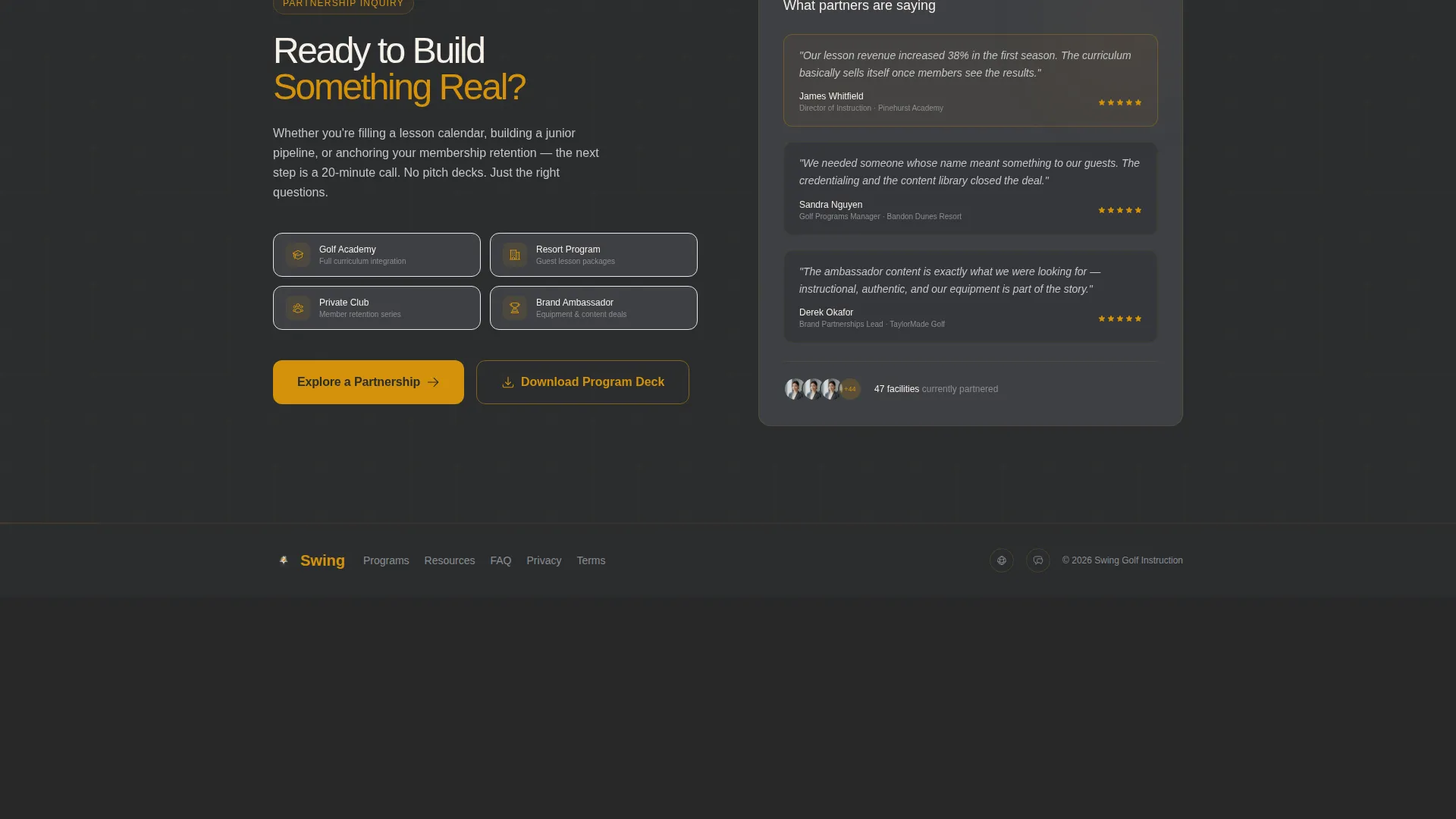
The primary call-to-action opens a two-step form. Step one captures facility name, location, and program type across four options: academy, resort, private club, or brand collaboration. Step two asks for current lesson volume and includes a short open text field labeled "What are you looking to build?" This structure pre-qualifies every inquiry before it reaches the instructor.
Gated Program Deck Download
A secondary conversion path sits alongside the primary call to action. Visitors enter a business email address to unlock the program deck download. This path serves warm leads who want collateral immediately and simultaneously identifies them for follow-up.
Trust-Escalation Narrative Flow
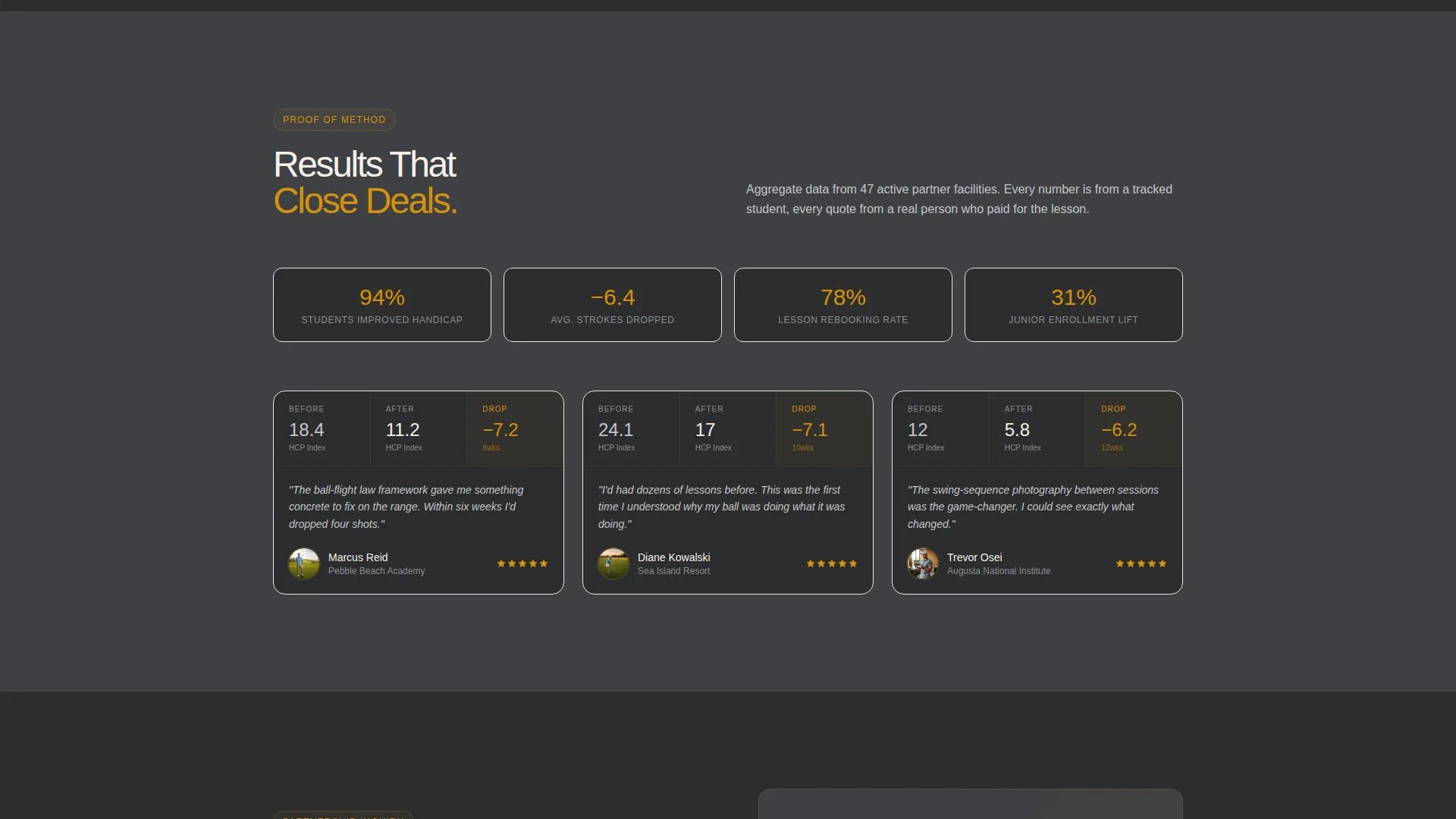
The page is structured so each section adds a new layer of evidence. The sequence moves from raw numbers, to partner names, to proof of teaching method, to proof of student results. By the time a visitor reaches the bottom call to action, partnership feels like a logical conclusion rather than a cold ask.
Page sections overview
| Section | Purpose |
|---|---|
| Stats and Metrics Header | Animate credential numbers and display grip photography |
| Partner Logo Ticker | Establish institutional credibility below the fold |
| FAQ Accordion Rows | Answer common B2B questions with paired resource previews |
| Primary Partnership call to action | Prompt facility directors to begin the two-step inquiry |
| Two-Step Inquiry Form | Capture facility details and partnership intent |
| Program Deck Download | Gate collateral behind business email for lead qualification |
| Footer call to action Repeat | Reinforce the partnership call to action at page bottom |
Design & branding system
The visual identity follows an Educational Guide theme rooted in a Charcoal and Amber color system. The overall feel is authoritative and warm, like a leather-bound yardage book left open on a locker-room bench.
- Deep graphite (#2B2D2F) for primary backgrounds, warm brushed charcoal (#3E4044) for card and panel surfaces
- Rich amber (#D4920B) for all accent elements, numerals, button fills, and hover states
- Clean parchment (#F5F0E8) reserved for text panels and FAQ expand zones to maintain readability
Mobile & speed optimization
The split-screen layout is structured to remain clear and scannable as screen sizes change. Panels that sit side by side on desktop stack vertically on smaller screens, preserving the logical reading order of question followed by resource.
- The FAQ accordion panels reflow naturally into a single-column stacked layout on mobile
- The stats wall numerals and the grip photograph each fill full width on narrow viewports for visual impact
- The two-step form fields are sized for comfortable touch input without requiring zoom
How this template helps you convert
The page uses a trust-escalation model to move B2B visitors from skepticism to action. Every visual and structural decision supports that goal.
- Animated credential metrics open the page with immediate, specific proof of scale, pulling institutional visitors past the skepticism stage before they begin to scroll.
- The accordion FAQ structure lets facility directors and brand contacts self-serve answers to their most common objections, while the paired resource previews give them something tangible to evaluate alongside each answer.
- The two-path conversion system captures visitors at different temperatures: the two-step inquiry form qualifies ready buyers, while the gated program deck download converts researchers who need more time.
Other information about this template
This template is categorized under Professional Services with a specific focus on Golf Instructor Online Presence. It is designed as a single-page partnership landing page, not a multi-page booking site.
- The template style is Split Screen (50/50), giving equal visual weight to persuasion copy and resource or visual proof on every row
- The creative direction follows a Logo Wall Authority framework, where partner brand recognition does the persuasion work before body copy begins
- The header concept is Stats and Metrics, a proven format for B2B audiences who respond to quantified evidence over narrative claims
- The landing-page direction is Partnership and B2B conversion, meaning every section is optimized for facility and brand decision-makers, not individual lesson buyers
- The theme is Educational Guide, which positions the instructor as a curriculum authority rather than a service vendor
Theme
Educational Guide
Creative direction
Logo Wall Authority
Color system
Charcoal & Amber
Style
Split Screen (50/50)
Direction
Partnership/B2B
Page Sections
Animated Stats Wall Header
Scrolling Partner Logo Ticker
Split-screen FAQ Accordion
Two-step Partnership Inquiry Form
Gated Program Deck Download
Trust-escalation Page Structure
Related questions
Is this template suitable for individual lesson bookings?
Can I update the credential numbers and partner logos to reflect my own history?
What information does the two-step inquiry form collect?
How does the gated program deck download qualify leads?
Can I customize the FAQ accordion content for different partnership types?



