Neurologist Specialist FAQ Website Template
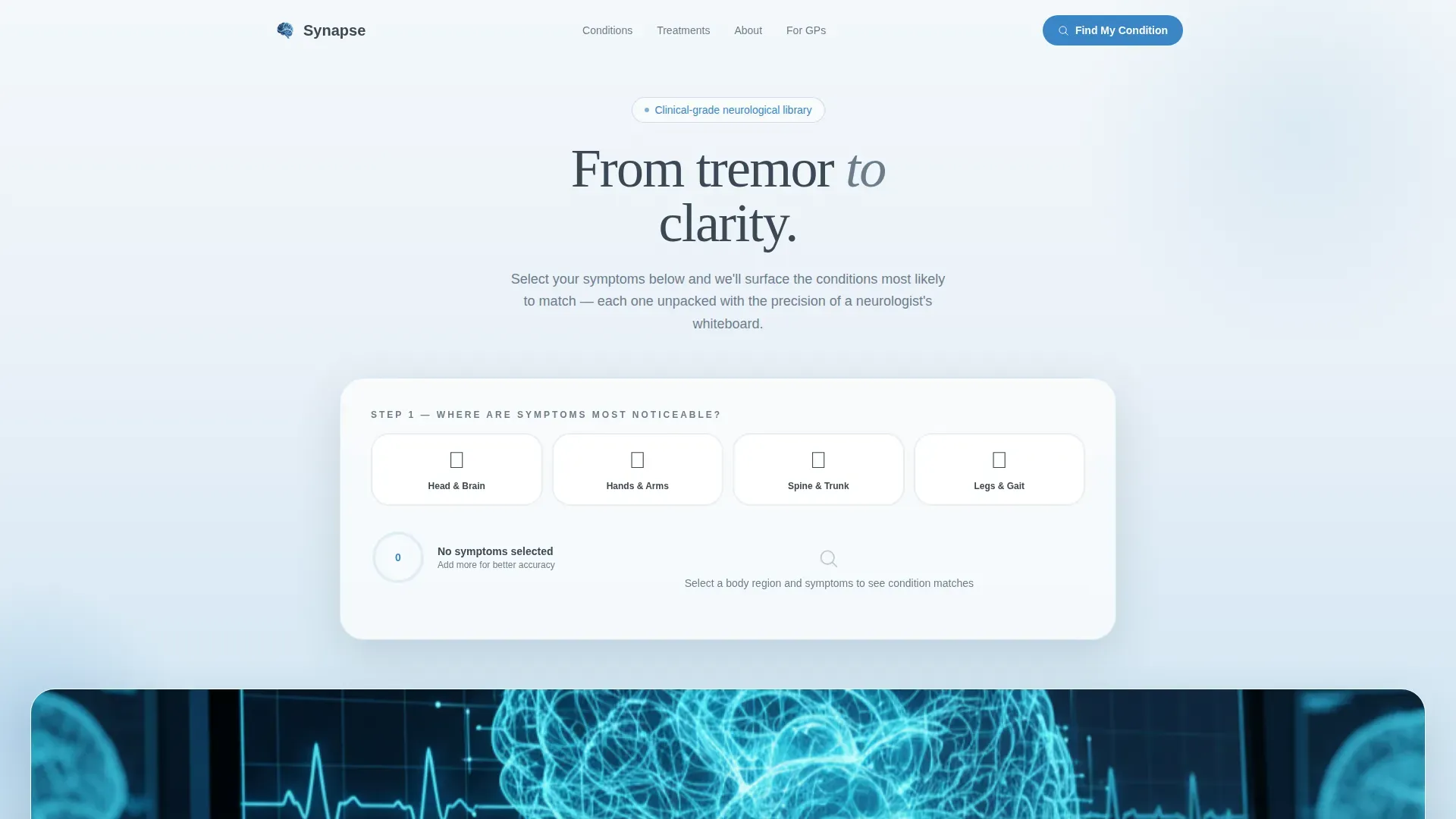
Synapse is a hub-and-spoke neurological condition library landing page built for patients, caregivers, and referring clinicians. An interactive Symptom Pattern Finder guides visitors from symptom selection to condition shortlist. Layered FAQ accordions then unpack each diagnosis in plain language, moving every visitor from anxious uncertainty toward grounded clinical understanding and a clear next step.
by Rocket studio
Quick summary
Synapse turns a neurologist's clinical depth into a calm, navigable landing page. Visitors start with a Symptom Pattern Finder, receive a ranked condition shortlist, then scroll into layered FAQ sections covering Parkinson's, Essential Tremor, Multiple Sclerosis, Epilepsy, and Migraine. Every section is built for the person reading on their phone at 2 a.m., not for a textbook audience.
Who this template is for
This template is purpose-built for neurology practices and medical information platforms that want to serve patients and clinicians with equal credibility. It fits teams who need their content to do real work before a visitor ever books an appointment.
- Newly diagnosed patients and caregivers who need plain-language answers quickly
- Referring general practitioners brushing up on specialist criteria before writing a referral
- Neurology practices that want to convert anxious site visitors into booked consultations
What problem this template solves
Most medical websites answer the questions clinicians think patients have, not the ones patients actually type into a search bar at midnight. The result is jargon-heavy pages that raise anxiety instead of reducing it. Synapse closes that gap directly.
- Visitors cannot trace a clear path from a symptom to a named condition to a treatment plan
- FAQ content is buried or structured for professionals rather than patients or caregivers
- Conversion asks appear before the visitor has received enough value to trust the source
What you get with this template
Synapse delivers a fully structured single-page experience with interactive and content-rich sections ready for a neurology context. Every section is mapped to a specific visitor need, from initial symptom confusion to downloadable condition guide.
- An interactive Symptom Pattern Finder with illustrated body-region icons, live ranked results, and confidence-match percentages
- Five condition deep-dive spoke sections with layered FAQ accordions, comparison tables, and cited clinical source placeholders
- A persistent bottom-bar call to action and a qualifying consultation booking form
Feature list
Symptom Pattern Finder Estimator
Visitors select body-region icons (head, hands, spine, legs) and check observed symptoms such as tremor, numbness, vision change, gait difficulty, and memory fog. A soft-gradient progress ring fills as selections are made. The tool returns a ranked shortlist of conditions with confidence-match percentages, each one a clickable anchor link that scrolls directly to its dedicated condition section.
Layered FAQ Accordion Sections
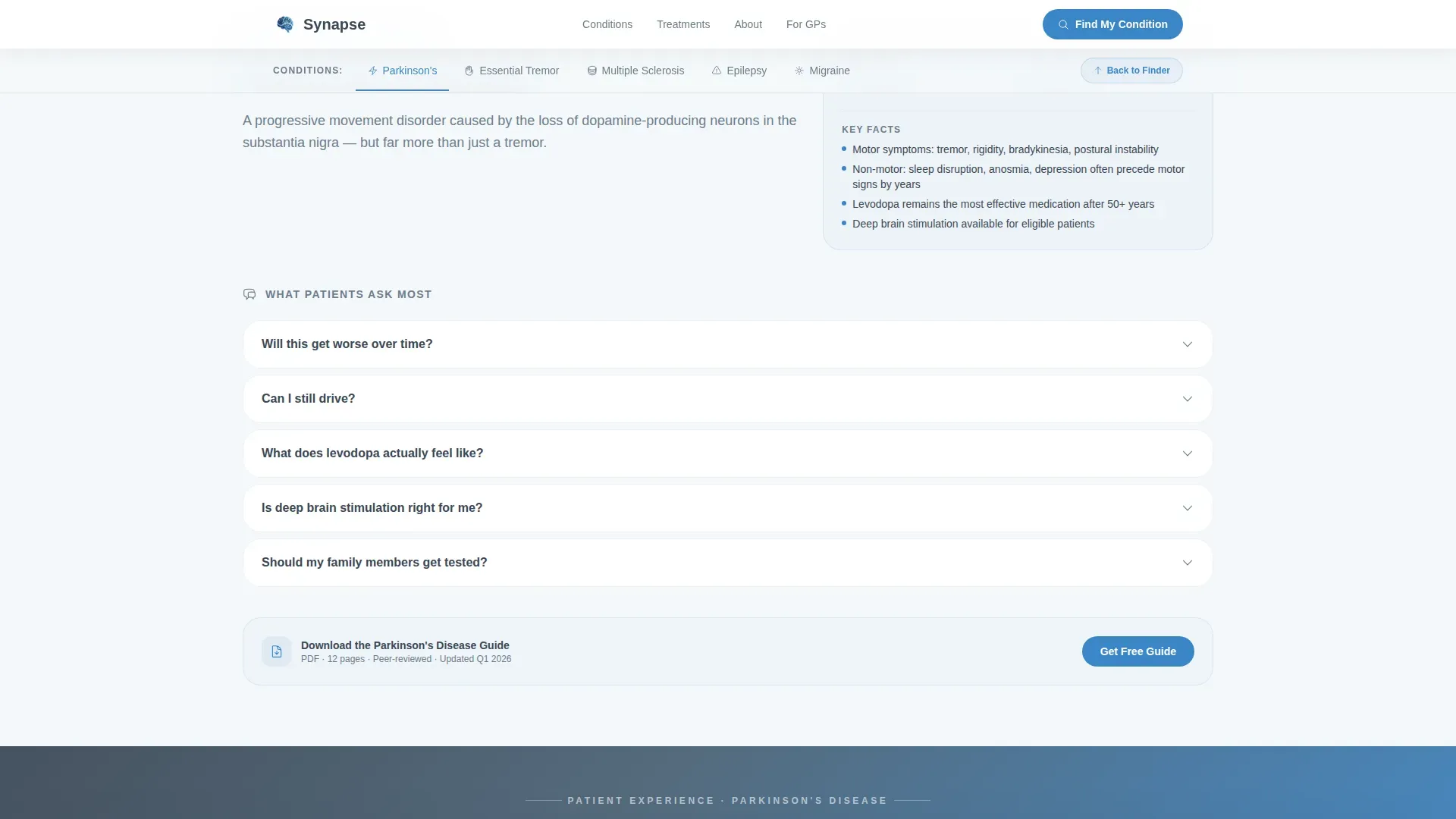
Each condition spoke opens with the real questions patients ask, not a textbook definition. Accordions reveal a plain-language summary first, then a diagram or comparison table, then a cited clinical source placeholder. Visitors never see more than they asked for, but the next question is always visible and pulls them deeper into the content.
Anchor Navigation Rail
A persistent navigation rail holds anchor links to every condition spoke. Visitors can jump directly to Parkinson's, Essential Tremor, Multiple Sclerosis, Epilepsy, or Migraine without scrolling through content they do not need. The rail highlights the active section as the visitor scrolls, keeping orientation clear at all times.
Persistent Condition Guide call to action Bar
After a visitor opens two or more FAQ accordions, a slim bottom bar appears offering a downloadable condition guide PDF. The form requests only an email address and auto-fills the condition name from the visitor's browsing path. The ask is minimal because the page has already delivered real value before the bar appears.
Patient Voices Pull-Quote Dividers
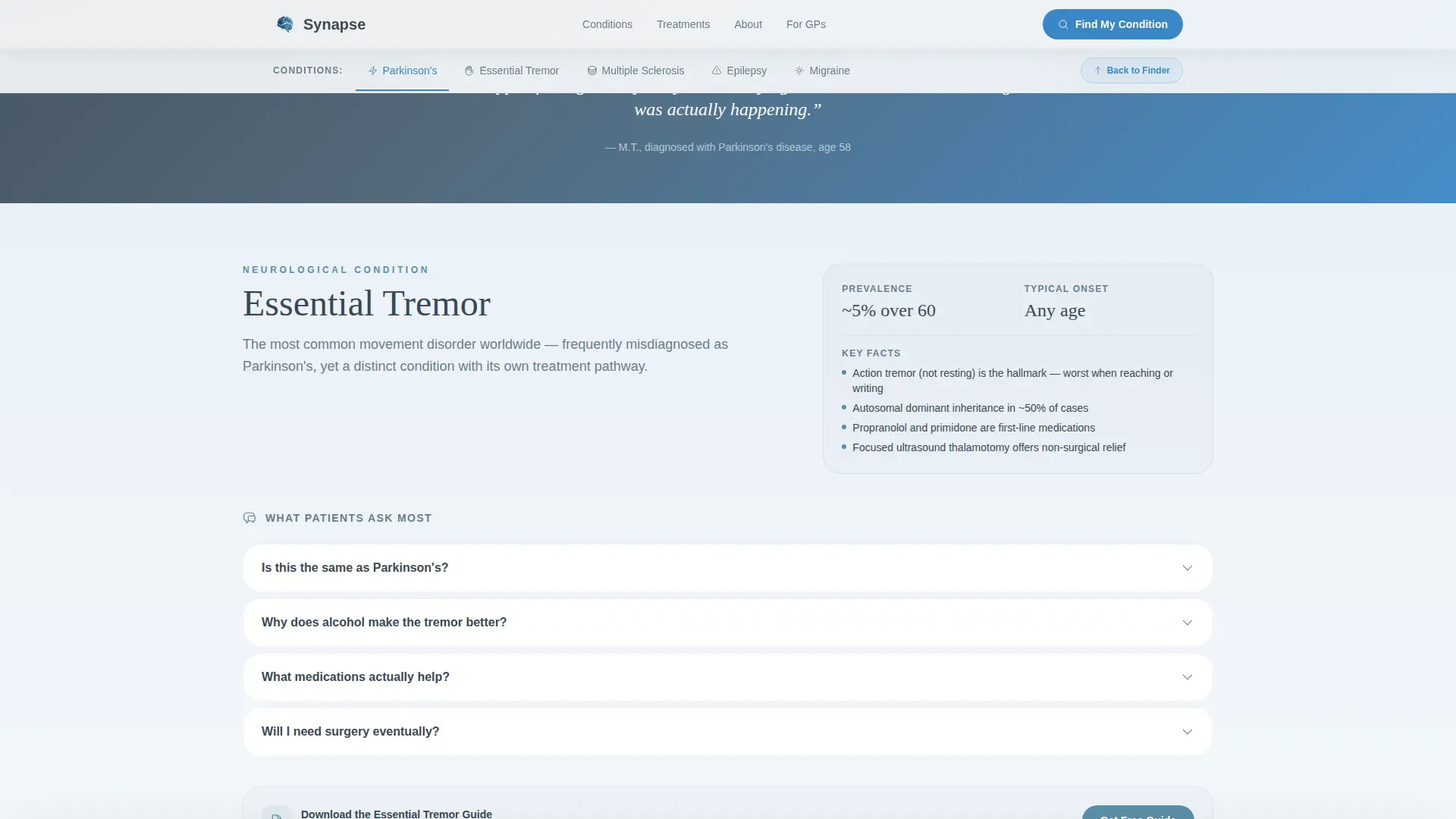
Between condition spoke sections, soft gradient dividers carry anonymized patient experience pull-quotes. These ground the clinical information in lived reality and maintain emotional continuity as the visitor moves from one condition topic to the next.
Consultation Booking Qualifying Form
A secondary conversion path offers a "Book a Consultation Review" form. It asks only three things: referral status, primary concern, and preferred contact method. The short form reduces friction while collecting the minimum context a neurology practice needs to prepare for a first contact.
Page sections overview
| Section | Purpose |
|---|---|
| Hero Symptom Finder | Opens with the Symptom Pattern Finder estimator and parallax sky imagery |
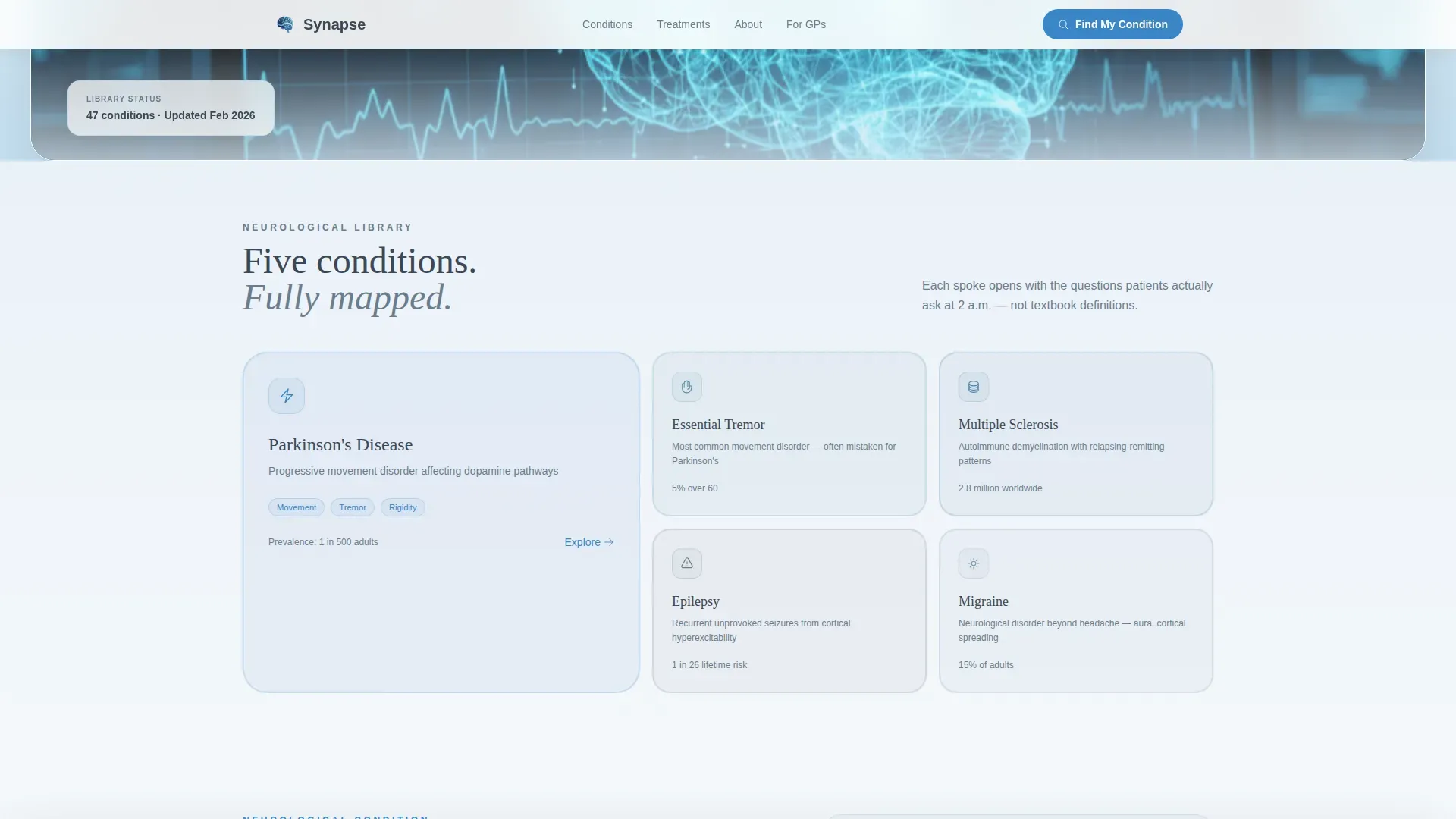
| Conditions Hub Nav | Anchor navigation rail with bento-style condition spoke cards |
| Parkinson's Deep-Dive | FAQ accordion with layered depth for Parkinson's disease |
| Essential Tremor Spoke | FAQ accordion covering Essential Tremor diagnosis and treatment |
| Multiple Sclerosis Spoke | Layered FAQ section for Multiple Sclerosis information |
| Epilepsy Condition Spoke | FAQ accordion unpacking Epilepsy from symptom to treatment |
| Migraine Condition Spoke | FAQ accordion for Migraine with aura and treatment planning |
| Patient Voices Dividers | Pull-quote gradient dividers between condition spoke sections |
| Consultation call to action Form | Persistent bottom bar and qualifying consultation booking form |
| Footer Flow | Pattern 3 horizontal flow footer with practice navigation links |
Design & branding system
The visual identity follows a Soft Gradient theme that moves the visitor from clinical heaviness into open, breathable clarity with every scroll. Typography pairs Fraunces serif headlines for warmth and authority with DM Sans for all body text and interface labels, keeping reading effort low.
- Color palette: deep clinical slate (#3B4856) for primary text and navigation rails, storm gray (#6B7D8D) for secondary labels and dividers, open-sky blue (#A8D0E6) for section background washes, calm cerulean (#3A86C8) for interactive elements and anchor-nav highlights, and near-white (#F4F7FA) at the top of the page
- Backgrounds transition from near-white at the hero through progressively deeper sky washes so the page itself breathes as the visitor scrolls downward
- Micro-animations on the symptom selector, spring-eased scroll reveals, and accordion unfold animations give interactions a guided, unhurried feel
Mobile & speed optimization
The template is built mobile-first because the primary use case is a patient or caregiver scrolling on their phone late at night. Every layout decision prioritizes readability and tap interaction on small screens before scaling up to desktop.
- Static-first architecture uses server-rendered components for all condition content and client components only for the interactive estimator and accordions
- Typography is large and unhurried, with generous line height and whitespace so long condition descriptions remain readable on small displays
- The persistent call to action bottom bar is designed to sit unobtrusively above the mobile browser chrome without blocking content
How this template helps you convert
Synapse earns conversion by delivering genuine clinical clarity before it ever asks for anything. The structure sequences value delivery ahead of every conversion ask, so each step feels like a logical next move rather than an interruption.
- The Symptom Pattern Finder gives immediate, personalized value by returning a ranked condition shortlist before any form or gate appears, establishing trust with the first interaction
- Layered FAQ accordions keep visitors engaged through multiple answer depths, and the persistent condition guide bar triggers only after two accordions are opened, meaning the visitor has already self-qualified
- The consultation booking form asks only three qualifying questions, reducing abandonment while giving the practice enough context to prepare a useful first response
Other information about this template
This template is designed for the Health and Medical category, specifically for the Neurologist Website subcategory and the Neurologist Condition and Treatment Library niche. It uses a hub-and-spoke anchor navigation structure as its core layout pattern.
- The template style is Hub and Spoke with Anchor Navigation, paired with a FAQ-Driven creative direction and a Calculator/Estimator header concept
- The landing page direction is Content and Resource, meaning conversion is earned through information delivery rather than immediate promotional pressure
- The footer uses a horizontal flow pattern suited to practice-level navigation and contact information
- Condition coverage in the template includes Parkinson's disease, Essential Tremor, Multiple Sclerosis, Epilepsy, and Migraine, each treated as an independent navigable spoke with its own FAQ depth
- Social proof elements include anonymized patient pull-quotes between spokes, clinical source citation placeholders within accordions, and a condition guide download count indicator
Theme
Soft Gradient
Creative direction
FAQ-Driven
Color system
Slate & Sky
Style
Hub & Spoke (Anchor Nav)
Direction
Content/Resource
Page Sections
Symptom Pattern Finder with Live Results
Layered FAQ Accordions Per Condition
Anchor Navigation Rail
Triggered Condition Guide Download Bar
Consultation Booking Qualifying Form
Patient Voices Pull-quote Dividers
Related questions
Who is this template designed for?
Can I add or remove condition spokes from the hub?
How does the Symptom Pattern Finder work for visitors?
When does the condition guide download prompt appear?
Is this template suitable for referring clinicians as well as patients?



