Neurosurgeon Reviews Website Template
Synapse is a neurosurgeon provider directory landing page built for patients, families, and referring physicians navigating high-stakes medical decisions. The zigzag layout walks visitors step by step through how the directory works, from understanding a diagnosis to reviewing verified credentials, before a confident click into the live search experience.
by Rocket studio
Quick summary
Synapse is a warm, trust-first neurosurgeon directory landing page. It uses an alternating zigzag layout to demystify the path from diagnosis to choosing a surgeon. Each scroll step builds clarity and confidence, ending with a single purposeful click into the live directory search. No forms, no pressure, just a calm and transparent process.
Who this template is for
This template is built for healthcare teams and directory operators who serve patients at some of the most stressful moments of their lives. It suits anyone building a neurosurgeon provider directory where trust and clarity are the core conversion tools.
- Patients who received a neurological diagnosis and are researching surgeons independently
- Primary care physicians looking for the right specialist referral for complex spinal or brain cases
- Spouses and family members searching on behalf of a loved one, often late at night
What problem this template solves
Most medical directory pages dump a list of names and credentials on a visitor who has no framework for evaluating them. That approach fails patients who are scared, overwhelmed, and unfamiliar with subspecialties or case volumes. This template builds that framework first.
- Visitors arrive frightened and leave with a clear understanding of how to choose a neurosurgeon
- The transparent step-by-step flow removes decision paralysis before asking for a click
- Two distinct entry points serve both diagnosis-aware and diagnosis-uncertain visitors
What you get with this template
You get a fully structured, single-page landing page with five content sections, a hero portrait block, and a footer. Every section is designed to earn the visitor's trust before presenting a call to action.
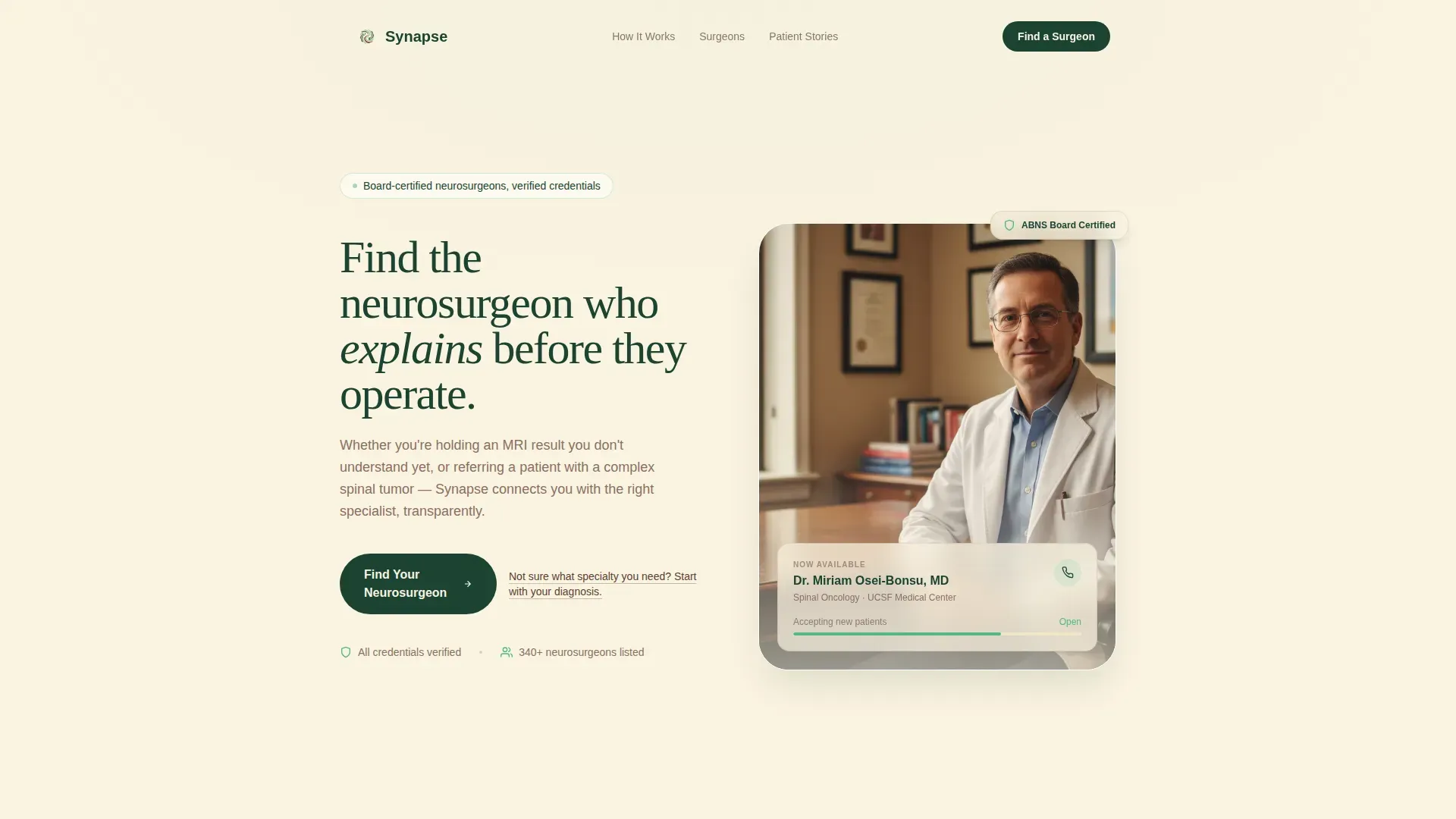
- A portrait-centered hero with headline, primary call-to-action button, and a secondary text link entry point
- Four alternating zigzag sections covering diagnosis guidance, surgeon filtering, patient narratives, and credential transparency
- A horizontal-flow footer built for clean closure without distraction
Feature list
This section covers the core built-in components and layout capabilities of the Synapse template.
Portrait-Centered Hero Block
The hero pairs a warmly lit consultation portrait with a headline that speaks directly to the patient's first fear. The primary call to action, "Find Your Neurosurgeon," appears immediately below. A secondary text link, "Not sure what specialty you need? Start with your diagnosis," gives overwhelmed visitors an alternative path in.
Zigzag Alternating Layout
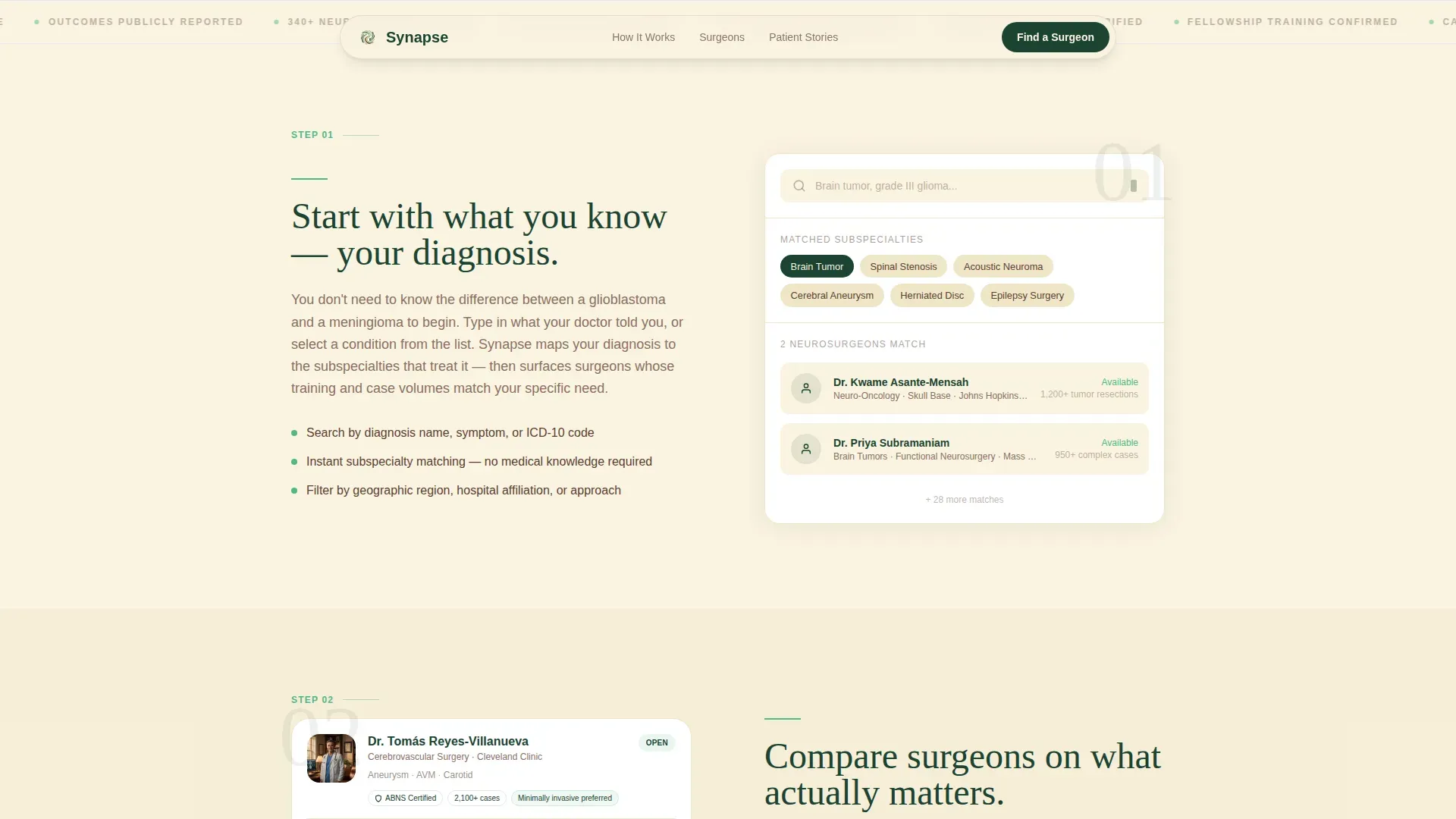
Four content sections alternate left-right in a calm, rhythmic flow. Each section pairs a short explanatory paragraph on one side with a functional visual preview on the other. The alternating pattern guides the eye naturally down the page without creating visual fatigue.
Diagnosis-to-Search Step Flow
The scroll sequence mirrors the real decision journey. It moves from understanding a diagnosis, to filtering by subspecialty and surgical approach, to reading patient narratives, to reviewing credentials and case volumes. Visitors reach the final call to action with context, not confusion.
Mock Search Filter and Credential Previews
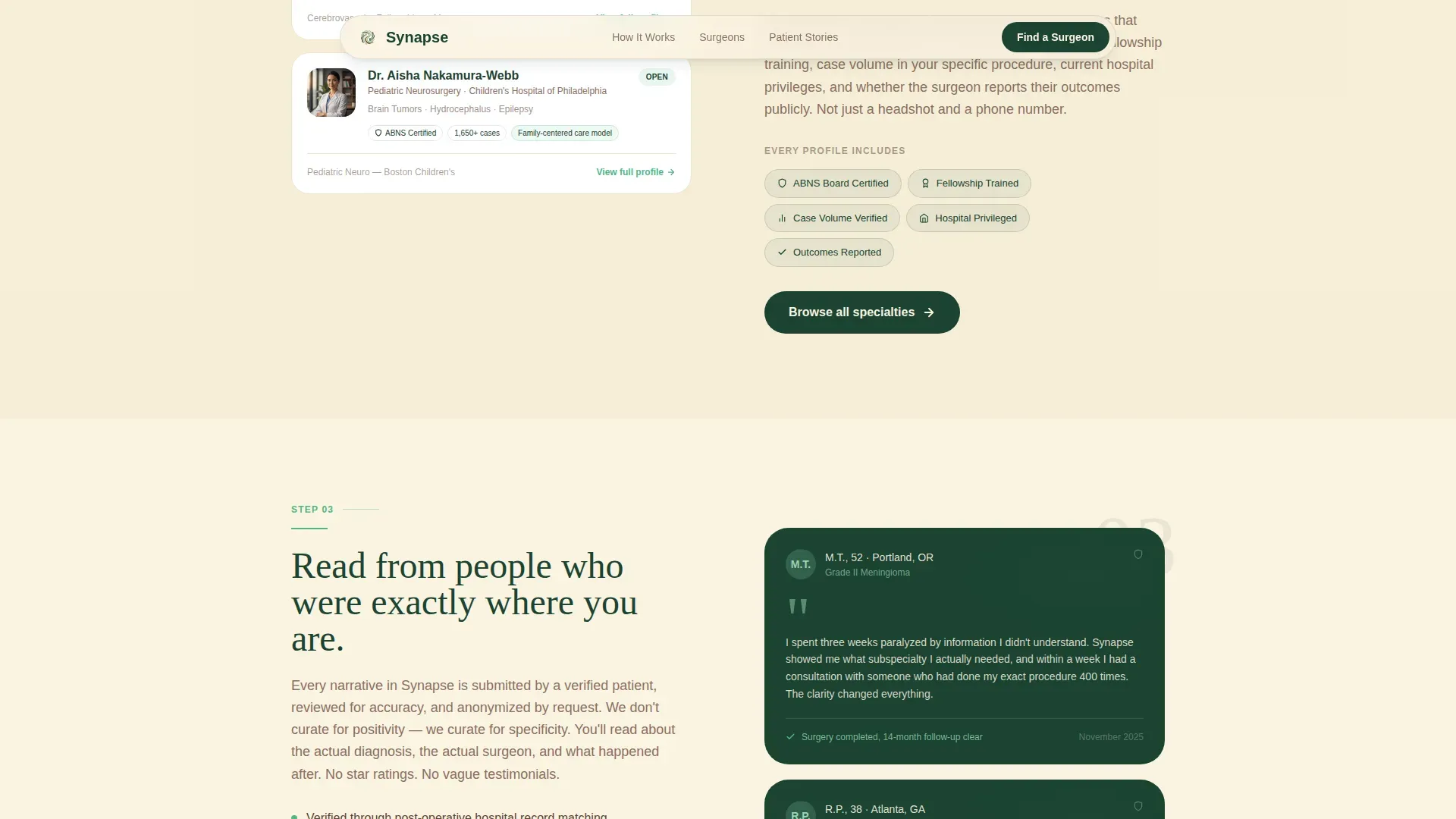
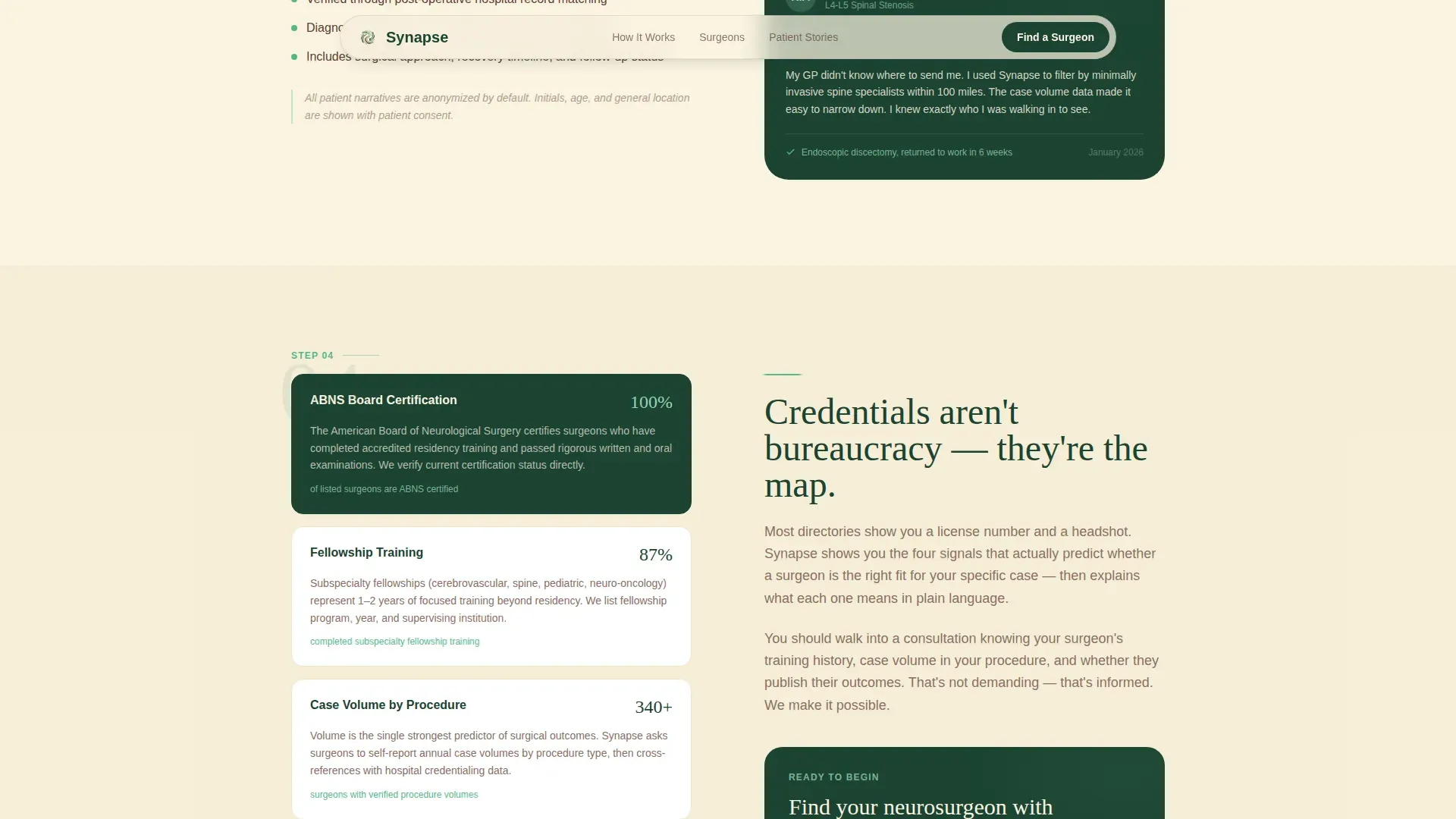
Each zigzag section includes a functional-looking interactive preview. These include a search filter mock-up, a credential badge cluster, and an anonymized patient story card. The previews show how the live directory works before the visitor ever clicks.
Scroll-Reveal Animation System
The template uses medium-weight scroll reveals, staggered fade-ins, a parallax portrait effect, and subtle hover states on credential badges and story cards. Animations are purposeful and calm, matching the emotional tone of the page without distracting from content.
Dual Call-to-Action Placement
The primary call to action appears three times: below the hero portrait, after the credential transparency section, and anchoring the final section. This placement follows the trust arc of the page, reinforcing the action only when the visitor is ready to take it.
Page sections overview
| Section | Purpose |
|---|---|
| Hero Portrait Block | Introduce the directory and present dual entry-point calls to action |
| Diagnosis Understanding | Explain what the directory does before the visitor searches |
| Surgeon Profile Filtering | Show how subspecialty and approach filters work via credential badge preview |
| Patient Narratives | Build emotional trust through anonymized verified story cards |
| Credentials and Case Volume | Deliver final transparency layer and anchor the primary call to action |
| Horizontal Footer | Close the page cleanly with navigational and contextual links |
Design & branding system
The visual identity uses an Organic Flow theme grounded in a Forest Trust color system. The palette is warm and grounded, avoiding the sterile clinical whiteness that often makes medical pages feel cold and impersonal.
- Birch (#FAF3E0) serves as the dominant reading canvas, keeping the eye comfortable during long research sessions
- Deep evergreen (#1B4332) anchors headers and trust signals, while soft fern (#95D5B2) highlights hover states and progress cues
- Fraunces serif headlines pair with DM Sans body text for a tone that feels both authoritative and approachable
Mobile & speed optimization
The template is designed desktop-first, with a strong mobile layout for patients researching from phones late at night. Scroll animations and interactive previews are implemented with minimal JavaScript to keep the experience smooth.
- Server Components handle static sections, keeping the page load lean for users on slower mobile connections
- Scroll reveals and staggered fades are scoped to lightweight animation logic that does not block rendering
- The zigzag layout reflows naturally on smaller screens, preserving the left-right rhythm as a stacked vertical sequence
How this template helps you convert
The conversion strategy here is transparency, not urgency. The page earns each click by showing the visitor exactly what the directory contains before asking them to use it.
- The hero establishes immediate relevance with a specific, human-centered headline and a portrait that says consultation, not operating theater, reducing anxiety on arrival
- Each zigzag section builds one layer of confidence, moving the visitor from information to trust to readiness before the primary call to action reappears
- The dual entry points, one for visitors who know their diagnosis and one for those who do not, capture a wider range of visitors without forcing a single path
Other information about this template
This template is built specifically for the neurosurgeon provider directory niche within the broader health and medical category. It fits the neurosurgeon website subcategory and is designed as a click-through landing page, not a form-capture page. The goal is to move a qualified, informed visitor into the live directory search with conviction.
- Typography uses Fraunces for display headings and DM Sans for interface and body copy, a pairing chosen for warmth and readability in a medical context
- The footer follows a horizontal flow pattern suited to directory-style page closures
- Color tokens, type scales, and section spacing are all structured around the Organic Flow theme, making it straightforward to apply brand customization
Theme
Organic Flow
Creative direction
Transparent Process
Color system
Forest Trust
Style
Zigzag/Alternating
Direction
Click-Through
Page Sections
Portrait-centered Hero with Dual Entry Points
Zigzag Alternating Section Layout
Step-by-step Diagnosis-to-search Flow
Interactive Section Previews
Scroll-reveal and Hover Animation System
Three-point Call-to-action Placement
Related questions
Is this a form-based lead capture page?
Can the template serve two different types of visitors at once?
How does the zigzag layout behave on mobile screens?
What social proof elements are built into the template?
Who is this landing page template designed for?



