Premium Paving | Free Website Template | Rocket
Tarmac is a premium landing page template built for Lagos-based paving and asphalt contractors. It uses a structured comparison table layout to help estate developers, facility managers, and church building committees choose the right surface type. The design blends an Executive Suite aesthetic with booking-focused conversion tools, including a site survey form and an inline estimate calculator.
by Rocket studio
Quick summary
Tarmac is a single-page template designed for a professional asphalt and paving contractor serving Lagos. It guides visitors through a technical, side-by-side comparison of surface types, then moves them toward booking a site survey or requesting a quick estimate. The layout is authoritative, visually premium, and built around real decision-making criteria for Lagos conditions.
Who this template is for
This template is built for paving and asphalt businesses that need to earn trust from sophisticated buyers before closing a job. It works best when your clients ask detailed questions before committing.
- Estate developers finishing gated communities before rainy season in Lagos
- Facility managers resurfacing corporate car parks on tight weekend timelines
- Church building committees paving large lots that face annual flooding
What problem this template solves
Most paving contractors present a portfolio and a phone number. That is not enough for buyers managing large-scale projects with real budget pressure. This template replaces vague brochure copy with a structured, technical conversation.
- Buyers cannot easily compare asphalt, interlocking stone, and concrete on Lagos-specific criteria
- There is no clear path from interest to booking without a friction-heavy phone call
- Contractors lose leads because their site feels generic and unqualified
What you get with this template
You get a fully structured landing page that opens with a bold manifesto header and moves through a series of expert-led comparison tables before presenting a conversion-ready booking form. Every section is purpose-built.
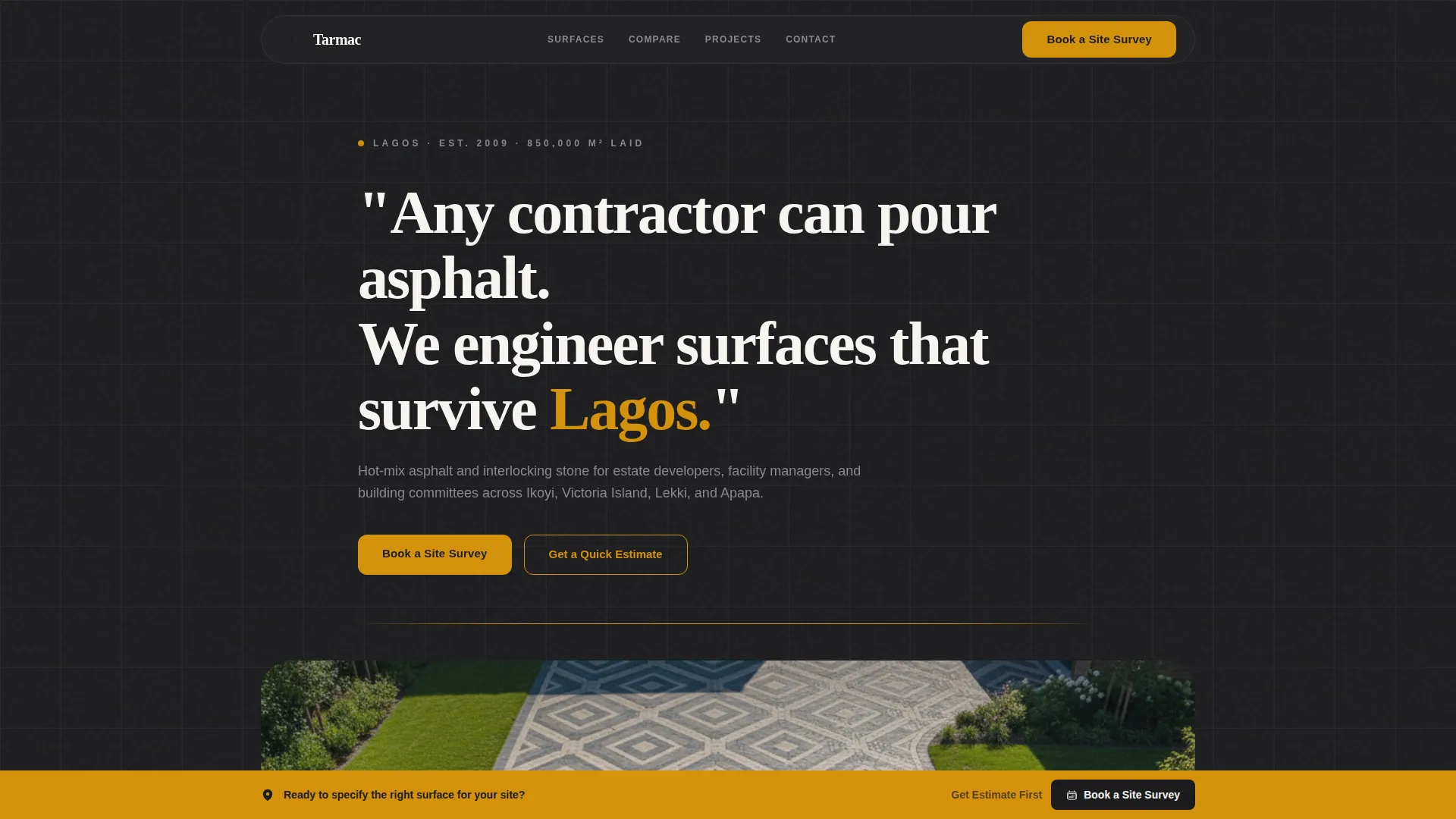
- A quote-driven hero header with charcoal and amber styling and an aerial drone image
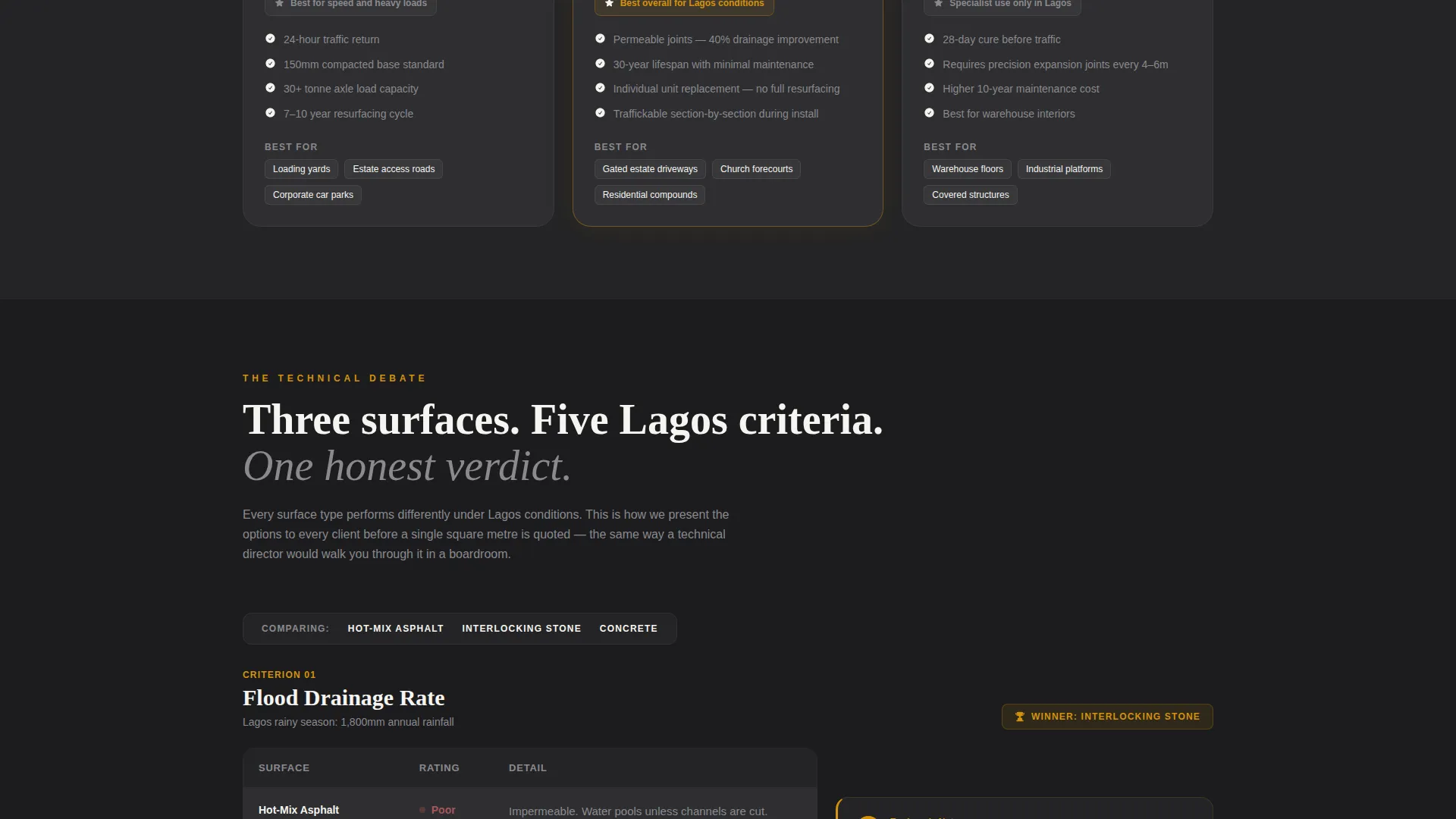
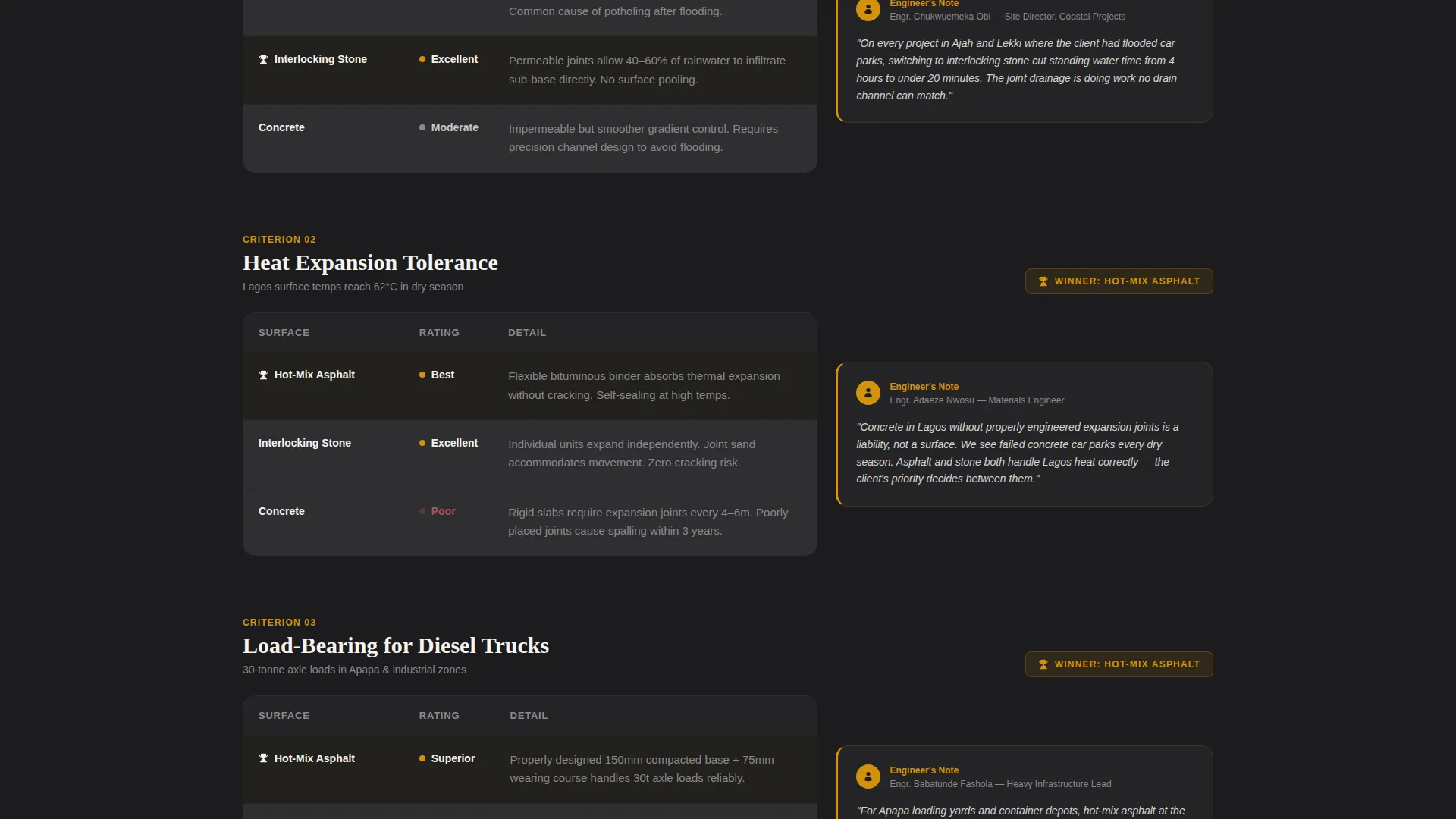
- Side-by-side comparison tables judging surface types across real Lagos performance criteria
- A pinned "Book a Site Survey" call-to-action bar and an inline estimate calculator
Feature list
This template is built around a set of deliberate design and functional choices. Each one serves a specific role in the buyer's journey.
Bold Manifesto Header
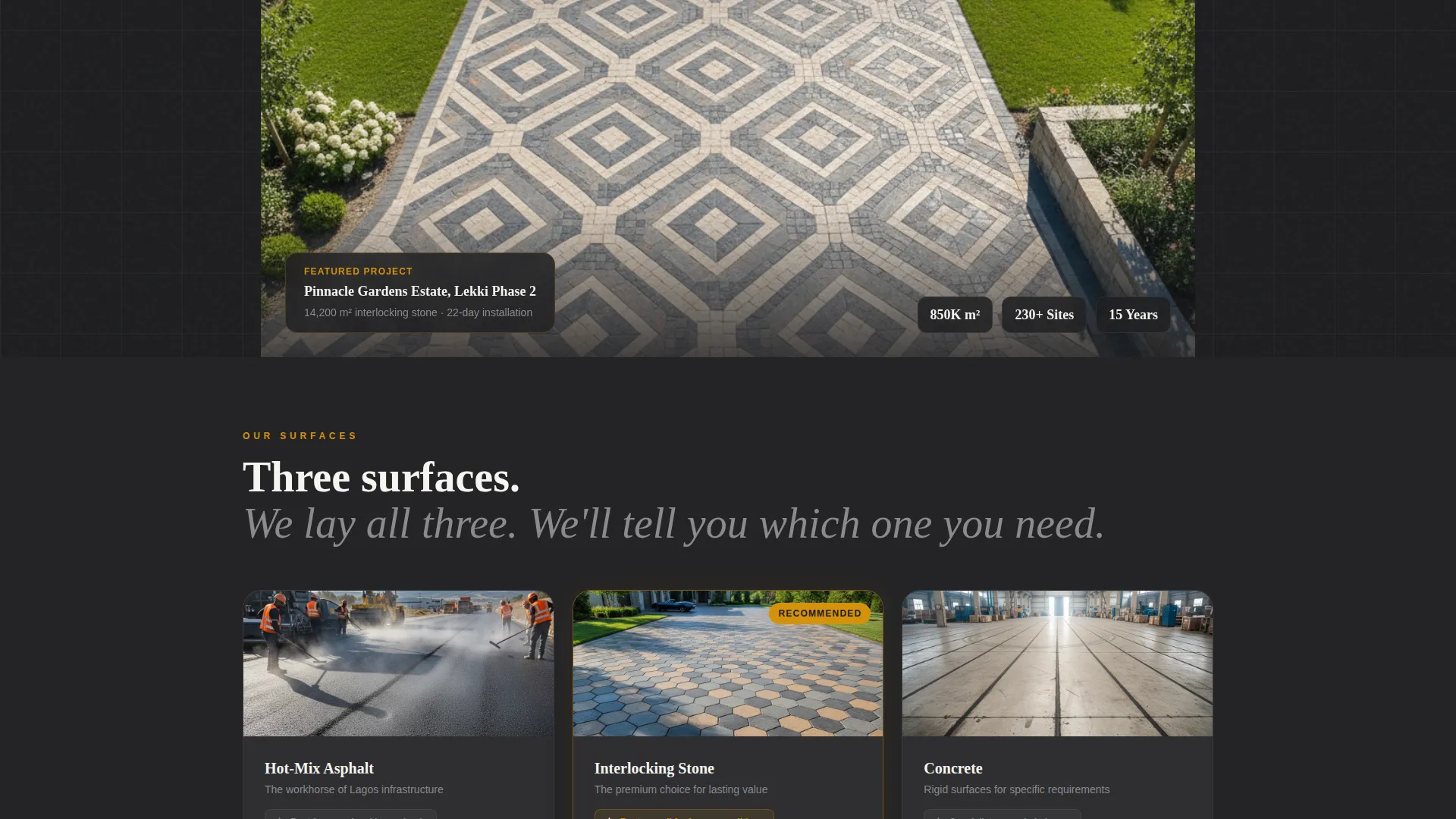
The header opens with a large serif quote set in ivory on a deep charcoal field. A single amber rule separates the statement from a slow-revealing aerial drone photograph of a geometric interlocking-stone driveway. The combination earns attention and sets a premium tone immediately.
Expert Panel Comparison Tables
Each scroll section presents a structured table comparing asphalt, interlocking stone, and concrete. Criteria include flood drainage rate, heat expansion tolerance, load-bearing capacity for diesel trucks, installation speed during dry-season windows, and ten-year maintenance cost per square metre. Each table is paired with a brief project engineer's commentary note.
Amber Row Reveal Animation
As the visitor scrolls, each table row reveals with a subtle amber underline animation. The motion is controlled and purposeful, reinforcing the premium feel without distracting from the technical content.
Pinned Site Survey call to action Bar
After the first comparison table, a fixed amber bar appears with the primary call-to-action: "Book a Site Survey." The bar stays visible as the visitor continues scrolling, reducing the distance between decision and action.
Booking Form with Contextual Fields
The survey booking form collects property type via a selector (residential, commercial, religious, industrial), estimated square metres via a slider, a preferred survey date from a calendar picker, and a WhatsApp number for follow-up confirmation.
Inline Estimate Calculator
A secondary conversion path labelled "Get a Quick Estimate" opens an inline calculator. Visitors select a surface type and enter their area to receive an instant ballpark cost range, warming them toward the full booking without requiring a phone call.
Page sections overview
| Section | Purpose |
|---|---|
| Manifesto Hero Header | Set premium tone and anchor the brand statement |
| Amber Rule Divider | Create a visual pause before the aerial drone image |
| Aerial Drone Image | Show precision craftsmanship from directly above |
| First Comparison Table | Compare surface types across drainage and heat criteria |
| Pinned call to action Bar | Capture booking intent immediately after first table |
| Second Comparison Table | Evaluate load-bearing and installation speed by surface |
| Engineer Commentary Panel | Add expert authority beside each comparison section |
| Third Comparison Table | Present ten-year maintenance cost per square metre |
| Site Survey Booking Form | Convert high-intent visitors into scheduled appointments |
| Quick Estimate Calculator | Warm lower-intent visitors with an instant cost range |
Design & branding system
The visual identity follows an Executive Suite theme. Every colour and type choice is designed to feel like a freshly paved executive parking bay: authoritative, industrial, and unmistakably premium.
- Colour palette: deep bitumen black (#1C1C1E), crushed granite grey (#4A4A4D), polished amber (#D4920B) for accents and calls-to-action, and boardroom white (#F5F4F0) for open space
- Typography: bold ivory serif for the hero quote; clean, structured type for table content and commentary panels
- Amber is used consistently for hover states, animated underlines, the pinned call to action bar, and every interactive element across the page
Mobile & speed optimization
The template is structured to remain fully readable and usable on smaller screens. Comparison tables reflow cleanly, and the booking form fields stay accessible without horizontal scrolling.
- The pinned call to action bar adjusts to the bottom of the screen on mobile, keeping the booking action always within thumb reach
- The inline estimate calculator is built as a compact, scrollable inline component so it does not interrupt the mobile reading flow
How this template helps you convert
The page is designed to move visitors from curiosity to commitment through a deliberate sequence of trust-building and low-friction actions.
- The manifesto header and expert comparison tables establish technical credibility early, so visitors arrive at the booking form already convinced rather than still evaluating.
- The pinned "Book a Site Survey" bar removes the need to scroll back to find a contact point, while the "Get a Quick Estimate" calculator provides an alternative entry for visitors who are not yet ready to commit to a full survey.
Other information about this template
This template is a strong fit for any Lagos-based paving contractor looking to serve premium residential and commercial clients. It is equally effective for contractors who operate across multiple surface types and need to educate buyers before closing.
- The WhatsApp number field in the booking form reflects how project confirmations and follow-ups actually happen in Lagos, making the workflow feel natural to local clients
- The comparison table structure can be adapted to highlight any combination of surface types relevant to a specific contractor's offering
- The Expert Panel creative direction makes this template suitable for technically minded buyers such as engineers, project managers, and procurement officers who prefer data over decoration
- The template style is a single landing page, making it straightforward to launch quickly without managing multiple pages or navigation menus
Theme
Executive Suite
Creative direction
Expert Panel
Color system
Charcoal & Amber
Style
Comparison Table
Direction
Booking/Scheduling
Page Sections
Bold Manifesto Hero Header
Expert Panel Comparison Tables
Amber Row Reveal Animation
Pinned Site Survey Call to Action Bar
Contextual Booking Form
Inline Estimate Calculator
Related questions
Can I change the surface types shown in the comparison tables?
Does the booking form send WhatsApp confirmations automatically?
Is this template suitable for a contractor who only does one surface type?
Can the Quick Estimate calculator show my real pricing?



