Delhi Paving Contractor Comparison Table Landing Page
Tarmac is a comparison table landing page built for Delhi paving and asphalt contractors. It leads with a credential ribbon of certifications and service milestones, then walks visitors through hot-mix versus cold-patch data, thickness and load-rating matrices, and a downloadable paving guide form. The design pairs crew portraits with data tables to build trust fast.
by Rocket studio
Quick summary
Tarmac is a single-page template for Delhi-based asphalt and paving contractors. It opens with an award badge ribbon, moves through comparison tables paired with crew portraits, and closes with a guide download form. The page is built to earn trust through credentials and data before asking for any contact detail.
Who this template is for
This template is designed for paving and asphalt contractors who serve a mix of residential, commercial, and municipal clients in Delhi and the wider National Capital Region (NCR). It works best for operators who have real certifications and completed project volume to show.
- Housing colony Resident Welfare Associations (RWAs) researching surface repair options before monsoon season
- Facility managers at warehouse parks or commercial lots who need truck-rated surfaces on a deadline
- Municipal subcontractors looking to qualify and win resurfacing jobs from larger contractors
What problem this template solves
Most paving contractors rely on word-of-mouth or basic listing pages that show no proof of quality. Potential clients, especially institutional ones, need data and credentials before they commit to a large surfacing job. This template replaces vague promises with structured comparison tables, verified badge displays, and a downloadable reference guide.
- RWAs and facility managers often cannot compare hot-mix versus cold-patch options without expert help
- Contractors lose leads because visitors cannot verify credentials or past project scale at a glance
- High-value municipal clients require demonstrated technical authority before engaging a subcontractor
What you get with this template
The template delivers a fully structured, single-page layout built around proof and comparison. Every scroll section is designed to pair a human face with a data point, so the page feels credible rather than corporate.
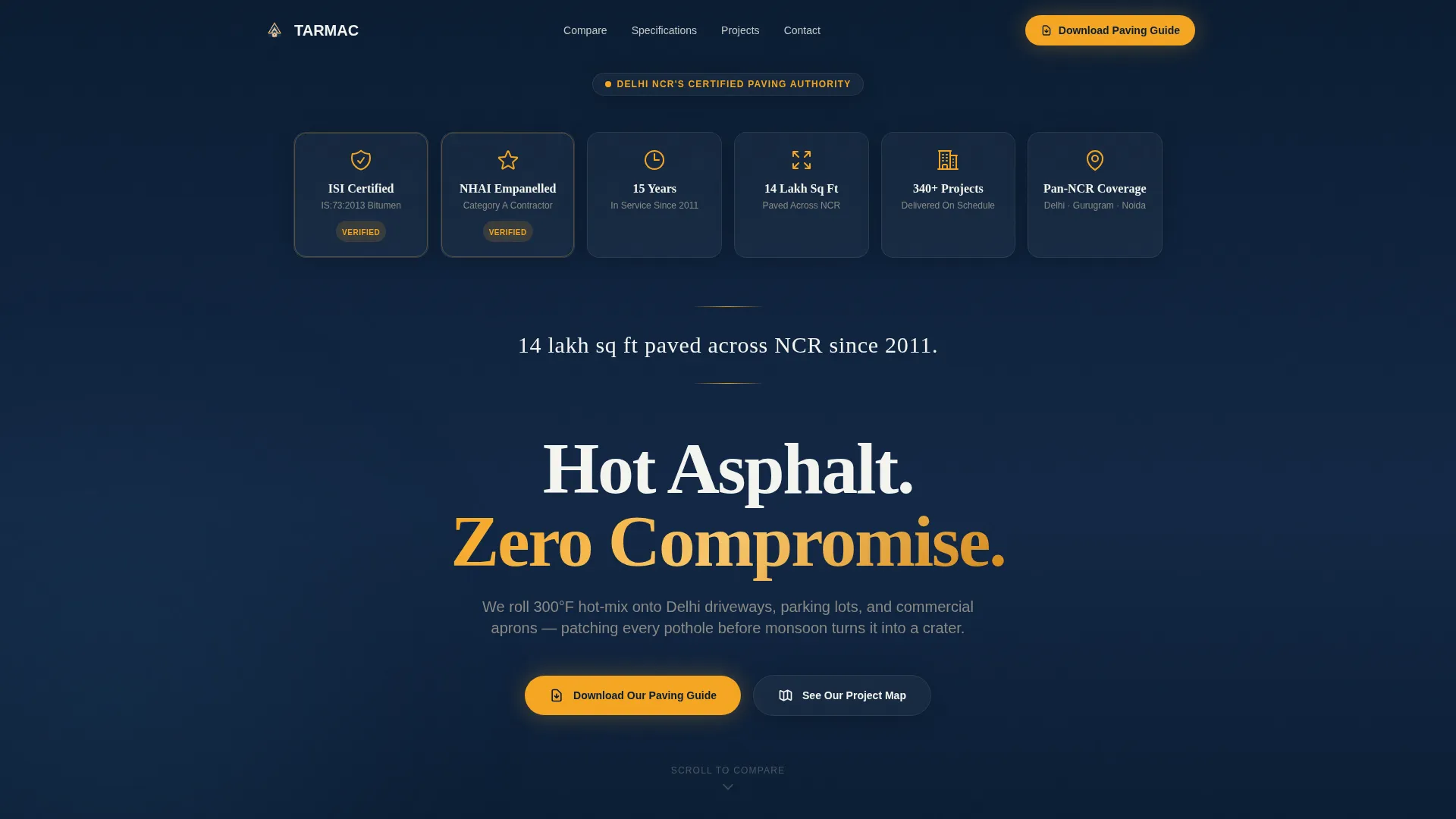
- A horizontal credential ribbon displaying certification marks, empanelment seals, years-in-service shields, and total square-metre tallies
- Side-by-side comparison tables covering hot-mix versus cold-patch and a thickness-and-load-rating matrix, each placed beside a crew portrait
- A lead capture form tied to a downloadable paving guide, with fields for name, project type, and estimated area in square feet
Feature list
This section outlines the core built-in components that come ready to use in the Tarmac template.
Award Badge Credential Ribbon
A full-width header ribbon displays certification marks, empanelment seals, years-in-service shields, and completed square-metre tallies arranged against a deep navy background. The ribbon acts as the primary visual, replacing a hero photograph with tangible proof of track record.
Hot-Mix versus Cold-Patch Comparison Table
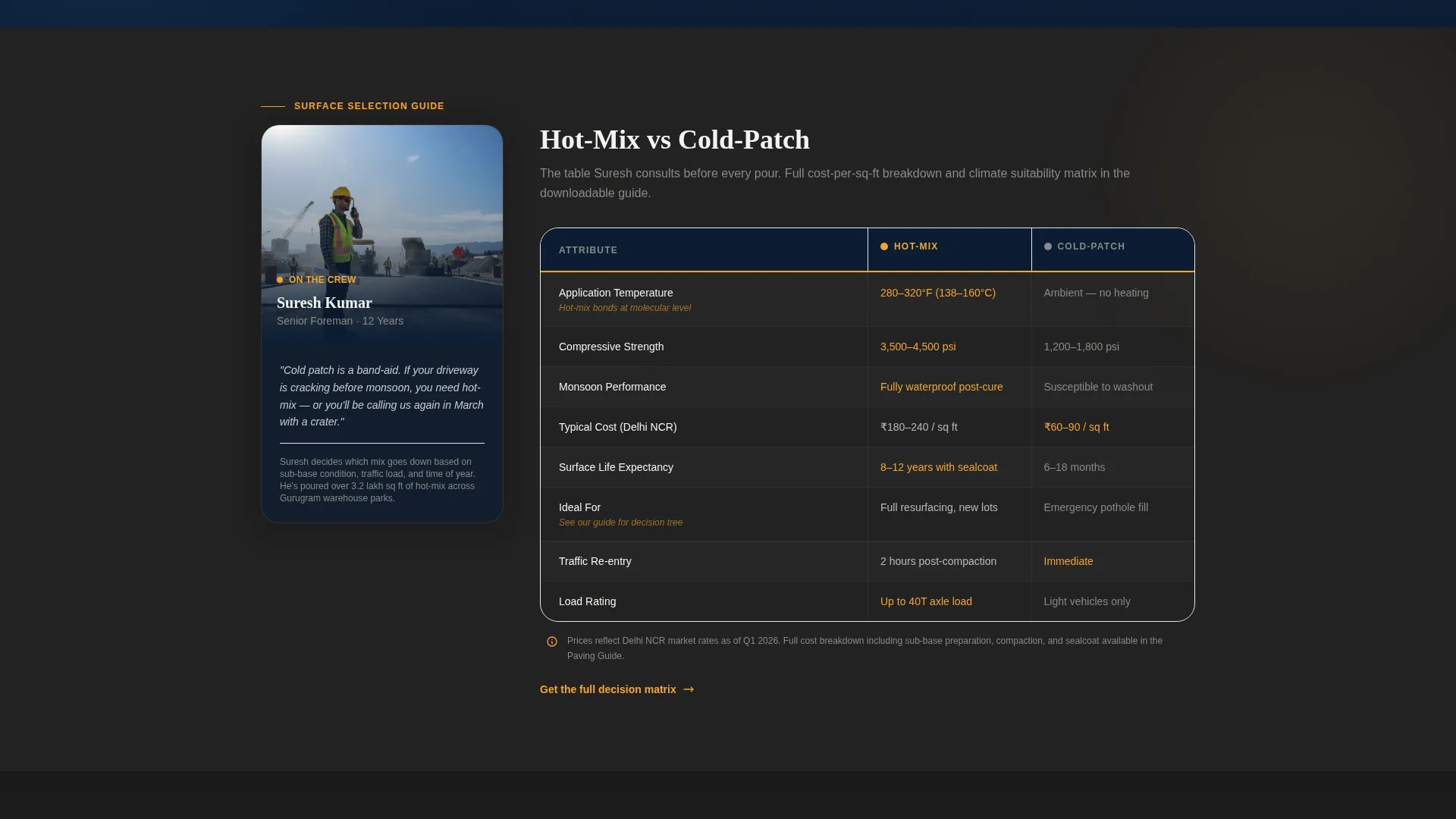
A structured comparison table sits beside a crew foreman portrait. It contrasts hot-mix asphalt and cold-patch repair across key decision factors, giving visitors enough data to understand the difference without replacing the full downloadable guide.
Thickness and Load-Rating Matrix
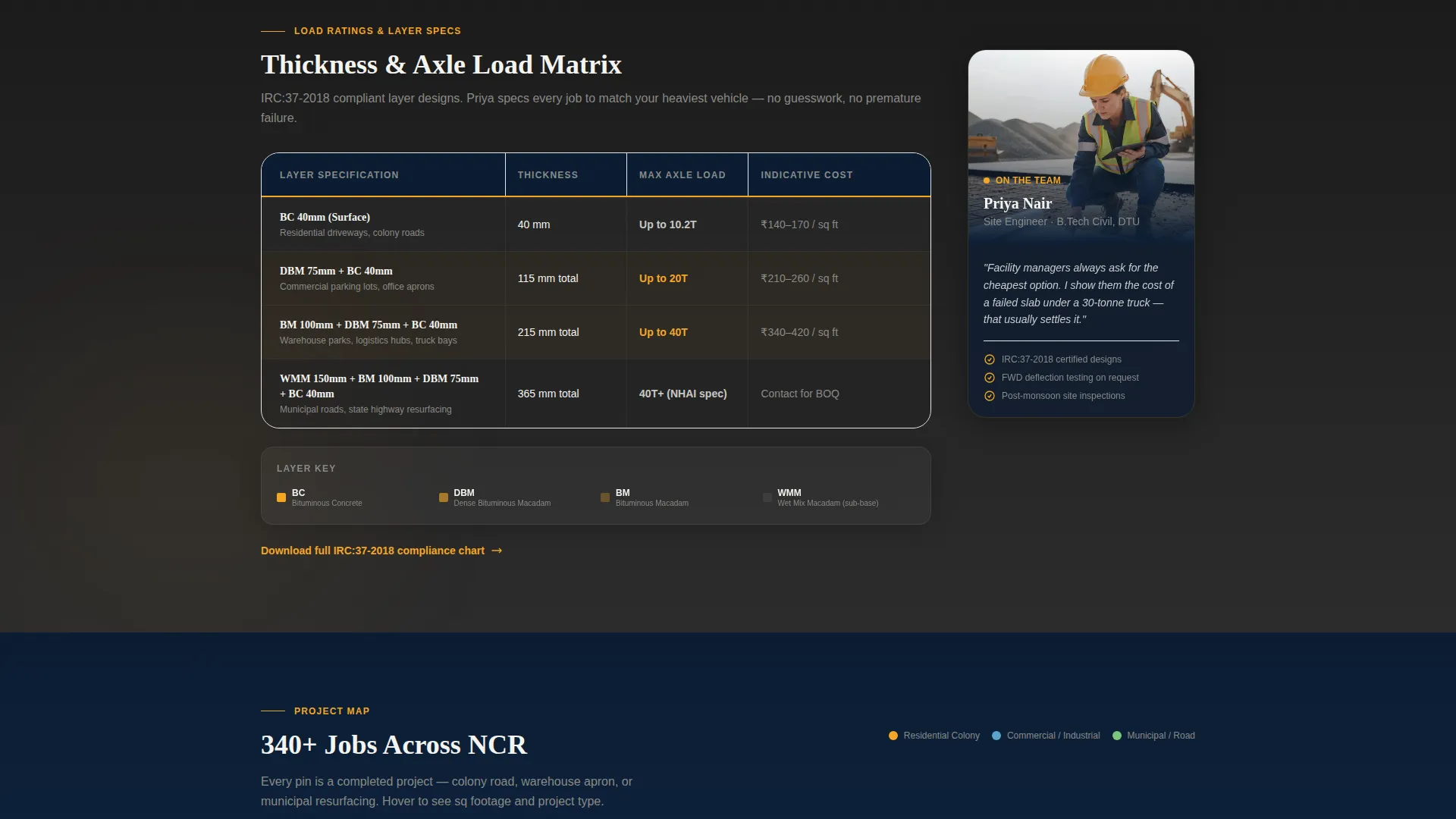
A second data table, paired with a site engineer portrait, presents surface thickness options against load ratings. This helps facility managers and municipal contractors quickly identify the specification that fits their project requirements.
Downloadable Paving Guide Form
A short lead capture form invites visitors to download a PDF guide comparing surface types, load ratings, and cost-per-square-foot benchmarks for Delhi's climate. The form collects name, project type, and estimated project area, keeping the friction low and the value clear.
Interactive NCR Project Map Path
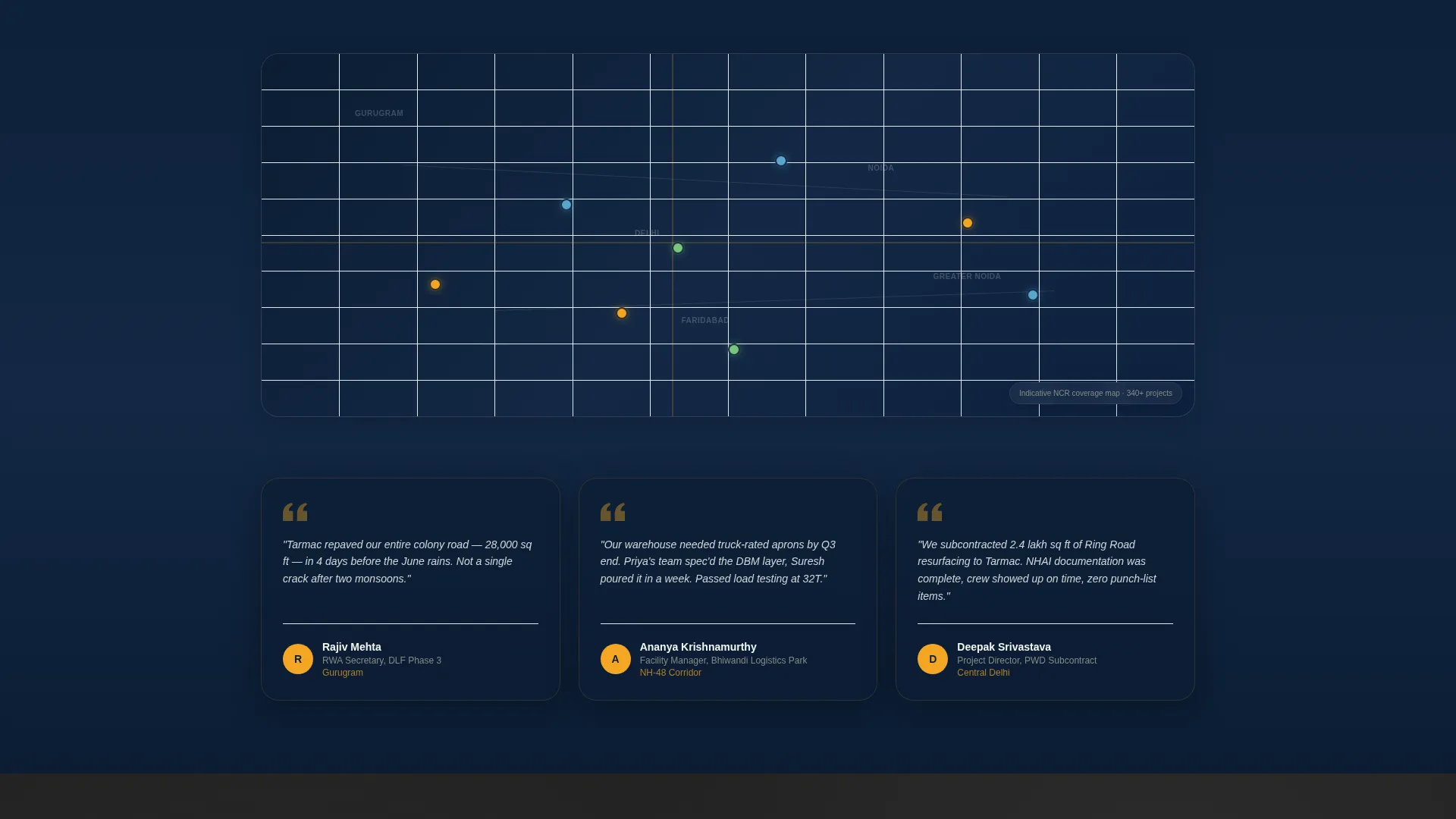
A secondary call-to-action directs visitors to a project pin map covering completed jobs across the NCR. This gives institutional clients a geographic sense of the contractor's reach and operational history without requiring a sales call.
Team and People Section Layout
Each data section is paired with a real crew member or project manager portrait. The pairing gives the comparison tables human context and gives the staff members data-backed authority, creating a scroll pattern that alternates between people and proof.
Page sections overview
| Section | Purpose |
|---|---|
| Credential Badge Ribbon | Display certifications, seals, and project milestones |
| Tagline Statement Line | Anchor credibility with a single square-footage claim |
| Hot-Mix Comparison Table | Compare hot-mix asphalt and cold-patch repair side by side |
| Foreman Portrait Block | Add human context to the paving method table |
| Load-Rating Matrix | Match surface thickness to vehicle and load requirements |
| Site Engineer Portrait | Give the load data a named, qualified face |
| Guide Download Form | Capture leads in exchange for the paving PDF guide |
| NCR Project Map call to action | Direct visitors to an interactive completed-projects map |
Design & branding system
The template uses a Navy Authority color system built for high-visibility, no-nonsense communication. The palette reads like a highway sign caught in headlights: commanding, clear, and built to be processed quickly.
- Deep command navy (#0B1D33) dominates headers and footers; road-stripe amber (#F5A623) activates every button and callout badge; fresh-pour charcoal (#2C2C2C) grounds body and table sections; clean curb white (#F4F4F0) opens breathing room between dense data rows
- The Service Utility theme keeps typography functional and authoritative, with no decorative elements competing against the credential ribbon or comparison tables
- The amber accent creates an unmistakable visual signal for calls-to-action, making the download button and project map link instantly identifiable as the next step
Mobile & speed optimization
The layout is structured to remain scannable on smaller screens, where facility managers and RWA committee members frequently review contractor options on the go. Comparison tables are designed to reflow cleanly rather than collapse into unreadable grids.
- The credential ribbon stacks badge elements vertically on narrow viewports so no certification mark is cut off or hidden
- The crew portrait and table pairings shift to a stacked layout on mobile, with the portrait appearing above its corresponding data table for logical reading order
- The lead capture form reduces to a single-column input stack on small screens, keeping the download path accessible without excessive scrolling
How this template helps you convert
The template is built around a content-resource conversion model. Visitors receive genuine comparison data at no cost, which earns enough trust to make the guide download feel like a natural next step rather than a hard sell.
- The credential ribbon and square-footage tagline establish authority in the first viewport, so visitors immediately understand they are dealing with a qualified, experienced contractor before reading a single service description.
- The alternating crew-portrait-and-data-table scroll pattern keeps visitors engaged section by section, trading a person for proof and proof for a person, until the download form feels like the logical conclusion of a useful research session.
- The secondary project map call-to-action provides a low-commitment alternative path for visitors not ready to share contact details, keeping them on the page longer and increasing the likelihood of eventual conversion.
Other information about this template
The Tarmac template is well-suited for contractors who want to position themselves as the technical authority in Delhi's asphalt and paving market. It is especially effective for those targeting institutional clients who require documented credentials before awarding contracts.
- The template is categorised under Professional Services, specifically Delhi Local Services, reflecting its focus on a defined geographic and trade niche
- It follows a Comparison Table template style, meaning the primary content structure is data-driven rather than narrative or portfolio-led
- The lp_direction is Content/Resource, so the page earns attention by delivering useful surface-type and load-rating information before requesting any visitor data
- The creative direction is Team and People, which means crew and project manager portraits are a structural element of the layout, not decorative additions
- The header concept is Award Badges, making certifications and empanelment seals the literal first visual a visitor encounters rather than a photograph or tagline
Theme
Service Utility
Creative direction
Team & People
Color system
Navy Authority
Style
Comparison Table
Direction
Content/Resource
Page Sections
Award Badge Credential Ribbon
Hot-mix Versus Cold-patch Table
Thickness and Load-rating Matrix
Paving Guide Download Form
Interactive NCR Project Map Call to Action
Team and People Scroll Layout
Related questions
Who is the Tarmac template designed for?
What is the primary call-to-action on this landing page?
Can I update the comparison tables for my own service specifications?
What does the secondary call-to-action do?
Does the template include crew portrait photographs?



