South Indian Restaurant Landing Page Template
Tawa is a gallery-and-detail landing page template built for South Indian quick-service restaurants. It pairs macro food photography with a warm terracotta-and-cream color system to create an immersive scroll experience. Visitors browse dishes, build their order as they go, and check out without creating an account, all in a single, beautifully composed page.
by Rocket studio
Quick summary
Tawa is a single-page landing page template designed for dosa restaurants and South Indian quick-service eateries. It uses a Gallery Walk layout to turn dish browsing into a sales journey. Every scroll reveals a new photograph paired with dish details and an "Add to Tiffin" button. The result feels warm, tactile, and genuinely appetising.
Who this template is for
This template is built for food businesses that lead with strong visuals and want to convert hungry visitors directly on the page. It suits owners who want orders placed without friction.
- South Indian restaurants and dosa-focused quick-service counters
- Home-kitchen and cloud-kitchen operators serving tiffin delivery
- Food entrepreneurs targeting office-goers, young families, and homesick South Indian diners
What problem this template solves
Most restaurant pages bury the menu behind slow navigation. Visitors lose patience before they ever reach an "Order" button. Tawa solves that by making the gallery itself the ordering engine.
- No account creation required, removing the biggest checkout barrier for new customers
- Dish photography and pricing appear together, so visitors decide and act in the same moment
- A sticky mini-cart and pinned call-to-action button keep ordering always within reach
What you get with this template
You get a complete, ready-to-customise landing page that works as both a visual menu and a direct sales tool. Every section is purposefully sequenced to move a visitor from curiosity to checkout.
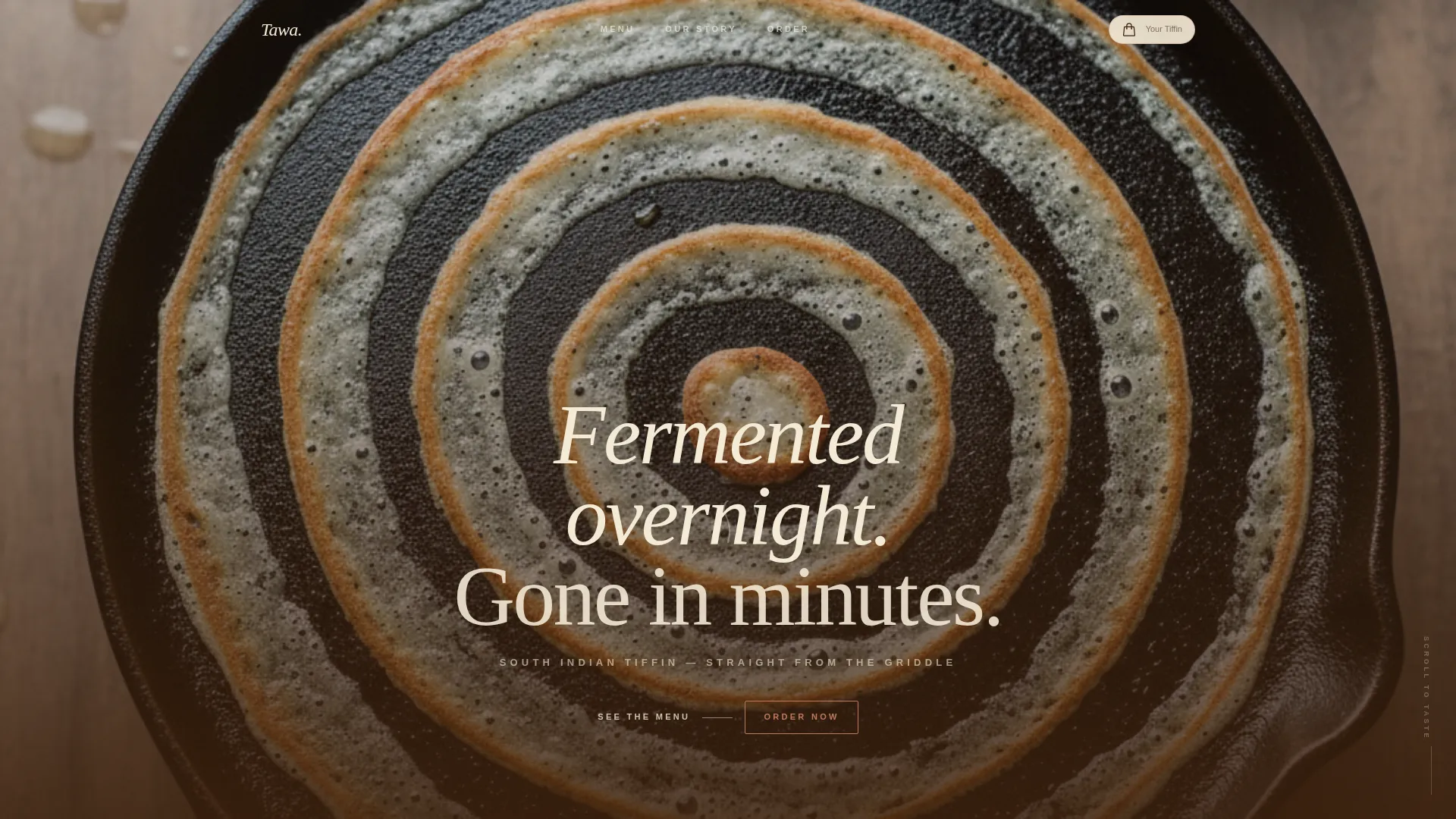
- A full-viewport macro header image with a fade-in headline and immersive depth-of-field effect
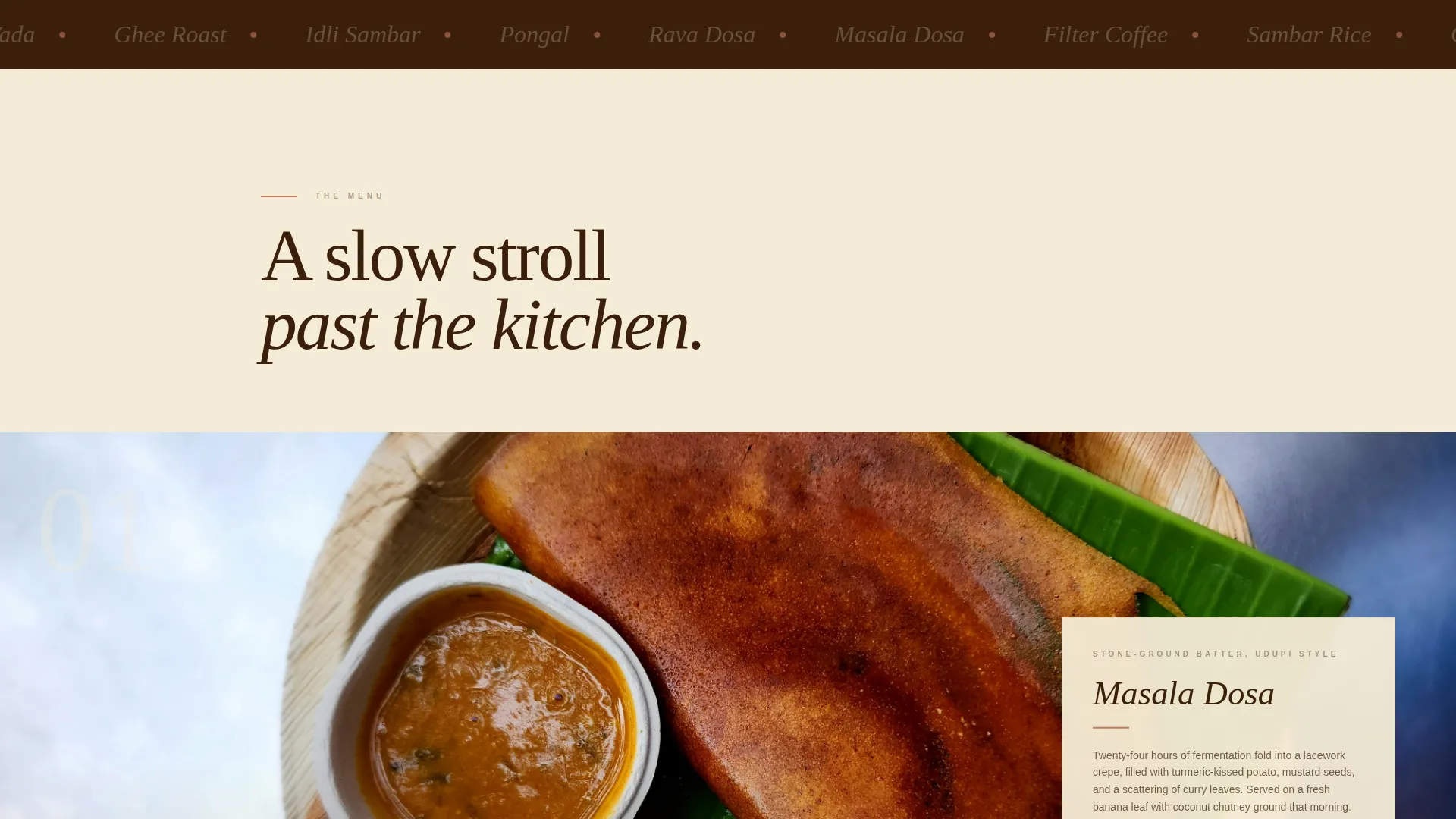
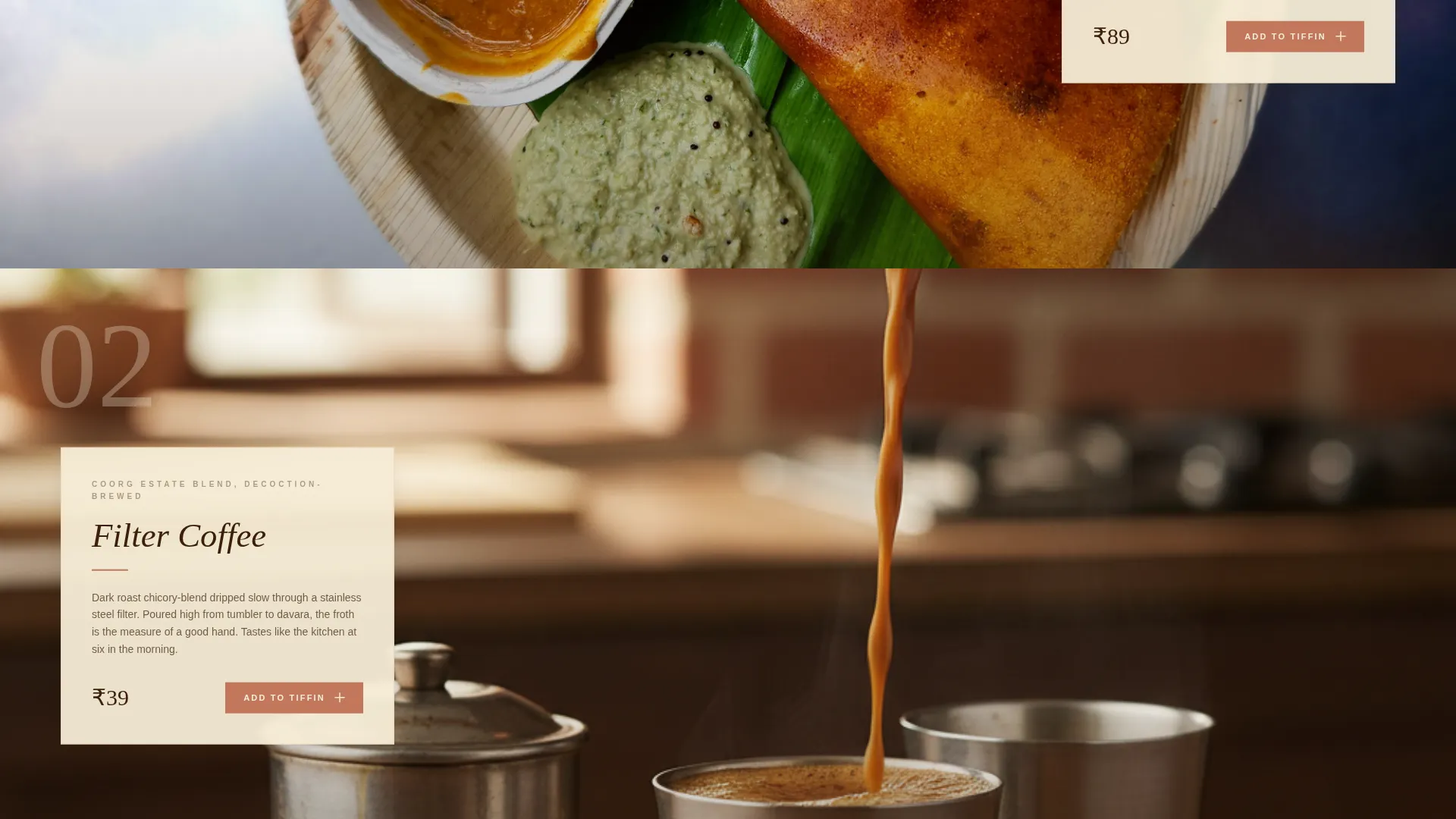
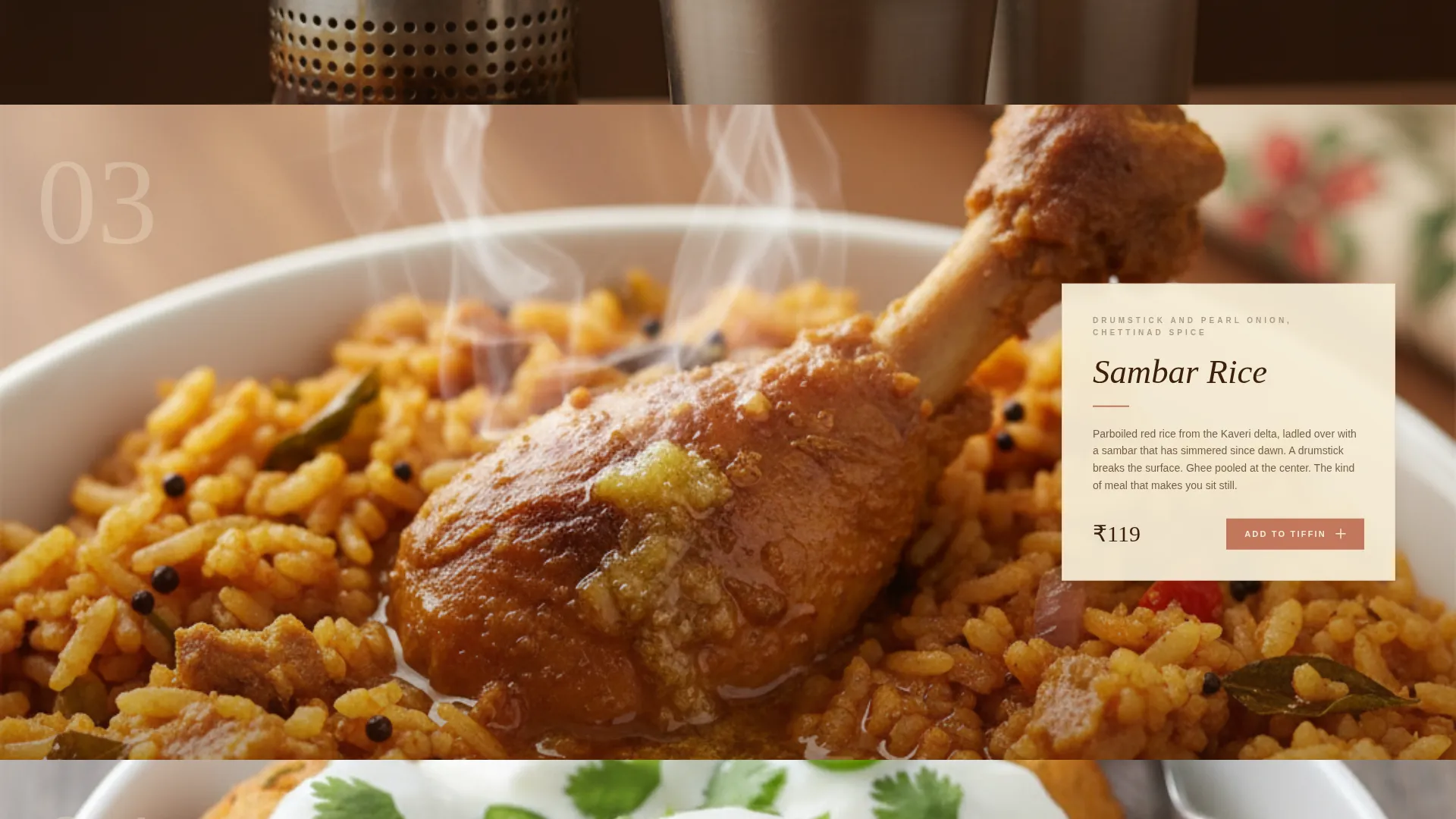
- A scrollable gallery of dish cards, each with a large photograph, origin note, price, and individual "Add to Tiffin" button
- A frictionless checkout section with address autofill, time-slot selection, and phone-number-only order confirmation
Feature list
This section describes the core built-in capabilities included in the Tawa template.
Full-Viewport Macro Header
The header opens on a razor-thin depth-of-field close-up of a dosa surface. A single cream-coloured headline fades in after a beat, setting an immersive, appetite-driven first impression before any menu item appears.
Gallery Walk Dish Cards
Each dish is presented as a large, uncropped photograph paired with a sliding detail panel. The panel carries the dish name, a one-line origin note, and the price. This image-pause-detail rhythm pulls visitors deeper into the page naturally.
Sticky Mini-Cart
A persistent mini-cart sits in the top-right corner of the viewport at all times. It displays the current item count and running total so visitors always know where their order stands without leaving the page.
Pinned Order Call to Action
An "Order Your Tiffin" button is fixed to the bottom of the viewport throughout the scroll. It pulses gently with a jasmine pink hover state, staying visible without being intrusive.
Frictionless Checkout Section
The bottom of the page handles delivery address entry with autofill enabled, a preferred time-slot selector covering breakfast, lunch, and dinner, and payment collection. No account creation is required, only a phone number for order updates.
Per-Card Add to Tiffin Button
Every gallery dish card carries its own "Add to Tiffin" button. Visitors can build an order incrementally as they scroll, without needing to navigate to a separate cart or menu page.
Page sections overview
| Section | Purpose |
|---|---|
| Macro Header | Full-viewport dosa close-up with fade-in headline |
| Gallery Dish Cards | Scrollable image-and-detail ordering gallery |
| Sticky Mini-Cart | Persistent item count and order total display |
| Pinned call to action Bar | Always-visible bottom bar for order action |
| Checkout Section | Address, time slot, payment, and phone confirmation |
Design & branding system
Tawa follows an Agrarian Root theme expressed through the Desert Rose color system. Every color choice references a material from a South Indian kitchen or landscape, keeping the visual tone warm, grounded, and immediately recognisable.
- Sun-baked terracotta (#C2785C) anchors headlines and section dividers; deep tamarind brown (#3B1F0B) carries all body text; raw rice-batter cream (#F5ECD7) dominates backgrounds like unbleached cotton
- Muted jasmine pink (#D4A5A5) appears only on hover states and call-to-action borders, arriving at exactly the right moment
- Typography and spacing follow the same unhurried rhythm as the Gallery Walk layout, giving every dish room to breathe on the page
Mobile & speed optimization
The Gallery Walk layout is designed with touch-first scrolling in mind. Dish cards, detail panels, and the mini-cart all respond cleanly to smaller screens.
- The sticky mini-cart and pinned call to action bar remain accessible on mobile viewports without obscuring gallery content
- Address autofill and the time-slot selector are built for quick thumb interaction, reducing friction at the checkout step
How this template helps you convert
Tawa treats every design decision as a sales decision. The page does not ask visitors to hunt for a way to order, it places the order path inside the browsing experience itself.
- The macro header creates an immediate sensory connection, making visitors feel hungry and curious before they read a single menu item
- The Gallery Walk rhythm earns each click organically, a visitor who has paused three times over a photograph is already halfway to placing an order
- The no-account checkout removes the final hesitation point, turning a browsing session into a completed tiffin order with minimal effort
Other information about this template
Tawa is a single-page landing page template categorised under Food and Beverage, specifically the Quick Service and Takeaway subcategory. It is built around the Dosa and South Indian QSR niche.
- The template style is Gallery + Detail, combining large visual storytelling with inline purchase actions
- The header concept is Macro Close-Up, a full-viewport photograph format that works especially well for textured, handcrafted food
- The creative direction follows the Gallery Walk pattern, which is well suited to restaurants where the food itself is the strongest selling argument
- The landing page direction is Direct Sales, meaning every layout decision prioritises completing an order over building a content library
Theme
Agrarian Root
Creative direction
Gallery Walk
Color system
Desert Rose
Style
Gallery + Detail
Direction
Direct Sales
Page Sections
Full-viewport Macro Header
Gallery Walk Dish Cards
Sticky Mini-cart Display
Pinned Order Call to Action
Per-card Add to Tiffin Button
Frictionless Checkout Section
Related questions
Can I use this template without a large photography budget?
Does the checkout section require customers to create an account?
Can I add or remove dishes from the gallery?
Is this template suitable for a cloud kitchen or home-delivery-only business?
What makes the Gallery Walk layout different from a standard menu page?