Professional Resume Landing Page Template, Credential
Credential is a full-width immersive landing page template built for a teacher professional resume service. It combines a Floating Photos header, before-and-after resume transformations, and a certificate-inspired Award and Recognition layout to guide educators toward a single clear action: clicking through to start their resume intake. The design speaks directly to teachers ready for their next career move.
by Rocket studio
Quick summary
Credential is a single-page template designed for a teacher professional resume service. It uses a warm Cloud Canvas color palette, drifting educator credential photos in the header, and a scrolling Award and Recognition visual rhythm. Every section builds the case that a teacher's experience deserves a sharp, professionally written resume that earns interviews.
Who this template is for
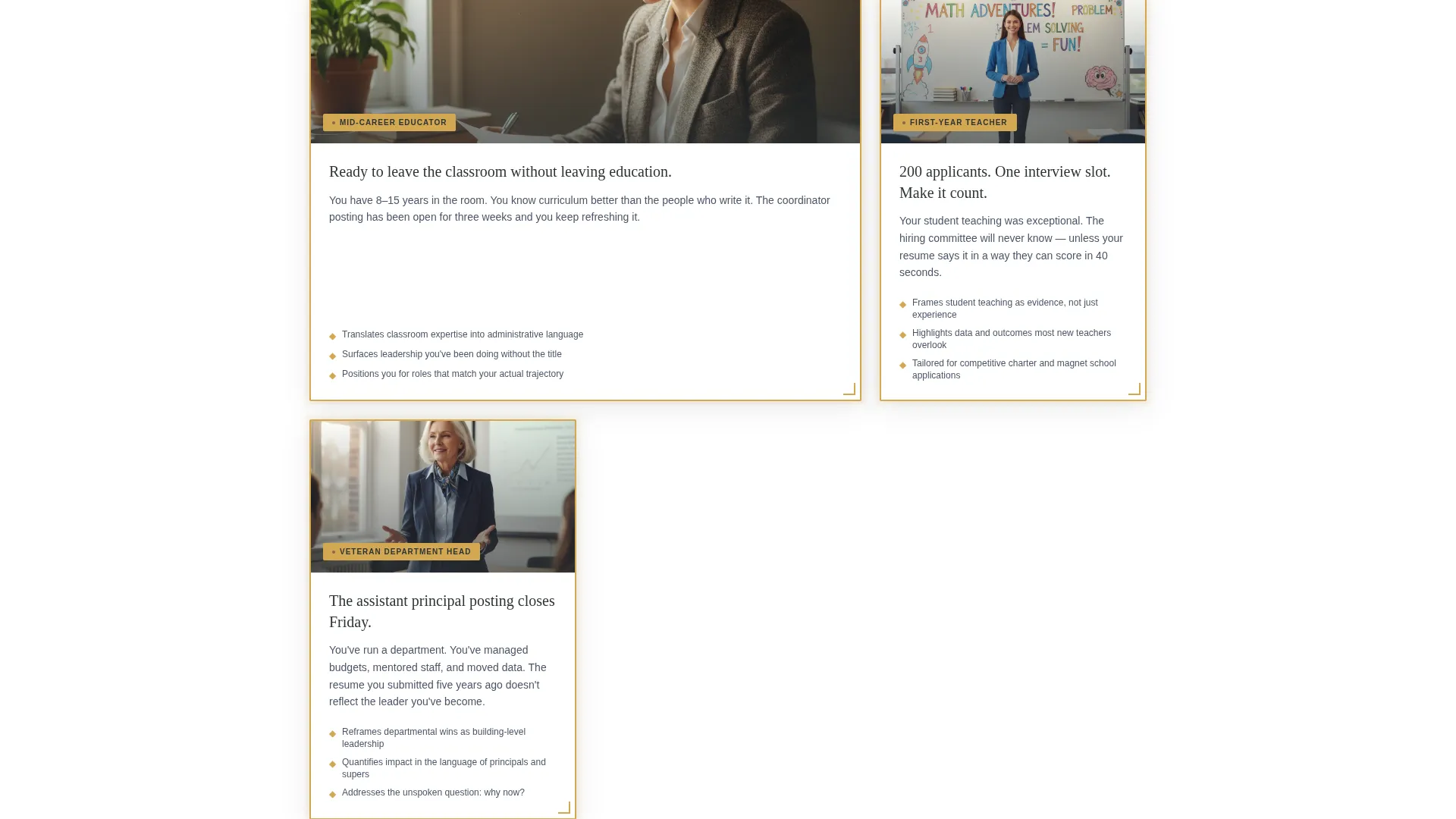
This template is built for resume service providers who work specifically with educators at different career stages. It speaks to the distinct challenges each type of teacher faces when applying for roles beyond the classroom.
- Mid-career educators moving from classroom roles into curriculum or instructional coordinator positions
- First-year teachers competing for limited spots at charter schools or selective public school programs
- Veteran department heads and experienced educators pursuing assistant principal or administrative postings
What problem this template solves
Most resume service landing pages feel generic. They do not reflect the specific language, credentials, or career paths that educators care about. Teachers visiting a generic page cannot see themselves in the examples, and they leave without converting.
- Educators struggle to translate classroom achievements into resume language that impresses hiring committees
- Resume service pages rarely show concrete before-and-after proof, so visitors cannot trust the quality of the work
- Hesitant buyers need a low-commitment path forward, not just a single hard-sell button
What you get with this template
This template delivers a complete, ready-to-customize landing page that leads visitors from awareness to click-through without a form on the page. Every visual and copy element is structured to build credibility and move educators toward the intake questionnaire.
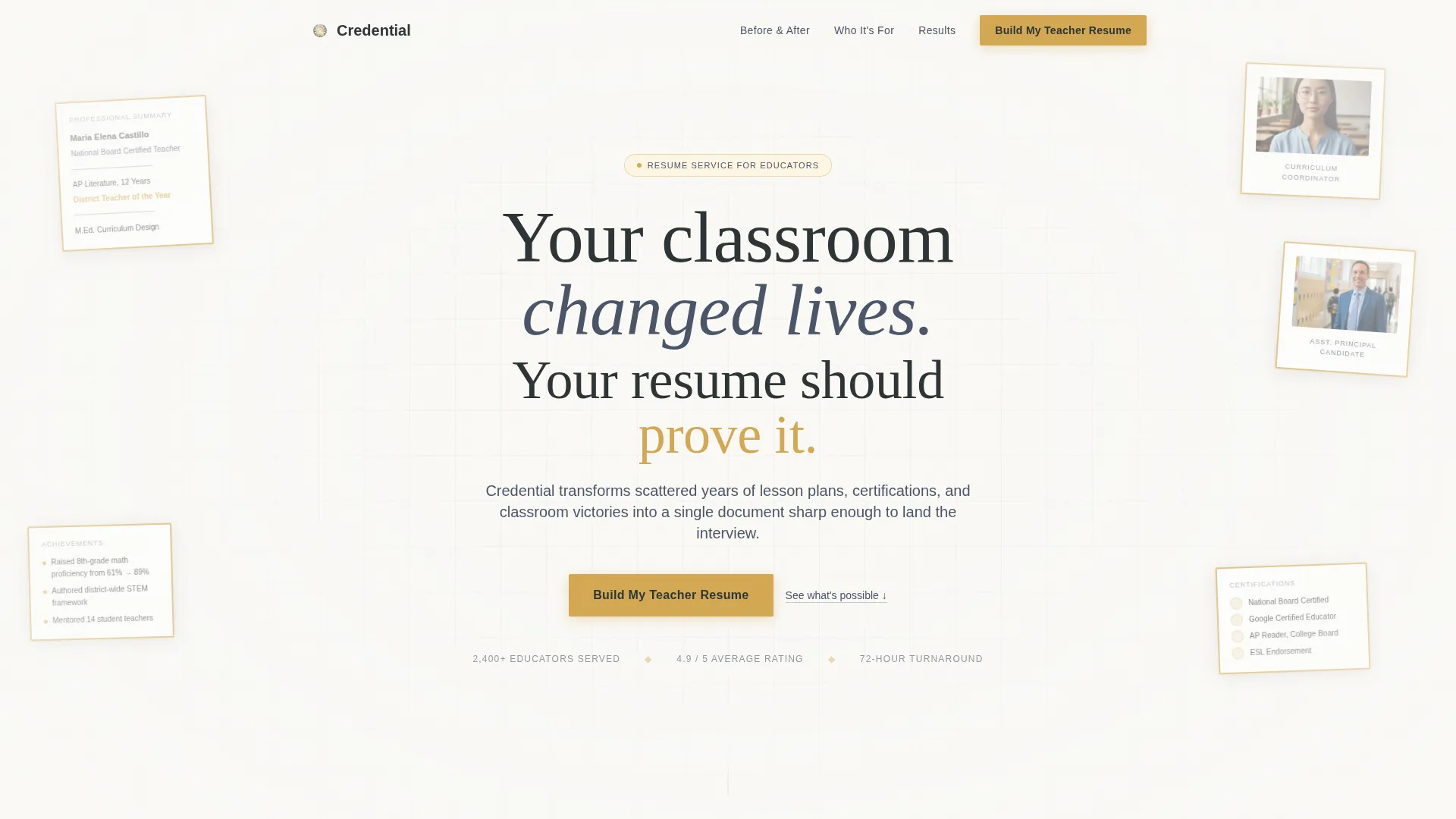
- A full-viewport Floating Photos header with softly shadowed resume pages, educator headshots, and legible credential fragments
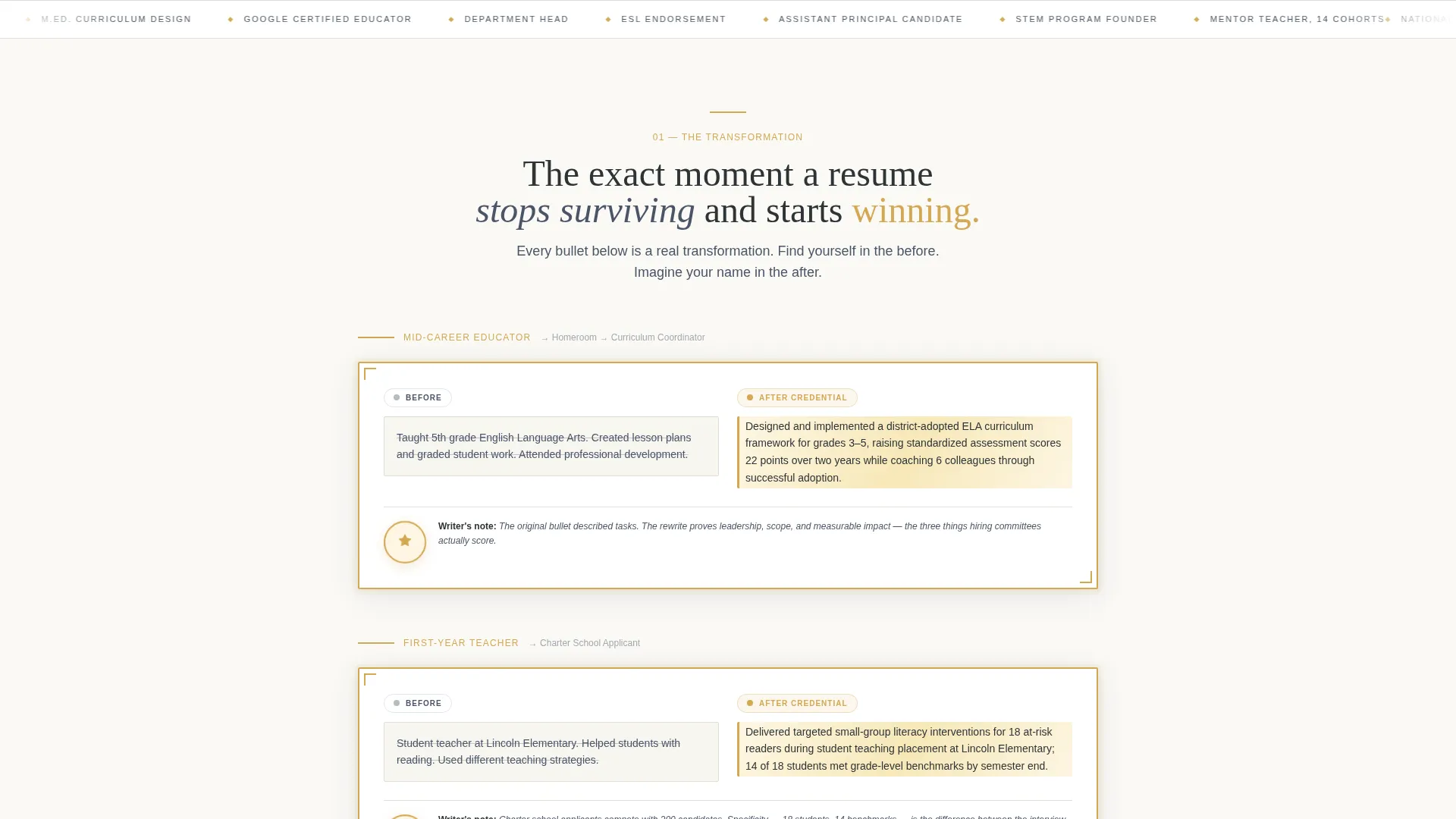
- Before-and-after resume transformation sections with gold-highlighted rewrites framed like commendations
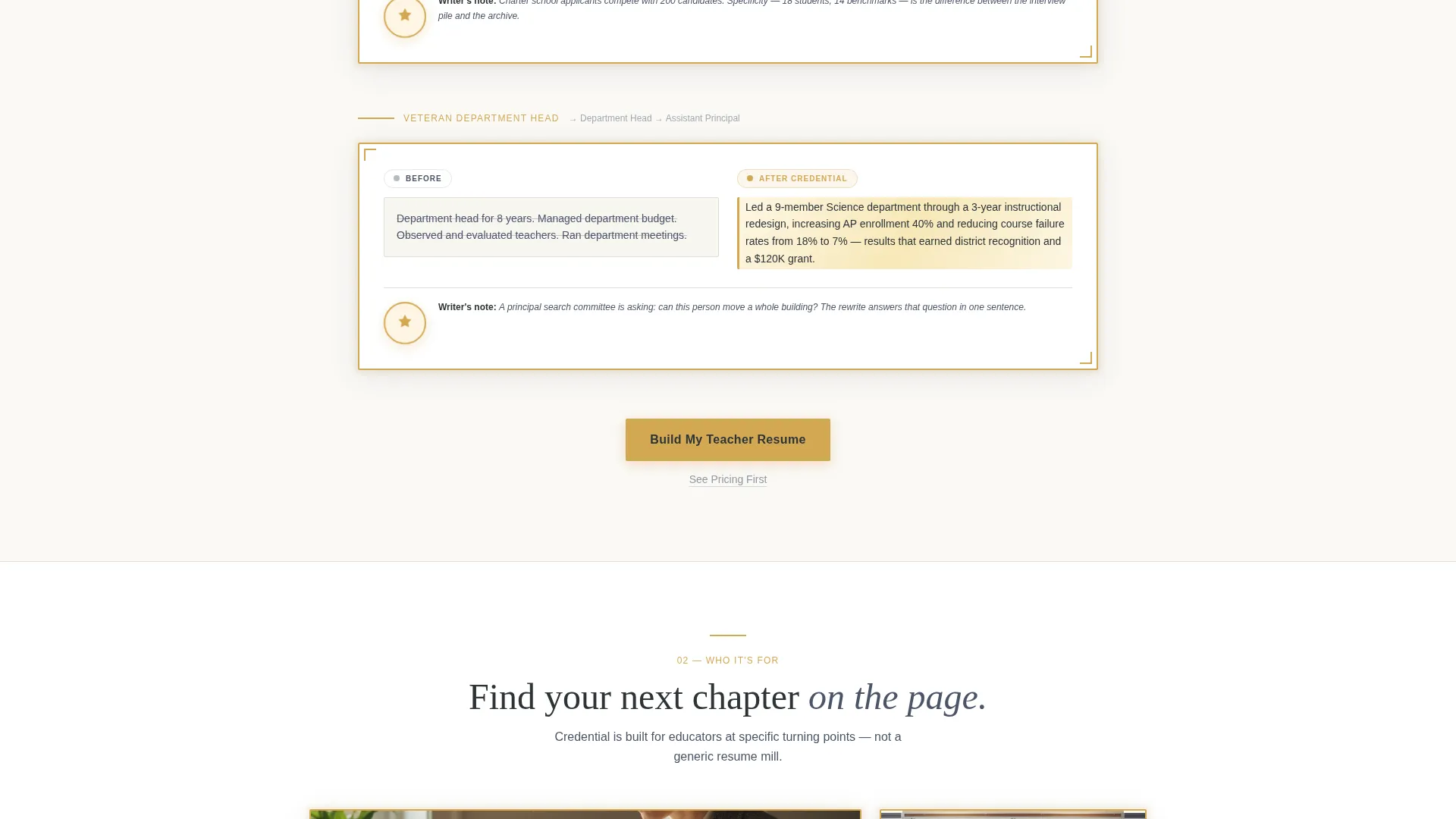
- Repeating "Build My Teacher Resume" call-to-action buttons with escalating urgency copy and a secondary "See Pricing First" text link beneath each
Feature list
This template comes with a tightly structured set of visual and functional components, each grounded in the Award and Recognition creative direction and Click-Through landing page strategy.
Floating Photos Header
Five or six softly shadowed resume pages and educator headshots drift across the full viewport at slightly different depths and angles. Each image is framed with a thin gold border. Legible credential text fragments such as "National Board Certified" and "District Teacher of the Year" give visitors real proof to read before the headline even registers.
Before-and-After Resume Panels
Each transformation section pairs a bland original resume bullet with a rewritten version glowing in gold highlight. The panels are framed like commendations, making the quality difference immediately visible. This format lets educators recognize their own weak resume language and understand the service's value without reading a single sales claim.
Certificate-Style Testimonial Containers
Testimonials appear inside containers styled with embossed borders, echoing the look of award certificates. This visual treatment reinforces the Award and Recognition theme while lending each client story the weight of an official credential.
Escalating Call-to-Action System
The primary "Build My Teacher Resume" button appears first after the header and repeats at every section break. Supporting copy escalates in urgency from "See what's possible" to "Your next role is already posted." A secondary "See Pricing First" text link sits beneath each button for visitors who need more context before committing.
Gold Seal Section Stamps
Each section ends with a small gold seal icon, visually stamping approval on the transformation shown. This detail reinforces the Award and Recognition rhythm and gives the scroll a satisfying, deliberate cadence that mirrors walking down a hallway of framed achievements.
Recognition Gold Accent System
The recognition gold color (#D4A853) is reserved for badges, hover states, highlights, and interactive elements throughout the page. This restraint keeps the palette feeling professional rather than decorative, and it draws the eye directly to the moments that matter most.
Page sections overview
| Section | Purpose |
|---|---|
| Floating Photos Header | Opens with credential visuals and the core headline |
| Headline and Primary call to action | Anchors the value proposition and first click-through button |
| Before-and-After Panel 1 | Shows a formatting-level resume transformation with gold highlight |
| Section call to action Break 1 | Repeats the primary button with "See what's possible" urgency copy |
| Before-and-After Panel 2 | Demonstrates a career-narrative-level rewrite framed as a commendation |
| Section call to action Break 2 | Repeats the button with escalating urgency copy |
| Testimonial Certificate Row | Displays client stories inside embossed certificate-style containers |
| Before-and-After Panel 3 | Highlights a career-defining transformation with gold seal stamp |
| Final call to action Section | Closes with "Your next role is already posted" and the primary button |
Design & branding system
The Cloud Canvas color system gives the page the feeling of a clean classroom whiteboard at the start of a new school year. Every color serves a specific role, and the palette stays warm rather than institutional.
- Soft chalkboard slate (#4A5568) and warm parchment white (#FAF9F6) form the base surfaces, keeping the page organized and easy to read
- Quiet pencil graphite (#2D3436) carries all primary text, giving the page the weight of a freshly printed resume
- Recognition gold (#D4A853) is used exclusively for badges, gold seal icons, hover states, before-and-after highlights, and interactive call to action buttons
Mobile & speed optimization
The Lens and Frame theme and full-width immersive template style are designed to scale cleanly across screen sizes. Floating photo layers and certificate-style containers are built to reflow without losing the visual hierarchy that makes the page effective.
- Floating Photos header elements adjust depth and spacing on smaller screens so the credential text fragments remain legible
- Before-and-after panels stack vertically on mobile, preserving the visual contrast between the original and rewritten resume bullets
- Escalating call to action buttons remain full-width and thumb-friendly at every breakpoint, keeping the click path clear on any device
How this template helps you convert
The entire page is structured as a Click-Through landing page with no form. Every design and copy decision is built to lower resistance and build enough trust that the visitor clicks through to the intake questionnaire.
- The before-and-after transformation panels show specific, recognizable resume language that educators see in their own documents, making the service feel immediately relevant and worth trying.
- The escalating call to action copy moves visitors through an emotional arc, from curiosity at the top of the page to urgency at the bottom, so the final button click feels like a natural next step rather than a hard sell.
- The secondary "See Pricing First" text link beneath every call to action gives hesitant visitors a low-commitment option, reducing bounce and keeping comparison shoppers on the page long enough to build trust.
Other information about this template
This template is built around a niche-specific approach that general resume service pages cannot replicate. A few additional details worth noting for anyone evaluating this template for their setup.
- The Lens and Frame theme is designed to feel personal and documentary, like a portfolio of evidence rather than a sales page
- The full-width immersive template style means the page uses the entire viewport at every scroll point, keeping visual engagement high throughout
- The no-form Click-Through structure routes all conversions through an external intake questionnaire, so no form-handling setup is needed within the page itself
- The Award and Recognition creative direction scales well for services targeting educators at multiple career levels, since each transformation panel can be customized to reflect a different client archetype
- The Cloud Canvas palette and Floating Photos header concept are part of the same matched intersection context, meaning the visual system was purpose-built for this specific niche and template style combination
Theme
Lens & Frame
Creative direction
Award & Recognition
Color system
Cloud Canvas
Style
Full-Width Immersive
Direction
Click-Through
Page Sections
Floating Photos Header with Credential Text
Before-and-after Resume Transformation Panels
Certificate-style Testimonial Containers
Escalating Click-through Call to Action System
Gold Seal Section Stamps
Recognition Gold Accent System
Related questions
Does this template include a contact form or booking widget?
Can I customize the before-and-after resume examples for my own service?
Is this template suitable for a resume service working with teachers at different career levels?
What does the secondary 'See Pricing First' link do?
How many times does the primary call to action button appear on the page?



