Golf Leagues Specialist Professional Website Template
Tee is a bento grid landing page built for youth golf leagues. It pairs a countdown-driven registration flow with bold before-and-after visuals to move families from curious to signed up. The Fire and Earth color system and Dynamic Motion theme give the page the warm energy of a golden-hour round, while a three-step form keeps sign-up simple.
by Rocket studio
Quick summary
Tee is a single-page registration template designed for youth golf leagues. It opens with a full-width countdown header, moves through a bento grid of before-and-after transformation cells, and closes with a sticky registration bar. The page targets sports-minded parents, grandparents gifting a season, and school coordinators looking to enroll kids in weekend golf.
Who this template is for
This template is built for organizers running junior golf programs that need registrations filled fast. It works equally well for a municipal parks department, an independent youth league director, or a school coordinator building a seasonal activity program.
- Parents looking for a structured, screen-free weekend activity for their children
- Grandparents who want to gift a full season of junior golf as a present
- School physical education coordinators plugging students into a skill-building outdoor sport
What problem this template solves
Youth league organizers often rely on flat flyers or basic form links that do not communicate urgency or show real results. Families scroll past without registering because nothing compels the decision right now.
- No visible countdown means no sense of deadline, so registrations trickle in late
- Generic sign-up pages fail to show the personal transformation junior golf delivers
- A single long form discourages parents who are browsing on a phone between errands
What you get with this template
The template delivers a complete, ready-to-customize landing page with every section pre-built. Each component is designed to compress decision time and make the registration path obvious from the first scroll.
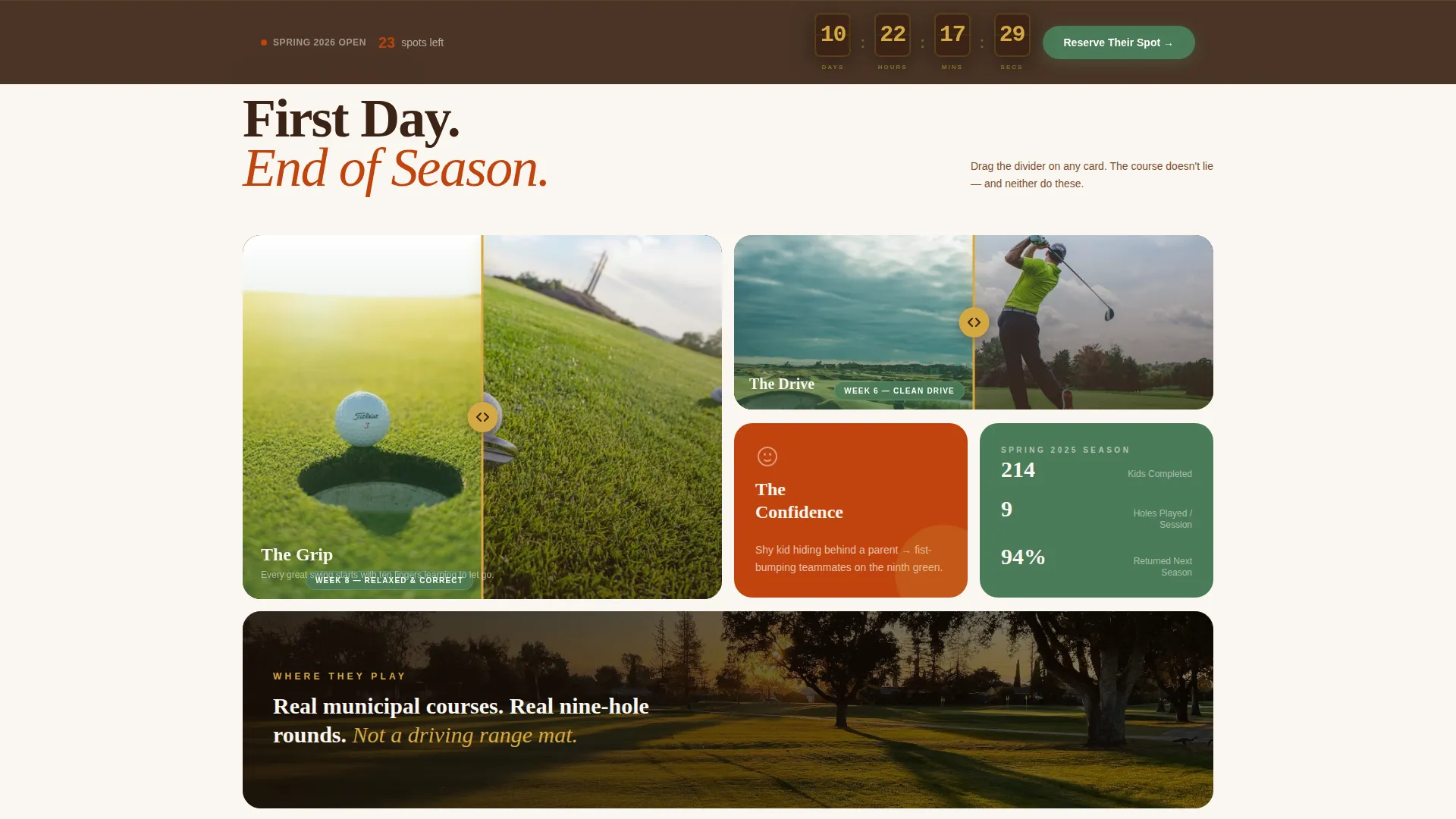
- A full-width countdown header with a mechanical digit-flip clock and a motion-blurred junior golfer hero image
- A bento grid layout with before-and-after reveal cells showing child progression throughout the season
- A sticky bottom registration bar with a three-step form and a live spots-remaining counter
Feature list
This template is built around urgency, visual proof, and a low-friction sign-up path. Every feature below comes directly from the template structure described in the brief.
Countdown Timer Header
The header fills the full viewport width with a freeze-frame of a junior golfer mid-backswing under golden-hour light. A bold countdown clock overlays the image in oversized knockout type, with each digit flipping mechanically like a vintage departures board. The single line beneath reads "Spring League Starts In..." so urgency is visual before it is verbal.
Before and After Bento Grid
Each bento cell pairs a first-day moment with an end-of-season transformation. A tight, white-knuckle grip beside relaxed correct hands. A topped ball dribbling off the tee beside a clean drive in flight. A shy child hiding behind a parent beside that same child fist-bumping a teammate on the ninth green. The scattered layout lets the eye jump freely between cells, matching the energy of kids spread across a course.
Three-Step Registration Form
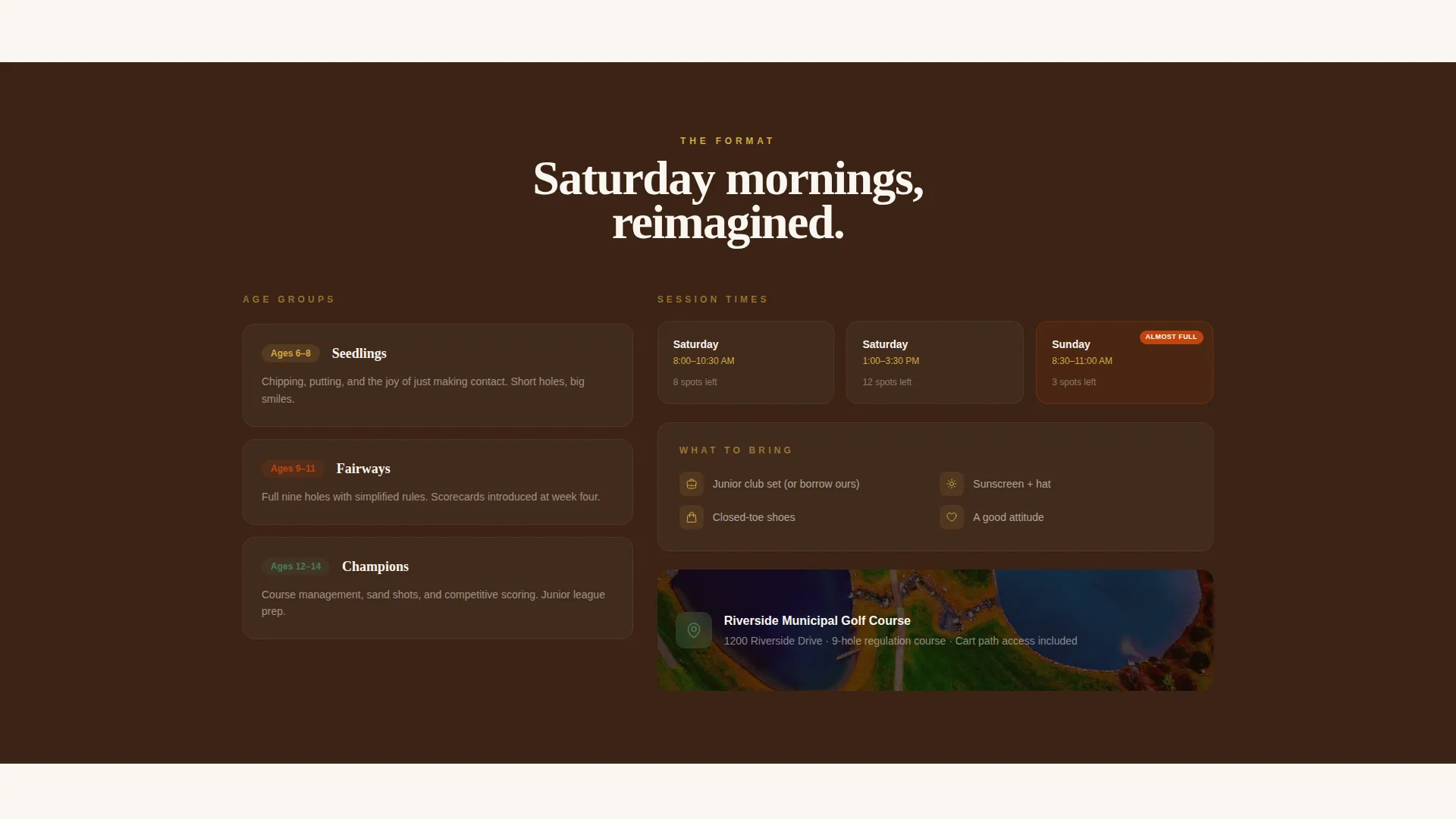
The sign-up form is broken into three focused steps: child name and age, preferred session (Saturday morning, Saturday afternoon, or Sunday morning), and parent contact details. Splitting the form this way reduces friction and keeps each screen simple enough to complete on a mobile device in under a minute.
Live Spots-Remaining Counter
A live number displayed beside the registration form shows how many spots are still open. The number drops like a leaderboard score, creating visible scarcity that pushes hesitant parents to commit before a session fills.
Sticky Registration Bar
After the first scroll, a sticky bottom bar appears with the primary call to action "Reserve Their Spot" rendered in bermuda green. The bar stays pinned as the visitor browses, so the registration entry point is always one tap away regardless of where they are on the page.
Gift a Season Cell
The final bento cell offers a secondary conversion path labeled "Gift a Season" aimed specifically at grandparents purchasing a registration as a present. It sits naturally at the end of the scroll without interrupting the primary sign-up flow for parents.
Page sections overview
| Section | Purpose |
|---|---|
| Countdown Hero Header | Opens with urgency and a registration deadline |
| Before and After Grid | Shows real child progression cell by cell |
| Session Selection Block | Highlights available Saturday and Sunday slots |
| Registration Form Steps | Captures child details in three focused steps |
| Spots Remaining Counter | Displays live scarcity to prompt faster decisions |
| Gift a Season Cell | Converts grandparents with a gift-purchase path |
| Sticky Registration Bar | Keeps the primary call to action pinned at all times |
Design & branding system
The template uses a Fire and Earth color system that feels like a late-afternoon round when the light turns amber. Every color choice is grounded in the physical world of a golf course at golden hour: warm soil, clay-stained hands, and the smell of grass rising off a sun-baked cart path.
- Terracotta (#C1440E) and deep divot brown (#3B2314) carry the hero and bento grid sections
- Warm fairway gold (#D4A843) accents headlines and motion-blur detail in the hero image
- Bermuda green (#4A7C59) is reserved exclusively for calls to action and active interface states
Mobile & speed optimization
The bento grid layout and sticky bar are structured to work cleanly on a phone screen. Parents browsing between errands on a Saturday morning are a core audience, so mobile usability is a design priority throughout.
- The three-step form breaks registration into one focused screen at a time, reducing drop-off on small displays
- Bento cells reflow naturally for vertical scrolling without losing the before-and-after visual pairing
How this template helps you convert
Every structural decision in this template is aimed at reducing the time between landing on the page and completing a registration. The combination of visible urgency, social proof through transformation visuals, and a frictionless form path works together to move families toward action.
- The countdown timer and live spots counter create two independent urgency signals that encourage immediate decisions rather than "I'll come back later" behavior
- The before-and-after bento grid replaces written promises with visual evidence, so parents and grandparents can see the transformation junior golf delivers before they ever fill in a name
- The sticky registration bar with a clear "Reserve Their Spot" call to action means the conversion path is never more than one tap away, no matter how far down the page the visitor has scrolled
Other information about this template
This template is suited for any youth golf program that runs seasonal sessions and relies on online registration to fill limited spots. It was designed with the specific rhythms of a junior league in mind: short enrollment windows, mixed audiences of parents and grandparents, and the need to communicate real-world benefit quickly.
- The "Gift a Season" cell makes this template useful beyond a standard registration push, opening a gifting conversion path in a single cell
- The Dynamic Motion theme and mechanical countdown digits give the page an active, energetic feel that matches the sport and the age group without feeling cartoonish
- The template is fully customizable, so league colors, session names, course details, and registration deadlines can all be updated to match a specific program

Theme
Futuristic Neon
Creative direction
Hero's Journey
Color system
Fire & Earth
Style
Hero-Dominant (90/10)
Direction
Marketplace/Multi
Page Sections
Countdown Timer Hero Header
Before and After Bento Grid
Three-step Registration Form
Live Spots-remaining Counter
Sticky Bottom Registration Bar
Gift a Season Conversion Cell
Related questions
Can I change the session options in the registration form?
Is the countdown timer connected to a real date?
Can grandparents use the Gift a Season path on a phone?
How does the live spots-remaining counter work?
Can I use this template for a league that runs outside of spring?