Indian Government Education Website Template
Tehsil is a split-screen educational landing page built for India's revenue office audience. It guides farmers, property buyers, lawyers, and NRIs through mutation, fard, khasra correction, and land conversion procedures using interactive checklists and audit panels. The design draws from an archival mofussil aesthetic, and the primary conversion is a gated PDF checklist download.
by Rocket studio
Quick summary
Tehsil is a single-page educational resource for anyone navigating Indian revenue office procedures. It pairs step-by-step document checklists with plain-language audit panels that explain what can go wrong at each stage. The page earns its PDF download by proving its depth before the form ever appears.
Who this template is for
This template is built for educators, legal-aid organizations, and government resource publishers who need to explain revenue office procedures clearly. It works especially well for audiences in rural and semi-urban India who interact with tehsil offices regularly.
- Farmers and property heirs who need document checklists for mutation after inheritance
- NRIs and first-time buyers trying to understand fard, khasra, and title verification steps
- Lawyers and legal-aid publishers preparing plain-language guides for revenue court procedures
What problem this template solves
Tehsil offices handle some of India's most consequential paperwork, yet clear guidance on procedures is almost nonexistent outside the office itself. Visitors waste trips because they arrive with incomplete documents, wrong fees, or no understanding of what a patwari objection actually means.
- Most people do not know which documents are required for each procedure before they show up
- Rejected applications and missing signatures are common because the process is never explained in sequence
- NRIs and first-time buyers often confuse a fard with a jamabandi, or miss a required girdawari entry entirely
What you get with this template
You get a fully structured split-screen landing page organized around four core revenue procedures. Each section combines an interactive checklist with a parallel audit panel, building visitor confidence progressively as they scroll.
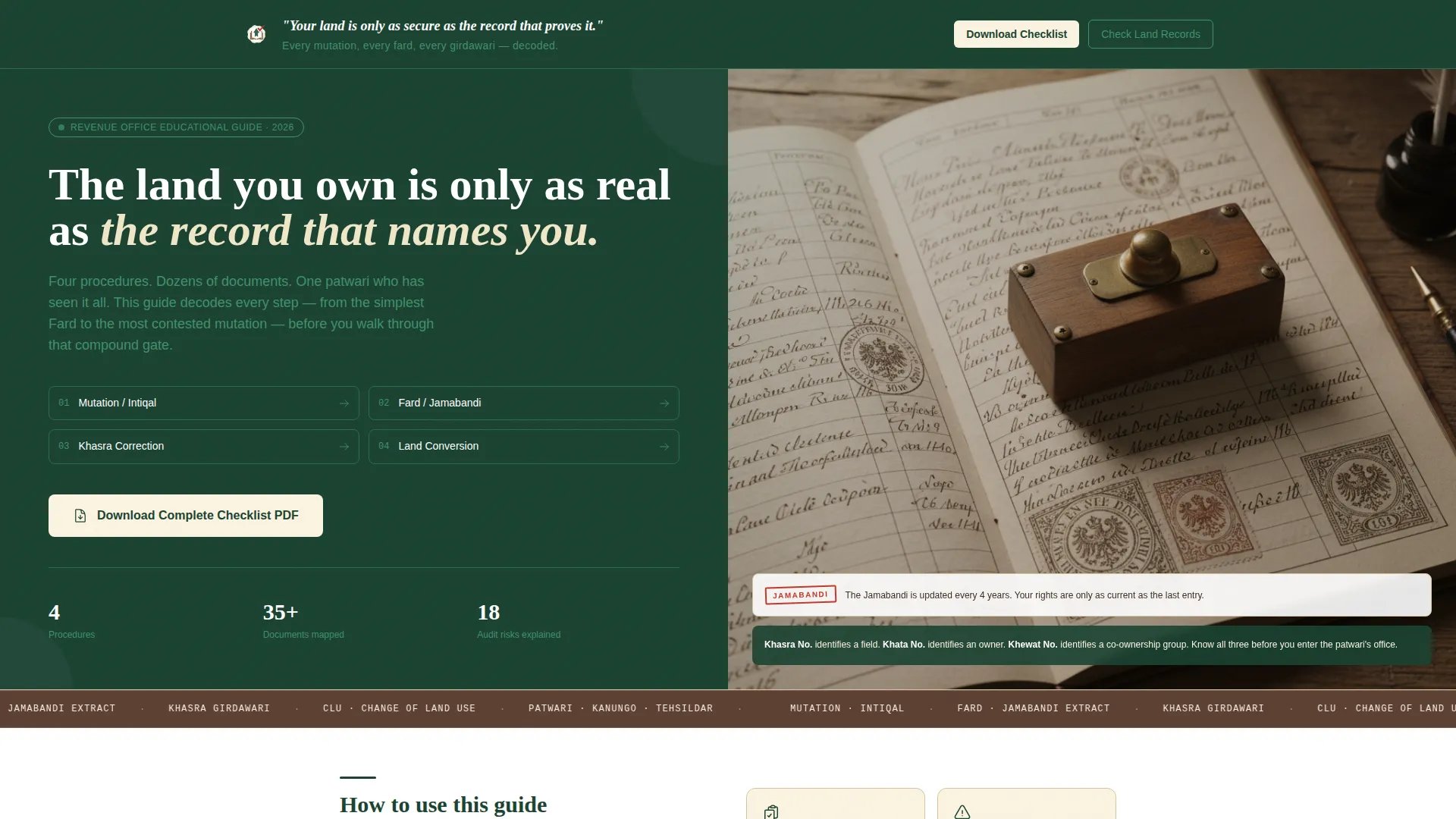
- A hero section with a manifesto quote on the left and an archival jamabandi photograph composition on the right
- Four procedure sections covering mutation, fard, khasra correction, and agricultural land conversion
- A gated PDF download form and a secondary call-to-action linking to state land record portals
Feature list
This template includes a focused set of interactive and structural features drawn directly from the brief.
Split-Screen Hero with Manifesto Quote
The hero opens with a 50/50 split layout. The left panel displays the manifesto quote in white Devanagari-weight text on deep sal green. The right panel holds an overhead archival photograph of an actual jamabandi register, complete with columns of Hindi or Urdu script, thumbprints, and registrar seals.
Interactive Procedure Checklists
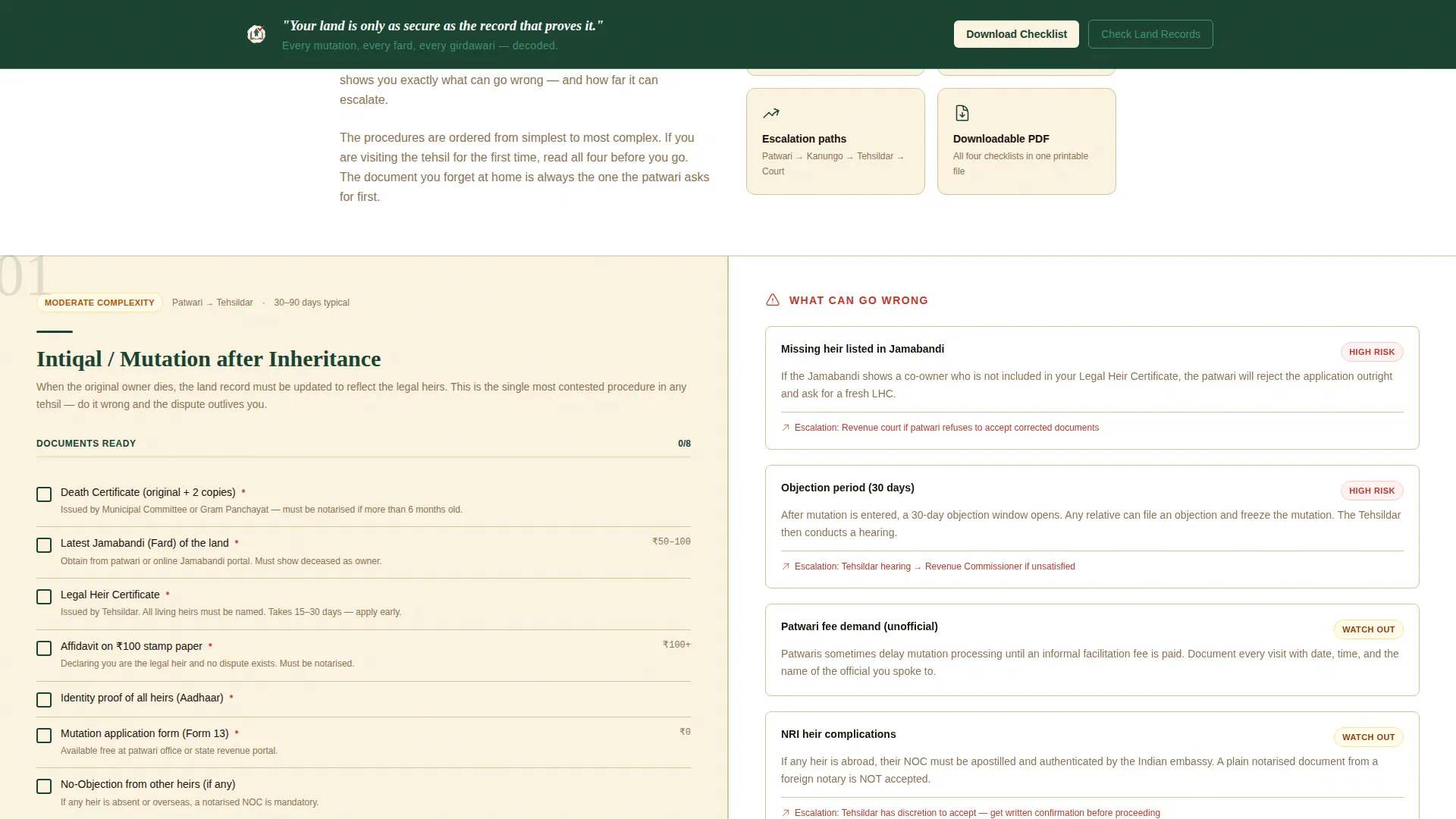
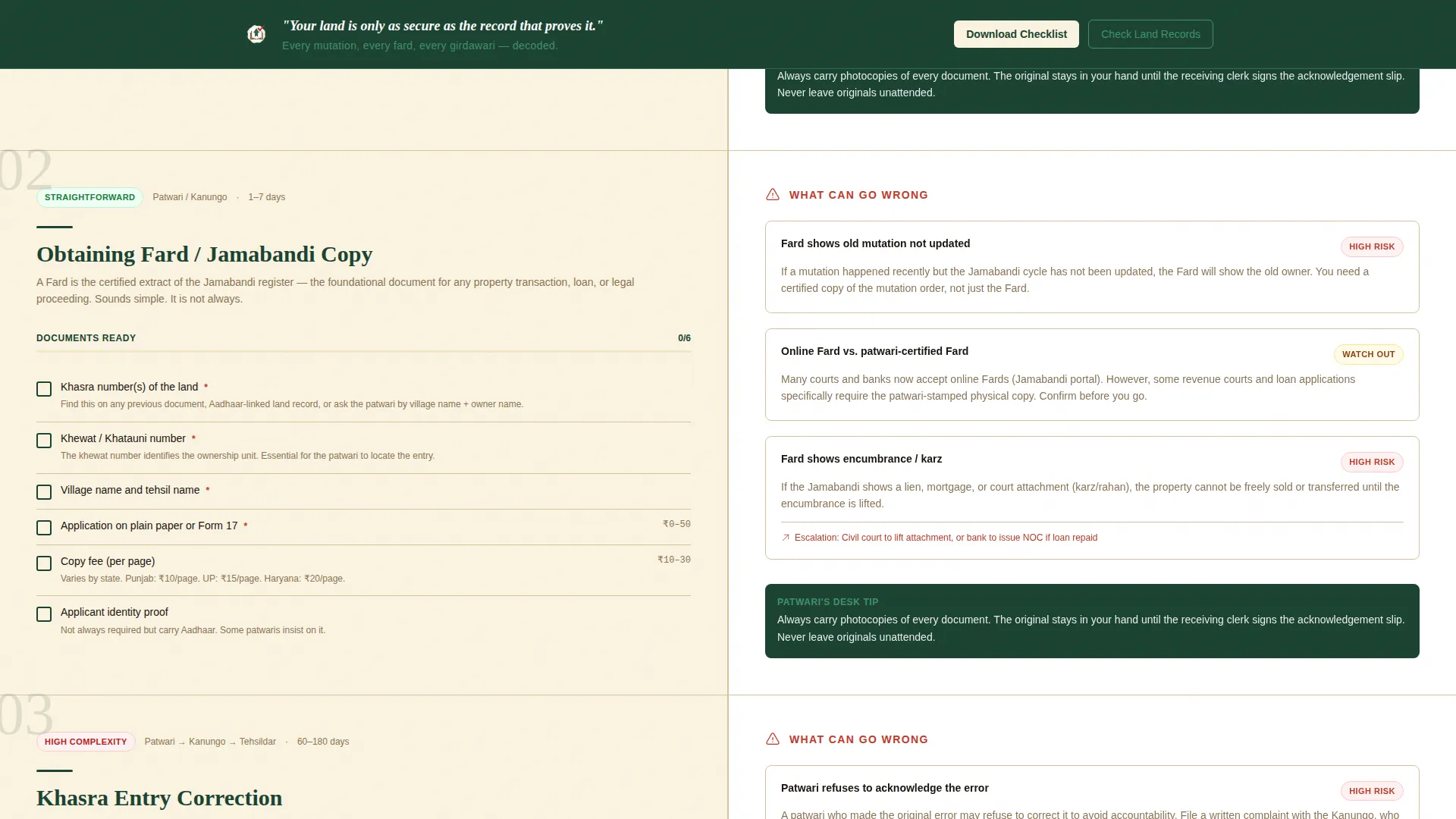
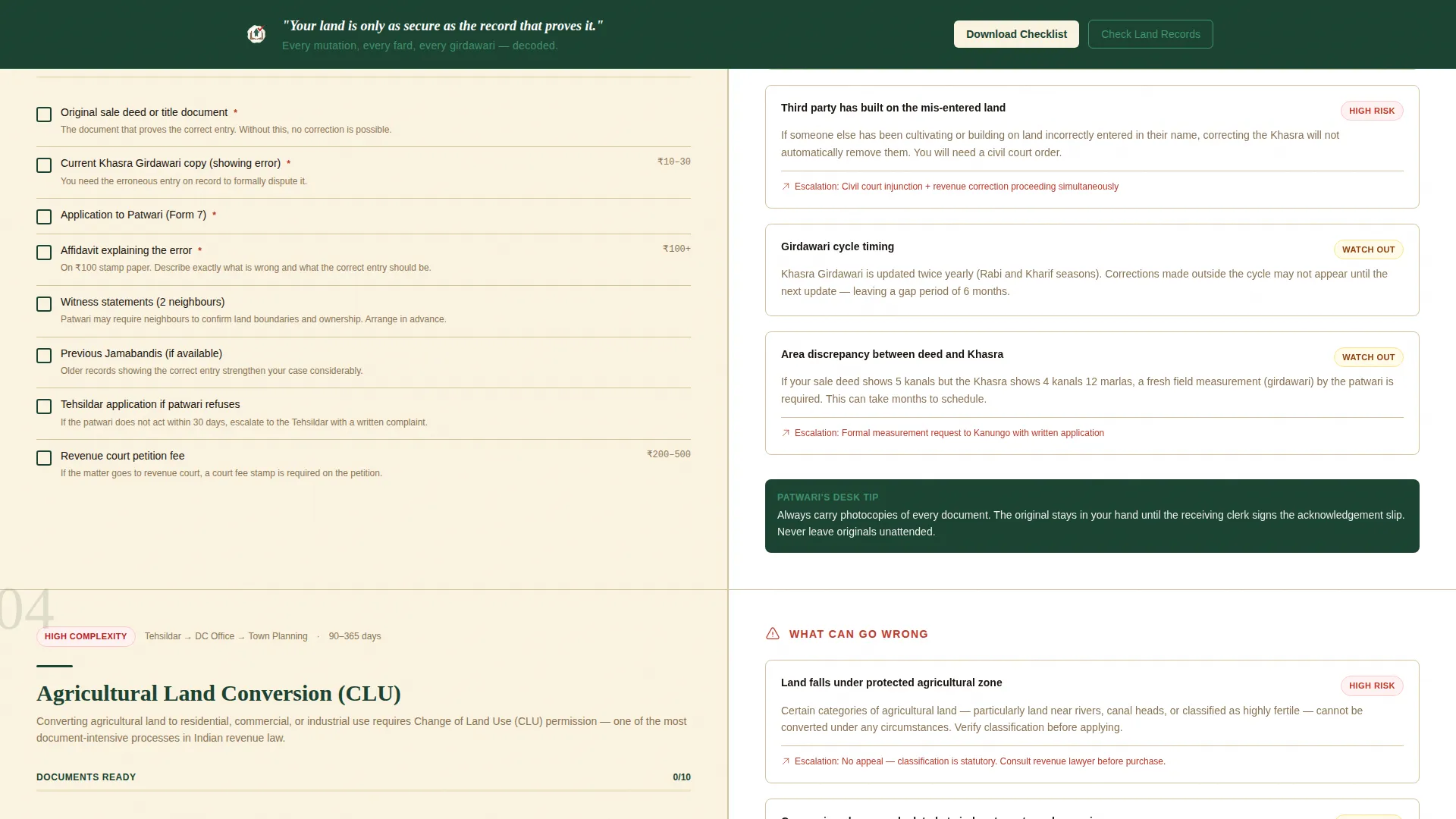
Each of the four procedure sections includes a live checklist of required documents, fees, and office visits. Visitors can toggle checkmarks as they work through each item. This makes the page feel like a tool, not just an article.
Audit Panel with Risk Annotations
Every checklist section has a paired right-side audit panel. It explains what commonly goes wrong at each step, including rejected applications, missing signatures, patwari objections, and escalation to revenue court.
Gated PDF Download Form
The primary call-to-action gates a printable PDF checklist behind a simple form collecting the visitor's name, district, and a purpose dropdown. Purpose options include property purchase, inheritance, correction, conversion, and other.
Secondary Portal Link with Reading Guide
A second conversion path links to the relevant state Bhulekh or Jamabandi portal. A brief inline explainer helps visitors understand how to read the result once they land there.
Scroll-Triggered Reveal Animations
Checklist items and audit panel entries animate into view as the visitor scrolls. Staggered entry timing keeps the page feeling responsive without overwhelming the content.
Page sections overview
| Section | Purpose |
|---|---|
| Hero Split Screen | Opens with manifesto quote left, jamabandi register photograph right |
| Mutation Procedure | Checklist and audit panel for inheritance mutation steps |
| Fard Procedure | Checklist and audit panel for obtaining a fard document |
| Khasra Correction | Checklist and audit panel for correcting a khasra entry |
| Land Conversion | Checklist and audit panel for agricultural land conversion |
| PDF Download Gate | Form collecting name, district, and purpose for checklist PDF |
| Portal Link Section | Secondary call-to-action with Bhulekh portal link and reading guide |
| Footer | Horizontal footer layout with supporting navigation |
Design & branding system
The visual identity uses a Forest Trust color system that references the physical materials found inside a mofussil land record room. Typography pairs DM Sans for body text with Fraunces serif headings, giving the page archival weight without feeling dated.
- Deep sal green (#1B4332) as the primary background and panel color, evoking neem shade outside a tehsil compound
- Weathered register brown (#5C4033) for secondary elements, referencing cloth-bound registers stacked ceiling-high
- Revenue stamp off-white (#FAF3E0) as the page background, echoing aging khasra pages
- Demarcation pillar red (#C0392B) reserved for alerts, required-action highlights, and urgent notices
Mobile & speed optimization
The template is designed desktop-first because the checklist interaction and document-heavy layout work best on wider screens. A mobile fallback ensures the content remains usable on smaller devices.
- Static-first architecture uses server components for layout and limits client components to checklist toggles and the download form
- Scroll-triggered animations are set to medium intensity to keep the experience smooth without overloading the interaction budget
How this template helps you convert
The page builds trust through demonstrated depth before it asks for anything. By the time a visitor reaches the download form, they have already used three interactive checklists and recognized that the PDF compiles everything they have been screenshotting.
- Progressive checklist engagement creates a felt sense of preparation that makes the PDF download feel genuinely useful rather than promotional
- The audit panels surface risks visitors did not know existed, making them more likely to want the complete compiled resource before their next tehsil visit
Other information about this template
This template sits at the intersection of Indian government services and educational resource design. It is suited to publishers, legal-aid groups, and civic-tech projects that serve Hindi-speaking and Urdu-reading audiences across rural and semi-urban districts.
- Terminology throughout the page uses localized Hindi and Urdu revenue vocabulary including jamabandi, fard, khasra, girdawari, patwari, and tehsildar
- Fee references and district name inputs in the form are formatted for Indian administrative contexts
- The footer follows a horizontal Vercel-style layout pattern for clean navigation at page end
- The Checklist and Audit creative direction makes this template adaptable to any multi-step government procedure beyond revenue offices
Theme
Educational Guide
Creative direction
Checklist & Audit
Color system
Forest Trust
Style
Split Screen (50/50)
Direction
Content/Resource
Page Sections
Split-screen Hero with Manifesto Quote
Interactive Procedure Checklists
Audit Panel with Risk Annotations
Gated PDF Checklist Download
Secondary Portal Link with Reading Guide
Scroll-triggered Reveal Animations
Related questions
Who is this landing page template designed for?
What revenue procedures does this template cover?
How does the PDF download gate work?
Can this template be adapted for other government procedures?
Is this template designed for desktop or mobile use?



