Precision Metal Treatment Landing Page Template
Anneal is a dashboard-style landing page template built for industrial heat treatment facilities serving consumer goods manufacturers. It combines a logo bar header, a real-time data ticker, and a progressive case study grid to move prospects from first impression to qualified inquiry. The design uses a Warm Stone palette to feel precise, credible, and technically authoritative.
by Rocket studio
Quick summary
Anneal is a Corporate Precision landing page template for industrial heat treatment facilities. It leads with a logo bar and live furnace data, then walks prospects through a progressive case study grid that escalates from product photography to metallurgical science. Two gated conversion paths capture both quote-ready leads and early-stage researchers.
Who this template is for
This template is designed for heat treatment facilities whose clients sit inside consumer goods supply chains. It speaks the language of engineers, procurement managers, and quality directors who evaluate vendors on process evidence, not sales copy.
- Product engineers at consumer goods manufacturers who specify component hardness and dimensional tolerances
- Procurement managers at contract fabrication shops comparing treatment capabilities across vendors
- Quality directors who need documented process consistency before approving a new supplier
What problem this template solves
Most industrial service pages either look like outdated brochures or read like raw technical specs. Neither format builds the trust a quality director needs before switching vendors. Anneal solves this by turning process credibility into a structured visual narrative.
- Prospects arrive skeptical and leave with evidence: micrographs, hardness charts, and quantified variance data
- The progressive grid answers harder questions with every scroll, moving from social proof to scientific proof
- Two distinct conversion paths prevent early-stage researchers from bouncing before they engage
What you get with this template
You get a fully structured, single-page layout that does the selling through documented precision. Every section is purpose-built to reduce vendor doubt and move the right prospect toward a process review request.
- A logo bar header, real-time data ticker, and headline block that establish authority in the first viewport
- A progressive case study grid with product photos, component callouts, process labels, and quantified outcomes
- A sticky bottom bar with a gated quote form and a secondary PDF download path for earlier-stage prospects
Feature list
This template includes six core design and layout features, all drawn directly from the brief.
Logo Bar Authority Header
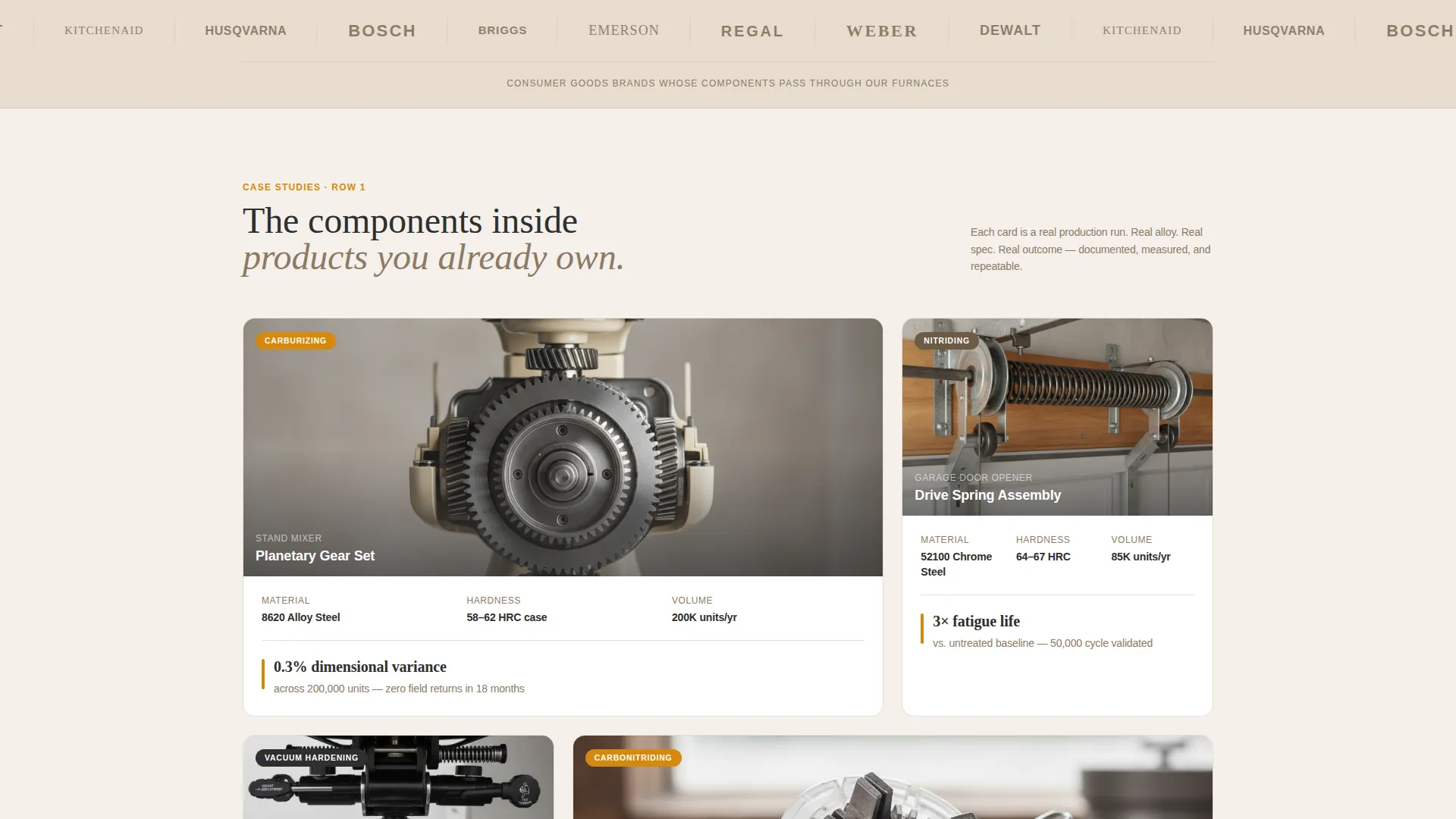
A horizontal ribbon of recognizable consumer brand logos renders in monochrome against the sandstone background. No names, no explanations. The silent weight of familiar marks does the credibility work before a single word is read.
Real-Time Data Ticker
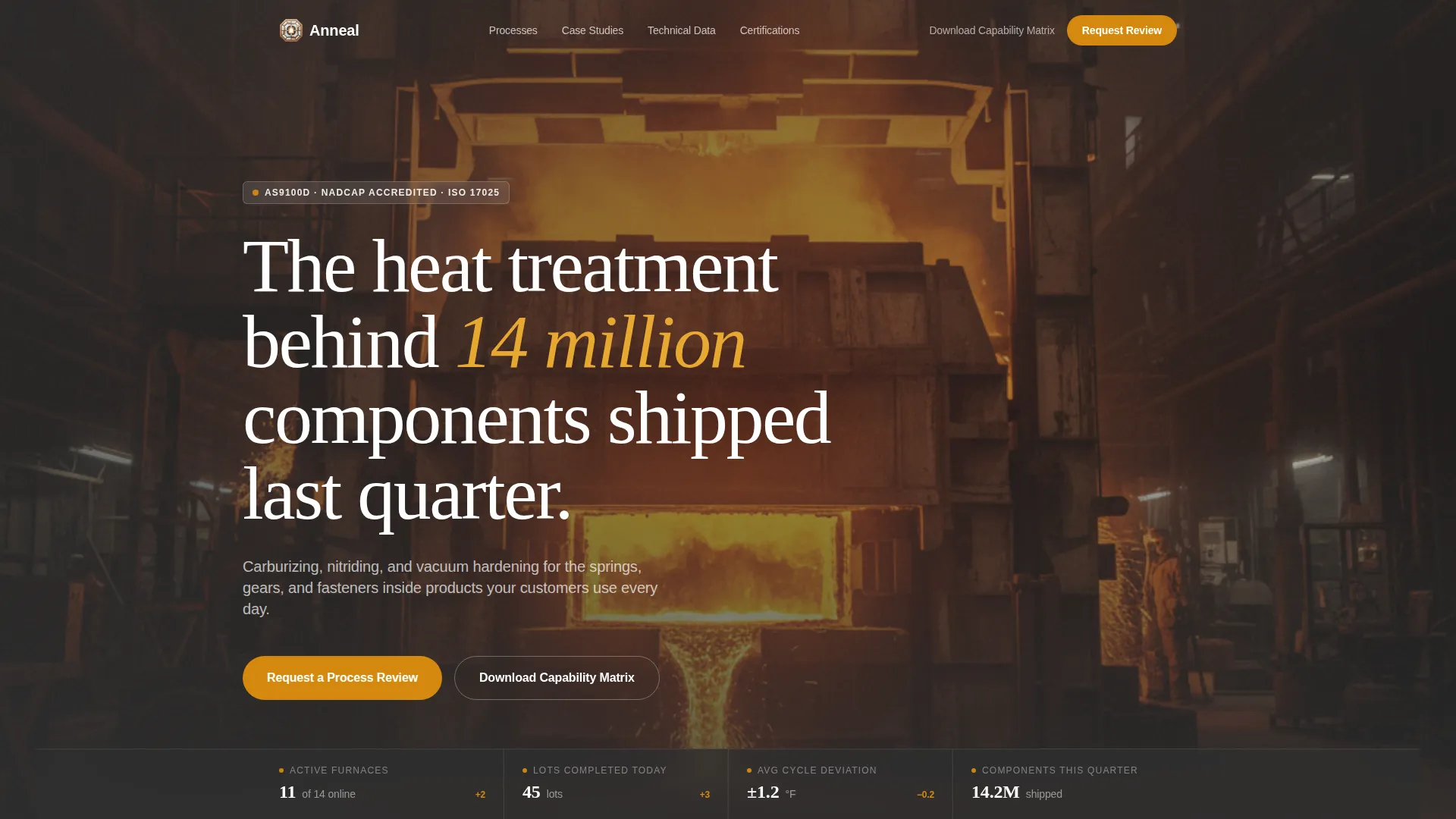
A live data ticker sits beneath the headline and pulses with today's furnace count, lots completed, and average cycle deviation in degrees. It signals operational scale and process control without requiring a single marketing claim.
Progressive Case Study Grid
Each grid tile is a self-contained case study card. Cards display a consumer product photograph, the specific component treated, the metallurgical process used (such as carburizing, nitriding, or vacuum hardening), and one quantified outcome. Rows escalate in technical depth as the visitor scrolls deeper.
Escalating Technical Depth
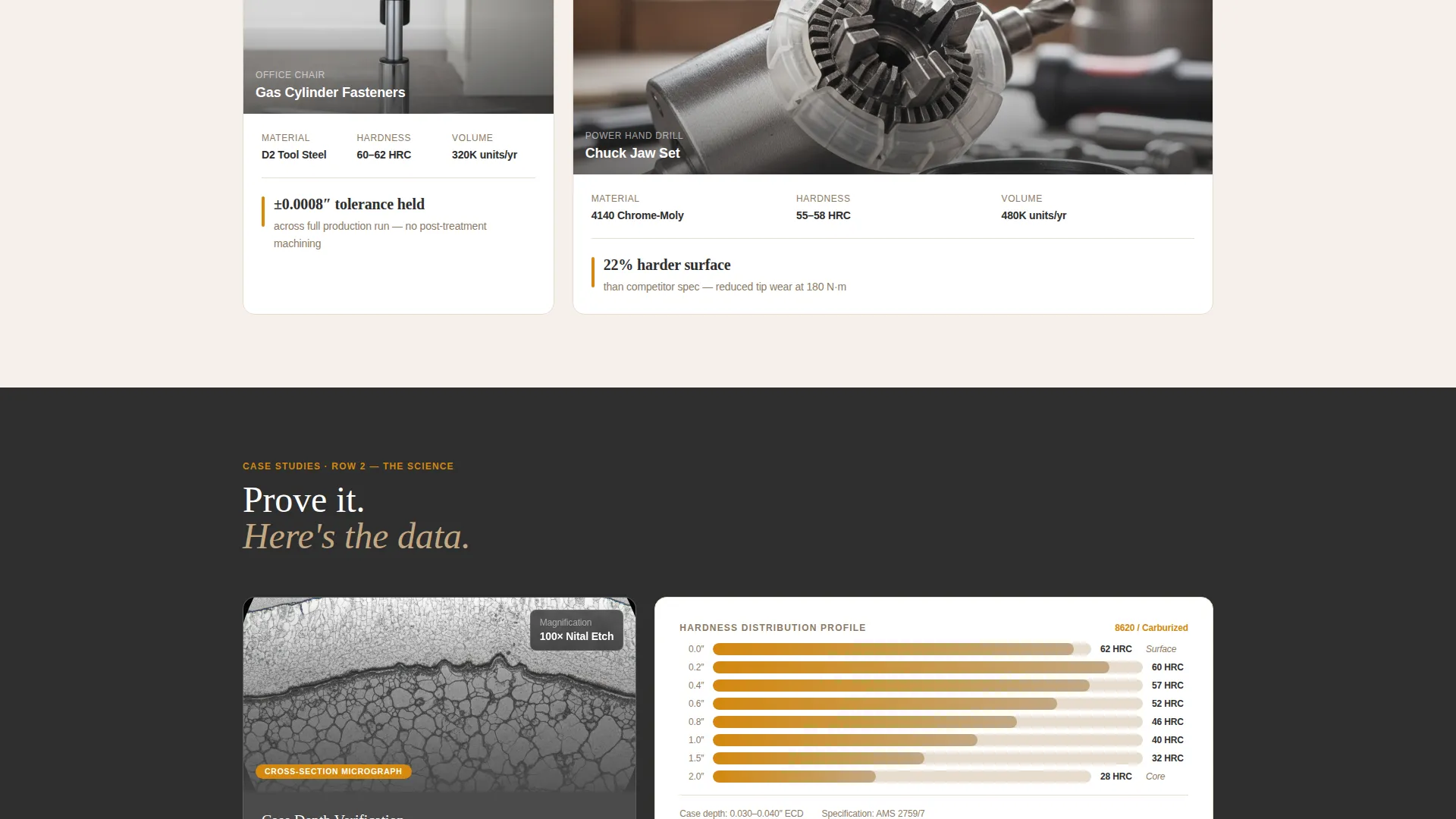
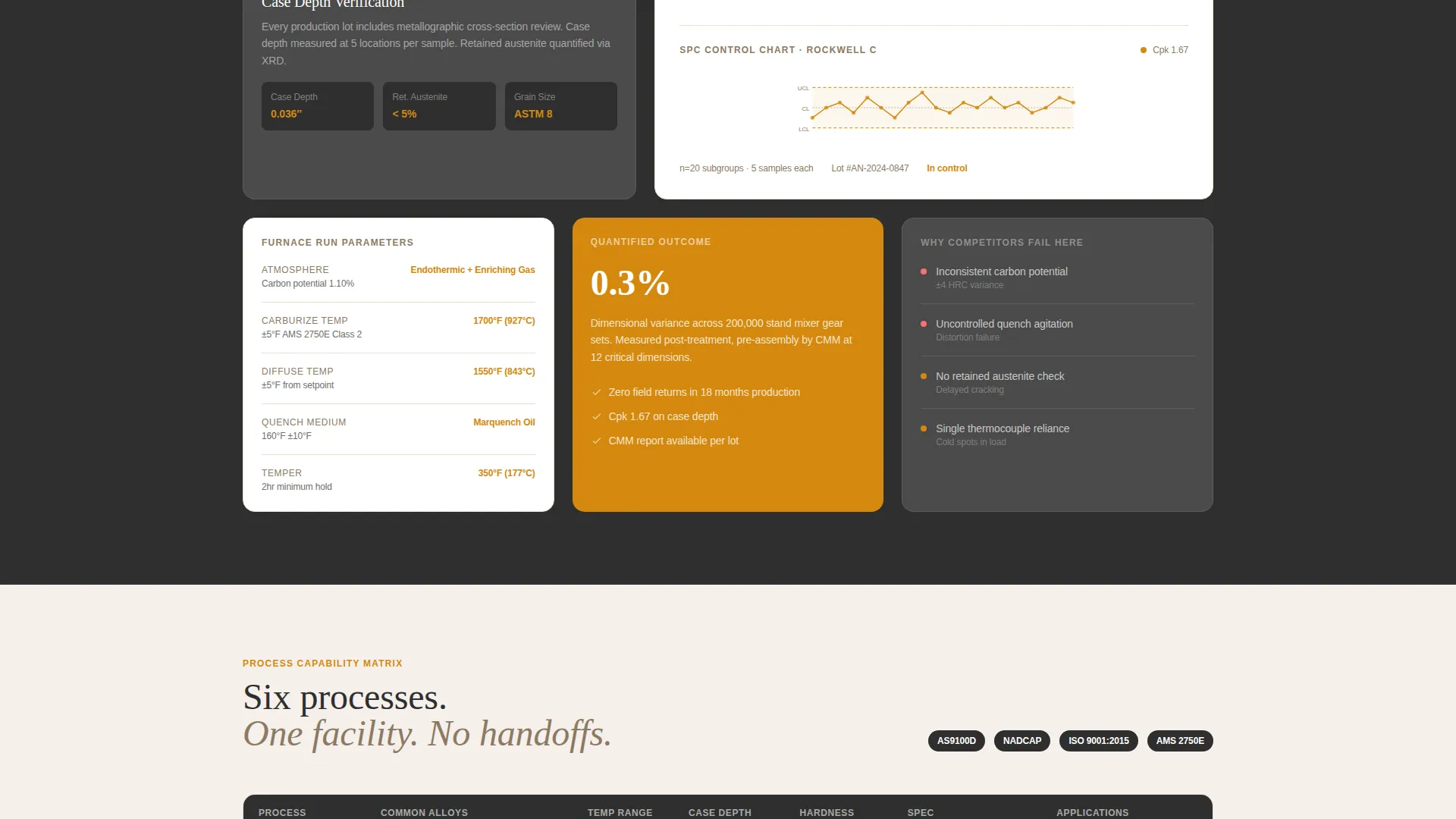
The grid narrative moves deliberately from product beauty shots to cross-section micrographs, hardness distribution charts, and statistical process control data. Each row answers a harder question than the last, building earned credibility at every scroll step.
Sticky Lead Capture Bar
A sticky bottom bar activates after the second grid row. It anchors the primary call to action, "Request a Process Review," and presents a focused form collecting part material, annual volume range, treatment specification or target hardness, and a file upload for drawings or prints.
Dual Conversion Path
A secondary call to action, "Download Our Capability Matrix," gates a PDF behind only an email address and company name. This captures earlier-stage prospects who need to compare vendors before they are ready to request a quote.
Page sections overview
| Section | Purpose |
|---|---|
| Logo Bar | Establish silent brand authority |
| Headline Block | State scale with a single data-backed claim |
| Live Data Ticker | Surface real-time operational metrics |
| Case Study Grid Row 1 | Introduce product-level social proof |
| Case Study Grid Row 2 | Show component-level process specifics |
| Case Study Grid Row 3 | Present cross-section micrographs and hardness data |
| Case Study Grid Row 4 | Display statistical process control evidence |
| Sticky Bottom Bar | Anchor primary lead capture form |
| Capability Matrix Gate | Capture early-stage researchers via PDF download |
Design & branding system
The Warm Stone color system feels like a metallurgical lab report printed on heavy stock. It is warm enough to feel human and structured enough to trust with tight tolerances.
- Kiln-fired sandstone (#C4A882) and refractory white (#F5F0EB) form the base surfaces, with carbon steel charcoal (#2E2E2E) for all primary type
- Molten accent amber (#D4880F) is reserved strictly for calls to action, live data highlights, and hover states, keeping it high-contrast and purposeful
- The Corporate Precision theme pairs the palette with a grid-forward layout that reads like a dashboard, not a brochure
Mobile & speed optimization
The dashboard grid layout is structured to reflow cleanly from wide desktop views to narrower mobile screens. Case study cards stack vertically without losing their internal hierarchy.
- The sticky bottom bar repositions gracefully on smaller screens so the primary call to action remains visible without blocking content
- The logo bar and data ticker collapse into compact formats that preserve legibility at any viewport width
How this template helps you convert
Anneal is structured to move three distinct prospect types toward action without a single generic pitch.
- The case study grid builds progressive trust, so a quality director who arrives skeptical scrolls deeper instead of bouncing, then hits the sticky bar already persuaded by the data they have just seen.
- The dual conversion path means a procurement manager doing early vendor research captures the capability matrix PDF without committing to a quote conversation, keeping them inside your pipeline.
Other information about this template
Anneal is built for facilities where the selling is done by process evidence, not personality. A few additional details worth knowing before you adopt this template.
- The template style is Dashboard and Data Grid, making it well suited for any industrial service that can express outcomes in numbers
- The Case Study Narrative creative direction means the layout rewards facilities that have documented outcomes they can share, the more specific the better
- The Lead Generation direction means every design decision, from the ticker to the sticky bar, is oriented toward a qualified form submission or a captured email
- The Warm Stone palette and Corporate Precision theme can be adapted to adjacent industrial niches without rebuilding the layout from scratch
Theme
Corporate Precision
Creative direction
Case Study Narrative
Color system
Warm Stone
Style
Dashboard/Data Grid
Direction
Lead Generation
Page Sections
Logo Bar Authority Header
Real-time Furnace Data Ticker
Progressive Case Study Grid
Sticky Lead Capture Bar
Dual Conversion Path
Warm Stone Color System
Related questions
What kind of facility is this template designed for?
Do I need real case study data to use this template?
What does the primary lead capture form collect?
Can early-stage prospects engage without requesting a quote?
When does the sticky bottom bar appear?



