Pre-Retiree Auto Insurance Landing Page Template
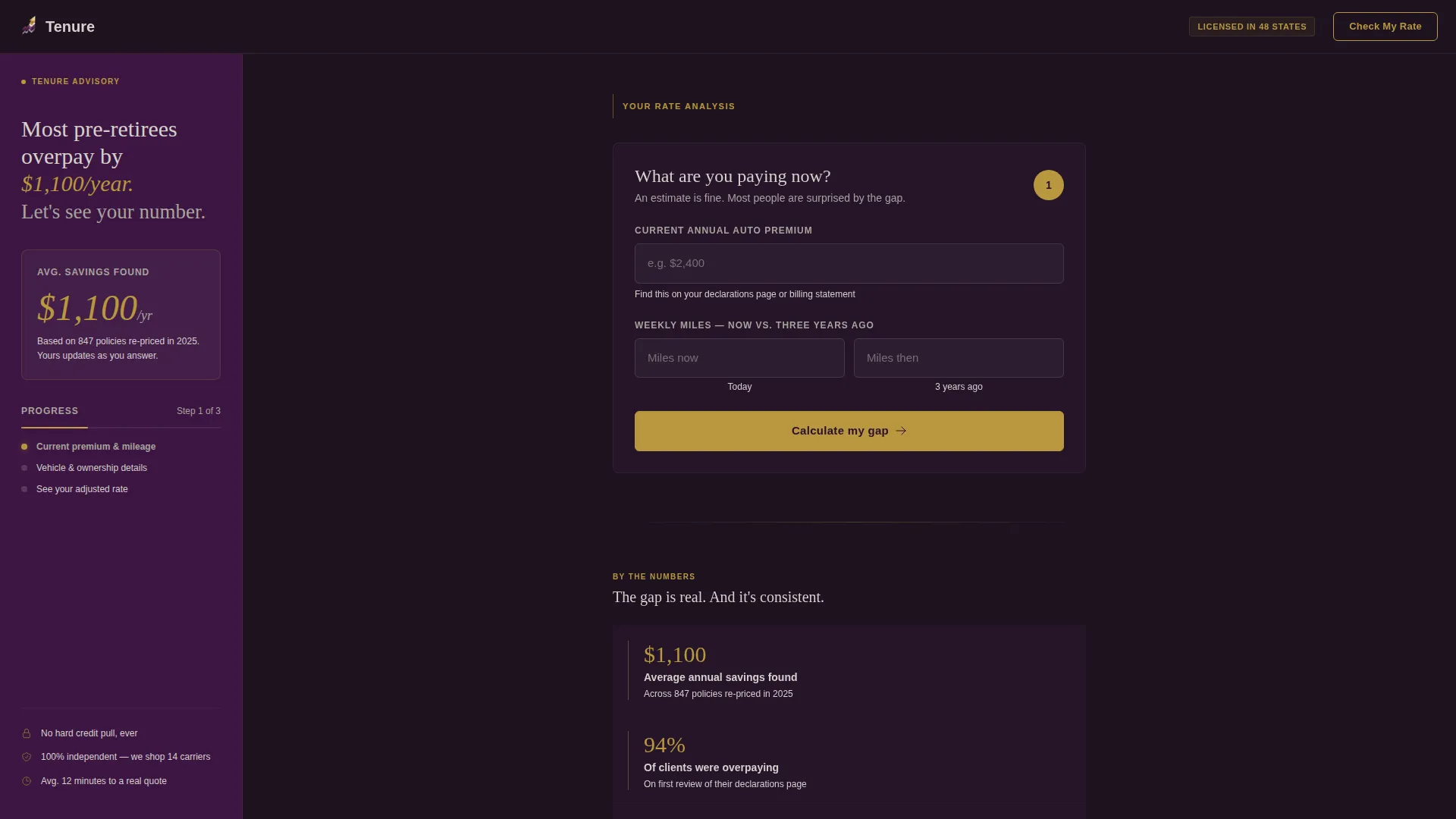
Tenure is a sidebar companion landing page built for pre-retiree auto insurance brokerages. It leads with a multi-step form that exposes the gap between what drivers aged 55 to 65 currently pay and what their changed driving profile warrants. The design uses a dark Executive Suite palette to match the audience's expectations of a serious financial conversation.
by Rocket studio
Quick summary
Tenure is a single-page, sidebar-layout template designed for pre-retiree auto insurance brokerages. It opens with a two-question form, builds trust through advisor-voiced FAQ cards, and closes with a clear call to action. The goal is simple: show the premium gap first, then earn the click.
Who this template is for
This template is built for brokerages and advisors who specialize in repricing auto policies for drivers in the 55-to-65 age window. It works especially well when the audience has changed how they drive but has not yet seen their premium reflect that change.
- Pre-retiree auto insurance brokerages serving the 55-to-65 age corridor
- Independent advisors or agencies targeting recently empty-nested couples and early-exit professionals
- Financial-adjacent referrers such as fee-only planners and human resources benefit advisors who route clients toward a quoting partner
What problem this template solves
Carriers often continue charging commute-era premiums long after a driver's habits change. A senior director who stopped commuting, a couple who consolidated to one driveway, or a professional who took an early exit may be overpaying by a significant margin without knowing it.
- Visitors arrive without clarity on whether their current premium still fits their driving profile
- Most comparison tools ask too many questions upfront, creating drop-off before the value is shown
- The page must earn trust quickly with an audience that is financially sophisticated and skeptical of generic insurance pitches
What you get with this template
You get a fully structured, single-page sidebar layout ready to be customized for a pre-retiree auto insurance audience. Every section is designed to move a qualified visitor from curiosity to a completed quote request.
- A multi-step form in the main column with a live gold progress bar and a sidebar savings estimate that updates as the visitor engages
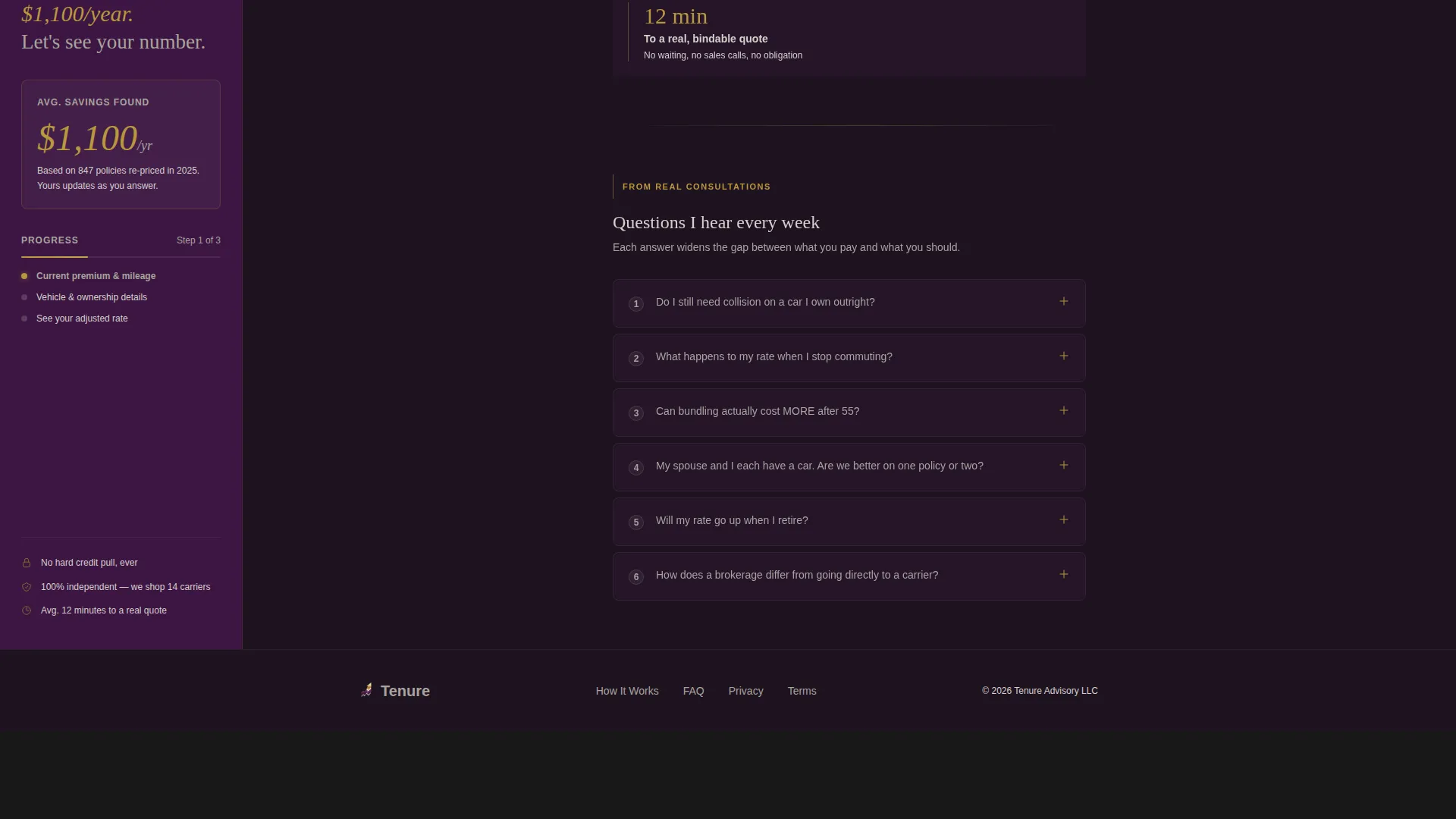
- A curated FAQ accordion stack written in first-person advisor voice, with contextual prompts returning the visitor to the next form step every third card
- A credibility bar featuring three concrete statistics, a final form continuation section, and a footer built on a linear pattern
Feature list
This section covers the core functional and design components built into the Tenure template.
Multi-Step Form with Progress Bar
The hero of the page is the form itself. Step 1 asks two focused questions about current annual premium and mileage change. A thin gold progress bar shows three steps with one filled on load. Steps 2 and 3 collect vehicle age, ownership status, and estimated annual mileage before presenting the primary call to action.
FAQ Accordion with Contextual Prompts
The FAQ stack uses accordion-style cards that expand on click to reveal two-paragraph answers written in first-person advisor voice. Every third answer ends with a prompt that guides the visitor back to the next step of the form, keeping the reading experience connected to the conversion path.
Live Sidebar Savings Estimate
The sidebar holds a quiet headline and a running savings estimate. As the visitor engages with FAQ cards, the sidebar counter updates to accumulate an argument for acting. This turns passive reading into an active, personalized case for completing the quote.
Credibility Bar with Concrete Statistics
A dedicated credibility section presents three grounded statistics: an average savings figure of $1,100 per year, a finding that 94 percent of visitors discover overpayment, and an average requote time of 12 minutes. These figures are displayed as visual anchors rather than marketing claims.
Dual Call-to-Action Architecture
The primary path is the "See My Adjusted Rate" button appearing at Step 3 of the form. A secondary gold text link reading "Skip ahead, get your quote now" lives at the bottom of every expanded FAQ card, serving visitors who arrive already ready to proceed.
Page sections overview
| Section | Purpose |
|---|---|
| Hero Form Area | Launch multi-step form with gold progress bar and sidebar savings headline |
| Sticky Savings Sidebar | Display live savings estimate that updates as visitor scrolls and engages |
| FAQ Accordion Stack | Present advisor-voiced question cards with contextual form re-entry prompts |
| Credibility Statistics Bar | Anchor trust with three concrete aggregate savings and timing statistics |
| Form Continuation Steps | Collect vehicle details and ownership data before the final call to action |
| Footer Linear Pattern | Close the page with a clean, minimal footer in the linear layout pattern |
Design & branding system
The Tenure template uses an Executive Suite visual identity built around a Plum Executive color system. The palette is deliberately dark and warm, designed to feel like a trusted financial consultation rather than a standard insurance comparison tool.
- Deep boardroom plum (#3C1642) anchors the sidebar and section dividers; warm charcoal (#2E2E3A) carries all body text; brushed platinum (#D5D0CC) washes the main content column
- Muted gold (#B8973E) appears only on interactive elements, the progress bar, and call-to-action borders, so the eye always lands where action is expected
- Typography pairs DM Sans for body text and user interface elements with Fraunces for editorial headings and italic accents, creating a contrast between precision and warmth
Mobile & speed optimization
The template is built desktop-first to support the sidebar layout, but it stacks responsively for mobile visitors. The interactive components are isolated so the static shell loads quickly while the form, accordion, and counter load as client-side components only.
- The sidebar savings counter, multi-step form, and FAQ accordion are built as separate client components to keep the static page shell fast
- On mobile, the sidebar stacks below the form column and the FAQ cards remain fully functional with tap-to-expand behavior
- Scroll-fade reveal animations are set to medium intensity, keeping the page feeling polished without slowing the reading experience
How this template helps you convert
The Tenure template is structured around a single conversion insight: show the gap before you ask for anything. Every section is ordered to widen the distance between what a visitor currently pays and what they should pay, so the final click feels like a natural conclusion.
- The form opens on load with just two low-friction questions, making entry easy and establishing the premium gap immediately before the visitor has committed to anything
- The FAQ accordion deepens the argument with advisor-voiced answers to real consultation questions, and every third card connects back to the form, so re-entry stays natural rather than pushy
- The dual call-to-action structure serves both patient and ready visitors, with the primary "See My Adjusted Rate" button at Step 3 and a gold skip link inside every expanded FAQ for visitors who are already convinced
Other information about this template
Tenure is designed for the United States market, with localization set for USD currency and MM/DD/YYYY date formatting. The page carries no stock photography or hero images; the form is the visual anchor, framed by generous whitespace.
- The template is categorized under Finance and Insurance, with a specific focus on the pre-retiree insurance subcategory and the pre-retiree auto insurance niche
- Animation intensity is set to medium, using scroll-fade reveals for section entries and a gold progress bar that advances as the visitor completes form steps
- The sidebar layout and dark Executive Suite aesthetic make this template well suited for audiences who expect the same level of presentation they receive from wealth managers or financial planners


Theme
Executive Suite
Creative direction
FAQ-Driven
Color system
Plum Executive
Style
Sidebar Companion
Direction
Click-Through
Page Sections
Multi-step Form with Gold Progress Bar
FAQ Accordion with Advisor Voice
Live Sidebar Savings Counter
Credibility Statistics Bar
Dual Call-to-action Structure
Executive Suite Visual System
Related questions
What kind of business is this template built for?
Does the template connect to a quoting engine automatically?
Can I edit the FAQ questions and advisor-voice answers?
Is this template usable on mobile devices?
Why does this template skip a hero image?



