Landscape Architect Portfolio Landing Page Template
Terrain is a bold brutalist landing page template built for landscape architects who work at civic scale. An asymmetric 60/40 grid pairs cinematic drone sequences with hand-sketched process drawings. The animated illustration header, Void and Violet color system, and sequential scroll experience create a portfolio that feels as considered as the practice it represents.
by Rocket studio
Quick summary
Terrain is a single-page landscape architect portfolio template built on an asymmetric 60/40 grid. It pairs a line-drawing animated header with a cinematic project scroll, a sliding lead-capture panel, and a secondary PDF download path. The Void and Violet color system runs from abyssal black through electric violet, building visual intensity as the visitor scrolls deeper into the work.
Who this template is for
This template is designed for landscape architecture studios whose work operates at civic and institutional scale. It suits practices that need to demonstrate process and vision simultaneously, not just finished photography.
- Landscape architects pitching municipal planning departments, commercial developers, or university facilities teams
- Portfolio studios whose projects span private courtyards, rooftop campuses, and large-scale riverfront reclamations
- Architecture practices that want a lead-generation landing page with a structured client inquiry form
What problem this template solves
Most portfolio templates flatten complex built-work into a grid of images. Terrain solves the specific challenge of communicating both the visual outcome and the intellectual process behind large-scale landscape projects.
- Prospects often cannot grasp project scope from images alone, so the template pairs drone footage with sketched cross-sections and material callouts
- Civic clients and institutional directors need to feel trust before initiating contact, and the cinematic scroll builds that trust project by project before asking for anything
- Standard contact forms feel generic for site-specific work, so the three-step inquiry panel asks location, site area, and existing conditions instead
What you get with this template
The template delivers a complete single-page structure built around proof and conversion. Every section is designed to earn the next scroll before presenting the call to action.
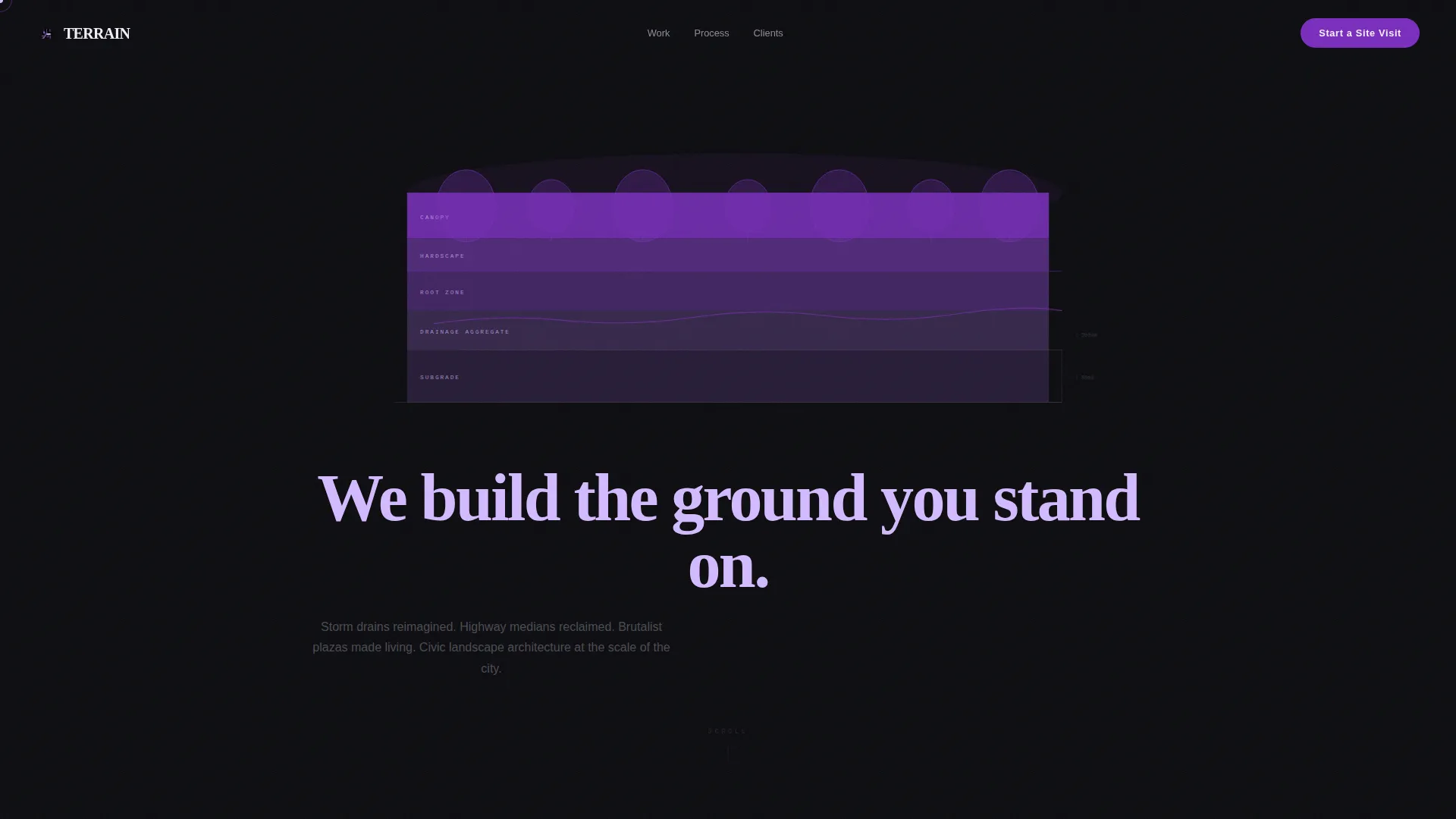
- An animated illustration header that constructs a landscape cross-section line by line, layer by layer, from subgrade to canopy
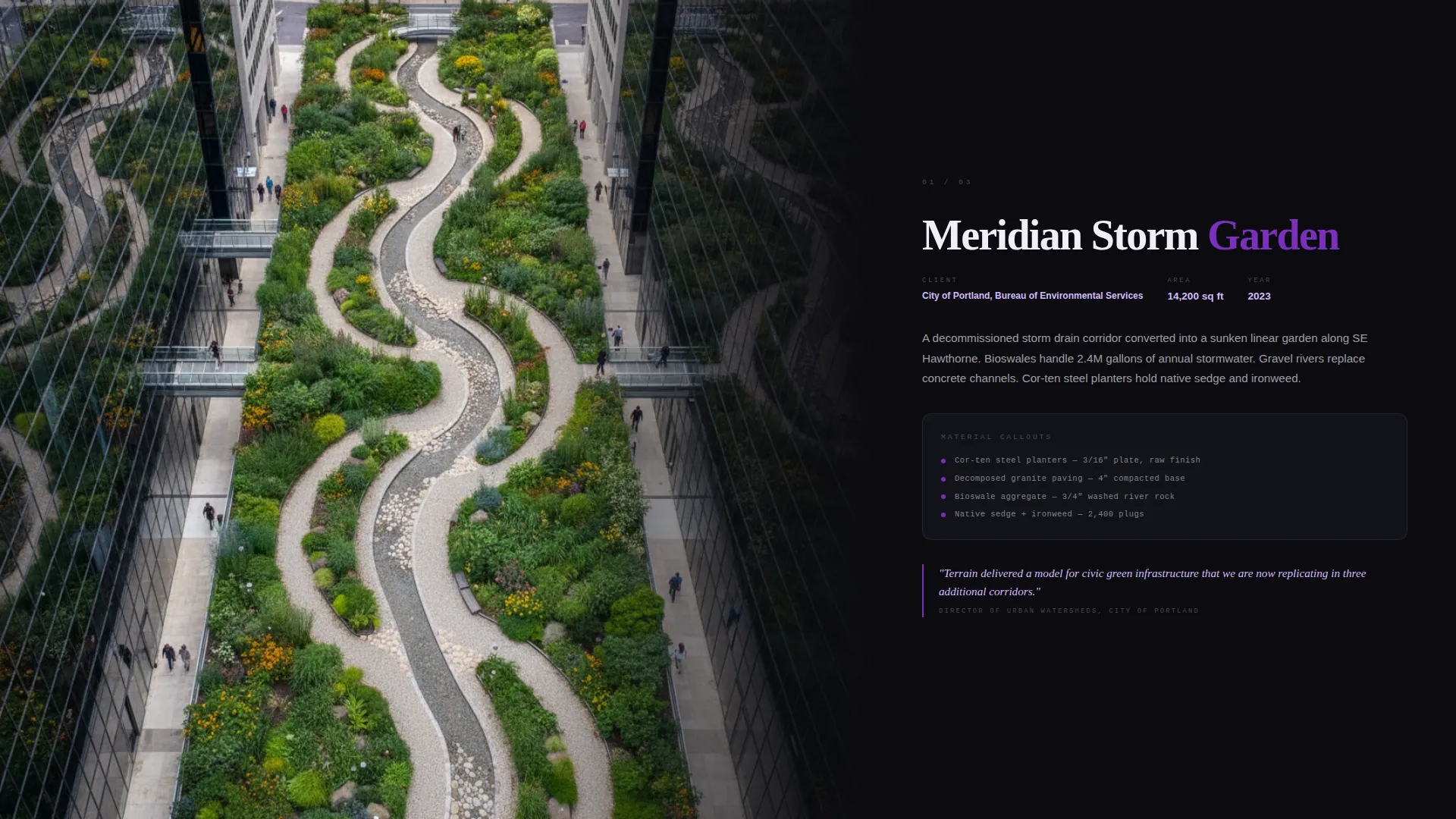
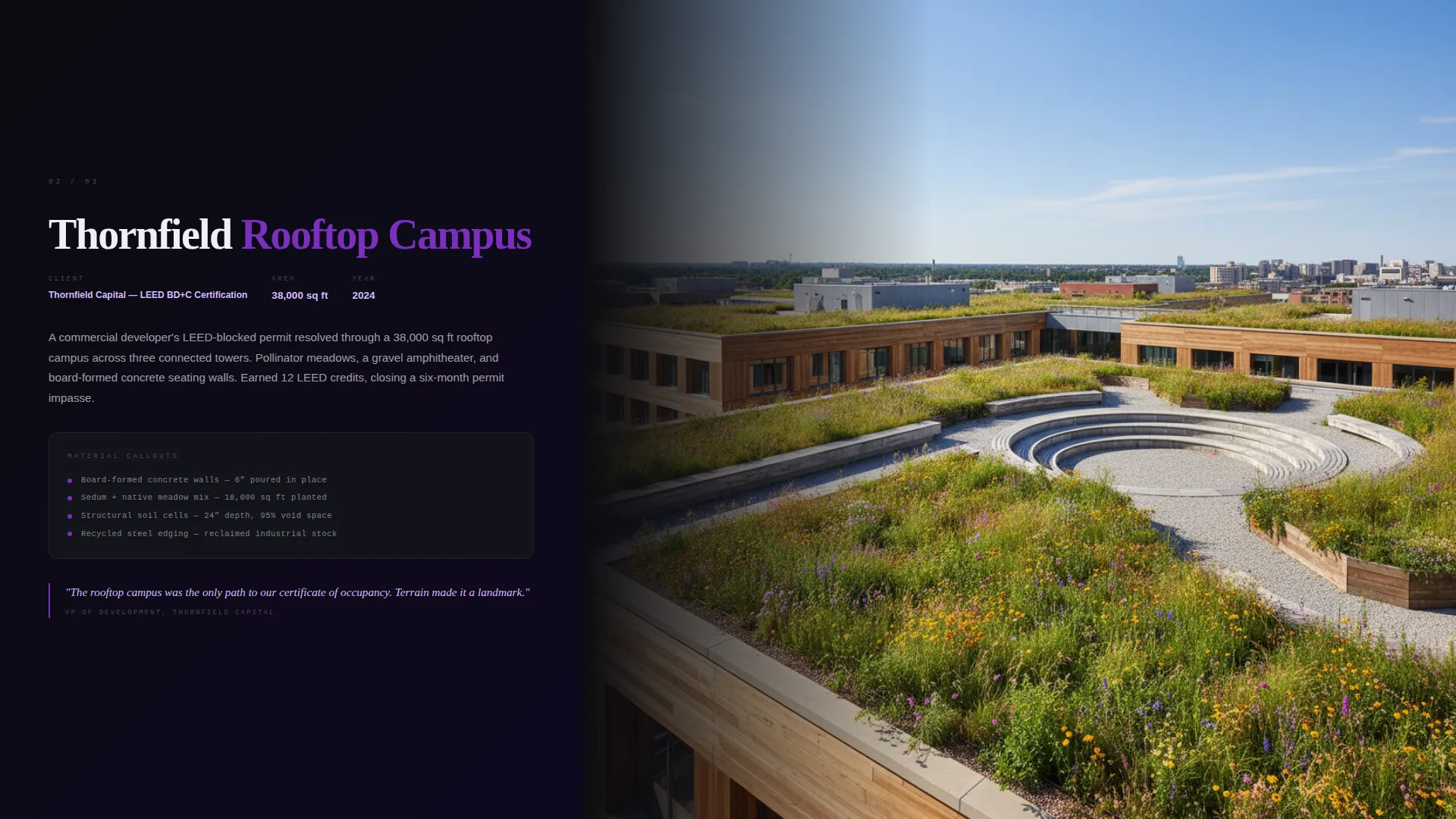
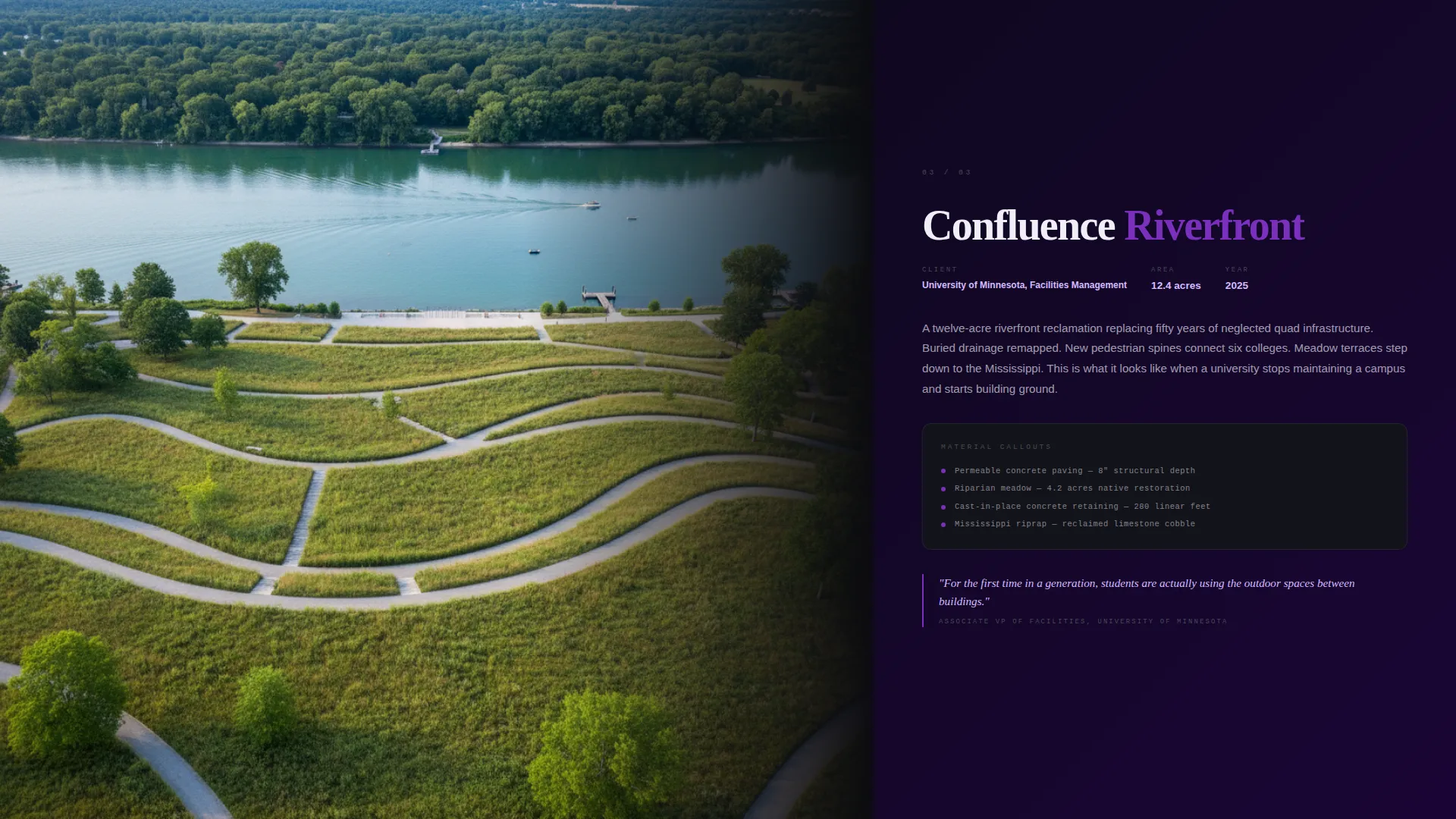
- A full cinematic project sequence where drone footage descends from aerial to eye level while the parallel column carries process drawings and pull-quotes
- A sliding lead-capture panel with three sequential fields, plus a secondary email-capture path for a process deck PDF download
Feature list
This section covers the core capabilities built into the Terrain template.
Animated Cross-Section Header
The header renders a hand-drawn landscape section directly in the viewport. Ink-black strokes build upward through subgrade, drainage aggregate, root zone, hardscape, and canopy layers. Violet fills flood each layer as it completes, and the headline materializes in pale ultraviolet only after the canopy layer finishes.
Asymmetric 60/40 Cinematic Grid
The larger 60-column frame holds full-viewport drone footage that descends from aerial to street level. The narrower 40-column frame runs a parallel track of process sketches, soil cross-sections, monospaced material callouts, and pull-quotes from project approvals. Both columns advance together, creating a documentary-plus-notebook reading experience.
Escalating Violet Accent System
Each project section increases the presence of the electric violet accent. Early projects use thin violet keylines. Mid-sequence sections shift to violet headlines. The final project floods the entire background with violet, giving the scroll a deliberate arc of intensity that mirrors the scale of the work.
Sliding Lead Capture Panel
The primary call to action, "Start a Site Visit," opens a sliding panel with three sequential inputs. Visitors enter a project location with map pin autofill, select a site area using a range slider from 500 to 500,000 or more square feet, and describe the existing site conditions in their own words through a single open text field.
Secondary Process Deck Download
Below the main inquiry form, a secondary conversion path offers a PDF of the studio's phasing methodology. Visitors who are not ready to book a site visit can leave an email address to receive the process deck, keeping them connected to the practice without pressure.
Fixed and Full-Width call to action Placement
The "Start a Site Visit" button appears as a fixed pill in the top-right corner throughout the entire scroll. It reappears as a full-width block after the final project section. This dual placement ensures the call to action is always reachable without interrupting the cinematic experience.
Page sections overview
| Section | Purpose |
|---|---|
| Animated Illustration Header | Opens with a line-drawing that builds a landscape cross-section layer by layer, ending with the primary headline |
| Fixed call to action Pill | Anchors the "Start a Site Visit" action in the top-right corner throughout the full scroll |
| Cinematic Project Sequence | Presents each project across a full viewport in the 60-column frame with drone footage descending to eye level |
| Parallel Process Column | Runs hand-sketched drawings, soil cross-sections, and pull-quotes in the 40-column frame alongside each project |
| Final Project Flood | Closes the project sequence with a full violet background section that marks the visual and emotional peak |
| Full-Width call to action Block | Repeats the primary call to action after the final project as a full-width section |
| Sliding Inquiry Panel | Collects project location, site area, and existing conditions through a three-step sequential form |
| Process Deck Download | Captures an email address in exchange for a PDF overview of the studio's phasing methodology |
Design & branding system
The Void and Violet color system is structured around a strict hierarchy of contrast and interaction. Black dominates every background and section divider. Gray carries body text and secondary containers. Violet owns every interactive surface and section headline. The pale ultraviolet highlight appears only on hover states, cursor trails, and active typography, making interaction feel earned rather than decorative.
- Color tokens: abyssal black (#0B0B0F) for backgrounds, poured-concrete gray (#4A4A52) for body text and secondary containers, electric violet (#7B2FBE) for interactive surfaces and headlines, pale ultraviolet (#D4BBFF) reserved for hover and active states
- Typography follows a Bold Brutalist theme, with monospaced type used for material callouts and technical annotations in the process column
- The overall visual register is comparable to a gallery opening inside a concrete parking structure, where fluorescent violet tubes contrast sharply with board-formed concrete walls
Mobile & speed optimization
The template is designed so the cinematic experience adapts across screen sizes without losing the tension of the sequential scroll. The asymmetric grid collapses gracefully on narrower viewports, keeping the drone footage and process column readable.
- The fixed call to action pill remains accessible on mobile screens so visitors can initiate an inquiry at any point during the scroll
- The sliding inquiry panel and range slider are built for touch interaction, keeping the form usable on phones and tablets
How this template helps you convert
The page earns trust before it asks for anything. The conversion architecture is deliberate: prove mastery first, then offer two paths forward at the moment of highest engagement.
- The cinematic project sequence builds credibility project by project, escalating in scale and visual intensity so that by the final section the visitor already believes in the studio's capability before the inquiry form appears
- The three-step sliding panel lowers friction by replacing a generic contact form with three specific, site-focused questions that feel like the start of a real professional conversation
- The secondary process deck download gives hesitant visitors a concrete next step, capturing their email without requiring full commitment
Other information about this template
Terrain sits within the Portfolio and Agency category and is specifically tailored to the Architecture and Interiors Portfolio subcategory. It is one of the more specialized templates in the landscape architect portfolio niche, designed for practices whose projects carry public significance and need to communicate that weight visually.
- The template is built as a single landing page, not a multi-page site, so all content flows through one continuous scroll experience
- The Bold Brutalist theme and Void and Violet palette are defined design systems baked into the template, not loose style suggestions
- The Cinematic Sequence creative direction and Animated Illustration header concept are structural features, not decorative overlays
- The 60/40 Asymmetric Grid is a foundational layout decision that shapes every section of the page
Theme
Bold Brutalist
Creative direction
Cinematic Sequence
Color system
Void & Violet
Style
Asymmetric Grid (60/40)
Direction
Lead Generation
Page Sections
Animated Cross-section Header
Asymmetric 60/40 Cinematic Grid
Escalating Violet Accent System
Sliding Three-step Inquiry Panel
Secondary Process Deck Download
Dual Fixed and Full-width Call to Action
Related questions
What kind of practice is this template designed for?
How does the lead capture form work?
What is the secondary process deck download for?
Does the template support projects of very different scales?
Is this a single-page template or a multi-page site?



