Terrain - Raw Automotive Landing Page Template
Terrain is a gallery and detail landing page built for Land Rover leasing specialists. It combines an industrial raw visual identity with a spatial scroll structure, guiding farm managers, corporate directors, and weekend overlanders from a full-bleed vehicle gallery through to a three-step booking consultation. Every section is designed to qualify interest and move serious buyers toward commitment.
by Rocket studio
Quick summary
Terrain is a single-page leasing showcase built around a raw industrial aesthetic. It opens with a cinematic full-bleed header, moves through a masonry vehicle gallery with expandable detail panels, and closes with a sticky booking bar. The design speaks directly to buyers who want a premium leasing experience without the corporate stiffness.
Who this template is for
This template is built for Land Rover leasing specialists who serve a mixed but discerning clientele. It works equally well for independent leasing brokers and fleet-focused dealerships who need one page to handle every type of enquiry.
- Farm and estate managers sourcing fleet replacements on a regular cycle
- Corporate directors seeking premium vehicles without long-term depreciation exposure
- Weekend overlanders and private drivers who treat their vehicle as both tool and statement
What problem this template solves
Most automotive leasing pages either feel too clinical or too salesy. They either bury the vehicle details behind a quote form or overwhelm visitors with specification tables before they have formed any emotional connection with the product.
- Visitors leave before booking because the page gives no sense of the brand or the offer
- Lease structure information is often confusing, making buyers hesitant to enquire
- The path from browsing a specific vehicle to booking a consultation is too long or unclear
What you get with this template
You get a complete single-page layout that handles discovery, detail, and booking in one continuous scroll. The structure is deliberate: each section feels like a distinct space, yet the page flows naturally from first impression to confirmed consultation.
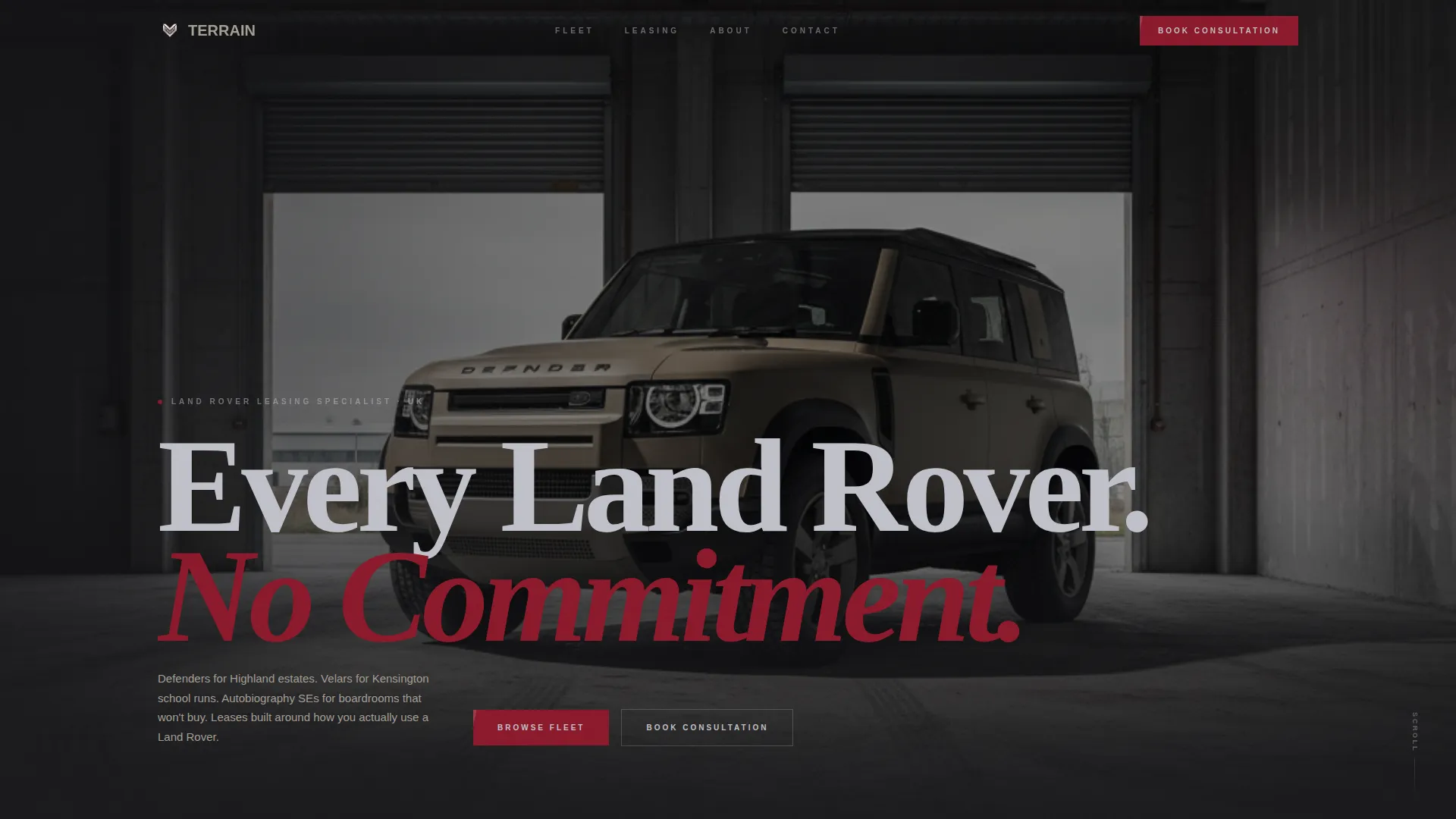
- A full-bleed photo header with a timed animated headline entry
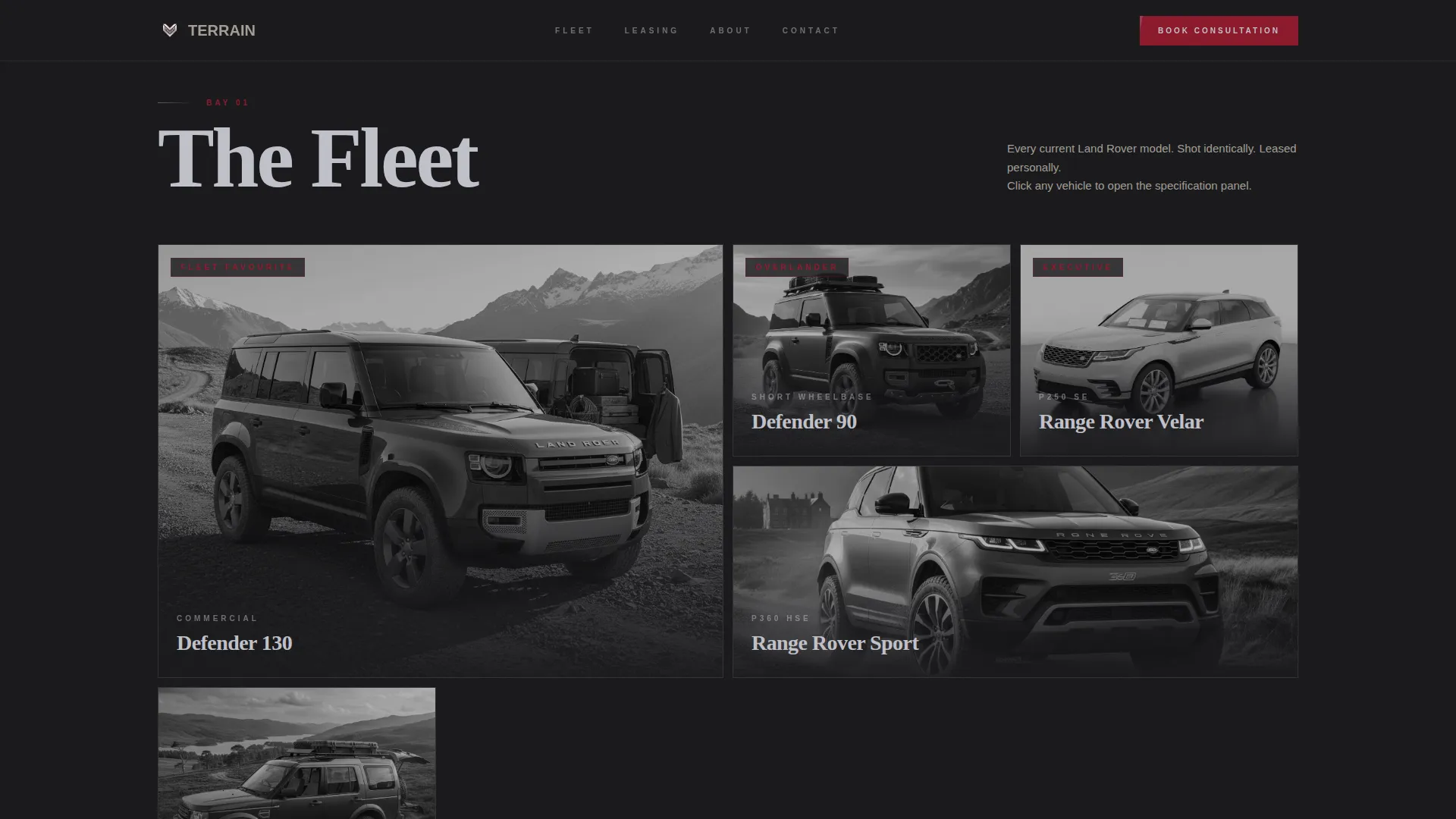
- A masonry fleet gallery with hover-reveal pricing and an in-page expandable detail panel
- A three-step booking form and a secondary quick-quote path on every vehicle panel
Feature list
This template is built around a focused set of purpose-designed components. Each one serves a specific moment in the buyer journey, from first glance to confirmed slot.
Full-Bleed Cinematic Header
A low three-quarter angle vehicle photograph fills the entire viewport against a raw concrete warehouse backdrop. Hard overhead lighting casts defined shadows across the bonnet. A single-line chrome headline slides in from the left on a timed delay, giving the page an immediate sense of arrival without visual clutter.
Masonry Fleet Gallery with Hover States
Vehicles are displayed in a masonry grid, each shot identically against the same concrete backdrop for a clinical, collectible feel. On hover, each card reveals the monthly lease price and mileage allowance. The consistent photography treatment makes comparison effortless.
Expandable In-Page Detail Panel
Clicking any vehicle card does not navigate away from the page. Instead, a detail panel slides open architecturally, presenting interior photography, specification sheets, and available trims. The layout is arranged like an exploded technical drawing, giving buyers full detail without losing their place.
Leasing Structure Explainer Section
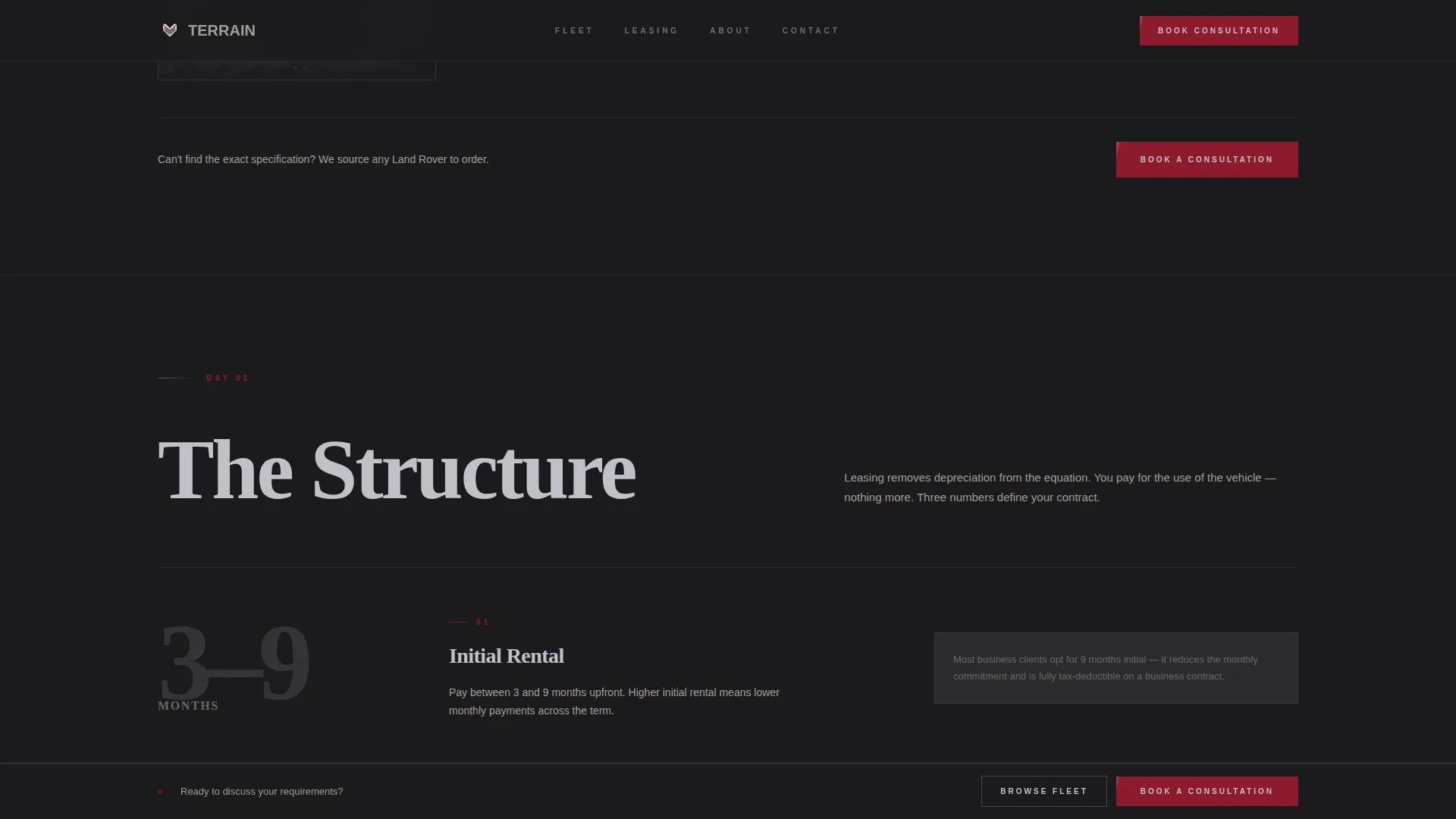
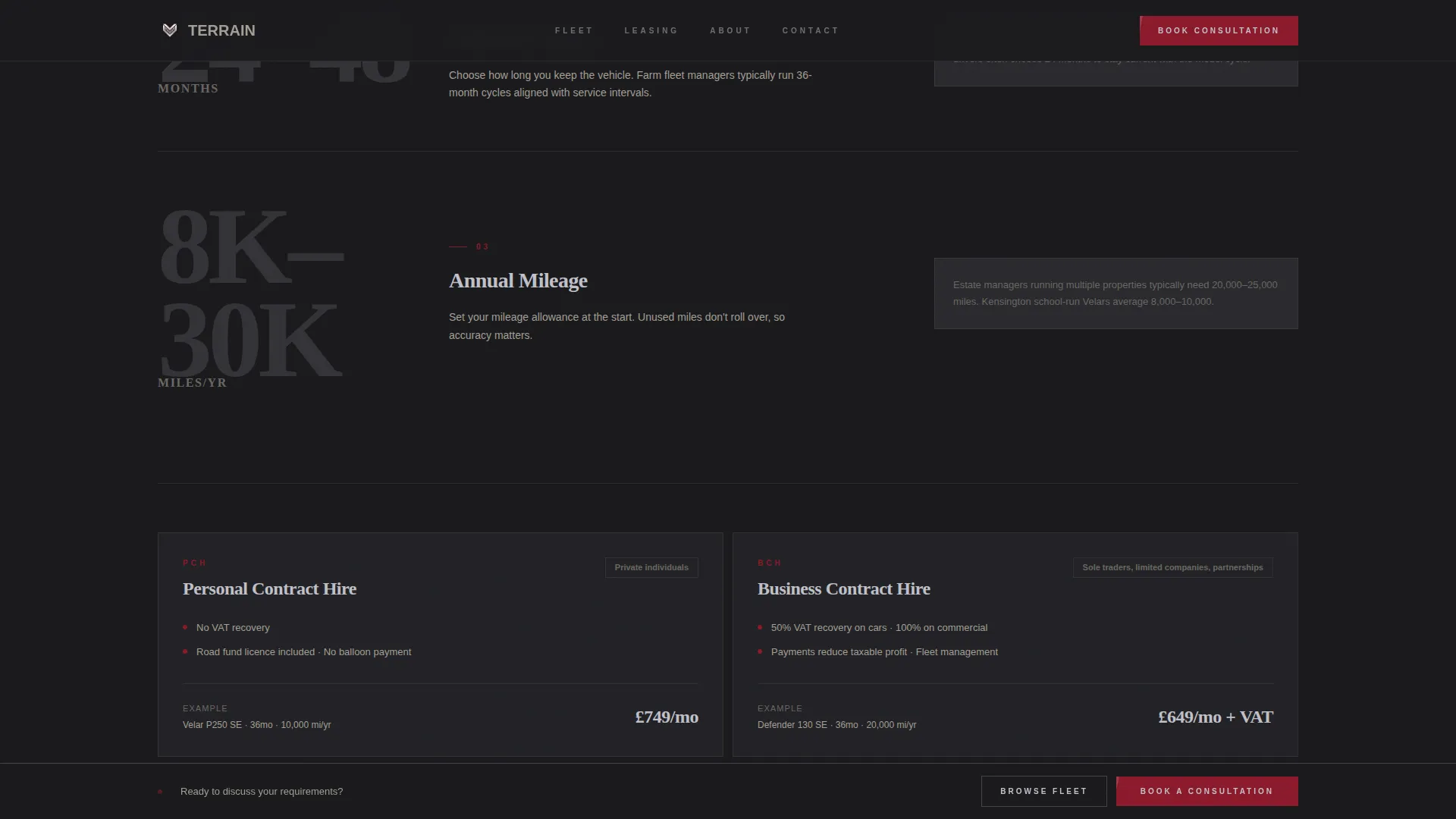
Large typographic numbers and minimal diagrams communicate the three key lease variables: initial rental, contract length, and annual mileage. The section reads with engineering clarity, removing the confusion that often stops buyers from enquiring.
Three-Step Booking Form with Calendar Widget
The primary call to action is a sticky footer bar that appears after the first gallery scroll. Tapping it opens a three-step form: vehicle interest with a pre-populated dropdown, lease type selection between personal and business, and a calendar widget showing available thirty-minute slots with a phone-or-video toggle.
Quick Quote Secondary Path
Every vehicle detail panel includes a secondary "Get a Quick Quote" option. It requires only a name, an email address, and a preferred monthly budget. This path qualifies browsers who are not ready to book a full consultation but are still actively considering a vehicle.
Page sections overview
| Section | Purpose |
|---|---|
| Full-Bleed Header | Establish brand atmosphere and introduce headline |
| Fleet Gallery Bay | Browse available vehicles with hover-reveal pricing |
| Vehicle Detail Panel | Expand individual vehicle specs and trim options |
| Leasing Structure Bay | Explain rental, term, and mileage with clarity |
| Cinematic Testimonial Bay | Build trust through client voices and a wide landscape image |
| Sticky Booking Bar | Anchor the primary consultation call to action |
| Three-Step Booking Form | Capture vehicle interest, lease type, and preferred slot |
Design & branding system
The visual identity follows an Industrial Raw theme built around four carefully chosen tones. Every colour has a specific role, and that discipline keeps the page feeling focused rather than decorative.
- Workshop black (#1A1A1D) bleeds edge to edge behind every vehicle image, giving photographs maximum depth
- Polished chrome silver (#C0C0C8) carries all headlines and divider rules, reading like brushed metal in bare filament light
- Heritage ruby (#8B1A2B) is reserved exclusively for calls to action and hover states, making every interactive moment immediately visible
- Poured-concrete warm gray (#A39E93) grounds all body text, maintaining readability without competing with the photography
Mobile & speed optimization
The layout is built with a mobile-first scroll rhythm in mind. The alternating pattern of dense gallery sections and wide cinematic breathing spaces works at any screen width, keeping the page feeling intentional rather than compressed.
- The masonry gallery reflows cleanly for smaller viewports, maintaining card proportions and hover states
- The sticky booking bar stays anchored at the bottom of the screen on mobile, keeping the primary call to action always within reach
- The three-step booking form is structured to feel manageable on a phone, with one decision per step rather than a long single-screen form
How this template helps you convert
The page is structured to reduce friction at every decision point. Rather than asking visitors to commit immediately, it builds confidence through information before presenting the booking option.
- The expandable detail panel keeps buyers on the page when their interest peaks, delivering specification depth without navigating away and losing momentum
- The sticky "Book a Consultation" bar appears only after the first gallery scroll, timing the prompt to a moment when genuine interest has already formed
- The quick-quote path on every vehicle panel gives hesitant visitors a low-commitment way to raise their hand, capturing leads who would otherwise leave without any contact
Other information about this template
This template is designed specifically for the Land Rover leasing niche, where buyers expect a high-standard visual presentation before they make any enquiry. The spatial and architectural creative direction reflects the premium positioning that this market demands.
- The template style is Gallery plus Detail, making it suitable for specialists who carry multiple models such as Defender, Discovery, Range Rover, and Velar variants
- The Industrial Raw theme and Ruby and Chrome colour system are matched to the intersection of premium automotive and practical working-vehicle identity
- The Booking and Scheduling landing-page direction means every design decision ultimately points toward a confirmed consultation slot or a qualified quote request
Theme
Industrial Raw
Creative direction
Spatial & Architectural
Color system
Ruby & Chrome
Style
Gallery + Detail
Direction
Booking/Scheduling
Page Sections
Full-bleed Cinematic Header
Masonry Fleet Gallery with Hover Reveal
Expandable In-page Detail Panel
Leasing Structure Explainer
Three-step Booking Form with Calendar
Quick Quote Secondary Path
Related questions
Can I pre-populate the booking form when a visitor clicks a specific vehicle?
Does the detail panel open on the same page or navigate to a new URL?
What is the difference between the booking form and the quick-quote path?
When does the sticky booking bar appear?
How many vehicles can the fleet gallery display?



