Expert Court Reporter Landing Page Template
Depose is a certified court reporter scheduling landing page template built for court reporting firms covering multiple jurisdictions. It combines a stats-driven hero, reporter comparison tables organized by courthouse and location, and a three-step booking form so attorneys, paralegals, and litigation teams can find their reporter and schedule a deposition in minutes.
by Rocket studio
Quick summary
Depose gives court reporting firms a polished, conversion-focused landing page that turns a service area into a searchable roster. Visitors see live coverage metrics, browse reporters by courthouse or county, confirm available services, and click to schedule. The page is built for litigation professionals who need answers fast and cannot afford to chase a court reporter by phone.
Who this template is for
This template is built for court reporting firms that serve multiple jurisdictions and need clients to book quickly without back-and-forth. It fits equally well for solo court reporter practices expanding their coverage footprint.
- Litigation paralegals managing active case files across several courthouses who need instant reporter lookup by location
- Solo practitioners who require a realtime feed or expedited transcript before the next business day
- Corporate defense teams coordinating multi-party depositions across time zones and virtual hearing platforms
What problem this template solves
Finding a qualified, credentialed court reporter for a specific courthouse should take seconds, not phone calls. Most court reporting firm websites bury their services in static text, leaving attorneys to guess at availability and send multiple request emails before getting a confirmation.
- No clear way to see which reporters cover which court location, stalling deposition scheduling
- Clients must contact the office by phone or email to ask basic questions about services, turnaround, and fees
- Attorneys lose time preparing for a meeting when they cannot confirm reporter credentials and availability at a glance
What you get with this template
This template provides a complete, ready-to-customize landing page that doubles as a service-area directory and a booking engine. Every section is purpose-built so your firm can go live without writing copy from scratch.
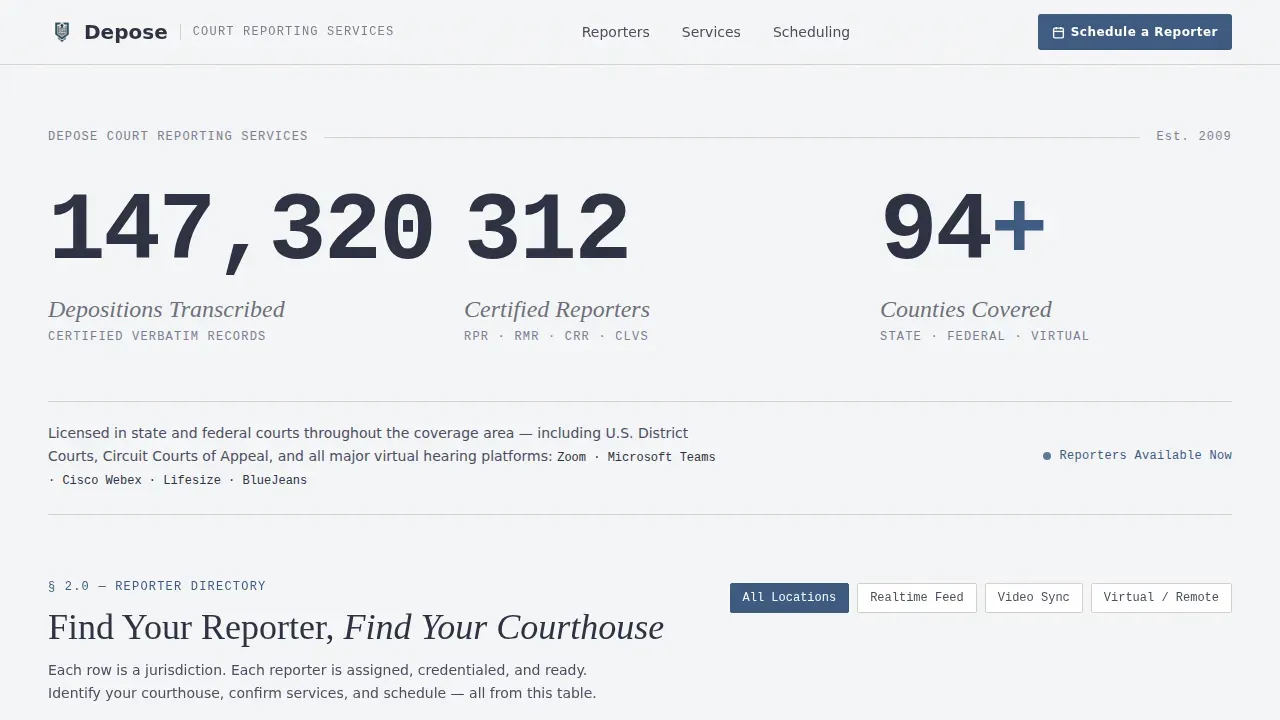
- A stats hero with rolling odometer counters for depositions transcribed, certified reporters on roster, and counties covered
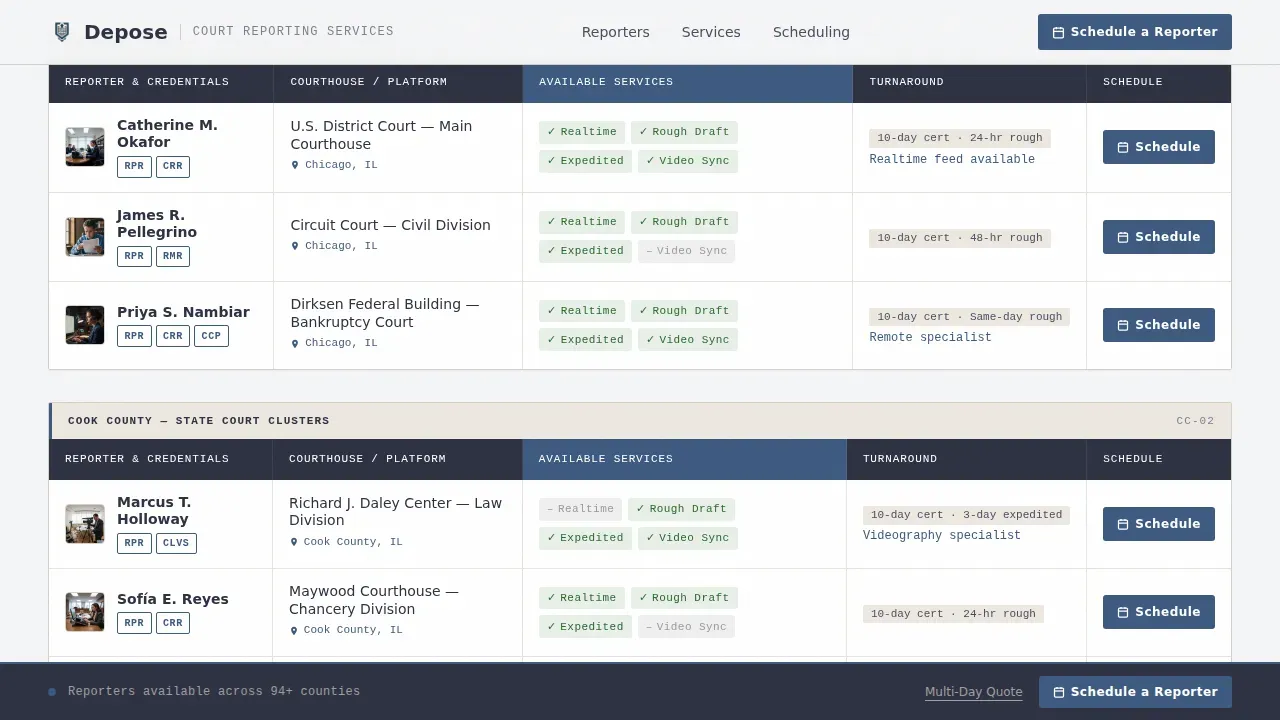
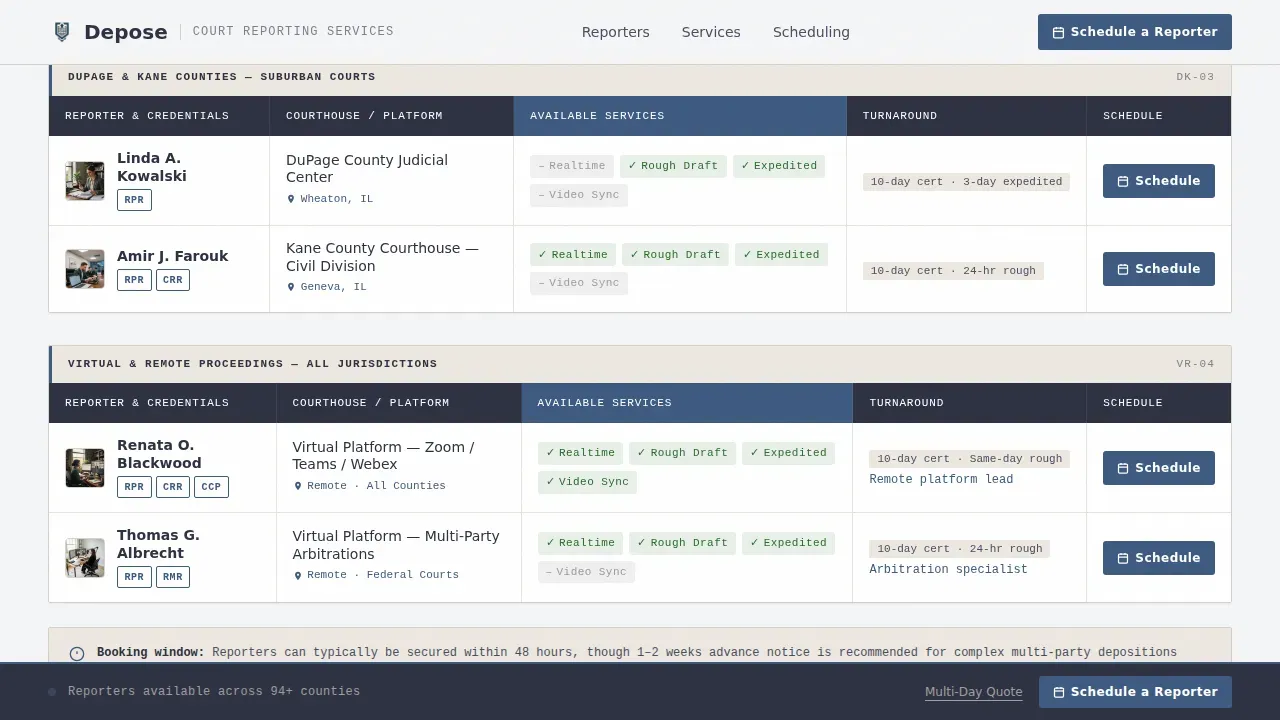
- Reporter comparison tables organized by courthouse cluster, with columns for services, turnaround guarantees, and a schedule call to action per row
- A three-step online scheduling form covering deposition date and time, location or virtual platform, and estimated duration with witness count
Feature list
This template delivers six tightly scoped features drawn directly from the brief. Each one serves a specific purpose in the deposition scheduling workflow.
Reporter Comparison Tables by Jurisdiction
Each table row represents a courthouse cluster or county. Columns show the assigned court reporter's name, credentials such as Registered Professional Reporter or Realtime Merit Reporter, and available services including realtime reporting, rough draft transcripts, expedited delivery, and videographer sync. A "Schedule a Reporter" button sits at the end of every row so clients can act immediately.
Stats Wall Hero with Live Counters
Three oversized counters display total depositions transcribed, the number of certified reporters on the firm's roster, and total counties covered. Numbers render in a monospaced typeface that echoes transcript formatting. A jurisdiction line below the counters names state, federal, and remote virtual coverage, followed by a horizontal rule that separates the data wall from the table content below.
Three-Step Booking Form
The scheduling form captures essential information in three focused steps: deposition date and time, location or virtual platform, and estimated duration with the number of witnesses. The form also includes a text area for special instructions and fields for case caption, attorney name, deponent name, and time zone. Providing complete information at this stage prevents delays in the litigation process.
Services Legend Section
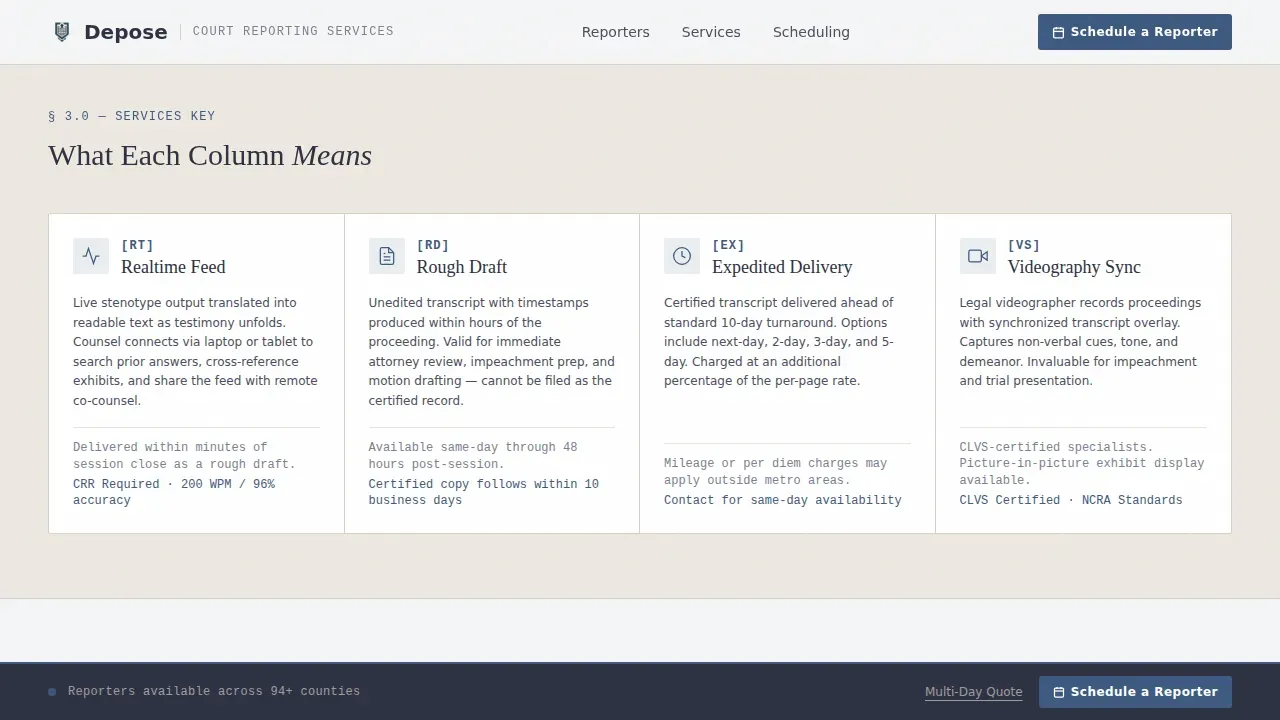
A visual legend explains what each service column in the comparison table means. Realtime reporting, rough draft delivery, expedited turnaround, and videographer sync each receive a brief description so first-time clients understand the services before they schedule.
Multi-Day Quote Path
A secondary call to action, "Request a Quote for Multi-Day," captures complex litigation needs that go beyond a single deposition. This path is designed for corporate defense teams and law firms coordinating extended proceedings where standard per-session scheduling does not apply.
Sticky Footer Scheduling Bar
A persistent footer bar keeps the primary "Schedule a Reporter" call to action visible as visitors scroll through the comparison tables. Clicking the button in the footer opens the same three-step scheduling form, reducing friction for users who have already decided to book.
Page sections overview
| Section | Purpose |
|---|---|
| Stats Hero Wall | Display coverage metrics with animated counters and jurisdiction line |
| Reporter Comparison Tables | Browse reporters by courthouse, services, credentials, and turnaround |
| Services Legend | Define each service column for first-time clients |
| How Booking Works | Walk visitors through the three-step scheduling form |
| Multi-Day Quote call to action | Capture complex litigation requests needing a custom quote |
| Sticky Footer Bar | Keep the schedule call to action visible throughout the page |
Design & branding system
The visual identity follows a Legal Shield theme using the Cloud Canvas color system. Every palette choice references a deposition conference room at 8:45 in the morning: neutral walls, dark polished wood, and a blue pen cap clicked open and ready.
- Overcast white (#F4F5F7) as the primary background, brief-paper cream (#EDE8E0) for table rows, counsel-table charcoal (#2D3142) for body text, and notary-seal blue (#3D5A80) for buttons, active table headers, and location pins
- Fraunces serif for display headlines and counter numbers; DM Sans for body copy and form labels; IBM Plex Mono for counter digits, credentials, and table data to echo accurate transcript formatting
Mobile & speed optimization
The template is built desktop-first to serve litigation paralegals on workstations, with a fully responsive layout for tablet access. Legal professionals increasingly schedule services on the go, so mobile optimization ensures the booking form stays easy to fill on smaller screens.
- Comparison tables reflow cleanly on tablet widths; the sticky footer call to action remains visible across all viewport sizes
- Counter animations and the scheduling modal are handled as client-side components while static table data loads efficiently as server-rendered content
How this template helps you convert
The comparison table is the sales engine. Seeing a named, credentialed court reporter already assigned to a courthouse collapses the decision from research to confirmation. Every design and copy choice moves visitors toward the schedule button.
- The stats hero builds immediate trust: six-figure deposition counts and a full county roster signal that this firm can handle any case, removing hesitation before visitors reach the table
- The per-row schedule button and sticky footer bar ensure that the moment a visitor finds their courthouse, the path to booking a deposition is one click away, with immediate confirmation provided after the form is received
Other information about this template
This template is the Depose certified court reporter scheduling landing page template, designed specifically for the court reporter service area and location page niche. Beyond the core sections, it supports several workflows that professional court reporting firms generally need to address.
- Court Reporter Agreements: agreements between reporters and the firm outline terms, certification verification, and service expectations; reporters may be required to sign eSignatures on confidentiality and data security protocols before their first assignment
- Onboarding for remote reporters requires the firm to verify credentials, grant platform access, set turnaround expectations, and maintain audit trails; automating these onboarding workflows helps the administrative team avoid gaps in coverage
- The deposition scheduling checklist built into the booking form reminds attorneys of what to bring and provide: a valid photo ID for the deponent, the deposition notice, the witness list, and any exhibits to be marked during the proceeding
- The page displays cancellation and rebooking policies clearly so clients know the terms before they agree to a booking; invoices and transcript download links can be referenced through the client portal login path
- The deposition scheduling checklist also guides the attorney to prepare the deponent: arrive early, review deposition guidelines and rights, avoid discussing testimony with anyone other than their attorney before swearing in, and understand that the deponent may object to questions or request breaks, though not to avoid answering a pending question
- Service guarantees such as standby reporter availability and last-minute scheduling options can be highlighted in the hero or table header to address urgent court needs; these signals give clients the confidence to book without calling the office
Theme
Legal Shield
Creative direction
Team & People
Color system
Cloud Canvas
Style
Comparison Table
Direction
Booking/Scheduling
Page Sections
Reporter Comparison Tables by Courthouse
Animated Stats Hero Wall
Three-step Deposition Booking Form
Services Legend and Key
Multi-day Quote Secondary Path
Sticky Footer Scheduling Bar
Related questions
What services does the reporter comparison table show?
How does the three-step scheduling form work?
Can this template handle remote and virtual deposition scheduling?
What happens after a visitor submits the scheduling form?
Is this template suitable for a firm covering multiple counties?



