Diwali Business Professional Website Template
Thali is a masonry-style Diwali catering landing page built for food businesses ready to show off spectacular spreads. A Comparison Journey layout moves visitors from basic to grand with vivid food photography cards, a sticky tier selector, and bold Dopamine Pop colors. It earns every upgrade before asking for the click.
by Rocket studio
Quick summary
Thali is a single-page Diwali catering template designed to sell spectacular food experiences. Its masonry layout pairs Basic, Grand, and Epic photography cards so visitors feel the upgrade gap before reading a word. Bold festival colors, a sticky package selector, and a pinned mobile call to action make every scroll a nudge toward the highest tier.
Who this template is for
This template is built for food businesses and event professionals who want Diwali catering to look and feel as impressive as it tastes. It speaks directly to hosts who are serious about presentation and scale.
- Second-generation families hosting their first large Diwali celebration without prior help
- NRI couples planning rooftop or venue parties and corporate event planners scaling up Diwali events
- Diwali catering businesses and food service operators ready to show multiple package tiers
What problem this template solves
Most catering pages list features in plain text. Buyers scan a table, shrug, and move on. This template replaces that experience with vivid, side-by-side food photography that makes the gap between package tiers impossible to ignore.
- Visitors struggle to visualize the difference between a basic spread and a full brass thali service
- A single flat price page fails to motivate an upgrade from a mid-tier to a premium package
- Catering businesses lose bookings because their page undersells the spectacle they actually deliver
What you get with this template
You get a fully structured, scroll-driven Diwali catering landing page with a visual identity built around festival energy and a layout engineered to push visitors toward higher-value packages.
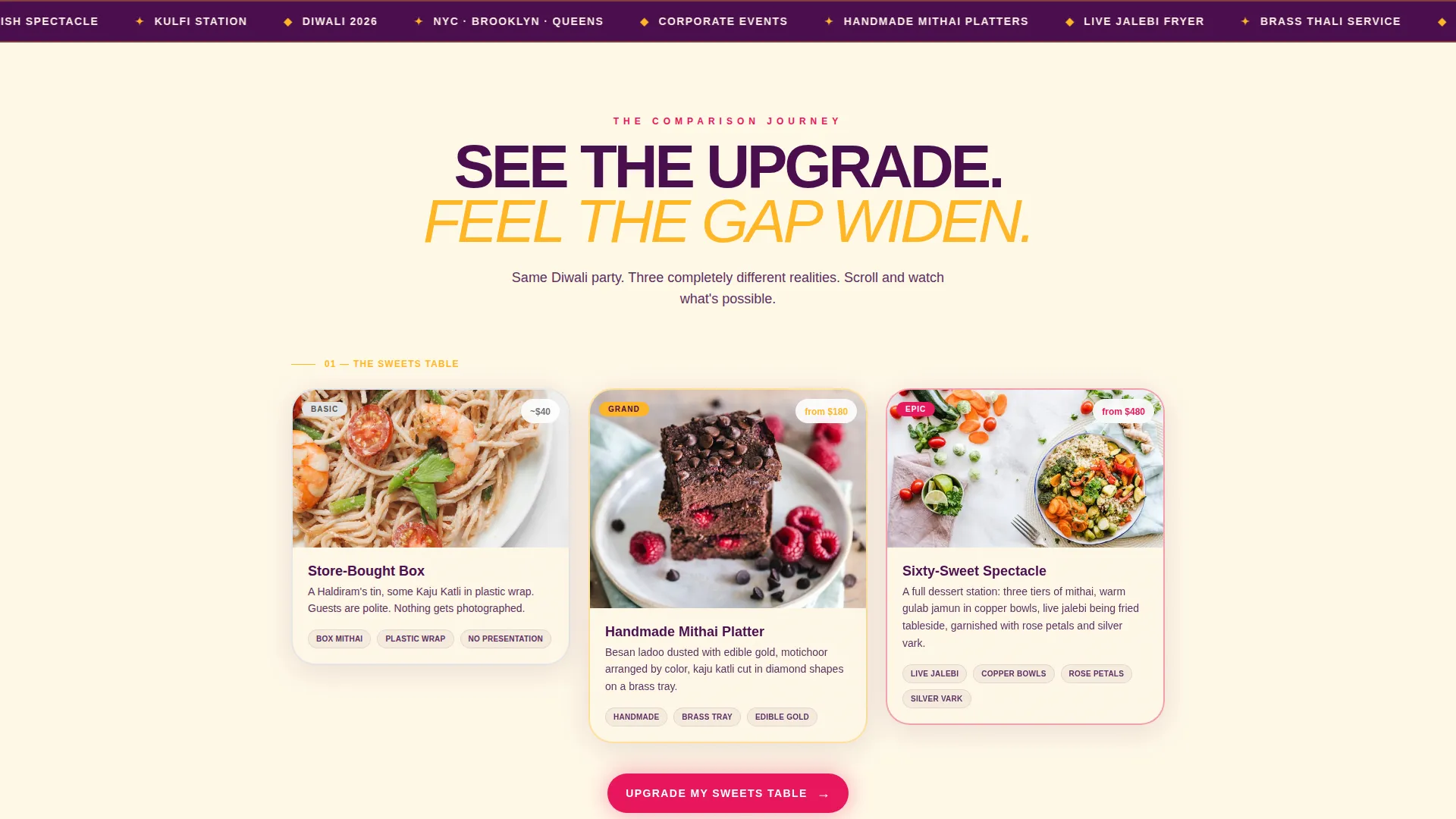
- A masonry Comparison Journey with three photograph-led rows contrasting Basic, Grand, and Epic Diwali setups
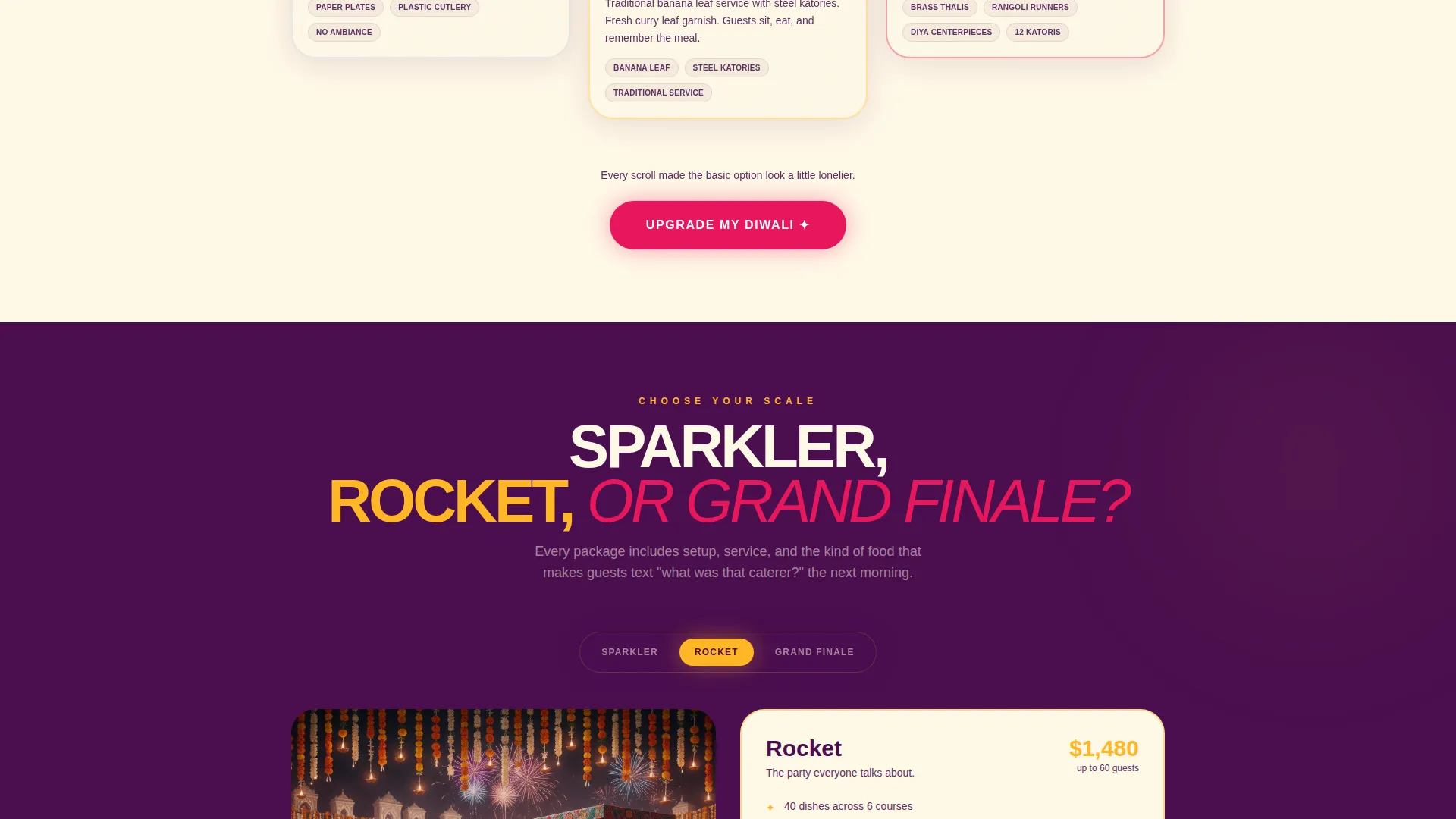
- A sticky tier selector pre-set to the mid-level Rocket package, with the Grand Finale option marked by a pulsing "Most Loved" badge
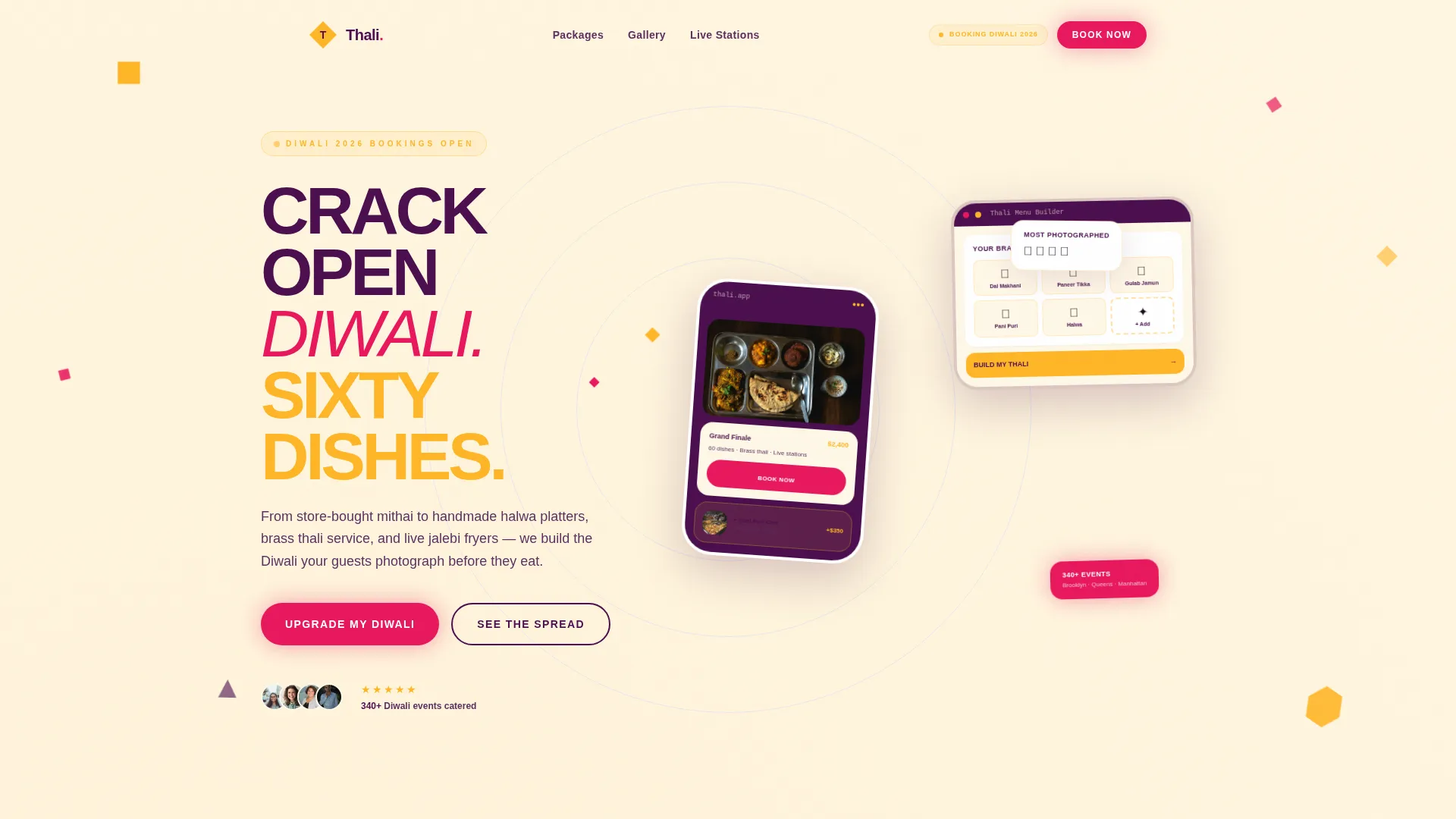
- A Device Mockup header section showing a phone and tablet displaying a thali builder interface, orbited by geometric marigold and magenta sparkler shapes
Feature list
This template is built around a small set of purposeful, high-impact components. Each one serves the single goal of making visitors want the next tier up.
Masonry Comparison Journey Layout
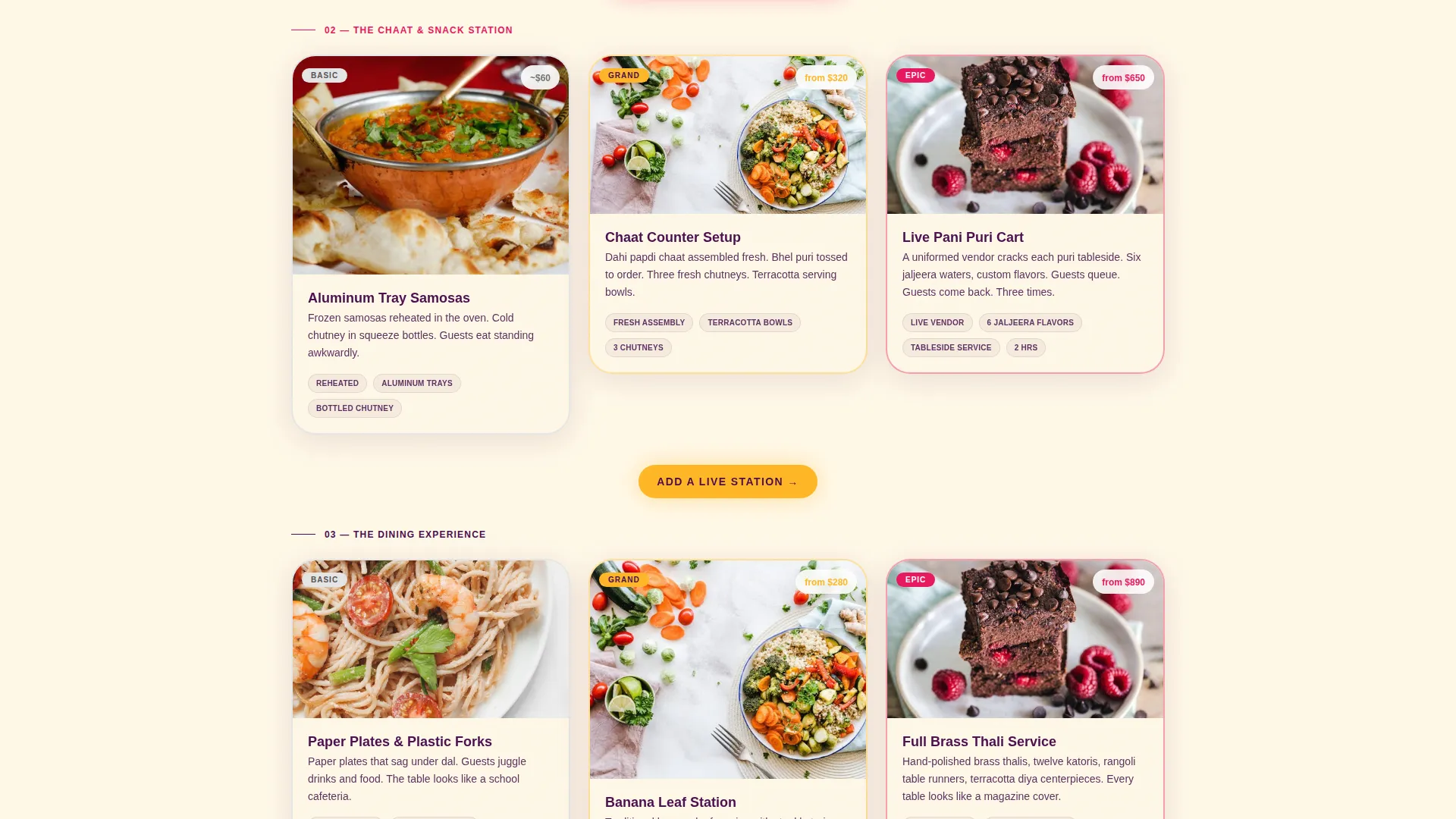
Three scroll sections each pair a Basic card against a Grand card and an Epic card. The first row contrasts store-bought sweets with handmade mithai platters. The second shows aluminum trays beside a live chaat station with a vendor. The third places paper plates next to full brass thali service with rangoli table runners. Every comparison is a photograph, not a feature list.
Sticky Tier Selector
A persistent package toggle lets visitors switch between Sparkler, Rocket, and Grand Finale tiers at any point during their scroll. The Rocket package is pre-selected on load. The Grand Finale option pulses gently with a "Most Loved" badge to draw the eye upward without forcing a decision.
Pinned Mobile Call to Action
On mobile viewports, the primary call to action button labeled "Upgrade My Diwali" stays pinned to the bottom of the screen throughout the scroll. Visitors never lose sight of the next step no matter how deep into the comparison cards they go.
Add a Live Station Drawer
After the third comparison row, a secondary call to action labeled "Add a Live Station" opens a slide-in drawer. The drawer presents à la carte add-ons including a pani puri cart, a jalebi fryer, and a kulfi station. This gives visitors a lower-commitment entry point to increase their order value.
Device Mockup Header
The header floats a phone and tablet at a slight angle over a scattered geometric rangoli pattern. The screens display a catering menu app with a thali builder interface showing real dishes being dragged onto a brass plate. Geometric diamonds and triangles in marigold and magenta orbit the devices like digital sparklers.
Dopamine Pop Color System
Electric marigold, hot magenta, deep jamun purple, and tikka-bright turmeric white work together as a four-color festival palette. Purple anchors the navigation and footer. Marigold fires on hover states and price tags. Magenta marks calls to action and badge labels. Turmeric white gives breathing room between dense food photography cards.
Page sections overview
| Section | Purpose |
|---|---|
| Device Mockup Header | Opens with floating phone and tablet over a rangoli pattern, showing the thali builder interface |
| Tier Selector Bar | Sticky toggle for Sparkler, Rocket, and Grand Finale packages, visible throughout scroll |
| Comparison Row One | Store-bought sweets versus handmade mithai platters side by side |
| Comparison Row Two | Aluminum trays versus a live chaat station with a vendor |
| Comparison Row Three | Paper plates versus brass thali service with rangoli table runners |
| Live Station Drawer | Slide-in add-on panel triggered after the third comparison row |
| Navigation and Footer | Jamun purple anchored brand bar and closing section |
Design & branding system
The visual identity follows a Playful Geometric theme powered by a four-color Dopamine Pop palette. Every color is chosen to vibrate against the next, the way festival rangoli powder looks when colors are pressed against each other with no gap.
- Four palette colors: electric marigold (#FFB627), hot magenta (#E8175D), deep jamun purple (#4A0E4E), and tikka-bright turmeric white (#FFF8E7)
- Geometric motifs including diamonds, triangles, and rangoli-inspired scatter patterns appear throughout the header and around device mockups
- Color roles are clearly assigned: purple for structure, marigold for energy and pricing, magenta for action, and turmeric white for card backgrounds and visual rest
Mobile & speed optimization
The template is structured with mobile-first interaction in mind. The pinned call to action and sticky tier selector are both designed to work cleanly on small screens where scroll behavior drives the buying decision.
- The "Upgrade My Diwali" button stays pinned to the bottom of the mobile viewport so the action is never off-screen
- The masonry card layout and drawer component are built to function within a single-page scroll flow on both phone and tablet viewports
- The Device Mockup header displays both phone and tablet screens, making the template visually relevant across device sizes from the first section
How this template helps you convert
The layout is engineered around a single conversion principle: show the gap between tiers visually before asking anyone to spend more. Every structural decision supports that goal.
- The Comparison Journey makes the Basic option look sparse next to the Grand and Epic cards, so visitors naturally move toward upgrading without feeling pressured by sales copy.
- The sticky tier selector and "Most Loved" badge on the Grand Finale package create a constant, gentle pull toward the highest-value offering throughout the scroll.
- The "Add a Live Station" drawer introduces add-on revenue after the comparison rows, catching visitors at the moment they are most engaged with the idea of a spectacular spread.
Other information about this template
This template fits within the broader Diwali Business category under Retail and E-Commerce. It is designed for a niche where visual presentation directly drives purchase decisions. A few additional details worth noting:
- The template style is Masonry or Pinterest-style, meaning cards vary in size and arrangement to create visual rhythm across the page
- The creative direction is a Comparison Journey, a scroll structure that earns the upsell before presenting a price
- The landing page direction is Upsell and Upgrade, with the mid-tier package as the entry point and the top tier as the pull destination
- The intersection match score for this template against its niche context is 9 out of 10, reflecting a strong alignment between the visual style, the audience, and the Diwali catering use case
- The template is built for a single-page layout, not a multi-page website structure
Theme
Playful Geometric
Creative direction
Comparison Journey
Color system
Dopamine Pop
Style
Masonry/Pinterest
Direction
Upsell/Upgrade
Page Sections
Masonry Comparison Journey
Sticky Tier Selector
Pinned Mobile Call to Action
Live Station Add-on Drawer
Device Mockup Header Section
Dopamine Pop Color System
Related questions
Who is this template designed for?
What are the three package tiers included in the template?
How does the add-on drawer work?
What does the Device Mockup header display?
Is this a single-page template or a multi-page website?