Paragliding Landing Page Template with Bento Grid
Thermal is a bento grid landing page template built for paragliding operations offering tandem flights, solo certifications, and cross-country expeditions. It pairs a full-viewport short-form reel header with a seasonally reorganizing bento grid, a countdown clock, and a two-step launch slot reservation form. The Industrial Raw visual identity makes every section feel like functional gear that happens to look stunning.
by Rocket studio
Quick summary
Thermal is a single-page bento grid landing page designed for paragliding businesses. It opens with a raw, vertical-shot video reel and organizes its content around the next upcoming flight event. A countdown clock, real weather snapshots, and a two-step booking form turn passive visitors into committed pilots and first-timers alike.
Who this template is for
This template was built for paragliding operations that run a mix of experiences and need one focused page to fill every available slot. It suits sites that attract a wide range of visitors, from total beginners to seasoned cross-country pilots.
- Paragliding schools and launch sites offering tandem flights, solo certifications, and cross-country expeditions
- Adventure operators targeting first-timers, licensed pilots, and experience-hungry couples
- Sites with seasonal programming that want the page to feel current and alive, not static
What problem this template solves
Most adventure sports pages look like brochures. They describe an experience without creating one. Visitors leave without booking because nothing conveys urgency, atmosphere, or trust.
- Static pages fail to show scarcity, so visitors delay and forget to return
- Generic layouts cannot communicate the seasonal, weather-dependent nature of paragliding
- No clear booking path means interested visitors drop off before committing to a slot
What you get with this template
You get a fully structured single-page layout that handles the entire visitor journey, from first impression to confirmed booking. Every section is designed around the rhythm of a real paragliding operation.
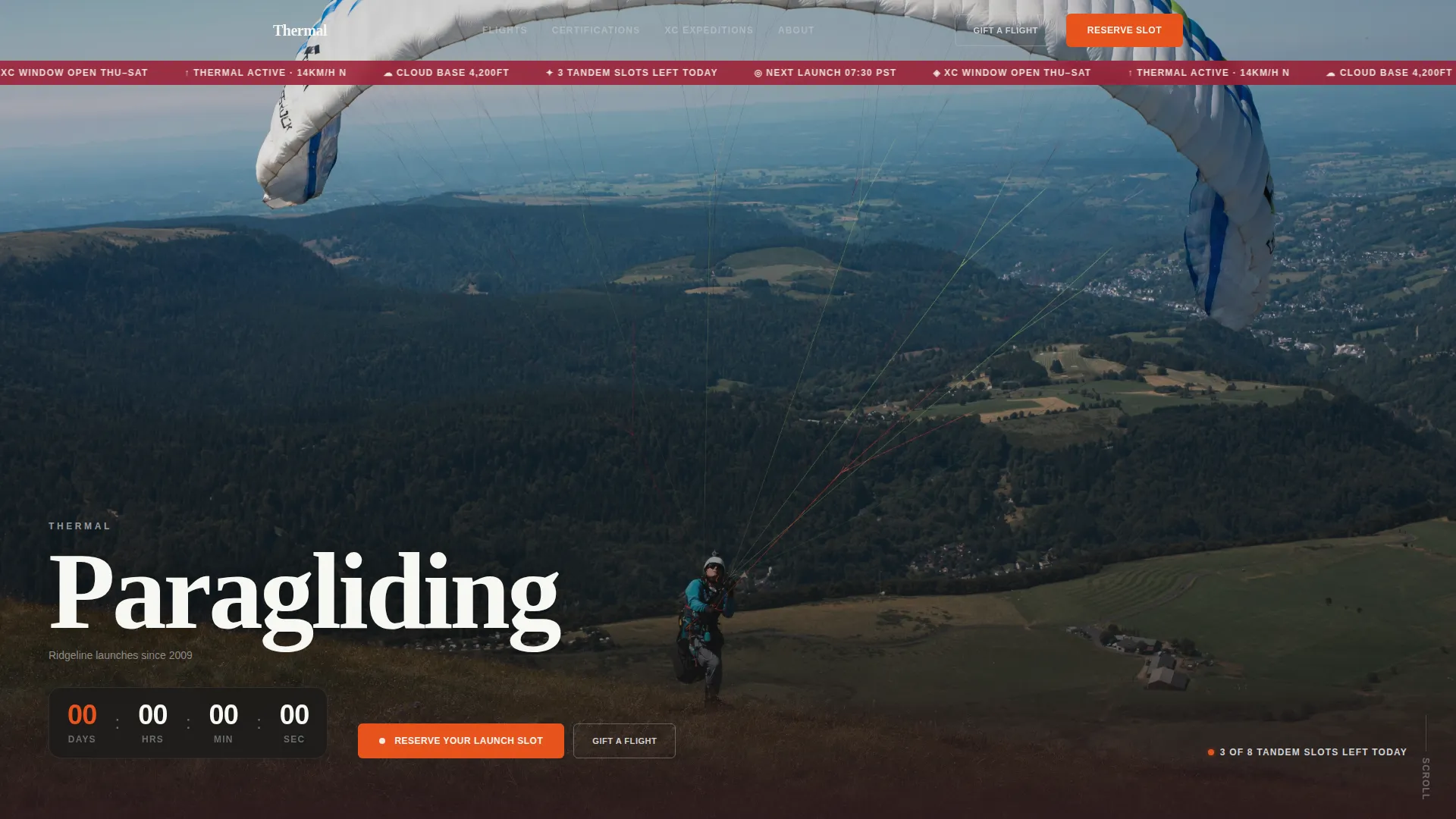
- A short-form reel header with viewport-filling vertical footage, raw audio cues, and punched-in white typographic overlays
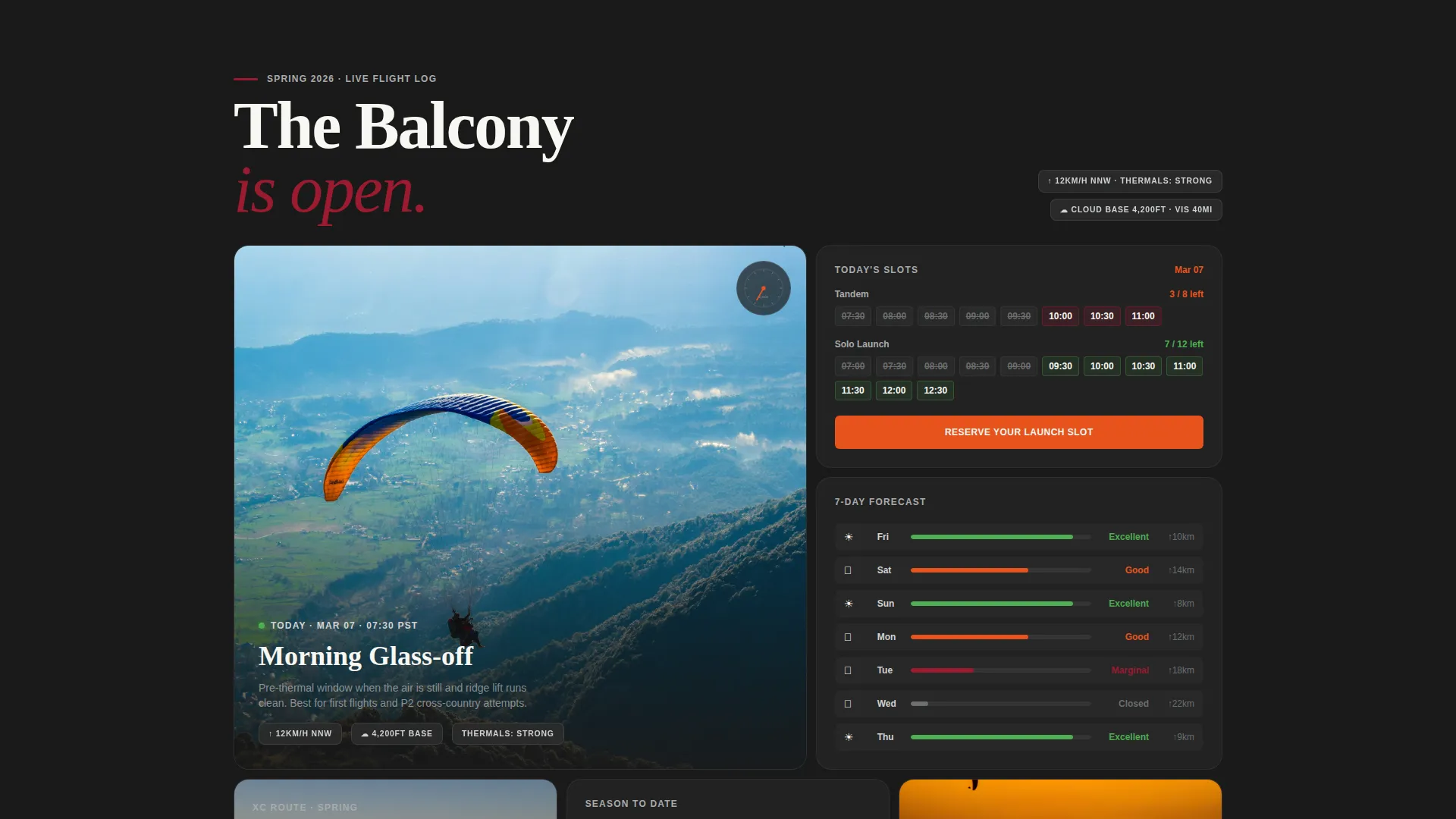
- A seasonally adaptive bento grid that reorganizes panels around the next event, with weather snapshots and timestamps on each cell
- A two-step reservation form covering experience level, preferred date, weight range, and emergency contact, plus a secondary "Gift a Flight" path
Feature list
This template delivers a tightly focused set of components drawn directly from the brief. Each one serves a specific conversion or engagement purpose.
Short-Form Reel Header
The header fills the entire viewport with vertically framed footage. It opens on hands pulling risers tight, cuts to a ground-level launch over the camera lens, then holds on a wide thermal spiral with an altimeter overlay ticking upward. Raw audio, wind buffeting, the click of the speed bar, and one breathless laugh, plays under the sequence. Frameless white type punches in with the season, site name, and date, then the view holds on a live countdown clock.
Seasonal Bento Grid Layout
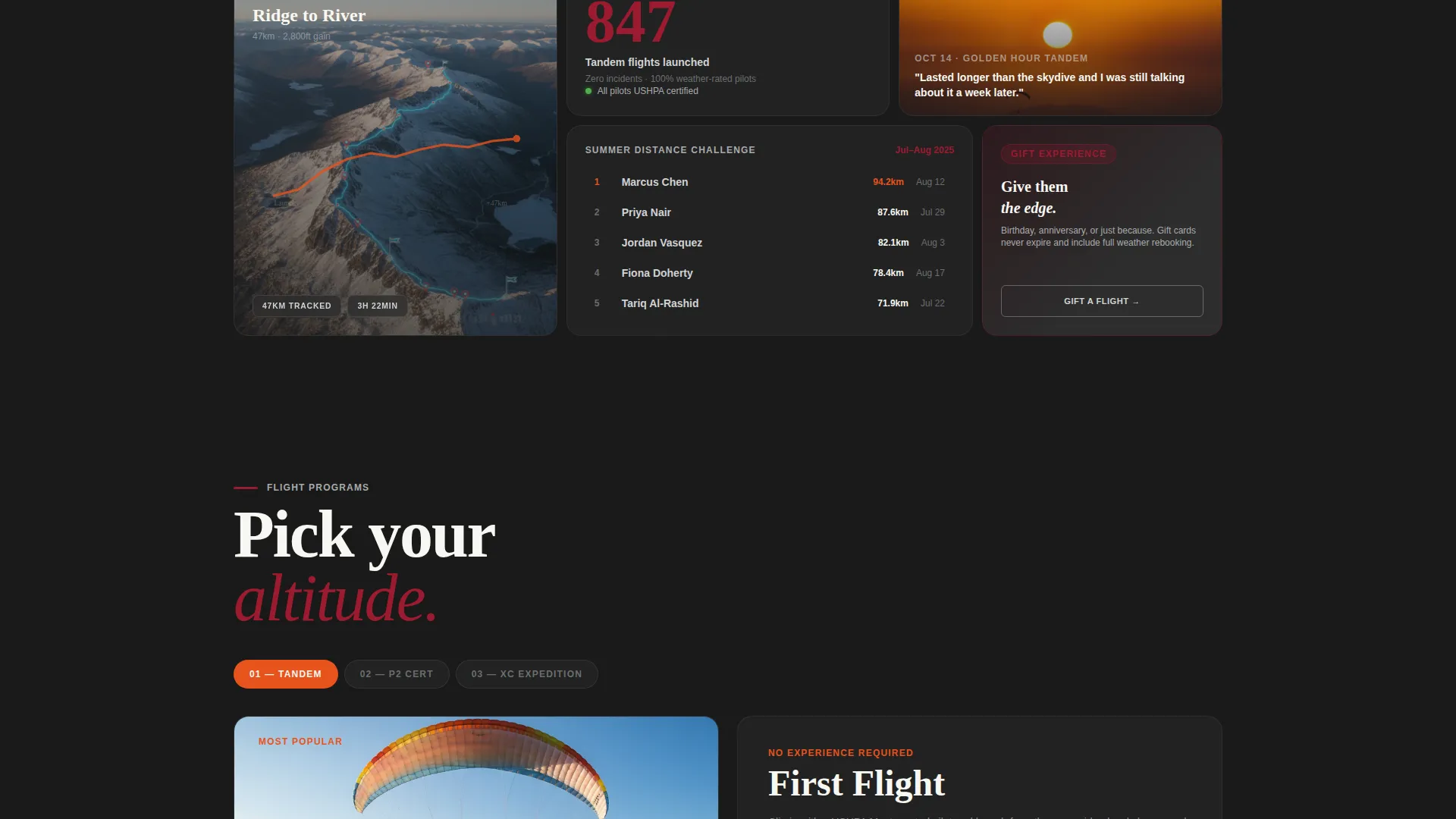
The bento grid reorganizes its panels around the next upcoming event. Spring cells show morning glass-off flights and green valley floors. Summer cards feature high-altitude cross-country routes with GPS tracklog overlays. Autumn tiles hold golden-hour tandem portraits and early sunset soaring windows. Each cell carries a timestamp and a weather snapshot showing wind speed, thermal forecast, and cloud base.
Two-Step Booking Form
The reservation form runs across two panels. The first asks for experience level, with options for first flight, licensed P2, and advanced cross-country, plus a visual calendar showing open slots and weather probability. The second collects name, weight range, and emergency contact. A separate "Gift a Flight" button sits in a chrome-outlined secondary style for visitors booking on behalf of someone else.
Countdown Clock and Slot Scarcity Display
A live countdown clock pins to the top bento cell beside the primary call to action. Daily slot limits, eight tandem flights and twelve solo launches, are displayed openly to create honest, visible scarcity. The clock and slot count repeat at the grid midpoint and base.
Past Season Proof Section
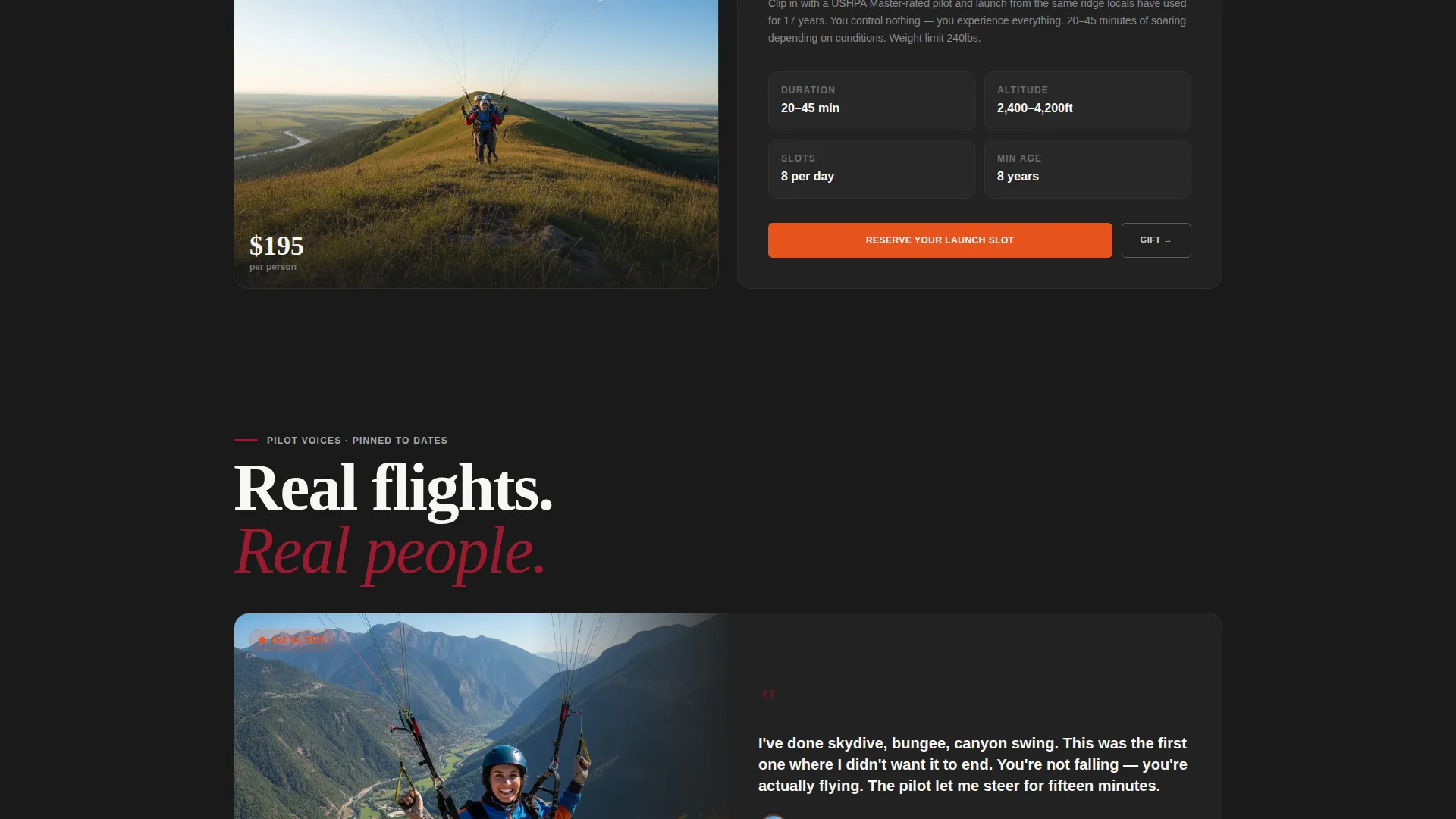
Scrolling deeper surfaces historical evidence of the operation's track record. Pilot testimonials are pinned to specific dates. Photo grids from past fly-in events appear alongside a distance challenge leaderboard. This proof section reads like a living flight log rather than a generic testimonials block.
Page sections overview
| Section | Purpose |
|---|---|
| Reel Header | Viewport video with countdown |
| Top Bento Cell | Primary call to action and slot count |
| Seasonal Grid | Event-driven flight panels |
| Weather Snapshots | Live-feel forecast per cell |
| Booking Form Step 1 | Experience and date selection |
| Booking Form Step 2 | Personal and contact details |
| Gift a Flight | Secondary conversion path |
| Past Season Proof | Testimonials and photo grids |
| Distance Leaderboard | Community proof and engagement |
| Footer call to action | Final slot reservation prompt |
Design & branding system
The Industrial Raw theme runs through every element. The palette feels like the inside of a gear bag: anodized buckles, nylon webbing, and scratched metal quick-links that are functional objects made beautiful by necessity.
- Core palette: deep cockpit red (#9B1B30), brushed aluminum (#D0D3D4), carabiner gunmetal (#2D2D2D), and altimeter white (#F7F7F2)
- Signal orange (#E8531E) applied to all primary calls to action and the countdown timer for maximum contrast and urgency
- Frameless white typography punches text directly over footage with no box or container, keeping the cinematic raw feel intact
Mobile & speed optimization
The bento grid layout is structured to reflow cleanly at smaller screen sizes. Vertical-shot footage in the header is already framed for portrait viewports, so it does not require cropping or repositioning on mobile.
- Vertical video framing fits mobile viewports natively without layout adjustments
- Bento grid cells stack into a logical single-column scroll on narrow screens
- The two-step form keeps each panel focused and thumb-friendly by limiting fields per screen
How this template helps you convert
The entire layout is built around reducing hesitation and moving visitors toward one clear action: reserving a launch slot.
- The countdown clock and visible daily slot limits, shown openly as eight tandems and twelve solo launches, create real urgency without manufactured pressure.
- The "Reserve Your Launch Slot" call to action appears in signal orange at the top bento cell, at the grid midpoint, and again at the base, so it is never more than a short scroll away.
- The two-step form lowers commitment friction by separating intent and scheduling from personal details, making the first step feel easy and low-stakes.
Other information about this template
Thermal fits naturally into the broader adventure sports and outdoor recreation category. It was designed to serve operations that sit at the intersection of experience-led adventure and structured event scheduling.
- The template suits any paragliding operation that sells by the slot, by the season, or by the certification level
- The seasonal creative direction means the page stays visually relevant across spring, summer, and autumn without a full redesign
- The "Gift a Flight" secondary path makes the template useful for gifting campaigns and birthday booking spikes
- This layout works well for operators who run annual fly-in events, distance challenges, or leaderboard-based community competitions
Theme
Futuristic Neon
Creative direction
Community Gallery
Color system
Neon Shock
Style
Hero-Dominant (90/10)
Direction
Marketplace/Multi
Page Sections
Short-form Reel Header with Countdown
Seasonal Bento Grid Layout
Two-step Launch Slot Reservation Form
Countdown Clock and Slot Scarcity Display
Past Season Proof Section
Related questions
Can I use this template for both tandem and solo paragliding bookings?
Does the bento grid change automatically with the season?
How does the slot scarcity feature work?
Is the Gift a Flight option a separate booking flow?
Can I display past event content like testimonials and photo grids?