Manufacturing Processes Professional Website Template
A split-screen landing page built for thermoforming service providers. It pairs a before/after case study header with a spec-sheet scroll experience, front-loading hard numbers like maximum sheet size, wall thickness tolerances, and available materials. The primary call to action drives RFQ submissions. A secondary gated download captures engineers still in the specifying stage.
by Rocket studio
Quick summary
This landing page template is purpose-built for thermoforming service providers. It opens with a before/after case study header and unrolls like a technical data package. Every scroll reveals another capability, quantified. The page anchors to a short-form RFQ and a secondary gated PDF download, converting both ready buyers and early-stage engineers.
Who this template is for
This template is designed for manufacturers and service bureaus that offer vacuum-forming or pressure-forming runs to industrial buyers. It speaks directly to the decision-makers who read spec sheets before they make calls.
- Product engineers evaluating tooling cost against injection molding alternatives
- Procurement managers sourcing repeatable, high-volume thermoformed parts
- Contract manufacturers quoting short-to-mid-volume runs with tight lead times
What problem this template solves
Most thermoforming providers lose leads because their web presence cannot answer basic engineering questions. Buyers move on rather than pick up the phone. This template solves that by front-loading every spec a buyer would otherwise have to ask about.
- Engineers leave pages that show photos but omit tolerances, draw depth, and material options
- Procurement teams need proof of process repeatability before they open a conversation
- Contract manufacturers miss RFQs because their intake form is buried or incomplete
What you get with this template
The template delivers a single-page, section-led layout structured around a lead generation goal. Each section pairs a production photograph with hard technical data, building trust as the visitor scrolls.
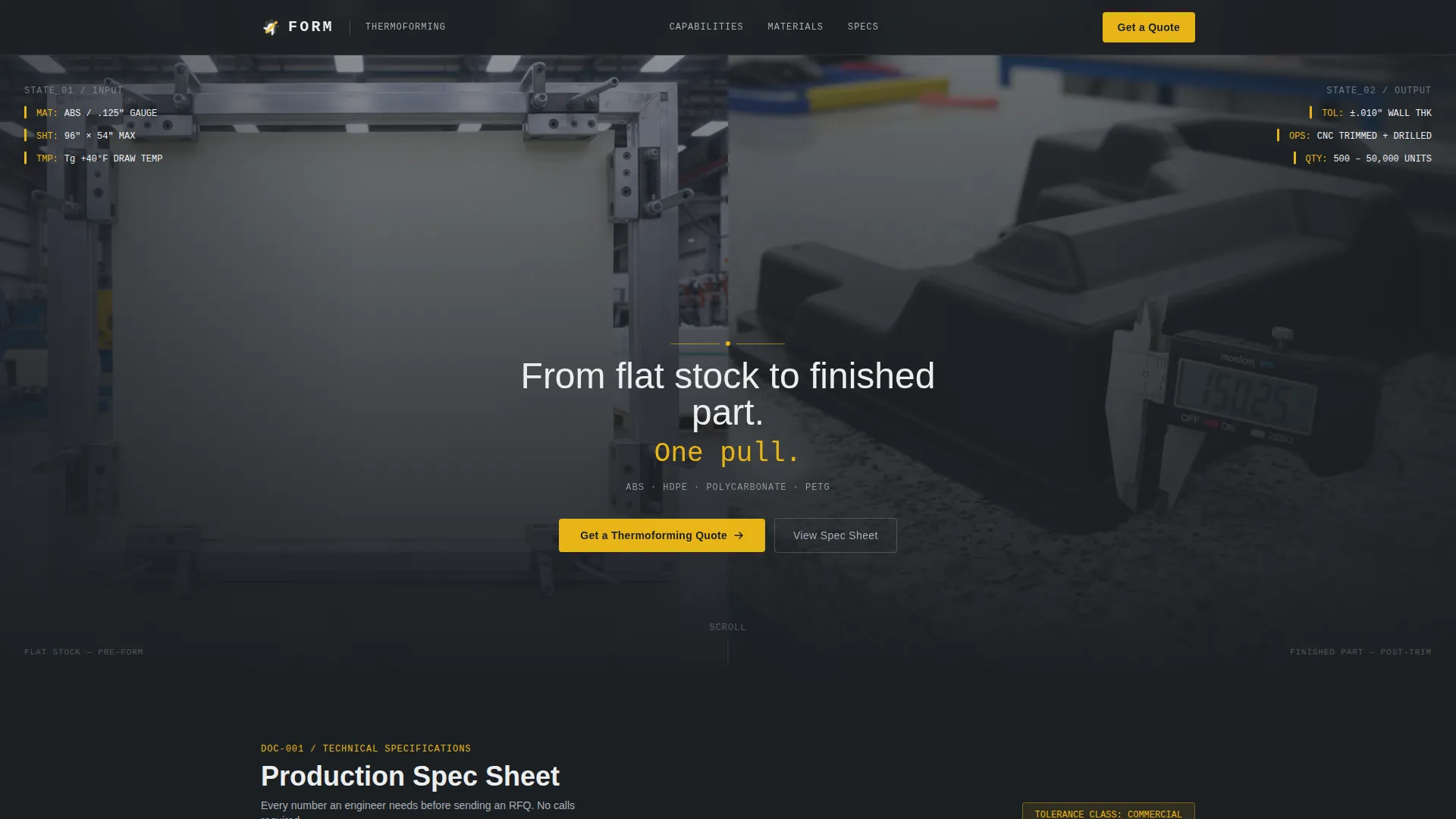
- A 50/50 split-screen header with a before/after case study concept and a centered headline
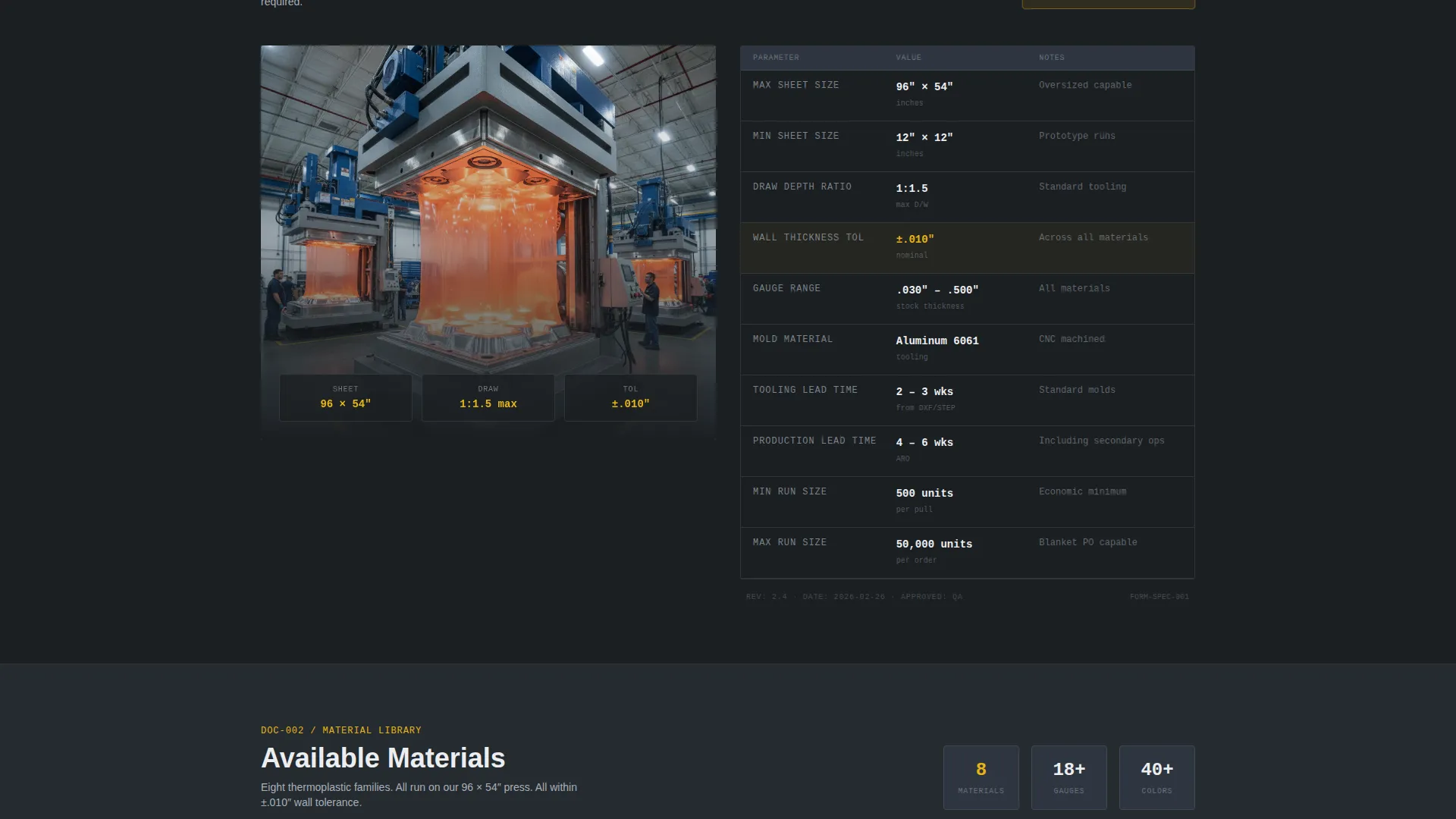
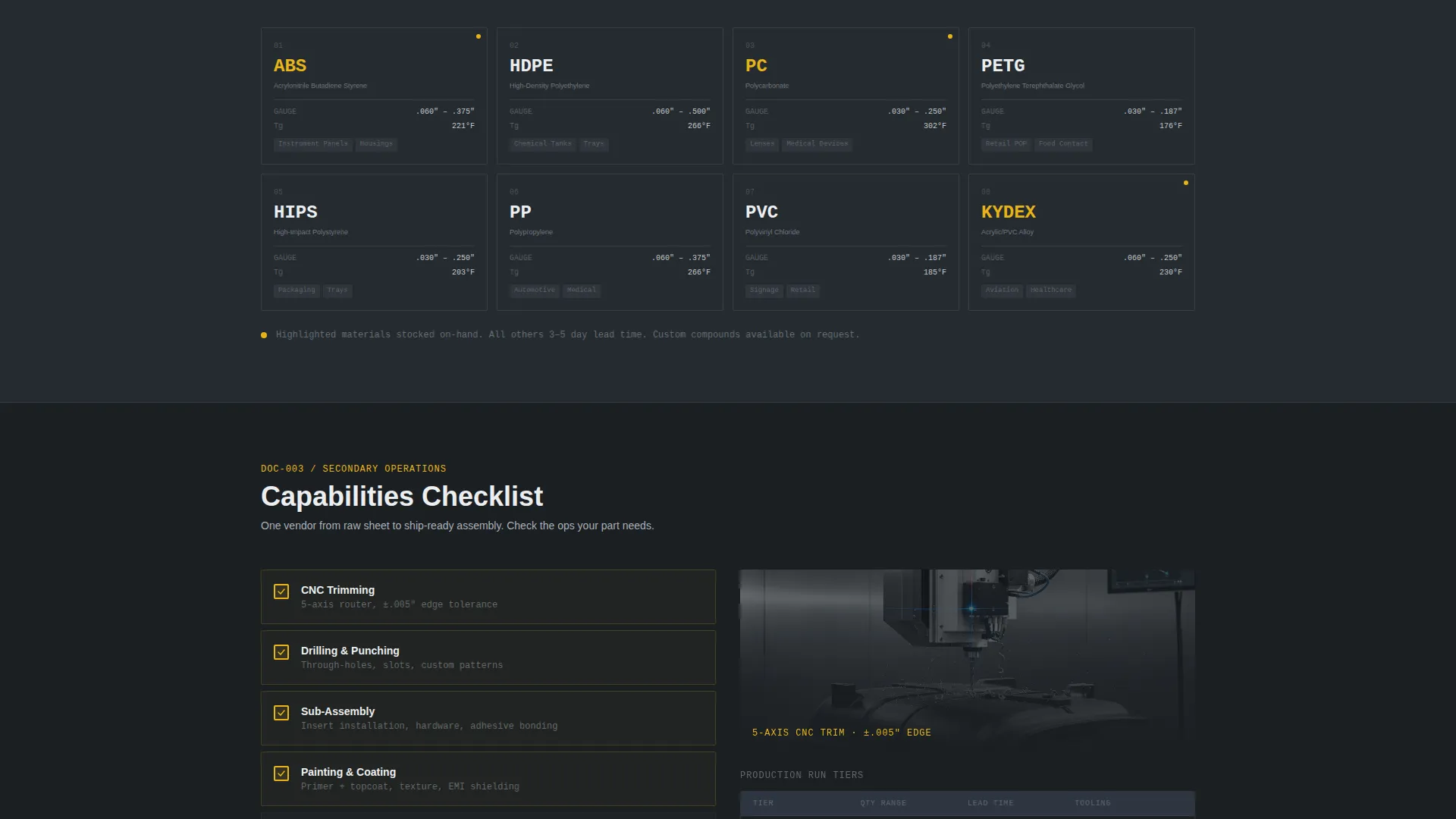
- A spec-sheet scroll experience with maximum sheet size, draw depth ratios, wall thickness tolerances, and a periodic-table-style material grid
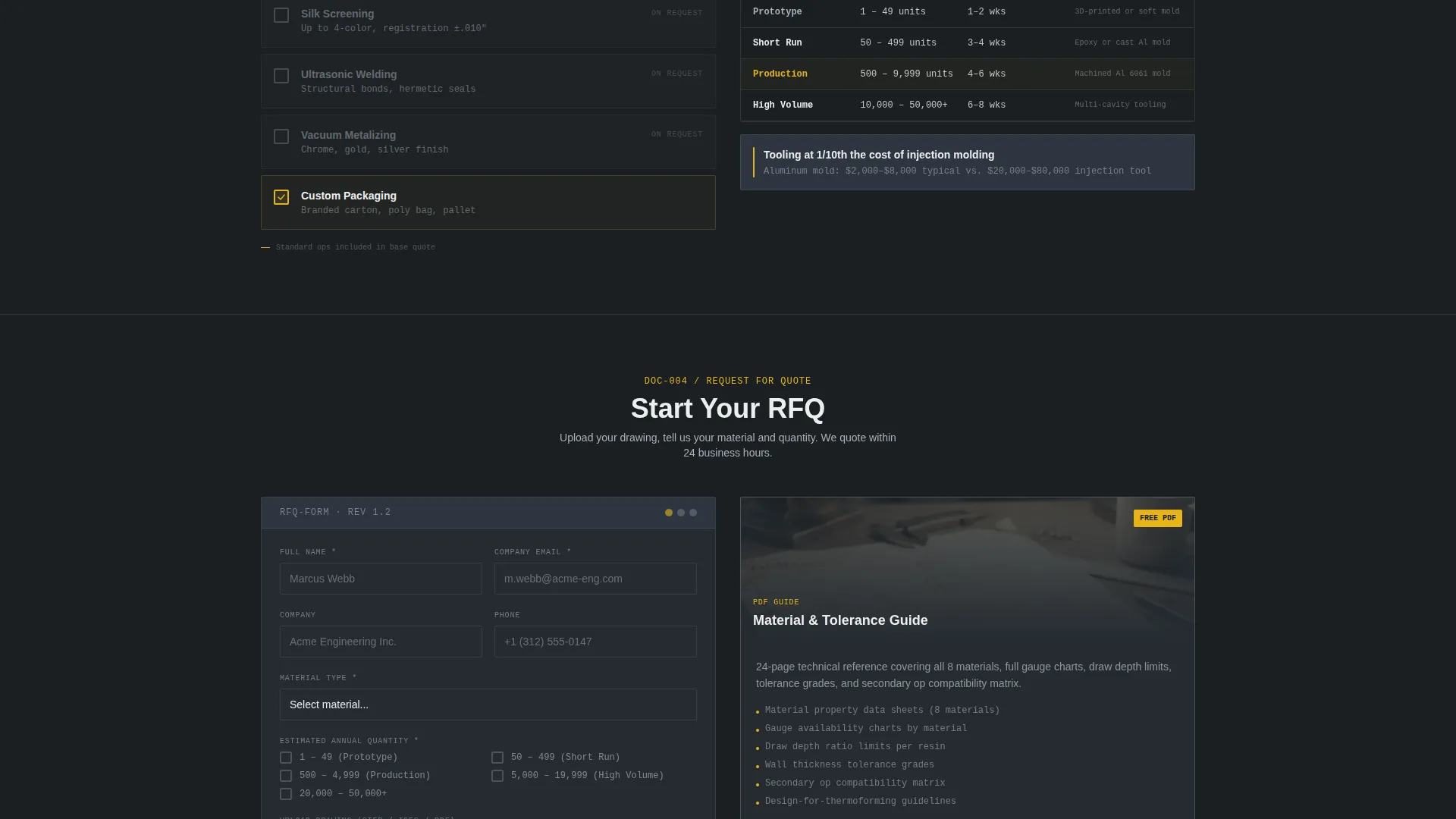
- A short-form RFQ with a material dropdown, quantity range selector, file upload for STEP, IGES, or PDF drawings, and a notes field
- A secondary gated download path offering a Material and Tolerance Guide for specifying-stage engineers
Feature list
This section covers the core built-in components and design constructs that ship with the template.
Before/After Case Study Header
The header uses a 50/50 split panel. The left panel shows a raw flat sheet clamped in frame with material grade and gauge called out in monospaced type. The right panel shows the finished trimmed part on a granite inspection surface with a digital caliper alongside it. A thin yellow divider line separates the two states, and the headline fades in over the center seam.
Spec-Sheet Scroll Layout
Each scroll section pairs a production photo on one side with hard specifications on the other. Included data points cover maximum sheet size at 96 inches by 54 inches, draw depth ratios, and wall thickness tolerances of plus or minus 0.010 inches. Secondary operations appear as a checklist: CNC trimming, drilling, assembly, and painting.
Periodic-Table Material Grid
Available materials, including ABS (Acrylonitrile Butadiene Styrene), HDPE (High-Density Polyethylene), and polycarbonate, are displayed in a periodic-table-style grid. The layout lets engineers scan and identify compatible materials at a glance without reading dense paragraphs.
Short-Form RFQ Block
The primary call-to-action anchors to a compact request-for-quote form. It includes a material type dropdown, an estimated annual quantity range selector, a file upload field that accepts STEP, IGES, and PDF drawing formats, and a single open notes field. The form is intentionally short to reduce friction.
Gated PDF Secondary Path
A secondary conversion path offers the Material and Tolerance Guide as a downloadable PDF. This path captures engineers who are still in the specifying stage and not yet ready to submit an RFQ, keeping them in the funnel.
Carbon Fiber Color System
The visual identity uses deep graphite, machined aluminum, shop-floor white, and a safety-yellow accent reserved for calls to action, tolerance callouts, and divider lines. Every color decision serves a functional role in the layout, matching the industrial utility of the service itself.
Page sections overview
| Section | Purpose |
|---|---|
| Split-Screen Header | Before/after case study with centered headline fade-in |
| Material Spec Grid | Periodic-table layout showing all available forming materials |
| Sheet Size Specs | Hard numbers for maximum sheet size and draw depth ratios |
| Tolerance Data Panel | Wall thickness tolerance callouts paired with production photos |
| Secondary Operations | Checkbox-style list of CNC trimming, drilling, assembly, and painting |
| Primary RFQ Form | Short-form quote request with file upload and material dropdown |
| Gated PDF Download | Secondary call to action for Material and Tolerance Guide download |
Design & branding system
The template follows a Service Utility theme. Every visual decision prioritizes function over decoration, the same logic that governs a well-run production floor.
- Color system: deep graphite (#1B1F23) as the base, machined aluminum (#A8B0B8) for secondary surfaces, shop-floor white (#ECEEF0) for content areas, and safety yellow (#E8B517) reserved strictly for calls to action, tolerances, and callout lines
- Typography: monospaced typefaces for material grades, gauge references, and tolerance values to reinforce the technical data package aesthetic
- Photography direction: production-floor images paired with specification data; the finished part is photographed on a granite inspection surface with a digital caliper, grounding every visual in process reality
Mobile & speed optimization
The split-screen layout is structured so its 50/50 panels adapt cleanly to narrower viewports. Spec data remains legible and scannable at any screen width.
- Stack behavior: the split-screen panels reflow to a single-column stack on smaller screens, preserving the before/after narrative without horizontal scrolling
- Form usability: the RFQ block and file upload field are sized for touch interaction, reducing drop-off on mobile devices
- Content hierarchy: section headlines and tolerance callouts remain prominent at reduced widths so engineers can skim key specs without zooming
How this template helps you convert
The page is engineered around two distinct buyer states: ready to quote, and still specifying. Both paths are served without forcing a choice.
- The spec-sheet scroll pre-answers every technical question a buyer would otherwise call about, removing the hesitation that typically delays RFQ submission.
- The short-form RFQ removes friction at the point of intent, with a material dropdown and file upload that match the natural workflow of a product engineer or procurement manager.
- The gated PDF download gives specifying-stage engineers a reason to convert now, capturing contact information from buyers who are not yet ready to submit a formal quote request.
Other information about this template
This template is a strong fit for service providers competing on process transparency and technical credibility. The layout anticipates the mindset of a buyer who has already done preliminary research.
- The template suits operations running 500-to-50,000-unit production volumes with six-week lead time commitments
- The secondary operations checklist, covering CNC trimming, drilling, assembly, and painting, communicates full-service capability without requiring a separate page
- The RFQ file upload accepts STEP, IGES, and PDF drawing formats, matching standard engineering file types used across product development workflows
- The gated PDF path works as a lead capture mechanism for early-stage buyers comparing thermoforming against alternative processes such as fiberglass layup or injection molding
Theme
Service Utility
Creative direction
Spec Sheet
Color system
Carbon Fiber
Style
Split Screen (50/50)
Direction
Lead Generation
Page Sections
Before/after Split-screen Header
Spec-sheet Scroll Experience
Periodic-table Material Grid
Short-form RFQ with File Upload
Gated PDF Secondary Conversion Path
Carbon Fiber Utility Color System
Related questions
What industries does this landing page template serve?
Can I customize the material list and tolerance values in the spec grid?
What file types does the RFQ upload field accept?
Does the template include the gated PDF, or do I supply it?
Is this template suitable for a provider that runs both short and long production runs?



