HVAC Technician Booking Website Template
Thermostat is a single-column HVAC technician booking landing page built for fast lead capture. It opens with a testimonial card, flows through an FAQ-driven scroll that answers every visitor objection, and places brass-on-plum booking forms at the right moments. The Executive Suite color palette signals authority without shouting. Designed for HVAC services that compete on speed and trust.
by Rocket studio
Quick summary
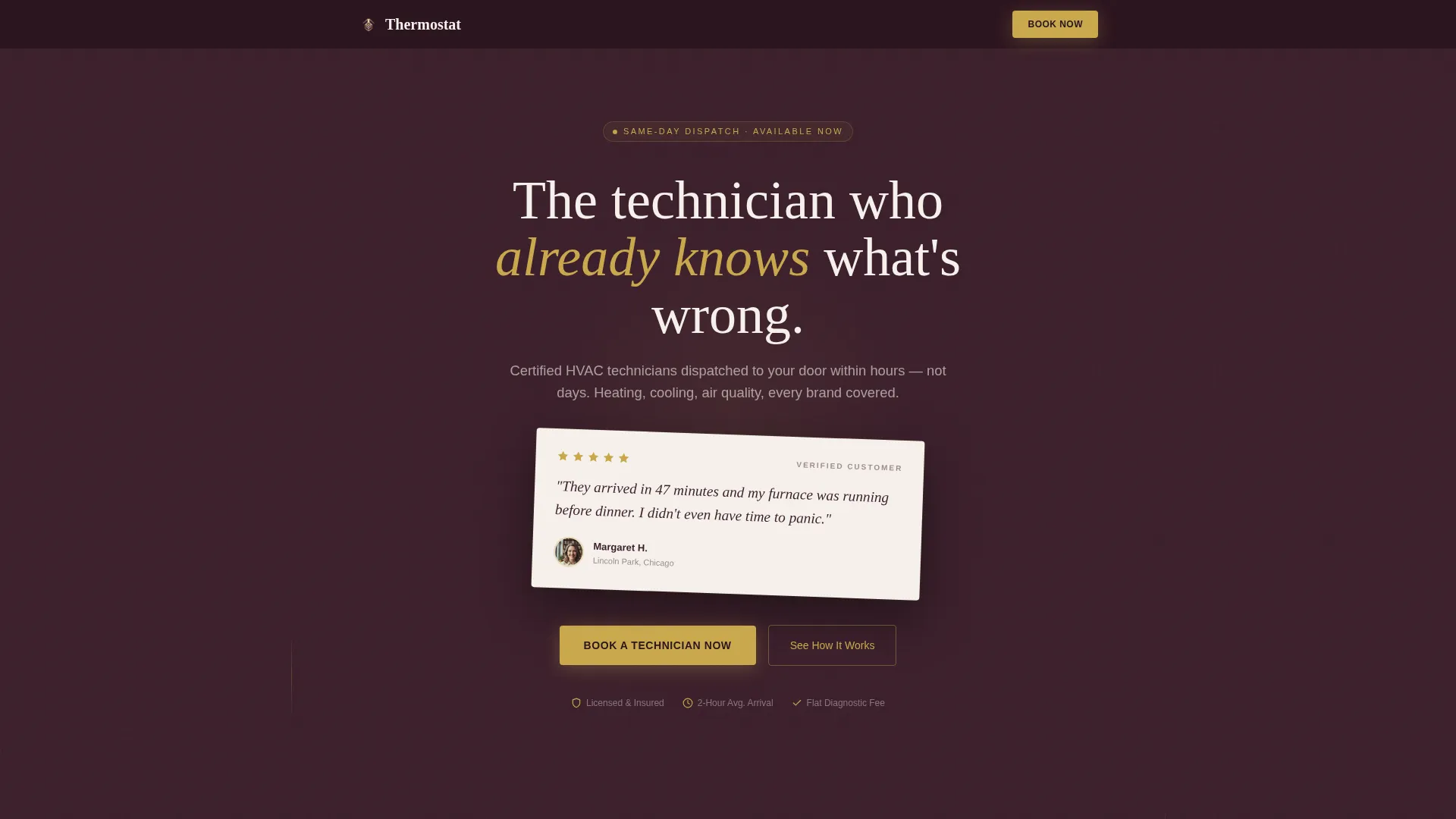
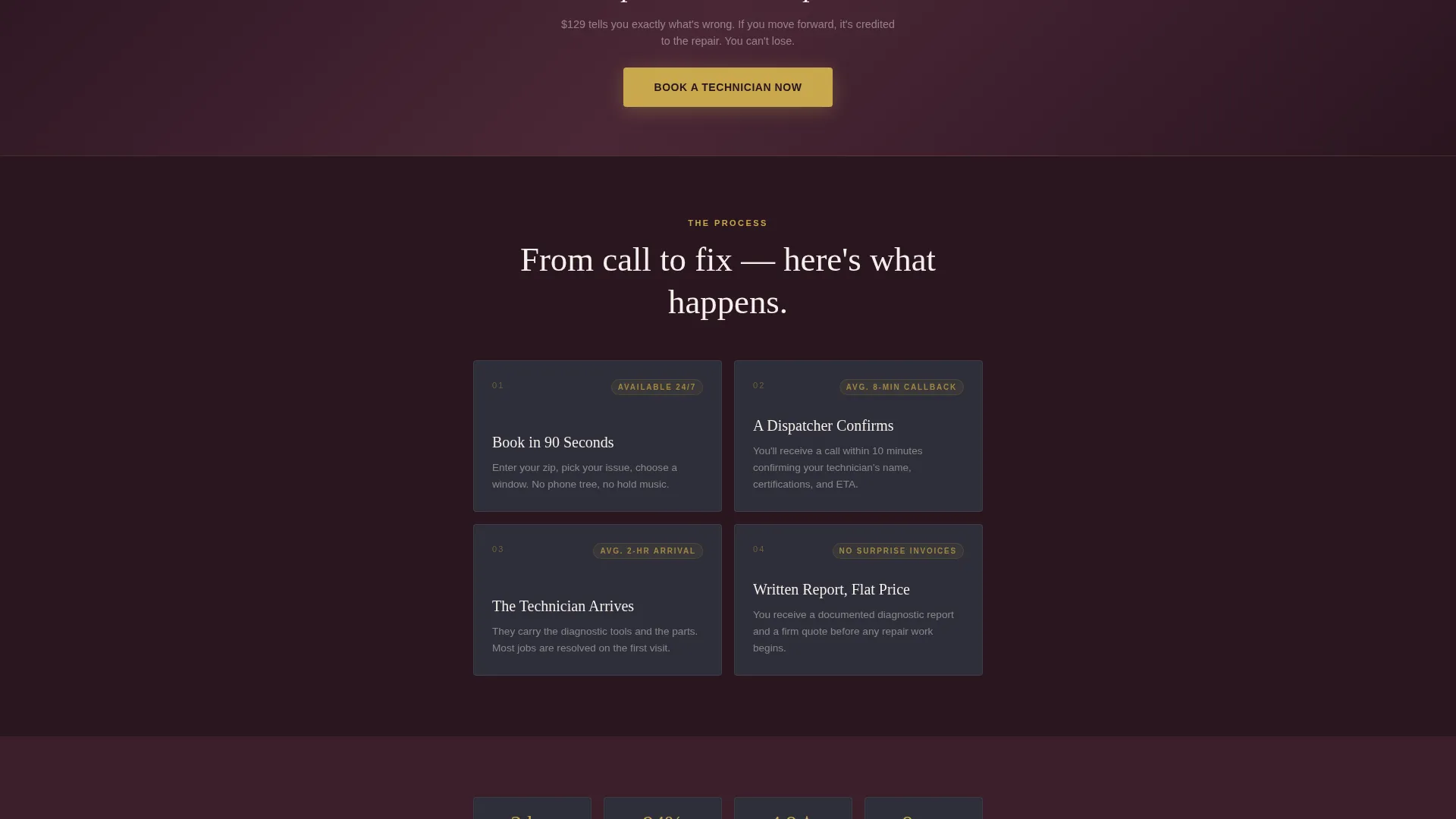
Thermostat is a single-column flow landing page for HVAC technician booking. It leads with a rotated testimonial card, then walks visitors through their own objections using an FAQ-driven layout. Each question is paired with a real customer quote. Booking forms appear at key scroll points, capturing zip code, issue type, and preferred time window.
Who this template is for
This template fits any HVAC service that competes on rapid response and verified expertise. It works especially well for businesses that dispatch certified technicians to both residential and commercial properties.
- HVAC companies and independent technicians who book jobs online
- Property managers who need a reliable page to share with tenants
- Office facility managers and homeowners looking for same-day service
What problem this template solves
Most HVAC service pages lead with stock photos and a phone number. Visitors arrive anxious, and the page gives them nothing to hold onto. Thermostat fixes that by meeting visitors where they already are: mid-worry, full of questions, skeptical of promises.
- Visitors leave before booking because the page never addresses their specific concerns
- Logistical questions like cost, availability, and brand compatibility go unanswered
- There is no clear, low-friction path for someone who cannot name their exact problem
What you get with this template
You get a structured, single-column landing page designed to move a nervous visitor toward a confirmed booking. Every component in this template has one job: reduce hesitation and earn the click.
- A testimonial card header with brass star rating, customer quote, name, neighborhood, and portrait
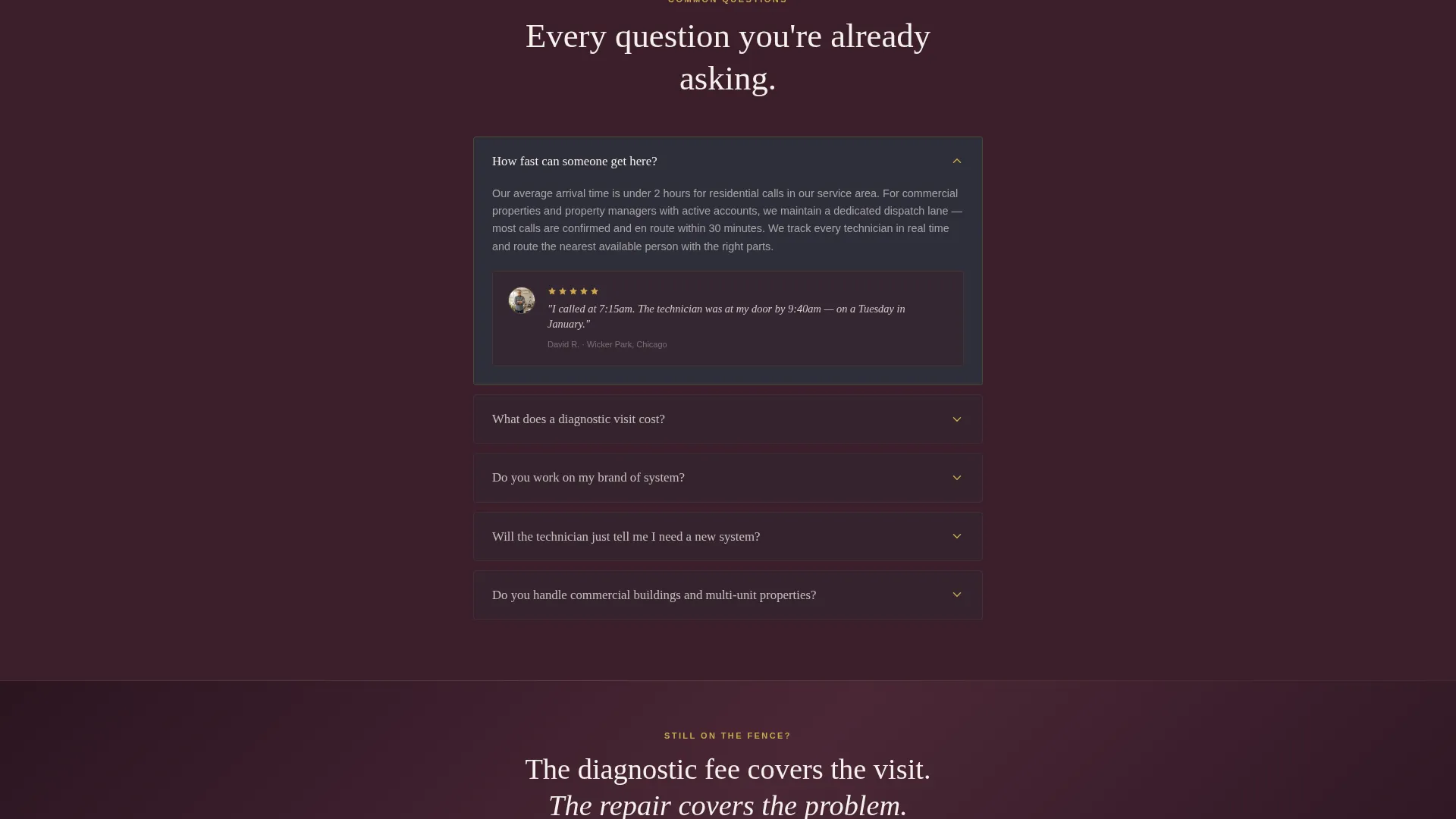
- An FAQ-driven scroll section where each question pairs with a supporting customer testimonial
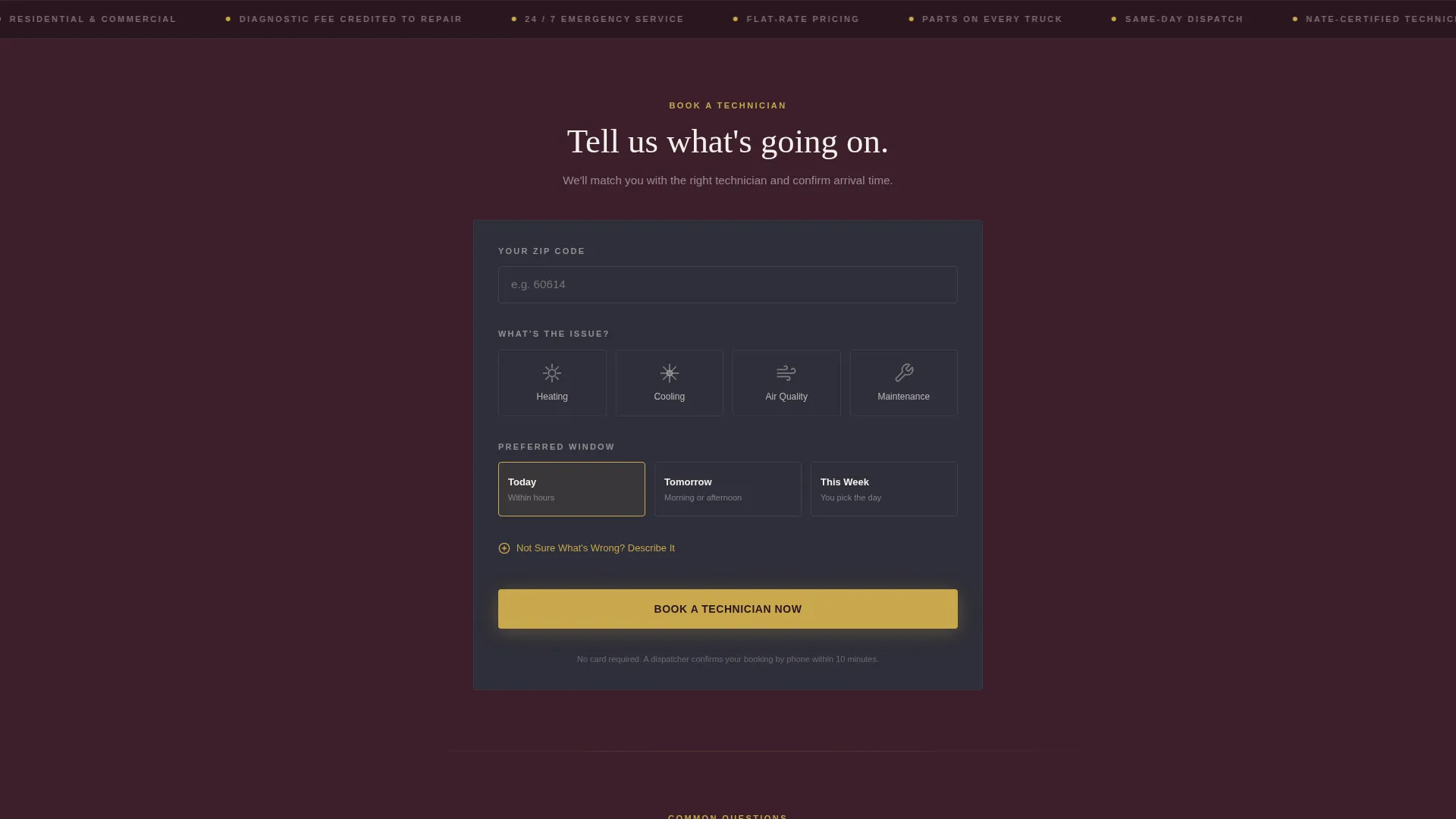
- A multi-step lead generation form capturing zip code, issue type, and preferred service window
Feature list
This template is built around a deliberate content rhythm. Each section exists because anxious buyers need a specific kind of reassurance before they commit.
Testimonial Card Header
The page opens with a single oversized card on warm ivory, rotated two degrees for a tactile, handwritten feel. It carries a five-star brass rating, a direct customer quote, a first name, a neighborhood, and a small circular portrait. The deep plum background sits behind it, letting the card command full attention.
FAQ-Driven Scroll Layout
Questions are stacked one by one in the visitor's own language: speed, cost, brand compatibility, and trust. Each question opens into a confident answer, then is reinforced by a matching customer testimonial card. The sequence moves from logistical concerns to financial ones to trust-based ones, following the natural arc of a buyer's internal negotiation.
Multi-Step Booking Form
The primary lead generation form appears first beneath the testimonial card and repeats after every third FAQ block. It starts with zip code for instant service-area confirmation, moves to issue type via illustrated icons, and ends with a preferred time window. A secondary freeform text path serves visitors who cannot name their problem.
Repeating Brass call to action Placement
The primary call-to-action button reads "Book a Technician Now" in polished brass on deep plum. It appears at the top of the page and recurs at regular intervals through the FAQ scroll, ensuring a booking path is never more than a short scroll away.
Executive Suite Color System
Deep plum, brushed charcoal, warm ivory, and polished brass work together to create a visual tone that feels premium and authoritative. Brass is reserved exclusively for calls to action, star ratings, and hover states, making every interactive element immediately recognizable.
Secondary Freeform Entry Path
Visitors who cannot identify their issue have a dedicated option: a text field labeled "Not Sure What's Wrong? Describe It." This reduces drop-off from uncertain homeowners who would otherwise leave rather than guess at an issue type.
Page sections overview
| Section | Purpose |
|---|---|
| Testimonial Card Header | Opens with social proof and sets the tone of instant competence |
| Primary Booking Form | Captures zip code, issue type, and preferred service window |
| FAQ Block One | Answers speed and availability concerns with a customer quote |
| Repeat call to action Button | Returns the booking action after the first FAQ set |
| FAQ Block Two | Addresses diagnostic cost and pricing transparency |
| Supporting Testimonial Cards | Reinforces each FAQ answer with a matched real-customer story |
| FAQ Block Three | Covers brand and equipment compatibility questions |
| Repeat Booking Form | Second full form placement after the third FAQ block |
| Secondary Text Path | Freeform field for visitors who cannot name their issue |
| Footer Section | Closes the page in deep plum with contact and branding details |
Design & branding system
The visual identity follows an Executive Suite theme using the Plum Executive color system. The palette was designed to feel premium without being cold, like a well-appointed waiting room rather than a corporate brochure.
- Deep plum (#3B1F2B) anchors the header and footer; brushed charcoal (#2E2E38) fills card backgrounds and section dividers
- Warm ivory (#F5F0EB) carries all body text areas, keeping reading comfortable and distinct from the dark sections
- Polished brass (#C9A84C) is used exclusively on call-to-action buttons, star ratings, and hover states to draw the eye to every conversion point
Mobile & speed optimization
The single-column flow is structured for clean rendering on smaller screens. Vertical stacking means every section reads naturally on a phone without horizontal scrolling or layout collapse.
- The FAQ scroll and testimonial cards are designed to remain legible and well-spaced at mobile widths
- The multi-step form reduces input friction by breaking the booking request into sequential, tap-friendly steps
- The repeating call to action placement ensures a booking button is visible without excessive scrolling on any screen size
How this template helps you convert
This template earns the click by removing hesitation before asking for anything. The structure follows a proven anxiety-to-answer rhythm that keeps visitors engaged from the first scroll to the final form submission.
- The testimonial card at the top replaces a generic headline with a real outcome, building immediate credibility before a single feature is listed
- The FAQ-driven layout intercepts each objection in sequence, pairing every concern with both a direct answer and a supporting customer story
- The repeating booking form and secondary freeform text path ensure no visitor reaches a dead end, whether they know their problem or not
Other information about this template
Thermostat is part of a template library built for professional service businesses that rely on fast trust-building and clear calls to action. This template is well-suited to HVAC technician booking pages where response speed and verified expertise are the primary selling points.
- The template is designed as a standalone landing page and does not require additional pages to function as a complete booking flow
- The illustrated issue-type icons in the form cover four categories: heating, cooling, air quality, and maintenance
- The freeform secondary path is included specifically for residential customers who experience unfamiliar symptoms and cannot categorize their issue
- This template can support any HVAC business looking to replace a basic contact form with a structured, trust-led booking experience
Theme
Executive Suite
Creative direction
FAQ-Driven
Color system
Plum Executive
Style
Single Column Flow
Direction
Lead Generation
Page Sections
Testimonial Card Header with Brass Stars
Faq-driven Objection Scroll
Multi-step Lead Generation Form
Secondary Freeform Text Path
Repeating Call to Action Button Placement
Related questions
Can I update the testimonial quotes and customer details?
Does the booking form send leads to an email or a CRM?
Can I add or remove FAQ blocks from the scroll section?
Is this template suitable for commercial HVAC clients, not just homeowners?
What if my brand colors are different from the default palette?



