HVAC Technician Specialist Booking Website Template
Thermostat is a split-screen HVAC technician landing page template built for lead generation. It pairs a stats-driven header with a case study narrative scroll, a persistent diagnostic booking form, and a Charcoal and Amber visual identity. The result is a page that communicates credibility fast and moves homeowners, property managers, and business owners toward scheduling a service call.
by Rocket studio
Quick summary
Thermostat is a single-page HVAC technician landing page template designed to win trust and generate service bookings. It uses a 50/50 split-screen layout, a metrics-first header, and a scrollable case study format. The Charcoal and Amber color system reinforces a professional, no-nonsense tone suited to emergency and routine HVAC service businesses.
Who this template is for
This template is built for HVAC service businesses that need an online presence focused on converting visitors into booked jobs. It works especially well for operators who serve both residential and light commercial clients and want to communicate reliability immediately.
- Independent HVAC technicians and small crews who handle diagnostics, repairs, and system retrofits
- Property managers and service companies that field maintenance requests across multiple units
- Small business owners who need a fast, credible page to capture emergency and scheduled service leads
What problem this template solves
Most HVAC service pages look generic. Visitors cannot tell whether the company is licensed, available, or capable of handling their specific problem. That uncertainty costs bookings, especially for emergency calls where trust must be established in seconds.
- Visitors cannot quickly verify credentials, service area, or availability before they bounce
- Generic layouts fail to convey the hands-on expertise that separates a certified technician from a general handyman
- There is no clear path from "I have a problem" to "I just booked a diagnostic" without friction
What you get with this template
You get a fully structured HVAC landing page layout with every section pre-designed and ready to customize. The template covers the entire visitor journey from first impression to form submission, using a narrative-driven format that builds confidence at every scroll point.
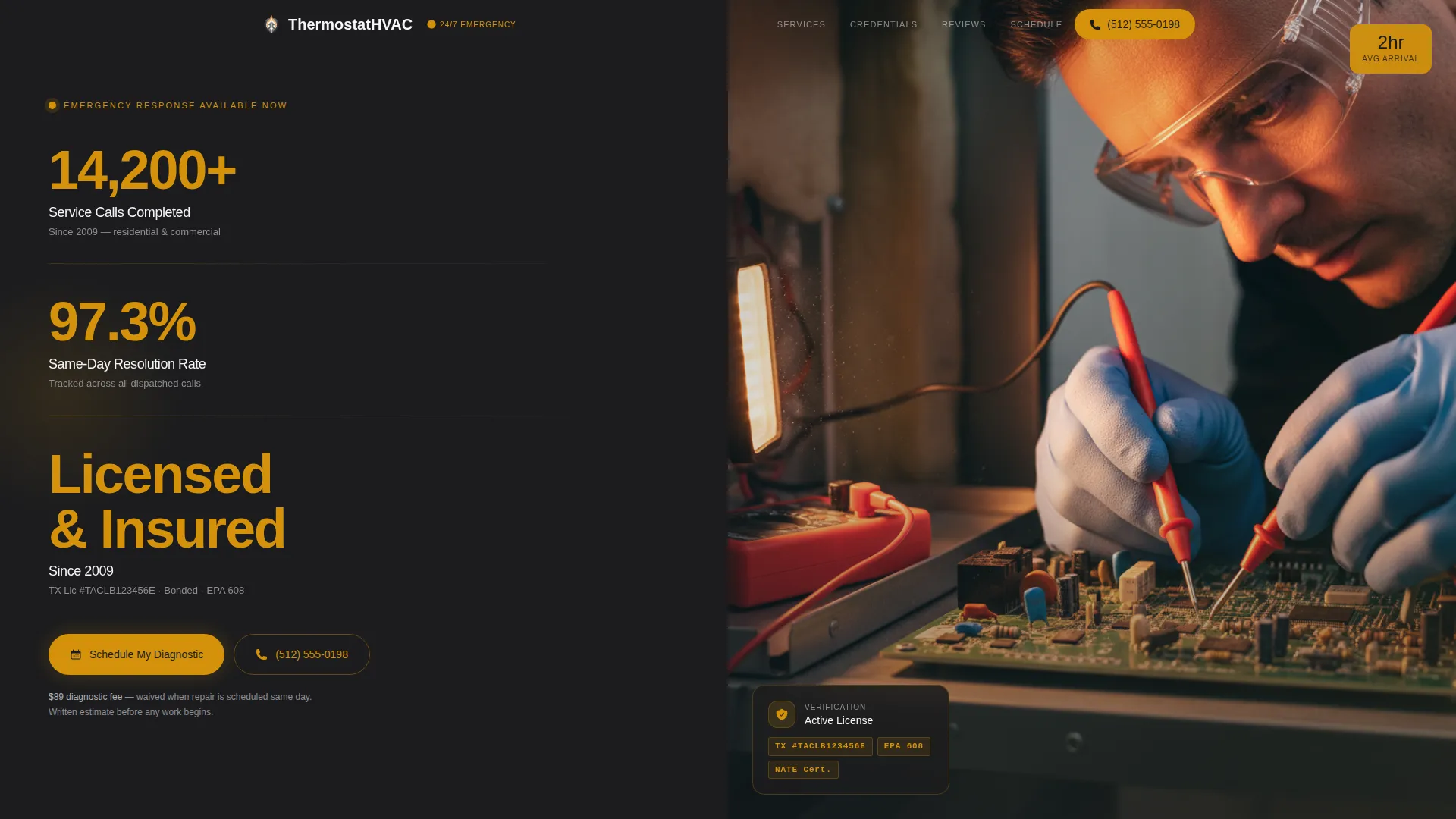
- A split-screen header with oversized amber metric panels and an editorial technician photograph
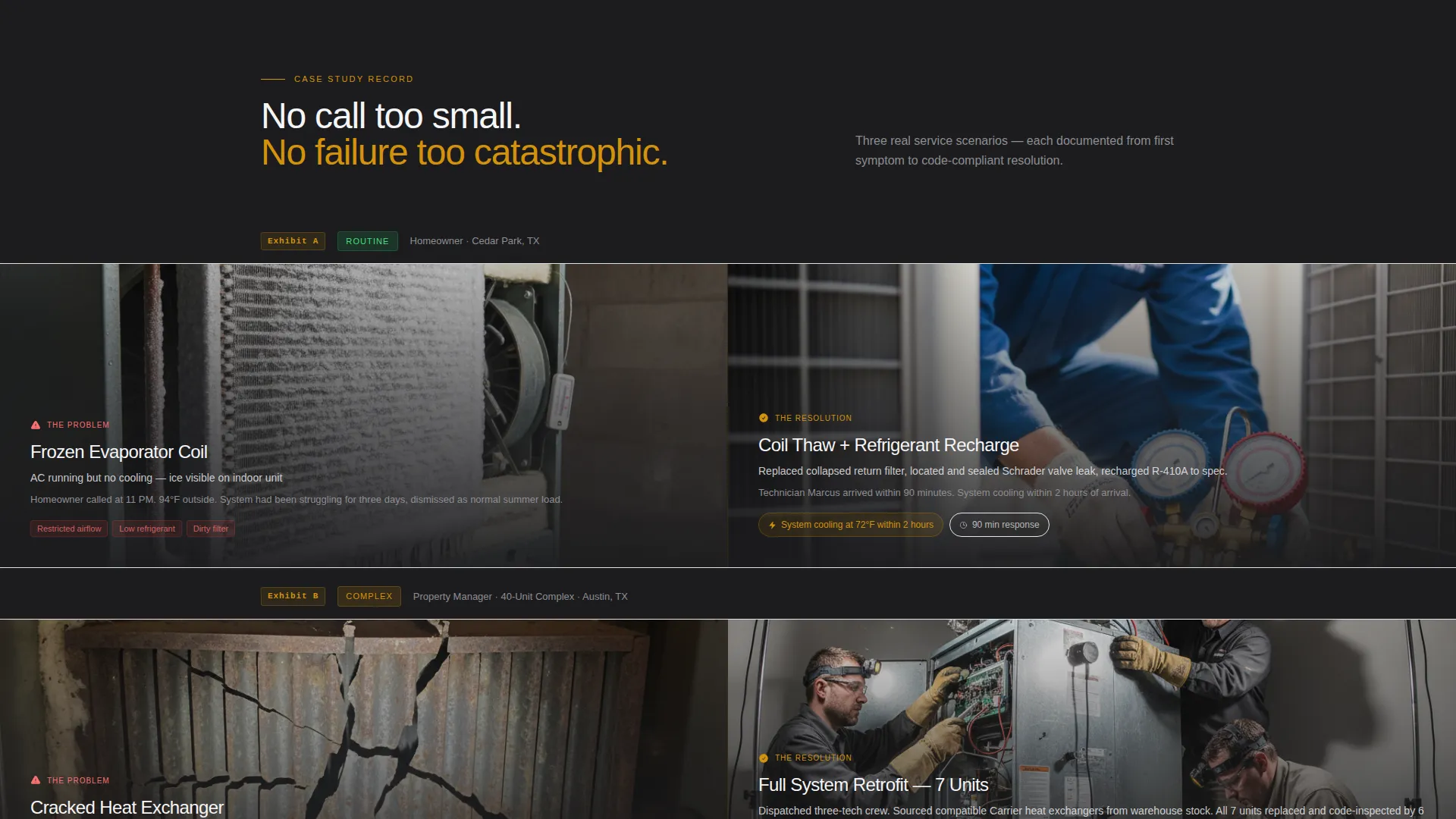
- A scrollable case study section presenting real service scenarios at escalating complexity
- A persistent right-panel booking form with zip code verification, system type selection, and urgency level input
Feature list
This template includes six core design and layout features drawn directly from its brief. Each one serves the lead generation goal without adding unnecessary complexity.
Stats and Metrics Header Wall
The header splits into two equal panels. The left panel displays three oversized numbers in amber against deep charcoal: total service calls completed, same-day resolution rate, and years licensed and insured. The right panel holds a tight editorial photograph of a technician mid-diagnostic, with a work light casting amber tones across the scene.
Case Study Narrative Scroll
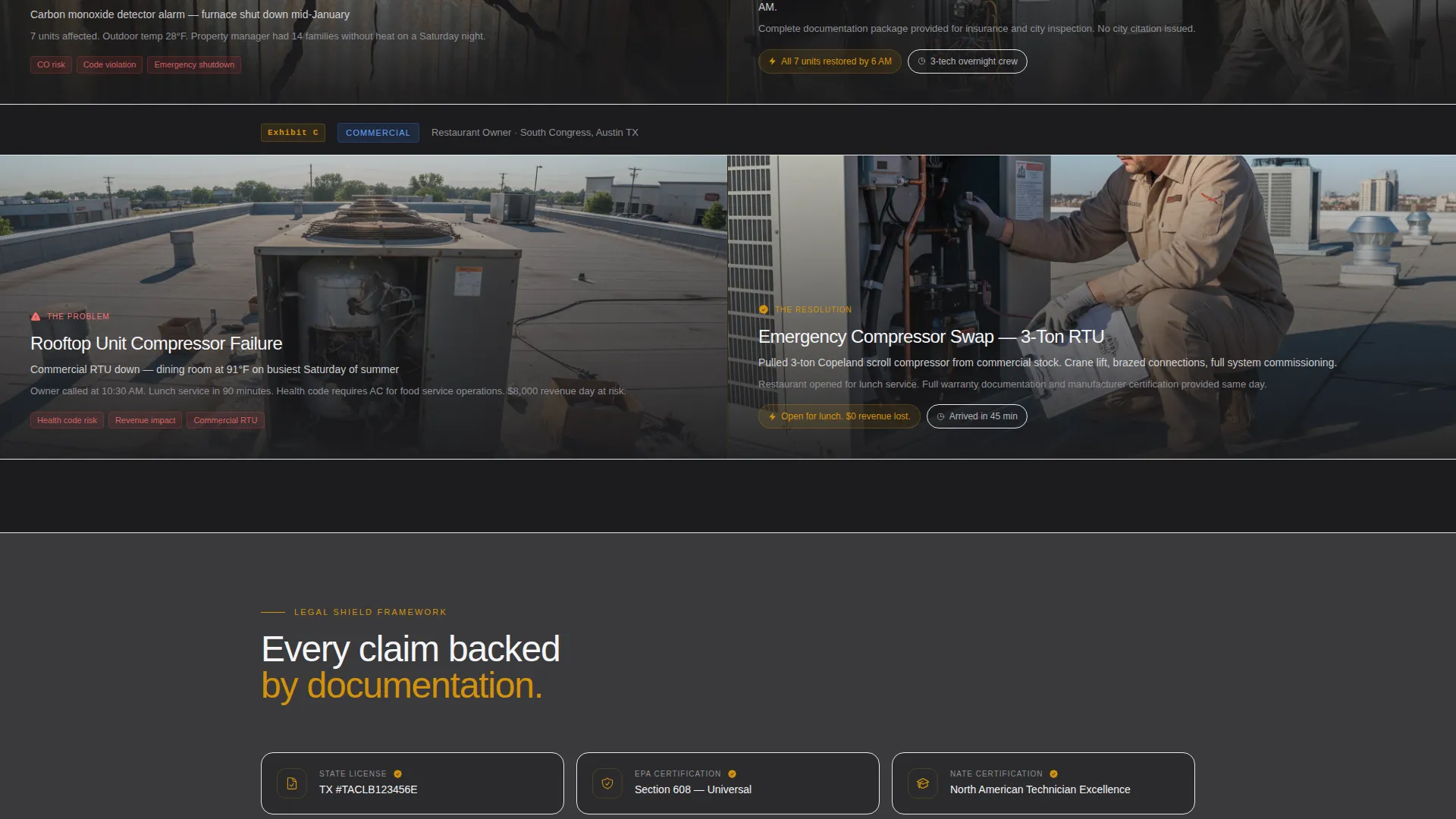
Each content section below the header presents a specific service scenario as a mini case study. The left side of the split screen shows the problem (a frozen coil, a cracked heat exchanger, a thermostat reading off by twenty degrees) and the right side shows the resolution, the part replaced, and the code-compliant installation. Scenarios escalate from a filter replacement to a full system retrofit to an emergency commercial job.
Persistent Lead Generation Form
A sticky right-panel form travels with the visitor as they scroll. It asks for zip code first to confirm service area coverage with a visual checkmark, then collects system type (central air conditioning, heat pump, furnace, mini-split, or commercial), then urgency level (emergency, this week, or just a quote). This three-step flow reduces friction and qualifies each lead before submission.
Legal Shield Trust Framework
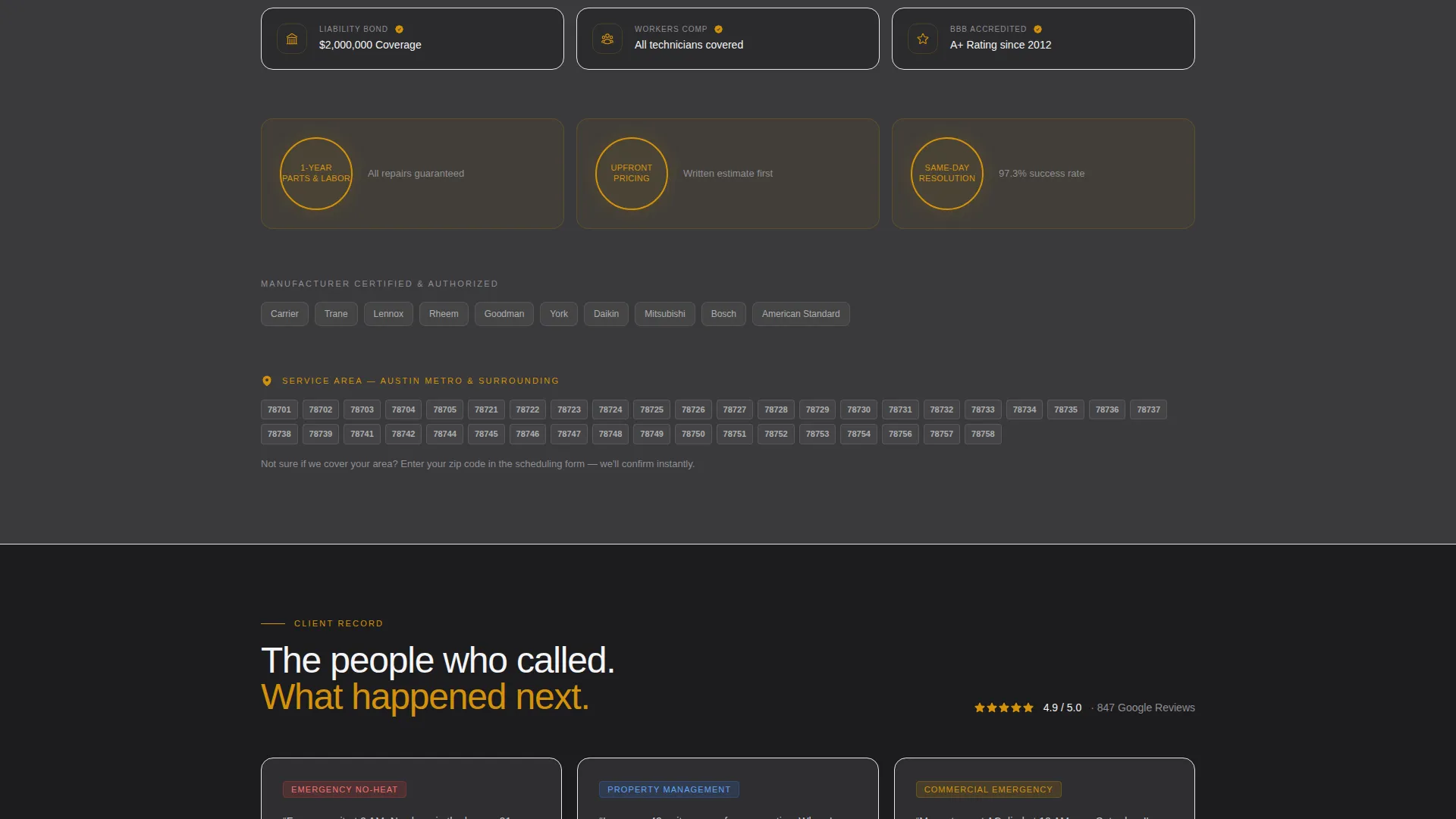
Between case study sections, amber-highlighted trust elements appear as exhibit-style callouts. These include license numbers, bonding details, manufacturer certifications, warranty terms, and a service-area map with highlighted zip codes. Every claim on the page is paired with a supporting number or a stated guarantee condition.
Amber-Accented Call-to-Action System
The primary call to action, labeled "Schedule My Diagnostic," appears in warm amber and anchors to the persistent form. A secondary "Call Now" path uses a click-to-dial number styled in oversized amber type, sized for easy thumb tapping on mobile screens. The diagnostic fee is stated upfront with its waiver condition to remove doubt before the click.
Alternating Background Sections
Backgrounds alternate between deep furnace charcoal and clean condenser white throughout the scroll. Text is always set in high-contrast pairs to stay readable. Amber appears only on interactive elements, guarantees, license callouts, and the satisfaction seal, keeping visual hierarchy clean and purposeful.
Page sections overview
| Section | Purpose |
|---|---|
| Stats Metrics Header | Establish credibility instantly with three oversized performance numbers and an editorial technician photograph |
| Case Study One | Present a simple repair scenario (filter replacement) to show accessibility and responsiveness |
| Trust Exhibit Strip | Display license numbers, bonding details, and certifications between case studies |
| Case Study Two | Show a mid-complexity job (full system retrofit) to demonstrate broader technical capability |
| Service Area Map | Highlight covered zip codes and confirm geographic reach visually |
| Case Study Three | Present a high-stakes commercial emergency job to prove the team handles critical failures |
| Persistent Booking Form | Collect zip code, system type, and urgency level in a sticky right-panel module |
| Guarantee Seal Block | State the satisfaction guarantee and diagnostic fee waiver condition explicitly |
| Call Now Footer | Offer a click-to-dial phone number in amber as a secondary conversion path |
Design & branding system
The visual identity uses a Charcoal and Amber color system that references the feel of a well-maintained mechanical room. Matte dark surfaces, brushed metal tones, and a single amber indicator light define the mood. The palette communicates precision and dependability without relying on generic blue-and-white service aesthetics.
- Core colors: deep furnace charcoal (#1C1C1E), ductwork gunmetal (#3A3A3C), clean condenser white (#F5F5F7), and warning-light amber (#D4920B)
- Amber is reserved exclusively for calls to action, trust badges, license callouts, guarantee seals, and interactive form elements
- Typography and text are set in high-contrast pairs (amber or white on charcoal, charcoal on white) throughout every section
Mobile & speed optimization
The split-screen layout is designed to reflow cleanly on smaller screens so the booking form, trust elements, and case study panels remain readable and functional on phones and tablets. The "Call Now" button is sized specifically for thumb interaction, recognizing that many emergency HVAC calls start on a mobile device.
- The persistent booking form is styled for smooth vertical scrolling on mobile without obscuring content
- The click-to-dial amber button is oversized and thumb-friendly for fast emergency contact
- Alternating section backgrounds maintain visual clarity and contrast across all screen sizes
How this template helps you convert
The page is structured around one goal: turning a stressed visitor into a booked service call. Every design and layout decision reduces the steps between problem and resolution.
- The metrics header front-loads credibility so visitors trust the business before reading a single line of body copy, lowering the chance they leave without engaging.
- The case study scroll shows visitors their own scenario reflected in a real job, building confidence that this crew can handle their specific system and urgency level.
- The three-field persistent form (zip code, system type, urgency) removes guesswork and confirms service area coverage immediately, so the visitor feels certain before they submit.
Other information about this template
This template is part of the Professional Services category, specifically built for the HVAC technician online presence niche. It is positioned as a service area and location page, making it well suited for technicians who want to rank and convert within a defined geographic territory.
- The Legal Shield theme frames every claim as verifiable and every promise as documented, which mirrors how licensed contractors build trust in regulated trades
- The Case Study Narrative creative direction is especially effective for trades where showing the work is more persuasive than describing it
- The template style is a strict 50/50 split screen, giving equal visual weight to evidence (the photo and the problem) and resolution (the repair and the outcome)
- The intersection match between the Lead Generation direction and the HVAC service area niche is reflected in every layout decision, from the sticky form to the upfront diagnostic fee disclosure
Theme
Legal Shield
Creative direction
Case Study Narrative
Color system
Charcoal & Amber
Style
Split Screen (50/50)
Direction
Lead Generation
Page Sections
Stats and Metrics Header Panel
Case Study Narrative Scroll
Persistent Booking Form Module
Legal Shield Trust Exhibits
Dual Call-to-action System
Alternating Section Backgrounds
Related questions
Can I customize the service scenarios in the case study sections?
Does the template include the booking form logic?
Is this template suitable for a commercial HVAC business as well as residential?
Can I update the license numbers, certifications, and warranty terms?
How does the zip code confirmation in the booking form work?



