Thoracic Surgeon Booking Website Template
Thorax is a sidebar companion landing page built for thoracic surgeons offering virtual consultations. It combines a portrait-centered hero, FAQ-driven scroll, and a five-step quiz that guides patients toward booking. The Medical Clarity design keeps the experience warm and trustworthy, with a Cloud Canvas color palette and a conversion flow that earns the click before asking for personal health information.
by Rocket studio
Quick summary
Thorax is a sidebar companion landing page template for a thoracic surgeon's virtual consultation practice. It guides three distinct visitors, recently diagnosed patients, referring physicians, and post-operative patients, through a calming FAQ scroll and a five-step quiz that ends in either a direct booking or a clinical review request.
Who this template is for
This template is designed for thoracic surgeons who offer video consultations and need a single page that speaks to anxious patients, busy referring doctors, and recovering post-op individuals at the same time.
- Recently diagnosed patients holding a CT report and searching for plain-language answers at any hour
- General practitioners seeking a specialist second opinion before transferring a patient across state lines
- Post-operative patients tracking recovery milestones and wanting remote access to their surgeon
What problem this template solves
Patients facing lung, esophagus, chest wall, or mediastinum diagnoses often feel overwhelmed before a first appointment. A standard contact page does nothing to lower that anxiety. This template replaces the cold web form with a conversational experience that answers real questions first, then earns the visitor's trust before asking for personal information.
- There is no clear entry point for patients who are unsure whether a virtual visit applies to their case
- Referring physicians have no quick way to assess whether a remote second opinion is appropriate for their patient
- The standard booking flow asks for commitment before the visitor understands what they are booking
What you get with this template
The template delivers a complete, single-page layout structured around four content pillars: patient education, surgeon credentialing, conversion assessment, and appointment logistics. Every section is intentional and ready to customize with real procedure details, outcomes data, and a surgeon's own credentials.
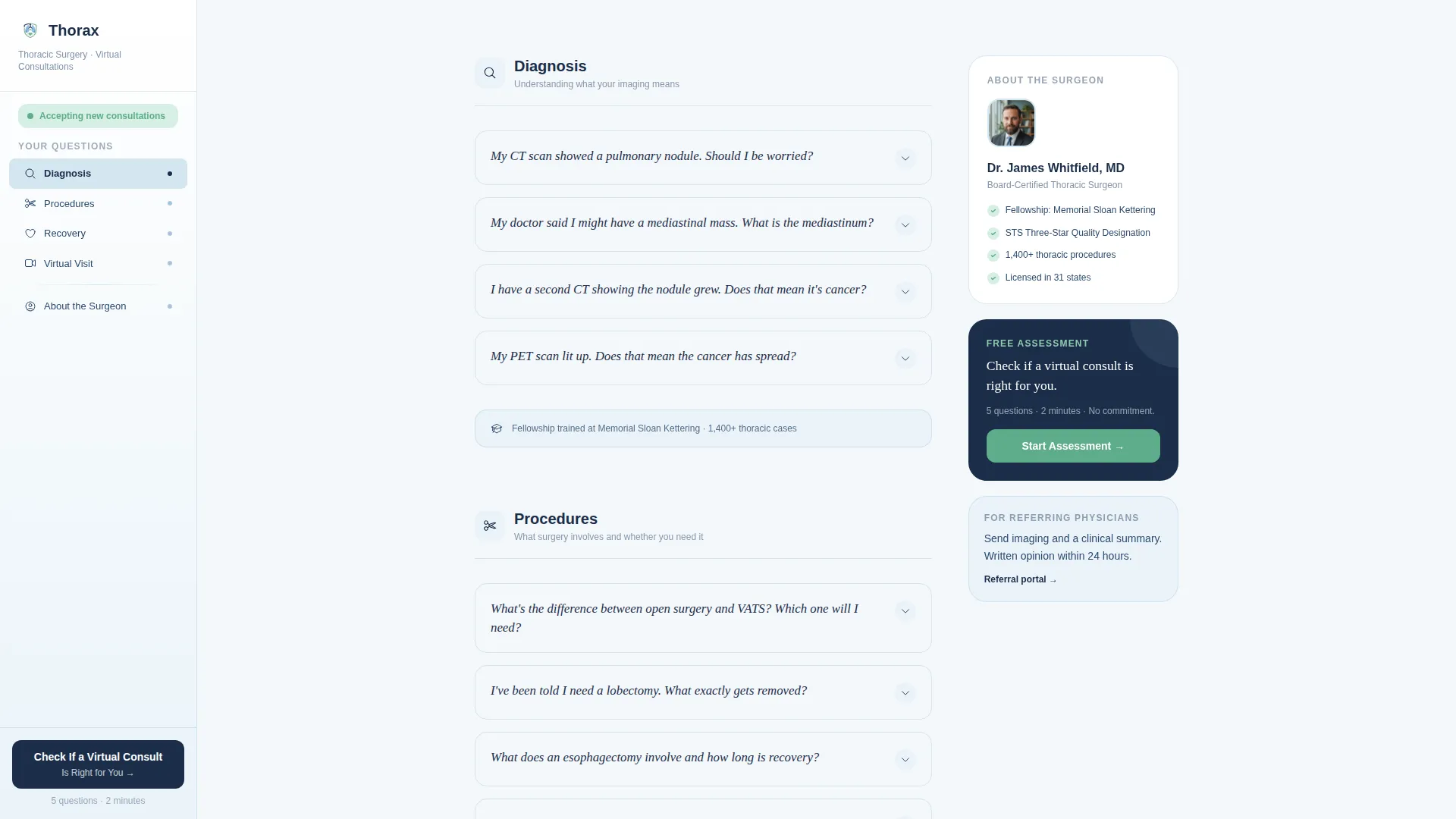
- A fixed sidebar companion that tracks which FAQ cluster the visitor is reading and lets them jump directly to Diagnosis, Procedures, Recovery, or Virtual Visit Logistics
- A five-step progressive quiz with a reassurance green progress bar that ends in either a live booking calendar or a 24-hour clinical review response
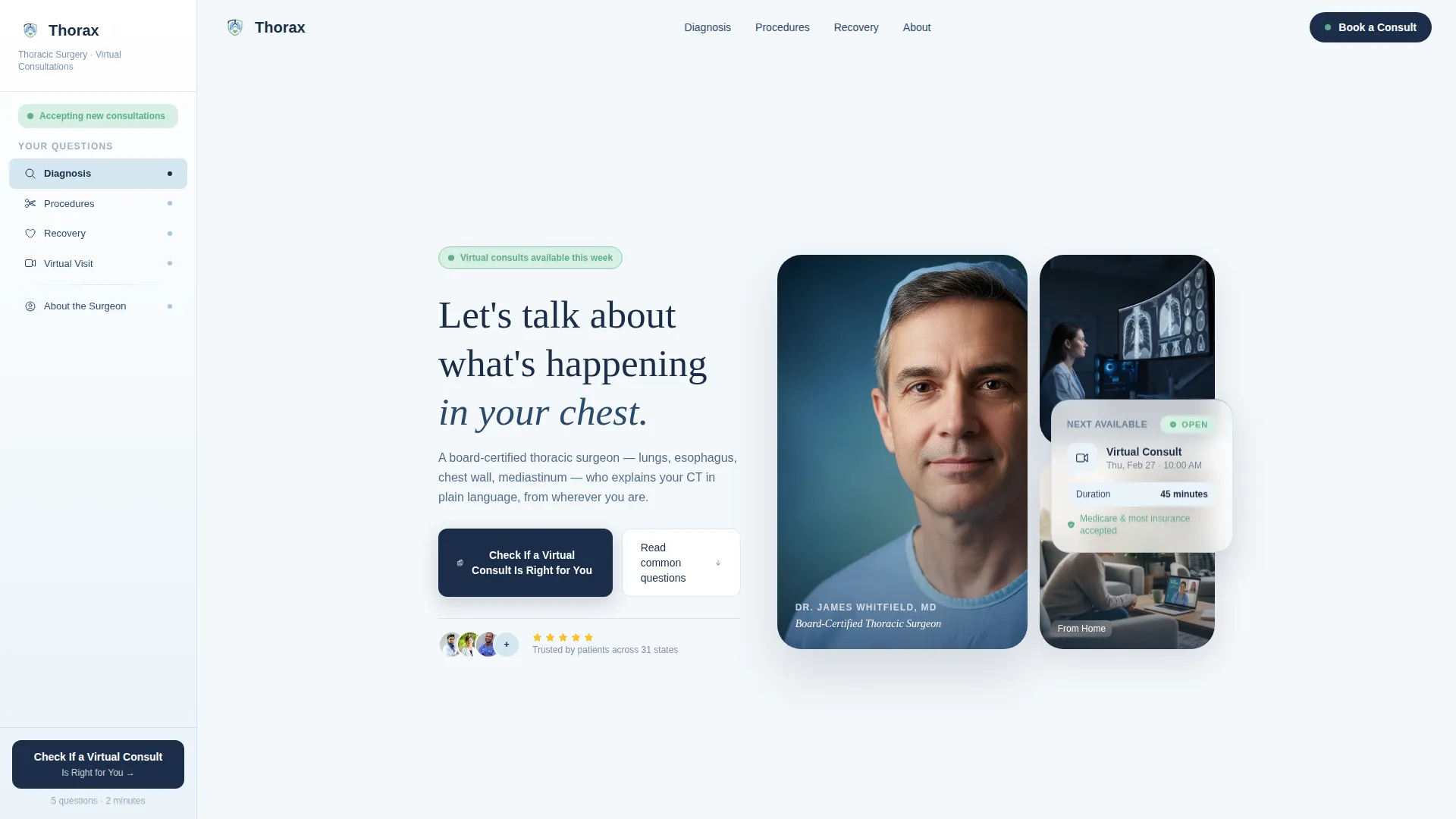
- A portrait-centered hero with a floating consultation card and a single direct headline that meets patient anxiety with calm authority
Feature list
This section outlines the core built-in components and interaction patterns included in this template.
Portrait-Centered Hero with Floating Consultation Card
The hero opens with a close-cropped surgeon portrait set against a soft white-to-sky-blue gradient. A floating card sits beside the portrait, reinforcing the virtual consultation context. Beneath the portrait, one clear headline invites the visitor into the conversation without clinical jargon or generic stock imagery.
FAQ-Driven Scrollable Content Clusters
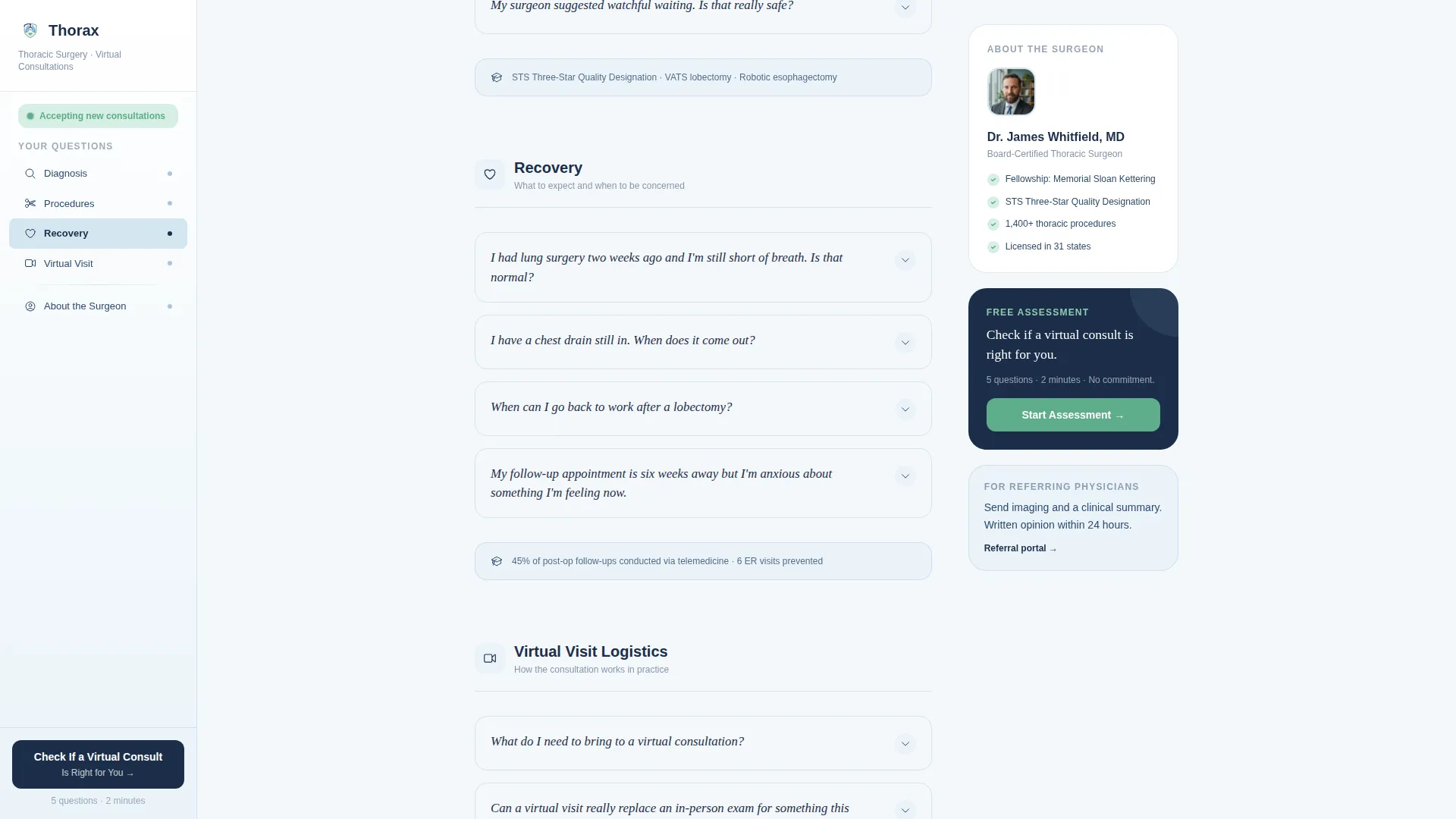
The main content area unfolds as four question clusters: Diagnosis, Procedures, Recovery, and Virtual Visit Logistics. Each question appears in a slightly larger typeface, followed by a three-to-five sentence plain-language answer with a link to a deeper explanation. Credential callouts, such as fellowship institution or case volume, appear quietly between clusters as embedded proof rather than promotional banners.
Fixed Sidebar Navigation with Scroll Tracking
The left sidebar stays fixed as the visitor scrolls. It highlights the active question cluster in real time, letting visitors jump between concern areas without losing their place. The primary call to action, "Check If a Virtual Consult Is Right for You," is pinned at the bottom of the sidebar throughout the session.
Five-Step Progressive Assessment Quiz
The quiz reveals one question at a time across five steps: area of concern, availability of imaging or pathology results, current treatment status, insurance or self-pay preference, and preferred appointment window. A reassurance green progress bar advances with each step. Completion delivers a personalized result, either a direct booking calendar for qualifying cases or a message confirming clinical review within 24 hours.
Credentials and Social Proof Section
A dedicated section surfaces fellowship institution, case volume, and outcomes data in a quiet, factual format. The presentation avoids fanfare, letting the numbers and credentials speak without competitive phrasing or inflated claims.
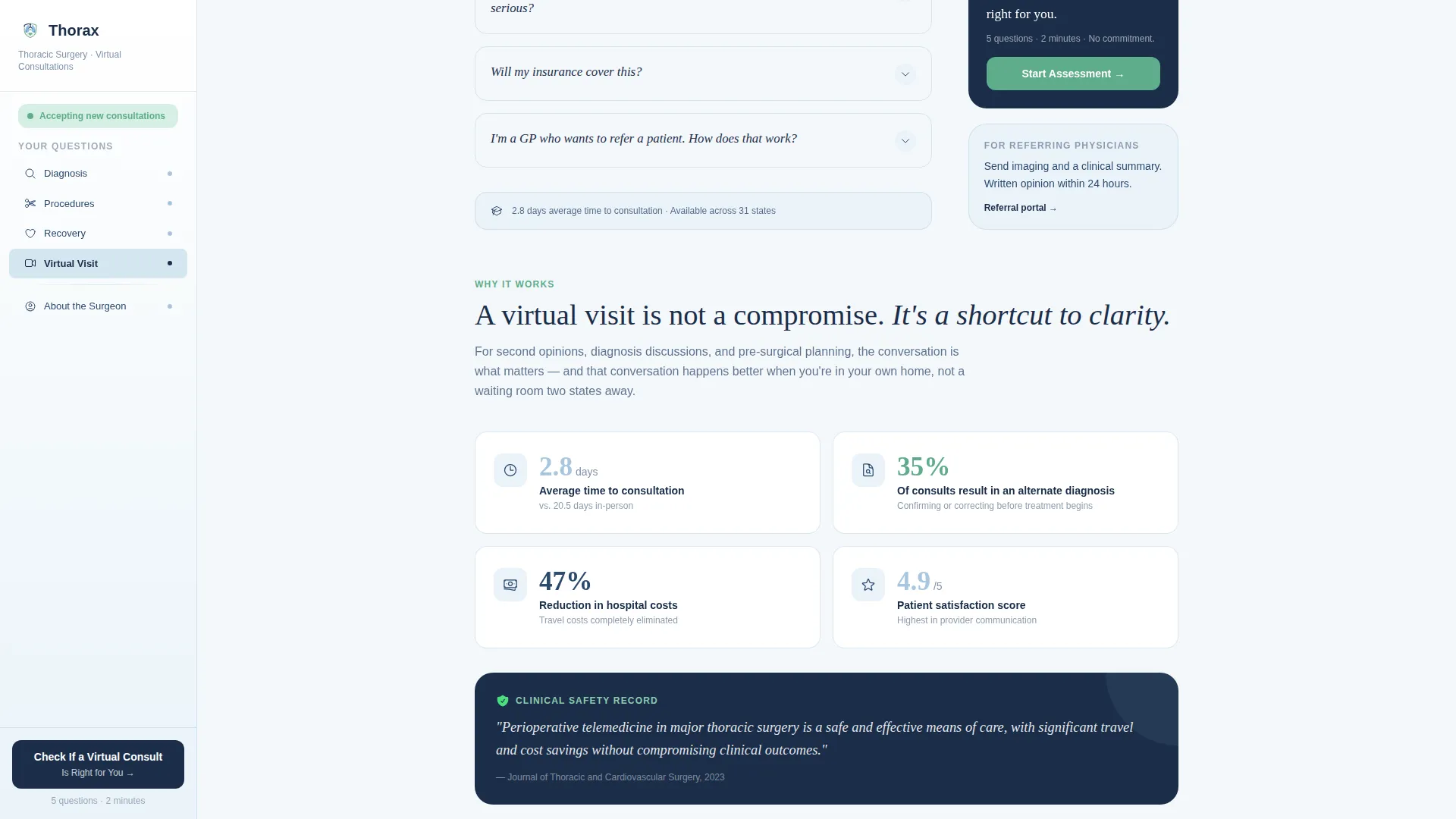
Why Virtual Works Section
This section presents the practical case for remote thoracic consultations: outcomes data, travel savings, and consultation efficacy. It answers the skepticism a referring GP or out-of-state patient might bring before they are willing to book a video appointment.
Page sections overview
| Section | Purpose |
|---|---|
| Hero Portrait Block | Introduce the surgeon and surface the primary call to action |
| FAQ Cluster: Diagnosis | Answer common questions about lung, esophagus, and chest wall findings |
| FAQ Cluster: Procedures | Explain what thoracic surgical procedures involve in plain language |
| FAQ Cluster: Recovery | Address post-operative milestones and remote monitoring expectations |
| FAQ Cluster: Logistics | Cover virtual visit setup, insurance, and appointment scheduling |
| Why Virtual Works | Build confidence in the video consultation format with proof points |
| Credentials Section | Display fellowship, case volume, and outcomes data with quiet authority |
| Quiz Assessment | Guide visitors through five steps toward booking or clinical review |
| Single-Row Footer | Provide essential contact links and practice information |
Design & branding system
The visual identity follows a Medical Clarity theme built on the Cloud Canvas color system. The palette is sterile without feeling cold and open without feeling empty. Body text and headings are set in deep surgical navy, which anchors every section. DM Sans carries all body copy for readability, while Fraunces appears at emotional heading moments to add warmth and weight.
- Cloud Canvas palette: atmospheric white (#F4F7FA) for content panels, clinical sky blue (#A8C6DF) for the sidebar and section dividers, deep surgical navy (#1B2E4A) for all headings and body text, and reassurance green (#5FAD8B) reserved strictly for the quiz progress bar and confirmed-state interface elements
- Typography pairing: DM Sans for body copy and navigation labels, Fraunces for serif heading moments where tone and warmth matter most
- No hospital corridors, no caduceus symbols, and no generic healthcare stock imagery; the design relies on a single human portrait and direct language to build trust
Mobile & speed optimization
The template is desktop-first by design. The fixed sidebar companion requires a full desktop layout to function as intended, since it tracks scroll position and pins the quiz call to action throughout the session. A mobile fallback is included so the content remains accessible on smaller screens.
- On mobile, the fixed sidebar collapses into an accessible navigation pattern so the FAQ clusters remain reachable without the desktop layout
- Static FAQ content is built with server-rendered components for fast initial load, while the interactive quiz and sidebar tracking use client-side rendering only where interactivity requires it
- Scroll reveal animations and quiz step transitions are set to a medium intensity, keeping the experience smooth without distracting from the clinical content
How this template helps you convert
The conversion architecture is designed so that visitors earn enough trust through the FAQ scroll before they are ever asked to share personal health information. The quiz feels like a natural next step because competence and empathy have already been demonstrated.
- The FAQ-driven scroll answers real patient concerns first, cluster by cluster, reducing anxiety and establishing the surgeon's authority before any form appears
- The pinned sidebar call to action stays visible throughout the entire scroll, so the booking prompt is always one click away without interrupting the reading experience
- The five-step assessment quiz filters and routes each visitor to the right outcome, either a direct booking calendar or a 24-hour clinical review, so no inquiry falls through without a response
Other information about this template
This template is part of a focused set of medical telehealth layouts designed for specialist virtual consultation practices. It is especially well suited for surgeons who need their online presence to feel as considered and authoritative as an in-person consultation.
- The template is localized for English (US) audiences, with USD pricing references and United States insurance terminology built into the quiz flow
- Animation intensity is set to medium across scroll reveals, sidebar tracking transitions, and quiz step progressions, keeping the experience purposeful without feeling clinical or robotic
- The footer follows a linear single-row pattern, keeping the page exit clean and focused on the primary conversion goal rather than scattering attention across multiple links
Theme
Medical Clarity
Creative direction
FAQ-Driven
Color system
Cloud Canvas
Style
Sidebar Companion
Direction
Quiz/Assessment
Page Sections
Portrait-centered Hero with Consultation Card
Faq-driven Scrollable Question Clusters
Fixed Sidebar with Scroll Tracking
Five-step Progressive Assessment Quiz
Credentials and Outcomes Section
Why Virtual Works Section
Related questions
Who is this template designed for?
How does the five-step quiz work?
Does this template work on mobile devices?
Can I customize the FAQ questions and credential details?
Can a referring physician use this page too?



