Cinematic Twitter/X Story Template Landing Page
Thread is a cinematic design toolkit for Twitter/X creators who want their threads to look like editorial art direction. It includes bold typography cards, quote overlays, and carousel frames styled in an Obsidian and Gold palette. Built for ghostwriters, solo creators, and social media managers who need scroll-stopping visuals fast.
by Rocket studio
Quick summary
Thread transforms raw tweet copy into cinematic story templates. The toolkit delivers bold typography cards, quote overlays, and carousel frames designed around an Editorial Magazine theme. The Obsidian and Gold color system gives every output a high-end, press-ready feel. If your threads deserve more than a default text tile, this is the pack for them.
Who this template is for
This toolkit is built for people who create content on Twitter/X at a professional pace. They know their writing is strong. The visuals are the part that needs to catch up.
- Ghostwriters building personal brands for founders who need polished output on a fast turnaround
- Solo creators who have outgrown default template tools and want an editorial upgrade
- Social media managers at direct-to-consumer brands who need scroll-stopping visuals on a tight deadline
What problem this template solves
Most thread visuals look like everyone else's. Plain quote tiles, generic fonts, and no visual hierarchy. The gap between what you are posting now and what your content could look like is costing you attention and authority.
- Raw tweet copy gets lost when the visual presentation has no editorial personality
- Building custom cards from scratch every time is slow and eats into creative energy
- Generic defaults make strong writing look like weak content
What you get with this template
The pack gives you a complete visual system designed for Twitter/X story content. Every component is ready to receive real tweet copy and output something that looks art-directed.
- Bold typography cards that frame tweet text with editorial weight and hierarchy
- Quote overlay layouts and carousel frames styled in the Obsidian and Gold palette
- A hero-dominant landing page built around a looping short-form reel showing the raw-to-styled transformation
Feature list
The Thread toolkit is built around one promise: make your threads look like a magazine editor signed off on them. Every feature below comes from the source brief and exists in the delivered pack.
Cinematic Hero Reel
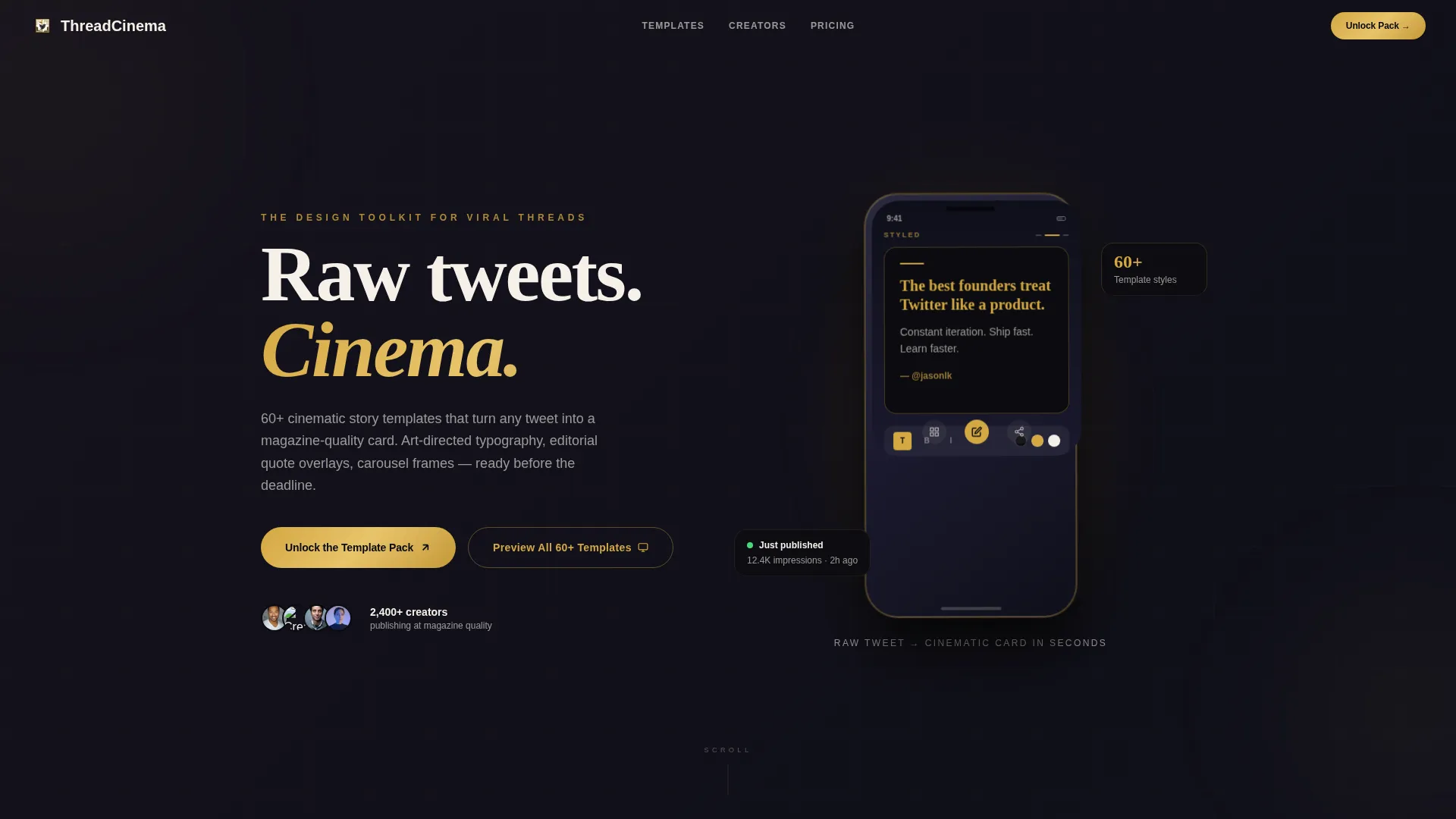
The hero section centers a looping vertical video composited into a phone mockup. It shows a raw tweet transforming in real time into a fully styled story template, with typography snapping into place and gold particles on the final frame. The reel autoplays muted against the obsidian background.
Typography Card System
Bold typography cards are the core output unit of this toolkit. Each card is designed to frame tweet text with strong visual hierarchy, making short-form copy feel intentional and editorial rather than thrown together.
Quote Overlays and Carousel Frames
Quote overlay layouts and carousel frames are included for threads that need to travel across multiple slides. They follow the same Editorial Magazine theme and work alongside the card system for consistent, branded output.
Staggered Template Preview Grid
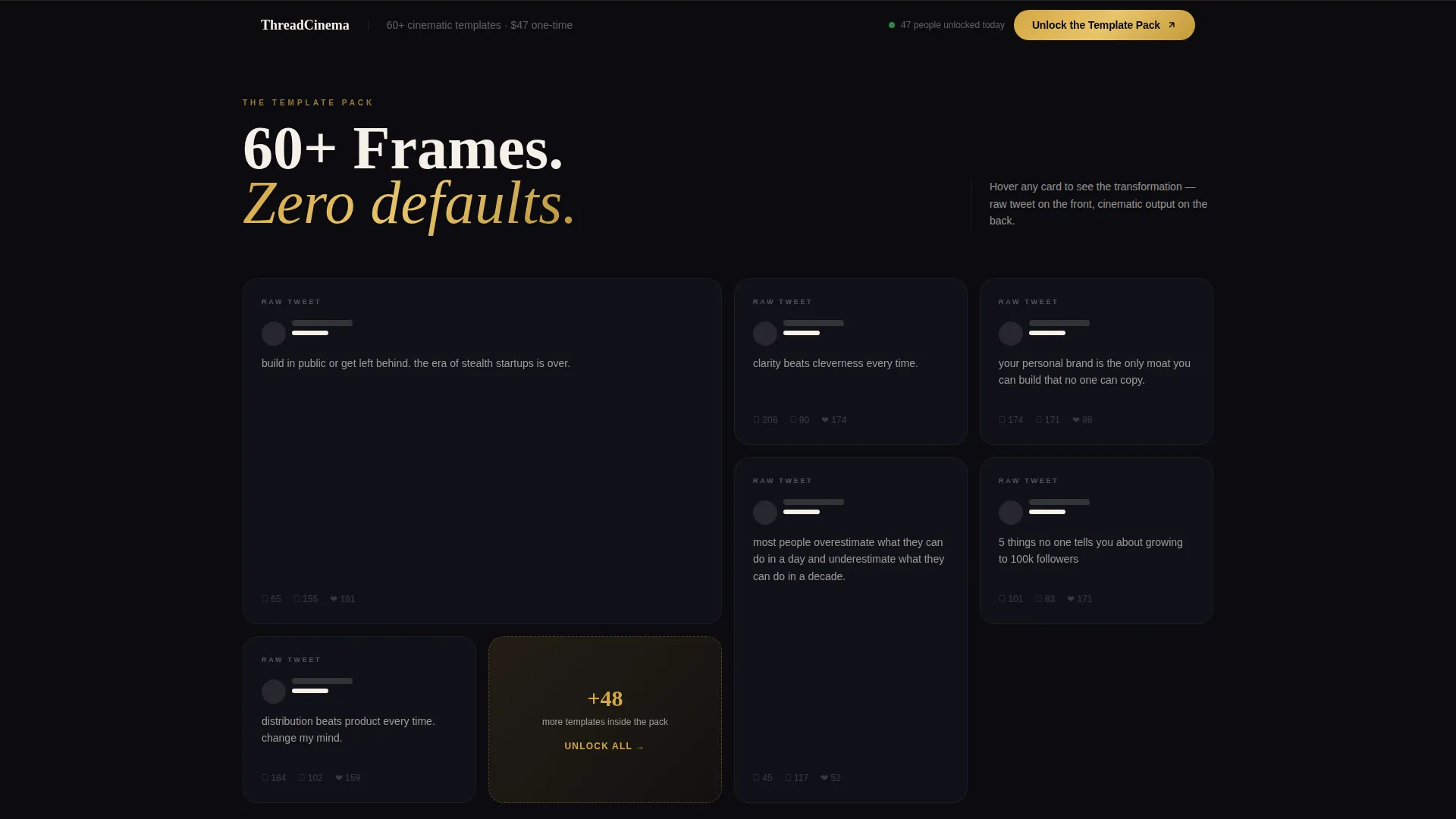
Below the hero, a rapid-fire grid of template previews tiles in with staggered animation. Each card flips from raw tweet text to styled output on hover, letting visitors see the transformation before they commit to the pack.
Dual Call-to-Action System
The primary call to action, "Unlock the Template Pack," appears once beneath the hero reel and again as a sticky bottom bar that activates after 40 percent scroll depth. A secondary ghost-button reads "Preview All 60+ Templates" and opens a lightbox gallery.
Social Proof and Testimonial Section
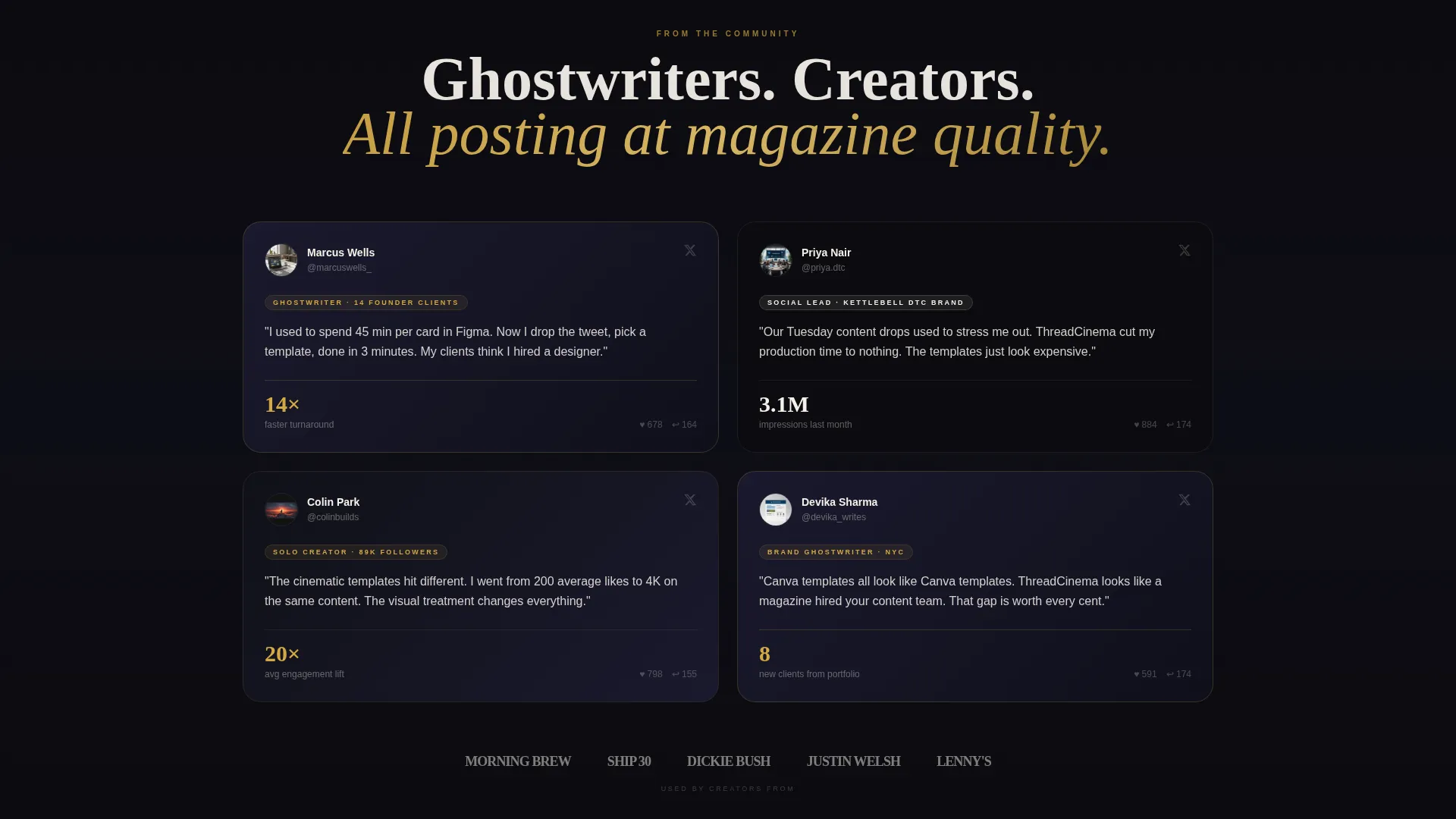
Social proof numbers animate upward as they enter the viewport. Creator testimonials are styled as tweet cards themselves, reinforcing the product's own visual language while building trust.
Page sections overview
| Section | Purpose |
|---|---|
| Hero Reel Section | Showcases raw-to-styled transformation inside a phone mockup |
| Template Preview Grid | Displays staggered card flips from plain text to styled output |
| Social Proof Numbers | Animates key credibility figures upward on scroll |
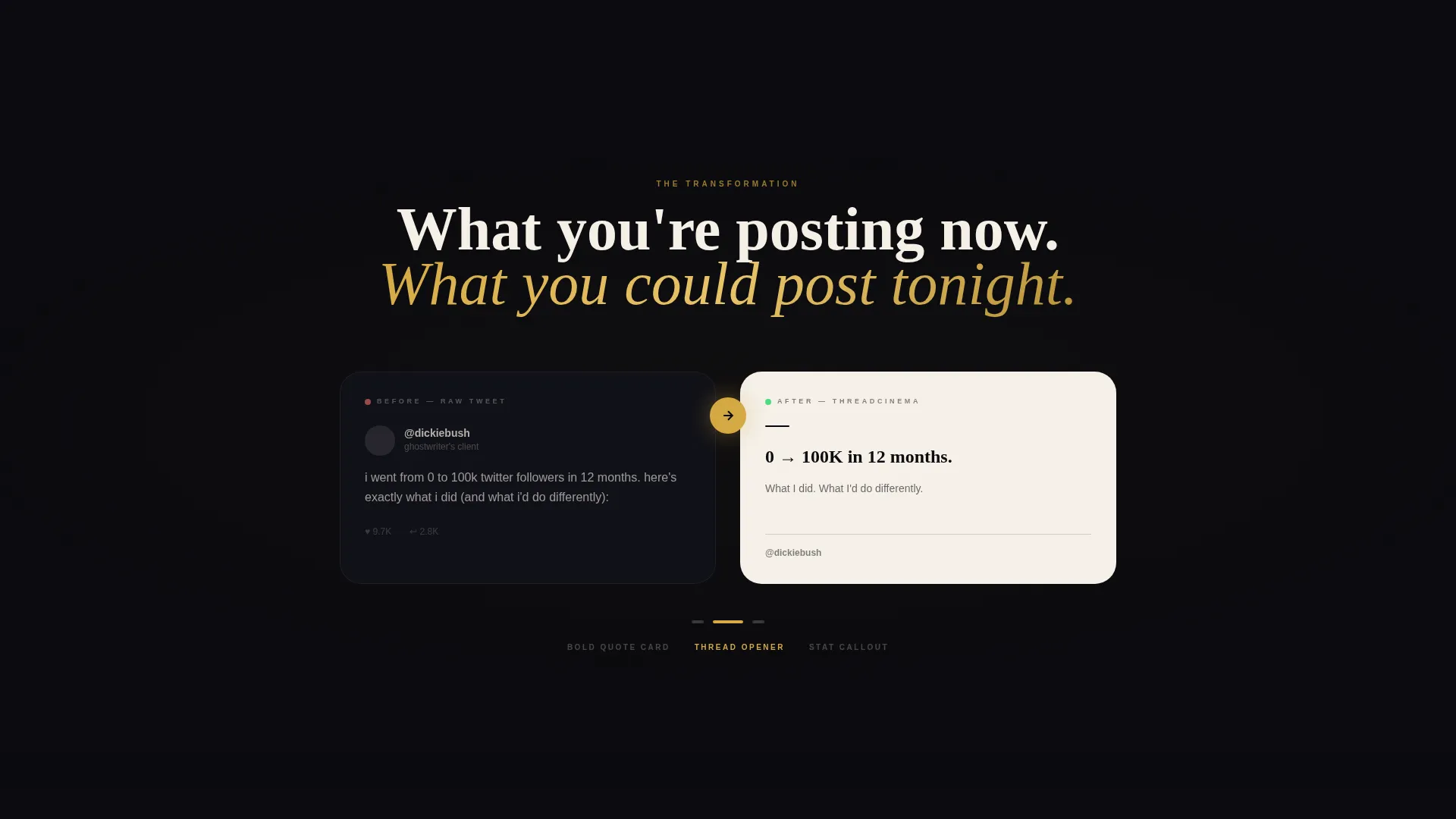
| Before/After Carousel | Auto-advances to show the editorial transformation repeatedly |
| Creator Testimonials | Styled as tweet cards to reinforce the product's own visual language |
| Sticky call to action Bar | Activates at 40 percent scroll to keep the primary action in view |
| Lightbox Gallery | Opens on ghost-button click to preview all 60+ template frames |
Design & branding system
The visual identity follows an Editorial Magazine theme. Every design decision references the feeling of a luxury quarterly laid flat on a matte black desk, with gold foil catching the light.
- Color system uses deep obsidian black (#0B0B0F), ink-dark charcoal (#1A1A2E), molten gold (#D4A843), and bright editorial cream (#F5F0E8)
- Typography is bold and hierarchical, built to carry tweet copy with editorial authority
- Card surfaces use cream and gold accents against obsidian backgrounds for high contrast and visual tension
Mobile & speed optimization
The template is structured for a vertical-first viewing context. The hero reel composites into a phone mockup, which reflects the native experience of consuming Twitter/X content on a mobile screen.
- Vertical video format in the hero aligns with how the audience already consumes short-form content
- Staggered animations and hover states are designed for a scroll-based rhythm that builds momentum section by section
- The sticky call to action bar is positioned for thumb-friendly access on smaller screens after 40 percent scroll depth
How this template helps you convert
The page is a click-through design. Every section is built to show the transformation repeatedly until the visitor feels the gap between their current output and what this toolkit makes possible.
- The hero reel demonstrates the raw-to-styled transformation immediately, so the value is visual before any copy is read
- The staggered preview grid and before/after carousel reinforce the same message from different angles, building momentum toward the primary call to action
- The dual call-to-action system, sticky bar plus hero placement, keeps the "Unlock the Template Pack" button accessible at every stage of the scroll
Other information about this template
Thread is a landing page template in the Media and Entertainment category, filed under Twitter/X Templates and the Twitter/X Story Template niche. It is built for creative professionals who treat social content as a craft, not a commodity.
- The template style is Hero-Dominant at a 90/10 content ratio, meaning the visual impact carries the page with minimal supporting copy
- Creative direction follows a Launch Energy principle, where scroll momentum builds like a product drop countdown
- The landing page direction is Click-Through, with no form on the page and all primary clicks routing to a checkout or gated access destination
- The 60+ template frames referenced in the ghost-button call to action reflect the scale of the toolkit as described in the source brief
- This template is well suited for creators building a personal brand presence on Twitter/X and for agencies that produce thread content for multiple clients
Theme
Editorial Magazine
Creative direction
Launch Energy
Color system
Obsidian & Gold
Style
Hero-Dominant (90/10)
Direction
Click-Through
Page Sections
Cinematic Hero Reel with Phone Mockup
Bold Typography Card System
Quote Overlays and Carousel Frames
Staggered Animated Preview Grid
Dual Call-to-action System
Animated Social Proof and Tweet-style Testimonials
Related questions
What types of visual assets does this toolkit include?
Is there a way to preview the templates before purchasing?
Who is this toolkit best suited for?
Does the page require a form to access the templates?
Can this toolkit support a consistent visual brand across multiple threads?