Retail Space Inspection Booking Landing Page
Threshold is a single-page booking landing page built for retail space inspection professionals. It pairs a Charcoal and Amber visual system with an asymmetric 60/40 grid and interactive scroll zones that let visitors explore what a trained inspector actually examines. The result is a calm, credible page that guides serious buyers toward scheduling a walkthrough or downloading a sample report.
by Rocket studio
Quick summary
Threshold is a retail space inspection landing page built around trust, clarity, and action. An asymmetric 60/40 grid gives the layout confident structure. Charcoal and Amber branding anchors credibility while warm interactive zones walk visitors through what a real inspection covers. Every section ends at either a booking form or a sample report download.
Who this template is for
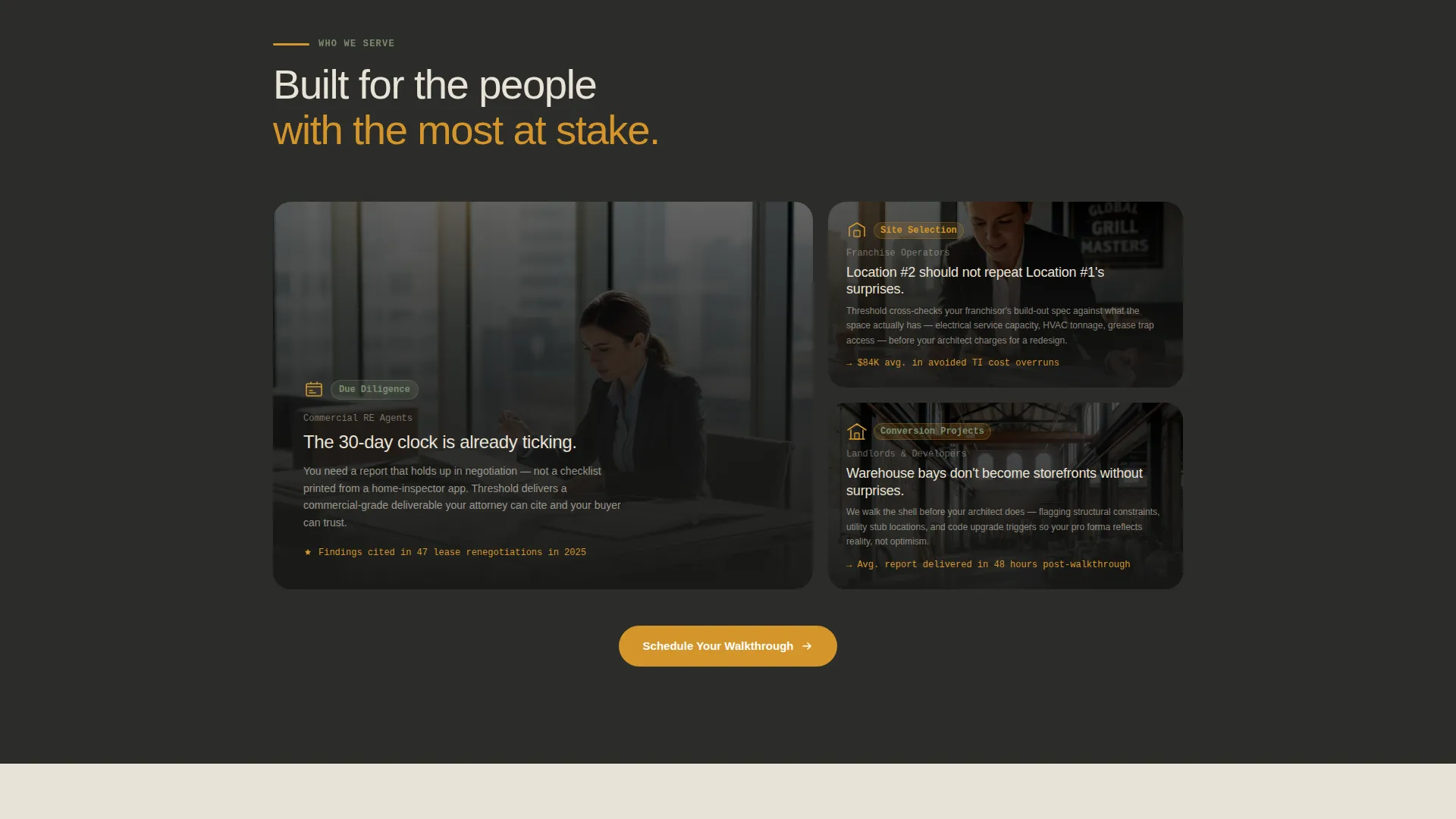
This template is designed for inspection professionals who serve commercial clients with real time pressure and high-stakes decisions. It speaks to buyers who need to see competence before they commit to a booking.
- Commercial real estate agents working within a 30-day due diligence window
- Franchise operators scouting their second or third retail location
- Landlords converting warehouse bays into leasable storefronts
What problem this template solves
Most inspection service pages look like contractor directories. They list credentials and prices but never help a visitor understand the depth of the work. Clients arrive skeptical and leave without booking because nothing on the page builds genuine confidence.
- Visitors cannot see the scope of a retail inspection, so they undervalue the service
- No clear booking path means interested leads lose momentum and drop off
- Cautious visitors who need proof before committing have nowhere to go
What you get with this template
This template delivers a complete single-page layout with every section mapped to a specific job. The visual and interactive design do the persuasion work so the inspector does not have to explain everything in a sales call first.
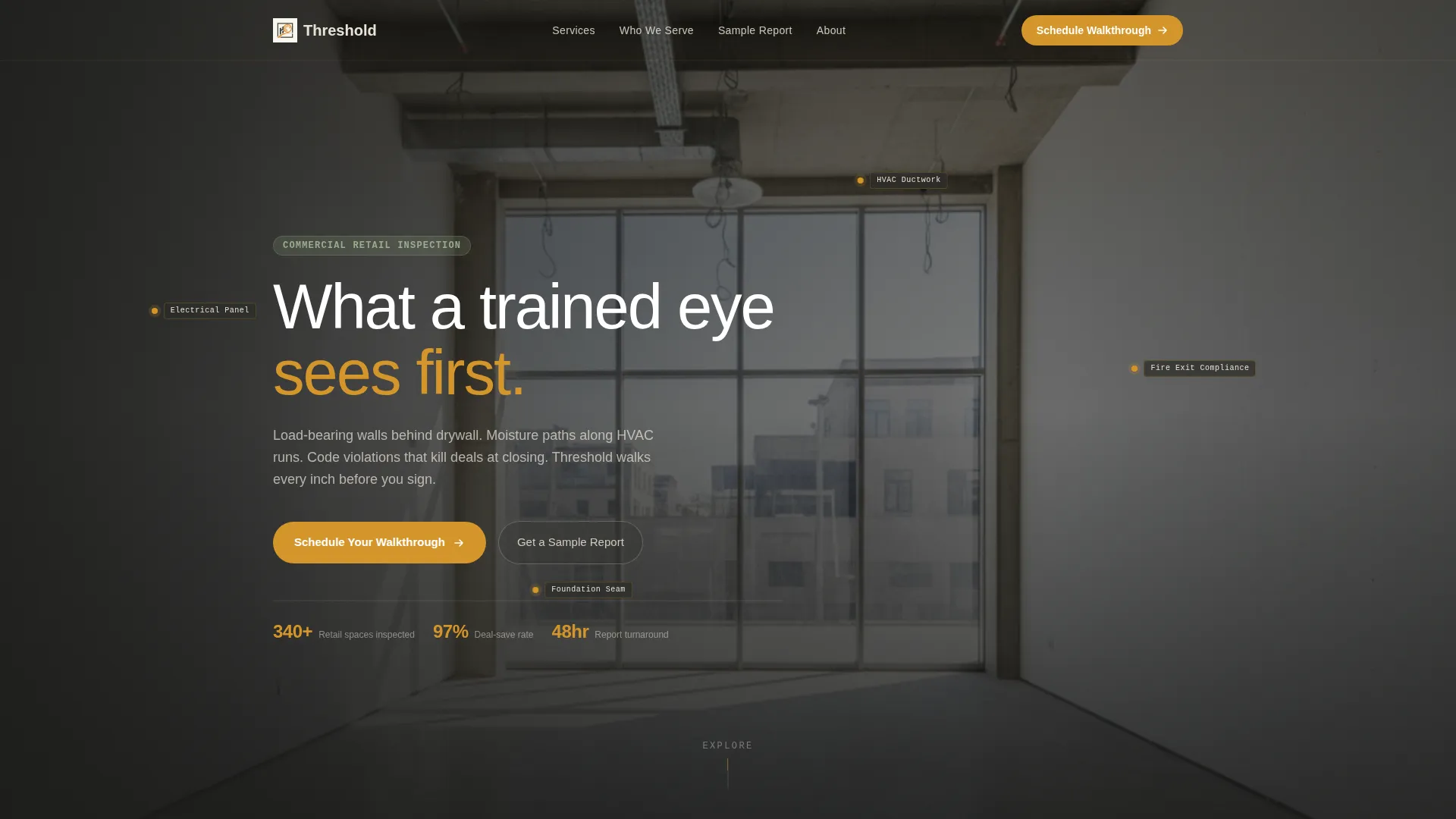
- A panoramic hero section with an animated inspection-zone overlay tracing electrical panels, fire exits, and foundation seams
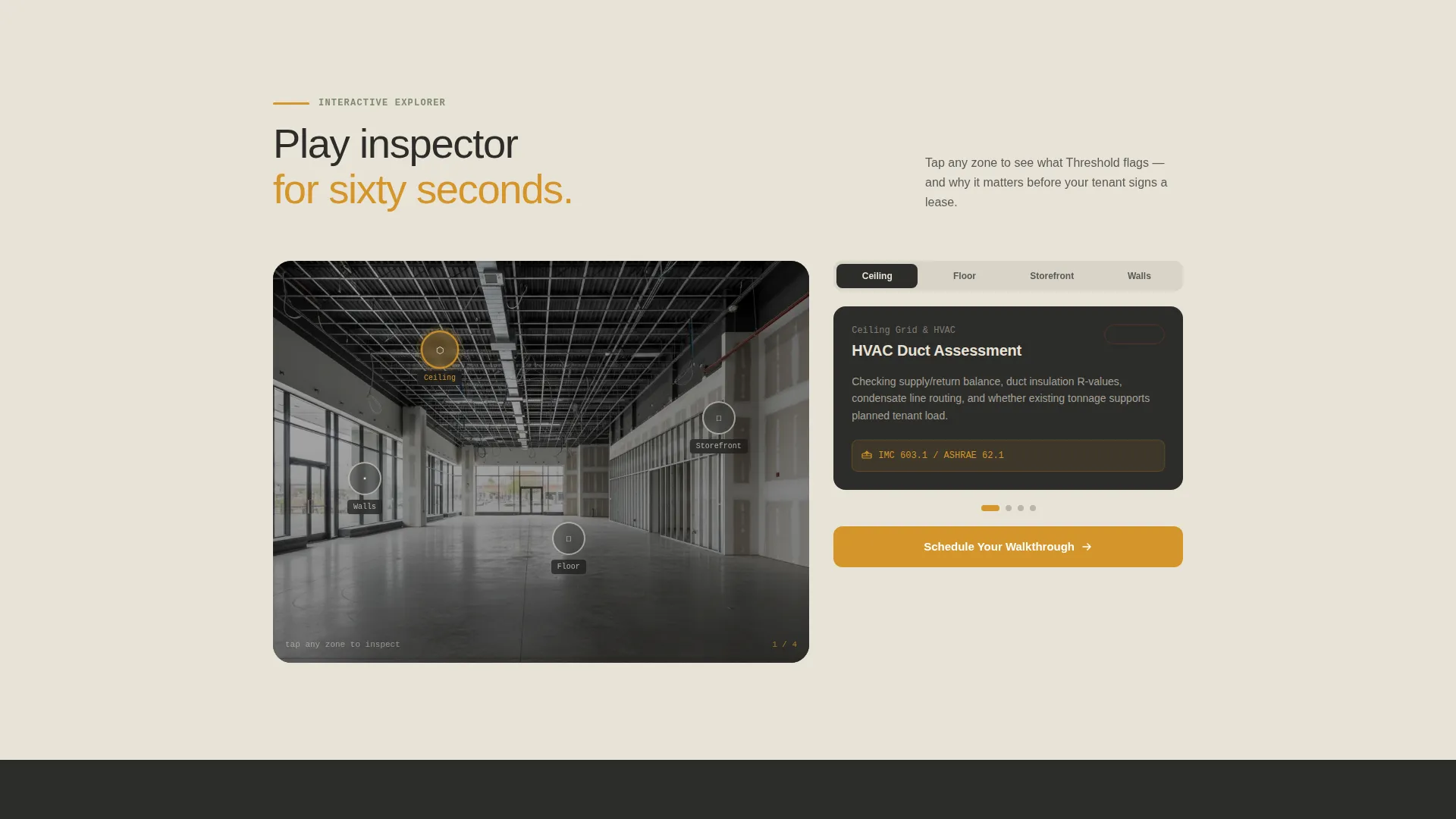
- Interactive scroll sections where visitors hover or tap retail space elements to reveal what gets inspected and why
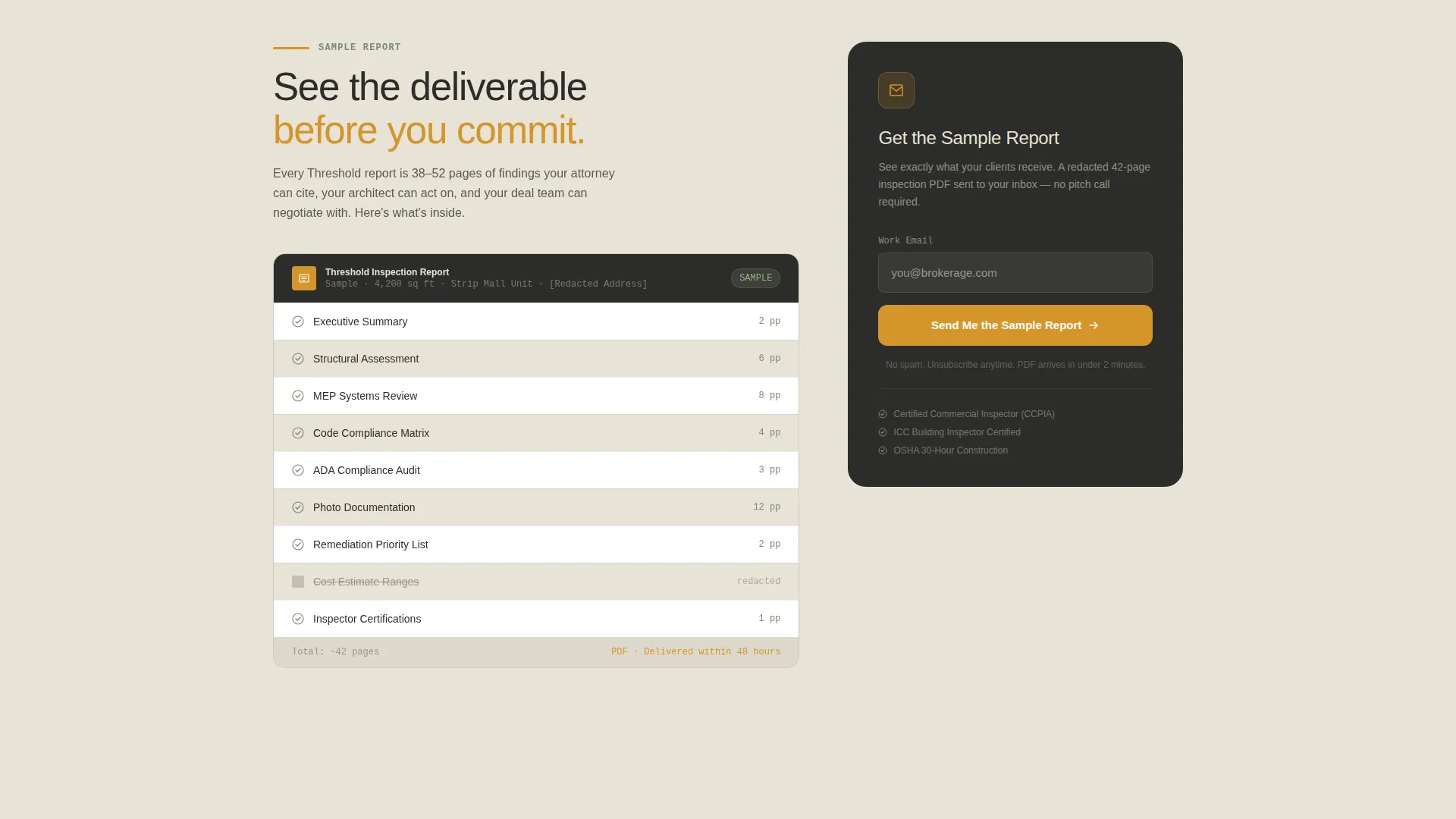
- A three-field booking form and a secondary sample report download path for leads who are not yet ready to schedule
Feature list
This template is built around six focused capabilities, each grounded in the structure and functionality described in the project brief.
Asymmetric 60/40 Grid Layout
The page uses a deliberate 60/40 column split throughout its core sections. This gives the layout visual weight and direction, letting inspection details sit alongside imagery or interactive elements without competing for attention.
Animated Inspection Zone Overlay
The hero header features a wide-angle retail interior image with a subtle animated overlay. Soft amber outlines trace key inspection zones, including the electrical panel, fire exits, and foundation seams. Each outline pulses once and fades, hinting at what a trained eye sees without overwhelming the viewer.
Interactive Scroll Explorer Sections
Each scroll section invites the visitor to tap or hover on elements of a retail space to reveal inspection details. A ceiling grid exposes HVAC duct assessments. A floor plan highlights compliance checkpoints. A storefront facade peels back to show weather seal and structural glazing notes.
Floating Schedule Call-to-Action Button
After the first scroll, a floating "Schedule Your Walkthrough" button stays pinned in amber on charcoal. It reappears at the close of every interactive section, keeping the booking path visible without interrupting the exploration experience.
Three-Field Booking Form
The booking form asks for three things in order: property address, square footage estimate with a "not sure" option to lower friction, and a preferred inspection window chosen from a visual calendar showing real availability. The form is short enough to complete in under a minute.
Sample Report Download Path
A secondary call to action, "Get a Sample Report," lets cautious visitors exchange their email address for a redacted inspection PDF. This warms leads who need to see the deliverable before they are ready to commit to a full booking.
Page sections overview
| Section | Purpose |
|---|---|
| Panoramic Hero Header | Draws visitors into an empty retail shell and sets a calm, competent tone |
| Animated Inspection Overlay | Shows key inspection zones with pulsing amber outlines on the hero image |
| Interactive Ceiling Grid | Lets visitors reveal HVAC duct assessment details on hover or tap |
| Floor Plan Explorer | Highlights compliance checkpoints across a retail floor plan |
| Storefront Facade Peel | Exposes weather seal and structural glazing notes behind the facade |
| Booking Form Section | Collects property address, square footage, and preferred inspection window |
| Sample Report Download | Offers a redacted PDF in exchange for an email address |
| Closing Call to Action | Repeats the Schedule Your Walkthrough prompt to close the page with intent |
Design & branding system
The visual identity follows a Pastoral Calm theme. The palette feels like a well-maintained farmhouse porch at golden hour, where dark timber frames warm honeyed light. Every color carries a specific structural role across the page.
- Deep charcoal (#2D2D2A) anchors headers, navigation, and body text with quiet authority
- Warm amber (#D4952A) highlights every interactive element, call-to-action button, and animated overlay outline
- Soft limestone (#E8E2D6) fills background panels to keep negative space calm rather than clinical, while muted sage (#7A8B6F) appears in secondary badges and trust indicators
Mobile & speed optimization
The template is structured to translate its asymmetric desktop grid into a clean single-column flow on smaller screens. Interactive sections reformat so tap targets remain usable on touch devices.
- The floating call-to-action button repositions cleanly on mobile viewports without obscuring content
- The visual calendar in the booking form is sized for thumb interaction, and the "not sure" square footage option removes a common friction point on mobile
How this template helps you convert
The page is built so every design decision moves the visitor one step closer to a booking or a qualified lead exchange. Credibility is established before price or credentials are ever introduced.
- The interactive explorer sections let visitors spend sixty seconds playing inspector, which builds respect for the complexity of the work and lowers resistance before the booking ask appears
- The floating call-to-action button keeps the scheduling path visible at every stage of the page, so momentum is never lost between exploration and action
- The sample report download gives hesitant visitors a low-commitment next step, converting cautious browsers into warm email leads rather than losing them entirely
Other information about this template
Threshold is built specifically for retail space inspection services operating in commercial real estate markets. The template style follows a Gallery and Detail approach, combining rich visual zones with precise informational layers. The booking and scheduling direction makes it practical for service providers who take appointments online.
- The template is designed as a single landing page, not a multi-page website, making it fast to deploy and easy to maintain
- The Pastoral Calm theme and Charcoal and Amber color system were chosen to communicate structural authority and warm reliability at the same time
- The page is well suited to retail space appraisal service providers who want to differentiate on depth of expertise rather than on price
Theme
Pastoral Calm
Creative direction
Case Study Narrative
Color system
Charcoal & Amber
Style
Gallery + Detail
Direction
Booking/Scheduling
Page Sections
Asymmetric 60/40 Grid Layout
Animated Inspection Zone Overlay
Interactive Scroll Explorer Sections
Floating Schedule Call-to-action Button
Three-field Booking Form
Sample Report Download Path
Related questions
Who is this landing page template designed for?
Can I use this template without interactive design experience?
What is the purpose of the sample report download section?
Can the Charcoal and Amber color system be changed to match my brand?
Is this template a single page or a multi-page website?



