Millennial Finance Pricing Website Template
Ticker is a data-forward investment landing page built for self-directed millennial investors. It uses a dark terminal aesthetic, animated live metrics, a side-by-side broker fee comparison table, a portfolio performance tier breakdown, and an interactive fee calculator to make the cost of staying with a legacy broker impossible to ignore.
by Rocket studio
Quick summary
Ticker is a single-page fintech template designed to convert fee-aware millennial investors into self-directed account holders. It opens with an animated live metrics wall, moves through a rigorous broker fee comparison, and closes with two clear calls to action. The layout reads like a proprietary research brief and earns every click with hard numbers.
Who this template is for
This template is built for fintech brands, self-directed brokerage platforms, and investment product teams targeting a financially literate millennial audience. It suits teams who want a high-impact landing page that leads with data rather than lifestyle imagery.
- Fintech startups launching zero-commission self-directed investment accounts
- Investment platforms targeting 28-to-40-year-olds ready to move beyond their employer 401(k)
- DIY investing brands that need a conversion-focused page built around fee transparency
What problem this template solves
Many millennial investors already know they are overpaying for trades. The problem is they have never seen the exact dollar cost laid out in front of them. This template solves that by structuring the entire page around one argument: staying with a legacy broker is the most expensive decision a person makes by doing nothing.
- Visitors cannot easily compare their current broker fees against a modern platform without a side-by-side breakdown
- Most investment landing pages rely on generic copy rather than live data and interactive tools that make the cost of inaction personal
- Fee-aware investors need to feel professional-grade access before they commit, not just read about it
What you get with this template
You get a fully structured, single-page layout with five distinct content sections, high-animation interactions, and a dual call-to-action system. Every section is designed to escalate the case for switching, using data at each step.
- Animated live metrics wall header with count-up number animations and a marquee ticker strip
- Side-by-side broker fee comparison table, portfolio performance tier breakdown, and interactive five-year fee calculator
- Two calls to action: a sticky bottom bar after the comparison table and a full-width block after the fee calculator, plus a secondary email-capture option
Feature list
This template includes purpose-built components designed specifically for data-driven financial conversion pages.
Animated Live Metrics Header
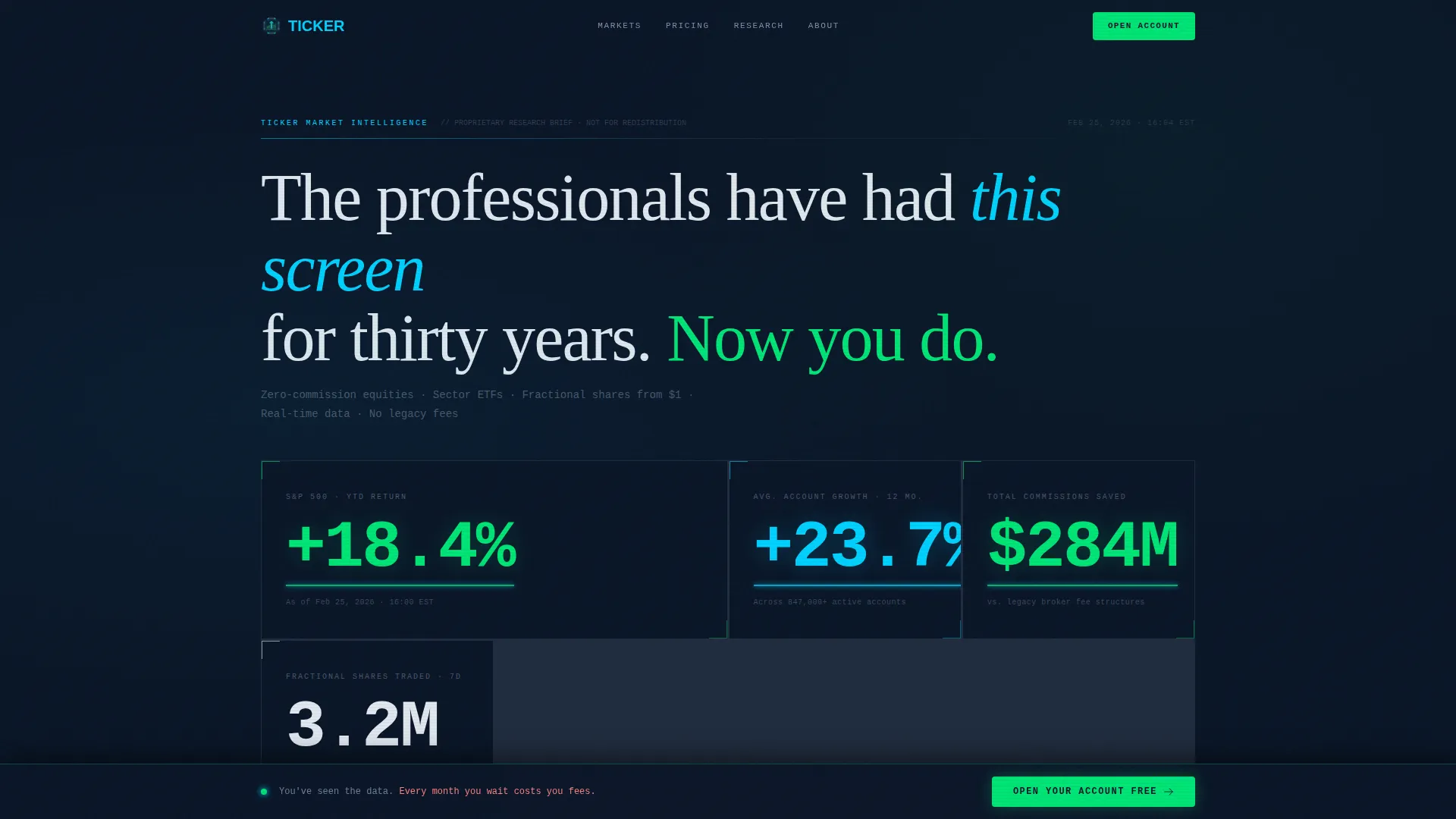
The header fills the full viewport with a grid of real-time-style financial figures. Numbers animate upward on load using count-up effects. A marquee ticker strip runs beneath the metrics wall. No hero image is used; data is the visual.
Side-by-Side Fee Comparison Table
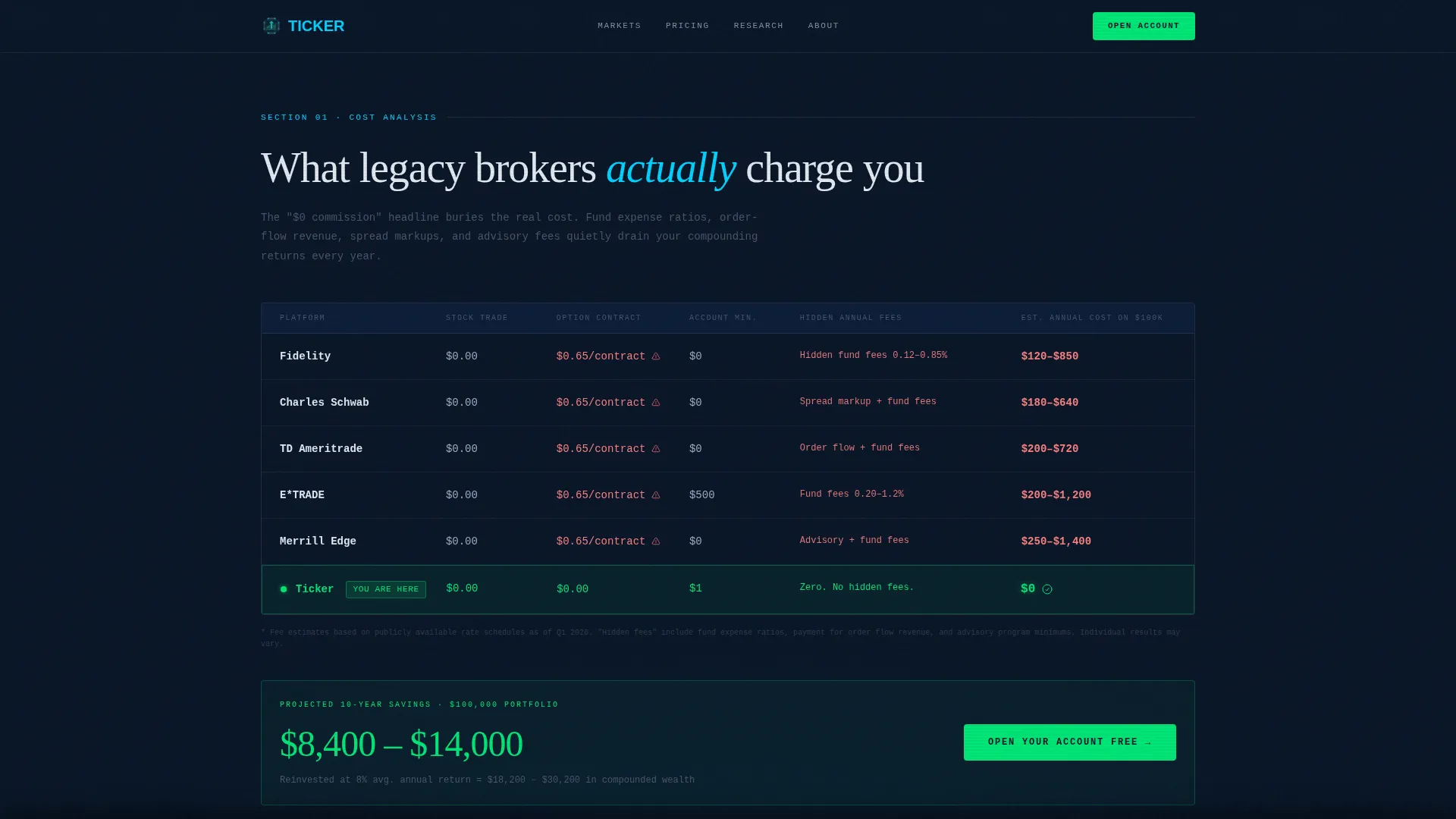
A structured comparison table benchmarks legacy broker fees directly against the platform. Savings rows are highlighted for immediate visual impact. Hover states activate on each row using cyan accent styling to draw attention to the most important figures.
Portfolio Performance Tier Breakdown
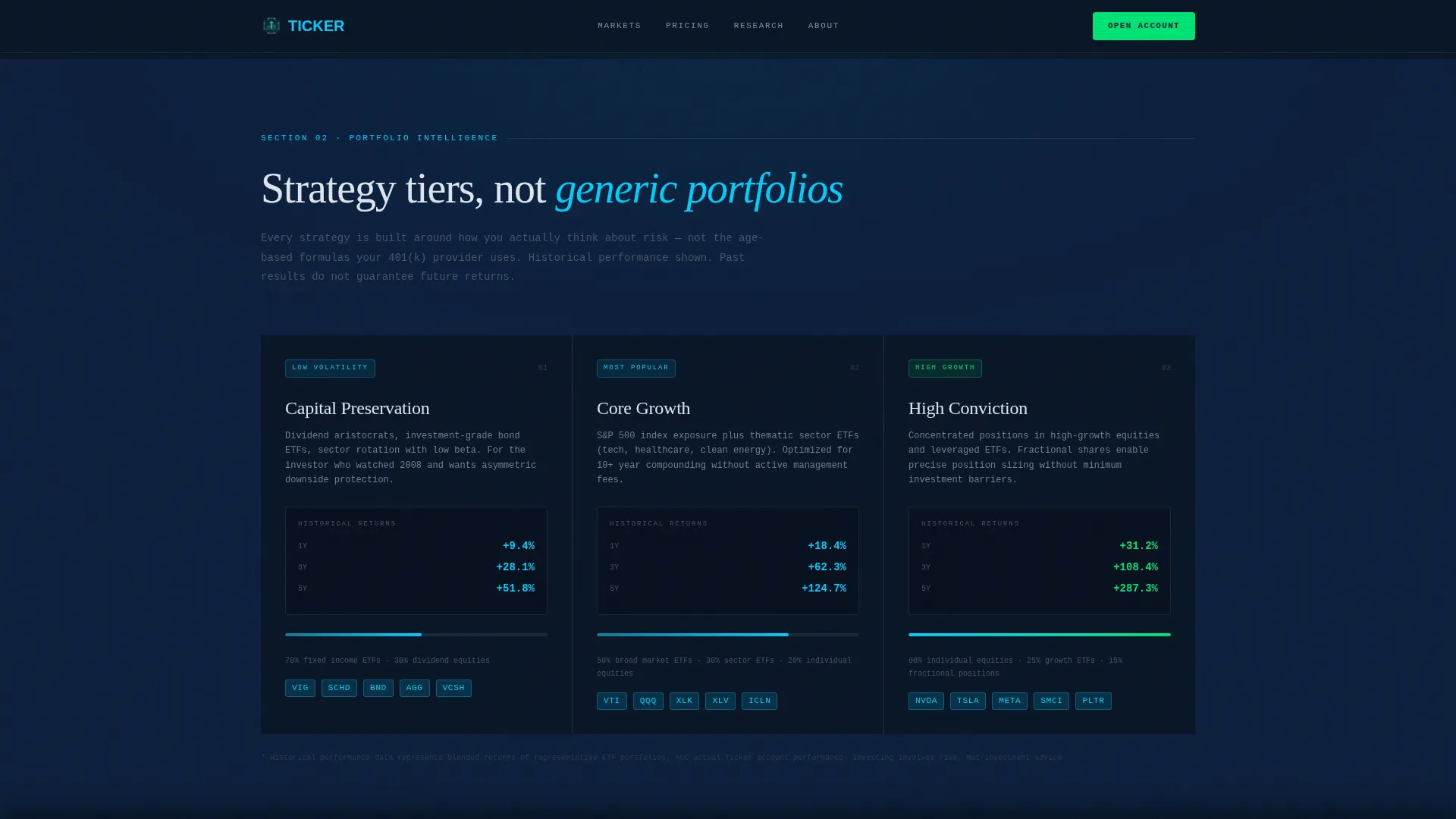
Three strategy tiers, Conservative, Balanced, and Aggressive, are presented with animated performance bars. This section gives visitors a clear picture of how different investment approaches have performed and builds credibility through data rather than claims.
Interactive Five-Year Fee Calculator
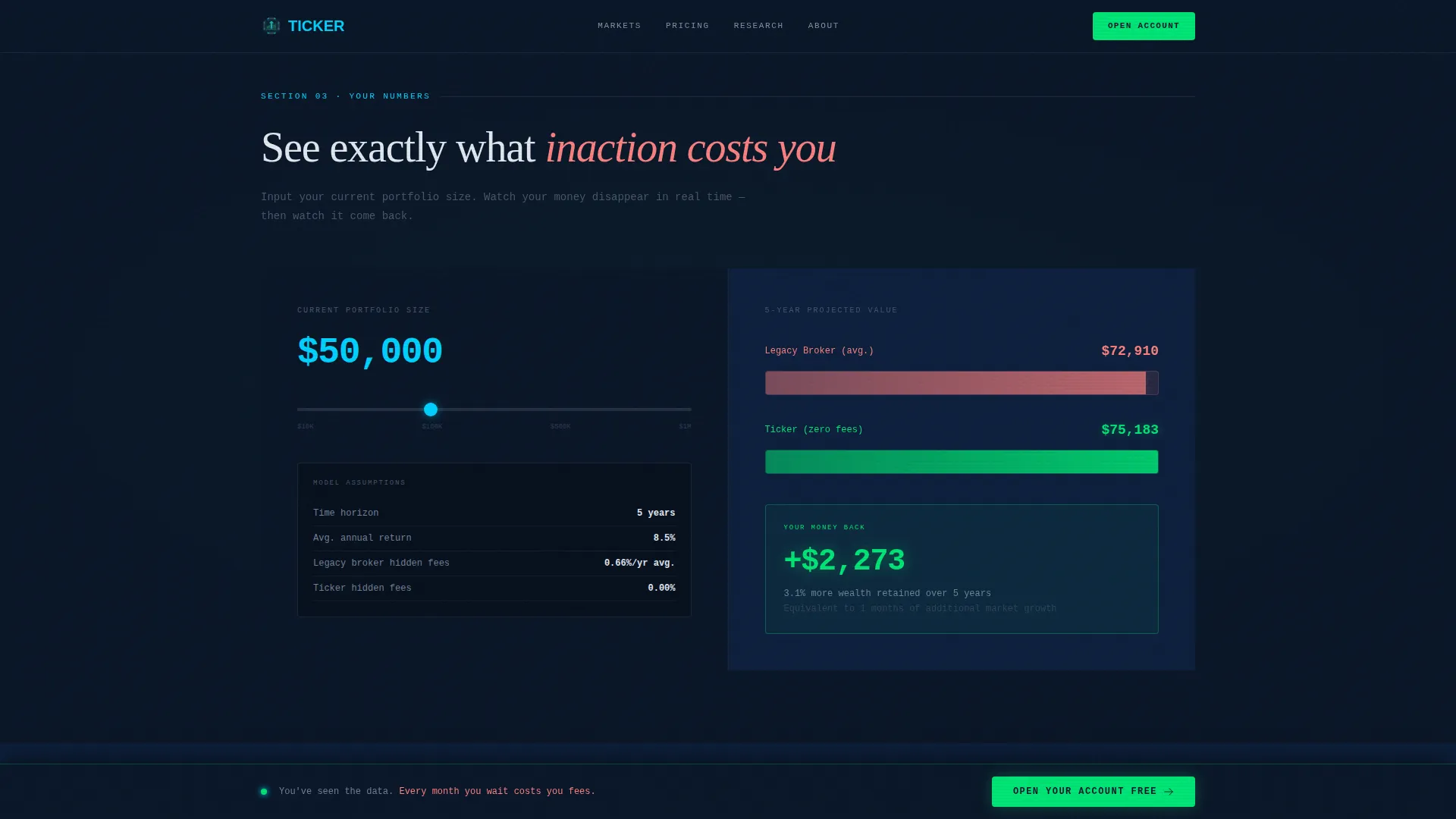
Visitors input their current portfolio size and receive an animated bar chart showing projected five-year cost differences. This is the page's highest-impact persuasion tool. It makes the fee argument personal and specific to each visitor's situation.
Dual Call-to-Action System
The primary call to action, "Open Your Account Free," appears first as a sticky bottom bar after the comparison table and again as a full-width block after the calculator. A secondary call to action, "Download the Full Fee Report," captures email addresses for visitors not yet ready to commit.
Data Command Visual System
The entire layout uses JetBrains Mono for all numerical and data displays, Fraunces for display headlines, and DM Sans for body text. The color system pairs deep terminal navy backgrounds with cyan interactive highlights and signal green reserved exclusively for positive performance indicators and primary calls to action.
Page sections overview
| Section | Purpose |
|---|---|
| Live Metrics Wall | Opens with animated financial figures and a marquee strip to establish data authority immediately |
| Fee Comparison Table | Side-by-side legacy broker versus platform breakdown with highlighted savings rows and hover states |
| Performance Tier Breakdown | Conservative, Balanced, and Aggressive strategy tiers shown with animated performance bars |
| Interactive Fee Calculator | Visitor-input tool that generates an animated five-year cost comparison bar chart in real time |
| Full-Width call to action Block | Primary account-open button and secondary fee report download presented as the page's closing argument |
| Developer Minimal Footer | Clean footer following the GitHub Developer Minimal pattern, keeping focus on conversion |
Design & branding system
The visual identity follows a Data Command theme. Every design decision reinforces the feeling of professional-grade financial tools, not consumer-grade finance apps. The palette is cool, authoritative, and specific.
- Color system: deep terminal navy (#0A1628) for backgrounds, active-ticker cyan (#00D2FF) for interactive highlights and hover states, muted chart-line gray (#4A5568) for body text and secondary data, and signal green (#00E676) reserved strictly for positive performance indicators and primary calls to action
- Typography stack: JetBrains Mono for all numbers and data figures, Fraunces for large display headlines, and DM Sans for body copy, creating a clear hierarchy between data, brand voice, and readable prose
- Layout style: grid-bordered sections with monospaced number displays, staggered row reveals, parallax depth layers, and cyan underline pulses beneath key figures
Mobile & speed optimization
The template is built desktop-first to honor the Bloomberg terminal aesthetic, but it is fully responsive across screen sizes. The technical architecture separates static and interactive content for efficient loading.
- Server Components handle all static layout sections, keeping initial load fast without sacrificing visual density
- Client Components are scoped only to the interactive calculator and animation-heavy elements, limiting JavaScript weight to where it is actually needed
- All animated elements, including the count-up header, marquee strip, staggered row reveals, and bar chart, are optimized to run without blocking the page render
How this template helps you convert
The page is structured as an escalating argument. Each section adds a harder layer of evidence, so by the time a visitor reaches the final call to action, they have already seen their own money disappearing in a bar chart.
- The metrics wall opens with live-style platform data, establishing credibility and creating an immediate sense of professional access before the visitor reads a single word of copy
- The fee comparison table and performance tier section build the rational case, giving visitors concrete numbers to compare against their current broker experience
- The interactive calculator delivers the personal closing argument, showing each visitor their specific projected loss from inaction, making the "Open Your Account Free" button feel like the only logical next step
Other information about this template
This template is categorized under Finance and Insurance, with a specific focus on the Millennial Finance subcategory and the Millennial Investment Account niche. It is localized for the United States market, using USD currency, MM/DD/YYYY date formatting, and Eastern Standard Time zone references throughout.
- The template style is Comparison Table, and the creative direction follows an Industry Report structure, meaning the scroll reads like a research brief the visitor was not meant to see
- The header concept is a Stats and Metrics wall, and the landing page direction is Click-Through, with no form on the page itself and all conversion handled through button click-through to an account creation flow
- Animation level is high throughout: count-up number effects on load, staggered row reveals, a running marquee ticker, parallax depth layers, and an interactive calculator with an animated output bar chart
Theme
Data Command
Creative direction
Industry Report
Color system
Midnight Blue
Style
Comparison Table
Direction
Click-Through
Page Sections
Animated Live Metrics Wall
Side-by-side Fee Comparison Table
Portfolio Performance Tier Breakdown
Interactive Five-year Fee Calculator
Dual Call-to-action Architecture
Data Command Visual System
Related questions
Does this template include a signup form?
What sections are included in the template?
Is the fee calculator truly interactive?
What fonts and colors does the template use?
Is this template suitable for other financial products?



