Kids Activity & Learning Center Booking Website Template
Tinker is a scroll-reveal landing page template built for kids robotics and engineering labs. It guides parents from a playful mascot hero through session stations, a project gallery, a schedule grid, and a three-step inline booking form. The design mixes soft lavender, buttercream, and electric coral in a Playful Geometric style that feels exciting for kids and trustworthy for parents.
by Rocket studio
Quick summary
Tinker is a single-page, scroll-reveal template for a kids robotics and engineering makerspace. It opens with a character mascot hero, walks visitors through progressive session reveals, and closes with a three-step inline booking form. The layout is mobile-first, visually energetic, and built to turn curious parents into booked trial class attendees.
Who this template is for
This template is designed for makerspace owners, STEM enrichment educators, and activity center operators who want a polished online presence that books real sessions. It speaks directly to the parents, co-ops, and party planners who are most likely to fill your calendar.
- Parents of hands-on kids aged 5 to 14 who want structured, screen-free STEM enrichment
- Homeschool co-ops looking for recurring, curriculum-aligned engineering sessions
- Birthday party planners searching for a unique, high-energy alternative to standard kids parties
What problem this template solves
Most activity center pages either look too generic to build trust or too plain to excite a curious kid scrolling over a parent's shoulder. Tinker fixes that. It combines visual energy with clear booking logic so parents never lose the thread between "this looks amazing" and "I'm reserving a spot right now."
- Visitors leave before booking because the page feels flat and gives no sense of what actually happens in a session
- Parents cannot quickly find open slots or understand session types, so they give up and look elsewhere
- The page fails to communicate the hands-on, build-it-yourself value that makes a robotics lab worth the trip
What you get with this template
You get a fully designed, scroll-reveal landing page with every section a robotics makerspace needs to convert first-time visitors into confirmed bookings. Every visual and functional element is sourced from the project brief and ready to customize.
- A mascot hero section with parallax geometric shapes and a primary coral call-to-action button
- A progressive Gallery Walk corridor featuring a breadboard wiring video loop, a finished-bot carousel with handwritten labels, and a pegboard-style schedule grid
- A three-step inline booking form covering age group selection, session type, and a visual date-picker calendar
Feature list
This template is packed with purpose-built components that work together to guide a parent smoothly from discovery to booking.
Scroll-Reveal Corridor Layout
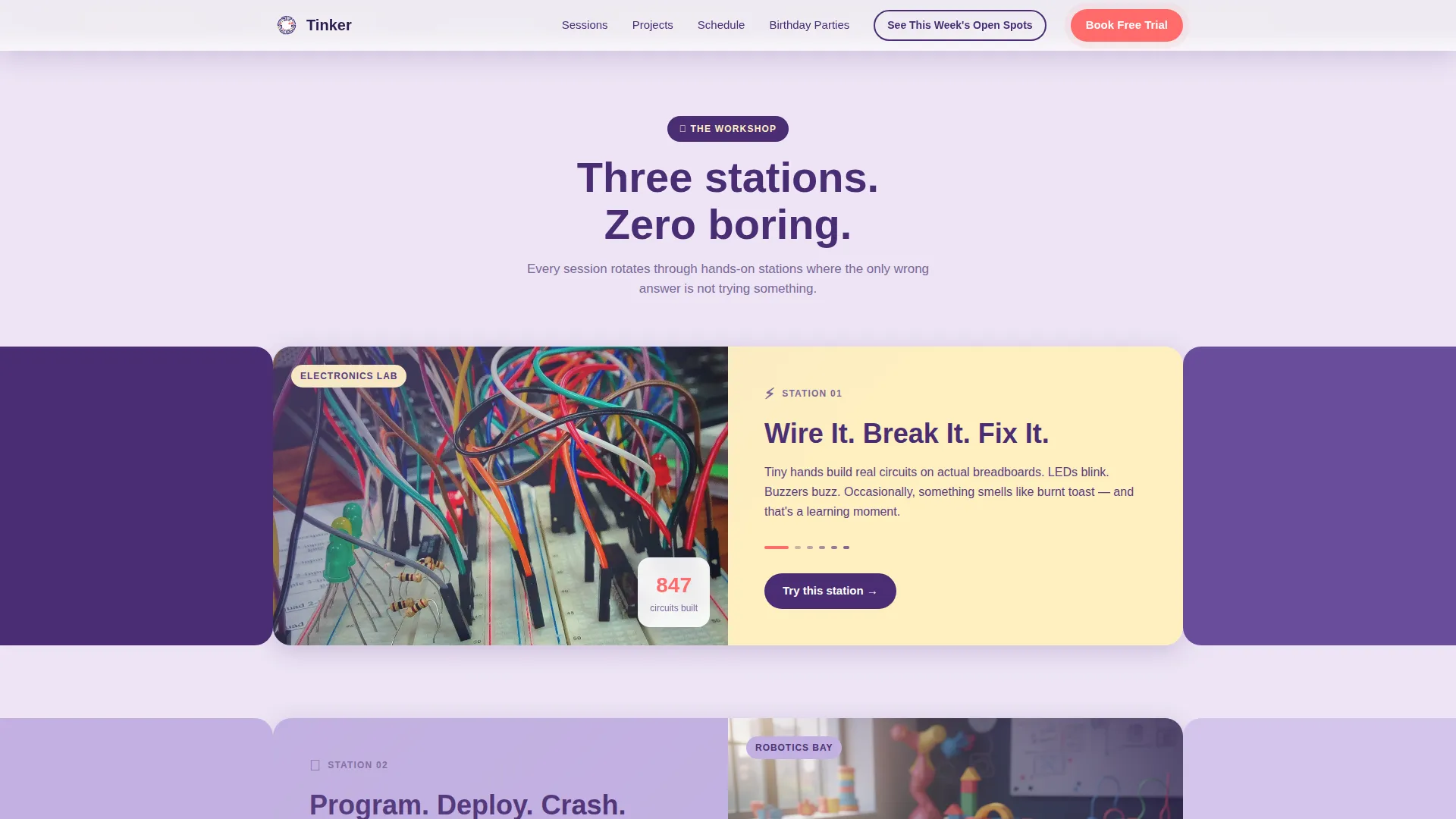
Each section enters the viewport progressively, emerging from behind geometric shapes that slide apart like workshop doors. The reveal sequence makes the page feel actively constructed as the visitor scrolls, keeping attention high from top to bottom.
Lopsided Mascot Hero
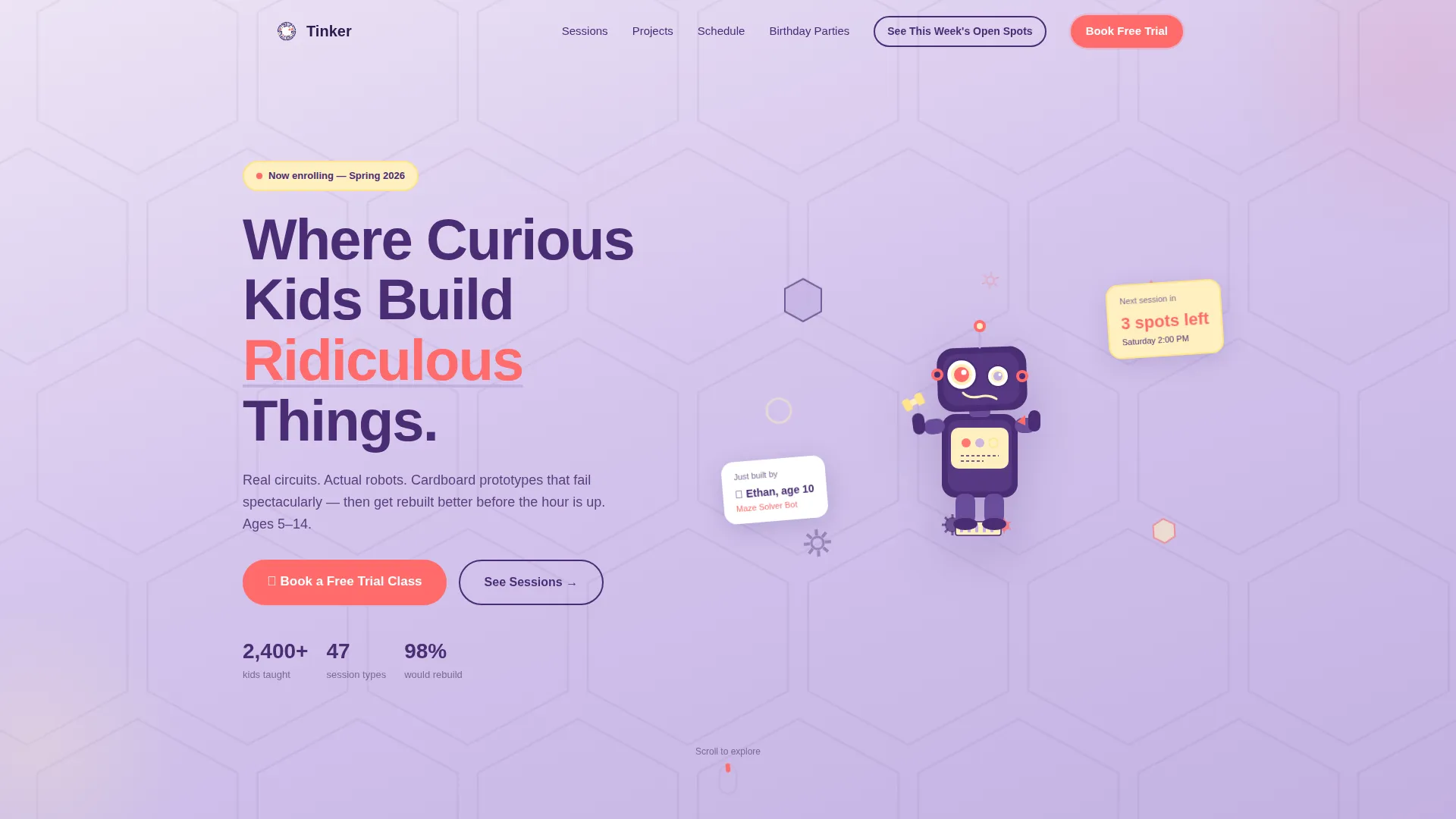
The header features a hand-drawn robot character, slightly lopsided with one eye bigger than the other, holding a wrench and a soldering iron while standing on a pile of gears and breadboards. Floating hexagons, triangles, and circles rotate gently in parallax around the mascot, creating immediate visual delight.
Finished-Bot Project Carousel
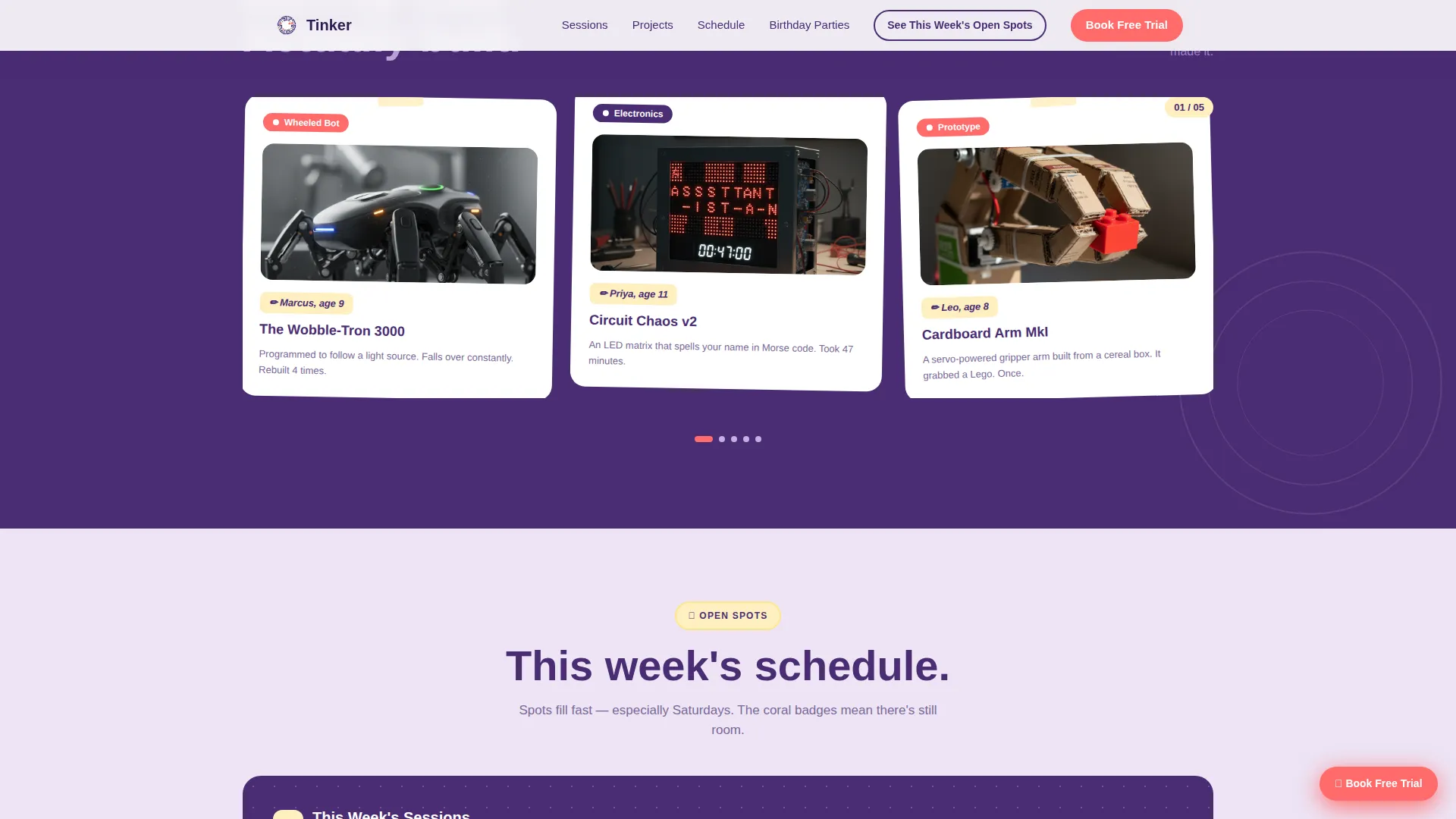
A carousel section displays completed projects photographed on white backgrounds. Each bot includes a handwritten label and the age of the kid who built it. This component builds trust by showing real outcomes from real young builders.
Pegboard Schedule Grid
The sessions and schedule section renders as a rotating, pegboard-style grid. Session type cards sit alongside the grid so parents can quickly compare drop-in classes, weekly series, and birthday party options without leaving the page.
Three-Step Inline Booking Form
The booking flow is embedded directly on the page. Step one asks for the child's age group (5 to 7, 8 to 10, or 11 to 14). Step two selects a session type. Step three shows a visual calendar where open slots appear in buttercream and full slots are grayed out.
Sticky Coral Call-to-Action Button
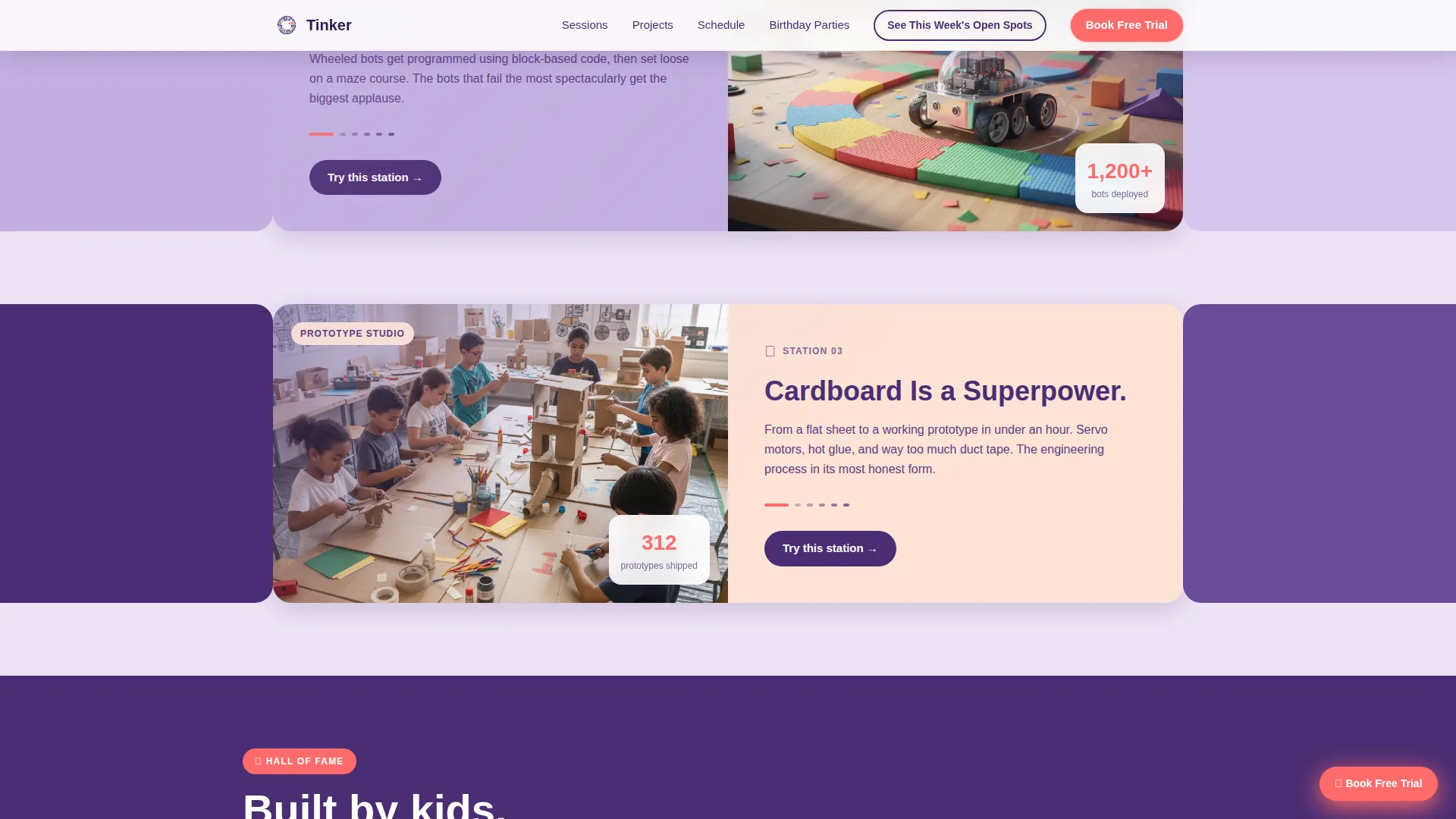
After the second scroll reveal, the "Book a Free Trial Class" button floats as a persistent sticky element. A secondary navigation anchor labeled "See This Week's Open Spots" gives returning parents a direct shortcut without scrolling.
Page sections overview
| Section | Purpose |
|---|---|
| Hero with Mascot | Introduce the brand and capture attention with the mascot robot, parallax shapes, and primary booking call to action |
| In-Action Reveals | Walk visitors through session stations using progressive corridor reveals and geometric animations |
| Project Gallery | Show finished bots with handwritten labels and builder ages to establish real-world credibility |
| Sessions and Schedule | Display the pegboard-style schedule grid and session type cards for easy comparison |
| Inline Booking Form | Convert visitors with a three-step form covering age group, session type, and date selection |
| Footer | Provide a clean single-row linear footer with navigation and contact essentials |
Design & branding system
The visual identity follows a Playful Geometric theme built on the Lavender Dream color system. The palette is deliberately soft enough for a parent scanning quickly but bright enough to hold a child's attention, like a pastel circuit board with a few sparks of color.
- Soft digital lavender (#C3B1E1) as the primary background wash, deep ultraviolet (#4A2D73) for headlines and navigation, warm buttercream (#FFF0C1) for surface cards, and electric coral (#FF6B6B) for buttons, badges, and interactive hotspots
- Plus Jakarta Sans in chunky, rounded weight for headlines, and DM Sans for body text, creating a friendly but readable typographic hierarchy
- Rotating geometric shapes including hexagons, triangles, and circles used as both decorative elements and structural animation triggers throughout the scroll sequence
Mobile & speed optimization
The template is built mobile-first, which makes sense given that most parents will discover and book sessions directly from their phones. The desktop version adds visual richness without sacrificing the mobile-first layout logic.
- Scroll reveals are powered by Intersection Observer, keeping animations smooth without heavy JavaScript overhead
- All motion is handled through CSS transforms only, avoiding layout-reflow and keeping the parallax and stagger effects lightweight
- The sticky call-to-action button and the inline booking form are both optimized for thumb-friendly tap targets on smaller screens
How this template helps you convert
Every design and layout decision in this template points toward one outcome: a confirmed booking. The page removes friction at every step so a parent who arrives curious leaves with a date on the calendar.
- The sticky coral "Book a Free Trial Class" button stays visible after the second scroll reveal, so the primary action is never more than one tap away regardless of how far down the page a visitor has scrolled.
- The three-step inline booking form keeps the entire reservation flow on the page, with a visual calendar that shows open and full slots at a glance, removing the need to navigate to a separate booking tool.
- The project gallery and session station reveals build progressive trust before the form appears, so parents arrive at the booking step already convinced by what they have seen.
Other information about this template
This template is a strong fit for any kids activity and learning center that wants a high-energy but organized online presence. A few additional details worth knowing before you start customizing.
- The template is localized for a United States audience, using USD pricing format and MM/DD/YYYY date display in the calendar picker
- Animation intensity is high by design, with staggered reveals, rotating geometric shapes, parallax floating cards, and a corridor-style progressive layout all working together
- The footer follows a Pattern 1 Linear Single-Row layout, keeping the bottom of the page clean and uncluttered
- Social proof elements include kid-built project photos with builder ages, parent testimonials, and session count statistics, all positioned to appear before the booking form
Theme
Playful Geometric
Creative direction
Gallery Walk
Color system
Lavender Dream
Style
Scroll Reveal (Progressive)
Direction
Booking/Scheduling
Page Sections
Scroll-reveal Corridor Layout
Lopsided Mascot Hero with Parallax
Finished-bot Project Carousel
Pegboard-style Schedule Grid
Three-step Inline Booking Form
Sticky Coral Call-to-action Button
Related questions
Can I replace the mascot robot with my own brand character?
Does the booking form work with an external scheduling system?
Is this template suitable for birthday party bookings?
How does the sticky call-to-action button behave on mobile devices?
Can this template support group or co-op session bookings?



