Tools & Hardware Rental Landing Page Template
Toolshed is a single-page landing page template built for tools and hardware rental platforms. It combines a Before/After Slider header, a masonry-style browsing grid, hover micro-animations, and an interactive quiz to match visitors with the right rental tool. The design uses a clean workshop palette and scroll-driven reveals to turn casual browsers into confident renters.
by Rocket studio
Quick summary
Toolshed is a landing page template designed for tools and hardware rental businesses. It opens with a dramatic Before/After Slider, flows into an animated masonry grid of tool cards, and closes with a five-question interactive quiz. Every section is built to make browsing feel effortless and renting feel like the obvious choice.
Who this template is for
This template is a natural fit for rental businesses that serve hands-on clients. It works equally well for a solo operator with fifty tools and a regional outfit managing hundreds of SKUs.
- Tools and hardware rental businesses targeting contractors, homeowners, and property managers
- Rental platform founders who want a polished storefront without starting from scratch
- Small to mid-size operators looking to convert first-time visitors into repeat renters
What problem this template solves
Most rental business pages feel like an afterthought. They list inventory in plain tables, bury pricing in footnotes, and give no guidance to visitors who are not sure what they need. First-time renters leave confused. Repeat customers settle for a clunky experience.
- Visitors arrive with a project in mind but no clear path to the right tool
- Rental pages rarely build trust or communicate value before showing a price
- Generic storefronts treat every visitor the same, missing the contractor, the homeowner, and the property manager entirely
What you get with this template
You get a fully structured, single-page landing page that covers the entire rental journey from curiosity to conversion. Every section serves a clear purpose, and the layout is designed to reward scrolling.
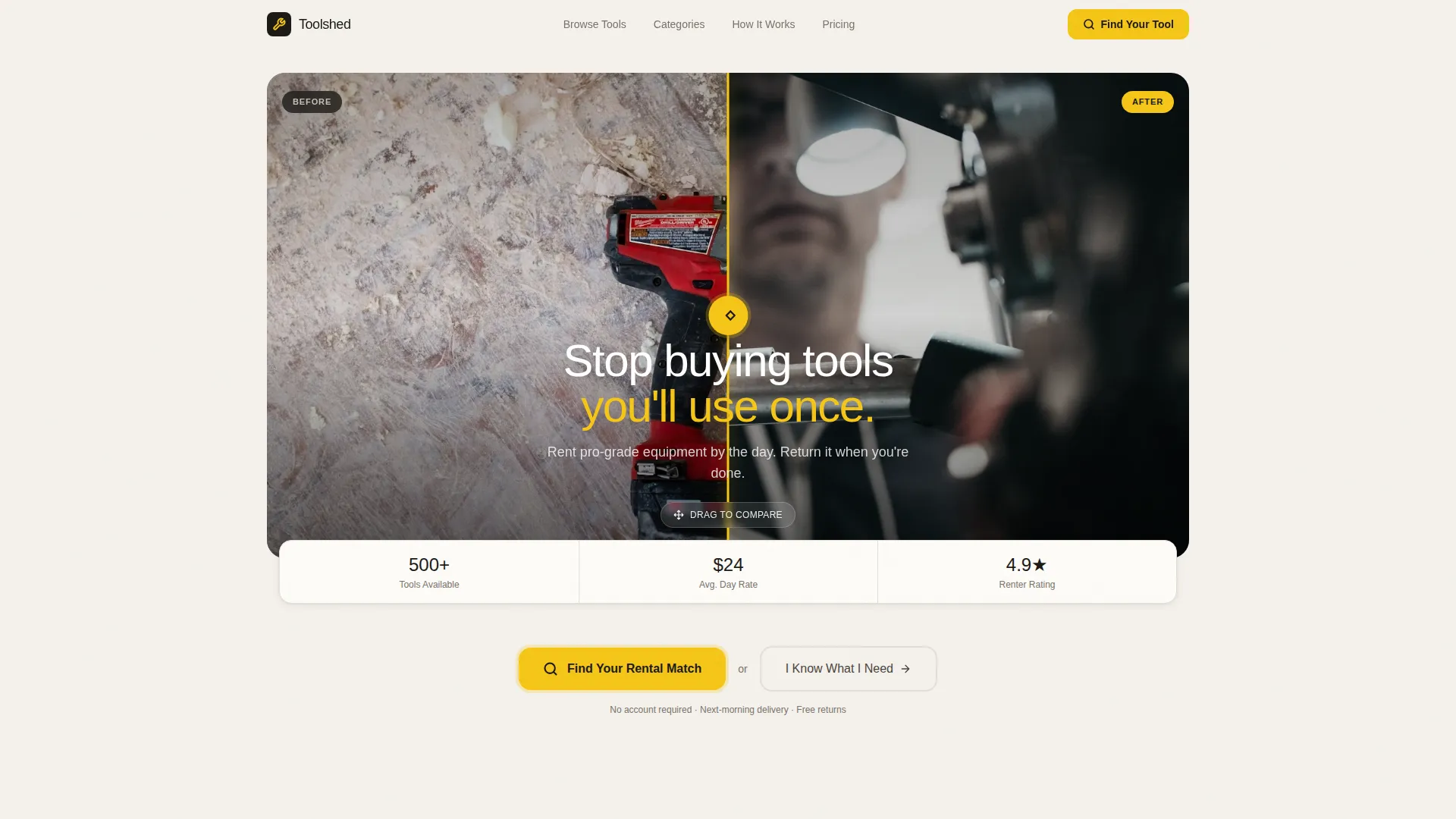
- A Before/After Slider header with a fade-in headline and visual contrast storytelling
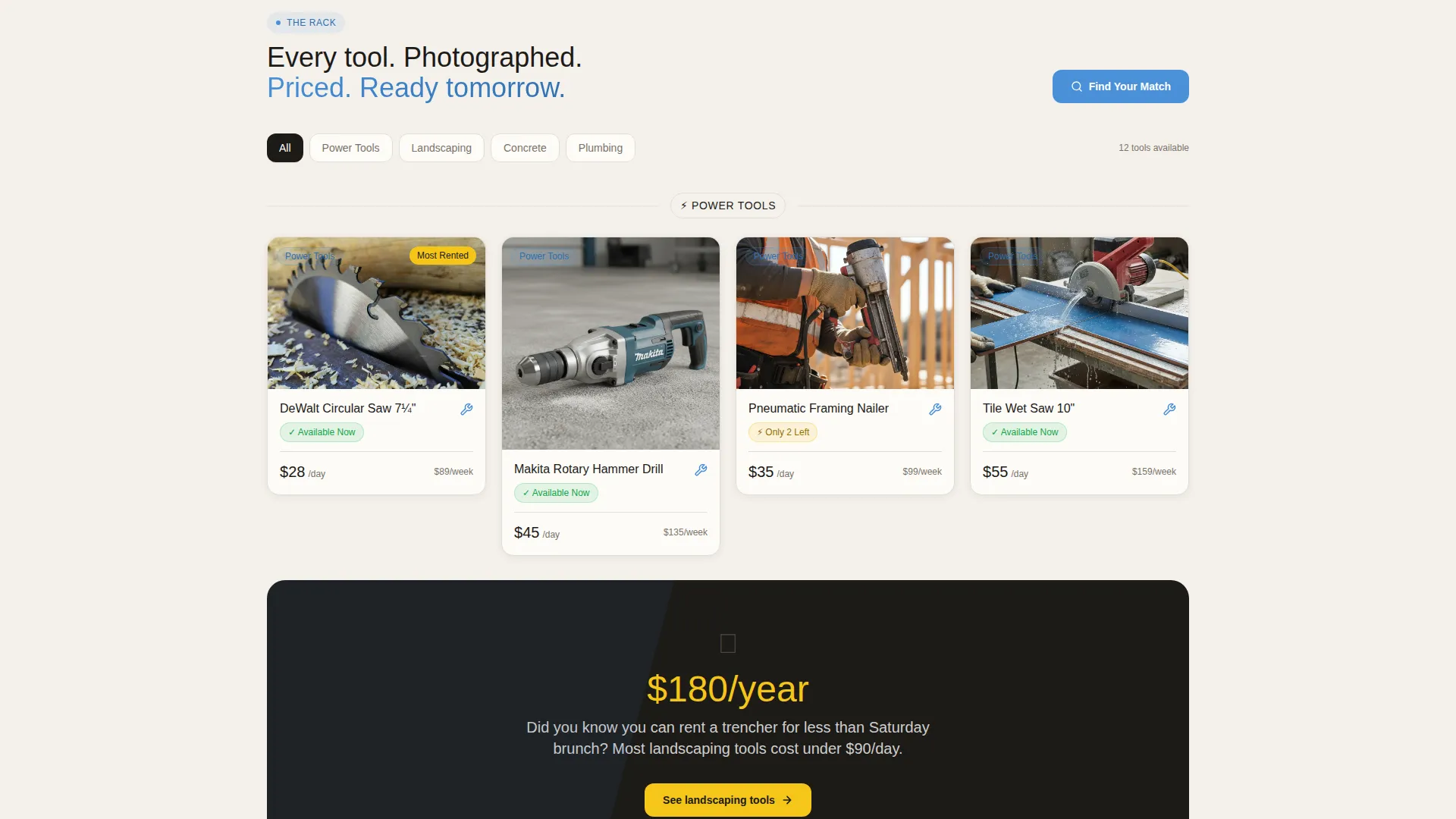
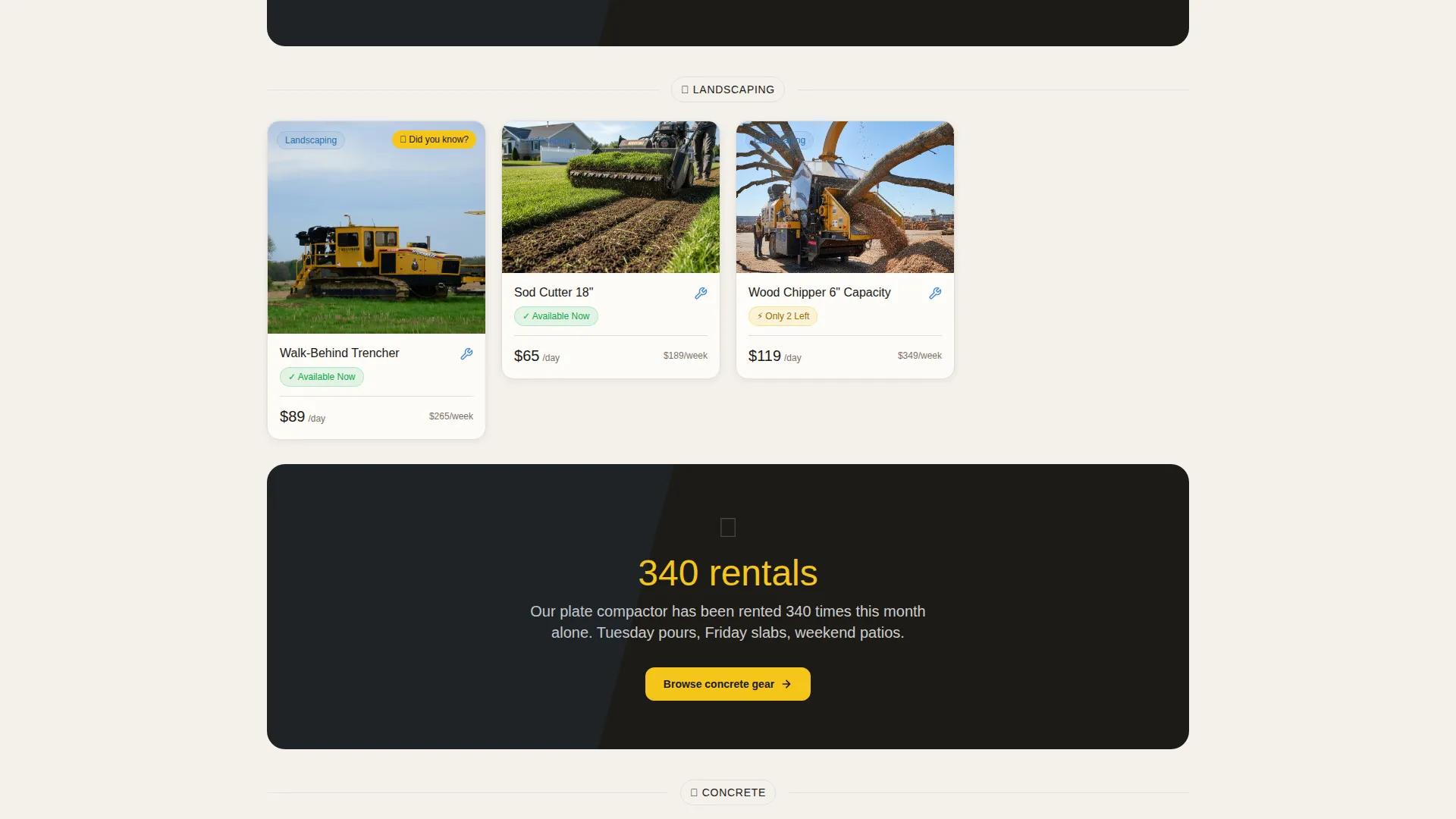
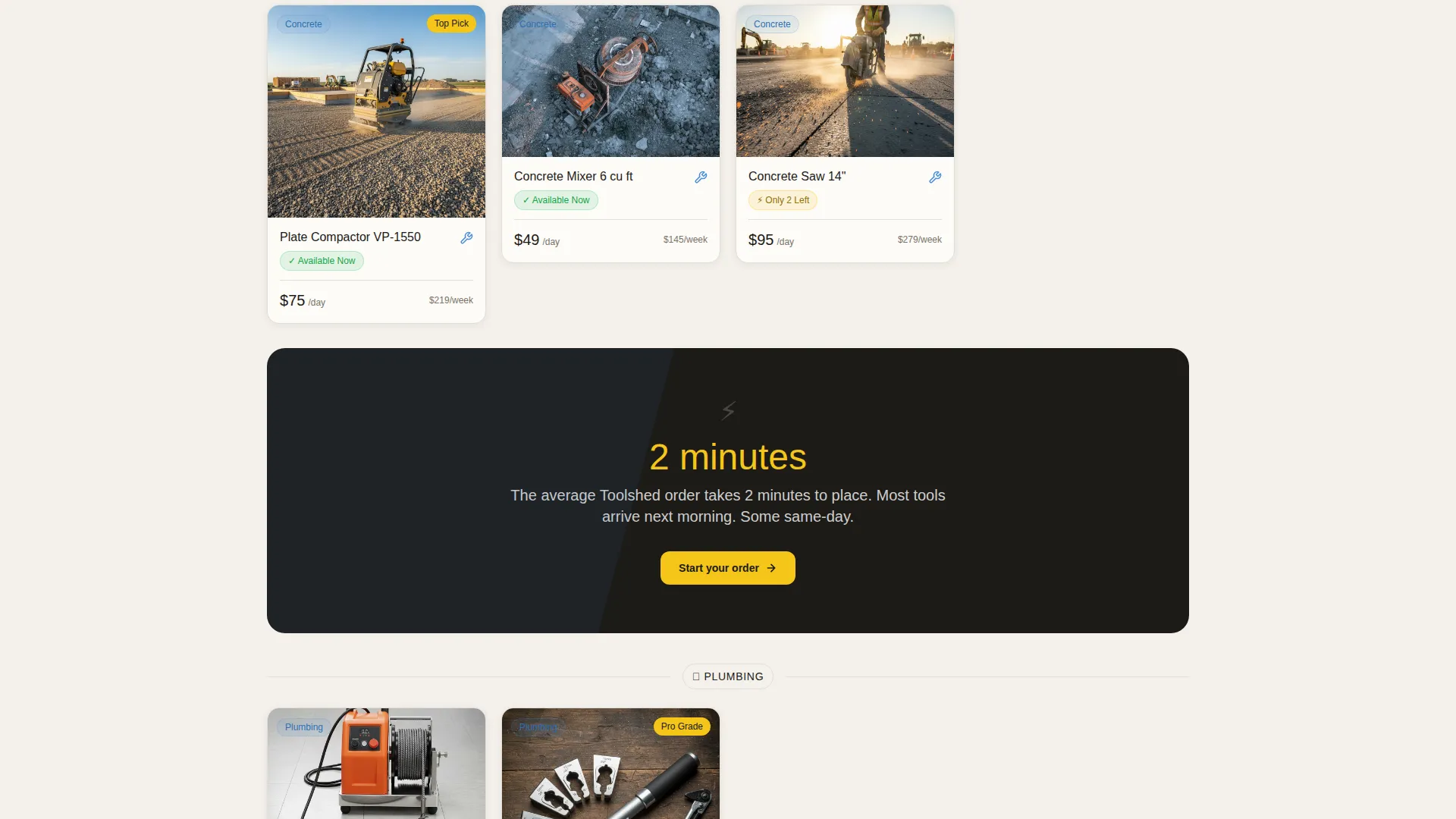
- A scroll-driven masonry grid with hover micro-animations and category-reshuffling behavior
- A five-question interactive Tool Finder quiz with real-time grid animation and a skip path for confident users
Feature list
This template ships with a focused set of interactive features drawn directly from the design brief. Each one plays a specific role in the visitor experience.
Before/After Slider Header
The header opens with a draggable slider. The left side shows a cluttered, disorganized garage. The right reveals a curated rental grid with clean product photography, prices, and availability. A headline fades in over the transition: "Stop buying tools you'll use once." It is the first moment of delight and the clearest pitch the page makes.
Masonry Grid with Hover Animations
The browsing section uses a Pinterest-style masonry layout. Tool cards flip, bounce, or reveal hidden details on hover. Each card can surface a micro-animation of the tool in action, a usage stat like "rented 340 times this month," or a short real-user review. The grid reshuffles by category as the visitor scrolls through power tools, landscaping, plumbing, and demolition.
Scroll-Triggered Category Transitions
As the visitor scrolls, the grid reorganizes itself by category. The transition is smooth and purposeful. Between category sections, a full-width interruption card drops in with a playful prompt, such as "Did you know you can rent a trencher for less than Saturday brunch?" These cards keep the scroll feeling rewarding rather than repetitive.
Interactive Tool Finder Quiz
The primary call to action leads to a five-question quiz. Questions cover project type, experience level, project duration, budget range, and zip code. Each answer animates the background grid to surface relevant tools in real time. A secondary path, labeled "I Know What I Need," lets experienced users skip straight to browsing.
Cloud Canvas Color System
The palette uses soft workshop white, pegboard warm gray, chalk-line blue, and safety-yellow for hover states, badges, and calls to action. The combination feels like a clean concrete floor under fluorescent shop lights. The yellow accent appears exactly where the visitor's eye should land next.
Surprise and Delight Scroll Moments
The template layers small moments of delight throughout the scroll journey. Hover states reveal unexpected stats and one-line reviews. Interruption cards drop playful prompts between categories. Every interaction rewards curiosity and encourages the visitor to keep exploring.
Page sections overview
| Section | Purpose |
|---|---|
| Before/After Slider | Opens the page with a visual transformation and headline hook |
| Fade-In Headline | Delivers the core rental value proposition over the slider |
| Masonry Tool Grid | Displays tool inventory in a browsable, animated category grid |
| Hover Detail Cards | Reveals usage stats, micro-animations, and user reviews on hover |
| Category Interruption Cards | Breaks up the scroll with playful, cost-comparison prompts |
| Tool Finder Quiz | Guides visitors to the right rental through five interactive questions |
| Skip-to-Browse Path | Offers a direct browsing route for experienced or confident visitors |
Design & branding system
The visual identity follows a Marketplace Grid theme built around a workshop-inspired palette. Every color choice is functional and grounded in the physical environment the template evokes.
- Soft workshop white (#F4F1EC) and pegboard warm gray (#C7BFB3) form the base, keeping the layout calm and easy to scan
- Chalk-line blue (#4A90D9) provides structure and directs attention to key interface elements
- Safety-yellow (#F5C518) activates on hover states, badges, and calls to action, appearing precisely where action is needed
Mobile & speed optimization
The template is designed with a scroll-first, mobile-aware layout. The masonry grid and quiz components are built to adapt to narrower viewports without losing the core interactive experience.
- The Before/After Slider is touch-friendly, allowing mobile visitors to drag the reveal just as easily as desktop users
- Tool cards in the masonry grid stack responsively so category browsing remains clear on smaller screens
- The five-question quiz uses a single-question-at-a-time format that keeps the mobile interaction focused and easy to complete
How this template helps you convert
Every design decision in this template is pointed toward one outcome: turning a curious visitor into a confirmed renter.
- The Before/After Slider creates an immediate emotional shift. Visitors see the problem (tool chaos) and the solution (organized rental access) before they read a single word of body copy.
- The Tool Finder quiz earns the click by making visitors feel understood. Each answered question narrows the grid in real time, so the visitor arrives at a recommendation that feels personal, not generic.
Other information about this template
This template sits within the Retail and E-Commerce category, specifically targeting the tools and hardware rental space. It is a strong starting point for businesses building a modern rental storefront.
- The Marketplace Grid theme is well-suited to inventory-heavy businesses that benefit from visual browsing
- The Scroll Reveal progressive layout means visitors are introduced to content gradually, keeping the page from feeling overwhelming
- The dual call-to-action structure (quiz path and skip path) accommodates both first-time renters and experienced contractors in a single page flow
- The Surprise and Delight creative direction makes this template memorable without relying on heavy copywriting
Theme
Marketplace Grid
Creative direction
Comparison Journey
Color system
Ink & Paper
Style
Scroll Reveal (Progressive)
Direction
Upsell/Upgrade
Page Sections
Before/after Slider with Headline
Masonry Grid with Hover Micro-animations
Scroll-triggered Category Reshuffling
Five-question Tool Finder Quiz
Dual Call-to-action Path
Safety-yellow Accent System
Related questions
Who is this landing page template designed for?
Can I customize the tool categories in the masonry grid?
What is the Tool Finder quiz and how does it work?
Does the Before/After Slider work on mobile devices?
Is this template suitable for a business that rents specialty tools?



