Tooltip - Bold Brutalist Contextual Help Widget Landing Page Template
Tooltip - Bold Brutalist Contextual Help Widget Landing Page Template
This tooltip bold brutalist contextual help widget landing page template is built for SaaS teams who need to stop onboarding drop-off in its tracks. A live ROI calculator anchors the pitch in the visitor's own numbers. Brutalist data grids, benchmark stat cards, and a three-line install demo carry the scroll. The primary call to action is a freemium signup with near-zero friction.
by Rocket studio
Loading preview…
Quick Summary
This template is a single-page, dashboard-style landing page designed to sell a lightweight contextual help widget. It opens with a live calculator that turns visitor inputs into deflection and savings projections. From there, the page descends through sourced industry benchmarks, a live widget preview inside a mock dashboard, and a head-to-head comparison grid. Every section earns the next scroll by raising a question the following section answers with data.
Who This Template Is For
This template is built for B2B software teams who know their onboarding is leaking users and want to prove the cost of that leak before asking for a signup. It speaks directly to the people who feel that pain every day.
Product managers drowning in onboarding tickets and watching activation rates stall at step three.
Developer experience leads and customer success teams who need to guide users through new features without writing the same documentation twice.
SaaS founders and user interface user experience designers who want a high-converting landing page that leads with data, not promises.
What Problem This Template Solves
Most landing pages for developer tooling ask visitors to trust a headline. This template earns trust differently. It puts the visitor's own numbers into a calculator and lets the output do the persuading. The page is structured so that visitors interact with the value proposition before they ever see a signup form.
Users abandon SaaS onboarding because the interface gives no contextual help at the moment of confusion, forcing them to open a new tab, search documentation, or file a support ticket.
Product teams struggle to display ROI for in-app guidance tools because the benefit feels abstract until it is tied to real metrics like ticket volume and activation rate.
Designers and developers need a template that can showcase rich content, live widget previews, and code snippets inside a coherent, high-trust layout without generic filler.
What You Get With This Template
You get a fully structured, section-complete landing page ready for a contextual help widget product. Every section is purposeful. Every component is grounded in the prompt brief. Nothing is decorative for decoration's sake.
Theme
Bold Brutalist
Creative direction
Industry Report
Color system
Monochrome Steel
Direction
Freemium/Trial
Page Sections
Live ROI Calculator with Real-time Output
Brutalist Benchmark Stat Card Grid
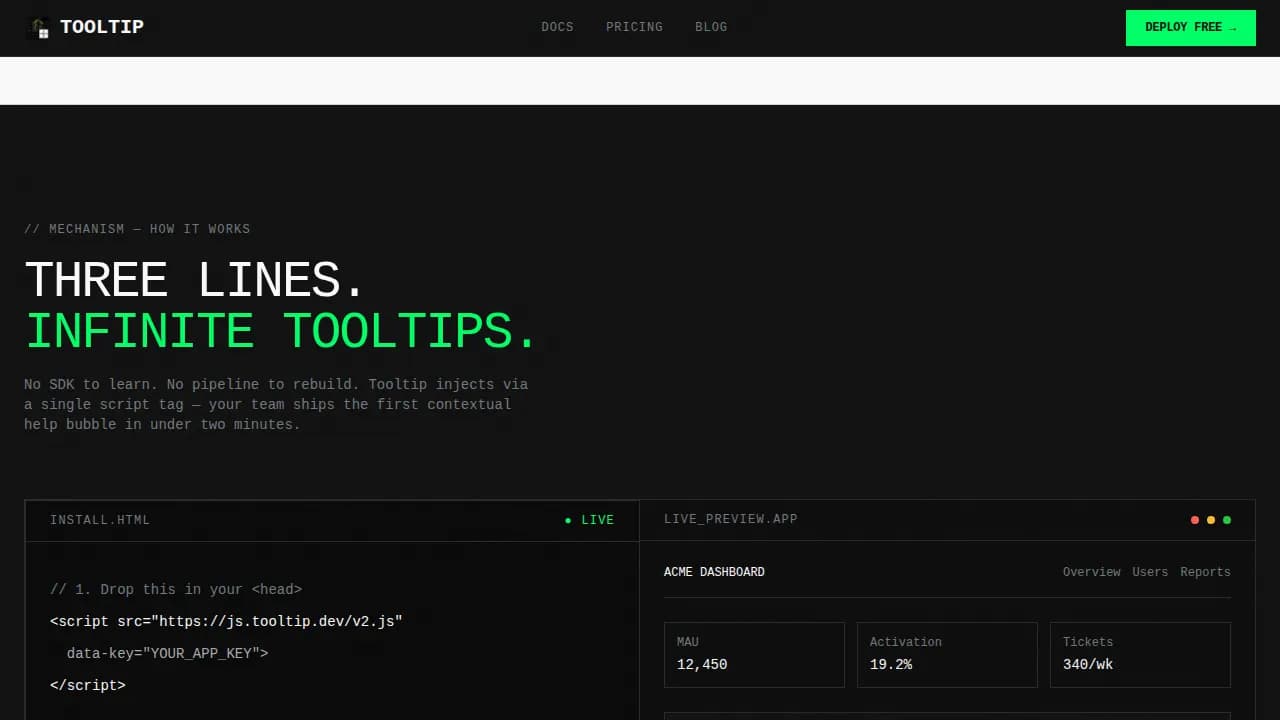
Three-line Install Demo with Widget Preview
Head-to-head Comparison Grid
Sticky Conversion Bar and Freemium Call to Action
Monochrome Steel Design System
Related questions
What kind of team is this landing page template built for?
How does the live calculator section work?
Can I use this template to showcase different tooltip types?
Does the template include a comparison section for competing solutions?
Is the freemium signup flow included in the template?
A live ROI calculator section that accepts monthly active user count, weekly support ticket volume, and current onboarding completion rate, then outputs real-time deflection, cost savings, and activation lift projections.
A brutalist data grid of industry benchmark stat cards, a three-step install walkthrough with embedded code snippets, a comparison grid, testimonials, and a sticky conversion bar that appears after 40 percent scroll depth.
A freemium signup flow that asks only for work email and app URL, then drops new users directly into a live sandbox environment with a pre-built tooltip on a sample dashboard.
Feature List
This template delivers focused, prompt-backed components that work together as a system. Each feature serves the single goal of converting a skeptical product manager into a free trial user.
Live ROI Calculator Header
The header is a brutalist input panel. Visitors type their monthly active users, average support tickets per week, and current onboarding completion rate. A real-time output column calculates estimated ticket deflection, projected support cost savings, and predicted activation lift. Each value snaps into place like a punch-card readout, and the high-voltage green accent fires when a result crosses a meaningful threshold. No hero image. No illustration. The tool is the pitch.
Industry Benchmark Data Grid
After the calculator anchors the value in the visitor's own data, the page scrolls into a grid of sourced stat cards. Each card presents a single benchmark finding with a description, source citation, and timestamp. This section uses the brutalist card format: 1px steel borders, no shadows, zero border radius, slab black or bare white backgrounds in hard cuts. The grid format lets a data analyst or product lead scan the findings at speed without reading prose.
Three-Line Install Walkthrough
The how-it-works section shows three lines of JavaScript and nothing more. An embedded code snippet sits beside a live widget preview rendered inside a mock dashboard image. Visitors can see exactly how a tooltip appears inside a real user interface context before committing. This section is designed to remove the "how hard is it to set up?" objection entirely.
Comparison Grid Section
A head-to-head table pits the widget against traditional documentation, chatbots, and video tutorials. The comparison spans response time, maintenance cost, and adoption rate. Every cell is formatted as a stark, high-contrast data point. Designers and product leads can screenshot this grid and share it with stakeholders in a single image.
Sticky Conversion Bar and call to action System
A secondary sticky bar appears after 40 percent scroll depth with the message "Start Free, No Credit Card." The primary call to action, "Deploy Your First Tooltip Free," repeats after the calculator output and again at the page bottom. The signup form asks only for work email and app URL, minimizing every possible point of friction.
Brutalist Dashboard Layout System
The full-page design system uses a Monochrome Steel palette and oversized monospace typography throughout. Data cards sit in rigid grids. Backgrounds alternate between slab black and bare white in hard cuts. The visual language is deliberately industrial: no gradients, no rounded corners, no decorative shadows. Every user interface element on the page models the same visual clarity that the widget itself delivers inside a SaaS interface.
Page Sections Overview
Section
Purpose
ROI Calculator
Anchor value with visitor's own numbers
Benchmark Grid
Display sourced industry data as stat cards
Install Walkthrough
Show three-line setup with live widget preview
Comparison Table
Contrast widget against alternative support tools
Social Proof
Build trust with testimonials and named metrics
Freemium Signup
Convert with low-friction email and URL form
Sticky Bar
Persist conversion prompt after scroll depth trigger
Developer Footer
Minimal GitHub-style footer with supporting links
Design & Branding System
The design system is built around one idea: raw function over polish. Every visual decision reinforces the product's promise of speed, clarity, and zero friction. The typography is oversized monospace, set flush-left with brutal leading. Color is treated like signal, not decoration.
Monochrome Steel palette: slab black (#111111), bare white (#FAFAFA), mill-finish aluminum (#A8A9AD), cold-rolled steel (#71797E), and a single high-voltage green (#00FF66) reserved exclusively for interactive states and call-to-action surfaces.
Brutalist user interface design rules: zero border radius on all elements, 1px steel borders on data cards, no shadows, no gradients, backgrounds alternating in hard cuts between slab black and bare white.
Typography is JetBrains Mono throughout, creating a visual identity that feels like a server terminal, every heading and description formatted for quick scanning rather than decorative effect.
Mobile & Speed Optimization
The template is built desktop-first, reflecting the target audience of product managers and developer experience leads working at a workstation. The calculator and data grid sections are the primary interaction surfaces and are optimized for that context.
Static sections use server-rendered components for fast initial load; the live calculator runs as a client component to support real-time interactivity without blocking the rest of the page.
The layout adapts to smaller device sizes with stacked grid columns and preserved typography scale, so the page remains readable and functional on any screen.
Counter animations and snap-in readouts are implemented at medium intensity, providing visual feedback during user interaction without creating unnecessary motion that distracts from the data.
How This Template Helps You Convert
Effective contextual help can significantly improve user experience by providing timely assistance and reducing frustration. This template applies that same principle to the landing page itself: every section reduces a specific hesitation before the visitor reaches the signup form.
The calculator converts abstract product claims into concrete savings figures using the visitor's own inputs, making the ROI impossible to ignore before the call to action is ever presented.
The benchmark grid and comparison table provide concise, sourced data that answers the "why not just use docs or a chatbot?" objection with hard numbers, so visitors arrive at the signup form already persuaded.
The sticky bar and repeated primary call to action ensure that whenever a visitor is ready to convert, the path to signup is one click away regardless of scroll position.
Other Information About This Template
This template is designed for teams creating a landing page for a contextual help widget product in the SaaS onboarding and documentation support niche. It covers a wide range of use cases tooltips teams encounter when building in-app guidance systems.
Tooltip best practices are modeled throughout the template's own user interface: tooltips deliver concise, actionable tips rather than detailed tutorials; they remain visible while hovering over the trigger element and disappear when the cursor moves away; they never block key elements of the surrounding interface.
The design reflects brutalist tooltip principles: harsh, high-contrast colors; thick, solid borders; sharp 90-degree angles; monospaced typography; and abrupt appearances without smooth fade-in animations, all consistent with a zero border radius approach.
Tooltips shown in live preview sections are accessible by supporting keyboard triggers and ensuring compatibility with screen readers, and they use ARIA labels for screen reader compatibility, following the rule that brutalist tooltips must appear on focus as well as on hover.
The template supports multiple tooltip types visible in the mock dashboard previews: a standard tooltip for brief definitions, a rich tooltip that includes an icon, bold text, or a text link for additional information, and tooltips with action that contain a clickable "Dismiss" or "Learn More" element.
For teams evaluating use cases, tooltips work best for identifying iconography for new users learning a new interface, providing field hints in forms, explaining complex terms in context, and revealing truncated content when a user hovers over an element, but should not be relied on for critical information since they are hidden by default.
Creating tooltips with HTML, CSS, and JavaScript from scratch allows complete customization; the template can also serve as a reference for designers and developers who want to define a standard design system for tooltip styles, font sizes, and messaging tone before going to production.
The page structure follows an Industry Report creative direction: data leads, every claim is sourced and timestamped, and the scroll path escalates from problem to mechanism to proof, enabling visitors to press enter on the signup form with full confidence rather than residual doubt.
Related topics well served by this template include documentation and support tooling, onboarding and user guide products, developer experience platforms, and any SaaS site that needs to store and surface contextual guidance without sending users away from their current task.