Welder Portfolio Website Template
Torch is an editorial-style landing page template built for professional welding shops. It uses a comparison table layout to showcase structural fabrication, mobile repair, and ornamental work side by side. With a clean Arctic White palette, bold serif typography, and trust-building certifications, it positions your shop as the authoritative choice before a client ever picks up the phone.
by Rocket studio
Quick summary
Torch is a single-page landing page template designed for experienced welding operations. It presents MIG, TIG, stick, and flux-core capabilities inside editorial comparison tables, supported by a pull-quote testimonial header, credential badges, and sticky call-to-action bars. The layout reads like a trade publication, earning client trust through process specificity rather than marketing fluff.
Who this template is for
This template fits established welding shops that serve multiple client types at once. It works especially well when your reputation needs to speak louder than your budget.
- Structural and fabrication welders serving general contractors and plant managers
- Mobile repair specialists who respond to urgent equipment failures on-site
- Custom ornamental welders taking on homeowner and architectural projects
What problem this template solves
Most welding shop pages either look too generic or try to explain everything in walls of text. Clients who call at 5 AM about a cracked conveyor support need to see credentials and process detail fast.
- No clear way to show the difference between structural, mobile, and ornamental services
- Generic layouts that fail to communicate certification depth or material range
- Missing trust signals that cause qualified clients to call a competitor first
What you get with this template
You get a fully structured landing page built around editorial comparison tables and layered trust signals. Every section is designed to move a hesitant client toward making contact.
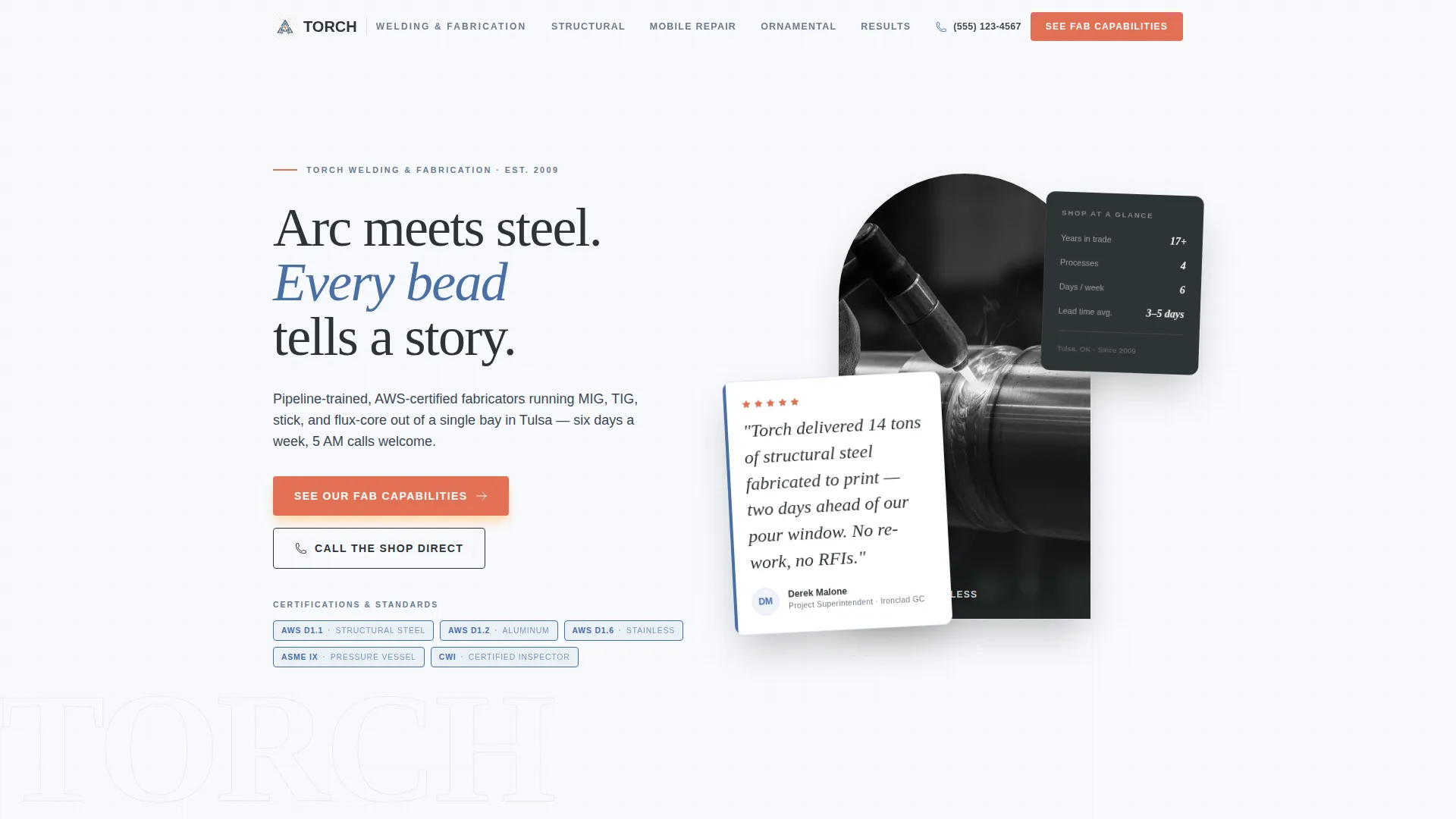
- A testimonial header with a large pull quote, named attribution, and five certification badge slots
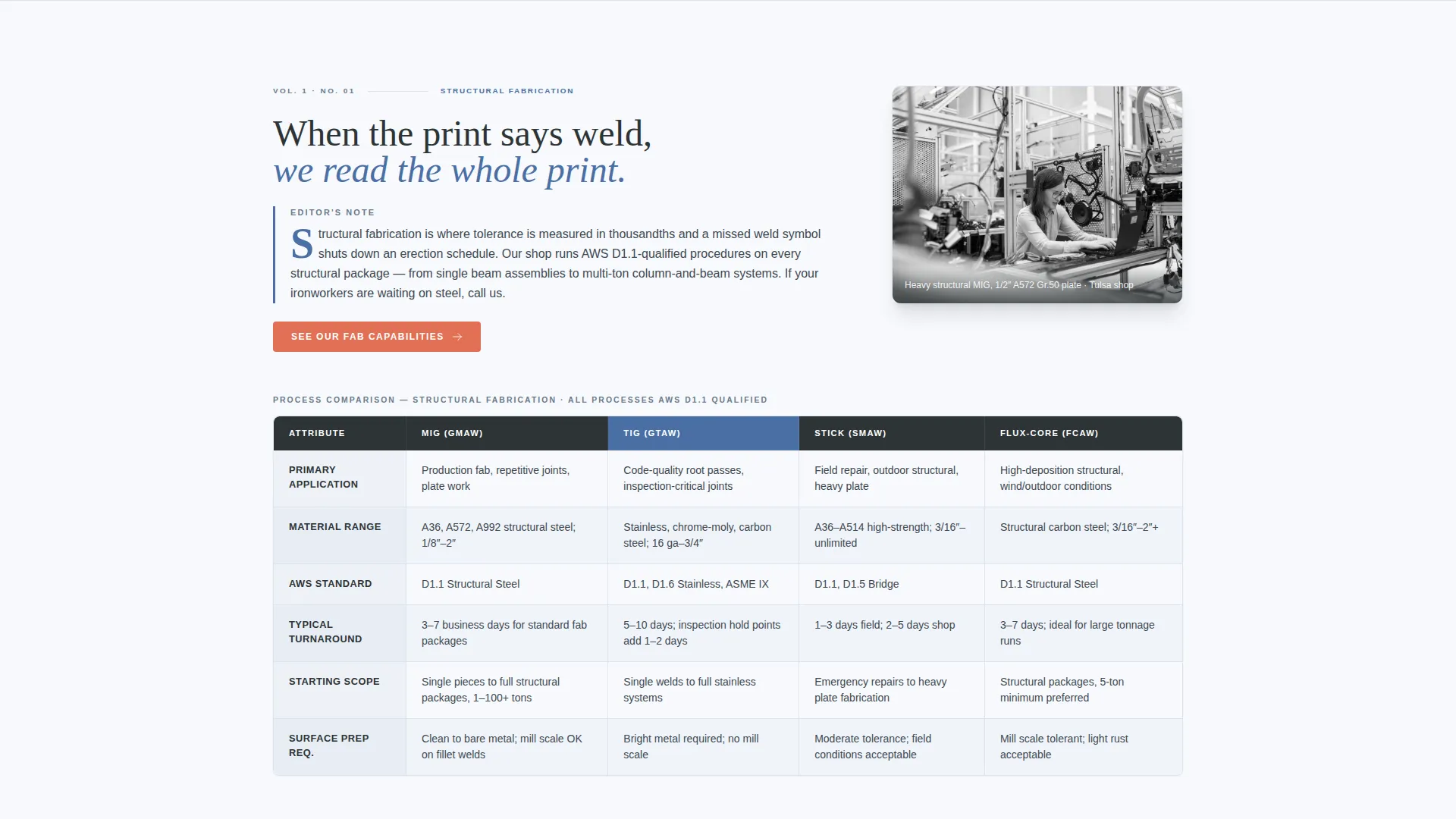
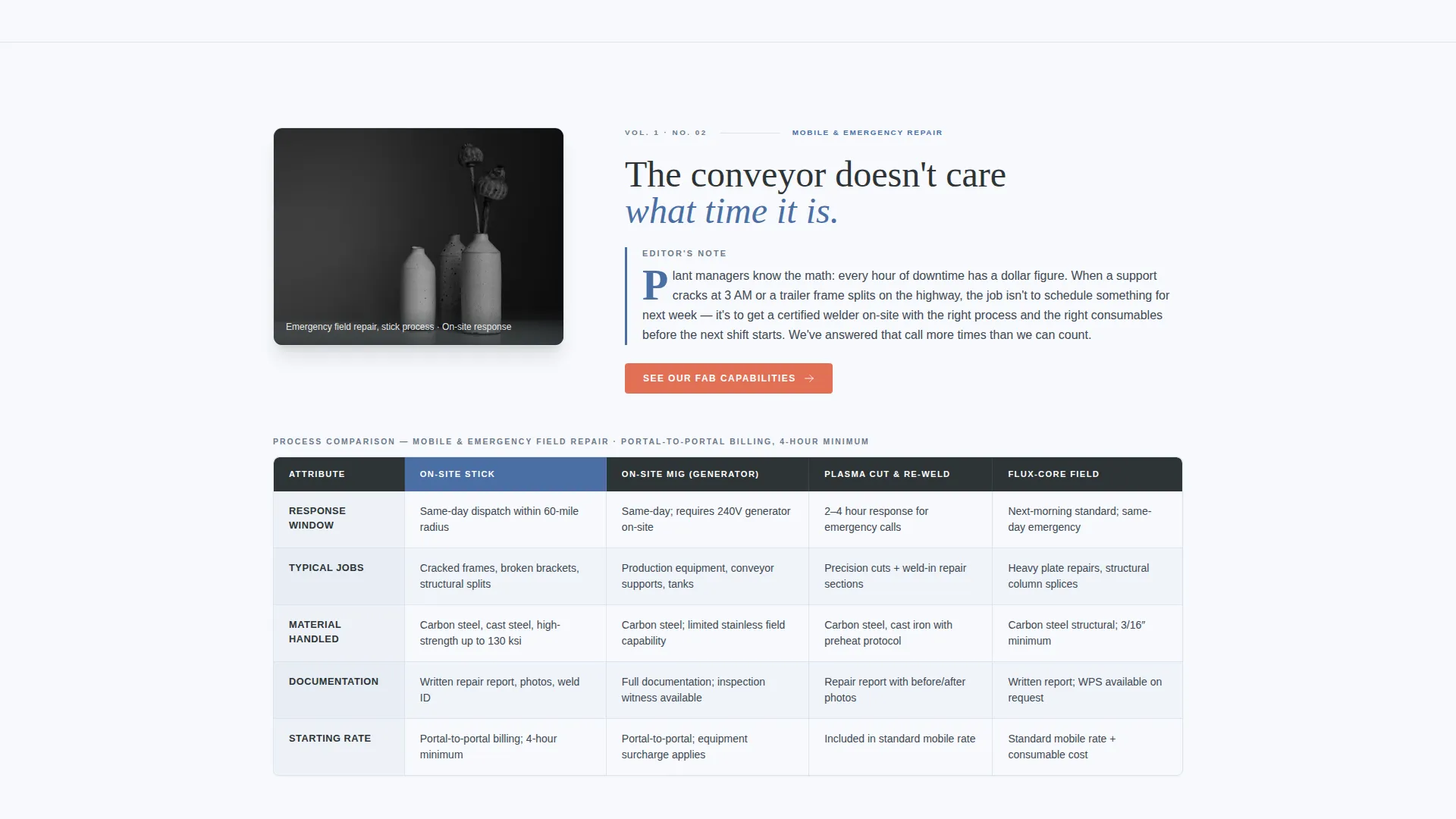
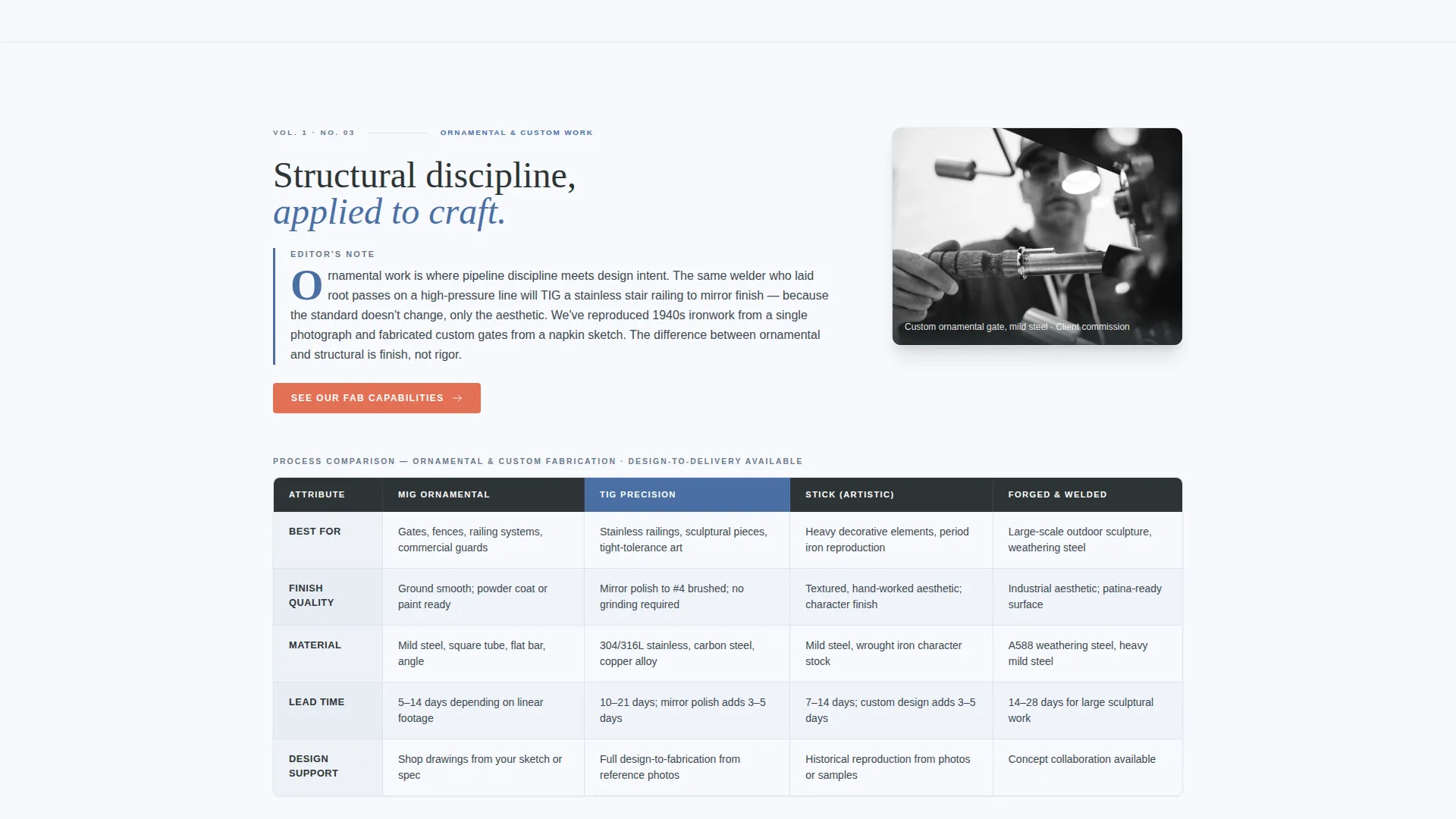
- Three service-specific comparison tables covering process, material range, turnaround, and starting scope
- A sticky call-to-action bar and a secondary click-to-call button for mobile visitors
Feature list
This template packs a precise set of components chosen for a high-stakes trade audience. Each one earns its place by doing real work in the conversion flow.
Editorial Comparison Tables
Three structured tables compare welding disciplines side by side. Each table covers process type, material range, typical turnaround, and starting project scope, so clients can self-qualify before reaching out.
Testimonial Pull-Quote Header
The page opens with a large-format quote from a named general contractor, set in bold editorial serif over a desaturated TIG bead photograph. The quote references a real deadline, a real tonnage, and a real outcome to build immediate credibility.
Certification Badge Row
Five credential slugs appear below the testimonial attribution. They are styled as magazine credential marks, not clip art, giving AWS D1.1, D1.2, and ASME certifications the visual weight they deserve.
Sticky Call-to-Action Bar
After the second scroll, a sticky bar keeps the primary call to action, "See Our Fab Capabilities," visible at all times. This reduces friction for visitors who are ready to click through before finishing the page.
Narrative Editor's Notes
Short copy blocks between tables read like editor's notes from a trade feature. Each one explains when a client needs one service over another, written with the authority of deep process knowledge.
Click-to-Call Mobile Button
A secondary call-to-action button surfaces a click-to-call option on mobile devices. Plant managers and contractors calling from a job site can reach the shop in one tap.
Page sections overview
| Section | Purpose |
|---|---|
| Testimonial Header | Opens with a named pull quote and credential badges to establish trust immediately |
| Structural Fabrication Table | Compares process, materials, turnaround, and scope for steel fabrication work |
| Editor's Note Block | Short narrative explaining when structural fabrication is the right service |
| Mobile Repair Table | Lays out on-site repair capabilities, response scope, and material range |
| Editor's Note Block | Guides clients on urgent repair scenarios and what to expect |
| Ornamental Custom Table | Details custom work processes, design range, and typical project timelines |
| Editor's Note Block | Distinguishes ornamental scope from structural and explains client fit |
| Sticky call to action Bar | Keeps "See Our Fab Capabilities" visible after second scroll |
| Testimonial Carousel | Names real companies and real project scopes to reinforce shop credibility |
| Click-to-Call Button | Mobile-focused secondary call to action for direct shop contact |
Design & branding system
The visual identity follows an Editorial Magazine theme built on an Arctic White color system. Every color choice reinforces the feeling of a technical journal placed on a brushed stainless workbench.
- Crisp glacier white (#F7F9FC) for open backgrounds, gunmetal masthead gray (#2D3436) for headers and body type, and cool weld-blue (#4A6FA5) for column headers and accent rules
- Spark-orange (#E17055) reserved exclusively for interactive highlights and call-to-action states, so it always draws the eye at the right moment
- Bold editorial serif typography paired with clean column layouts gives the page the authority of a thick-paper trade magazine
Mobile & speed optimization
The template is structured for field professionals who check vendors on a phone between shifts. Layout decisions prioritize fast scanning and easy contact on small screens.
- Single-column table fallback keeps comparison data readable on narrow viewports
- Click-to-call button is prominently placed for one-tap dialing on mobile devices
- Sticky call-to-action bar adapts to mobile scroll behavior so the prompt to act is never out of reach
How this template helps you convert
Conversion here is earned, not assumed. The template builds a logical trust ladder from the first scroll to the final tap.
- The testimonial header establishes credibility in the first three seconds with a specific, named project outcome and visible certifications.
- Comparison tables let visitors self-qualify by service type, so they arrive at the call-to-action already confident they are contacting the right shop.
- The sticky bar and click-to-call button reduce the steps between "I trust this shop" and "I am calling right now."
Other information about this template
Torch is built specifically for the professional welding services market, where clients judge a shop by how well it communicates process knowledge. The template style follows a Sidebar Companion approach, keeping navigation and contact options close while editorial content occupies the main column. The Service Utility theme means every design choice serves a practical purpose, with no decorative elements that distract from the core message. The booking and scheduling direction is supported by the prominent placement of both primary and secondary calls to action throughout the page flow.
- The template supports a welder online presence that communicates specialization across multiple disciplines from one focused page
- Certification slugs and named testimonials are formatted to support a professional welding business landing page that earns quote requests from general contractors and plant managers
- The comparison table structure makes this template adaptable for shops that want to highlight a specific discipline or expand their stated service range over time
Theme
Service Utility
Creative direction
FAQ-Driven
Color system
Arctic White
Style
Sidebar Companion
Direction
Booking/Scheduling
Page Sections
Editorial Comparison Tables
Testimonial Pull-quote Header
Certification Badge Row
Sticky Call-to-action Bar
Narrative Editor's Note Blocks
Click-to-call Mobile Button
Related questions
Can I use this template if I specialize in only one welding discipline?
Does the testimonial section support multiple client quotes?
How do the certification badges work in the layout?
Is the sticky call-to-action bar always visible while scrolling?
Who typically sends inquiries through a page built on this template?



