Car Dealership Advanced Booking Website Template
Torque is a precision-crafted landing page template built for independent Mercedes-Benz specialist workshops. It combines a carbon-dark visual identity with a technical Spec Sheet layout, a live Dealer versus Specialist comparison module, and a model-specific estimate form. The result is a page that builds credibility with data and converts serious owners into booked appointments.
by Rocket studio
Quick summary
Torque is a single-page landing page template designed for Mercedes-Benz independent specialists. It presents services as structured spec cards, organizes content like a technical service bulletin, and uses a carbon fiber color system to match the precision of the vehicles being serviced. Every section is built to earn trust before asking for a booking.
Who this template is for
This template is built for workshops that go deep on one brand and want their page to reflect that depth. It suits specialists who work on complex chassis codes, high-performance variants, and commercial fleets with high mileage demands.
- Independent Mercedes-Benz specialist mechanics and workshops
- High-performance and AMG-focused service shops
- Fleet maintenance operators managing commercial vans past high mileage
What problem this template solves
Most independent workshops lose potential clients before the first phone call. Their pages look generic, list vague services, and give no reason to trust them over a franchised dealership. This template closes that trust gap with specificity.
- Generic pages fail to communicate model-specific expertise or diagnostic capability
- Visitors cannot compare independent service value against dealer pricing without help
- Booking forms ask the wrong questions, filtering out informed owners who know their chassis code
What you get with this template
You get a fully structured, single-page layout built around the workflow of a specialist Mercedes-Benz workshop. The design, copy structure, and interactive modules are all aligned to one conversion goal: turning a skeptical owner into a booked client.
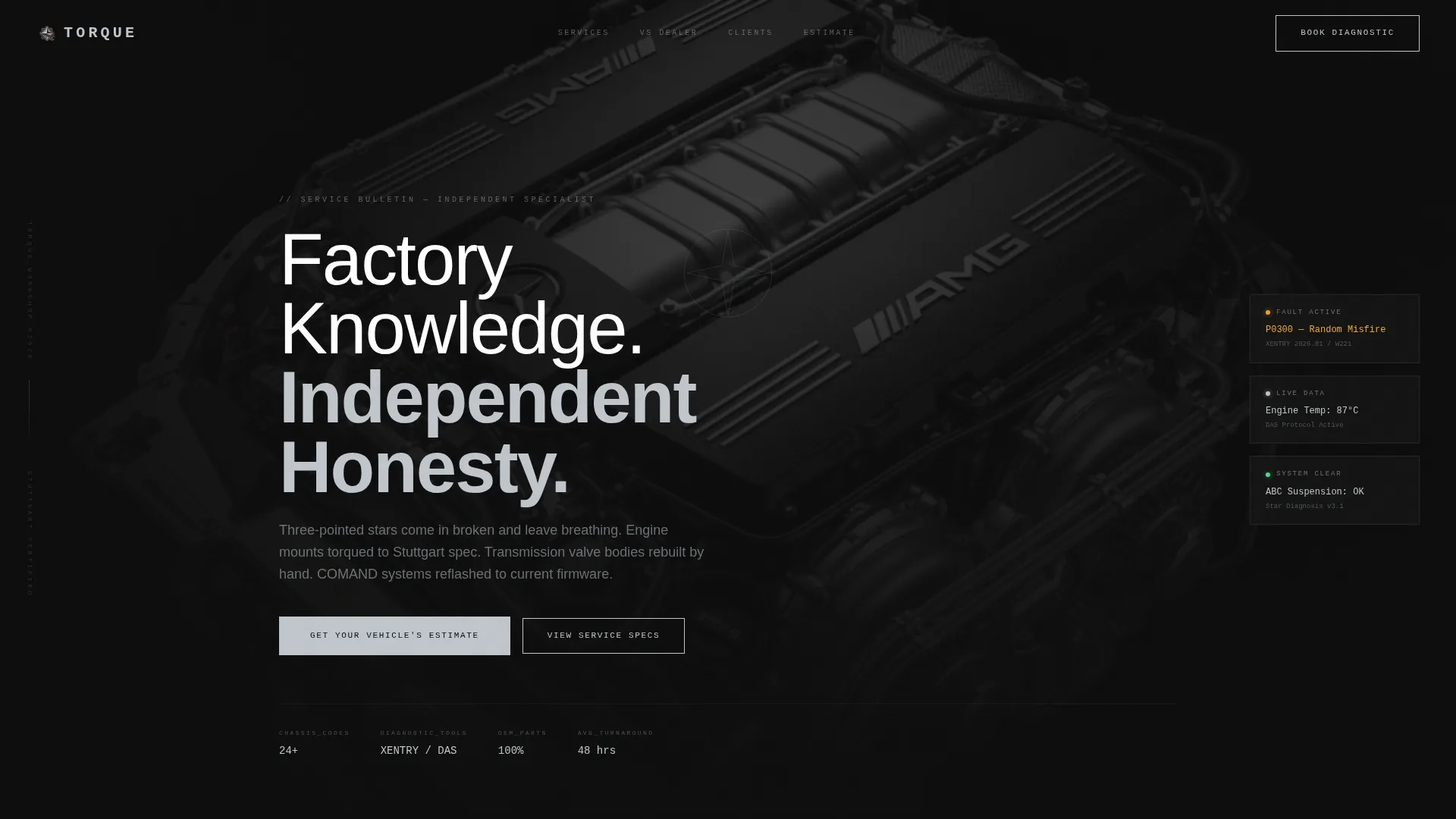
- A dark full-bleed header with a studio-lit engine bay hero image and tracked uppercase headline
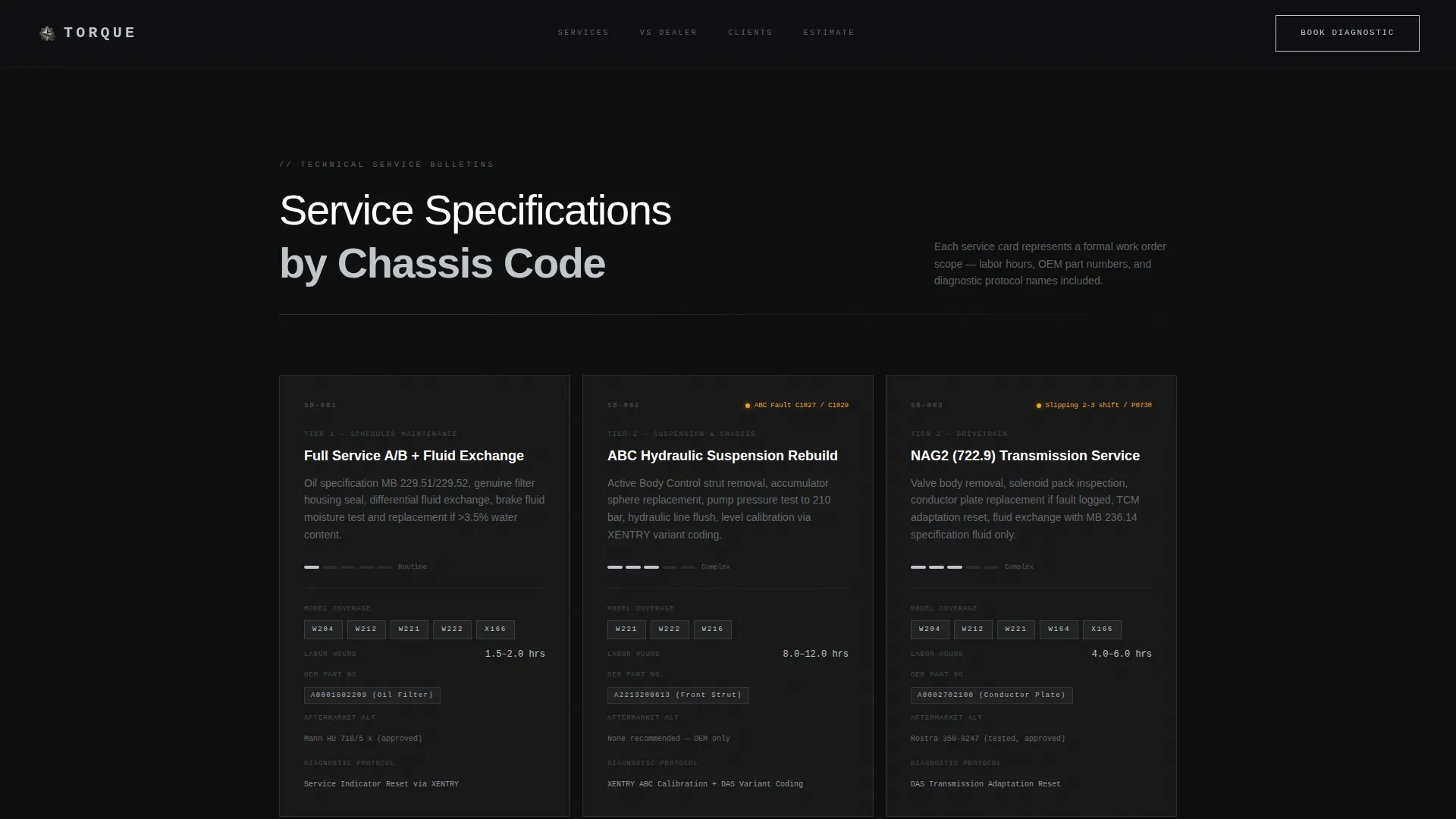
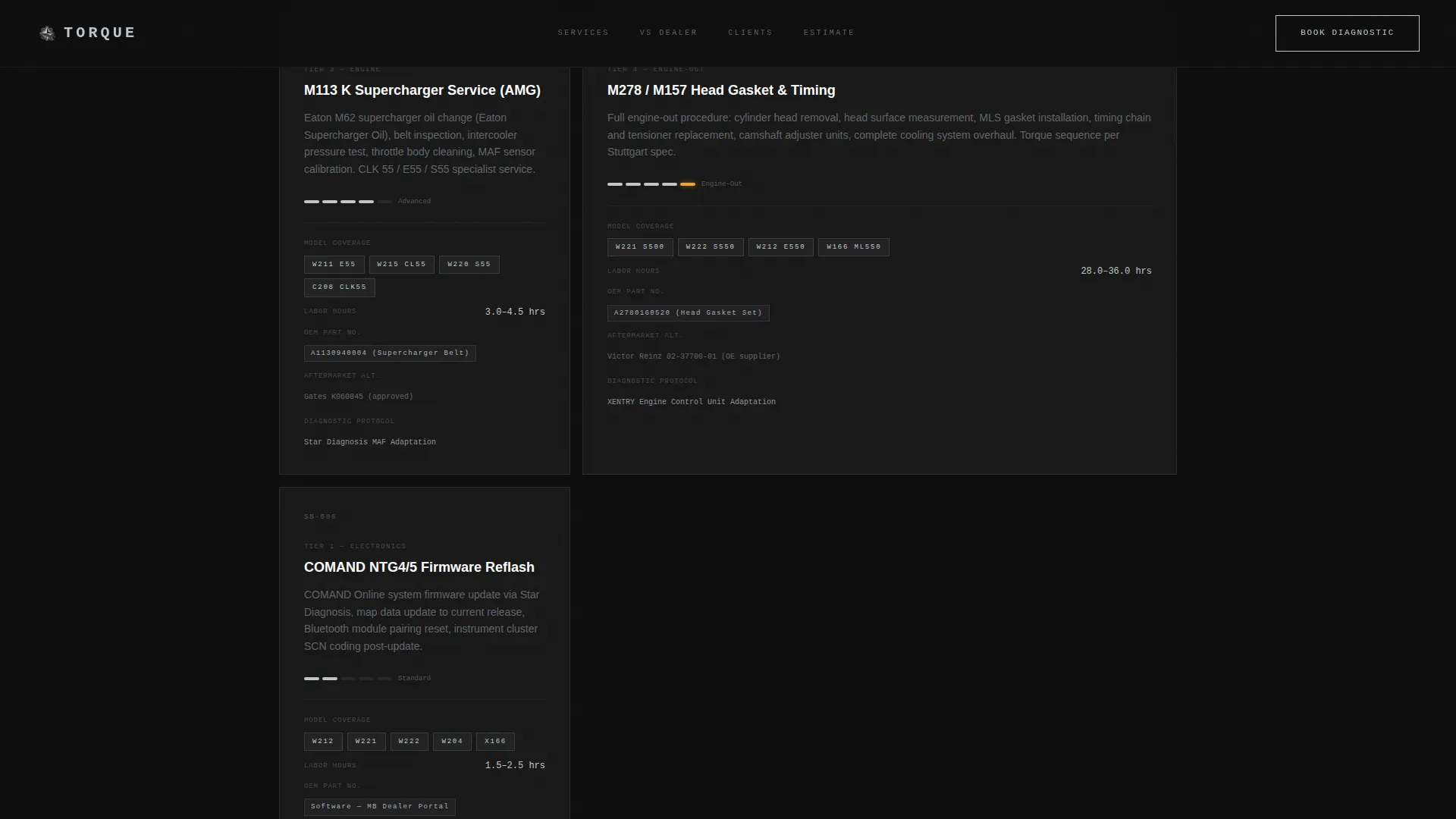
- Scrollable spec card service sections organized from routine maintenance to engine-out work
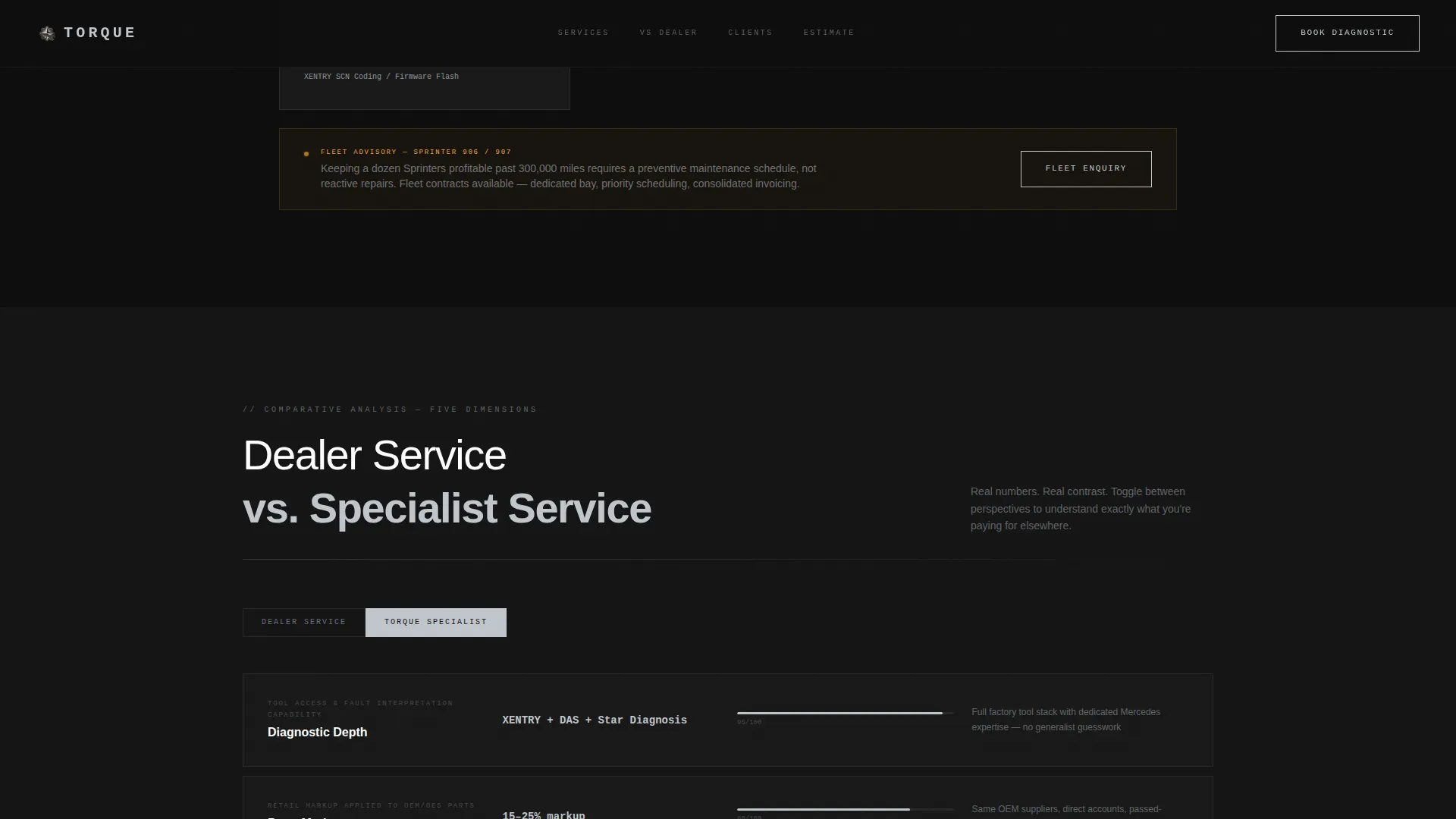
- A persistent Dealer versus Specialist comparison module with five measurable dimensions
- A model-specific estimate request form with chassis code selector, mileage field, and symptom checklist
- A secondary booking path for pre-purchase inspection of used vehicles
Feature list
This section details the core functional and design components delivered with the template.
Spec Card Service Layout
Services are displayed as structured cards that include model coverage by chassis designation, estimated labor hours, original equipment versus aftermarket parts options, and diagnostic protocol references. The layout scrolls from simpler jobs to complex engine-out procedures, building a clear picture of workshop capability.
Dealer versus. Specialist Comparison Module
A persistent interactive toggle lets visitors compare dealer service against specialist service across five dimensions: diagnostic depth, parts markup, labor rate, technician certification, and turnaround time. Real comparative values are displayed for each dimension, not general claims.
Model-Specific Estimate Form
The estimate request form uses a chassis code selector rather than marketing names, paired with a mileage input and a symptom checklist. Checklist entries cover specific fault scenarios such as check-engine light with rough idle, suspension system faults, and transmission shift issues.
Pre-Purchase Inspection Booking Path
A secondary conversion flow offers visitors the option to book a pre-purchase inspection for a used Mercedes-Benz vehicle they are evaluating. This captures a distinct buyer segment without competing with the primary estimate form.
Dark Full-Bleed Hero Section
The header uses a black-on-black overhead engine bay photograph, studio-lit to reveal only valve covers, the intake manifold, and braided lines. A subtle luminous bloom sits on the three-pointed star emblem on the engine cover. One headline fades in above the image in tracked uppercase type.
Carbon Fiber Branding System
The color palette uses deep cockpit black, brushed aluminum, AMG carbon weave gray, and a silver accent that activates on hover states and primary buttons. A single warm amber tone appears only on diagnostic callout and warning indicator elements, keeping the visual hierarchy strict and readable.
Page sections overview
| Section | Purpose |
|---|---|
| Hero Header | Establishes premium workshop identity and headline promise |
| Routine Maintenance Cards | Presents entry-level service offerings with spec detail |
| Transmission Service Cards | Communicates mid-complexity rebuild capability |
| Engine-Out Service Cards | Demonstrates top-tier technical depth |
| Dealer versus. Specialist Module | Converts comparison shoppers with real data |
| Estimate Request Form | Captures primary leads via chassis-specific input |
| Pre-Purchase Inspection | Captures secondary leads from used-car buyers |
Design & branding system
The visual identity is built around a Corporate Precision theme that draws from the interior of a high-specification Mercedes-Benz cabin at night. Every surface is matte, every glow is intentional, and nothing competes with the content.
- Color system: deep cockpit black (#0D0D0D), brushed aluminum (#A8B0B8), AMG carbon weave gray (#1A1A2E), silver accent (#C0C6CC) for hover and active states, and warm amber (#F5A623) reserved for diagnostic callouts only
- Typography uses tracked-out uppercase for display headings and clean body type for service card detail, matching the tone of a technical bulletin
- Hover states and active button glows are driven by the silver accent, keeping interactive feedback consistent and premium
Mobile & speed optimization
The layout is structured to remain readable and functional at any screen width. Spec cards, the comparison module, and the estimate form are all designed to stack cleanly on smaller viewports without losing the hierarchy that makes the page convincing.
- Spec cards reflow to single-column stacks on mobile, keeping chassis codes, labor hours, and parts detail legible
- The comparison toggle and estimate form maintain full interactivity on touch devices
- The dark palette reduces visual noise on OLED and high-contrast mobile displays
How this template helps you convert
The page is structured as a deliberate trust-building sequence. Each scroll section adds a layer of credibility before the visitor reaches any call to action.
- The hero section opens with a premium visual and a direct statement of workshop philosophy, setting expectation immediately.
- The spec card sections prove capability with real data, model coverage, and diagnostic protocol references rather than adjective-heavy claims.
- The Dealer versus Specialist module resolves the main objection most independent workshops face, making the value gap visible before the estimate form appears.
Other information about this template
This template is categorized under Automotive and Transport, specifically within the Mercedes-Benz Services subcategory. It is designed for the independent specialist niche where technical credibility is the primary conversion lever.
- The template style is Gallery plus Detail, combining visual impact with structured informational density
- The creative direction is Spec Sheet, meaning content is organized like a technical service bulletin rather than a typical marketing page
- The header concept is Dark Full-Bleed plus Glow, using studio-lit photography and ambient light effects to establish premium positioning
- The landing page direction is Comparison and Versus, built around the persistent interactive module that quantifies the difference between dealer and specialist service
- The template is suitable for chassis-specific queries covering designations such as W204, W212, W221, W222, X166, CLK 55 AMG variants, and Sprinter fleet applications
Theme
Corporate Precision
Creative direction
Spec Sheet
Color system
Carbon Fiber
Style
Gallery + Detail
Direction
Comparison/Versus
Page Sections
Spec Card Service Layout
Dealer Versus. Specialist Comparison Module
Model-specific Estimate Request Form
Pre-purchase Inspection Booking Path
Dark Full-bleed Hero with Glow Effect
Carbon Fiber Color System
Related questions
Can I customize the chassis codes and service card details?
How does the Dealer versus Specialist comparison module work?
Is the estimate form connected to a booking or scheduling system?
Can I use this template for a multi-brand European workshop?
What is the secondary conversion path designed for?



