Aerospace Assembly & Defense Contractor Website Template
Torque is a split-screen aerospace assembly landing page template built for tier-one suppliers, defense contractors, and MRO service providers. It combines a full-bleed photo header, a scroll-driven process reveal, and an eight-row comparison module to show prospects exactly how your shop operates, building trust through documented proof rather than promotional claims.
by Rocket studio
Quick summary
Torque is a precision-built landing page template for aerospace assembly service providers. It uses a 50/50 split-screen layout, a Data Command visual theme, and a Warm Stone color palette to present your process as verifiable evidence. Every scroll step shows a real operation photo alongside the matching quality data artifact, turning the page into a live quality dossier.
Who this template is for
This template is designed for businesses that win contracts through demonstrated process rigor, not marketing language. It speaks directly to buyers who expect documented proof before signing a purchase order.
- Tier-one aero suppliers managing production surges and sub-assembly outsourcing
- Defense prime contractors who need milestone delivery commitments backed by traceability
- MRO directors scheduling structural repairs against tight airframe slot windows
What problem this template solves
Aerospace buyers do not respond to generic capability statements. They need to see how you control quality at every stage before they will hand over a flight-critical scope of work. Most service landing pages fail because they describe the outcome without showing the process.
- Visitors leave without trusting that your shop can handle their traceability and certification requirements
- Prospects cannot easily compare your controls against their current outsource partner
- Engineers building an internal business case have no downloadable proof to share with decision-makers
What you get with this template
You get a complete, single-page layout that guides an aerospace procurement or engineering visitor from first impression through a structured process proof and on to a qualified contact request. Every section is purposeful and sequence-driven.
- A full-bleed photo header with a timed amber headline fade-in
- A scroll-driven five-stage process reveal pairing operation photos with data artifacts
- A persistent eight-row comparison module and a dual call-to-action set
Feature list
This template includes the following built-in design and layout capabilities, each grounded in the source brief.
Full-Bleed Photo Header with Timed Headline
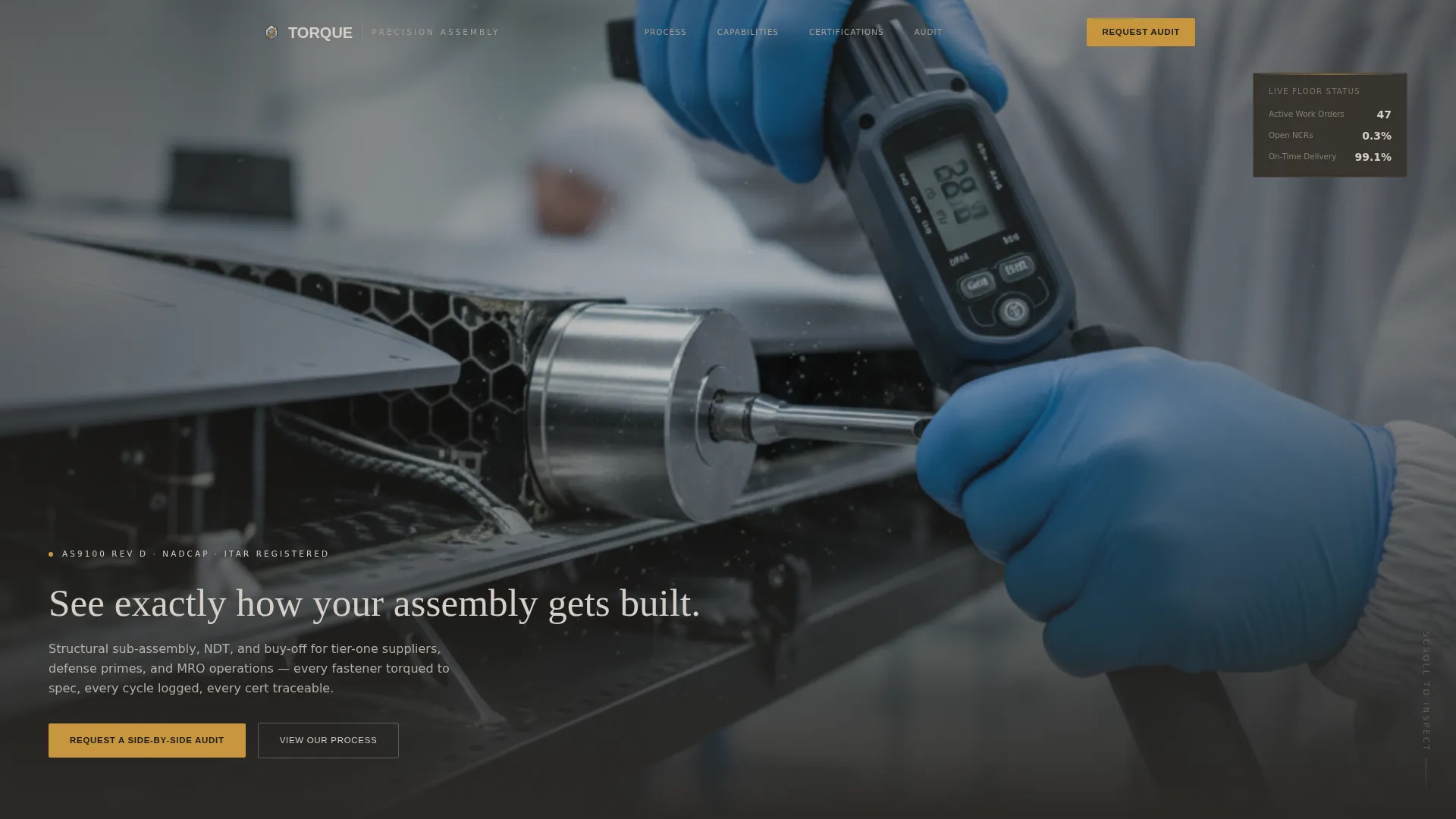
The header fills the viewport with a chest-height assembly cell photograph. A shallow depth of field keeps the torque wrench and technician's hands sharp while the fuselage ribs behind dissolve into soft geometry. After two seconds, a single amber headline fades in over the lower third of the image.
Scroll-Driven Process Reveal
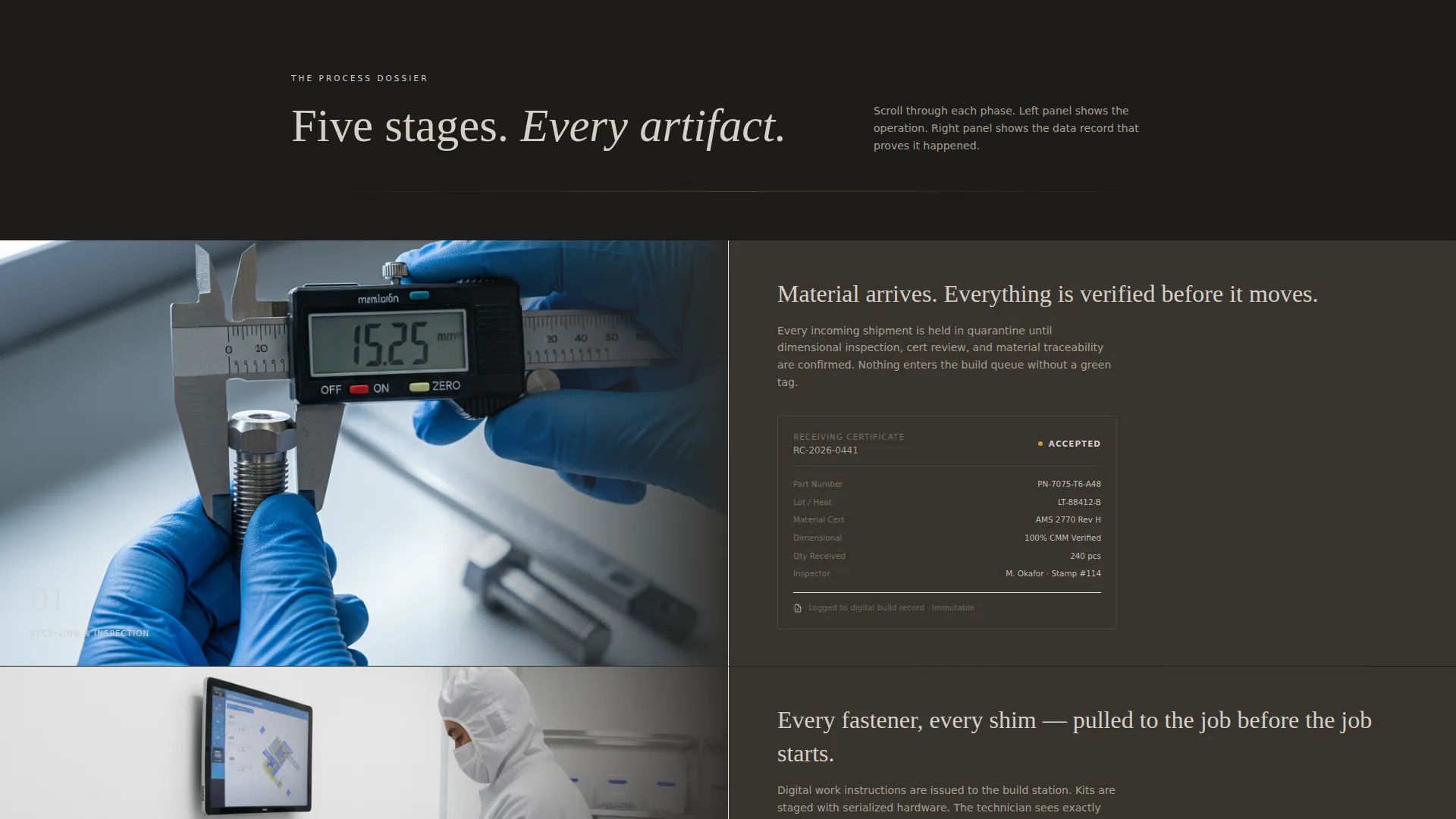
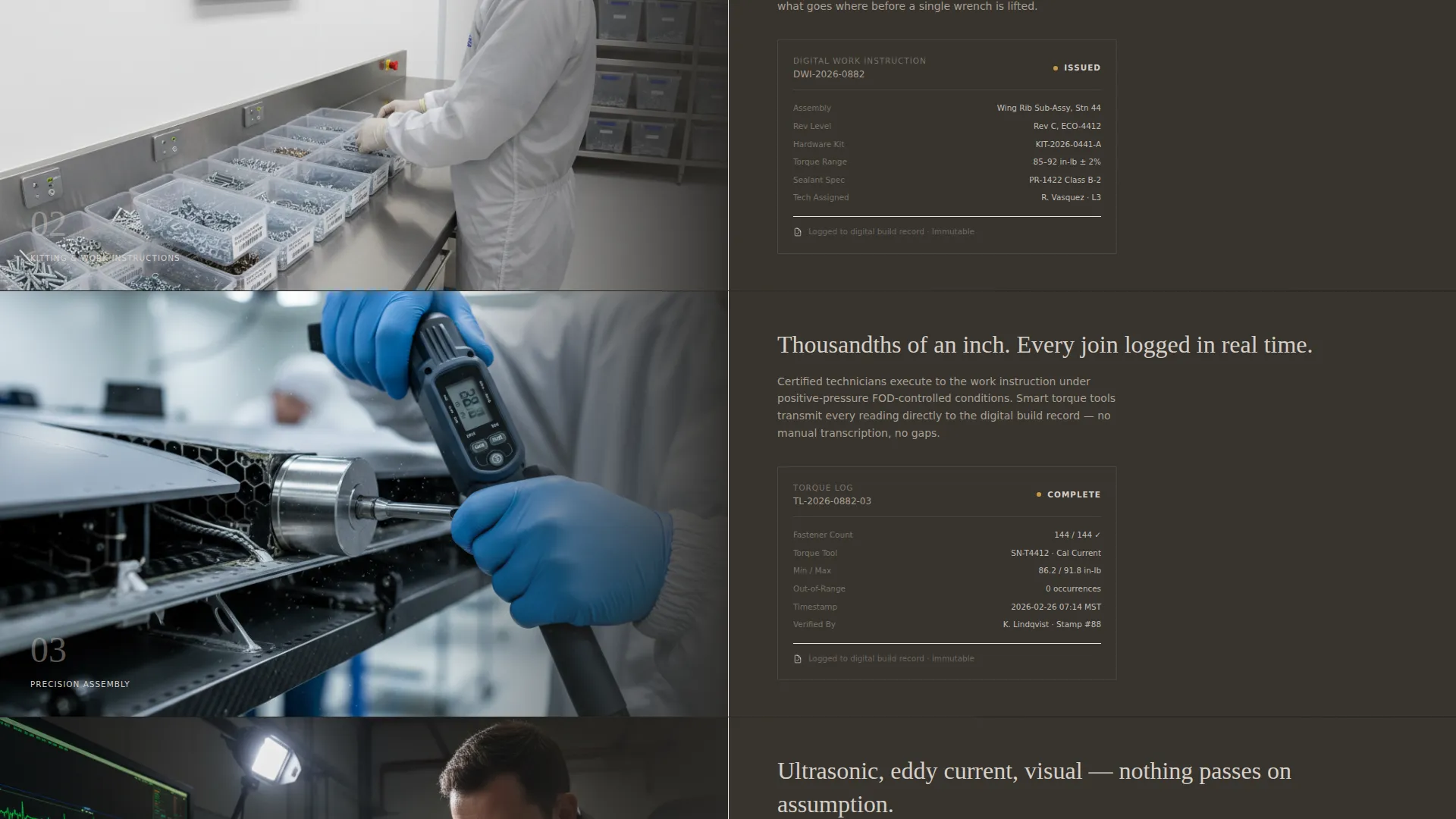
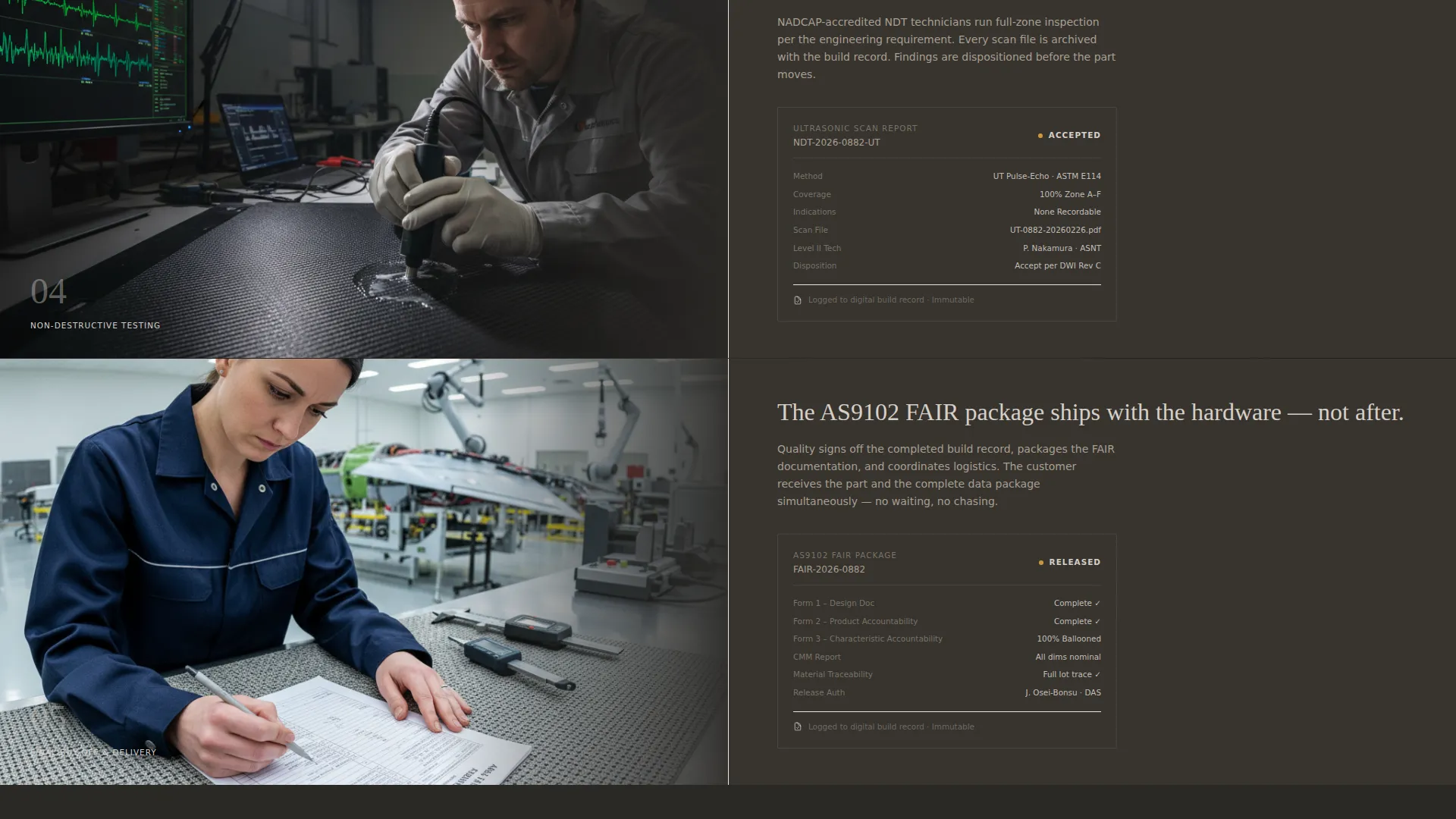
Each scroll step loads a paired left-right panel: the left side shows a real operation photograph (incoming inspection, kitting, assembly, non-destructive testing, final buy-off), and the right side displays the corresponding data artifact such as a receiving certificate, digital work instruction, torque log, ultrasonic scan report, or AS9102 First Article Inspection Report package. The sequence feels like reading a quality dossier page by page.
Eight-Row Comparison Module
A persistent two-column module sits mid-page and contrasts your current outsource partner against working with you across eight specific metrics: traceability depth, certification turnaround, nonconformance rate, tooling ownership, surge capacity response time, foreign object debris control protocol, digital thread integration, and cost-per-unit trend. Each row animates on scroll, with amber highlighting the winning metric.
Dual Call-to-Action Set
The primary call to action, "Request a Side-by-Side Audit," opens a short qualification form with a scope dropdown (structural, electrical, interiors, modification), an annual unit volume field, and a certification standard selector (AS9100, NADCAP, or customer-specific). The secondary path, "Download Our Process Map PDF," gives engineers a shareable document for internal business cases.
Data Command Visual Theme
The layout uses charcoal for background and data overlay areas, concrete tone for body text regions, titanium wash for section dividers and card surfaces, and mission-critical amber for every interactive element, hover state, and live metric. The palette reads like a machined aluminum billet fresh from a CNC: industrial weight softened by human craft.
Page sections overview
| Section | Purpose |
|---|---|
| Full-Bleed Header | Opens with assembly cell photography and a timed amber headline |
| Process Reveal Panels | Pairs operation photos with quality data artifacts across five stages |
| Comparison Module | Contrasts outsource partner metrics against your capabilities across eight rows |
| Audit Request Form | Captures qualified leads with scope, volume, and certification inputs |
| Process Map Download | Offers a secondary conversion path for engineers in the evaluation stage |
Design & branding system
The Warm Stone color system gives the page an industrial weight that feels native to a precision manufacturing environment. Every color choice has a functional role, so the design reads as a data interface rather than a marketing brochure.
- Hangar concrete (#A89F91) and anodized titanium (#D6CFC7) carry body text regions and card surfaces
- Deep tool-steel charcoal (#2B2926) anchors backgrounds and data overlays for contrast and legibility
- Mission-critical amber (#C8963E) activates on every interactive element, hover state, and live metric, acting as a visual signal lamp throughout the page
Mobile & speed optimization
The 50/50 split-screen layout is designed to reflow cleanly for narrower viewports. Each paired panel in the process reveal stacks vertically on smaller screens so the photograph and the data artifact read in the correct sequence.
- The comparison module rows maintain their amber highlight behavior at mobile screen widths
- Both call-to-action paths remain accessible without horizontal scrolling on standard mobile devices
How this template helps you convert
The template converts by replacing persuasion with proof. Every layout decision moves the visitor from observer to qualified prospect through a structured, evidence-based sequence.
- The header creates immediate credibility by showing a real technician at work rather than a stock-image composite, and the delayed amber headline rewards the visitor for staying on the page.
- The scroll-driven process reveal builds cumulative trust by presenting documented quality evidence at each production stage, so the buyer experiences your controls firsthand before reading a single marketing claim.
- The dual call-to-action set captures visitors at two different decision stages: procurement contacts ready to request an audit, and engineers still building the internal case who need a downloadable process map to share.
Other information about this template
This template is part of a manufacturing and industrial template category focused on aerospace manufacturing and precision assembly service niches. It is designed for high-stakes B2B sales cycles where procurement decisions require documented evidence.
- The template style is a 50/50 split screen, suited to side-by-side content like process-versus-data and comparison-versus-audit formats
- The creative direction is Transparent Process, meaning the layout prioritizes showing verifiable operational evidence over promotional language
- The header concept is Full-Bleed Photo, using real assembly cell imagery rather than illustrated or abstract visuals
- The landing page direction is Comparison/Versus, structured around the eight-row metric comparison as the primary persuasion engine
- The Data Command theme and Warm Stone palette are designed to position your service as a precision-controlled, data-driven operation rather than a generic job shop
Theme
Data Command
Creative direction
Transparent Process
Color system
Warm Stone
Style
Split Screen (50/50)
Direction
Comparison/Versus
Page Sections
Full-bleed Photo Header with Timed Headline
Scroll-driven Process Reveal
Eight-row Comparison Module
Dual Call-to-action Set
Data Command Visual Theme
Related questions
What kind of business is this landing page template designed for?
Can I adapt the eight-row comparison module to reflect my specific service metrics?
What does the audit request form collect from visitors?
What is the secondary conversion path in this template?
Is the scroll-driven process reveal locked to a specific set of production stages?



