Precision E-Bike Shop Landing Page Template
Torque is a full-page landing page template built for electric bike shops that hand-craft performance rides. It opens with a cinematic full-screen video hero, then walks visitors through an interactive engineering story, motor specs, battery range, and component details, before earning the booking with a calendar-based test ride scheduler.
by Rocket studio
Quick summary
Torque is a storybook-style landing page template designed for e-bike workshops and retailers. It guides visitors through a scroll-driven engineering narrative: from a cinematic hero to motor cutaways, battery range visuals, and a clickable component picker. Every section builds trust before the final call to action, a calendar widget that books test rides and custom consultations.
Who this template is for
This template is built for electric bike businesses that sell on proof, not promises. It works best when the product is complex enough to need explaining and compelling enough to deserve a full story.
- Independent e-bike workshops and boutique builders selling hand-crafted electric bikes
- Urban mobility retailers targeting daily commuters and weekend trail riders
- E-bike shops offering custom builds and consultation-based purchasing
What problem this template solves
Most product pages ask visitors to trust a bike they have never touched. Torque flips that by leading with engineering evidence first and the booking form last, so by the time a visitor reaches the calendar, the decision feels earned.
- Visitors bounce when a page jumps straight to a price without explaining what makes the bike worth it
- Commuter and trail rider audiences need terrain-specific range data, not generic spec tables
- A generic booking form with no context rarely converts skeptical first-time e-bike buyers
What you get with this template
This template delivers a fully structured, single-page layout with high interactivity baked in from the first scroll. Every section has a defined role in the conversion journey, and the visual system is ready to use out of the box.
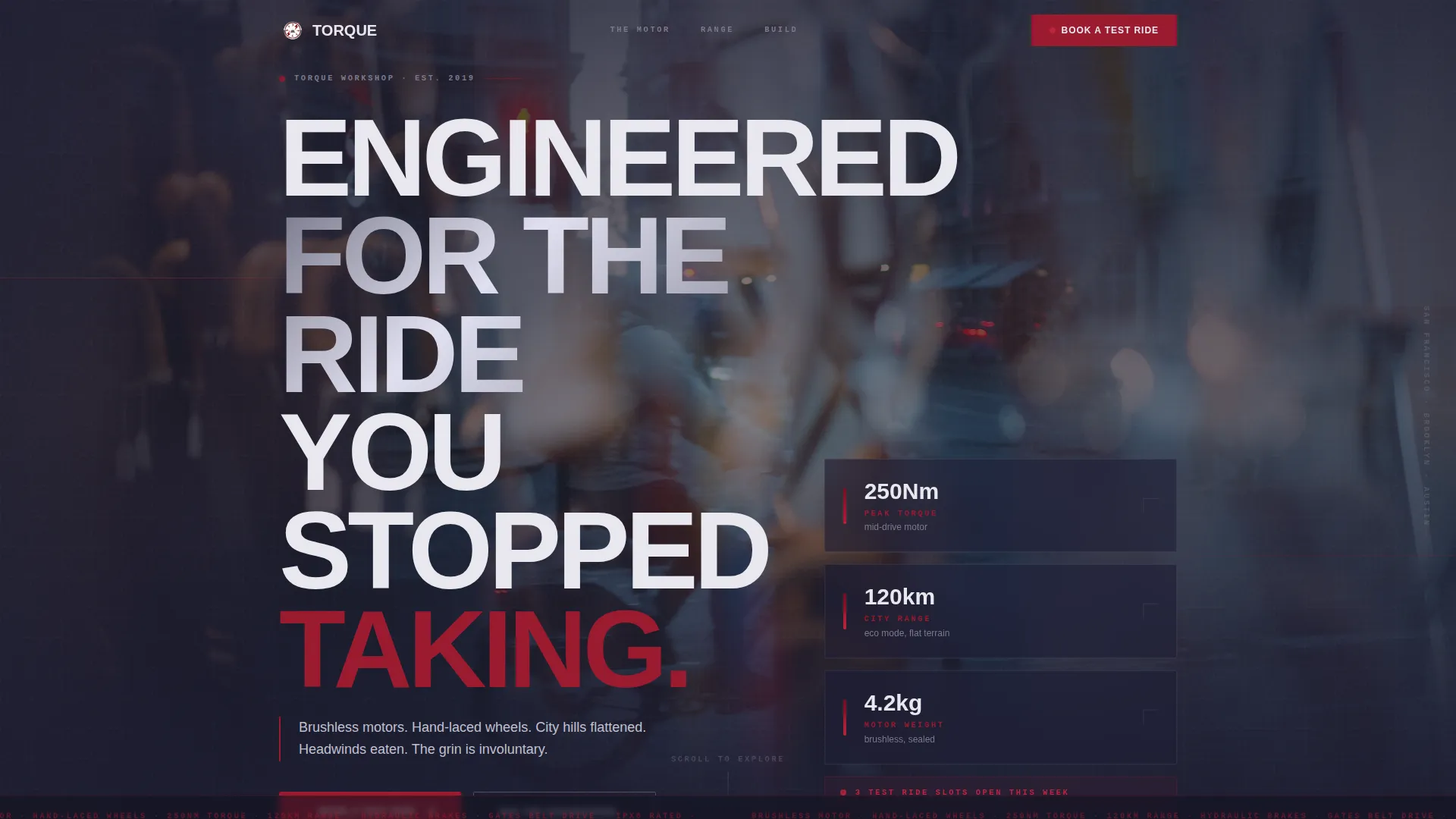
- A cinematic full-screen video hero with an engineering-spec headline and floating stat cards
- An interactive motor cutaway, a scroll-animated battery range explorer, and a clickable component picker bento grid
- A test ride booking section with a calendar widget filtered by location, bike class, and rider experience level
Feature list
This template ships with a tightly integrated set of interactive sections, each one designed to answer a specific buyer question before asking for a commitment.
Full-Screen Video Hero with Stat Cards
The hero plays a cinematic slow-motion loop shot from handlebar level. A single engineering headline fades in over the footage. Floating stat cards sit above the video, surfacing key figures at a glance without interrupting the mood.
Interactive Motor Station
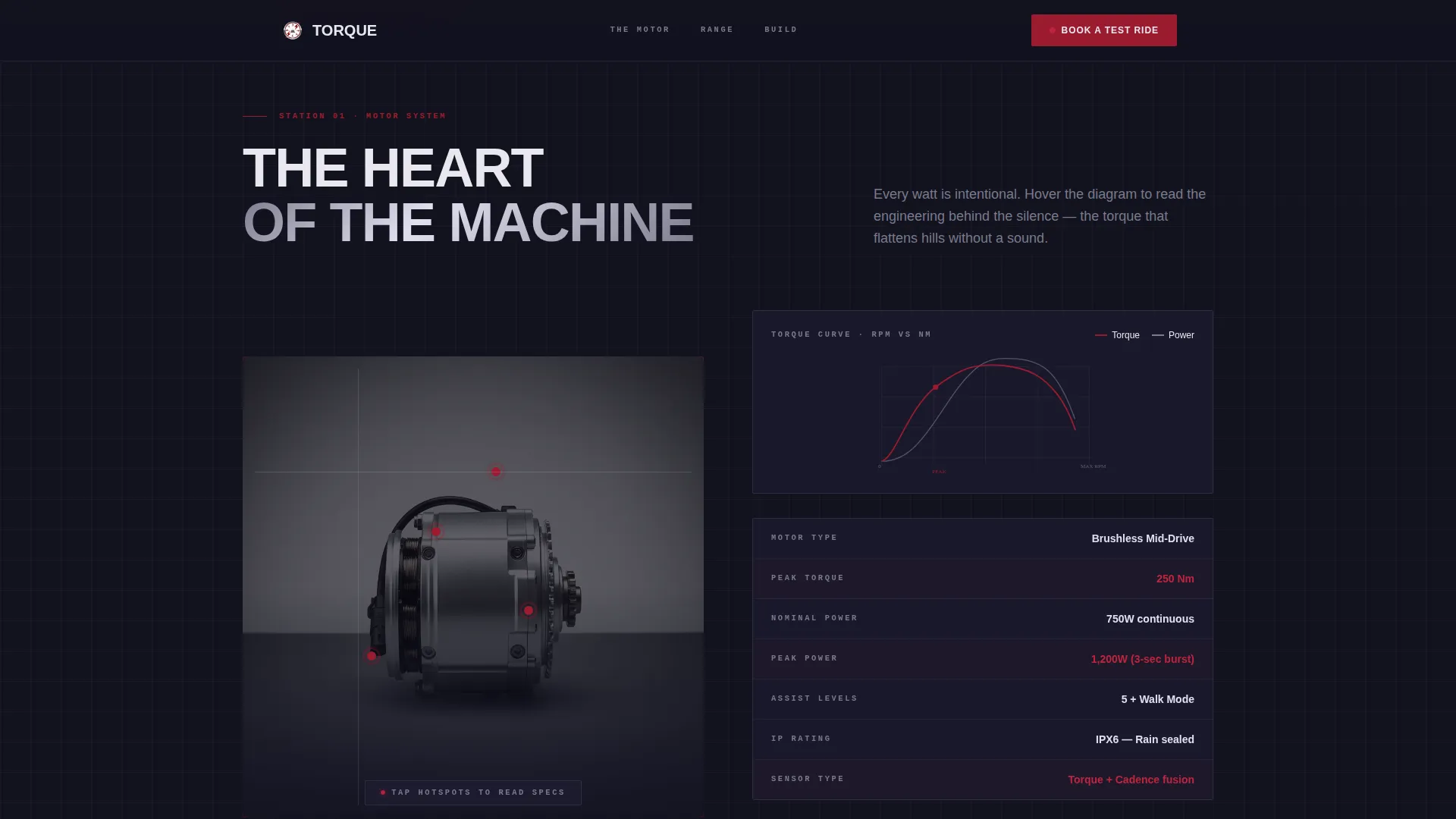
A motor cutaway diagram lets visitors hover over specific components to reveal torque curves and watt-hour figures. This section answers the most common first question, "Is it powerful enough?", with visual, spec-driven evidence rather than marketing copy.
Scroll-Animated Battery Range Explorer
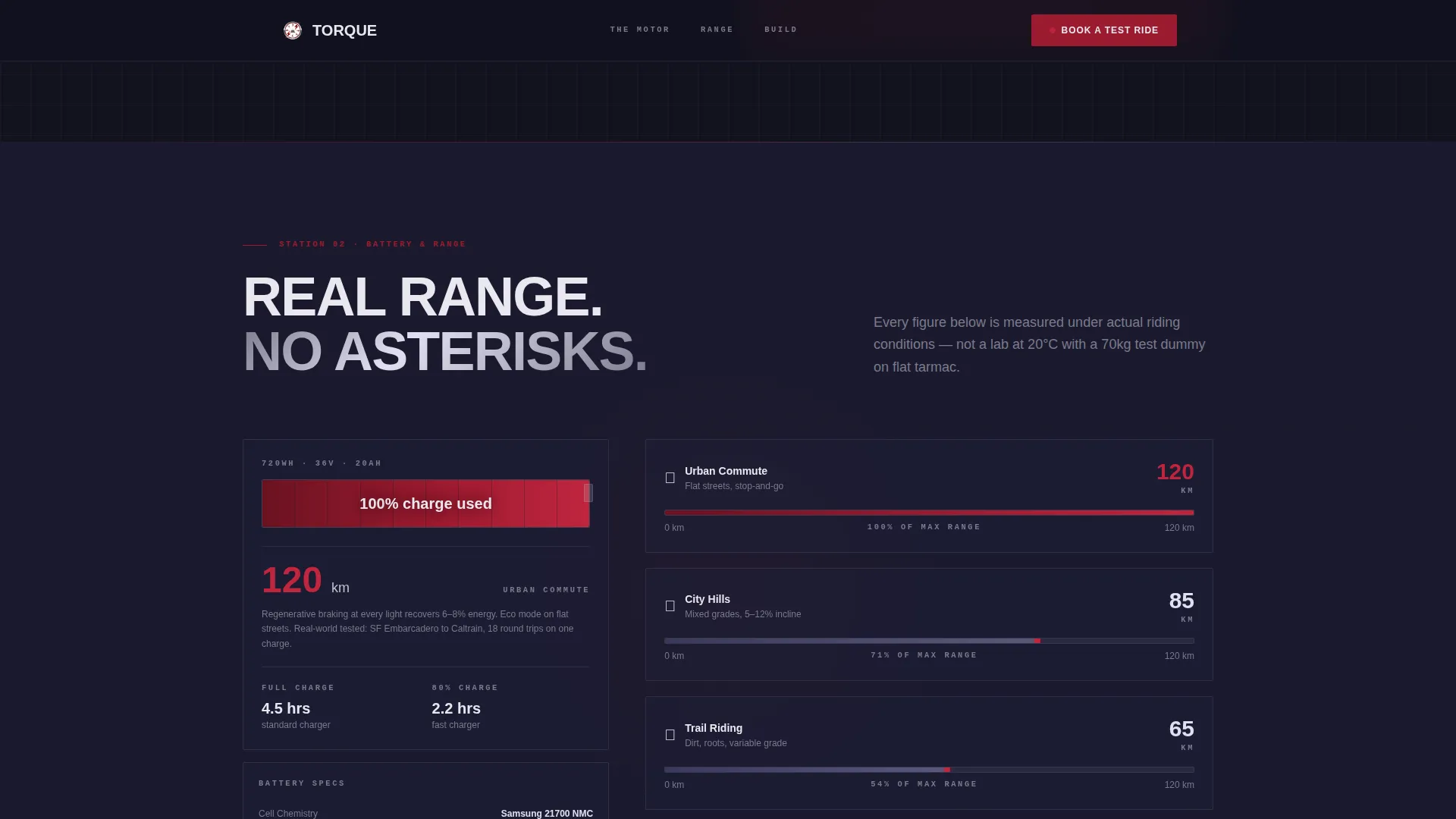
A battery cross-section fills progressively as the visitor scrolls. The fill reflects real-world range estimates broken down by terrain type, flat city, rolling hills, steep trail, giving riders a concrete sense of what the battery means for their specific route.
Clickable Component Picker
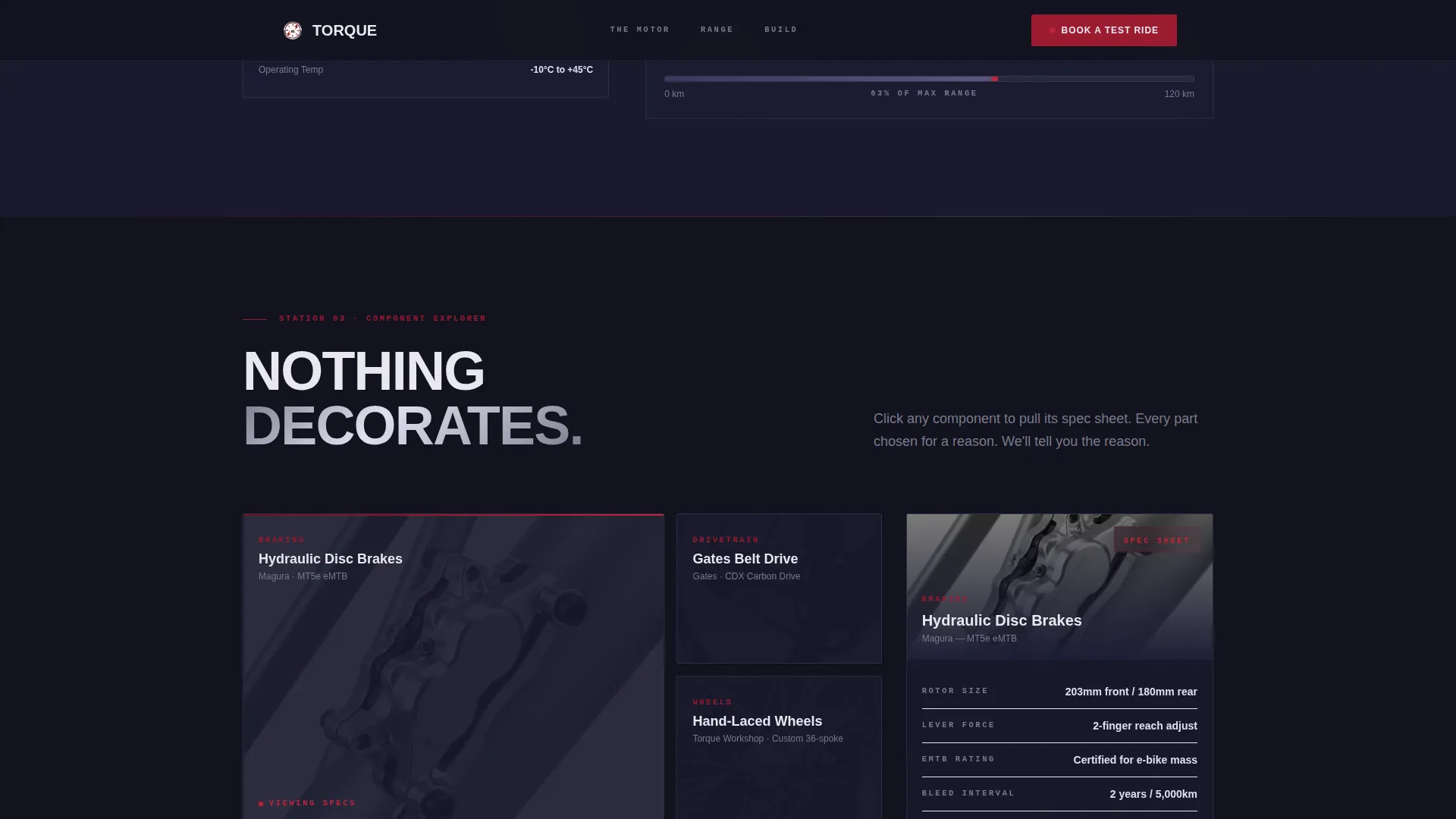
A bento-style grid displays the bike's key components. Clicking any part, derailleur, brake caliper, hub motor, pops open its full spec sheet. Visitors can inspect the build quality at their own pace before committing to a booking.
Test Ride Booking Calendar
The primary call to action is a calendar widget pinned after the motor section and repeated at the page end. Visitors filter by store location, preferred bike class (commuter, trail, or cargo), and riding experience level before selecting a slot.
Build and Quote Consultation Path
A secondary interactive path lets visitors configure a custom build. The configuration auto-generates a consultation appointment, turning a browsing session into a scheduled conversation with the workshop team.
Page sections overview
| Section | Purpose |
|---|---|
| Hero Video Header | Opens with cinematic footage and an engineering headline to hook the visitor instantly |
| Floating Stat Cards | Surfaces key performance figures above the hero without interrupting the video |
| Motor Station Cutaway | Answers the power question with hover-activated torque and watt-hour specs |
| Battery Range Explorer | Shows real-world range by terrain type through a scroll-linked fill animation |
| Component Picker Grid | Lets visitors click individual parts to read full spec sheets at their own pace |
| Test Ride Booking | Presents a calendar widget filtered by location, bike class, and experience level |
| Build and Quote Path | Guides custom-build visitors toward a consultation appointment |
| Page Footer | Closes with a linear single-row footer pattern |
Design & branding system
The visual identity follows an Engineering Blueprint theme. Every color in the palette has a functional role, and nothing is decorative for its own sake. The result feels like a precision toolbox opened under workshop lighting.
- Base layer uses deep workshop black (#1A1A2E), with polished chrome silver (#C0C0D0) and machined aluminum (#E8E8EF) for surfaces and detail lines
- Ruby red (#9B1B30) is reserved exclusively for calls to action, power indicators, and accent lines that trace through the layout like wiring diagrams
- Typography pairs Manrope for body text with DM Sans for display headings, keeping readability high at all scroll speeds
Mobile & speed optimization
The template is designed desktop-first to support its complex interactive explorer sections fully. All interactive layers remain accessible and functional on smaller screens through a fully responsive layout.
- Interactive sections including the component picker and booking calendar adapt to touch inputs on mobile and tablet viewports
- Static content sections use server-side rendering while interactive sections load as client components, keeping initial page weight low
- GSAP ScrollTrigger drives the scroll-linked animations, with staggered reveals and hover effects handled as lightweight client interactions
How this template helps you convert
The conversion strategy in this template is sequential. Each section removes a specific objection before the booking form appears, so the ask feels natural rather than premature.
- The hero establishes the workshop's identity and surfaces key stats immediately, reducing the "is this credible?" bounce that hits generic product pages
- The motor, battery, and component sections build engineering proof in a logical order, answering the power, range, and build-quality questions that hold back first-time buyers
- The booking calendar appears only after the full proof sequence, so visitors arrive at the scheduler already convinced, they are choosing a time slot, not deciding whether to trust the brand
Other information about this template
This template is built for the Automotive and Transport category under the Bike and Motorcycle subcategory. It is optimized for direct-to-consumer e-bike retail and workshop businesses operating in English-language, United States markets with USD pricing.
- The template style is Storybook and Full-Page, designed for a single continuous scroll journey rather than a multi-page site structure
- Rider testimonials with concrete outcomes are supported as a social proof layer within the layout, reinforcing the engineering narrative with real-world results
- The footer uses a linear single-row pattern, keeping the close of the page clean and uncluttered after the booking call to action
Theme
Engineering Blueprint
Creative direction
Interactive Explorer
Color system
Ruby & Chrome
Style
Storybook/Full-Page
Direction
Booking/Scheduling
Page Sections
Full-screen Video Hero with Stat Cards
Interactive Motor Station Cutaway
Scroll-animated Battery Range Explorer
Clickable Component Picker Bento Grid
Test Ride Booking Calendar Widget
Build and Quote Consultation Path
Related questions
Who is the Torque template built for?
Can I customize the bike classes in the booking calendar?
Does the template include the video footage shown in the hero?
How does the Build and Quote path work?
Is this template suitable for a shop with multiple locations?



