Specialist Mechanical Engineer Profile Pre-Launch & Coming Soon Website Template
Torque is a precision-built landing page template for mechanical engineer resume services. The asymmetric 60/40 grid, Monochrome Steel palette, and Lens & Frame visual theme give the page the weight and clarity of a machinist's drawing. It includes a waitlist form, scarcity progress bar, and a secondary lead-capture path, all structured to convert cautious engineers into committed sign-ups.
by Rocket studio
Quick summary
Torque is a single-page, waitlist-focused landing page template built for a mechanical engineer professional resume service. It pairs a 60/40 asymmetric grid with a Monochrome Steel color system to deliver a layout that feels as deliberate as a GD&T (Geometric Dimensioning and Tolerancing) callout sheet. Every section earns its place, and every visual choice reinforces craft.
Who this template is for
This template was built for resume service founders and freelance career consultants who work specifically with engineering professionals. If your clients carry calipers in one hand and a half-finished CV in the other, this layout speaks their language.
- Resume service operators targeting mechanical and design engineers at the mid-career or senior level
- Career coaches serving recent graduates competing for rotational programs at top engineering employers
- Independent consultants who need a credible, coming-soon presence before their full service launches
What problem this template solves
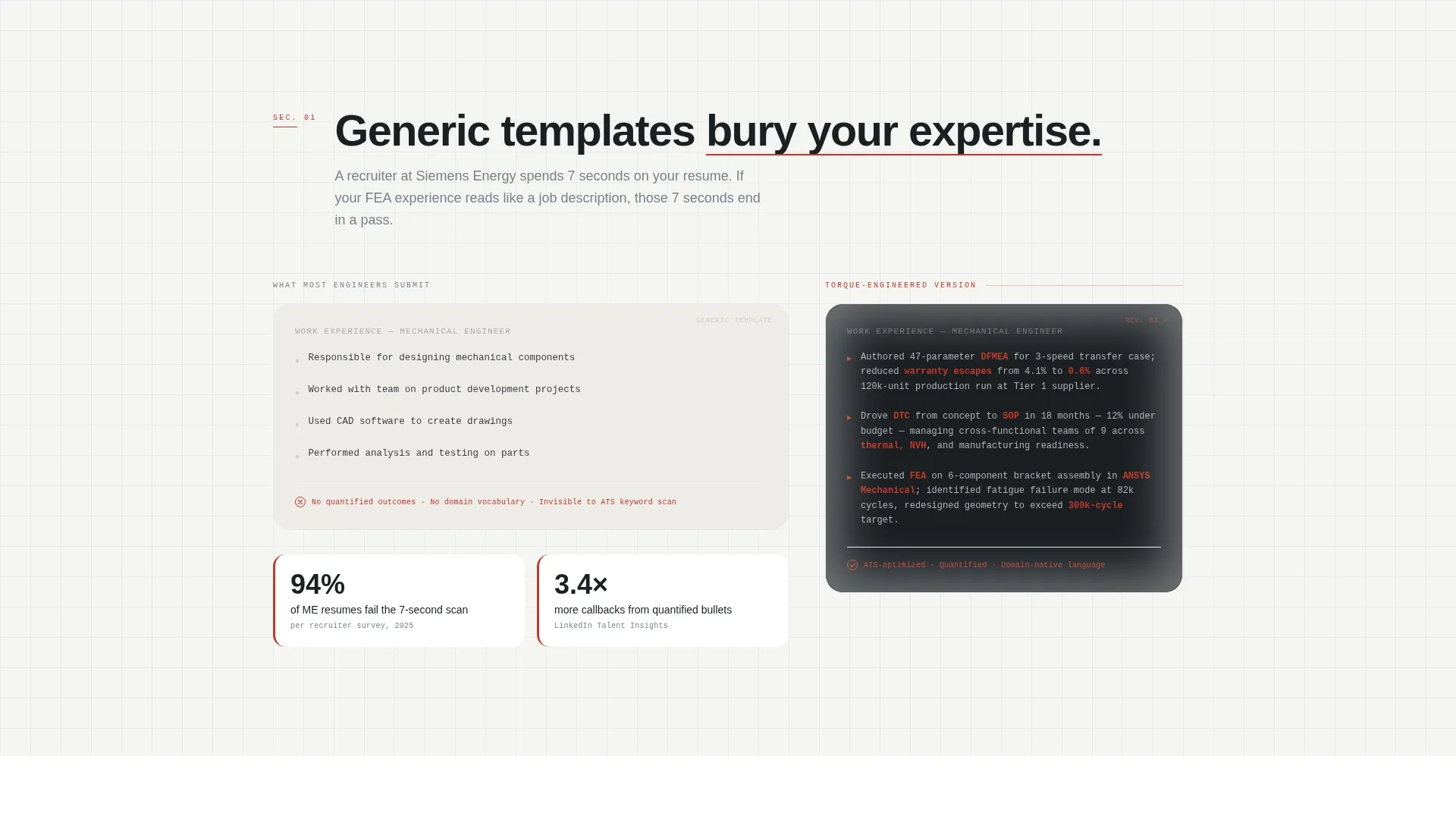
Generic landing page templates make a technical service look ordinary. For engineers, ordinary means unreliable. A resume service that helps clients translate SolidWorks, DFMEA (Design Failure Mode and Effects Analysis), and tolerance-stack experience into a compelling two-page story needs a page that demonstrates the same precision it promises.
- Bland templates bury the specialist value of a niche engineering resume service
- Visitors with a technical mindset distrust pages that feel vague or visually inconsistent
- No scarcity or commitment mechanism means visitors browse and leave without converting
What you get with this template
You get a complete, ready-to-customize landing page built around a waitlist conversion flow. The structure moves a visitor from first impression through proof and into action without a single wasted section.
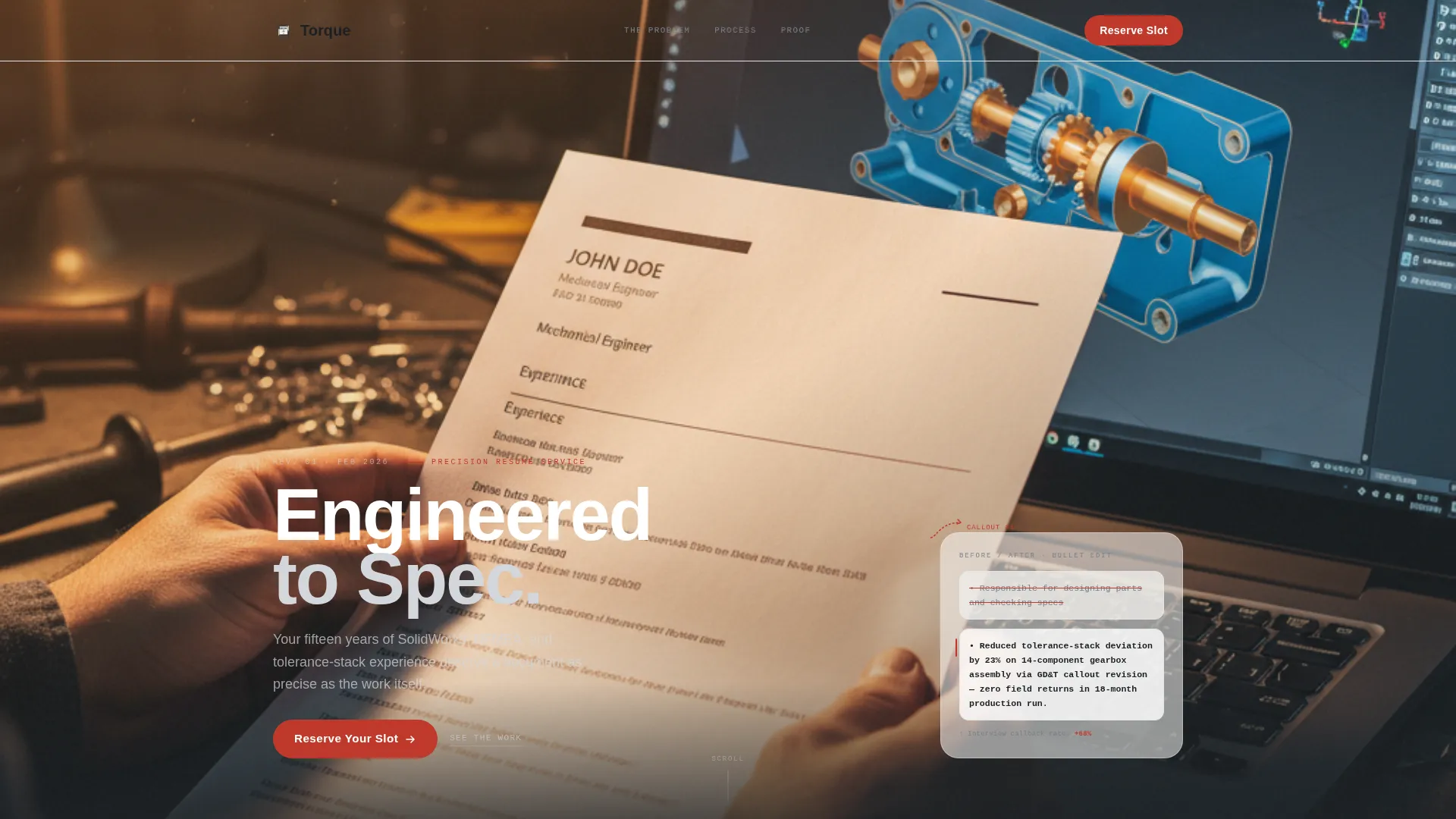
- A full-bleed photo header with a timed "Engineered to Spec" headline fade-in and a red inspection-arrow annotation mark
- A 60/40 asymmetric content grid that pairs transformation narratives with zoomed resume detail callouts
- A waitlist form with an email field, engineering discipline dropdown, and a live capacity progress bar showing claimed slots
Feature list
This template packs a focused set of purpose-built components. Each one serves the waitlist conversion goal without adding noise.
Full-Bleed Photo Header
The header opens with a tightly composed, shallow-depth-of-field photograph. An engineer's hands hold a printed resume beside an open laptop displaying a CAD assembly. A single red annotation arrow points to a bullet line on the page, mimicking an inspection markup. The headline "Engineered to Spec" fades in after two seconds along the left 60-column in light steel type.
Asymmetric 60/40 Content Grid
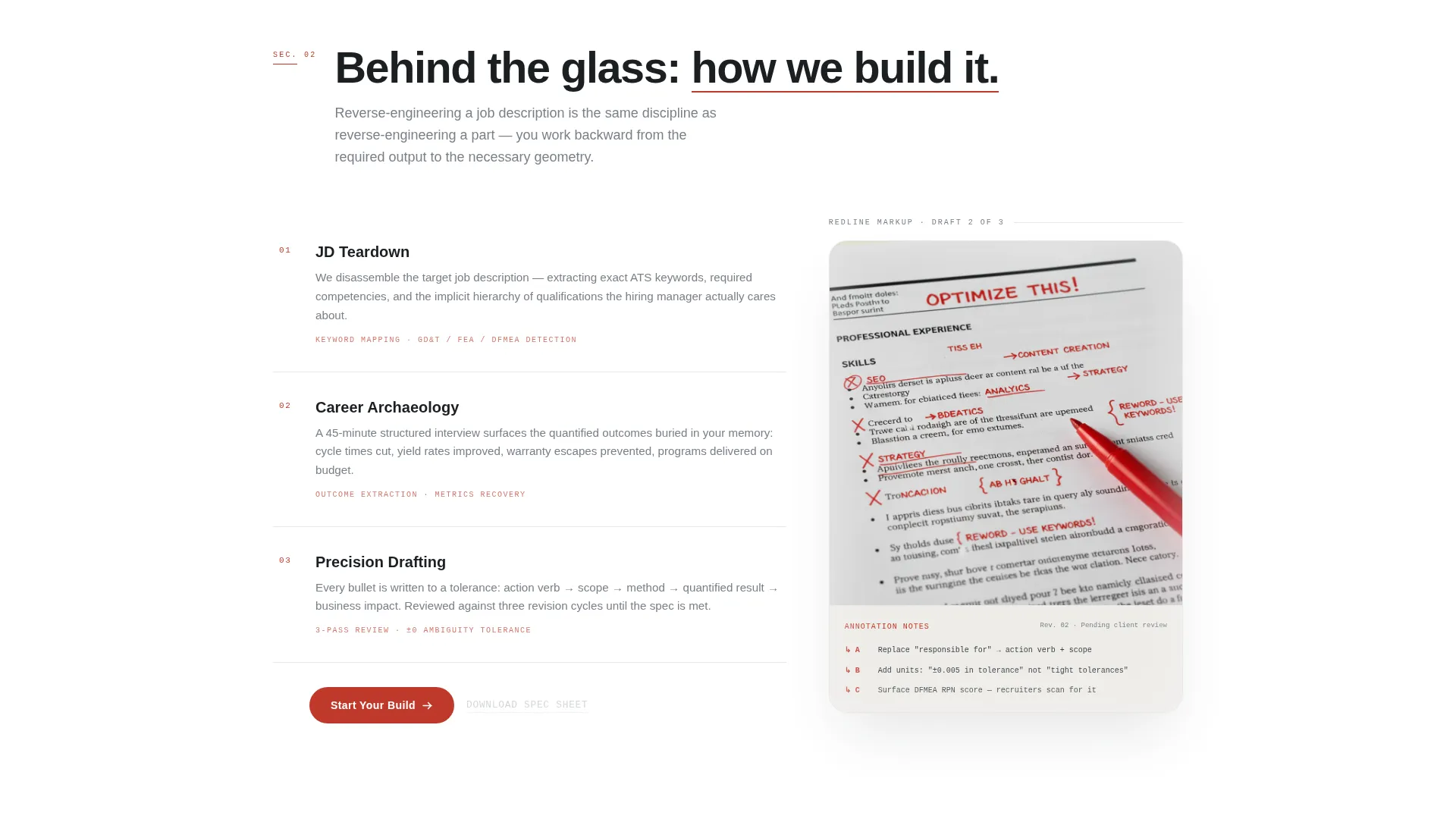
The layout divides every content section into a 60-column narrative lane and a 40-column visual lens. The wider column carries the transformation story, moving from problem through process to proof. The narrower column holds cropped resume detail views showing redline edits, quantified achievements, and technical keyword placement.
Waitlist Form with Scarcity Bar
The primary conversion component is a clean email-capture form. It includes a single email input field and a dropdown for engineering discipline, covering design, manufacturing, thermal/fluids, and robotics/controls. A progress bar beneath the form displays real claimed capacity, for example "37 of 50 launch slots claimed," creating urgency that feels native to a limited-run production mindset.
Secondary Lead Capture Path
Below the main form, a secondary call to action invites visitors to download a free PDF checklist. The checklist covers what recruiters scan for on mechanical engineering resumes. This path captures leads who are not ready to commit but want proof of expertise before the service launches.
Before-and-After Resume Proof Panels
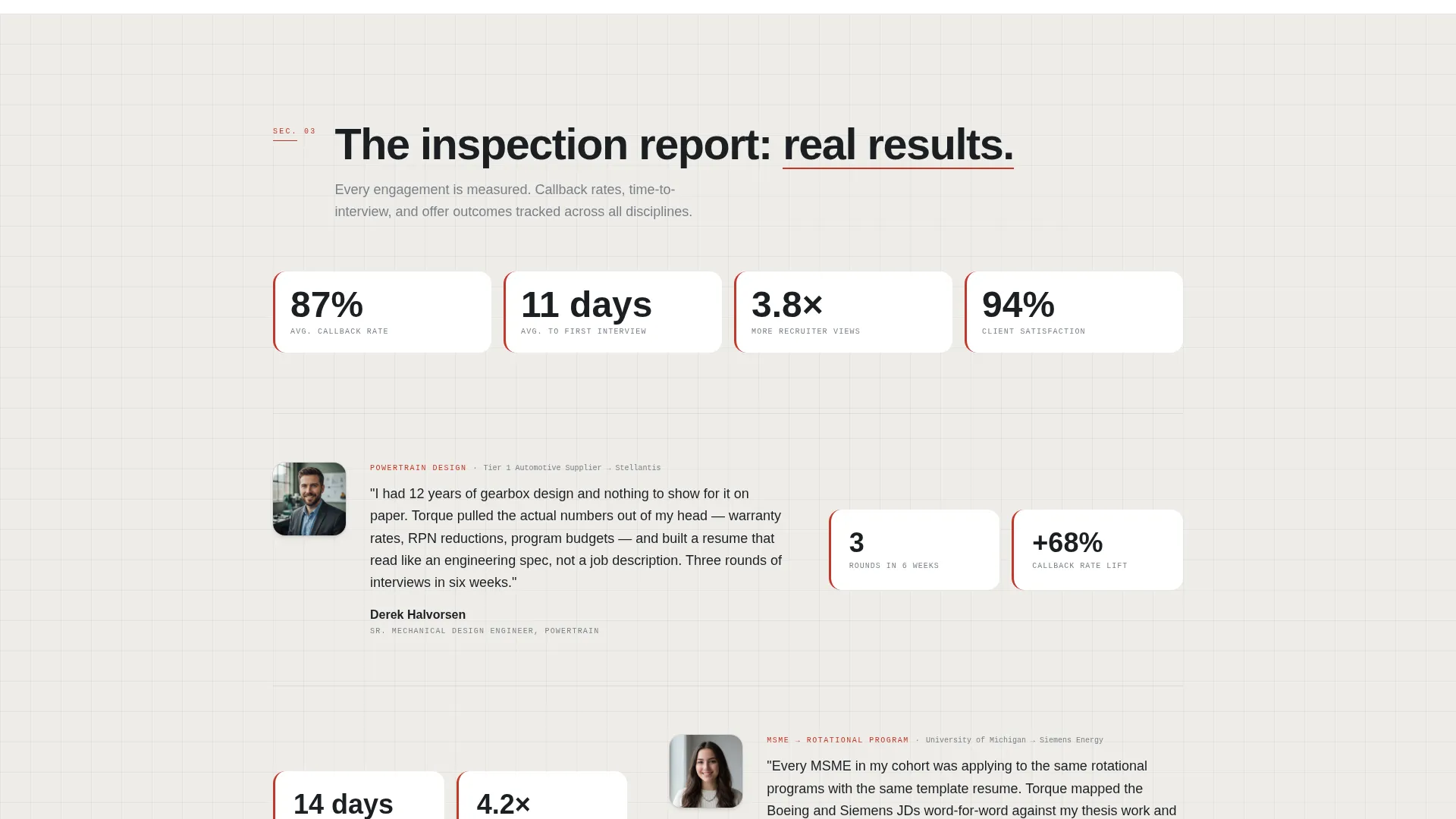
The proof section displays actual resume fragments showing redline edits and interview-callback metrics. This escalation from problem to process to measurable outcome gives technically minded visitors the evidence they need to trust the service.
Page sections overview
| Section | Purpose |
|---|---|
| Full-bleed header | Opens with photo, timed headline fade, and red annotation arrow |
| Problem narrative | Frames the pain of generic templates burying engineering expertise |
| Process walkthrough | Shows how the service reverse-engineers job descriptions |
| Before-and-after proof | Displays resume fragments with redline edits and callback metrics |
| Waitlist form | Captures email and engineering discipline with scarcity progress bar |
| Secondary lead path | Offers free PDF checklist to convert undecided visitors |
Design & branding system
The Monochrome Steel palette and Lens & Frame theme give this landing page the visual weight of a first-angle projection printed on vellum. Color does no heavy lifting here. Linework and contrast carry everything.
- Color system: mill-finish aluminum (#D4D7DC), turned-steel dark (#1B1F23), machinist-drawing background (#F5F5F3), and inspection-arrow red (#C0392B) reserved strictly for calls to action and annotation marks
- Typography: sharp, sans-serif type set in steel gray tones, echoing dimension text on a technical drawing
- Backgrounds alternate between warm engineering-paper off-white and near-black shop-floor dark, reinforcing the industrial shift between context and detail
Mobile & speed optimization
The template is structured with a single-column stacking order for smaller screens, so the 60/40 grid collapses cleanly without losing the narrative sequence. Visual lens panels reflow below their paired narrative blocks to maintain the story arc on any device.
- The asymmetric grid is built to stack responsively, keeping the problem-process-proof flow intact on mobile
- The full-bleed header image uses compositional focus points that remain effective at narrower widths
- The waitlist form and progress bar remain fully visible and usable at all common mobile screen sizes
How this template helps you convert
The page is engineered around a single conversion goal: filling the waitlist before launch. Every structural choice pushes a technically skeptical visitor toward that action.
- The timed headline reveal and red annotation arrow create a cinematic first impression that earns attention before making any ask.
- The before-and-after proof panels give engineers the kind of specific, measurable evidence they need before committing, removing the hesitation gap.
- The dual-path conversion model, with a primary waitlist slot and a secondary PDF download, captures visitors at two different readiness levels, maximizing the total lead yield from every visit.
Other information about this template
This template is built for the "Torque" service concept but the layout and components are fully adaptable for any niche professional resume or career consulting service. The Lens & Frame theme and Creator Spotlight creative direction make it particularly strong for service founders who want to demonstrate craft, not just claim it.
- Template style: Asymmetric Grid (60/40) under the Lens & Frame theme
- Creative direction: Creator Spotlight, escalating from problem to process to proof
- Landing page direction: Waitlist/Coming Soon with built-in scarcity mechanics
- Header concept: Full-Bleed Photo with a timed fade-in headline and inspection-mark annotation
- Category fit: Personal and Resume, Mechanical Engineer Profile subcategory
- The inspection-arrow red accent (#C0392B) is used exclusively on calls to action to preserve its visual urgency throughout the page
Theme
Lens & Frame
Creative direction
Creator Spotlight
Color system
Monochrome Steel
Style
Asymmetric Grid (60/40)
Direction
Waitlist/Coming Soon
Page Sections
Full-bleed Photo Header with Timed Reveal
Asymmetric 60/40 Content Grid
Waitlist Form with Scarcity Progress Bar
Secondary PDF Lead Capture
Before-and-after Resume Proof Panels
Related questions
Can I change the waitlist form fields?
Does the scarcity progress bar update automatically?
Can I use this template for a service that is already live?
Is the before-and-after resume content included in the template?
Can I update the color palette to fit a different brand?



