Pipefitter Landing Page Template for Mechanical Contractors
Torque is a precision-built landing page template for professional pipefitter services. It uses a FAQ-driven comparison layout to answer the exact questions facility managers and general contractors ask before hiring a mechanical sub. Every section stacks proof over hesitation, guiding serious buyers toward a single clear action: requesting a pipe-fit quote.
by Rocket studio
Quick summary
Torque is a single-page, click-through landing page template built for a professional pipefitter crew. It leads with a powerful testimonial, then walks buyers through a series of FAQ-anchored comparison tables. Each table pairs a typical vendor's answer against this crew's documented credentials. The page closes every visit with one clear call to action.
Who this template is for
This template is built for skilled trades businesses that need to earn trust fast. It speaks directly to the buyers who vet mechanical subs before a single wrench turns.
- Pipefitter and mechanical contracting businesses serving hospitals, high-rises, and commercial campuses
- Two-person or small-crew operations that carry certifications and need to prove it upfront
- Pipefitting professionals who respond to emergency calls and want to convert late-night searches into booked jobs
What problem this template solves
Facility managers and general contractors do not have time to chase down credentials or guess at a sub's capabilities. A generic services page fails to answer the specific questions these buyers are already asking.
- Visitors leave without booking because they cannot quickly verify certs, response times, or code compliance
- A basic portfolio page does not show how this crew compares to whoever is already on the vendor list
- Decision-makers need documented proof, not marketing copy, before they make a call at 2 a.m.
What you get with this template
This template gives you a fully structured, single-page layout that does the selling through specifics. Every section is pre-built for your real buyers and their real objections.
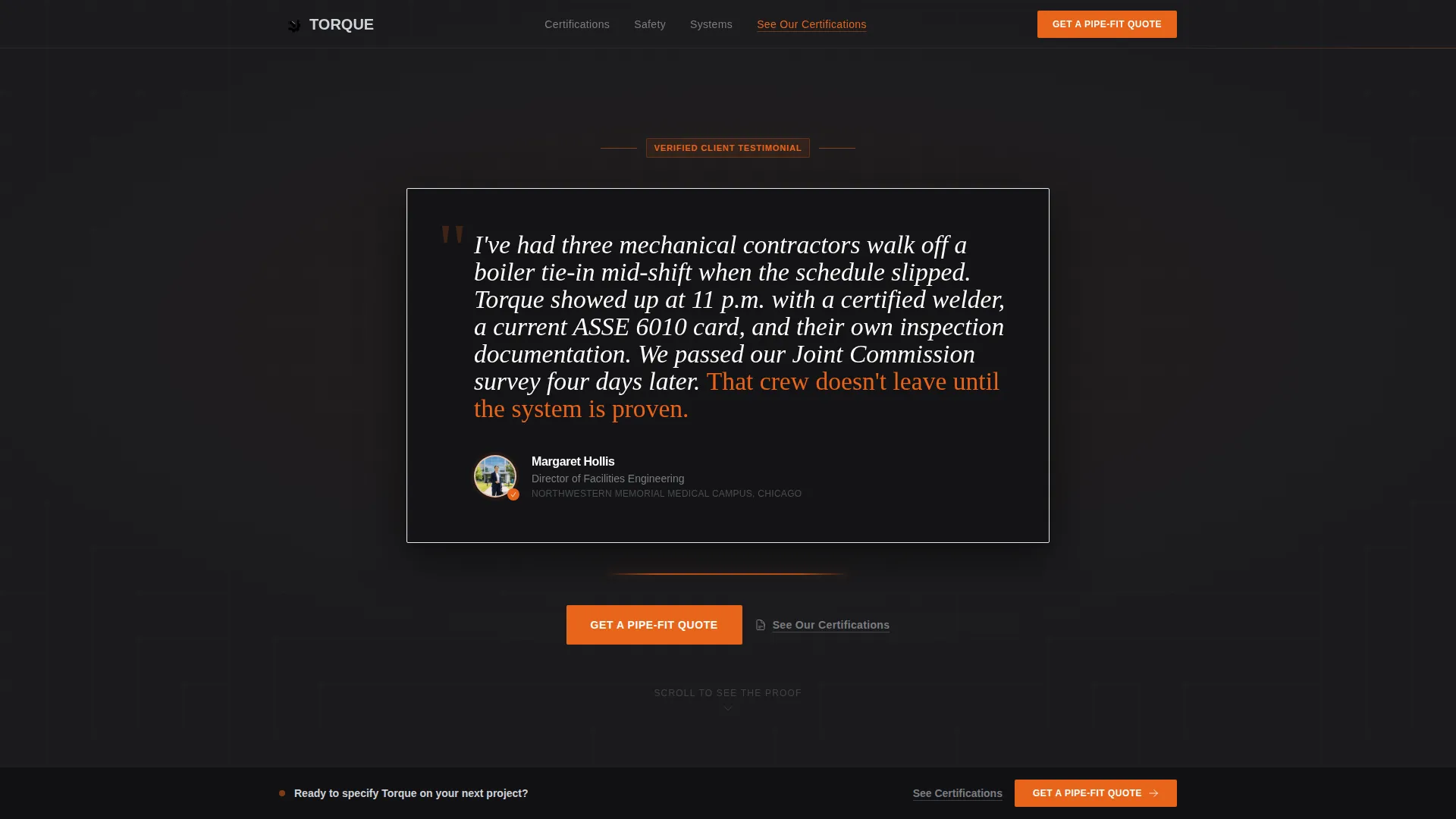
- A testimonial card header with a named client quote, speaker photo, title, and building name
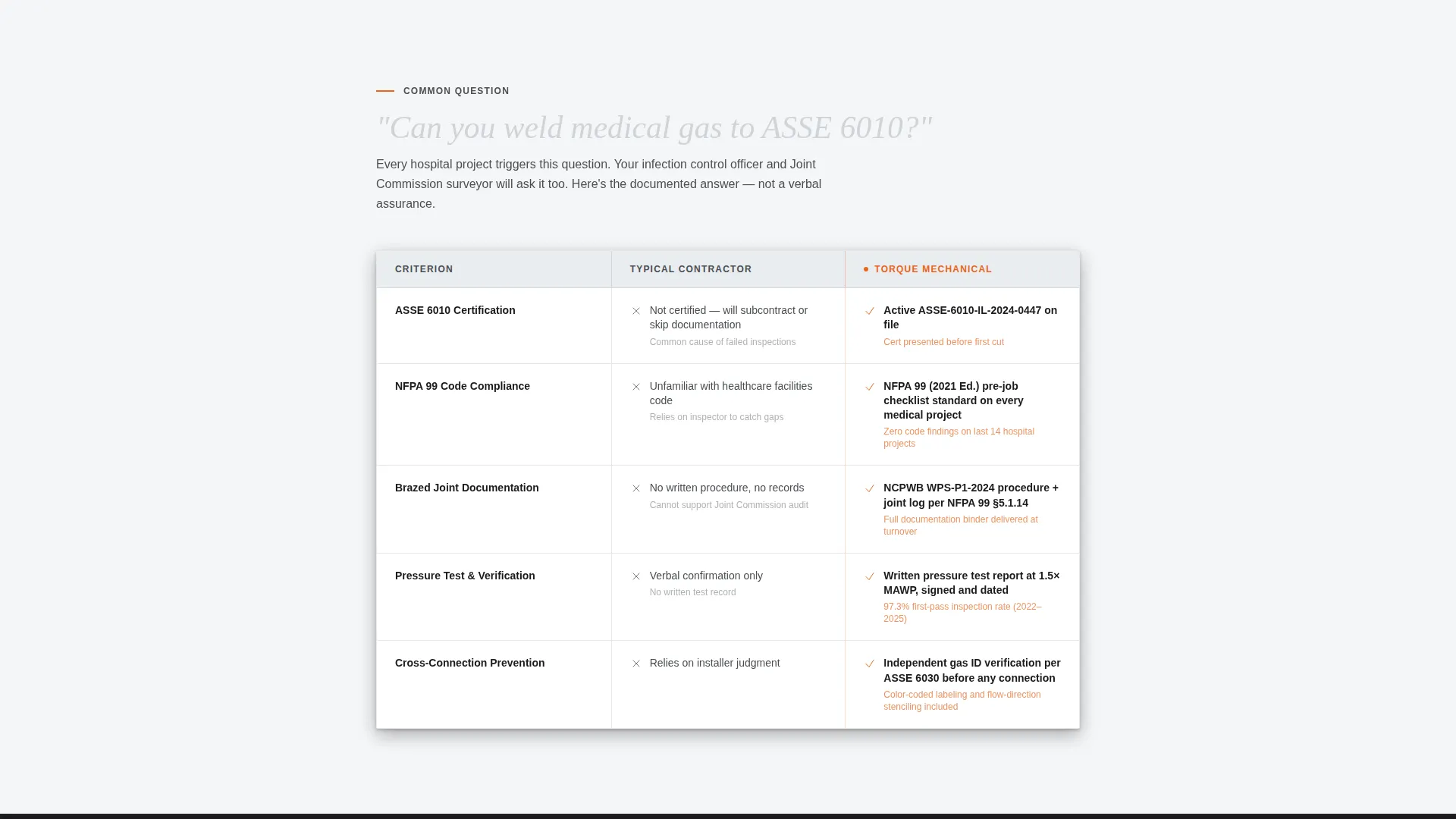
- FAQ-anchored sections, each opening into a two-column comparison table with your crew's documented answers
- A primary "Get a Pipe-Fit Quote" call-to-action button in arc-flash orange, plus a sticky bar that locks on after the second comparison table
- A secondary "See Our Certifications" text link that opens a slide-out panel for welding certs, insurance binders, and project photos
Feature list
This section describes the core layout components and interactive elements built into the Torque template.
Testimonial Card Header
A single oversized client quote sits on a forge black background in a serif typeface. Below the quote, a small speaker photo, title, and building name add immediate credibility. A thin arc-flash orange rule beneath the card draws the eye to the first FAQ section.
FAQ-Driven Comparison Tables
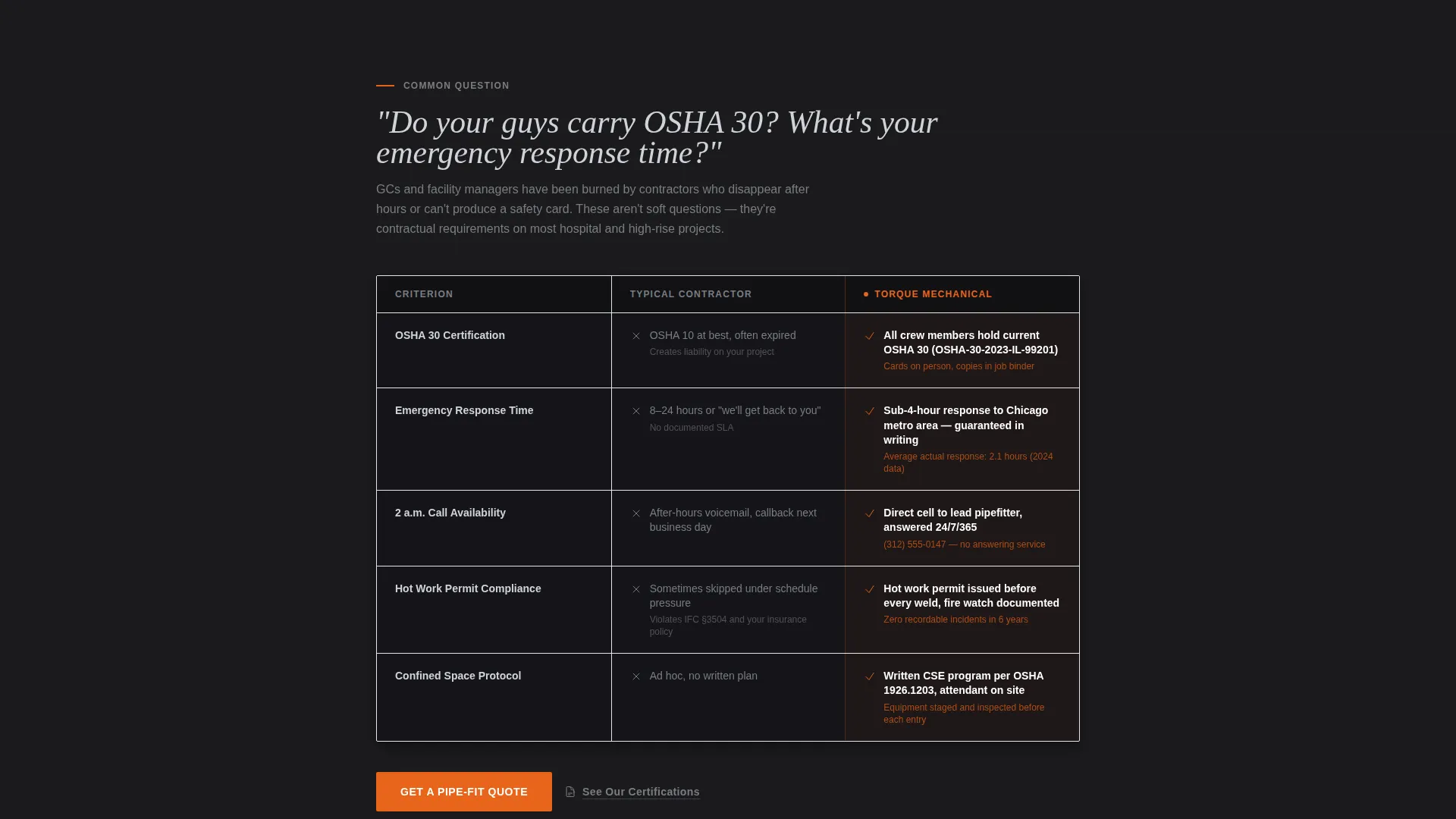
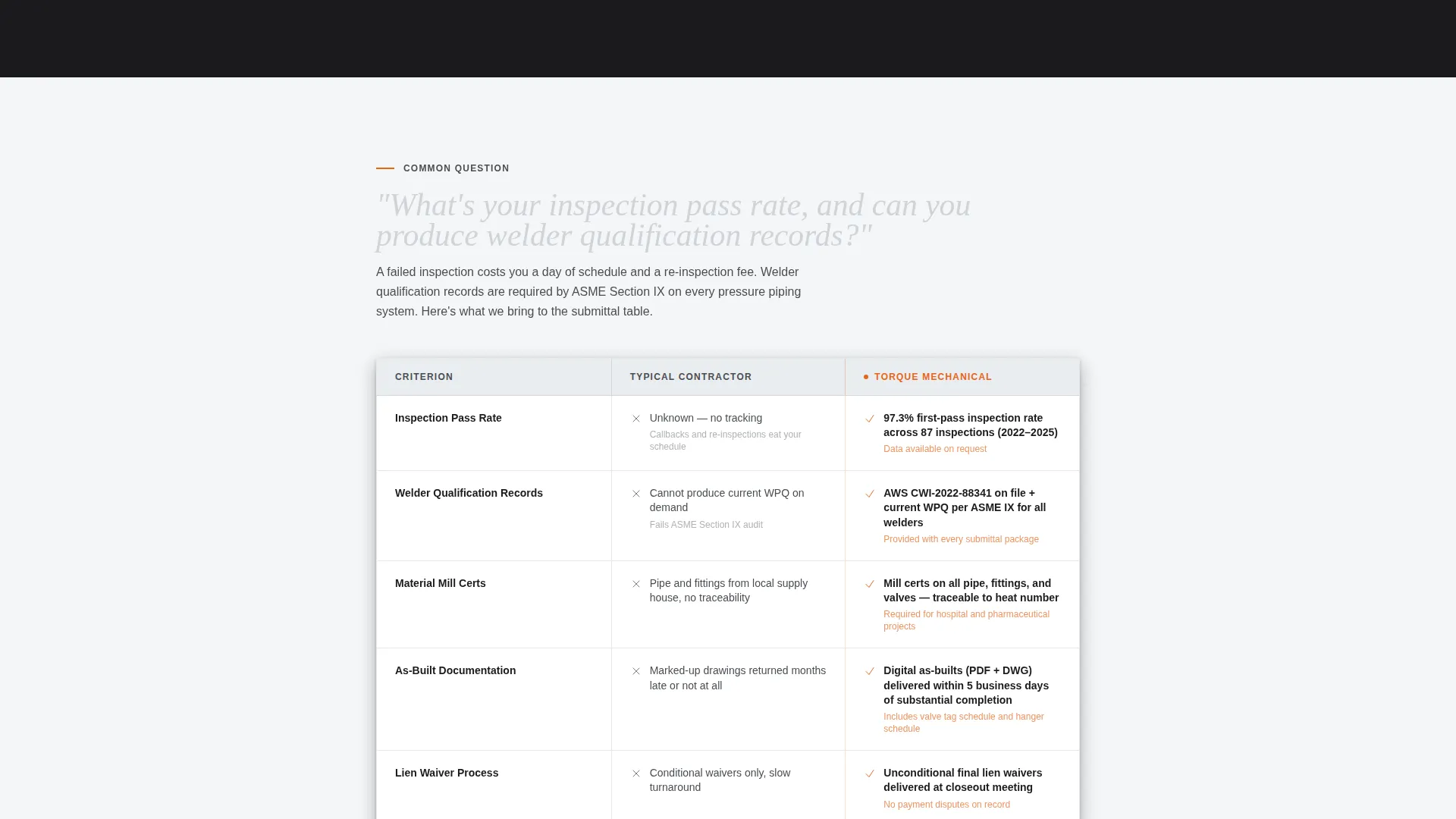
Each major buyer question anchors its own section. The section opens into a two-column table: a typical vendor's answer on the left, this crew's documented response on the right. Cert numbers, response-time commitments, and inspection pass rates fill the right column.
Sticky Call-to-Action Bar
After the second comparison table, a slim sticky bar locks to the viewport. It keeps the primary "Get a Pipe-Fit Quote" button visible as the visitor continues scrolling, removing any friction at the moment of decision.
Slide-Out Certifications Panel
The secondary "See Our Certifications" text link opens a slide-out panel. Welding certifications, insurance binders, and project photos live here. The visitor reviews credentials without leaving the conversion path.
Arc-Flash Orange Interactive States
Every button and hover state uses arc-flash orange exclusively. This keeps interactive elements visually distinct from the editorial content and makes the next action unmistakable at every scroll depth.
Alternating Section Backgrounds
Sections alternate between forge black and mill-finish aluminum white. Text switches between brushed nickel gray on light fields and mill-finish aluminum on dark backgrounds. The rhythm keeps long-scroll reading comfortable without visual fatigue.
Page sections overview
| Section | Purpose |
|---|---|
| Testimonial Card Header | Opens with a named client quote to establish immediate credibility |
| Orange Rule Divider | Draws the eye from the header down into the first FAQ anchor |
| FAQ Section One | Answers the first buyer question with a two-column comparison table |
| FAQ Section Two | Answers the second buyer question and triggers the sticky call to action bar |
| FAQ Section Three | Continues the proof rhythm with a third comparison table |
| FAQ Section Four | Deepens authority with cert numbers and response-time specifics |
| Slide-Out Cert Panel | Displays welding certs, insurance binders, and project photos |
| Sticky call to action Bar | Keeps the primary quote-request button locked in the viewport |
| Bottom call to action Section | Final call to action before the click-through to the scope form |
Design & branding system
The visual identity follows an Executive Suite approach built on a Monochrome Steel color system. The palette feels industrial at its core but finished to a tolerance that commands respect.
- Forge black (#1B1B1E) and mill-finish aluminum (#D0D3D8) alternate as section backgrounds, with brushed nickel (#7A7D82) carrying body text on light fields and aluminum white carrying text on dark backgrounds
- Arc-flash orange (#E8641B) appears exclusively on calls to action, hover states, and the thin divider rule, keeping every interactive moment visually sharp
- A serif typeface carries the testimonial header, reading like an executive memo, while the comparison table content uses clean, readable type that keeps credentials easy to scan
Mobile & speed optimization
The Torque template is structured for clarity at any screen width. Long comparison tables and sticky elements are designed to remain readable and functional on smaller viewports.
- Comparison tables reflow cleanly so left-column and right-column answers remain distinct and scannable on mobile screens
- The sticky call-to-action bar stays proportionate and accessible without covering critical table content on smaller devices
- The slide-out certifications panel is sized to open and close smoothly without requiring horizontal scrolling
How this template helps you convert
The page is built around one conversion goal: the click-through to a scheduling and scope form. Every design and content decision supports that single outcome.
- The testimonial card stops the scroll immediately. A named, titled person from a recognizable facility eliminates the anonymous-service-provider problem before the buyer reads a single table row.
- The FAQ-and-comparison rhythm removes objections one by one. By the time a facility manager or general contractor reaches the bottom, their remaining question is only about timing, not capability.
- The sticky call-to-action bar and slide-out certifications panel keep the conversion path intact. The buyer never needs to navigate away to verify credentials, and the quote button is always one tap away.
Other information about this template
Torque is designed specifically for pipefitter businesses operating in high-accountability environments such as hospitals, mechanical contractors serving commercial high-rises, and crews handling medical gas lines or steam systems. The template's editorial magazine structure and educational guide tone make it effective for buyers who research carefully before committing.
- The click-through landing page direction routes all traffic toward a dedicated scheduling and scope form, keeping the lead generation flow clean and focused
- The comparison table format works especially well for pipefitter businesses that hold documented certifications such as qualifications under standards like ASSE 6010 (the American Society of Sanitary Engineering standard for medical gas system installers) or OSHA 30 (a 30-hour occupational safety training credential), since the right-column proof format is built to display those specifics
- The template style suits professional services niches where a single persuasive page outperforms a multi-page site for converting high-intent, time-pressured buyers
Theme
Educational Guide
Creative direction
Logo Wall Authority
Color system
Navy Authority
Style
Editorial/Magazine
Direction
Lead Generation
Page Sections
Faq-driven Comparison Table Layout
Testimonial Card Header with Speaker Detail
Sticky Quote-request Bar
Slide-out Certifications Panel
Arc-flash Orange Call to Action System
Alternating Monochrome Steel Sections
Related questions
Can I update the comparison table content with my own certifications and response times?
Does the slide-out certifications panel support multiple document types?
How does the sticky call-to-action bar behave as visitors scroll?
Is this template suitable for a solo pipefitter or only for larger crews?
What page does the primary call-to-action button link to?



