Small Engine Repair Business FAQ Website Template
Torque is a single-page landing page template built for small engine repair shops. It uses a FAQ-driven scroll, side-by-side comparison tables, and embedded customer reviews to make the case for repair over replacement. A short lead-capture form and an SMS photo-request button give visitors two clear ways to get in touch.
by Rocket studio
Quick summary
Torque is a lead generation landing page template designed for small engine repair businesses. It pairs a dramatic dark header with a scroll that answers real customer questions using comparison tables and five-star reviews. By the time a visitor reaches the form, the math has already made the case. Two conversion paths keep the ask simple.
Who this template is for
This template was built for repair shop owners who work on residential and commercial small engine equipment. It speaks directly to the three customer types most likely to search for help: homeowners with a broken mower, landscaping crews with a machine down, and property managers running seasonal equipment fleets.
- Small engine repair shop owners looking to generate more service inquiries online
- Independent mechanics who want a professional web presence without a complex build
- Repair businesses serving both homeowners and commercial landscaping or property management clients
What problem this template solves
Most repair shop websites fail to convince visitors that repair is worth it. Customers arrive skeptical, unsure whether fixing an old machine makes financial sense. This template solves that doubt directly, question by question, before the visitor ever reaches a contact form.
- Removes the "is it even worth fixing?" hesitation by showing repair-versus-replacement cost comparisons
- Builds trust through real customer reviews embedded inside FAQ answers, not tucked away on a separate page
- Gives visitors two low-friction contact options so they can reach out the way that feels easiest to them
What you get with this template
You get a fully structured single-page layout designed around the repair shop customer journey. Every section earns its place, from the full-bleed header that sets the tone to the comparison tables that do the convincing.
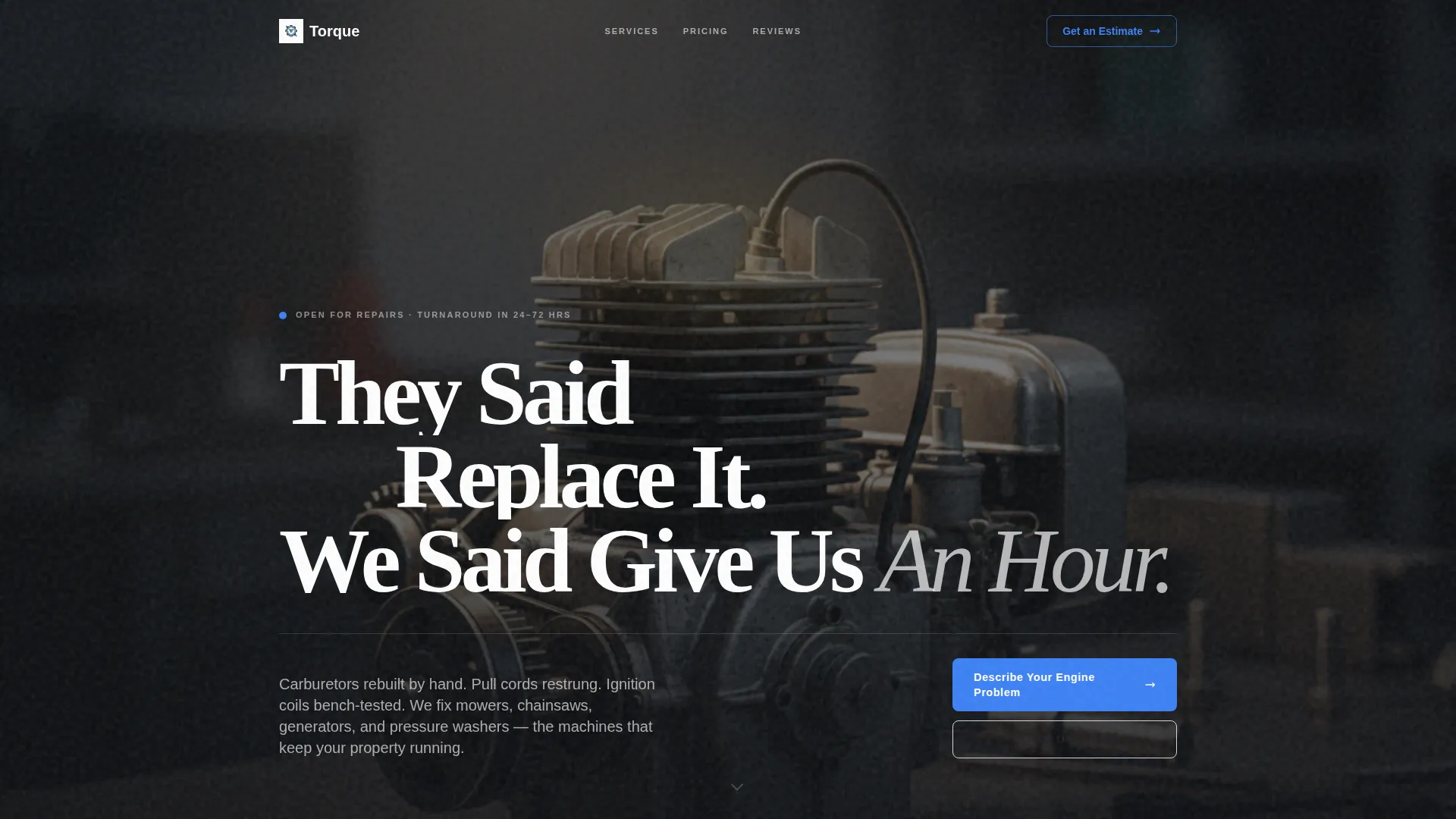
- A dark, glow-lit header section with a workshop scene and a bold headline
- FAQ-driven scroll sections, each opening with a real customer question and answering with a comparison table and embedded review
- A short lead-capture form with equipment-type dropdown, symptom text field, and phone number input, plus a secondary SMS photo-request button
Feature list
This template ships with a focused set of components, each matched to a specific stage of the customer's decision process.
Dark Full-Bleed Header with Glow Effect
The header fills the viewport with a near-black workshop scene. A hanging shop lamp casts a warm tungsten halo over a small engine on a steel bench. The headline, "They Said Replace It. We Said Give Us An Hour.", appears in Arctic White against the dark background.
FAQ-Driven Comparison Sections
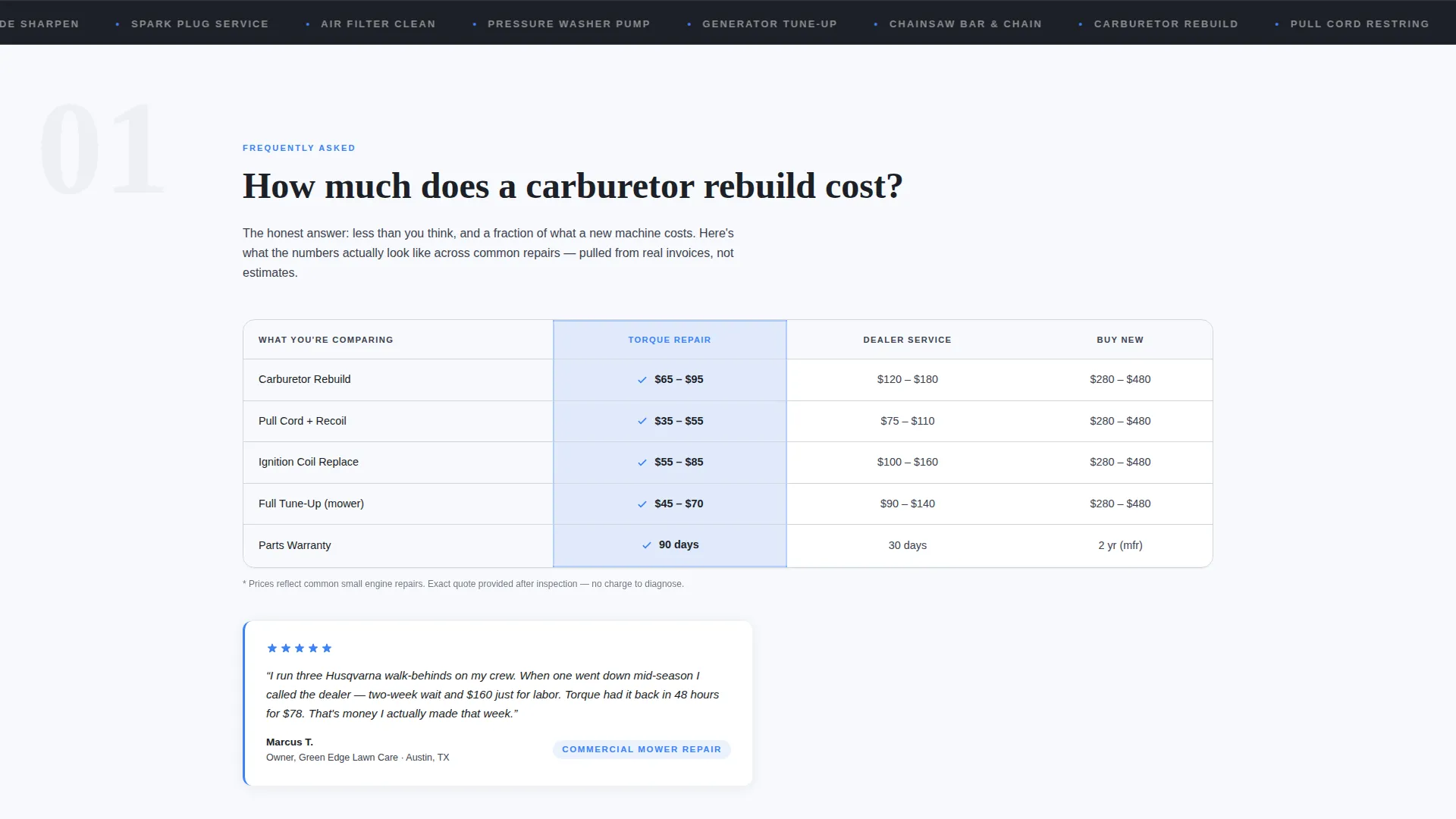
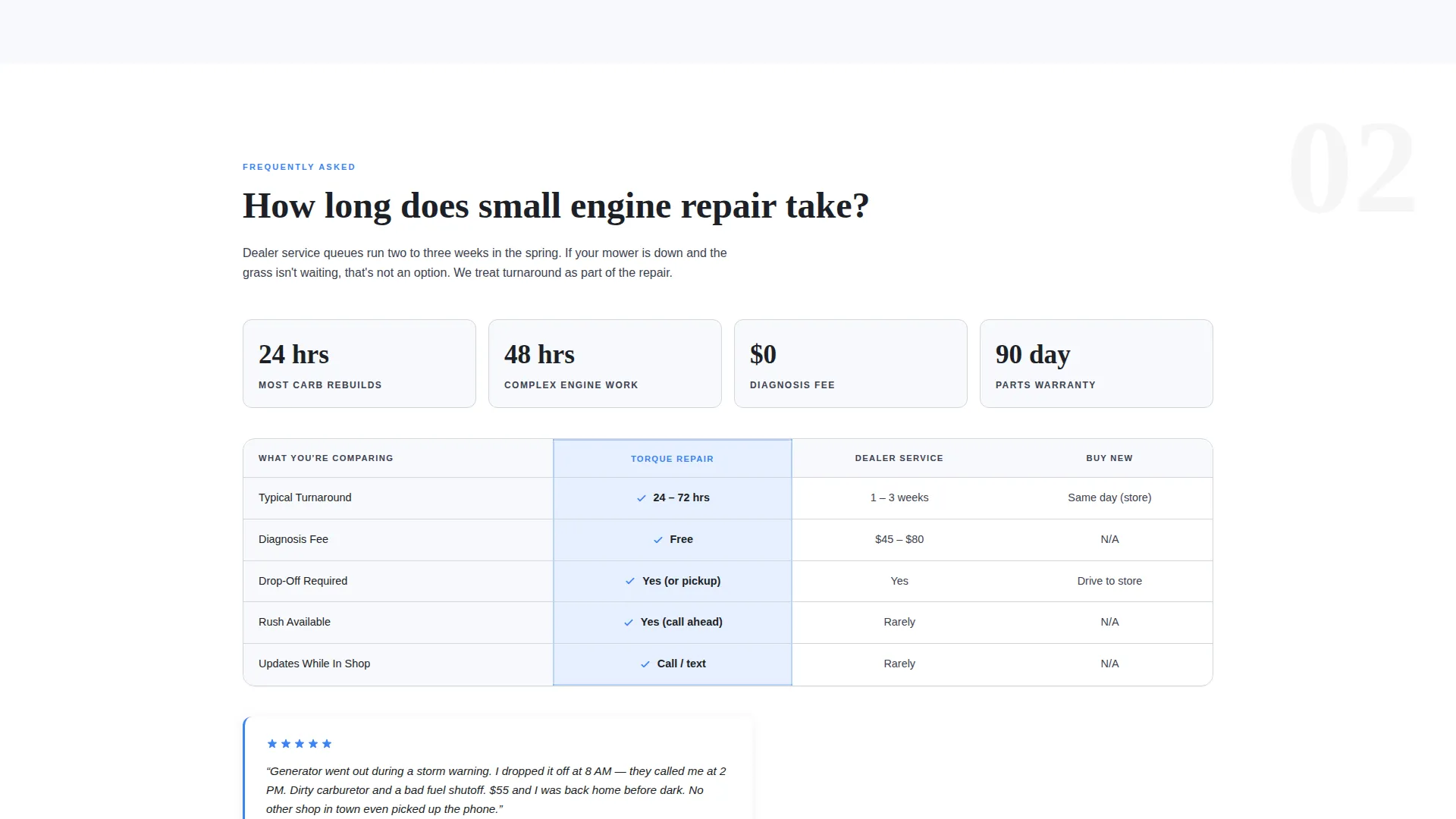
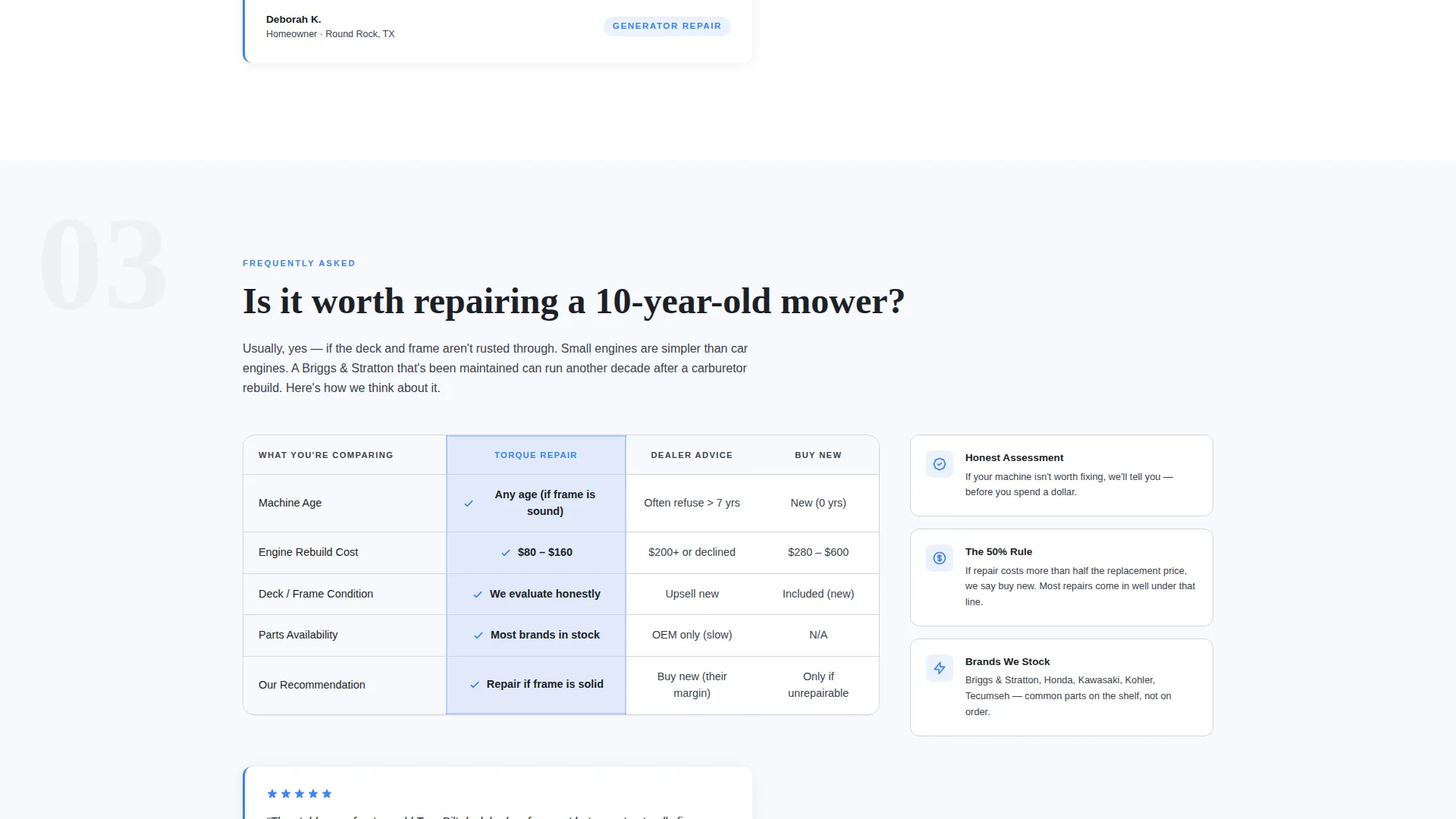
Each scroll section opens with a bold real-world question such as "How much does a carburetor rebuild cost?" or "Is it worth repairing a 10-year-old mower?". The answer is delivered through a side-by-side comparison table covering repair cost versus replacement cost, turnaround time, and warranty on parts.
Embedded Customer Reviews
Five-star customer quotes are placed directly inside FAQ answer blocks rather than in a separate testimonials section. A review from a landscaper sits next to the commercial equipment cost comparison, providing immediate social proof at the moment of highest relevance.
Lead Capture Form
The primary conversion element is a short form asking for equipment type via dropdown (mower, chainsaw, generator, blower, or other), a free-text symptom field, and a phone number. The call to action reads "Describe Your Engine Problem."
SMS Photo-Request Button
A secondary conversion path offers a "Text Us a Photo" button that links to SMS. This gives customers who prefer messaging a direct, zero-friction way to start a conversation without filling out a form.
Executive Suite Arctic White Design System
The color palette uses clinical white, machined aluminum, deep workshop charcoal, and a single diagnostic blue accent for interactive elements, star ratings, and call-to-action borders. The result feels like a clean, well-lit workbench rather than a generic service website.
Page sections overview
| Section | Purpose |
|---|---|
| Dark Glow Header | Sets atmosphere and tone with workshop imagery and the core headline |
| FAQ Repair Cost | Answers the repair-versus-replacement cost question with a comparison table |
| Embedded Review Block | Places a five-star customer quote beside the cost comparison for proof |
| FAQ Turnaround Time | Compares shop turnaround against dealer wait times with a table |
| FAQ Old Equipment | Addresses whether repairing older machines is worth the investment |
| Lead Capture Form | Collects equipment type, symptom description, and phone number |
| SMS Contact Button | Offers a second path to contact via text message photo submission |
Design & branding system
The visual identity follows an Executive Suite theme with an Arctic White color system. The palette was chosen to feel like a freshly wiped workbench under bright shop lights: competent rather than clinical, clean rather than cold.
- Colors: clinical white (#F7F9FC), machined aluminum (#D1D5DB), deep workshop charcoal (#1C1F26), and diagnostic blue (#3B82F6) reserved for interactive elements, star ratings, and call-to-action borders
- Typography and layout carry a calm authority, letting the comparison tables and customer quotes do the persuasive work without visual clutter
- The dark header contrasts sharply with the lighter scroll sections, giving the page a clear visual rhythm from first impression to form submission
Mobile & speed optimization
The layout was designed with a single-column scroll flow that translates naturally to smaller screens. Comparison tables remain readable at mobile widths, and both conversion paths (form and SMS button) are accessible without zooming.
- The short form and SMS button are sized for thumb-friendly interaction on phones
- The full-bleed header image and glow effect are structured to maintain visual impact on mobile viewports
- Section-by-section scroll structure keeps the page easy to navigate without a complex menu
How this template helps you convert
The template builds the case for conversion before it ever asks for anything. By the time a visitor reaches the form, they have already seen the cost comparison, the turnaround time advantage, and a real customer review from someone in a similar situation.
- Comparison tables answer the skeptic's questions first, so the form feels like a logical next step rather than a cold ask
- Embedded reviews at the point of highest doubt reduce hesitation without requiring the visitor to go looking for proof
- Two contact options (form and SMS) let visitors choose the path that feels most comfortable, lowering the barrier to the first message
Other information about this template
This template is a strong fit for repair shops that want their website to work as a sales tool, not just a digital business card. It is particularly effective when the shop serves both residential customers and time-sensitive commercial clients.
- The comparison table format can be updated with current local repair costs and typical dealer wait times to keep the content relevant
- The equipment-type dropdown in the form can be adapted to reflect the specific machines a shop services most
- The SMS button is a practical addition for shops where the owner or technician is more reachable by text than by email during work hours
- This template suits shops that already have strong customer relationships and want a page that reflects the trust those relationships have earned
Theme
Executive Suite
Creative direction
FAQ-Driven
Color system
Arctic White
Style
Comparison Table
Direction
Lead Generation
Page Sections
Dark Full-bleed Glow Header
Faq-driven Comparison Tables
Embedded Customer Reviews
Short Lead Capture Form
SMS Photo-request Button
Arctic White Executive Design System
Related questions
What types of equipment does this template focus on?
Can I update the comparison tables with my own pricing?
How does the two-path contact system work?
Is this template suitable for commercial landscaping clients?
What is included in the header section?



