Golf Cart Mechanic Review Landing Page Template
Torque is a single-page landing page built for golf cart mechanics who want to win bookings through transparency. It leads with animated service statistics, organizes real customer reviews into an expandable comparison table by service type, and closes with a sticky scheduling form. The design blends shop-floor honesty with country-club polish.
by Rocket studio
Quick summary
Torque is a booking-focused landing page for golf cart repair businesses. It opens with three animated counters that prove a track record before a single testimonial loads. A comparison table then organizes reviews by service category, showing average cost, turnaround time, and star rating per service. The result is a page that earns trust through process visibility, then converts it into scheduled appointments.
Who this template is for
This template is built for golf cart mechanics who serve a mixed clientele and want their reputation to do the selling. It suits shops that handle both electric and gas carts and need a page that speaks to several different buyer types at once.
- Independent golf cart repair shops looking to grow their booking volume
- Fleet service providers working with golf courses or resort maintenance directors
- Retirement-community-focused mechanics whose customers treat their cart as a daily driver
What problem this template solves
Most service business pages ask for trust before they earn it. A generic "call us" page gives a prospective customer no evidence of pricing, turnaround time, or real-world results. That gap creates hesitation, especially when the buyer is a fleet manager evaluating vendors for a purchase order or a retiree who depends on their cart daily.
- Prospective customers cannot compare service quality or cost before committing to a call
- No visible process means no confidence, especially for higher-ticket repairs like motor rebuilds
- Generic contact forms feel like a risk when the buyer has no proof of past performance
What you get with this template
This template delivers a structured, one-page booking experience built around transparency. Every section serves either trust-building or conversion, with no filler content between the two.
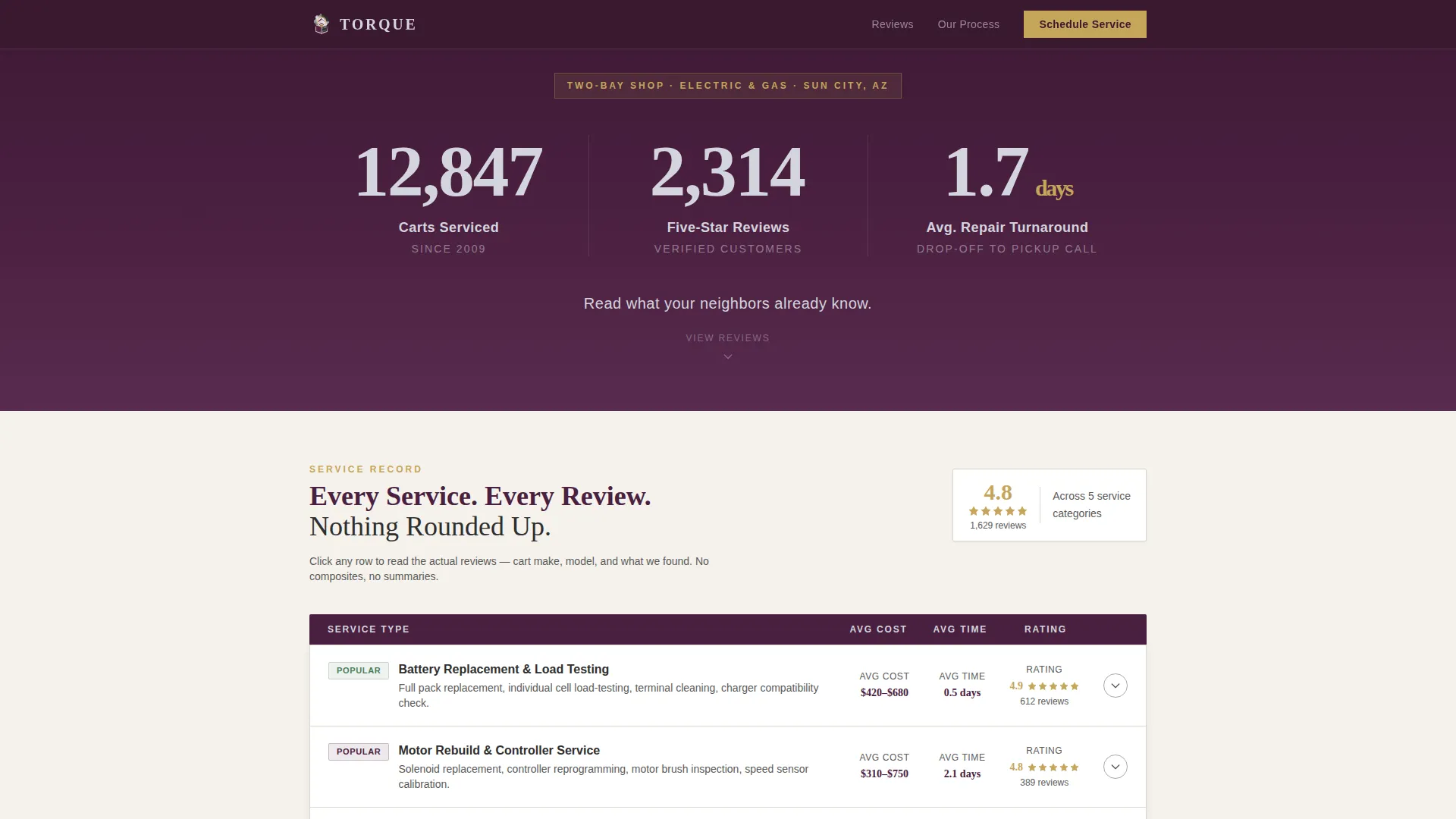
- An animated statistics header showing carts serviced, five-star reviews earned, and average repair turnaround
- A comparison table organizing customer reviews by service type, with expandable rows revealing individual reviews and cart details
- A sticky scheduling bar with a multi-field form, plus a lighter "Get a Quick Estimate" modal for low-friction inquiries
Feature list
This template is built around a small set of high-impact components. Each one is designed to move a skeptical buyer from curiosity to confirmed booking.
Animated Statistics Header
Three large counters tick upward on page load against a deep plum background. They display carts serviced (12,847), five-star reviews (2,314), and average repair turnaround (1.7 days). Each counter lands with a subtle mechanical click effect, establishing credibility before any review text appears.
Service Comparison Table
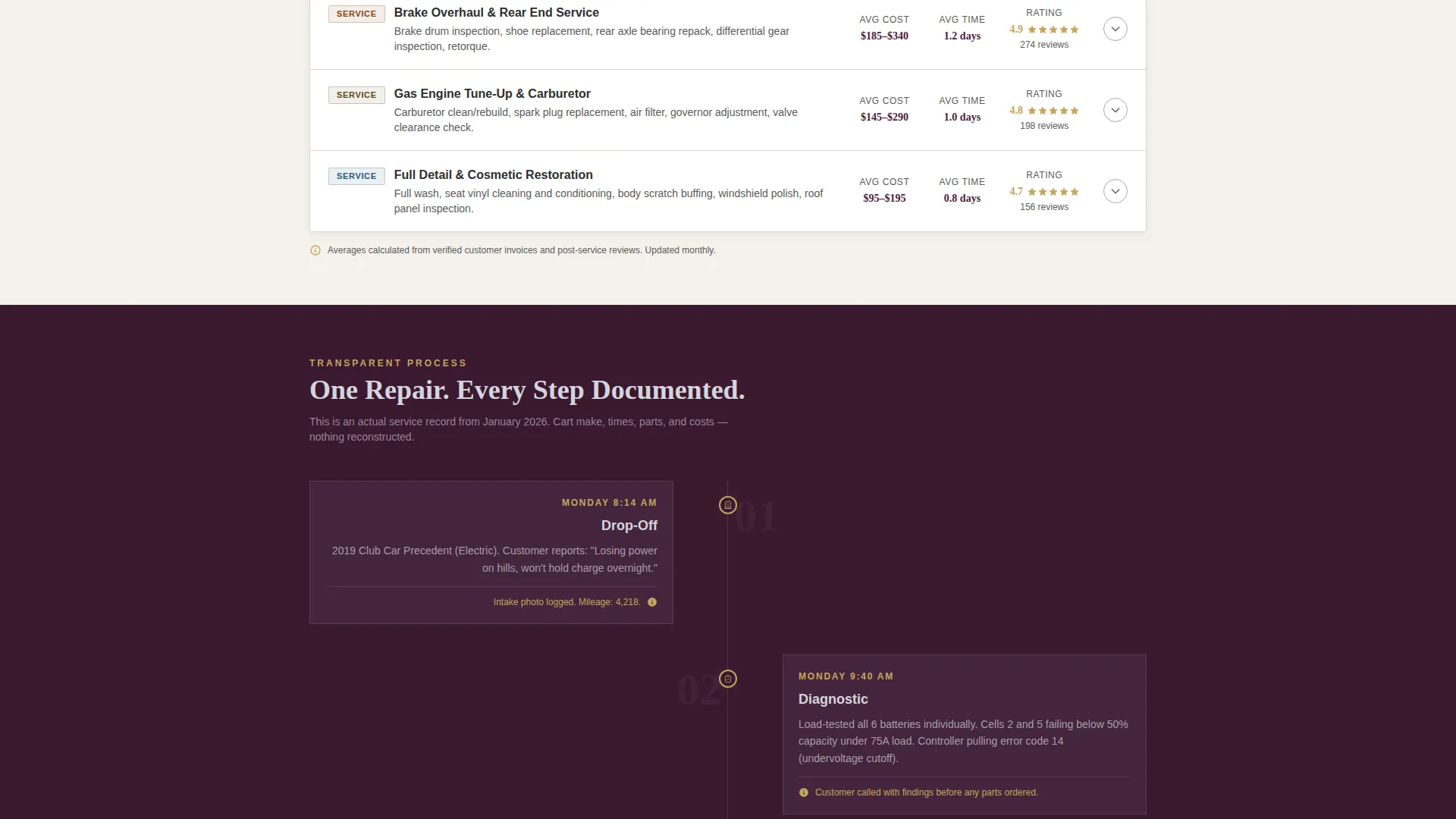
Reviews are grouped by service category: battery replacement, motor rebuild, brake overhaul, and full detail. Each row shows the average cost, average completion time, and star rating for that category. Rows expand to reveal actual customer reviews, including the cart make and model serviced.
Repair Process Timeline
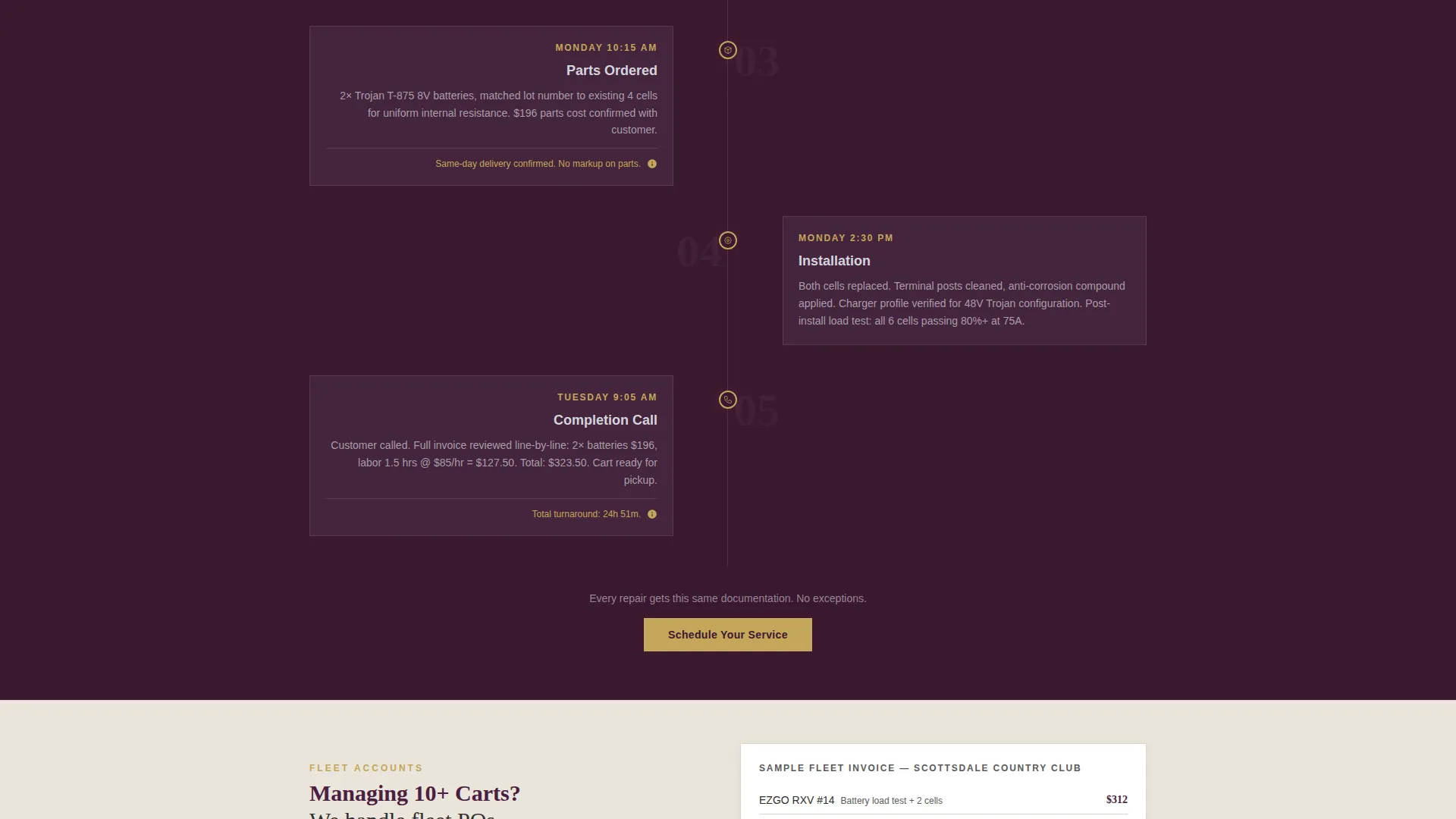
A visual timeline walks the visitor through a single real repair. It moves from drop-off photo through diagnostic notes, parts ordered, and completion call. This section reinforces the shop's transparent process and removes uncertainty about what happens after a cart is left at the bay.
Sticky Scheduling Bar
A fixed bottom bar appears after the visitor scrolls past the first table section. It anchors the primary call to action, "Schedule Your Service," in view at all times. The form captures cart type, make and model, service category, preferred drop-off date, and a phone number.
Quick Estimate Modal
A secondary conversion path opens a lightweight modal overlay. The visitor selects cart type and describes their symptom. This lower-commitment option captures leads who are not yet ready to schedule but want to understand costs before picking up the phone.
Page sections overview
| Section | Purpose |
|---|---|
| Animated stats header | Establish credibility with live counters before reviews load |
| Tagline beneath counters | Reinforce social proof with a single persuasive line |
| Service comparison table | Organize reviews by category with cost, time, and rating data |
| Expandable review rows | Reveal real customer reviews with cart make and model |
| Repair process timeline | Show drop-off to completion steps, reinforcing transparency |
| Sticky scheduling bar | Keep primary booking call to action visible after first table scroll |
| Quick estimate modal | Offer a low-friction path for visitors not ready to book |
Design & branding system
The visual identity follows a Service Utility theme built on the Plum Executive color system. The palette is designed to feel authoritative enough for a resort client and honest enough for a shop counter.
- Deep plum (#4A2040) for primary backgrounds and header fields, warm charcoal (#2E2E2E) for body text areas, and polished aluminum (#D4D4DC) for content surfaces
- Muted gold (#C5A55A) used exclusively for star ratings, review scores, and interactive highlights to draw the eye to social proof elements
- Typography and layout follow a leather-bound service manual aesthetic: clean, structured, and legible at a glance
Mobile & speed optimization
The layout is built for readability and usability across screen sizes. Visitors booking on a phone, a tablet at the pro shop, or a desktop in a fleet manager's office all get the same core experience.
- The comparison table adapts for smaller screens, keeping cost, time, and rating data accessible without horizontal scrolling
- The sticky scheduling bar remains anchored at the bottom of mobile viewports, keeping the booking form within thumb reach at all times
How this template helps you convert
The page is structured so that every scroll deepens trust before asking for a commitment. The conversion path moves from proof to action in a deliberate sequence.
- The animated counters provide immediate, quantified social proof before the visitor reads a single written review, reducing early bounce intent
- The comparison table connects specific services to real outcomes, giving fleet managers and individual cart owners the data they need to feel confident choosing this shop
- The sticky scheduling bar and estimate modal offer two commitment levels, capturing both ready-to-book visitors and early-stage researchers in the same session
Other information about this template
This template is specifically built for the golf cart mechanic customer review page use case. It is designed as a single landing page, not a multi-page website.
- The template style is a comparison table layout, making it well-suited for service businesses where pricing transparency builds competitive advantage
- It is built under the Transparent Process creative direction, meaning the design decisions prioritize visible proof over decorative storytelling
- The header concept is Data Storytelling, which means statistics lead the visual hierarchy rather than photography or lifestyle imagery
- The primary conversion direction is Booking and Scheduling, making it distinct from brochure-style pages that only seek contact form submissions
Theme
Service Utility
Creative direction
Transparent Process
Color system
Plum Executive
Style
Comparison Table
Direction
Booking/Scheduling
Page Sections
Animated Statistics Header
Service Comparison Table
Repair Process Timeline
Sticky Scheduling Bar
Quick Estimate Modal
Related questions
Who is this landing page template designed for?
Can I customize the service categories in the comparison table?
How does the booking form work?
Does this template support both electric and gas golf cart businesses?
What makes this template different from a standard service page?



