Personal Injury & Litigation Blog Website Template
Tort is a mass tort litigation landing page template built for law firms that recover settlements in pharmaceutical injury, medical device, and toxic exposure cases. It combines an editorial hero, a structured case qualifier table, an attorney authority panel, and a three-step progressive intake form, all styled in an Institutional Authority design system that signals courtroom credibility from the first scroll.
by Rocket studio
Quick summary
Tort is a single-page template designed for mass tort law firms. It presents qualifying conditions, settlement ranges, and filing deadlines in a structured comparison table, then guides visitors through a three-step eligibility form. The design uses deep plum, charcoal, ivory, and verdict gold to project the authority of a firm that has already won.
Who this template is for
This template is built for litigation firms that handle large-scale pharmaceutical, medical device, and toxic exposure cases. It speaks directly to people who discovered their diagnosis online and need immediate, credible legal guidance.
- Personal injury and mass tort law firms seeking qualified client leads
- Litigation practices covering conditions such as surgical mesh complications, Camp Lejeune cancers, aqueous film-forming foam (AFFF) kidney damage, and Roundup lymphomas
- Legal marketing teams that need a high-authority single page rather than a full website
What problem this template solves
Most legal landing pages ask for contact information before proving they can win. That approach fails the visitor who found you at 2 a.m. while searching their symptoms. Tort reverses that sequence.
- Visitors see their specific condition, the active lawsuit behind it, and the estimated settlement range before they are asked for a name or phone number
- The comparison table removes confusion about whether a case qualifies, reducing the friction that causes potential clients to leave
- The attorney panel and landmark wins timeline replace generic testimonials with named verdicts and dollar amounts, giving skeptical visitors a reason to trust the firm
What you get with this template
The template delivers a fully structured, section-led landing page with five core content zones and a linear single-row footer. Every section is purposefully sequenced to build conviction before the intake form appears.
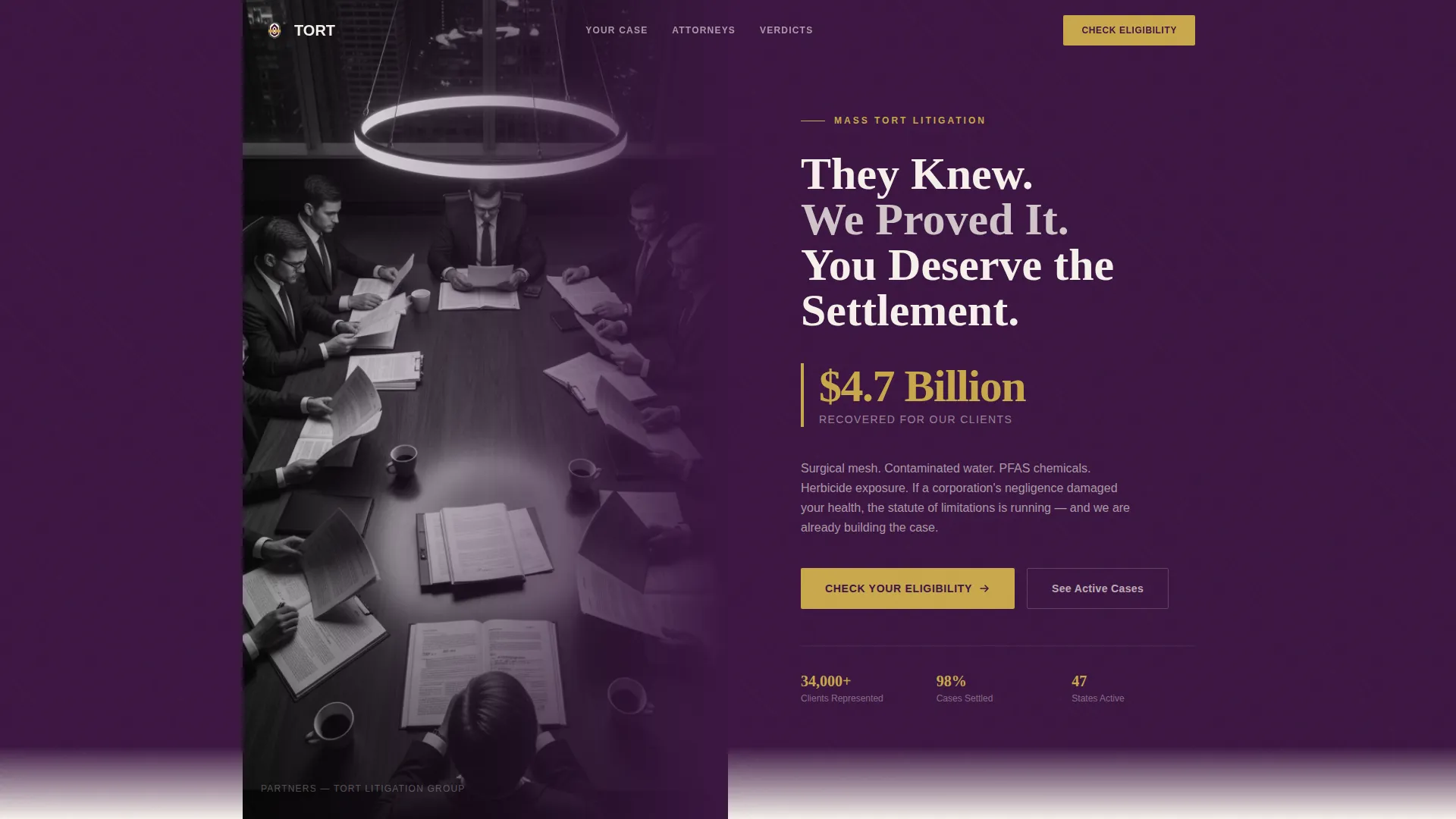
- An editorial half-page hero with a serif headline, a $4.7 billion recovered stat in verdict gold, and a split photo-and-text layout
- A filterable case qualifier table, an attorney authority panel with named verdicts, and a landmark wins timeline replacing standard testimonials
- A progressive three-step intake form with visual exposure-type selection, diagnosis confirmation, and contact details collection
Feature list
Half-Page Editorial Hero
The hero splits the viewport into a black-and-white editorial photo on the left and a serif headline on deep plum on the right. The $4.7 billion recovered figure sits below the headline in verdict gold, with no animation, letting the number carry the weight on its own.
Case Qualifier Comparison Table
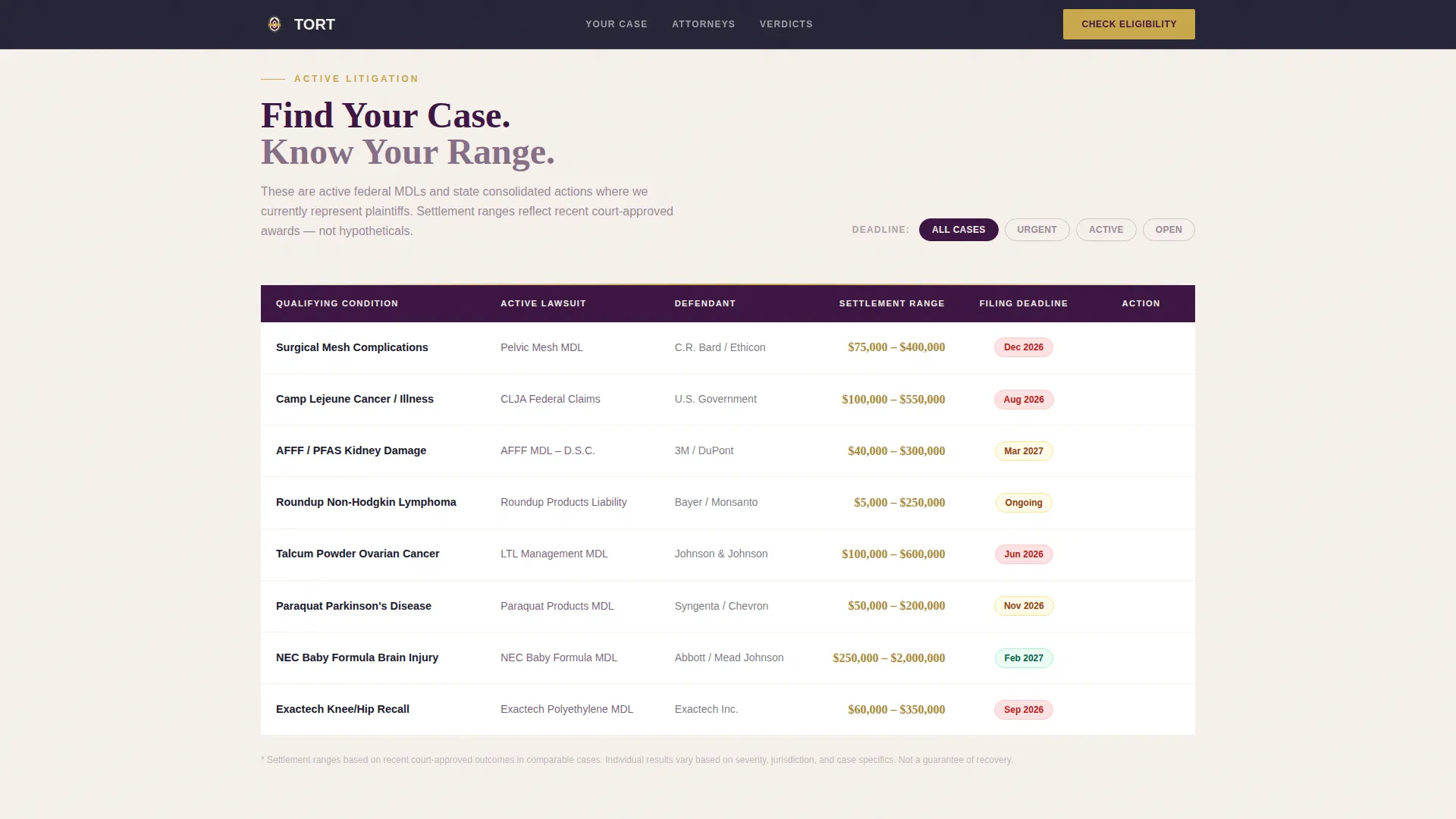
A structured grid maps qualifying conditions to their active lawsuit, estimated settlement range, and filing deadline. Visitors can scan the table to locate their specific situation, which frames the intake form as claiming a settlement rather than asking for help.
Attorney Authority Panel
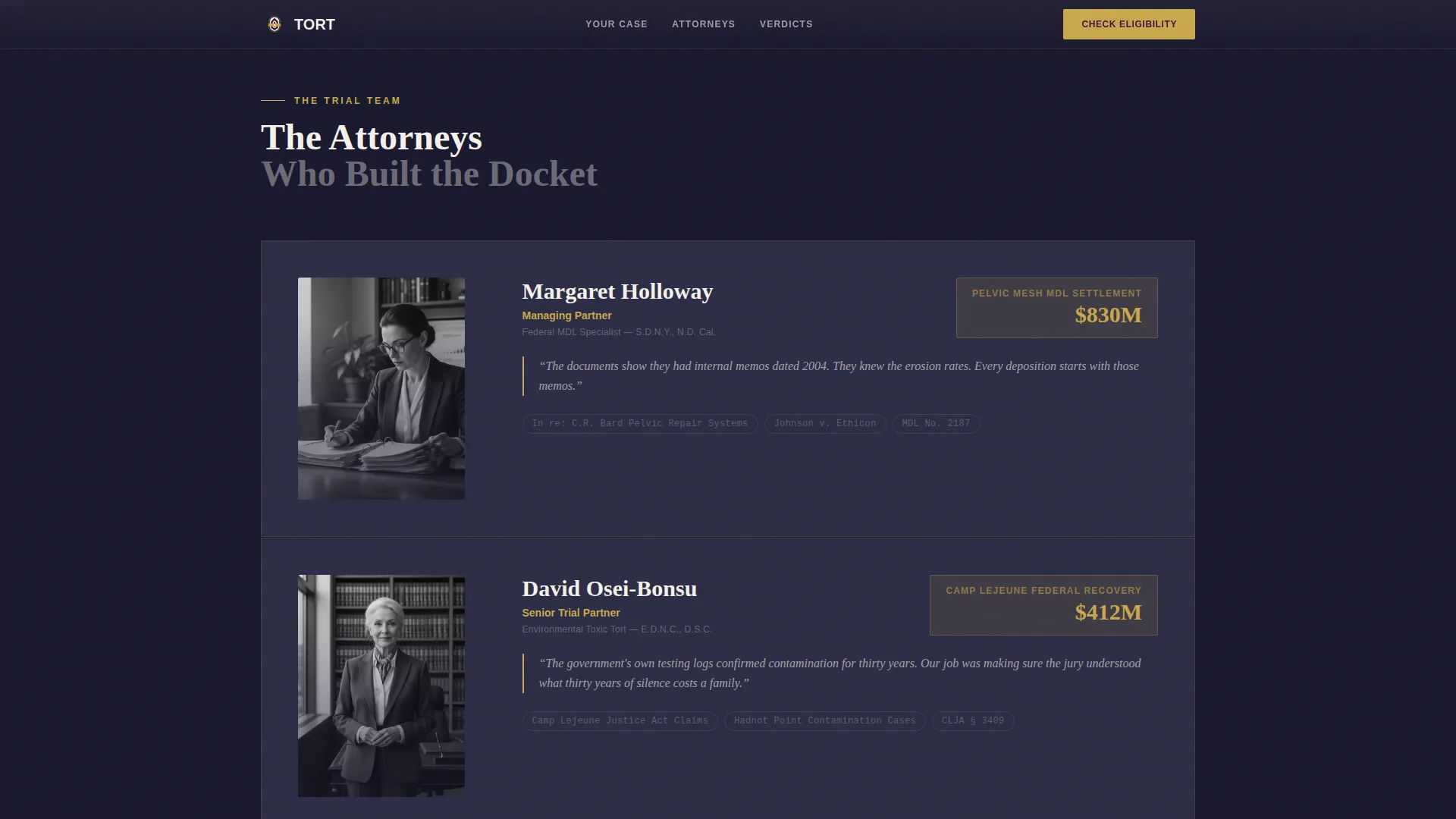
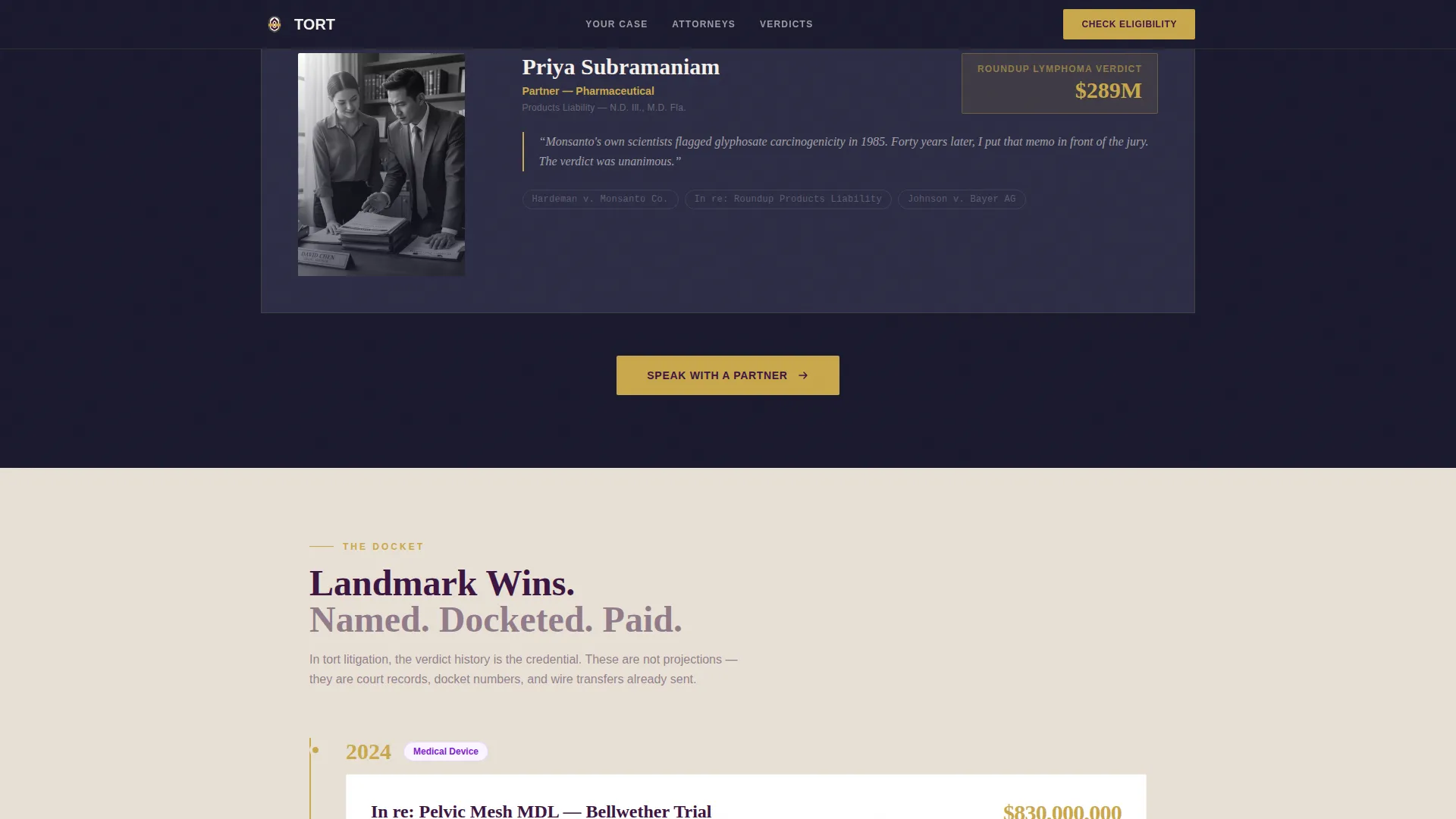
Each attorney card displays a named verdict, a jurisdiction specialty, and a direct quote written in the register of cross-examination preparation. Cards stagger in on scroll to give each attorney individual emphasis rather than presenting them as a group portrait.
Landmark Wins Timeline
A chronological timeline of case names, courts, and dollar amounts replaces standard client testimonials. In mass tort litigation, the docket record is the social proof, and this section presents it that way.
Three-Step Progressive Intake Form
The form opens with a visual card grid where visitors select their exposure type: product, chemical, or device. Step two confirms diagnosis and approximate date. Step three collects name, state, and phone number. A secondary path offers a free case evaluation callback within 24 hours.
Linear Single-Row Footer
The footer follows a clean single-row pattern that keeps the page focused on conversion without adding navigational distractions at the bottom.
Page sections overview
| Section | Purpose |
|---|---|
| Editorial Hero | Establish authority and display the $4.7B recovered stat |
| Case Qualifier Table | Map conditions to active lawsuits, settlement ranges, and deadlines |
| Attorney Authority Panel | Build trust through named verdicts and jurisdiction credentials |
| Landmark Wins Timeline | Use the case docket as verified social proof |
| Progressive Intake Form | Qualify and capture leads through a three-step eligibility flow |
| Linear Footer | Close the page with firm contact and navigation details |
Design & branding system
The visual identity follows an Institutional Authority theme. Every color, typeface, and layout choice is designed to feel like the embossed letterhead of a firm with a Supreme Court docket, weighty and deliberate.
- Color system: deep courtroom plum (#3C1642) for primary surfaces, senior partner charcoal (#1A1A2E) for text layers, ivory brief paper (#F5F0EB) for readable backgrounds, and verdict gold (#C9A84C) reserved for calls to action and trust indicators only
- Typography: Fraunces serif for headlines delivers courtroom gravity; DM Sans handles body text with clean readability at every size
- The mahogany war room aesthetic is reinforced through hard-shadow editorial photography, stacked case file imagery, and a palette that signals institutional seniority rather than consumer-brand friendliness
Mobile & speed optimization
The template is built mobile-first, recognizing that most visitors are searching their symptoms on a phone late at night. The layout adapts so the comparison table, attorney cards, and intake form all remain fully usable on small screens.
- The three-step form loads client-side only, keeping the intake experience fast even on slower mobile connections
- Scroll reveals and stagger animations on attorney cards use medium-weight motion that adds presence without slowing the first visible paint
- The hero photo-and-text composition reflows cleanly on mobile so the headline and gold stat remain prominent above the fold
How this template helps you convert
The conversion architecture is built around one insight: show the dollar figure before asking for the name. Every section earns the next click rather than demanding it.
- The case qualifier table shows settlement ranges tied to specific conditions, so visitors arrive at the intake form already believing their case has value rather than approaching it as a cold inquiry
- The attorney panel and landmark wins timeline stack institutional authority progressively down the page, so by the time a visitor reaches the intake form, the firm has already demonstrated it wins cases like theirs
- The three-step form breaks the intake into small, low-commitment steps, with a secondary callback path for visitors who are not ready to submit details immediately
Other information about this template
This template is built for the United States market, with localization set to USD currency and MM/DD/YYYY date formatting throughout the case qualifier table and filing deadline fields.
- The template style is a comparison table layout, making it suited to any litigation practice that handles multiple active case types simultaneously
- Animation settings are medium intensity: scroll reveals, staggered attorney card entries, and form step transitions add motion without overwhelming the institutional tone
- Interactivity is high by design, with comparison table filtering, a three-step intake form, and an eligibility qualifier working together as a cohesive lead generation system
- The template fits within the Legal and Compliance category, under the Personal Injury and Litigation subcategory, and is purpose-built for the mass tort litigation niche
Theme
Institutional Authority
Creative direction
Expert Panel
Color system
Plum Executive
Style
Comparison Table
Direction
Lead Generation
Page Sections
Case Qualifier Comparison Table
Editorial Half-page Hero
Attorney Authority Panel
Landmark Wins Timeline
Three-step Progressive Intake Form
Related questions
Can I customize the conditions listed in the comparison table?
Does the template include the intake form?
Can I update the attorney cards with real case details?
Is this template suited for a firm with only one active case type?
Can the color system be updated to match our firm's existing brand?