Fencing Professional Website Template
Touch is a single-column fencing tournament landing page built for electric competition weekends. It opens with a full-viewport countdown timer, delivers stats-first impact through scroll-animated number callouts, and drives registration through a structured form covering weapon, division, United States Fencing Association member number, and club affiliation. The design runs deep carbon black with blade silver, scoring-box red, and electric touch yellow.
by Rocket studio
Quick summary
Touch is a bold, single-column fencing tournament landing page designed to pull competitors and spectators straight into the action. The page opens with a massive countdown clock, then lands stat callouts hard before a single paragraph of copy appears. Every section builds the scale of the event and earns the registration click through a rhythm of data, context, and urgency.
Who this template is for
This template is built for fencing tournament directors and event organizers who need to market a competitive weekend to a specific, motivated audience.
- Junior fencing families who need clear logistics, schedule grids, and registration steps in one place.
- Collegiate athletes and open-division fencers seeking National ranking points and confirmed high-rated entries before committing.
- Spectators and parents who want a secondary path to follow the event without registering to compete.
What problem this template solves
Tournament promotion pages often bury the most persuasive details under generic event copy. Fencers decide whether a tournament is worth traveling to within seconds of landing on a page.
- The template front-loads prestige signals including strip count, prize purse, and ranking points available so fencers feel the cost of skipping before they reach the form.
- It gives parents and spectators a clean secondary path through an email-capture guide download, so no visitor leaves empty-handed.
- It removes the guesswork from registration by structuring the form around weapon, division, United States Fencing Association member number, and club affiliation in a single logical flow.
What you get with this template
You get a fully structured, single-column landing page designed specifically for a multi-weapon fencing tournament. Every section is sequenced to build urgency and guide each visitor type toward their intended action.
- A full-viewport countdown timer section, a stats impact block, schedule and venue sections, highlight reel placement, and a structured registration form section.
- A sticky yellow call-to-action button labeled "Register Your Bouts" that repeats after every third section throughout the page.
- A secondary email-capture path with a "Download the Tournament Guide" prompt aimed at non-competing visitors.
Feature list
This template delivers a focused set of built-in components designed around fencing tournament promotion.
Full-Viewport Countdown Timer Header
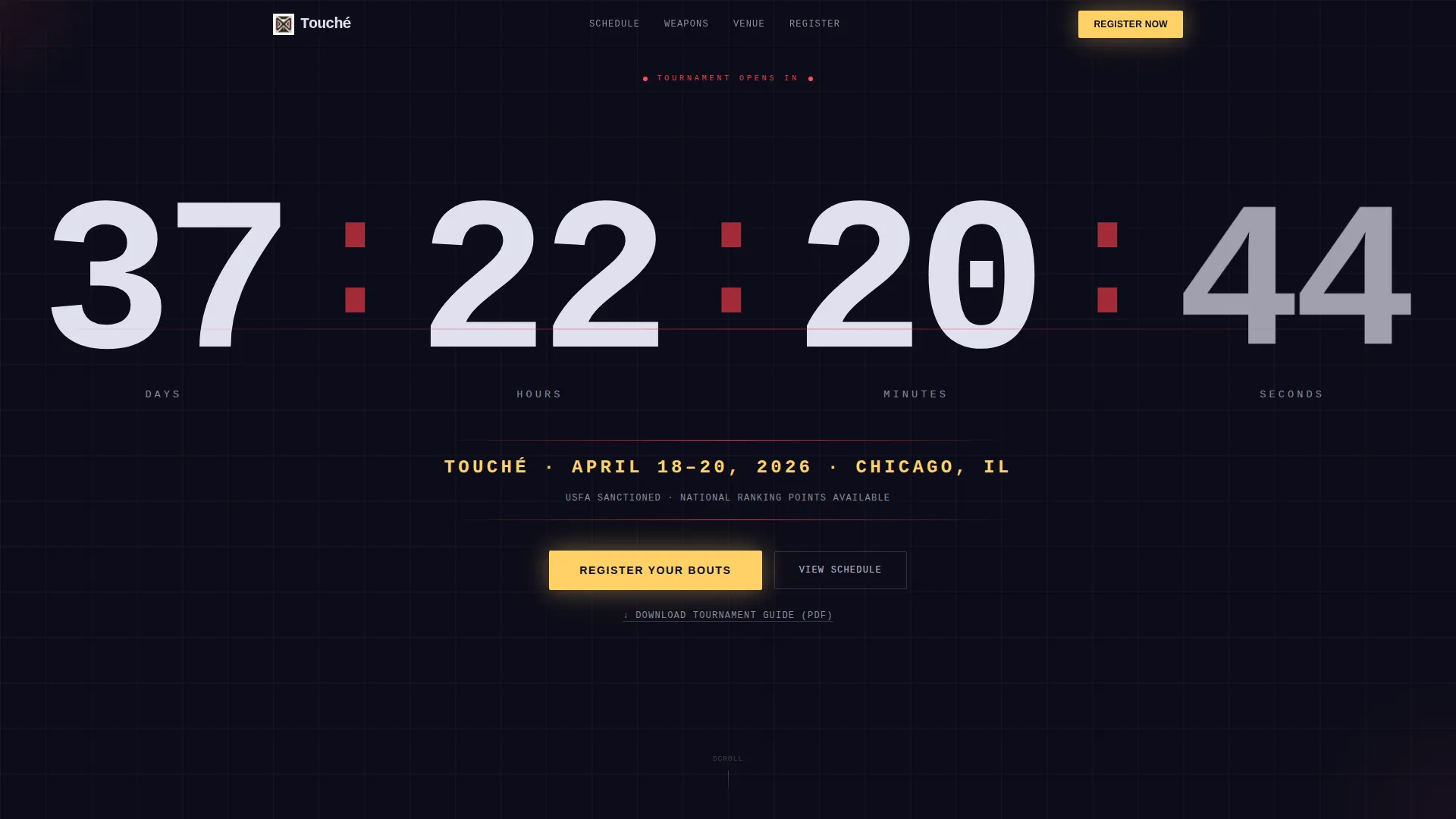
The header fills the entire screen with massive mono-spaced numerals in blade silver counting down days, hours, minutes, and seconds against a pure carbon black background. Red pulsing colons separate each digit. Below the clock, one line in electric touch yellow displays the tournament name, date, and city. No imagery competes with the numbers.
Scroll-Animated Stats Impact Block
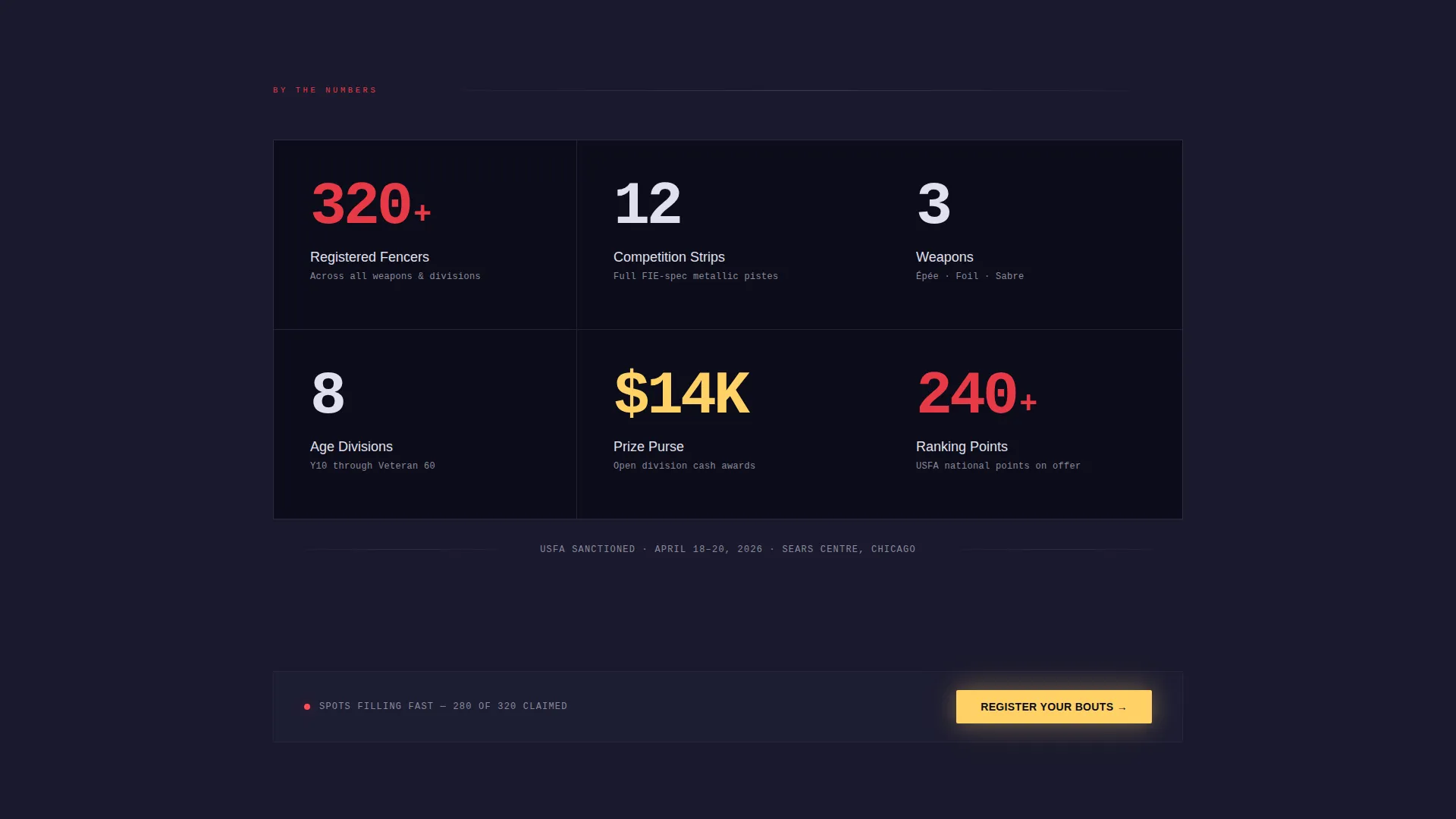
Immediately below the countdown, bold numerical callouts animate into view as the visitor scrolls. The block surfaces figures like registered fencer counts, strip count, weapons, age divisions, and prize purse in red on black. Each number arrives separately, building the tournament's scale before any descriptive copy appears.
Structured Registration Form
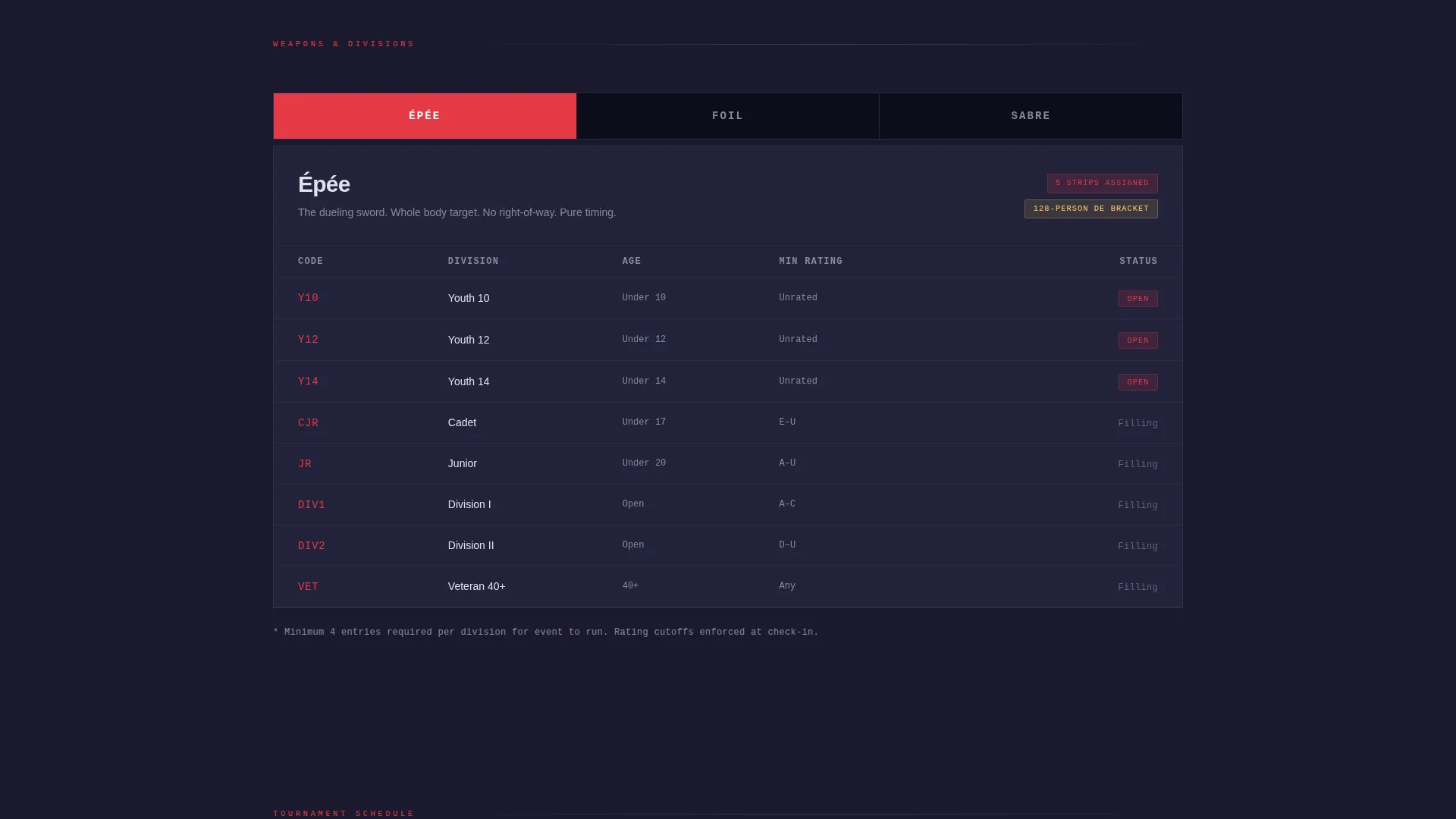
The registration form collects weapon selection through an épée, foil, and sabre checkbox set, division through an age and rating dropdown, United States Fencing Association member number, and club affiliation before routing to payment. The form is embedded within the single-column flow and is reached only after the visitor has absorbed the full case for attending.
Repeating Sticky Call-to-Action Buttons
The primary call-to-action, "Register Your Bouts," appears first beneath the countdown timer and repeats in sticky yellow buttons after every third section. This cadence keeps the registration path visible throughout the entire scroll without overwhelming the content sections between each appearance.
Secondary Email-Capture Path
A distinct secondary conversion path targets spectators and traveling parents with a "Download the Tournament Guide" prompt. This captures email addresses from visitors who are not competing, broadening the page's value beyond active fencers and keeping non-registrants engaged with the event.
Data-Rhythm Section Architecture
The page is structured so stat blocks punctuate every major content section, resetting the visitor's sense of scale after schedule grids, venue maps, and highlight reel sections. The rhythm alternates between data hits and breathing room, mirroring the pace of watching touches land on a scoring box during a bout.
Page sections overview
| Section | Purpose |
|---|---|
| Countdown Timer Header | Anchors urgency with a live countdown to the tournament start |
| Stats Impact Block | Delivers scale with animated fencer, strip, and prize figures |
| Primary call to action Placement | Presents the first "Register Your Bouts" button below the countdown |
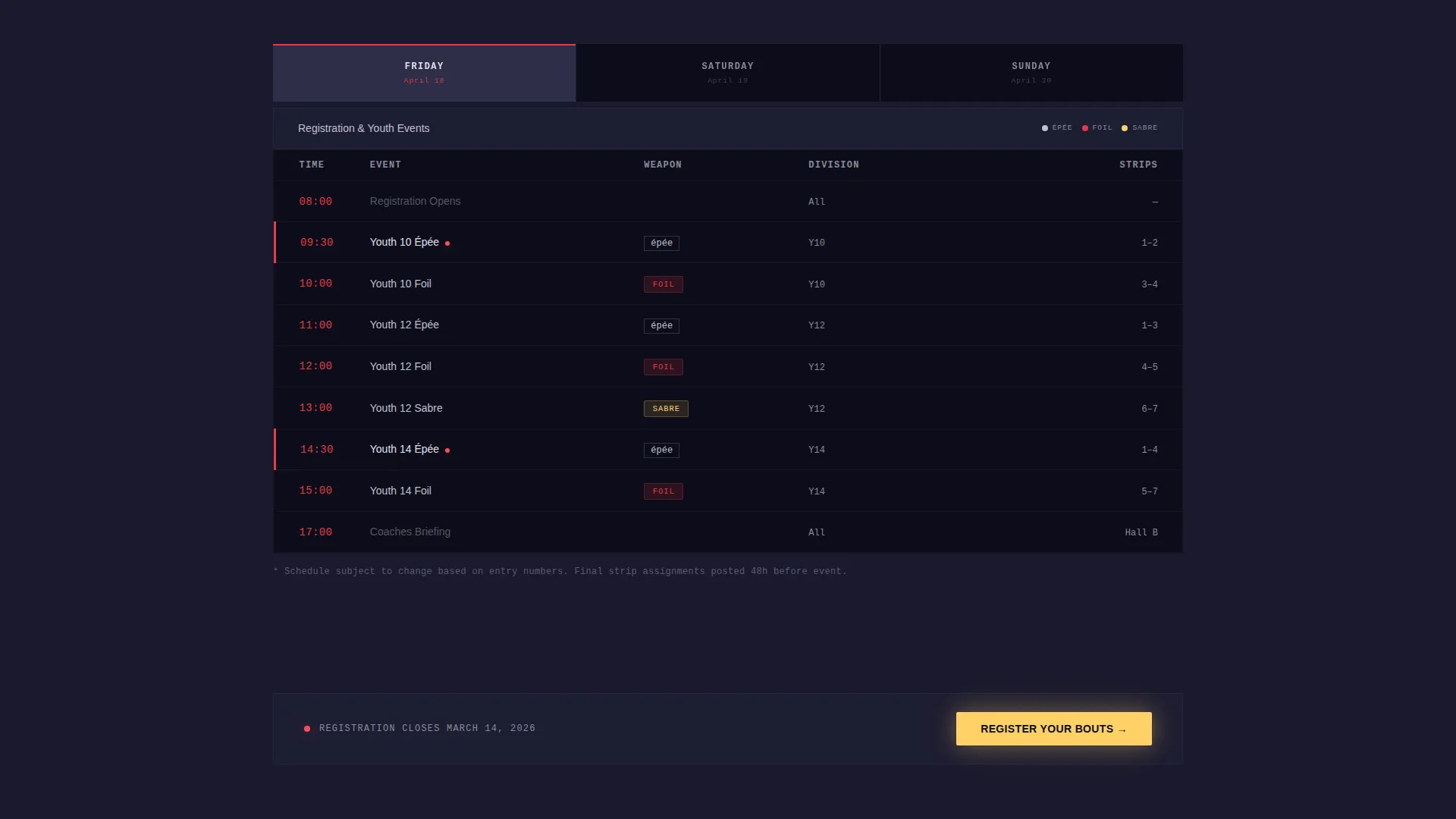
| Schedule Grid | Lays out the tournament day-by-day and weapon-by-weapon |
| Venue Map Section | Orients traveling competitors and families to the competition site |
| Highlight Reel Section | Showcases prior-year footage to build credibility and atmosphere |
| Registration Form | Collects weapon, division, membership number, and club affiliation |
| Email Capture Path | Offers the Tournament Guide download for spectators and parents |
Design & branding system
The Carbon Fiber color system runs on a palette that feels technical, kinetic, and arena-ready. Deep carbon black dominates every background, blade silver structures all typography, scoring-box red marks key data points, and electric touch yellow fires only on calls-to-action and live stat callouts.
- Typography is set in mono-spaced numerals for the countdown and stat blocks, giving the page a scoring-machine aesthetic that fits the sport's electronic timing culture.
- Red is reserved for high-priority data signals and the pulsing colons in the timer header, so it never loses its visual authority across the page.
- Yellow appears only where the visitor must act, keeping the primary call-to-action button visually distinct from every other element on the page.
Mobile & speed optimization
The single-column layout is structured to scale cleanly across screen sizes, which matters for fencers and parents checking registration details on a phone between bouts at another tournament.
- The full-viewport countdown timer resizes its mono-spaced digits to fill the screen proportionally on smaller viewports.
- Stat blocks and section transitions are built for vertical scroll, matching the natural thumb-scroll behavior of mobile visitors.
- The sticky call-to-action button remains accessible at scroll points throughout the mobile view without overlapping critical content.
How this template helps you convert
The page earns the registration click by sequencing persuasion before the ask, so visitors arrive at the form already convinced.
- The countdown timer creates immediate time pressure, making the tournament feel close and the registration window feel finite before the visitor reads a single word of copy.
- The scroll-animated stats block front-loads the tournament's prestige figures, so fencers understand the scale of the event and the cost of not attending before they ever see the registration form or its price.
- The repeating sticky call-to-action cadence keeps "Register Your Bouts" within reach at every scroll milestone, while the secondary email-capture path ensures spectators and parents convert on their own terms without cluttering the primary registration flow.
Other information about this template
This template is categorized under Sports and Recreation with a fencing-specific focus, making it a strong fit for regional, national qualifier, and open circuit tournament promotions.
- The template style follows a Hero-Dominant layout where the countdown and stat sections carry ninety percent of the visual weight, leaving supporting content sections lean and fast to scroll.
- The Festival Energy theme and Immersive Visual creative direction are built into the section sequencing, color application, and animation timing described in the brief.
- The Click-Through landing page direction means every section is designed to move visitors toward one of two exits: the registration form or the tournament guide email capture.
Theme
Festival Energy
Creative direction
Immersive Visual
Color system
Carbon Fiber
Style
Hero-Dominant (90/10)
Direction
Click-Through
Page Sections
Full-viewport Countdown Timer
Scroll-animated Stats Impact Block
Structured Multi-field Registration Form
Repeating Sticky Call to Action Buttons
Secondary Email-capture Path
Data-rhythm Section Architecture
Related questions
What types of fencing events is this landing page best suited for?
Can the registration form handle multiple weapon and division options?
Is there a path for spectators and parents who are not competing?
How does the countdown timer section look and behave?
Where does the primary call-to-action button appear on the page?