PCB Manufacturer Comparison Landing Page Template
Trace is a dark, data-driven landing page template built for printed circuit board manufacturers. It pairs a full-screen production video header with a side-by-side capability comparison grid, a drag-and-drop Gerber file upload zone, and a charcoal-and-amber visual system that reads like a live factory dashboard. Engineers get every spec they need before they ever reach a contact form.
by Rocket studio
Quick summary
Trace is a precision-focused landing page template designed for printed circuit board (PCB) manufacturers. It uses a Dashboard Pro theme with a Checklist and Audit creative direction, placing real capability specs beside industry benchmarks in a scrollable comparison grid. The charcoal-and-amber color system gives it the look and feel of an active factory monitoring interface.
Who this template is for
This template is built for technical buyers and the manufacturers who want to win them. It speaks directly to people who evaluate vendors on hard data, not marketing language.
- Hardware engineers comparing quotes and layer-stackup specs late at night
- Procurement managers vetting vendors on impedance control, surface finish, and IPC classification
- Startup chief technology officers who need a manufacturer they can verify, not a broker reselling reject panels
What problem this template solves
Most PCB manufacturer websites hide critical specifications behind a contact form or a sales call. Engineers do not have time for that. They arrive with a Gerber file, a tolerance requirement, and a list of questions.
- There is no easy way for visitors to compare your specs against the industry standard in a single view
- Upload paths for Gerber files, layer count, and surface finish selection are buried or missing entirely
- The page looks like every other industrial website, giving engineers no reason to stay or trust the claims
What you get with this template
Trace delivers a single-page layout that functions like a procurement audit tool. Every section is structured to answer the questions a hardware engineer or procurement manager would actually ask.
- A full-screen video background header with fade-in headline copy over real production footage
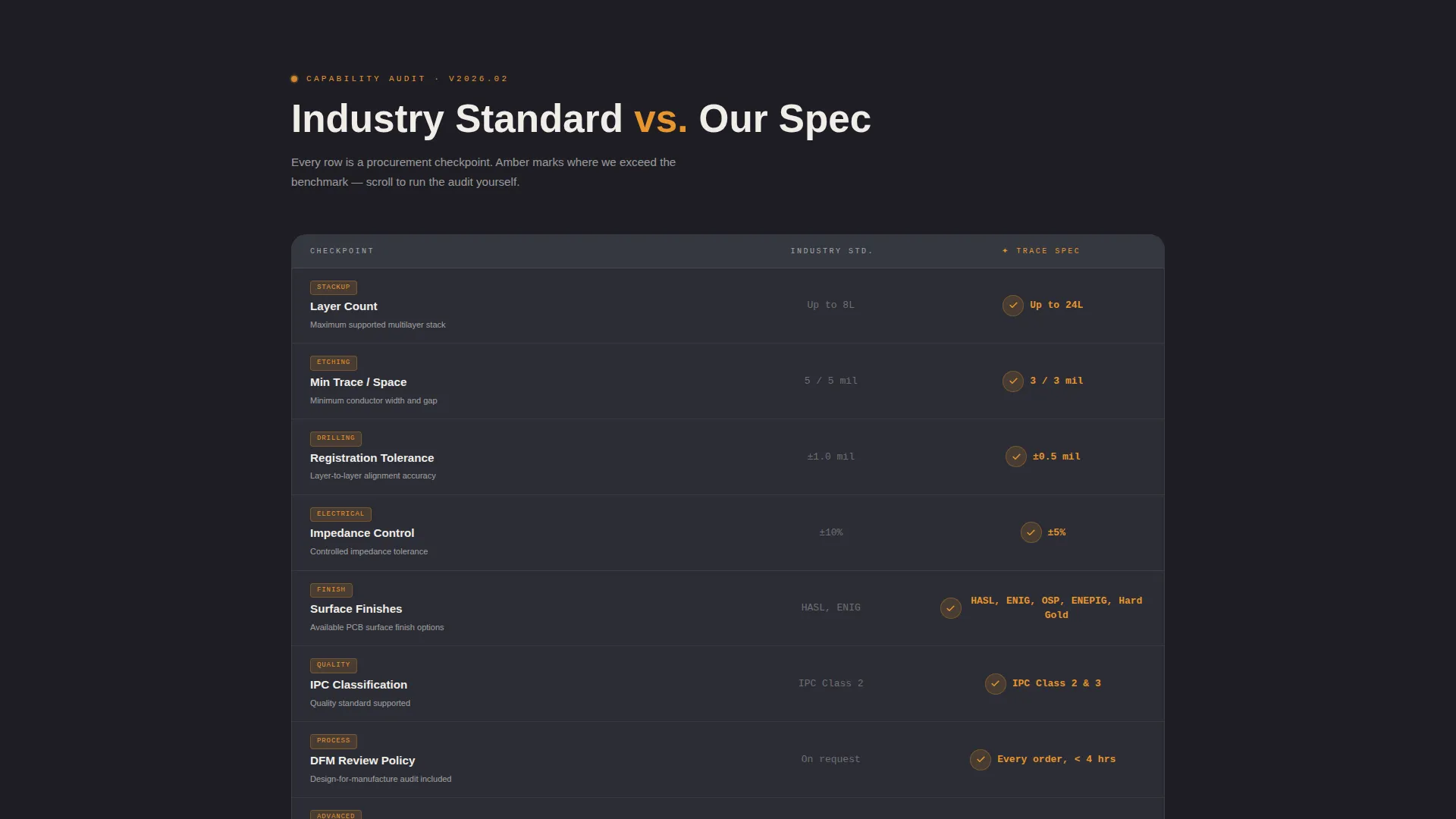
- A scrollable side-by-side capability comparison grid covering layer count, trace and space minimums, surface finish options, impedance tolerance, IPC class, lead time, and DFM review policy
- A drag-and-drop file upload zone accepting.zip,.rar, and ODB++ formats, with dropdowns for layer count, quantity, and surface finish selection
Feature list
This section covers the core built-in components included in the Trace template layout.
Full-Screen Video Background Header
The header occupies the full viewport and is designed to hold drone-smooth production footage. Text fades in over the video with a headline such as "Your Board. Our Line. Every Layer Audited." The video runs muted and continuous, replacing generic stock imagery with visible proof of real manufacturing capability.
Capability Comparison Grid
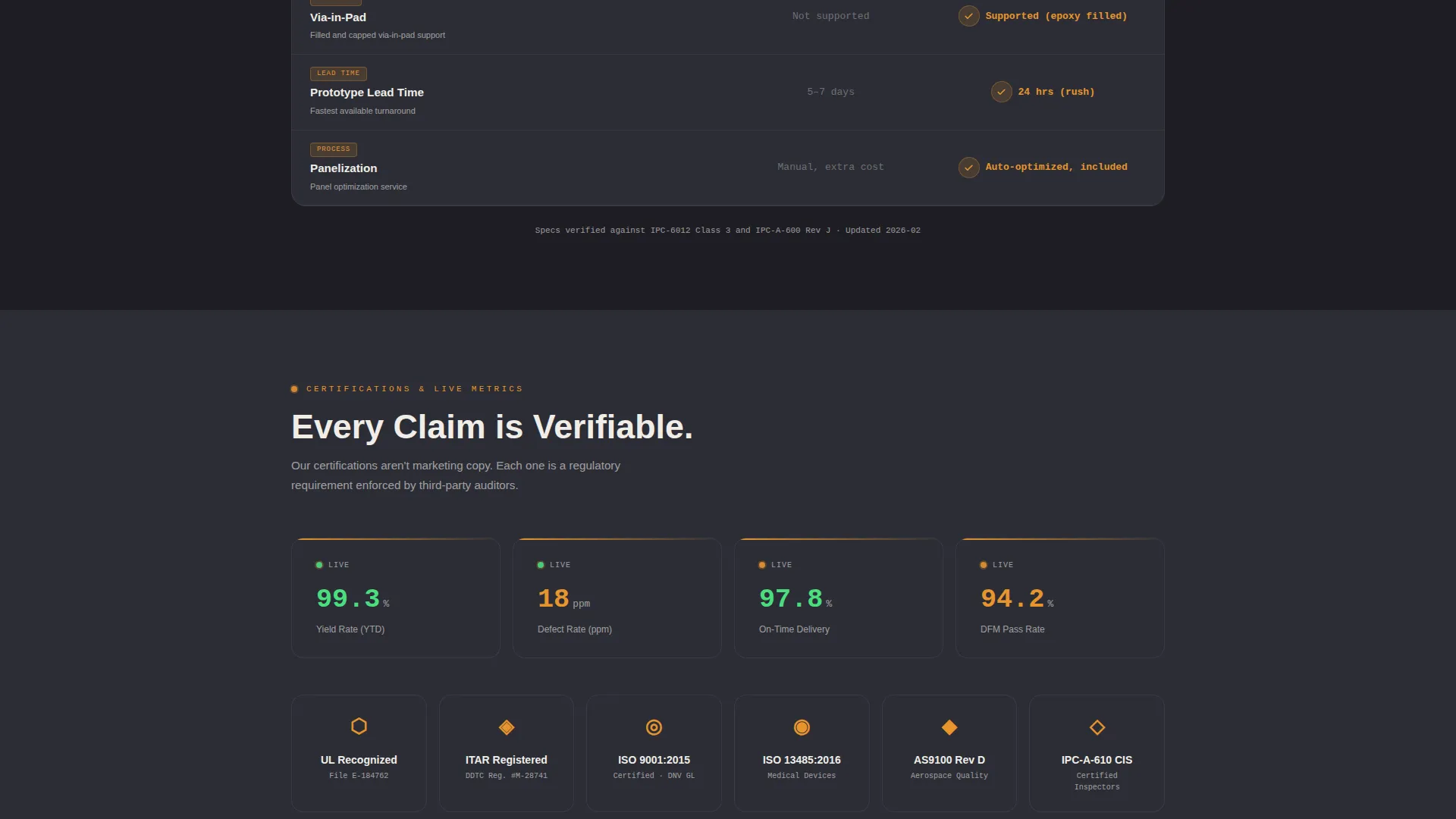
The comparison grid is the core of the page. Each row is a checkpoint: layer count, minimum trace and space, surface finish options such as HASL (Hot Air Solder Leveling), ENIG (Electroless Nickel Immersion Gold), and OSP (Organic Solderability Preservative), impedance control tolerance, IPC Class 2 and Class 3 classification, lead time tiers, and DFM (Design for Manufacturability) review policy. The left column shows the industry standard; the right column shows the manufacturer's spec. Rows where the manufacturer exceeds the benchmark trigger an amber checkmark animation on scroll.
Gerber File Upload Zone
A drag-and-drop file zone sits at the base of the comparison grid. It accepts.zip,.rar, and ODB++ file formats. Dropdown menus let visitors select layer count, order quantity, and surface finish before submitting. The primary call to action, "Upload Gerbers for DFM Audit," appears both in a sticky top navigation bar and at the upload zone itself.
Gated Competitor Spec Sheet Download
A secondary conversion path offers a downloadable PDF titled "Download Our Spec Sheet versus. Top 5 Competitors." The download is gated behind a work email field, giving the manufacturer a qualified lead while giving the engineer a useful reference document.
Sticky Navigation Call to Action
The top navigation bar remains visible as the visitor scrolls. It carries the primary "Upload Gerbers for DFM Audit" call to action at all times, ensuring the conversion action is always one click away regardless of where the visitor is on the page.
Live Yield-Rate Ticker
A ticker element is designed to display real production yield data pulled from the manufacturer's own metrics. This component sits within the audit flow, adding a live data point that reinforces the credibility of the comparison grid claims.
Page sections overview
| Section | Purpose |
|---|---|
| Video Header | Establish manufacturing credibility with real footage and headline |
| Comparison Grid | Side-by-side capability audit against industry benchmarks |
| Certifications Block | Display UL, ITAR, and ISO 13485 certifications |
| Yield Rate Ticker | Show live production yield data as a trust signal |
| Gerber Upload Zone | Primary conversion path with file upload and spec dropdowns |
| Spec Sheet Download | Secondary lead capture via gated competitor comparison PDF |
Design & branding system
The visual system is built around a dark industrial palette that reads like a factory monitoring interface. Every color choice has a functional purpose within the dashboard layout.
- Background panels use deep graphite (#1E1E24) and tooling-path gray (#2C2D35) to create depth across the grid layout
- Molten solder amber (#E8952E) activates on data points, progress indicators, checkmark animations, and hover states to draw the eye to key specs
- Silkscreen white (#F0EDE8) carries all specification text and labels, ensuring high contrast and zero ambiguity against dark backgrounds
Mobile & speed optimization
The Dashboard Pro theme is structured for responsive display across screen sizes. The grid and upload components are designed to reflow cleanly on smaller viewports.
- The comparison grid collapses to a single-column audit list on mobile, keeping each checkpoint readable without horizontal scrolling
- The sticky navigation call to action remains accessible on all screen sizes, so the upload path is never more than one tap away
- The full-screen video header is designed to display a static fallback image on devices where autoplay video is restricted
How this template helps you convert
Trace earns conversion before it asks for it. By the time a visitor reaches the upload zone, they have already completed a self-guided procurement audit against the manufacturer's actual specifications.
- The comparison grid answers every technical objection upfront, from minimum via-in-pad dimensions to first article inspection policy, removing friction before it forms
- The primary call to action, "Upload Gerbers for DFM Audit," gives engineers a concrete next step that fits naturally into their existing workflow rather than routing them through a generic contact form
- The gated spec sheet download captures work emails from visitors who are not ready to upload files yet, creating a second qualified lead path without interrupting the primary conversion flow
Other information about this template
Trace is a single landing page template, not a multi-page website. It is built inside the Dashboard Pro theme and is suited for manufacturers working in regulated or precision-critical sectors, including medical device, defense, and satellite electronics supply chains.
- The template is designed for Framer and follows the Dashboard Pro theme structure
- The charcoal-and-amber visual system is exclusive to this template and is not shared across other theme variants
- Page copy references industrial certifications such as UL, ITAR, and ISO 13485 as placeholder content blocks that the manufacturer replaces with their own verified credentials
- The Gerber upload zone and competitor spec sheet download are layout components; any file-handling or lead-capture behavior requires the manufacturer's own backend or form configuration


Theme
Dashboard Pro
Creative direction
Checklist & Audit
Color system
Charcoal & Amber
Style
Dashboard/Data Grid
Direction
Comparison/Versus
Page Sections
Full-screen Video Background Header
Side-by-side Capability Comparison Grid
Drag-and-drop Gerber Upload Zone
Sticky Navigation Call to Action
Gated Competitor Spec Sheet Download
Live Yield-rate Ticker
Related questions
What kind of manufacturer is this template built for?
Can I customize the comparison grid rows to match my actual specifications?
Does the Gerber file upload zone work out of the box?
What file formats does the upload zone display?
Is this template suitable for a manufacturer that also does assembly?



