National Park Visitor Center Landing Page Template
Trailhead is a single-column landing page template built for national park visitor centers. It translates geology, ecology, and trail logistics into a layered scroll that feels like unfolding a field journal at dawn. Visitors get real ranger data, expandable educational modules, and a personalized Trail Planner PDF download, all wrapped in a watercolor-style educational guide design.
by Rocket studio
Quick summary
Trailhead is an immersive, education-first landing page template designed for national park visitor centers. The page unfolds like a hand-drawn trail map: geological strata at the top, bedrock at the bottom, and every layer in between filled with ranger data, interactive exhibits, and seasonal trail intelligence. It earns a visitor's email by giving genuine knowledge first, then offering a personalized Trail Planner PDF as the natural next step.
Who this template is for
This template is built for organizations that operate a national park visitor center or a public-facing nature education facility. It serves teams who want to do more than list hours and location, they want to prepare visitors before boots ever hit the trail.
- Park services teams and rangers who want to share real monitoring data, burn acreage maps, and water quality readings with the public before visitors arrive.
- Tourism destination managers working on a monument, wilderness corridor, or multi-unit park site who need a gateway page that educates as well as converts.
- Educators and program coordinators building field trip resources, lesson plans, and curriculum guides for school groups, homeschool families, and students visiting on organized trips.
What problem this template solves
Most national park visitor center pages are static directories. They list park information, hours, maps, basic services, but they don't prepare visitors for what they're about to walk into. That gap creates crowding at fragile sites, unprepared hikers on wilderness trails, and missed opportunities for genuine nature education.
Trailhead solves this by turning the landing page itself into the first educational experience. Visitors don't just skim a facility overview; they descend through five ecological layers of the park before they ever arrive at the trailhead.
- Orientation before arrival: Visitors walk away from the page knowing elevation bands, seasonal access windows, and trail difficulty levels, reducing pressure on sensitive areas and on park staff.
- Education woven into conversion: The page earns the download by freely offering so much useful knowledge that the Trail Planner call to action feels like a natural continuation, not a gate.
- Audience flexibility: The same page serves retired couples planning multi-day crossings, homeschool families building a science curriculum around a field trip, and solo backpackers researching permit logistics.
What you get with this template
Trailhead delivers a fully structured, single-column landing page with six purpose-built sections and a cohesive visual identity rooted in the Educational Guide theme. Every section has a defined role, from the hero infographic to the footer, and the design system is ready to adapt to any national park, monument, or public wilderness facility.
- Six complete page sections spanning the hero elevation infographic, a five-layer Ecosystem Descent scroll, Trail Intelligence visitor cards, testimonials, the Trail Planner call-to-action form, and a horizontal-flow footer.
- A Cloud Canvas color system using high-altitude white, trail-dust warm gray, canopy green, and wayfinding red, a palette that recalls a watercolor field journal without competing with the landscape it describes.
- Typography, data panels, and animation scaffolding using Plus Jakarta Sans for headers, DM Sans for body copy, and IBM Plex Mono for coordinates and ranger data displays, with SVG path draw animations and scroll-linked ecosystem reveals built into the structure.
Feature list
This section gives a closer look at the core capabilities built into the Trailhead template.
SVG Elevation Infographic Hero
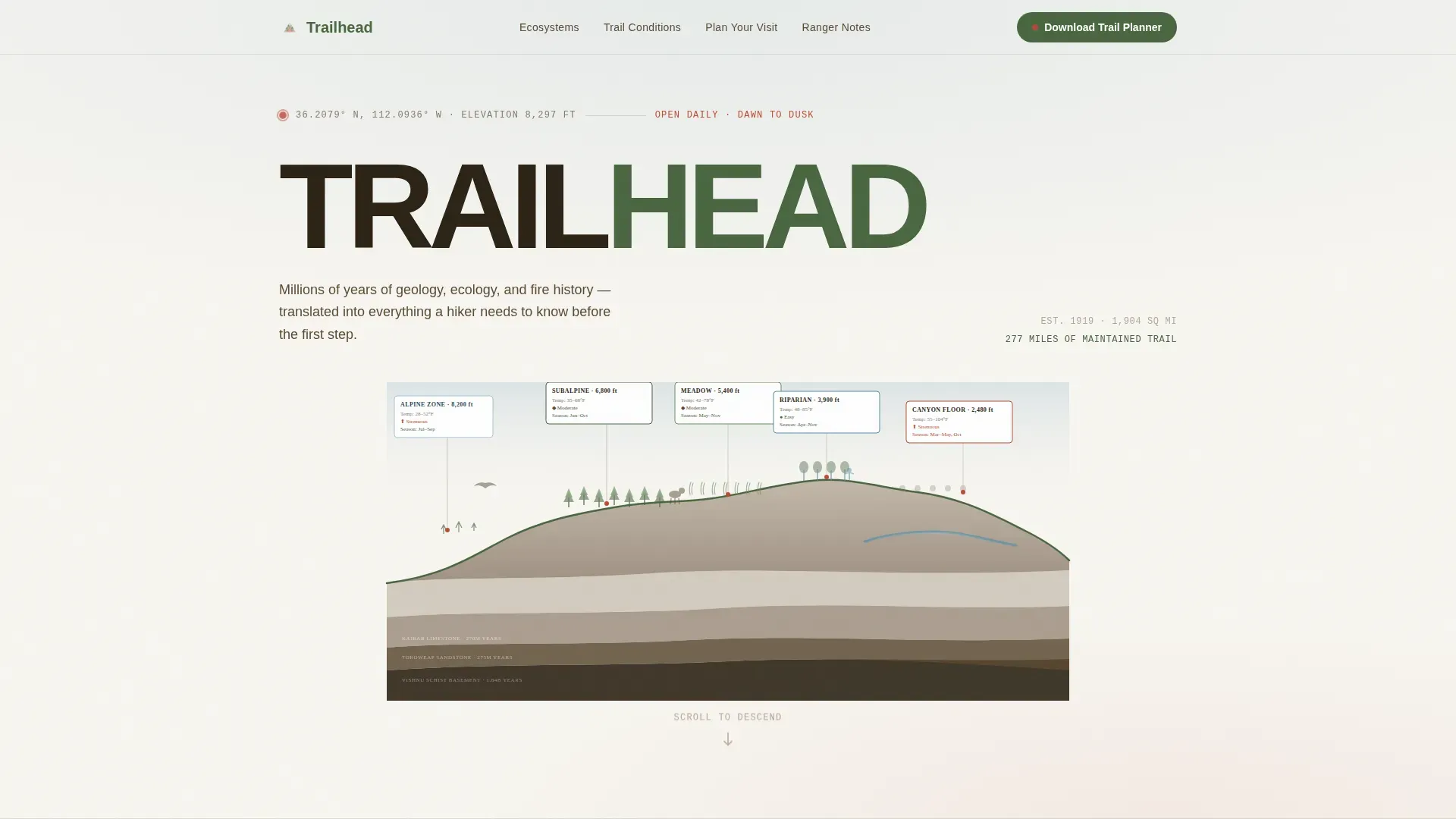
The header is a hand-illustrated cross-section of the park's elevation profile stretching edge to edge. It layers geological strata, vegetation zones, and wildlife silhouettes at their actual altitude bands. Dotted lines connect each zone to data cards showing temperature ranges, trail difficulty, and seasonal access windows. No photograph could teach this much in a single glance, the illustration earns the scroll by showing visitors how much they don't yet know about the ground beneath their feet.
Five-Layer Ecosystem Descent
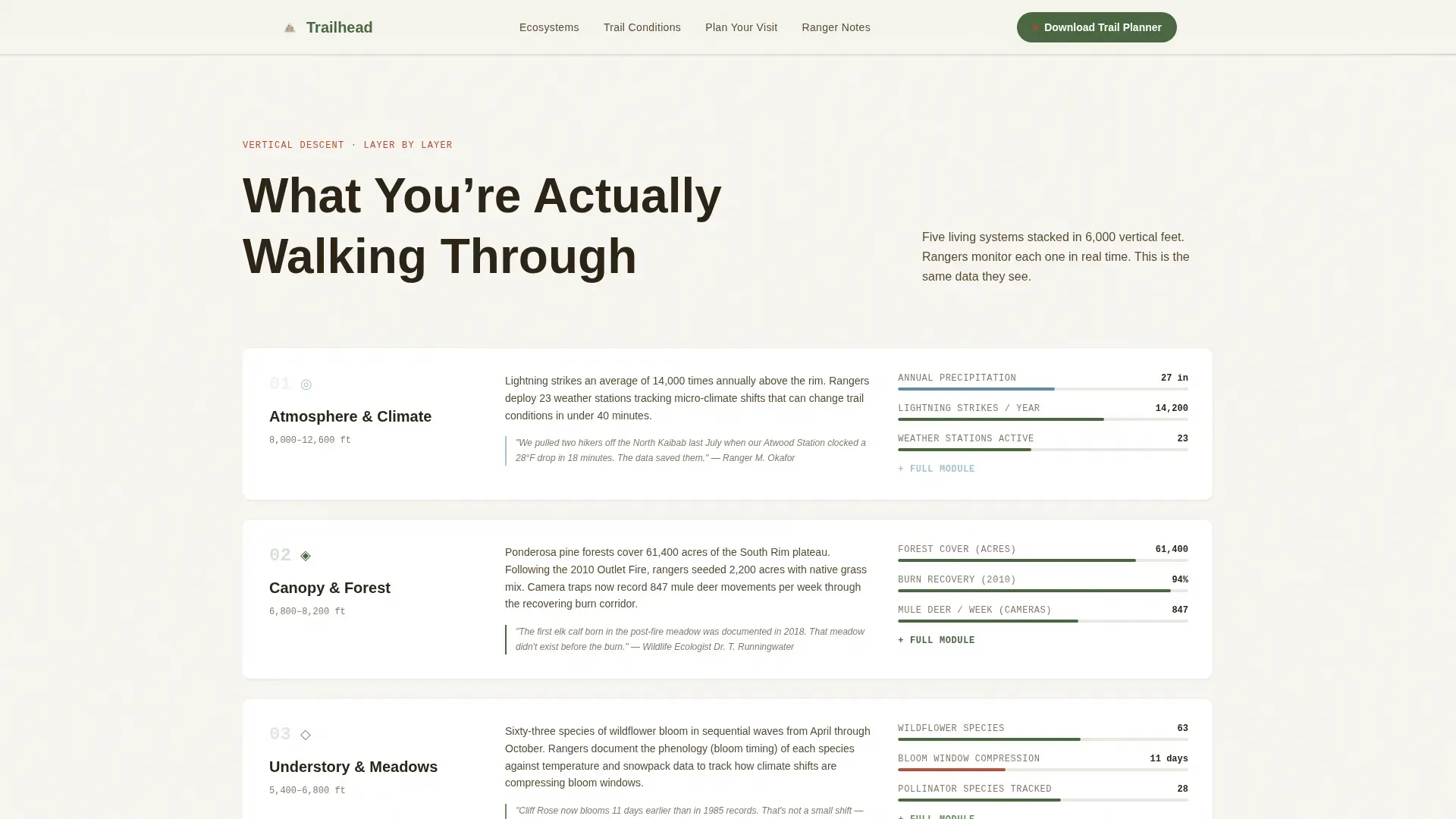
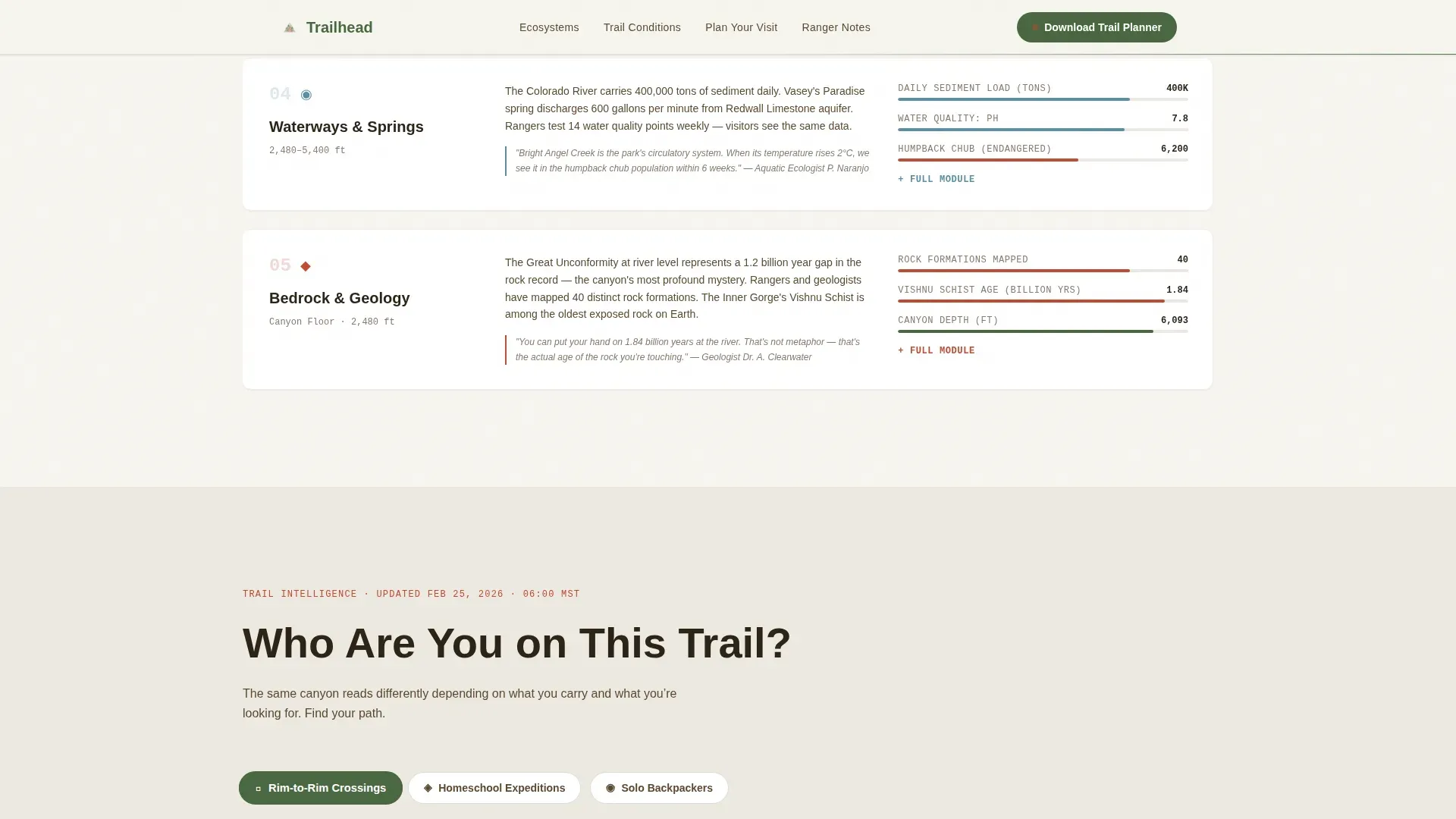
The Transparent Process creative direction drives the scroll as a vertical descent through the park's systems: atmosphere, canopy, understory, waterways, and bedrock. Each layer reveals how rangers monitor, protect, and restore that part of the park. Visitors see the same data rangers use, burn acreage maps, wildlife camera counts, water quality readings, making the page genuinely pedagogical rather than decorative. This approach reflects how immersive visitor gateways can shape behavior and set expectations before visitors enter sensitive areas.
Trail Intelligence Visitor Cards
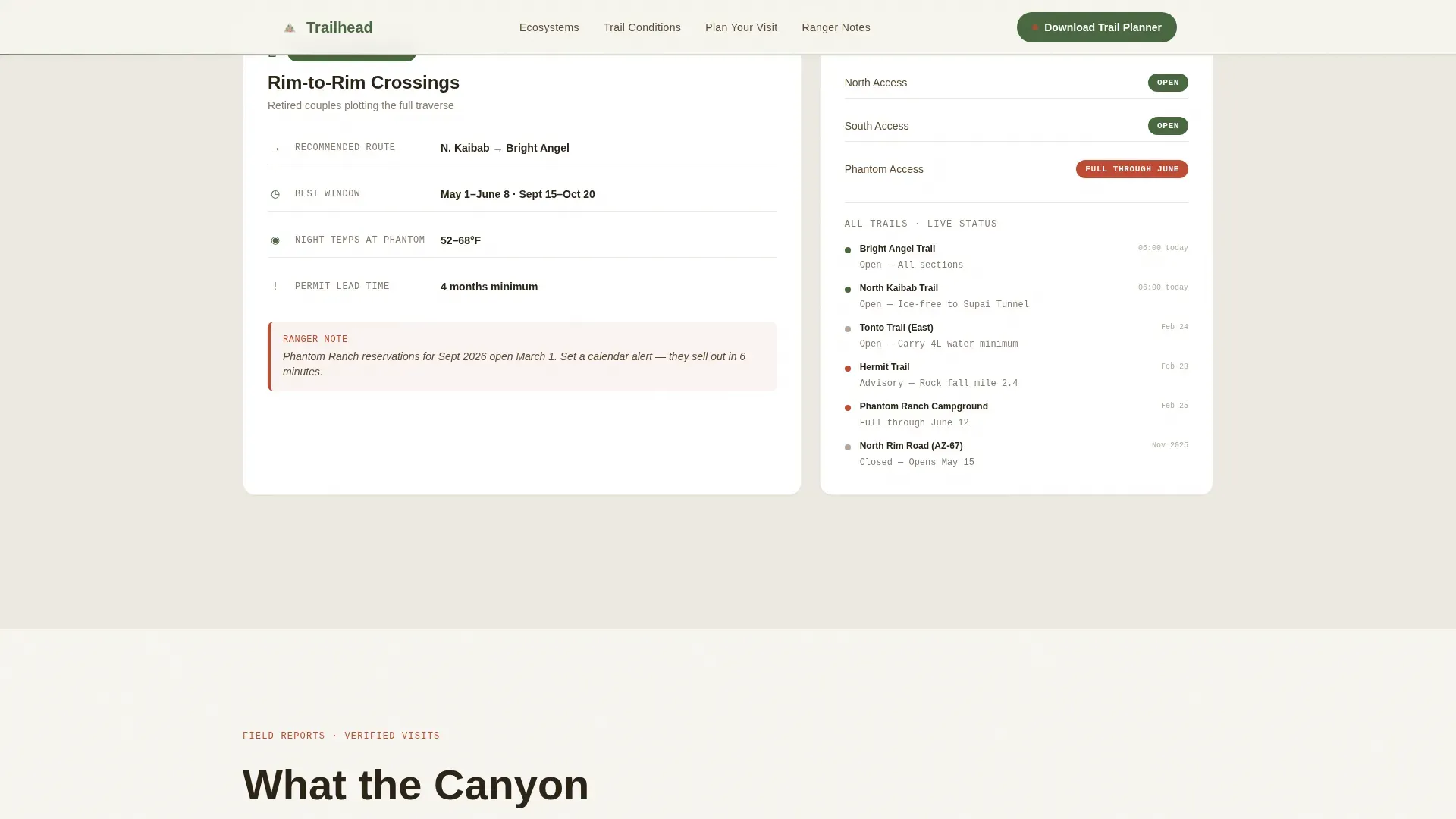
A dedicated section presents visitor-type cards matched to specific conditions and seasonal windows. Retired couples planning rim crossings, homeschool families on an extended field trip, and solo backpackers researching wilderness permits each get relevant trail conditions, timing guidance, and packing context. These cards make the page feel like a personal ranger conversation rather than a generic park information sheet.
Personalized Trail Planner Call to Action
The primary call to action asks only for an email address and visit month. In return, visitors receive a personalized PDF with trail conditions, sunrise times, and packing checklists matched to their season. This low-friction form reflects best practices for landing page conversion: ask for the minimum, deliver maximum value, and let the content itself do the persuading.
Expandable Educational Modules
Visitors can tap any infographic section to expand it into a full educational module. This supports the three-touch education model, pre-visit learning online, an in-person ranger experience, and post-visit reflection, by giving visitors a self-paced way to go deeper on topics like fire ecology, geology, and cultural history before they arrive. School groups and individual students alike benefit from this structure.
Testimonials with Specific Trip Detail
The Visitor Stories section features named testimonials that include specific trip details and transformation moments. Rather than generic praise, each testimonial references real itinerary elements, permit dates, trail names, night sky observations, giving new visitors the credibility signal they need to trust the resource and plan their own visit.
Page sections overview
| Section | Purpose |
|---|---|
| Hero Elevation Infographic | Establish scale and ecological depth at first glance using an illustrated cross-section |
| Ecosystem Descent Scroll | Guide visitors through five park layers with live-style ranger monitoring data |
| Trail Intelligence Cards | Match trail conditions and seasonal windows to specific visitor types |
| Visitor Stories | Build trust through named testimonials with concrete trip specifics |
| Trail Planner Call to Action | Capture email and visit month in exchange for a personalized seasonal PDF |
| Horizontal Flow Footer | Provide location, services links, and closing navigation in a clean footer pattern |
Design & branding system
The visual identity follows an Educational Guide theme built on the Cloud Canvas color system. The palette was designed to feel like a watercolor field journal left open to dry, soft washes of sky and stone, with precise ink notations in the margins. Nothing competes with the landscape itself.
- Color system: High-altitude white (#F7F5F0) as the base, trail-dust warm gray (#B5A898) for secondary surfaces, canopy green (#4A6741) as the primary content color, and wayfinding red (#C04A35) reserved strictly for interactive markers, callouts, and panels that demand attention.
- Typography: Plus Jakarta Sans handles headers with authority, DM Sans keeps body copy readable and warm, and IBM Plex Mono renders data coordinates and ranger statistics with the precise, field-report feel the content requires.
- Animation and interactivity: SVG path draw animations, scroll-linked ecosystem reveals, beam borders, and stagger effects give the page life without distracting from the educational content. GPU transforms and IntersectionObserver-based reveals are used throughout the structure.
Mobile & speed optimization
Trailhead is desktop-first by design, the trail map metaphor works best at full width, where the elevation infographic can stretch edge to edge and the ecosystem panels can display side-by-side data without compression. Careful mobile adaptation ensures the page remains fully usable on smartphones.
- Responsive layout adaptation: The single-column flow structure scales naturally to smaller screens. The infographic hero, data cards, and testimonials restack gracefully so visitors on mobile can still access all visitor information without horizontal scrolling.
- Performance-conscious animation: Native CSS smooth scroll, IntersectionObserver for scroll-linked reveals, and GPU-only transforms keep the animation system light. A one-second delay in page loading can reduce conversions by 7%, so the animation approach prioritizes visual impact without unnecessary render cost.
How this template helps you convert
A compelling headline and high-quality imagery are foundational to a high-converting landing page, but Trailhead goes further. It builds conversion pressure gradually and honestly, by the time visitors reach the Trail Planner call to action, they already trust the page because it has already given them real value. Dynamic media and interactive content can increase conversion rates by up to 80%, and Trailhead is built around that principle.
- Earn trust before asking: Every section above the call to action delivers freely accessible knowledge, ranger data, ecosystem maps, trail conditions, and field trip resources. Visitors arrive at the form already convinced the content is worth having. This mirrors the three-touch education model: give value first, then offer the next step.
- Reduce friction at the form: The Trail Planner call to action asks only for an email and a visit month. Low-ask, high-return forms consistently outperform long registration flows, especially for visitors who arrive with a specific plan already forming in their minds.
- Use social proof from real trips: Named testimonials with specific itinerary details, permit dates, trail difficulty, night sky moments, give prospective visitors a concrete picture of what a well-prepared park experience looks like. Including visitor reviews on landing pages demonstrably encourages new visitors to explore and sign up.
Other information about this template
Trailhead sits at the intersection of public land education, nature tourism, and destination gateway design. It reflects how modern visitor centers are evolving from simple orientation buildings into full educational experiences that shape visitor behavior before anyone sets foot on a trail.
- The National Park Service oversees roughly 400 natural, cultural, and recreational sites across the country. Each one benefits from a visitor center gateway that educates as well as informs. Trailhead is designed to serve that role online.
- Real-world examples like the Canyons of the Ancients Visitor Center and Museum demonstrate how a facility can feature interactive galleries and authentic cultural objects, displaying materials from millions of curated artifacts and records. Trailhead translates that museum-quality experience into a digital landing page structure.
- Programs at sites like the Tilden Environmental Education Center show how hundreds of school children can arrive each month for naturalist programs when the facility clearly communicates its education resources online. Trailhead supports that communication with lesson plans, field trip planning tools, and school groups content built into the page structure.
- The junior ranger booklet tradition, where young visitors earn badges by completing nature and history activities, is a strong model for the expandable educational modules in Trailhead. The junior ranger booklet concept maps directly to the tap-to-expand module system, giving students and families a self-paced way to explore topics before and after visiting.
- For teams working on sites in California or other western states with giant sequoias, high-altitude wilderness corridors, and complex land management responsibilities, Trailhead provides a structure that can be adapted to any park or monument context without rebuilding from scratch.
- The Bureau of Land Management and similar agencies managing public wilderness lands will find the Transparent Process direction especially relevant. Showing visitors the same data used in active land management builds credibility and public trust in ways that static brochure pages cannot.
- The template supports archaeology and cultural history content just as readily as ecology and geology. Whether the site focus is on ancient peoples, fire ecology and forest restoration, or panoramic views from high-altitude observation points, the section structure can highlight whatever story the park needs to tell.
- Visitor centers often provide maps, information, and educational exhibits to enhance the visitor experience. Trailhead packages those same resources digitally, including downloadable maps and online research tools, so visitors who discover the park remotely can begin learning long before they arrive at the physical facility.
Theme
Educational Guide
Creative direction
Transparent Process
Color system
Cloud Canvas
Style
Single Column Flow
Direction
Content/Resource
Page Sections
SVG Elevation Infographic Hero
Five-layer Ecosystem Descent Scroll
Trail Intelligence Visitor Cards
Personalized Trail Planner Download
Expandable Educational Modules
Named Testimonials with Trip Detail
Related questions
Can this template work for a smaller nature center or monument site, not just a major national park?
How does the Trail Planner call to action work in the template?
Is this template suitable for school groups and field trip planning?
Does the template include the ranger data and visitor testimonials shown in the preview?
Can the color system and typography be changed to match a different facility's branding?



