Emergency Petcare Landing Page Template
Triage is a single-column landing page template built for pet emergency services that need to communicate authority, calm, and competence at once. It pairs a press-mentions banner with staff profile cards, a structured lead-capture form, and a sharp Ink and Paper color system to turn panicked pet owners into confident inquiries the moment they arrive.
by Rocket studio
Quick summary
Triage is a single-column emergency petcare landing page template. It opens with a press-credibility banner, walks visitors through certified staff profiles, and closes with a focused lead form. The design uses deep editorial black, warm cream, and a single emergency-red accent to communicate authority without chaos.
Who this template is for
This template is built for petcare businesses that operate outside standard clinic hours and need to earn trust quickly. It suits any team that leads with staff credentials and human faces rather than generic marketing copy.
- Emergency pet stores staffed by certified veterinary technicians
- After-hours petcare services handling urgent calls from worried owners
- Specialty animal retailers offering prescription diets, wound-care kits, or oxygen support
What problem this template solves
Pet owners in a crisis do not browse. They scan for proof that someone competent is available right now. Generic pet store pages fail because they lead with product photos and promotions instead of people and credentials.
- Visitors arrive panicked and leave without contacting anyone because no clear authority signal exists
- Pages that bury the staff or hide their qualifications lose the trust needed before a form submission
- Emergency services lose leads when the contact path requires a phone tree or multiple clicks
What you get with this template
This template delivers a complete single-page layout designed specifically for emergency credibility and lead capture. Every section has a defined role, and nothing is decorative for its own sake.
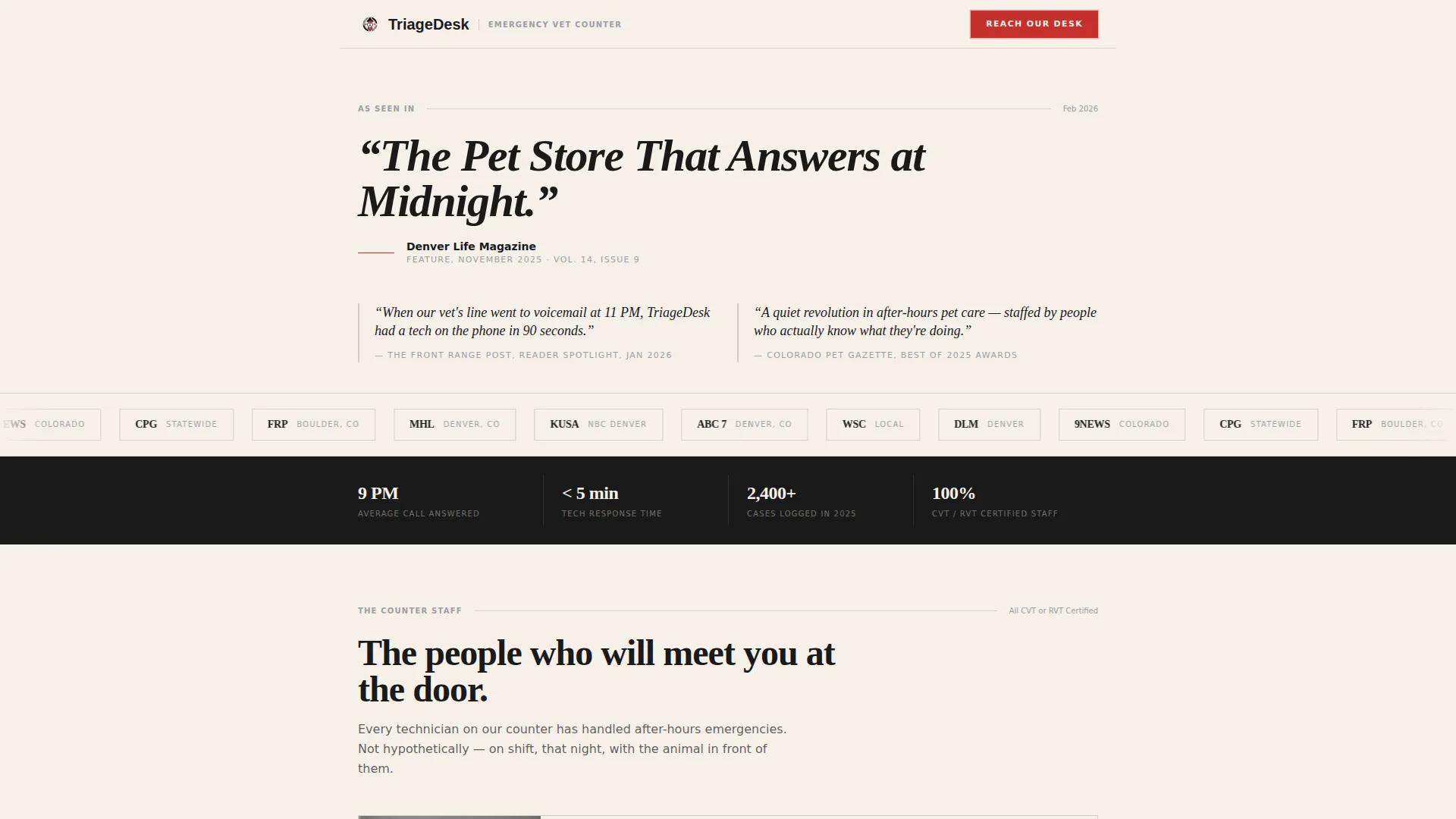
- A scrolling press-mentions banner with pull-quotes and publication mastheads at the top
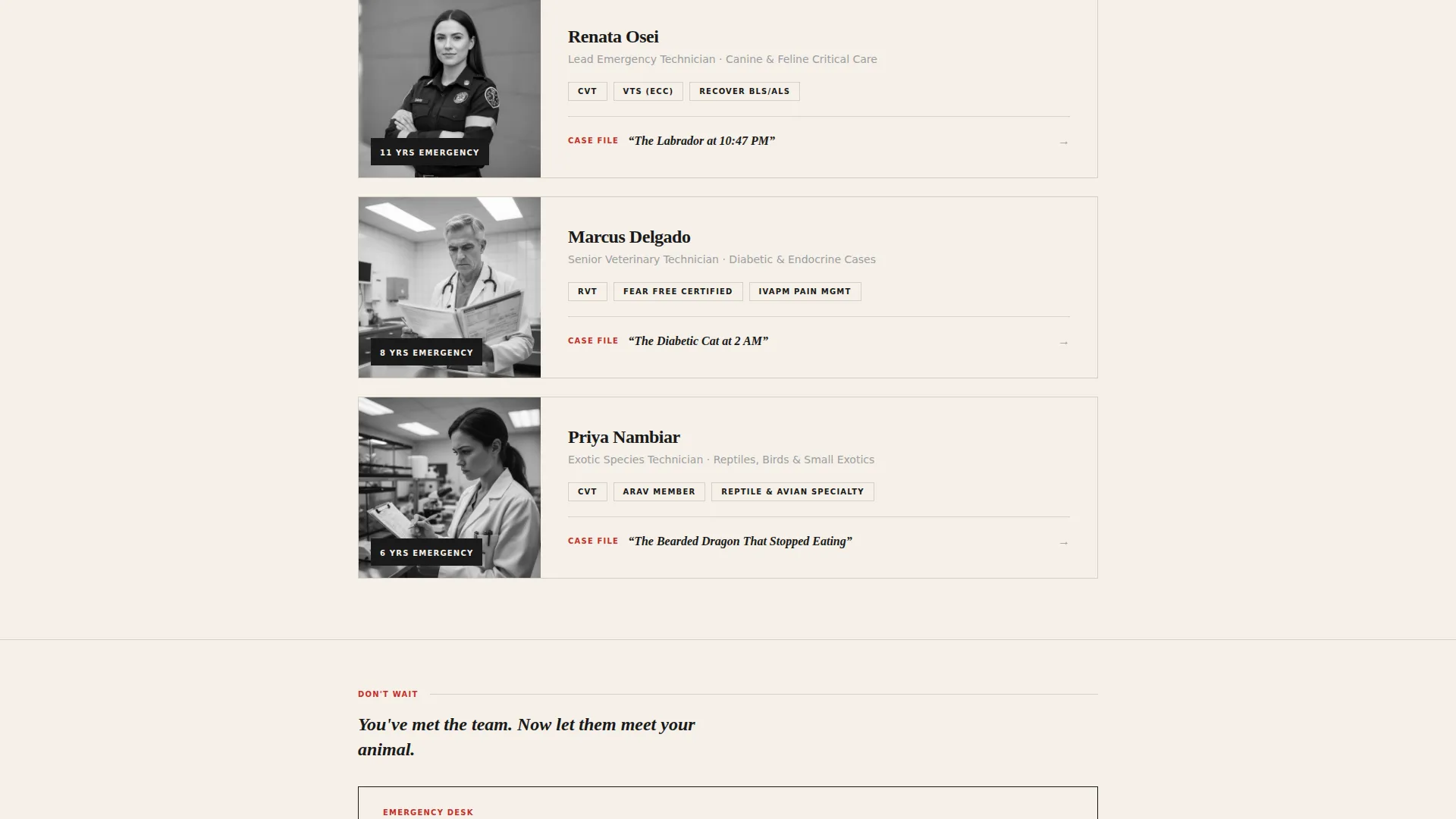
- Individual staff profile cards in black-and-white photography format with name, certification, specialty species, and a short competence story
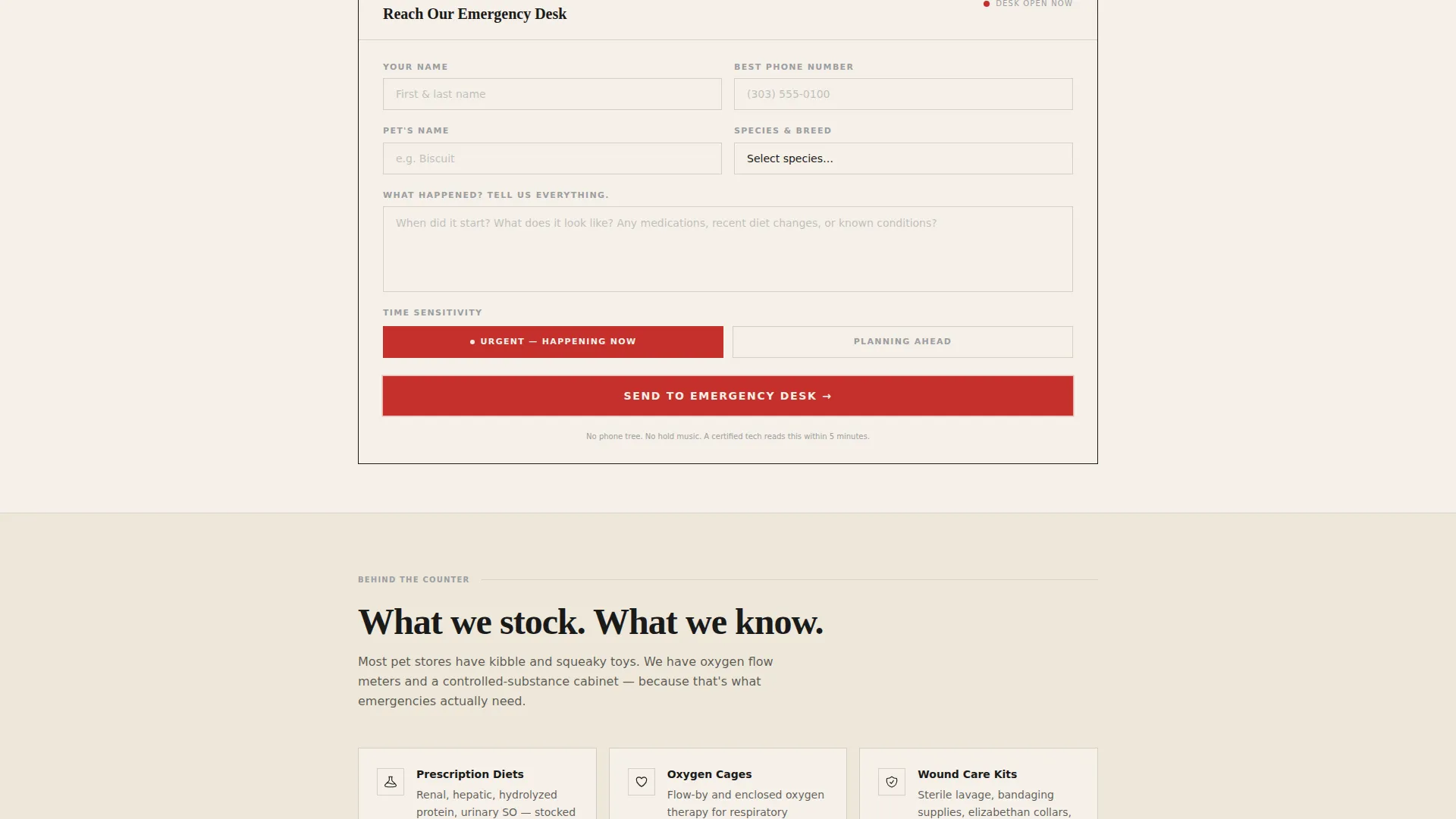
- A lead-capture form appearing twice on the page, built for urgent pet owner submissions
Feature list
This template includes a focused set of layout components, each designed to move a stressed visitor from uncertainty to confident contact.
Press Credibility Banner
A horizontal scrolling strip of newspaper mastheads and local news logos sits at the top of the page. One dominant pull-quote is set in large serif type against the cream background, attributed to a named publication with a visible dateline. The authority of real press coverage does the emotional heavy lifting before any product or service claim appears.
Staff Profile Card System
Each card introduces a real team member with name, certification, specialty species, years of emergency experience, and a clean black-and-white portrait. A short "worst night I handled" anecdote accompanies each card. The stakes build section by section, establishing competence through story before the lead form arrives.
Dual Lead Capture Form
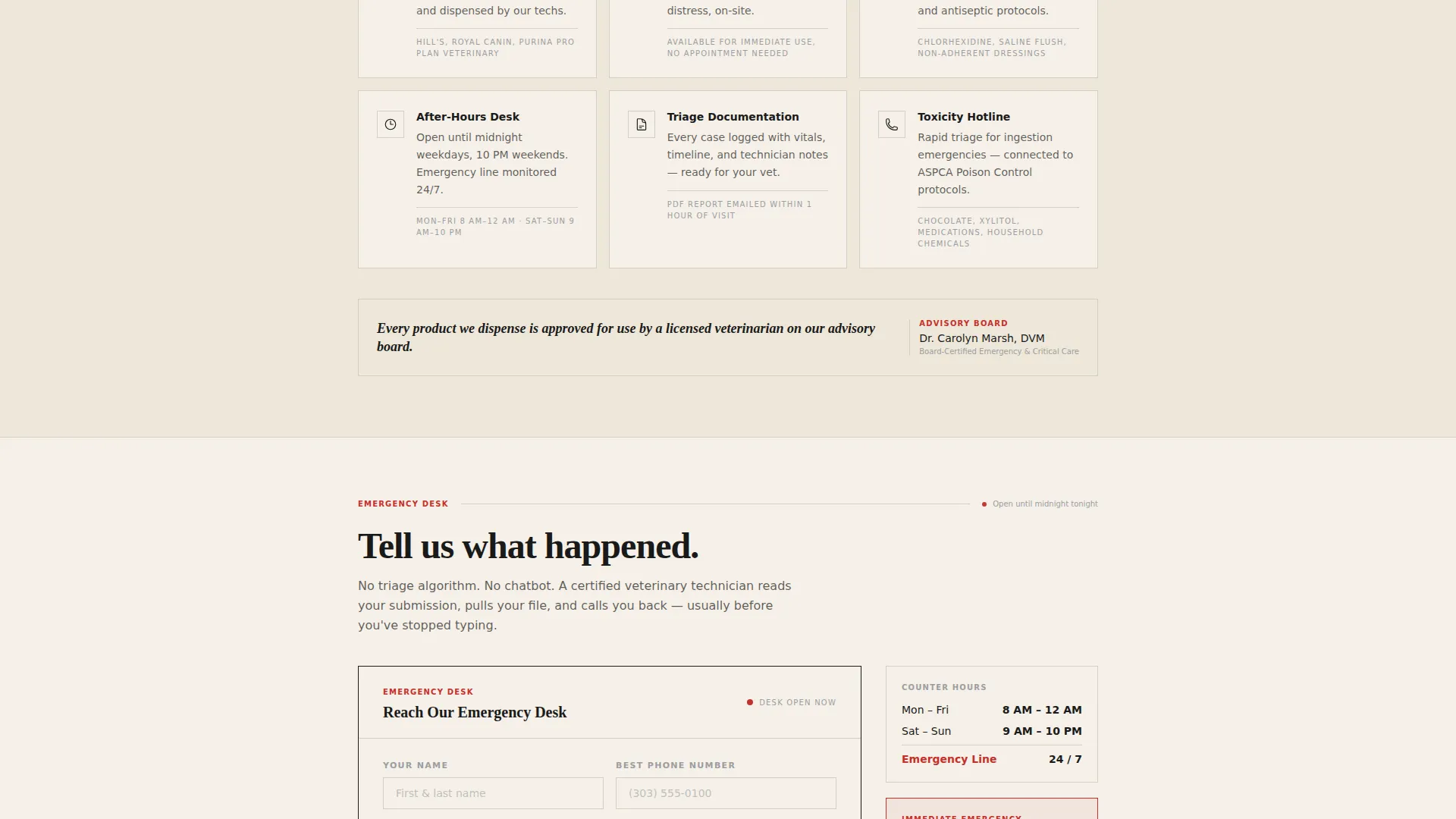
The lead form appears twice: once mid-page after the third staff card, and once anchored at the bottom. It collects pet name, species and breed via dropdown, a free-text symptom description, and a time-sensitivity toggle between "urgent now" and "planning ahead." The form sits on a cream card with a thin black border for visual clarity.
Emergency-Red call to action Treatment
The call to action reads "Reach Our Emergency Desk." The emergency-red accent color is reserved exclusively for this button and urgent callouts, so it reads like a visual siren against the otherwise quiet palette. Visitors cannot miss the action point.
Single-Column Scroll Flow
The entire layout follows a single-column flow with no sidebars or split distractions. The scroll mimics the experience of walking deeper into the store, meeting the team one by one. This structure keeps focus on the narrative and reduces cognitive load for users already under stress.
Page sections overview
| Section | Purpose |
|---|---|
| Press Mentions Banner | Opens with publication pull-quotes to establish authority immediately |
| Dominant Pull-Quote | Sets editorial tone with a headline quote from a named media source |
| Staff Profile Cards | Introduces each certified technician with credentials and a real story |
| Mid-Page Lead Form | Captures urgent inquiries after trust has been built by three staff cards |
| Emergency call to action Button | Directs attention to the "Reach Our Emergency Desk" action point |
| Bottom Lead Form | Re-presents the contact form for visitors who scroll the full page |
Design & branding system
The visual identity follows a Corporate Precision theme built on the Ink and Paper color system. Every color choice is deliberate and restrained, so the emergency-red accent registers immediately when it appears.
- Deep editorial black (#1A1A1A) for primary text, steel-gray (#9B9EA3) for rule lines and secondary elements
- Warm newsprint cream (#F5F0E8) as the page background, giving the layout a freshly printed broadsheet feel
- Emergency red (#C4302B) used exclusively on calls to action and urgent callouts, never decoratively
Mobile & speed optimization
The single-column layout adapts naturally to narrow screens without restructuring. Staff cards, the press banner, and the lead form maintain their hierarchy on any device width.
- Single-column flow eliminates the need for complex responsive grid adjustments
- Black-and-white photography keeps image assets visually consistent and lightweight
- The form's dropdown and toggle inputs are sized for comfortable mobile interaction
How this template helps you convert
Every structural decision in this template moves a stressed visitor toward one action: submitting the lead form.
- The press banner and staff stories build trust before any ask appears, so by the time the form surfaces mid-page, the visitor already feels they know the team.
- The form appears twice at high-intent scroll points, reducing the chance that a motivated visitor has to scroll back to find the contact path.
- The time-sensitivity toggle lets visitors self-segment between urgent and planned needs, making the form feel relevant rather than generic.
Other information about this template
This template is designed for the pet store marketing space, specifically for emergency and after-hours petcare services that compete on credibility rather than discounts. It is a strong fit for teams that have genuine press coverage and certified staff to feature.
- The template supports the "Expert Panel" creative direction, where human credentials carry the persuasion
- The header concept follows a Quote and Manifesto approach, leading with editorial authority rather than hero imagery
- The layout is aligned with a click-through and lead generation direction, guiding visitors to a single clear action
- Customization is straightforward: swap in real staff photos, paste in actual press quotes, and update form labels to match your intake process
- This template works equally well for exotic animal specialists, reptile keepers' resource centers, and feline or canine emergency-focused retailers
Theme
Executive Suite
Creative direction
Expert Panel
Color system
Ink & Paper
Style
Split Screen (50/50)
Direction
Click-Through
Page Sections
Press Credibility Banner
Certified Staff Profile Cards
Dual-placement Lead Capture Form
Emergency-red Call to Action System
Single-column Scroll Narrative
Related questions
Can I customize the staff cards with my own team's photos and credentials?
Does the lead form support both urgent and non-urgent inquiries?
Is this template suitable for exotic animal or reptile-focused services?
How many times does the lead form appear on the page?
Do I need existing press coverage to use this template?



