Specialist Emergency Dentist Appointment Booking Website Template
The Triage landing page template is built for emergency dental clinics that need to convert panicked patients into booked appointments fast. A floating "Get Seen Tonight" call-to-action bar, a side-by-side comparison table, and a frictionless three-field form work together to replace patient anxiety with a clear, immediate path to care.
by Rocket studio
Quick summary
Triage is a lead generation landing page template designed for emergency dental clinics. It opens with a raw patient testimonial, then walks visitors through a transparent comparison table, a four-step process timeline, and a minimal intake form. Every section is built to reduce panic and answer one question: what happens next?
Who this template is for
This template is purpose-built for dental practices that take calls outside of regular office hours. It speaks directly to patients who are in pain right now and need a plan, not a brochure.
- Emergency dental clinics offering same-night or after-hours appointments
- Dental practices targeting patients who would otherwise go to a hospital emergency room
- Clinics serving parents with children in pain, shift workers, and travelers with urgent dental needs
What problem this template solves
Most dental websites are built for scheduled appointments and business hours. They leave after-hours patients with no clear path forward, which sends them to costly emergency rooms or deep into painful waiting. This template replaces that dead end with a direct, reassuring flow.
- Patients in acute pain cannot navigate cluttered websites or long intake forms at 2 a.m.
- No standard dental page shows a transparent cost and wait-time comparison against ER visits
- Visitors need to know exactly what happens after they submit a form before they will trust a new clinic
What you get with this template
You get a fully structured, single-page lead generation layout designed for high-stress, time-sensitive visitors. Every section serves a specific role in moving someone from panic to a confirmed next step.
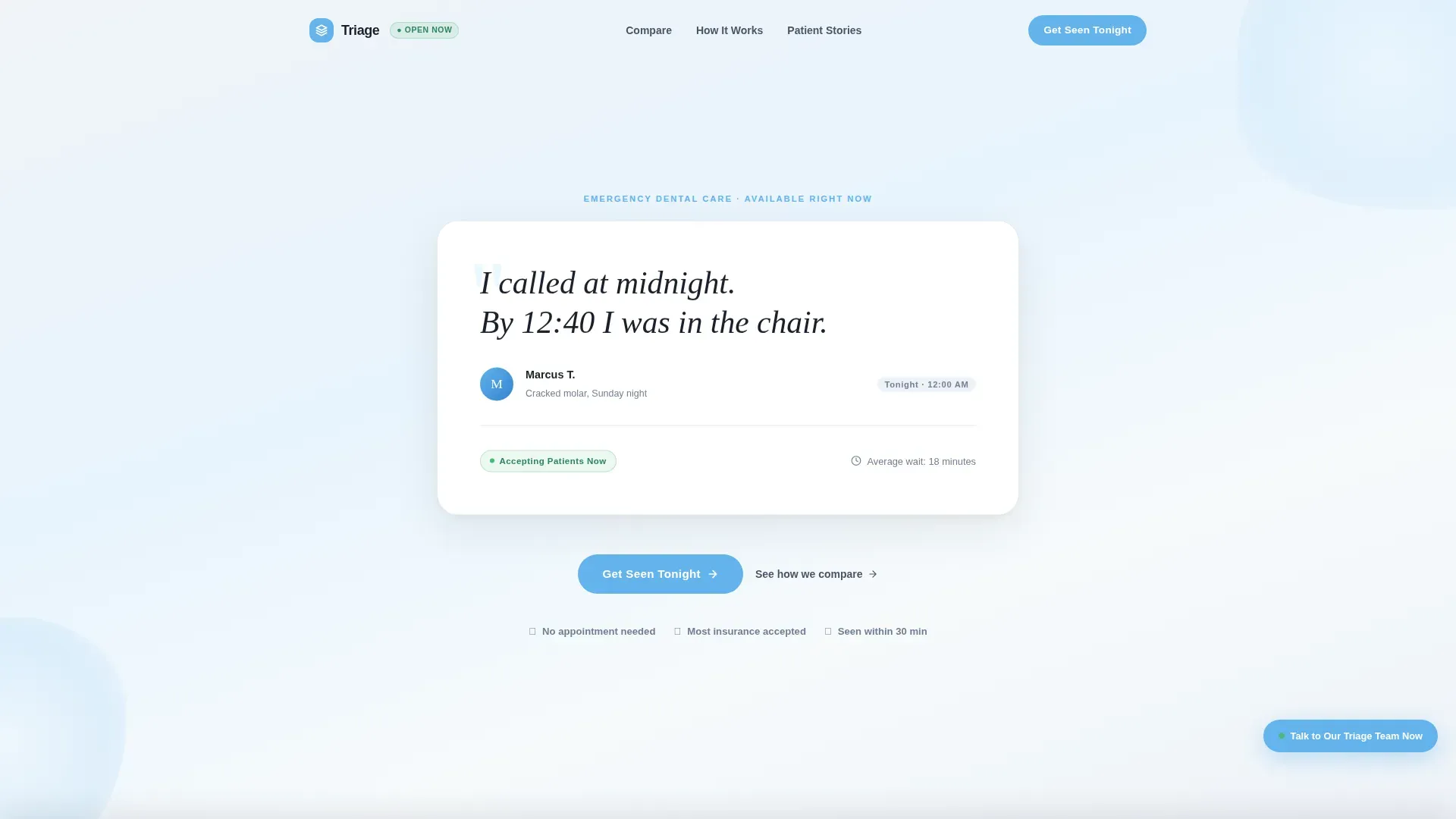
- An oversized testimonial card hero section with serif quote, patient avatar, first name, and chat-log style timestamp
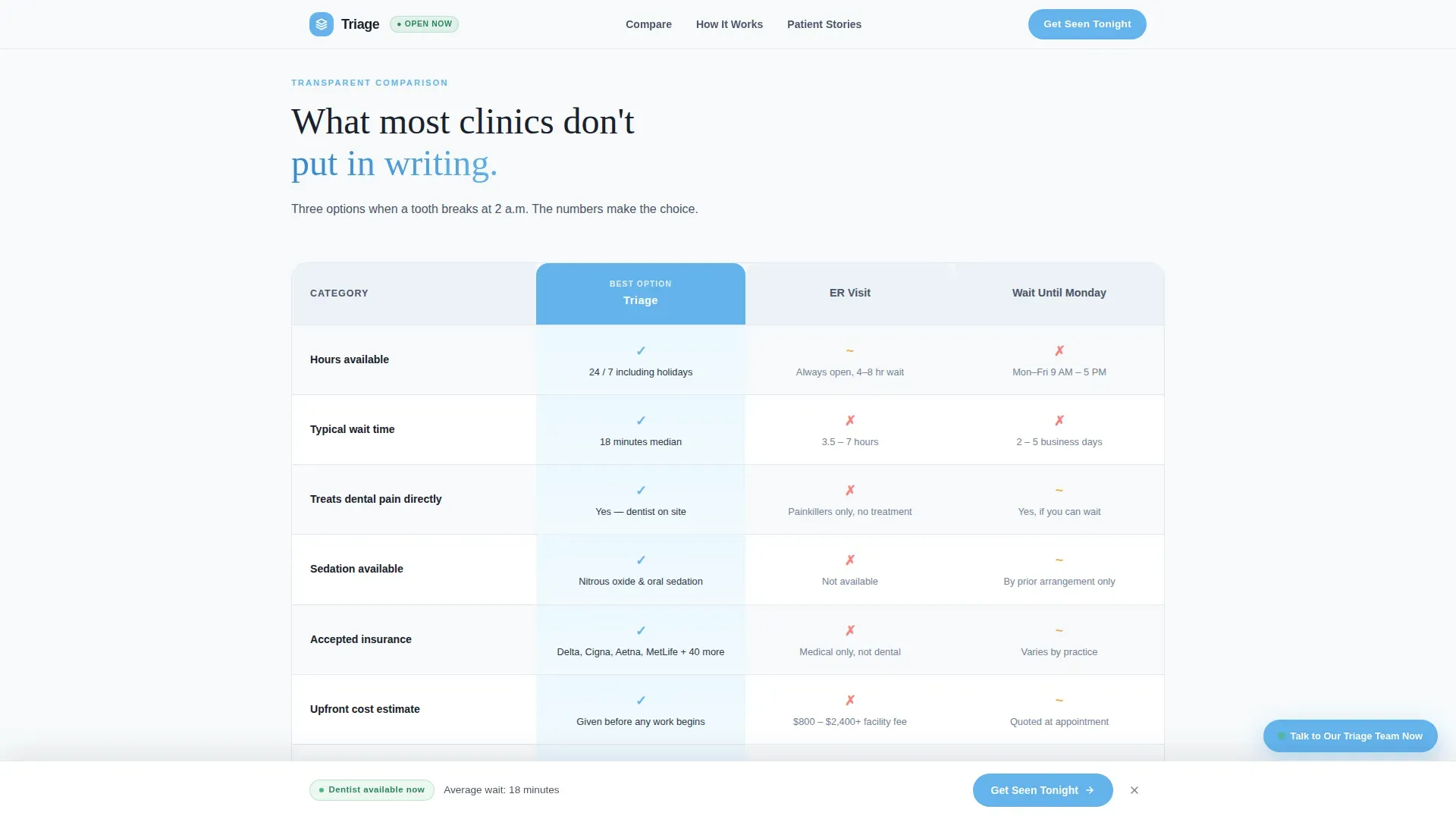
- A structured comparison table contrasting this clinic against a typical emergency room visit and a Monday morning dentist appointment
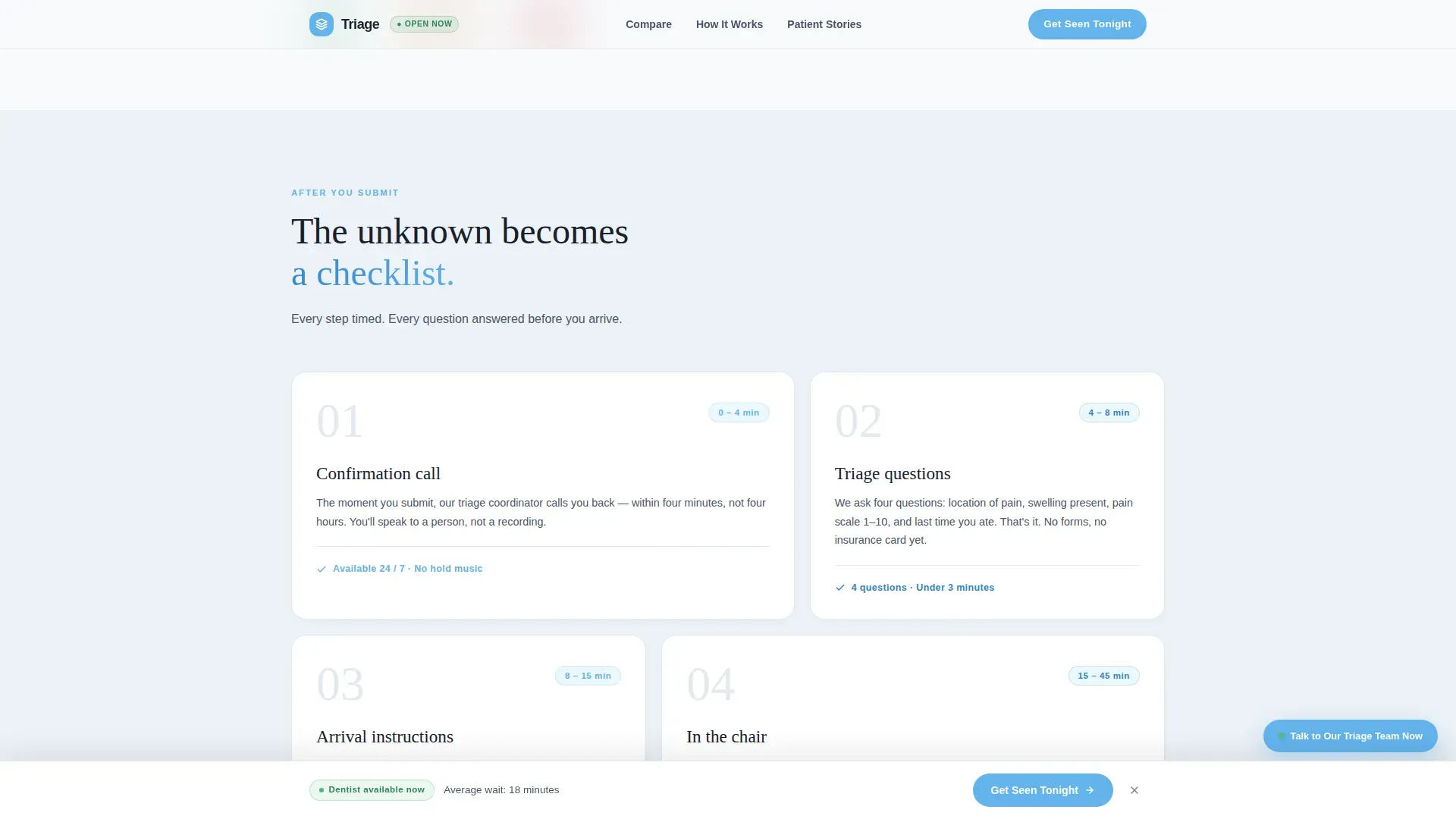
- A four-step post-submission process timeline, a minimal three-field lead form, and a floating "Get Seen Tonight" call-to-action bar
Feature list
This template is built around specific components described below.
Floating Call-to-Action Bar
After the first scroll, a fixed bar reading "Get Seen Tonight" in open-sky blue stays visible on screen. It removes the need to scroll back to the form and keeps the next action always within reach for a visitor in pain.
Transparent Comparison Table
A side-by-side table compares this clinic, a typical hospital emergency room, and waiting until Monday. The rows cover wait times, after-hours availability, accepted insurance, sedation options, and upfront cost ranges. The layout makes the decision clear without a single persuasive adjective.
Three-Field Intake Form
The lead form asks only three things: nature of the emergency via a dropdown, preferred contact method (call or text), and a phone number. No email address, no last name, no insurance upload. Friction is stripped to the minimum a person in pain can manage.
Testimonial Card Hero Section
The header is a single oversized floating card showing one patient's exact words in large DM Serif Display type. Below the quote sits a small avatar, a first name, and a timestamp styled like a chat log entry. No stock photography is used anywhere on the page.
Four-Step Process Timeline
A bento-style asymmetric timeline shows exactly what happens after form submission: a confirmation call within four minutes, triage questions, arrival instructions, and an estimated chair time. Each step removes one layer of the unknown.
Live-Chat Triage Widget
A secondary conversion path offers a live-chat widget labeled "Talk to Our Triage Team Now." This gives hesitant visitors a way to ask questions before committing to the form, reducing drop-off from visitors who need reassurance first.
Page sections overview
| Section | Purpose |
|---|---|
| Testimonial Card Hero | Anchor trust with a specific patient quote and timestamp |
| Comparison Table | Show wait times, cost, and availability side by side |
| Process Timeline | Explain the four steps after form submission |
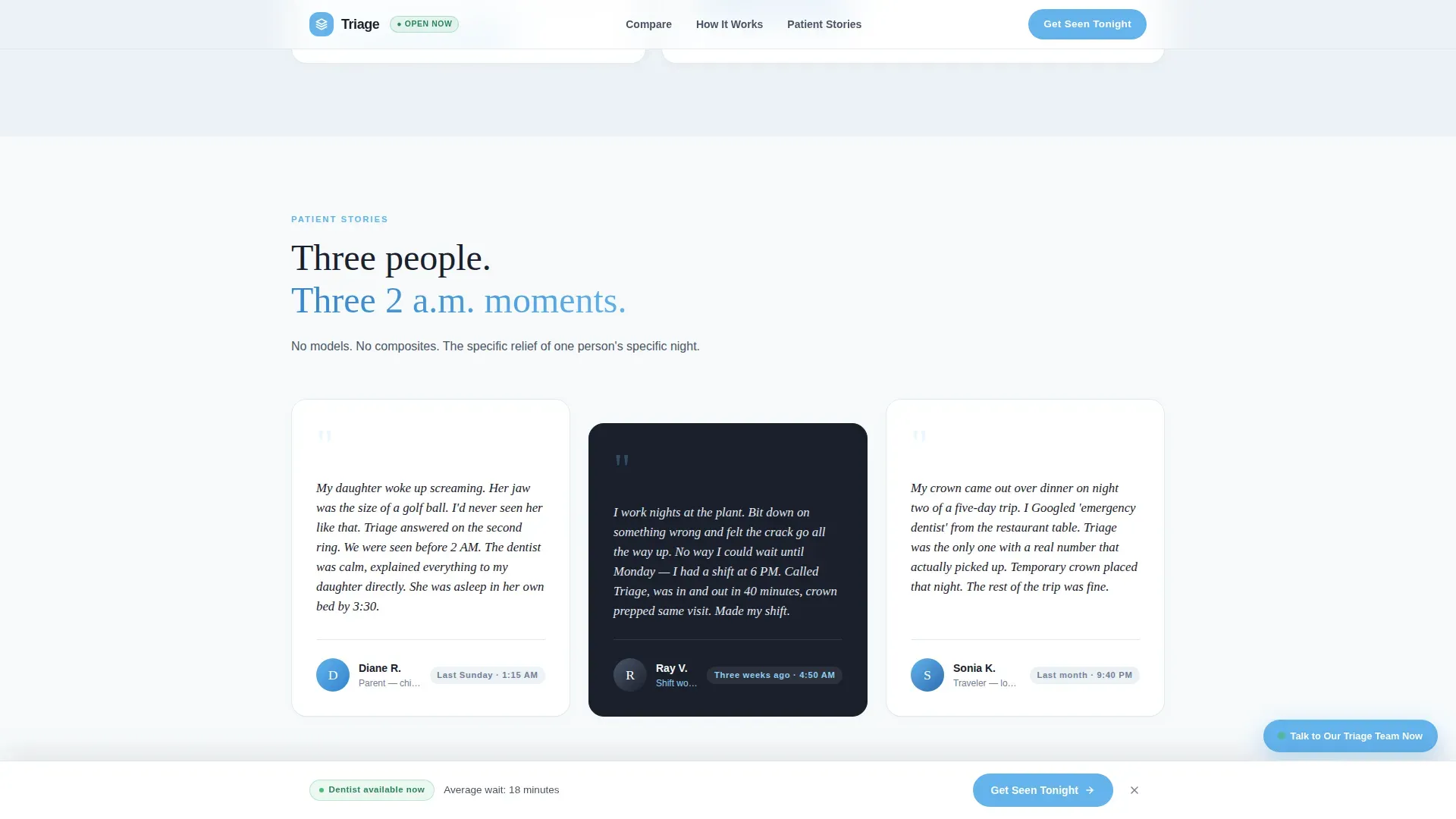
| Patient Stories | Reinforce trust with three more raw, specific testimonials |
| Lead Gen Form | Capture name, emergency type, and contact preference |
| Floating call to action Bar | Keep the primary call to action visible on every scroll |
| Footer Row | Provide clinic contact and legal line in a single row |
Design & branding system
The visual theme is called Healing Space and uses a Slate & Sky color system. The palette is designed to feel calm and clinical without being cold or cheerful, like the first clear breath of air after leaving a hospital.
- Deep charcoal (#1A202C) for all headings, clinical slate (#4A5568) for body text and dividers, open-sky blue (#63B3ED) for calls to action and trust indicators, and sterile white (#F7FAFC) for card backgrounds and spacing
- Typography pairs DM Serif Display for quotes and headlines with Manrope for body text and interface elements
- No stock photography of smiling models; social proof relies on the specificity of real patient words, names, and timestamps
Mobile & speed optimization
This template is built mobile-first because most emergency dental patients are reaching for their phone in the middle of the night, not sitting at a desktop.
- CSS smooth scroll and minimal JavaScript keep interactions light and responsive on small screens
- GSAP ScrollTrigger drives reveals and staggered table row animations without blocking the main thread
- The floating call-to-action bar and three-field form are both sized and spaced for one-handed thumb use on a phone screen
How this template helps you convert
The entire page is structured as a single, linear decision funnel. Each section answers one objection before the next one appears.
- The testimonial card hero replaces initial skepticism with a specific, timestamped account of care, establishing credibility in the first five seconds of a visit.
- The comparison table removes cost and timing uncertainty by presenting factual rows across three options, letting the data do the persuading without marketing language.
- The three-field form with a floating call-to-action bar ensures the commitment step is always visible, simple, and fast enough to complete while holding an ice pack.
Other information about this template
This template was designed specifically for the emergency dentist patient portal use case, where standard clinic website templates consistently fall short. It addresses the unique behavior of patients who arrive via urgent search queries late at night from a mobile device.
- The page layout follows a Transparent Process creative direction, meaning every section is designed to reveal rather than obscure information about cost, timing, and next steps
- The Comparison Table template style is the structural core of the page; it earns trust by showing rather than telling
- Animation is set to medium intensity using GSAP ScrollTrigger, with staggered table row reveals and a scroll-triggered floating bar
- The footer uses a Pattern 1 linear single-row layout to keep the page exit clean and uncluttered
- Localization is set to United States English, with USD pricing references and 12-hour time format throughout
Theme
Healing Space
Creative direction
Transparent Process
Color system
Slate & Sky
Style
Comparison Table
Direction
Lead Generation
Page Sections
Floating Get Seen Tonight Call to Action Bar
Side-by-side Comparison Table
Minimal Three-field Intake Form
Timestamped Testimonial Card Hero
Four-step Process Timeline
Live-chat Triage Widget Placement
Related questions
Can I edit the comparison table rows to match my clinic's real prices and hours?
Does the intake form collect more than three fields?
Is the live-chat widget connected to a live chat service out of the box?
Can this template work as a dedicated after-hours page alongside an existing clinic website?
Can I replace the testimonials with my own patient quotes?



