Emergency Physician Booking Website Template
Triage is a single-column landing page for an emergency physician's direct-to-patient practice. It guides anxious patients from first visit to booked appointment using a calm FAQ-driven flow, a portrait-centered hero, and a three-step scheduling form. The design uses soft linen whites, muted eucalyptus greens, and warm terracotta call-to-action buttons to create a reassuring, clinical-yet-human experience on any device.
by Rocket studio
Quick summary
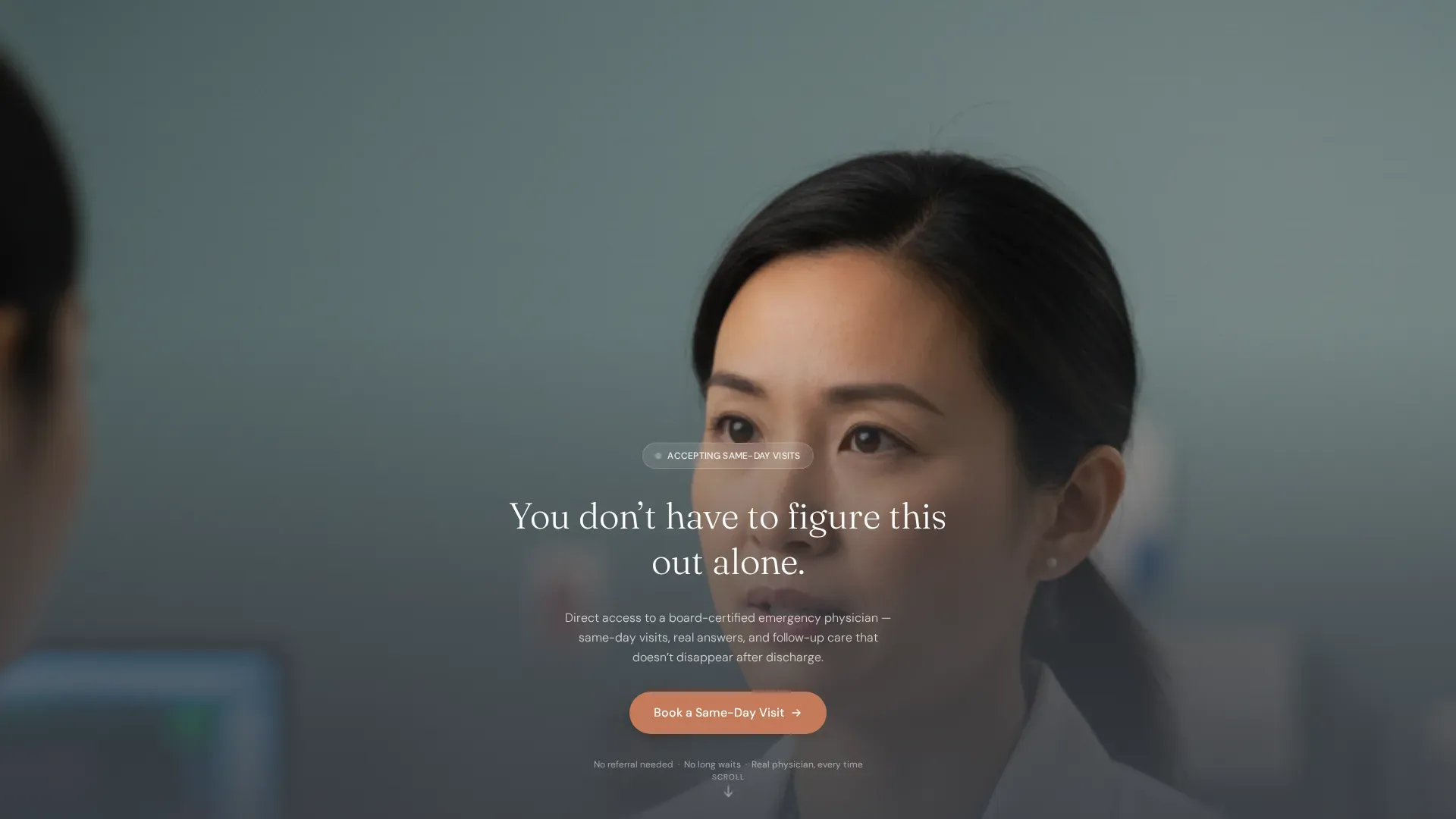
Triage is a single-column patient-facing landing page built for an emergency physician's private practice. It leads with a portrait-centered hero and a headline that says "You don't have to figure this out alone." From there, a FAQ-driven scroll flow deflates patient anxiety one honest question at a time, ending at a simple three-step booking form.
Who this template is for
This template is designed for emergency physicians running a direct-to-patient practice who want a calm, conversion-focused digital front door. It speaks directly to patients who arrive online mid-worry, not mid-browse.
- Emergency physicians offering same-day visits and follow-up care outside a traditional hospital setting
- Practices serving parents with sick children, post-discharge patients, and adults who delayed seeking care
- Physicians who want to lead with trust and human warmth before asking for a booking
What problem this template solves
Most medical websites feel institutional and cold. Anxious patients scanning at 2 a.m. on a phone need immediate reassurance, not a navigation menu. This template removes that friction entirely.
- Patients land on a page that answers their specific fears before they have to ask
- The booking path is short and sequential, reducing drop-off for users who are stressed or distracted
- A secondary "Message the Care Team" path captures patients who are not yet ready to commit to an appointment
What you get with this template
The template delivers a fully structured single-column landing page with every section ready to customize. It covers the full patient journey from first glance to confirmed booking.
- A portrait-centered hero section with headline, physician photo, and a primary call-to-action button
- Three FAQ scroll sections, each pairing a patient anxiety question with a plain-language answer and a scroll-triggered fade-in animation
- A three-step sequential booking form and a soft secondary lead-capture text field
Feature list
This template is built around one goal: turning a worried patient into a booked visit with as little friction as possible. Every design and interaction decision supports that goal directly.
Portrait-Centered Hero Section
The hero opens with a shoulders-up physician portrait shot at shallow depth of field, keeping the eyes sharp while the background dissolves. Below it sits a single 48-pixel charcoal headline and the primary "Book a Same-Day Visit" call-to-action button in terracotta. No navigation bar is visible until the user begins to scroll.
FAQ-Driven Scroll Flow
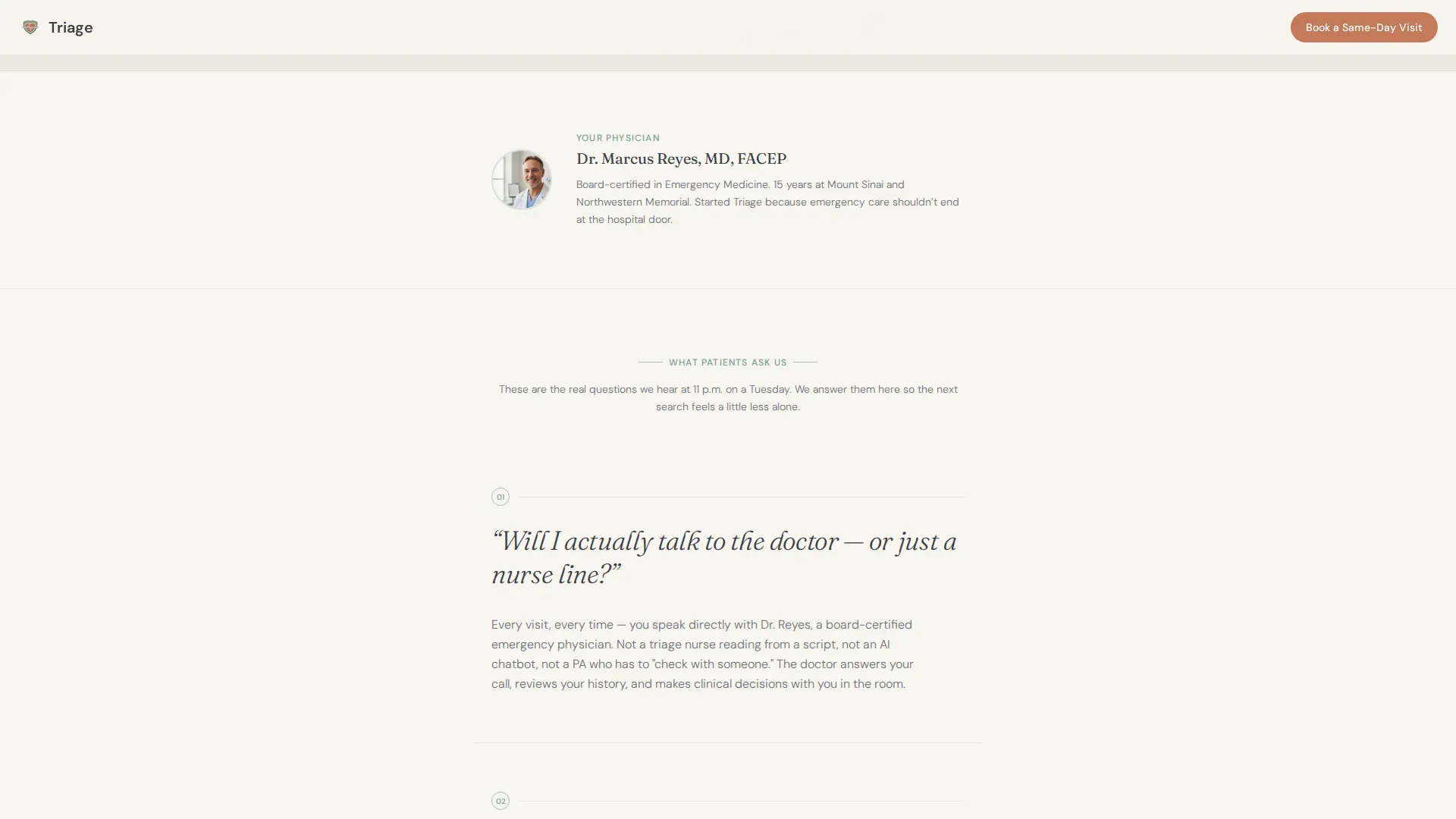
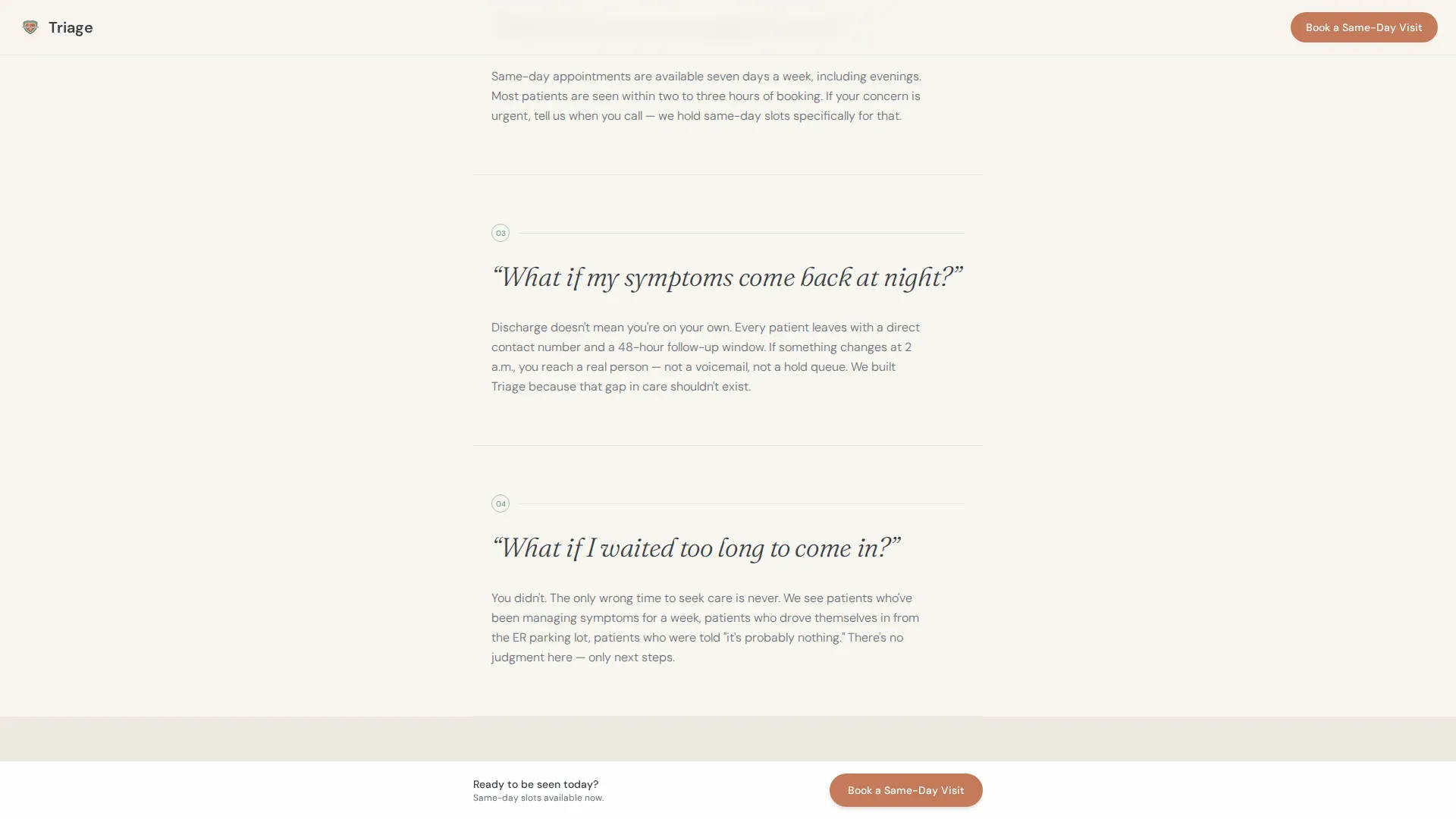
Three dedicated scroll sections each surface a real patient anxiety as a large serif question. Each question is answered in two to three plain-language sentences directly below. As the question enters the viewport, the answer fades in via a scroll-triggered animation, creating a conversation rhythm that builds trust gradually rather than all at once.
Sequential Three-Step Booking Form
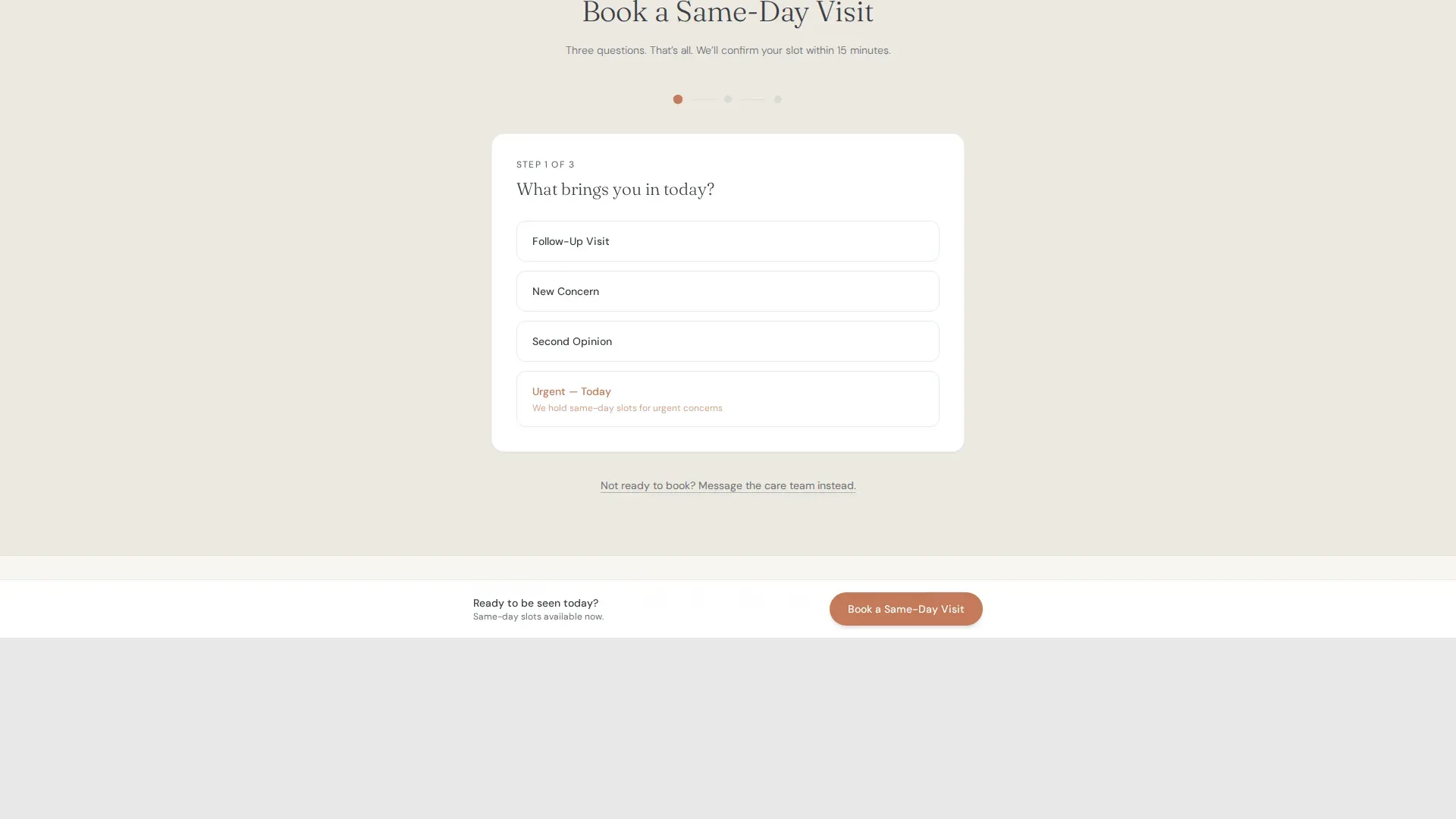
The booking form asks three questions in order: reason for visit from a dropdown, preferred time window, and phone number for confirmation. The sequential layout reduces visual overwhelm for users who are anxious or searching on a small screen. This section also includes a sticky bottom booking bar that appears after the third FAQ for persistent access to scheduling.
Secondary Lead-Capture Path
A "Message the Care Team" option sits alongside the booking form. It opens a simple text field for patients who need reassurance before committing to an appointment. This secondary path keeps soft leads on the page rather than letting them leave without any connection.
Healing Space Visual Theme
The Soft Mist color system pairs clinical linen white with muted eucalyptus green accents and deep charcoal body text. Terracotta is reserved exclusively for call-to-action buttons and urgent-care callouts, making every action point visually unmistakable without feeling alarming.
Mobile-First Single-Column Layout
The entire page flows as a single column, making it fast to scan on a phone at any hour. The layout prioritizes vertical rhythm and touch-friendly tap targets throughout, from the hero portrait to the booking form fields.
Page sections overview
| Section | Purpose |
|---|---|
| Hero Portrait | Establish physician trust and present the primary booking call to action |
| FAQ Trust Block | Address credibility concern: will the patient actually speak to the doctor |
| FAQ Access Block | Answer urgency concern: how quickly can the patient be seen |
| FAQ Continuity Block | Resolve after-hours fear: what happens if symptoms return at night |
| Booking Form | Capture appointment intent through a three-step sequential form |
| Message Care Team | Provide a soft secondary path for patients not ready to book |
| Footer | Deliver practice credentials and linear single-row contact details |
Design & branding system
The Healing Space theme uses a Soft Mist color palette that feels like a recovery room at golden hour. Every color choice has a defined role, and none are used interchangeably.
- Linen white (#F7F5F0) for all backgrounds, eucalyptus green (#A8BDB5) for section dividers and trust badge accents, and deep charcoal (#3B3F45) for all body text
- Terracotta (#C47A5A) used exclusively for call-to-action buttons and urgent-care callouts, never decoratively
- Fraunces serif for headlines and FAQ questions, DM Sans for all body copy, creating a clear typographic hierarchy between emotional prompts and practical information
Mobile & speed optimization
This template is built mobile-first because the target patient is most likely searching on a phone during a stressful moment, not at a desktop in the morning. The layout and interactions reflect that reality.
- Single-column flow eliminates horizontal scrolling and keeps the reading path linear on small screens
- Scroll-triggered FAQ animations use IntersectionObserver with minimal JavaScript, keeping interactive behavior lightweight
- A sticky booking bar appears after the third FAQ section, giving mobile users persistent one-tap access to scheduling without scrolling back to the top
How this template helps you convert
The page is designed to move anxious visitors toward a booked appointment through accumulated trust rather than a single high-pressure pitch. Every structural decision is intentional.
- The FAQ scroll rhythm deflates specific patient fears one by one, so by the time the booking form appears, resistance is lower and confidence is higher
- The terracotta "Book a Same-Day Visit" button appears first beneath the hero and again as a persistent sticky bar, giving ready patients an immediate path and hesitant patients a second chance
- The "Message the Care Team" secondary path captures leads who are not ready to book, turning a potential exit into a soft connection with the practice
Other information about this template
This template is part of a Health and Medical category set focused on emergency physician patient portals. It is built with a clear niche in mind and does not try to serve every medical use case.
- The template style is Single Column Flow, which suits both the emotional tone of the content and the mobile-first device priority of the target audience
- Physician credentials and trust badges are surfaced inline using eucalyptus-accented dividers, giving the page social proof without requiring a dedicated testimonial section
- The footer follows a linear single-row pattern, keeping the page close quickly without adding visual weight at the end
Theme
Healing Space
Creative direction
FAQ-Driven
Color system
Soft Mist
Style
Single Column Flow
Direction
Booking/Scheduling
Page Sections
Portrait-centered Hero with Primary Call to Action
Faq-driven Scroll Flow with Fade-in Animation
Sequential Three-step Booking Form
Sticky Bottom Booking Bar
Secondary Message Path for Soft Leads
Healing Space Color and Typography System
Related questions
What type of medical practice is this template designed for?
Can I customize the FAQ questions to match my own practice?
Does the booking form connect to a live scheduling system?
Is the sticky booking bar included in the template?
What makes this different from a general medical website template?



