Emergency Physician Cost Calculator Website Template
Triage is a landing page template built for emergency physicians who want to welcome new patients before they walk through the door. It combines an interactive "What to Expect" estimator, a scroll-driven step-by-step visit guide, and a clear comparison table covering the emergency department versus urgent care versus telehealth, all designed to reduce anxiety and build trust at 2 AM on a phone screen.
by Rocket studio
Quick summary
Triage is a single-page patient welcome template for emergency physicians. It opens with an interactive situation estimator, walks visitors through each stage of an emergency department visit, and ends with a downloadable visit guide. The design prioritizes calm, clarity, and mobile readability, built for patients who are scared, searching fast, and need honest answers right now.
Who this template is for
This template is designed for emergency physicians and emergency department teams who want to reduce patient anxiety before the visit even begins. It serves practices that believe informed patients are calmer patients, and that transparency about cost and process builds lasting trust.
- Emergency physicians launching or refreshing their practice's patient-facing web presence
- Emergency department administrators who want to reduce front-desk confusion and repeat phone calls
- Caregivers and family members researching options on behalf of a patient in the middle of the night
What problem this template solves
Most people dread the emergency department. They arrive stressed, uninformed, and unsure whether they're even in the right place. No clear information about wait times, costs, or what happens next makes that fear worse. This template addresses each of those pain points directly.
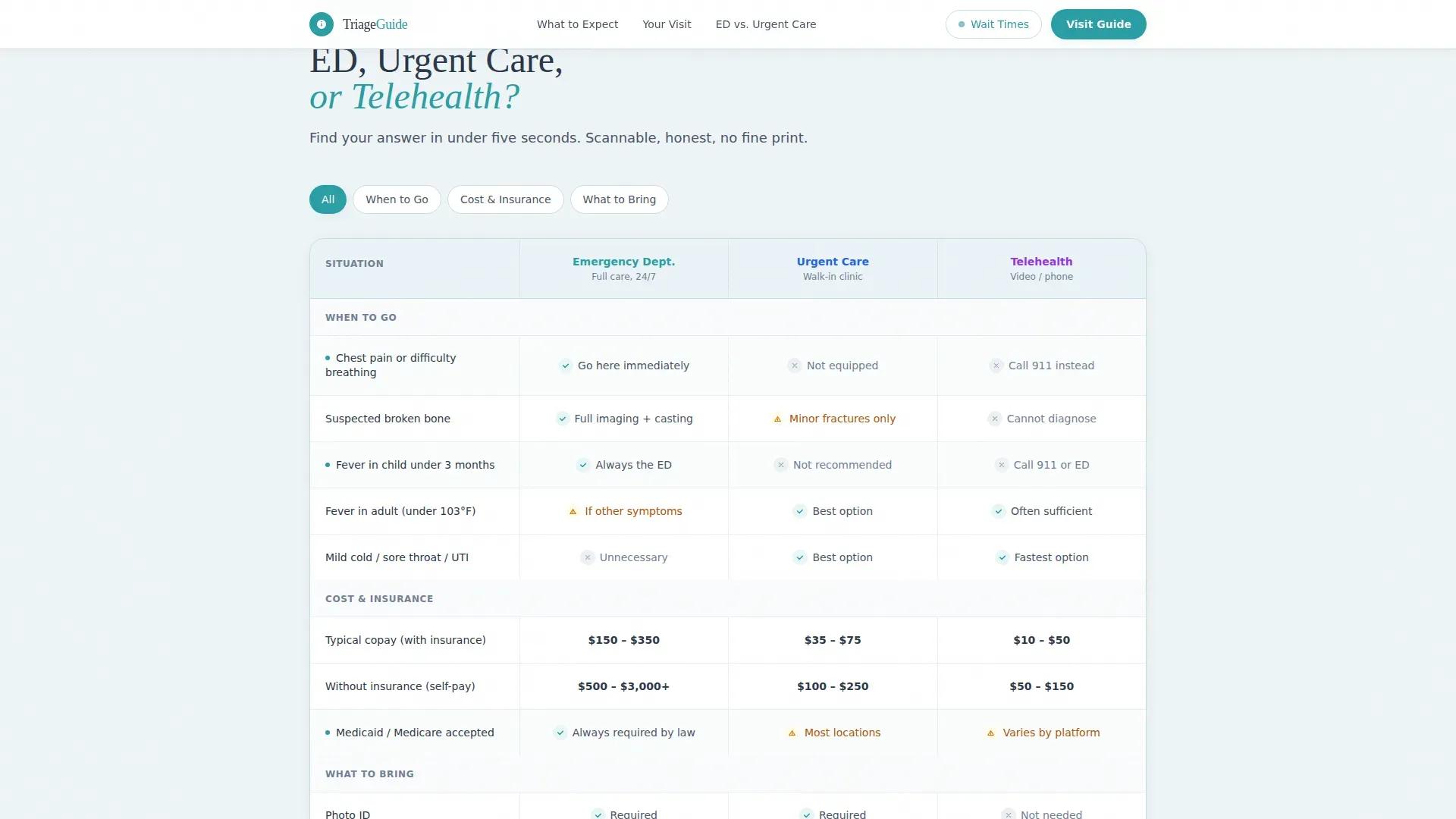
- Patients don't know whether to go to the emergency department, urgent care, or telehealth, the comparison table answers that in seconds
- First-time patients have no idea what an emergency department copay looks like or what to bring, the downloadable visit guide covers both
- Anxious visitors scanning a phone at midnight need fast, scannable answers, the layout and estimator deliver exactly that
What you get with this template
This template ships as a fully structured landing page with four primary sections and a footer. Every section is purpose-built to move a visitor from panic to preparation.
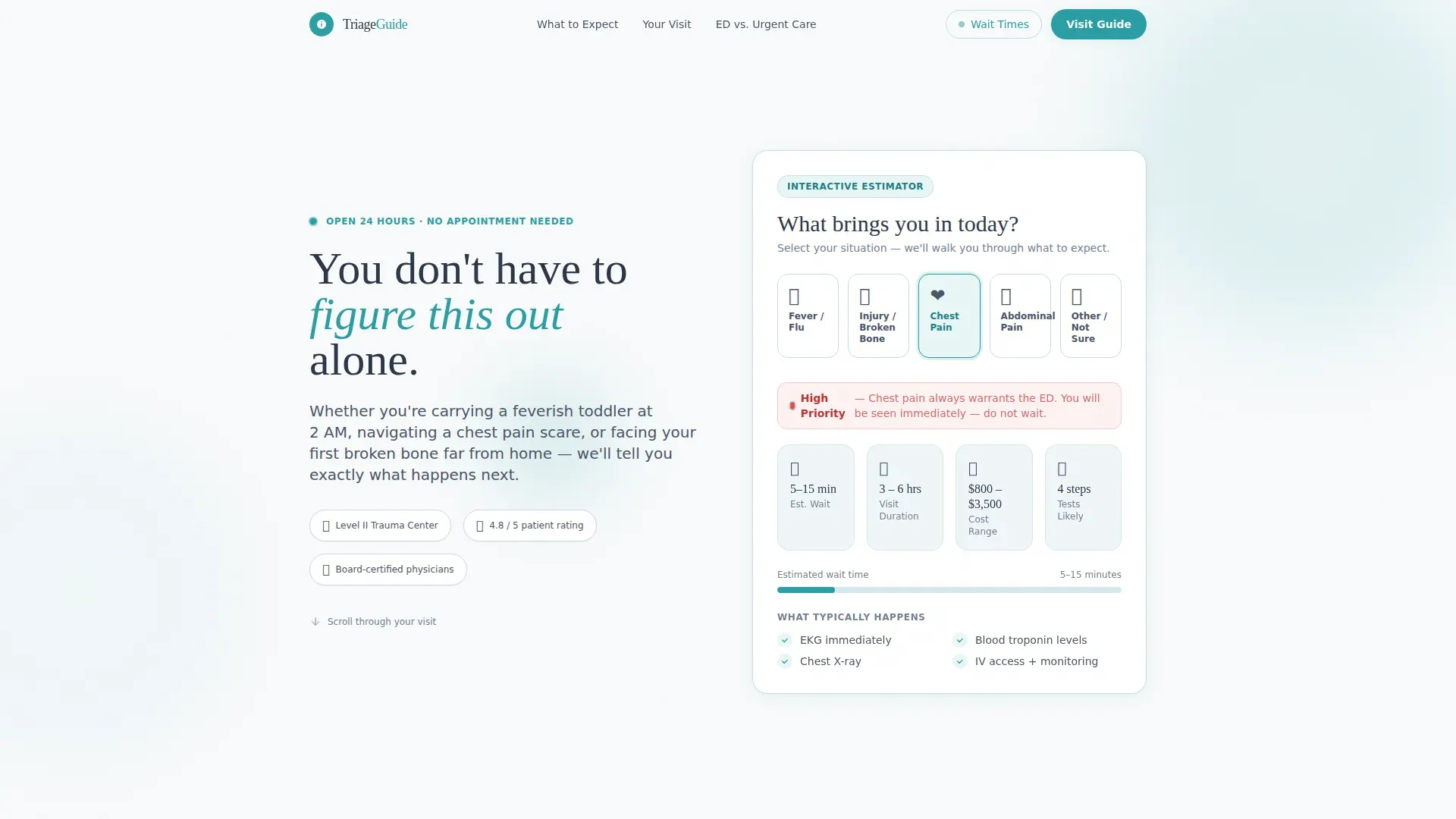
- An interactive "What to Expect" estimator in the header that generates a personalized visit timeline based on the patient's situation
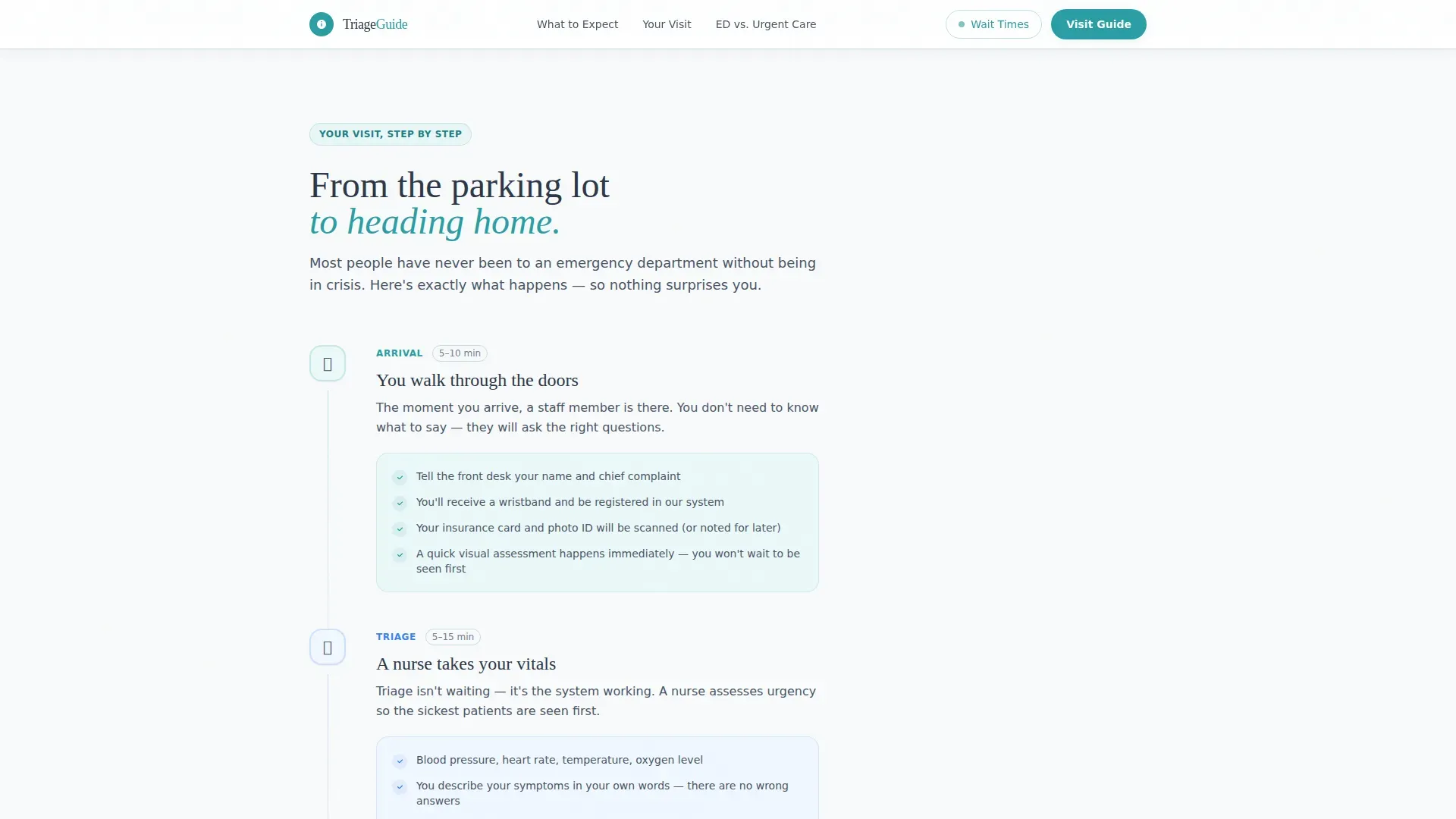
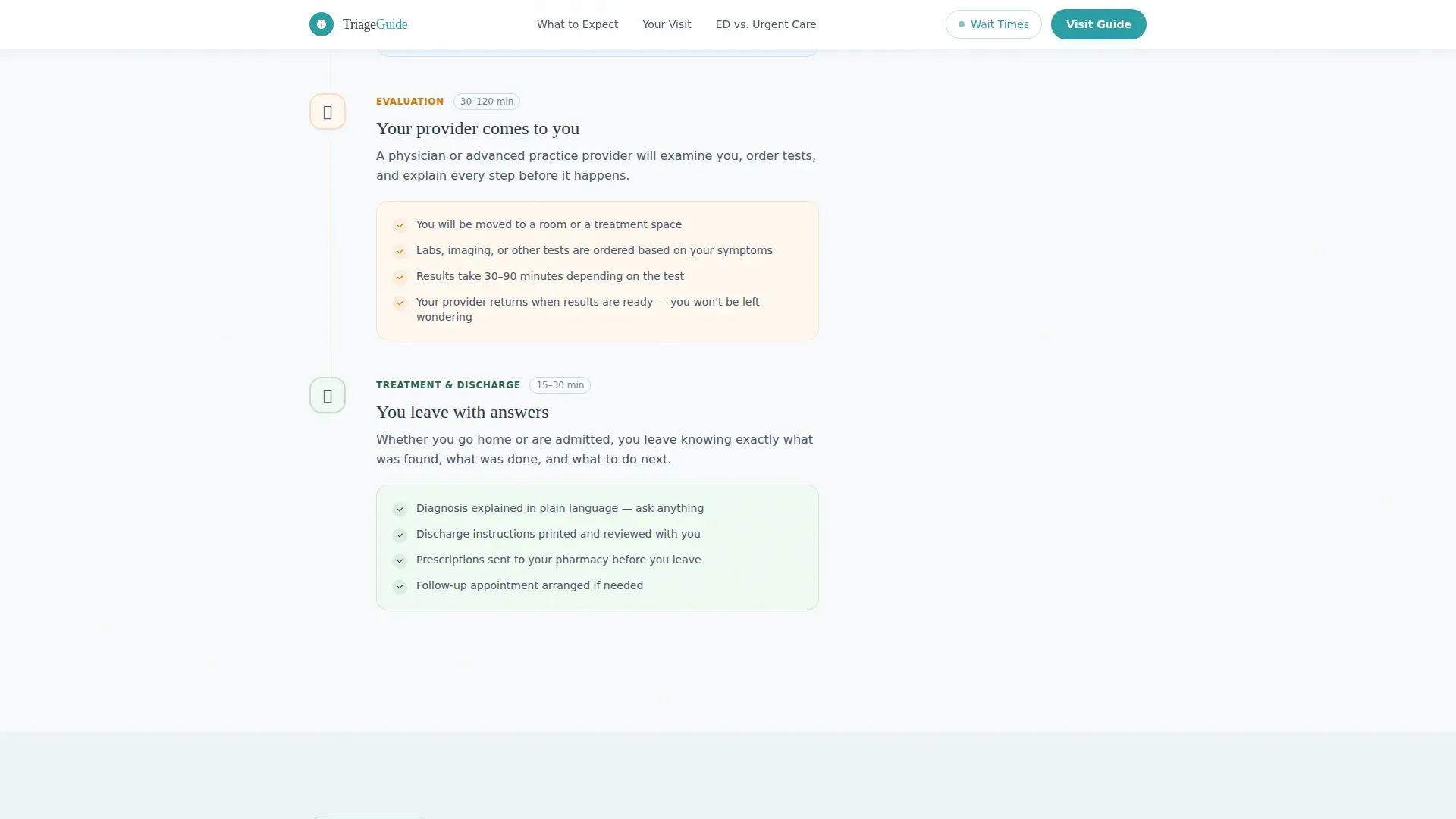
- A scroll-driven step-by-step guide covering arrival, triage assessment, treatment, and discharge with aftercare instructions
- A comparison table grid and a downloadable visit guide call to action with a simple name-and-email capture form
Feature list
This template is built around four high-impact components. Each one earns patient trust before any form is filled out.
Interactive Situation Estimator
The header section includes a touch-friendly situation selector. Visitors choose their scenario, fever or flu, injury, chest pain, abdominal pain, or other, and receive a personalized timeline showing estimated wait time, likely tests, average visit duration, and a cost-transparency range. The interface uses soft animations designed to feel calm rather than busy.
Scroll-Driven Step-by-Step Guide
The page unfolds like a patient moving through the department. Each step, arrival and check-in, triage assessment, treatment, and discharge, reveals as the visitor scrolls. Scroll-triggered animations pace the experience deliberately, letting the information land before the next section appears.
ED versus Urgent Care versus Telehealth Comparison Table
The core of the template is a scannable comparison grid. It covers when to use the emergency department versus urgent care versus telehealth, what insurance typically covers versus out-of-pocket costs, and what to bring. The table is designed so a panicking parent at midnight can find their answer in under five seconds.
Downloadable Visit Guide Call to Action
The primary call to action invites visitors to download a printable PDF checklist. The form captures a first name and email address only. A secondary call to action links to a live or estimated wait time tracker, giving visitors a second reason to engage before they arrive.
Physician Credentials and Social Proof Block
The template includes a dedicated area for physician credentials, patient volume statistics, and accreditation badges. This section gives first-time patients a concrete reason to trust the practice before they ever set foot inside.
Page sections overview
| Section | Purpose |
|---|---|
| Estimator Hero | Situation selector with personalized visit timeline |
| Arrival and Check-In | Step one of the scroll-driven patient journey |
| Triage Assessment | Step two explaining the clinical intake process |
| Treatment Step | Step three covering what happens during care |
| Discharge Instructions | Step four with aftercare guidance and next steps |
| Comparison Table | ED versus. urgent care versus. telehealth decision grid |
| Visit Guide Download | Name and email capture for printable PDF checklist |
| Wait Time Link | Secondary call to action for current wait estimates |
| Credentials Block | Physician credentials, volume stats, accreditation |
| Footer | Linear single-row footer with key links |
Design & branding system
The visual identity follows a Healing Space theme. The palette communicates clinical competence without feeling cold or institutional. Every color choice and typographic decision reinforces calm and clarity.
- Arctic White (#F8FAFB) as the dominant background, Glacier Blue (#D6E8EE) for card backgrounds and section dividers, Slate (#4A5568) for body text, and Teal (#2B9EA4) for interactive elements and key callouts
- Fraunces serif for headings to add warmth, and DM Sans for body text to maintain clean readability across all screen sizes
- No stock photos of smiling doctors, the design relies entirely on the interactive tools, structured content, and breathing pulse animations to create a reassuring atmosphere
Mobile & speed optimization
This template is built mobile-first. The estimator interface uses large touch targets designed for shaking hands on a phone screen at 2 AM. Static content loads immediately, and interactive components are structured to initialize without blocking the page.
- Large-touch estimator controls, high-contrast body text, and readable type sizing at every breakpoint
- Scroll-triggered step reveals and estimator transitions use lightweight animations that load progressively rather than all at once
- The comparison table layout adapts cleanly to narrow screens so critical decision information stays scannable on mobile
How this template helps you convert
The page earns the click by giving real value before asking for anything. By the time a visitor reaches the call to action, the template has already reduced their anxiety, answered their key questions, and positioned the physician as a trustworthy guide.
- The estimator delivers immediate, personalized value in the first few seconds, giving visitors a reason to stay and scroll rather than leave for a competitor's page
- The comparison table resolves the single biggest decision barrier, "should I even come to the emergency department?", which means the visitors who do convert are higher-intent and better prepared
- The downloadable visit guide converts passive readers into contactable leads by offering a practical, keep-it-in-your-pocket resource that reinforces trust long after the visit ends
Other information about this template
This template is categorized under Health and Medical, specifically the Emergency Physician Website subcategory, with a niche focus on the emergency physician new patient welcome page. It is localized for English-speaking audiences in the United States, using USD for cost references and MM/DD/YYYY date formatting.
- The template style is a Comparison Table layout, with the Creative Direction structured as a Step-by-Step Guide and the Header Concept built around a Calculator and Estimator component
- The landing page direction is Content and Resource delivery, making it well-suited for practices that want to lead with educational value before capturing patient contact details
- The Intersection Match Score for this template is 13, reflecting a strong alignment between the Health and Medical category, the Emergency Physician Website subcategory, and the emergency physician new patient welcome page niche
Theme
Healing Space
Creative direction
Step-by-Step Guide
Color system
Arctic White
Style
Comparison Table
Direction
Content/Resource
Page Sections
Interactive What to Expect Estimator
Scroll-driven Step-by-step Visit Guide
ED Versus. Urgent Care Versus. Telehealth Table
Downloadable Visit Guide with Lead Capture
Physician Credentials and Social Proof
Related questions
Who is this landing page template designed for?
What does the interactive estimator do?
Does this template include the comparison table by default?
Can I use this template to capture patient contact details?
What sections are included in the step-by-step guide?



