Pediatrician Condition & Treatment Library Landing Page
Triage is a pediatrician condition and treatment library landing page built for worried parents who need clear answers fast. It pairs jargon-free condition explanations with side-by-side treatment comparison tables, an interactive decision tree, and a contextual booking form. The design is warm and clinical, built mobile-first for midnight symptom searches.
by Rocket studio
Quick summary
Triage is a single-page pediatric condition library designed to turn parental anxiety into calm, informed action. It presents childhood conditions alongside the treatment pathways a board-certified pediatrician actually uses, laid out in plain language. A live search bar, side-by-side comparison tables, and an accordion decision tree make clinical reasoning visible to every parent reading from their phone.
Who this template is for
This template is built for pediatric practices that want to serve parents before, during, and between appointments. It suits clinics ready to lead with transparency and earn trust before asking for a booking.
- First-time parents searching symptoms at night on a mobile device
- Daycare directors deciding whether a child needs to go home
- Co-parents coordinating care decisions ahead of a well-check visit
What problem this template solves
Parents often arrive at the doctor already overwhelmed by conflicting search results. They need a trusted source that speaks plainly and shows its reasoning. This template addresses that gap directly.
- Clinical information is typically locked behind jargon, making it hard for non-medical readers to act with confidence
- Parents cannot see the decision logic a pediatrician uses, so they second-guess every symptom
- Most booking pages appear before trust is established, leading to hesitation and drop-off
What you get with this template
This template delivers a fully structured, single-page layout organized around how parents actually think about childhood illness. Every section builds on the last, moving a reader from confusion to clarity to confident action.
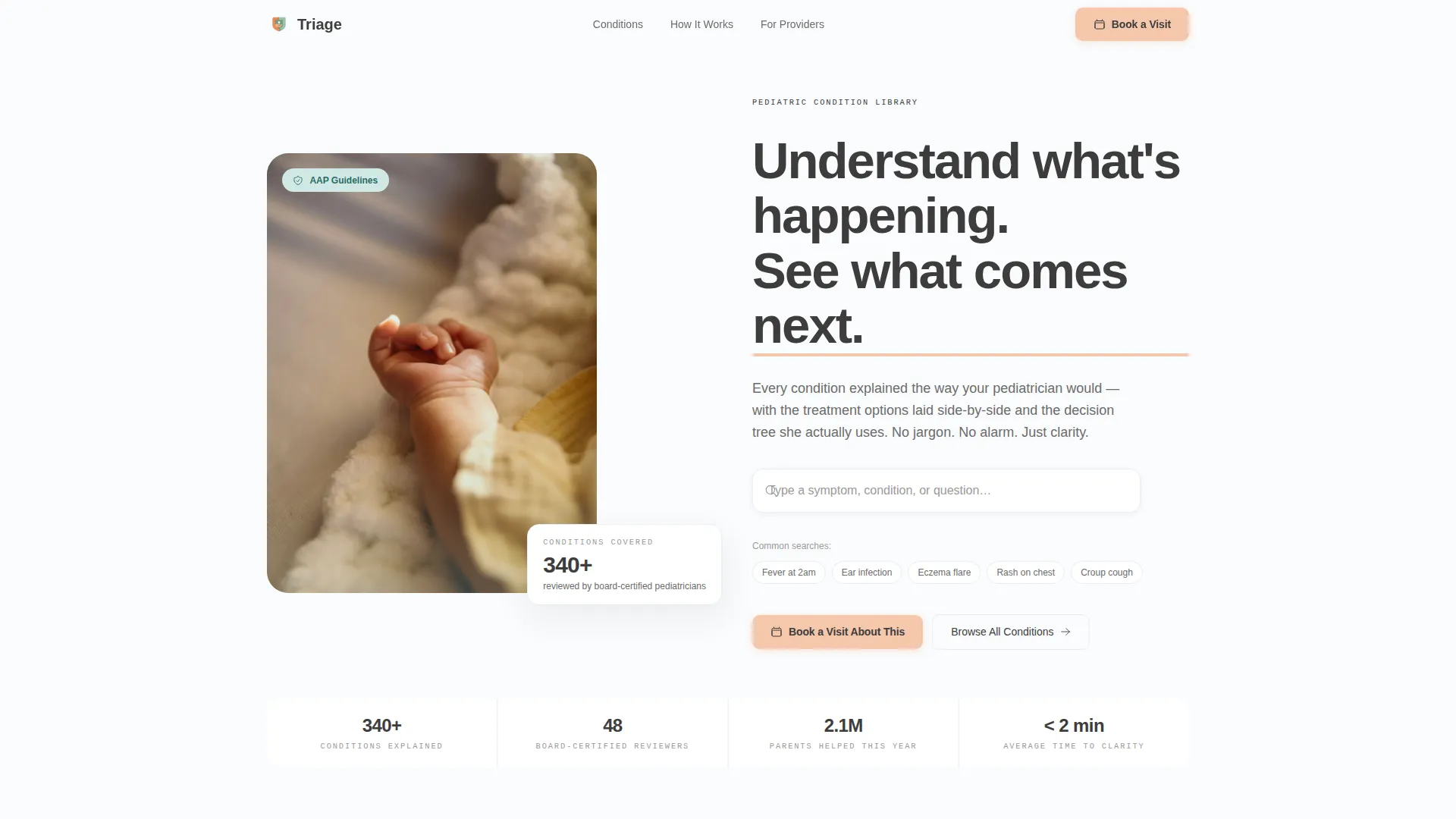
- A magazine-split hero with a live symptom search bar and a warm, directive headline
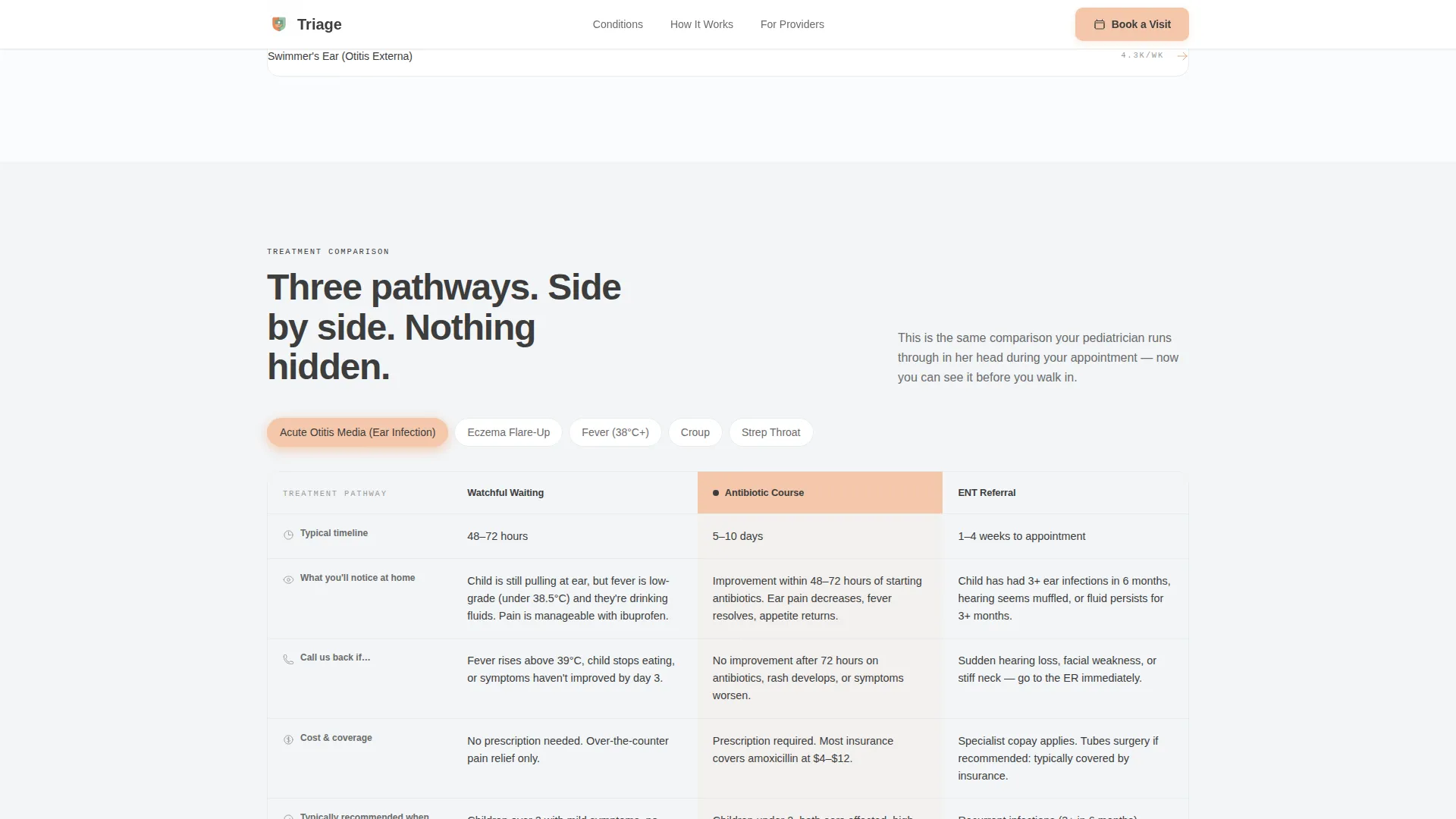
- Full-width treatment comparison tables showing watchful waiting, medication, and specialist referral side by side
- A contextual booking form that pre-fills the appointment reason based on the condition the parent just read
Feature list
This template includes purpose-built components designed specifically for a pediatric information and scheduling experience.
Live Symptom Search Bar
A search bar with ghost text sits in the hero section and begins filtering condition results from the second keystroke. Parents can type a symptom, condition name, or plain-language question without needing medical terminology.
Side-by-Side Treatment Comparison Table
Each condition entry includes a full-width table comparing treatment options across three paths: watchful waiting, medication, and specialist referral. Columns cover typical timeline, what parents will notice at home, and when to call the practice back.
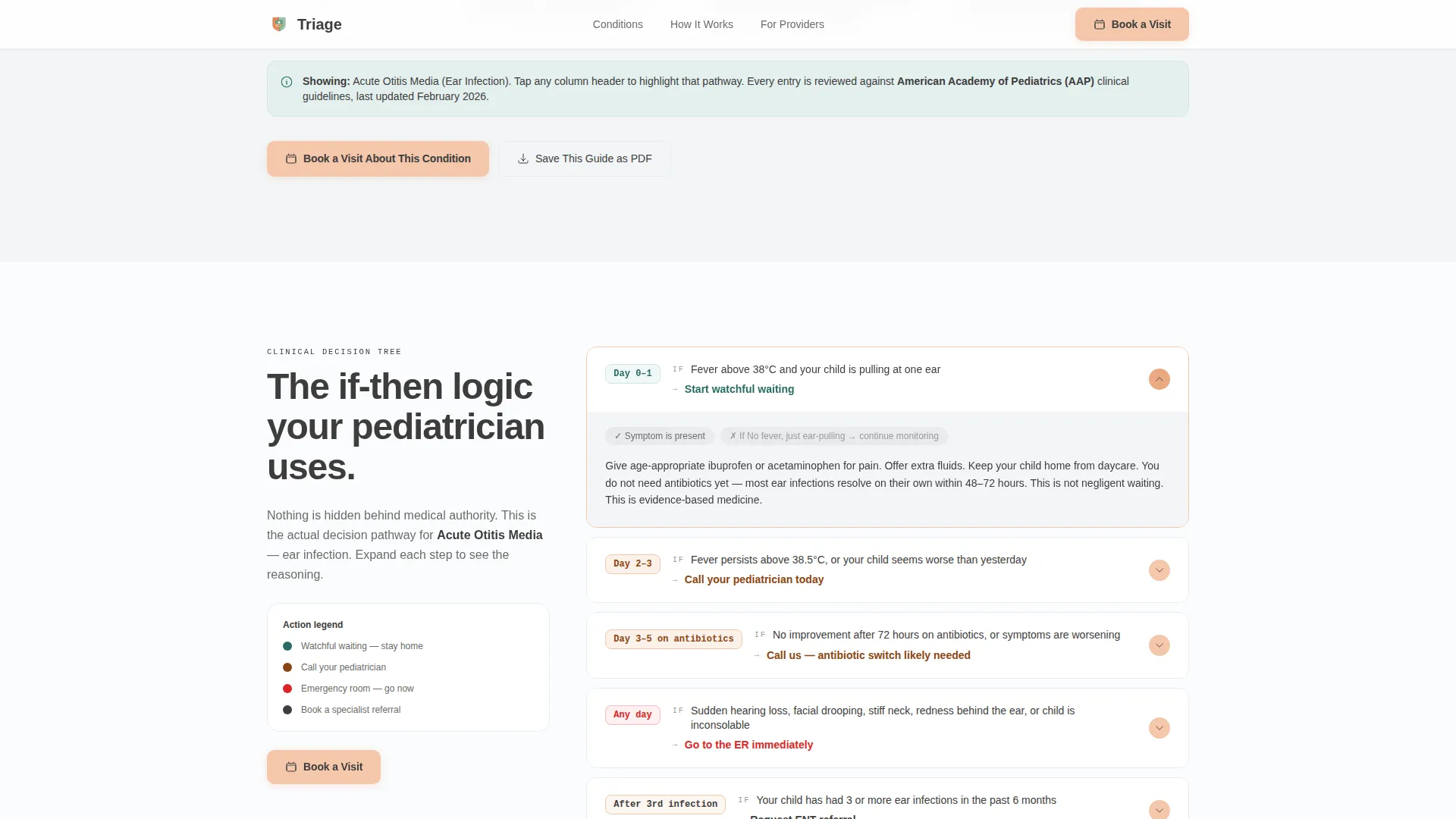
Accordion Decision Tree
An interactive accordion reveals the clinical reasoning the pediatrician actually follows. Each node uses plain IF/THEN logic: if a symptom persists past day three, the next step appears. If fever returns, a different path opens. Nothing is hidden behind medical authority.
Contextual Booking Form
The primary call to action, "Book a Visit About This," appears at the bottom of every condition entry. It pre-fills the appointment reason with the condition the parent just read and collects three items: child's name and age, preferred timing, and insurance carrier.
Email Capture for Condition Guides
A secondary path, "Save This Guide," captures an email address for parents who are not ready to book. It delivers a portable document of the condition page they were reading, extending the usefulness of the template beyond the visit.
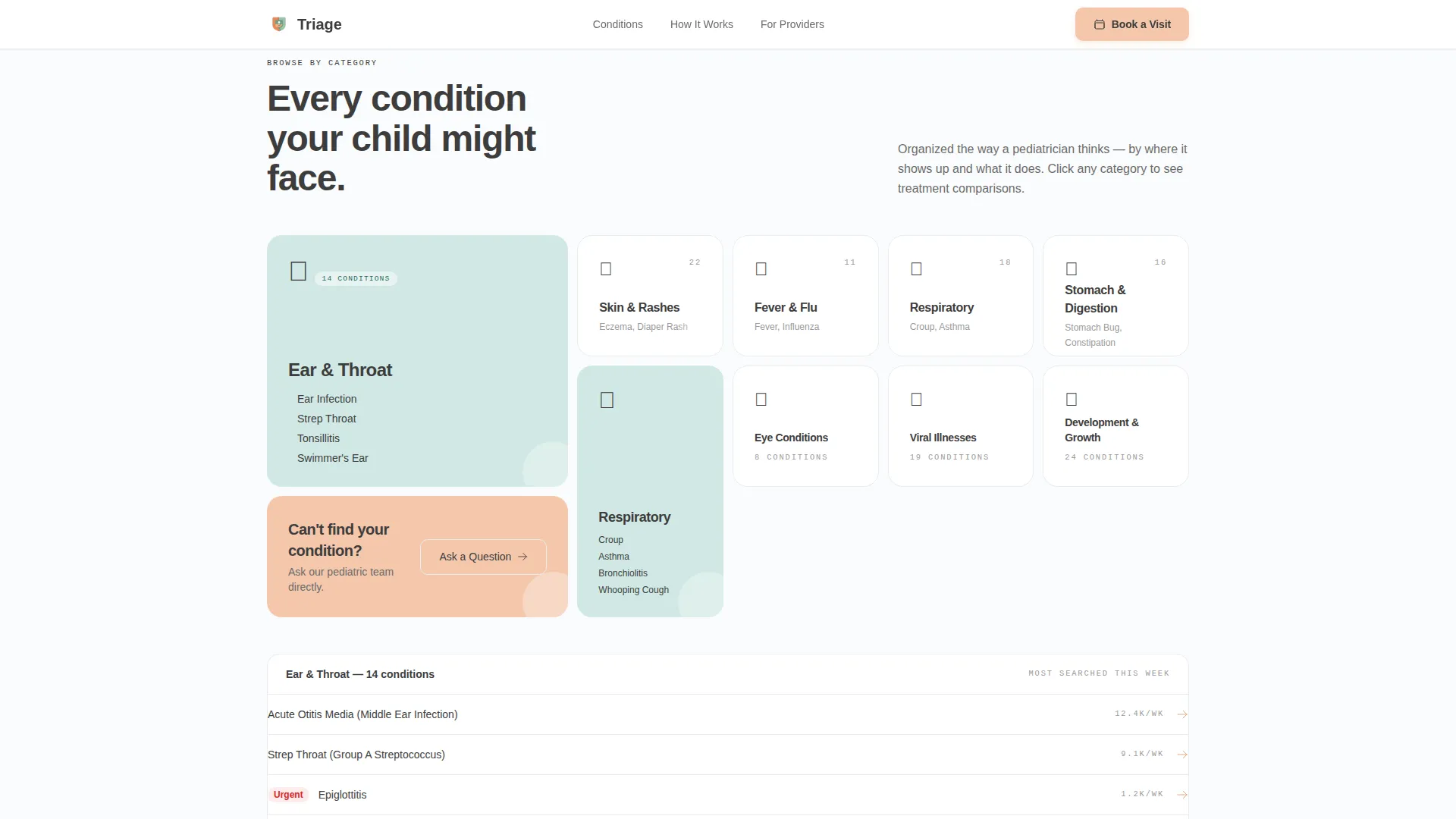
Condition Category Grid
An asymmetric bento grid organizes conditions into visual category cards. Soft celadon card backgrounds create clear groupings without clinical coldness, making it easy to browse by body system or symptom type.
Page sections overview
| Section | Purpose |
|---|---|
| Hero search split | Headline, photo, and live symptom search bar |
| Condition category grid | Browse conditions by category using visual cards |
| Treatment comparison table | Side-by-side pathway options for a sample condition |
| Decision tree accordion | IF/THEN clinical reasoning revealed step by step |
| Testimonials and trust | Parent quotes paired with credential and badge signals |
| Booking call to action | Scheduling form and email capture for condition guides |
| Footer | Linear single-row navigation and contact links |
Design & branding system
The visual identity follows an Organic Flow theme built around clinical warmth. Every color choice serves a clear emotional purpose: backgrounds feel clean and safe, interactive elements feel approachable, and body text reads like a calm voice.
- Arctic White color system: clinical snow (#FAFBFC) backgrounds, soft celadon (#D0E8E4) condition cards, warm graphite (#3D3D3D) body text, and pale apricot (#F4C7AB) on all interactive elements including buttons, toggle arrows, and active table headers
- Typography uses DM Sans, a rounded unhurried sans-serif for all headings and body copy, paired with JetBrains Mono for clinical reference codes
- The half-page hero photograph is shot at child-height, showing a toddler's hand resting on a pediatrician's open palm in natural window light, with a soft-focused stethoscope in the background
Mobile & speed optimization
This template is built mobile-first, recognizing that most parents search for symptoms on a phone, often late at night. Every interaction is designed to feel smooth and readable on a small screen.
- Scroll reveal animations, table row hover states, and accordion transitions are set to a medium intensity so they guide attention without overwhelming a tired parent
- Server Components handle static content sections to keep initial load light on mobile connections
- The booking form is simplified to three sequential questions, reducing friction for users completing it on a phone keyboard
How this template helps you convert
The template earns trust before it asks for anything. By the time a parent reaches a call-to-action button, the page has already given away the doctor's full reasoning for free.
- The live search bar and condition library pull parents in immediately, rewarding curiosity with clear, relevant answers before any form appears
- The "Book a Visit About This" button appears only after the condition entry has been read in full, with the appointment reason already filled in, removing friction at the moment of intent
- The "Save This Guide" email capture offers a second conversion path for parents who are not ready to book, keeping the practice top of mind when they are
Other information about this template
This template is part of the Health and Medical category, listed under the Pediatrician Website subcategory. It was designed specifically for the Pediatrician Condition and Treatment Library niche, making it a strong fit for practices that differentiate through education and transparency.
- The template style is a Comparison Table layout, built to show treatment options in parallel rather than in a long scrolling list
- The creative direction is Transparent Process, meaning clinical reasoning is surfaced at every scroll depth rather than summarized at the top
- The header concept is a Half-Page Photo and Text split, combining an emotive child-height photograph with a searchable text panel
- The landing page direction is Booking and Scheduling, with the primary conversion path tied directly to appointment intent
- The Organic Flow theme and Arctic White color system together create a space that feels sterile enough to trust and warm enough to exhale
Theme
Organic Flow
Creative direction
Transparent Process
Color system
Arctic White
Style
Comparison Table
Direction
Booking/Scheduling
Page Sections
Live Symptom Search Bar
Treatment Comparison Table
Accordion Decision Tree
Contextual Booking Form
Email Capture for Condition Guides
Condition Category Grid
Related questions
Can I customize the conditions listed in the library?
Does the booking form connect to a scheduling system?
Can I use this template for a general pediatric practice, not just a condition library?
Is the decision tree content included, or do I write it myself?
What does the "Save This Guide" button do?



