Hospital & Health System Cost Calculator Website Template
Triage is a sidebar companion landing page built for rural hospital leadership navigating compliance pressure. It combines a pre-filled compliance readiness calculator, an eight-domain audit checklist, and a live-scoring sidebar into one focused assessment experience. Designed for critical access and small rural hospitals, it converts checklist completion into qualified institutional lead capture.
by Rocket studio
Quick summary
Triage is a compliance readiness assessment landing page built specifically for rural and critical access hospital leaders. It opens with a pre-filled gauge-chart calculator showing real staffing, facility, and survey data. A persistent sidebar tracks progress through eight audit domains. The primary call to action unlocks only after six of eight sections are touched, creating genuine investment before submission.
Who this template is for
This template is built for institutional decision-makers at small rural and critical access hospitals. These are professionals managing compliance obligations with limited staff and significant regulatory exposure.
- Rural hospital chief executive officers and administrators managing 18 to 50-bed facilities
- Chief nursing officers stretching travel nurse budgets and monitoring staffing coverage ratios
- Board members who received a Centers for Medicare and Medicaid Services (CMS) deficiency letter and need a structured starting point
What problem this template solves
Rural hospital leadership teams rarely have a dedicated compliance officer. They face the same CMS survey expectations as larger health systems, but with far fewer internal resources. Generic compliance tools are built for urban systems and miss the specific pressures of critical access care.
- No purpose-built assessment tool exists for the rural hospital sector
- Leaders lack a fast, structured way to surface their actual compliance gaps before a CMS survey does
- Capturing qualified institutional leads in this sector requires trust before a form appears
What you get with this template
This template delivers a complete interactive assessment experience in a single, well-organized landing page. Every component is built around the audit workflow, from the opening calculator to the final score gate.
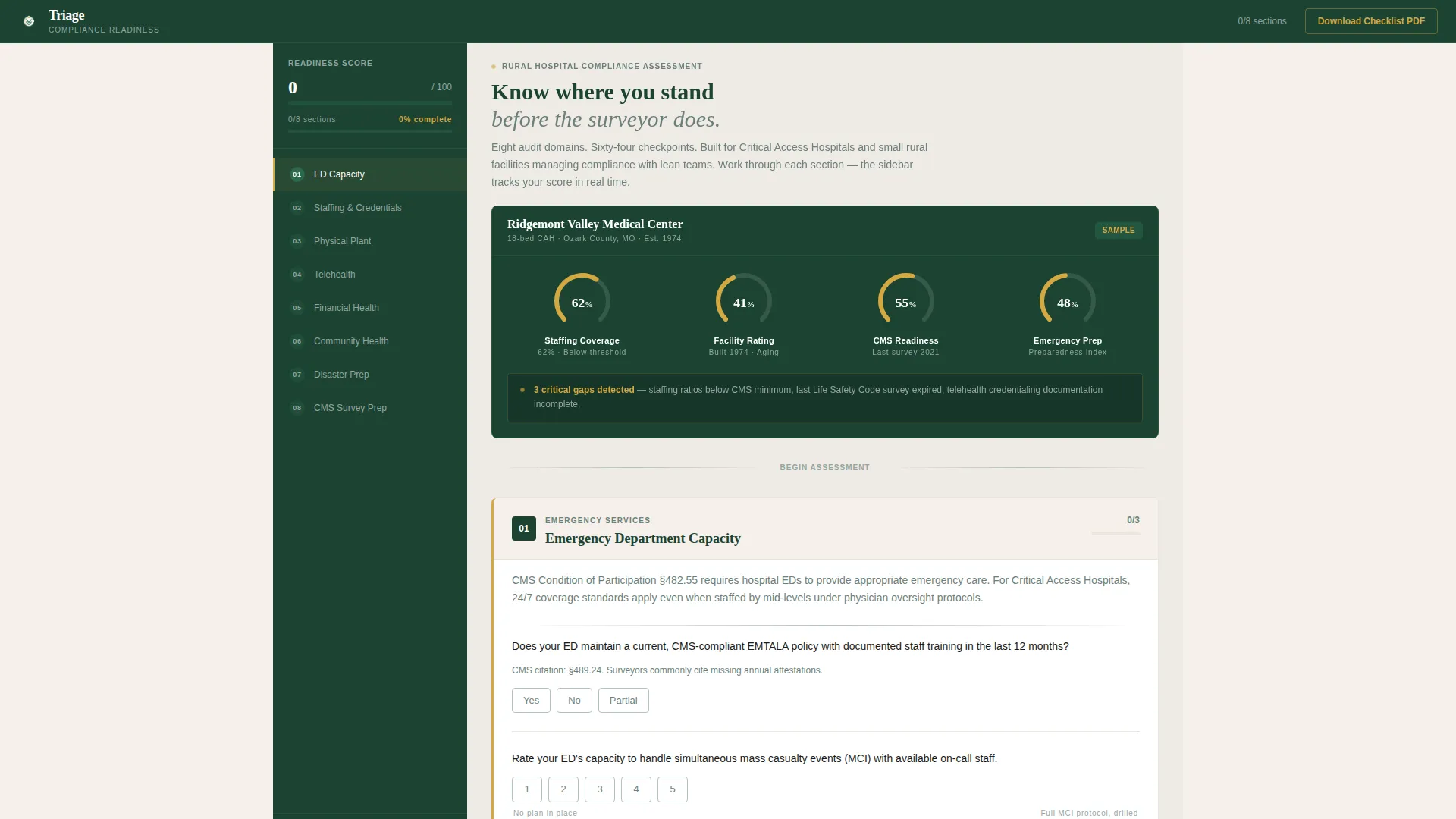
- A pre-filled compliance calculator with gauge charts showing staffing coverage, facility age, CMS readiness score, and emergency preparedness index
- Eight scrollable audit domain sections, each with yes/no or scaled questions and live sidebar score tracking
- Two conversion paths: a gated readiness score form that unlocks after six sections, and a secondary PDF download gate requiring only an email address
Feature list
This template includes purpose-built interactive components designed for a desktop-first compliance workflow.
Pre-Filled Compliance Calculator
The header section opens with a compact scoring tool showing a sample rural hospital profile. Real numbers are pre-loaded: 62 percent staffing coverage, built in 1974, last surveyed in 2021. Visitors recognize their own situation immediately, without needing to enter data first.
Eight-Domain Audit Checklist
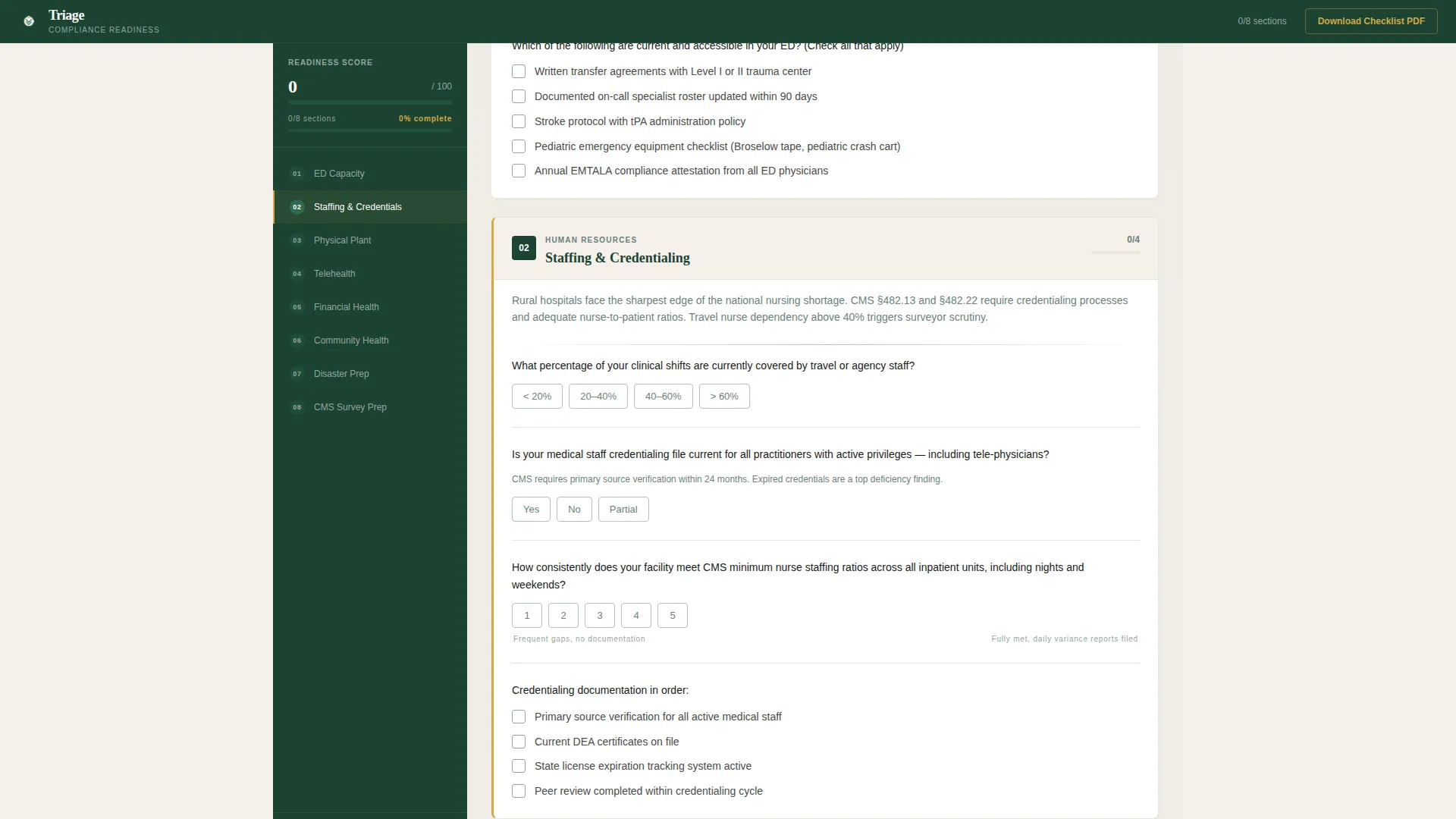
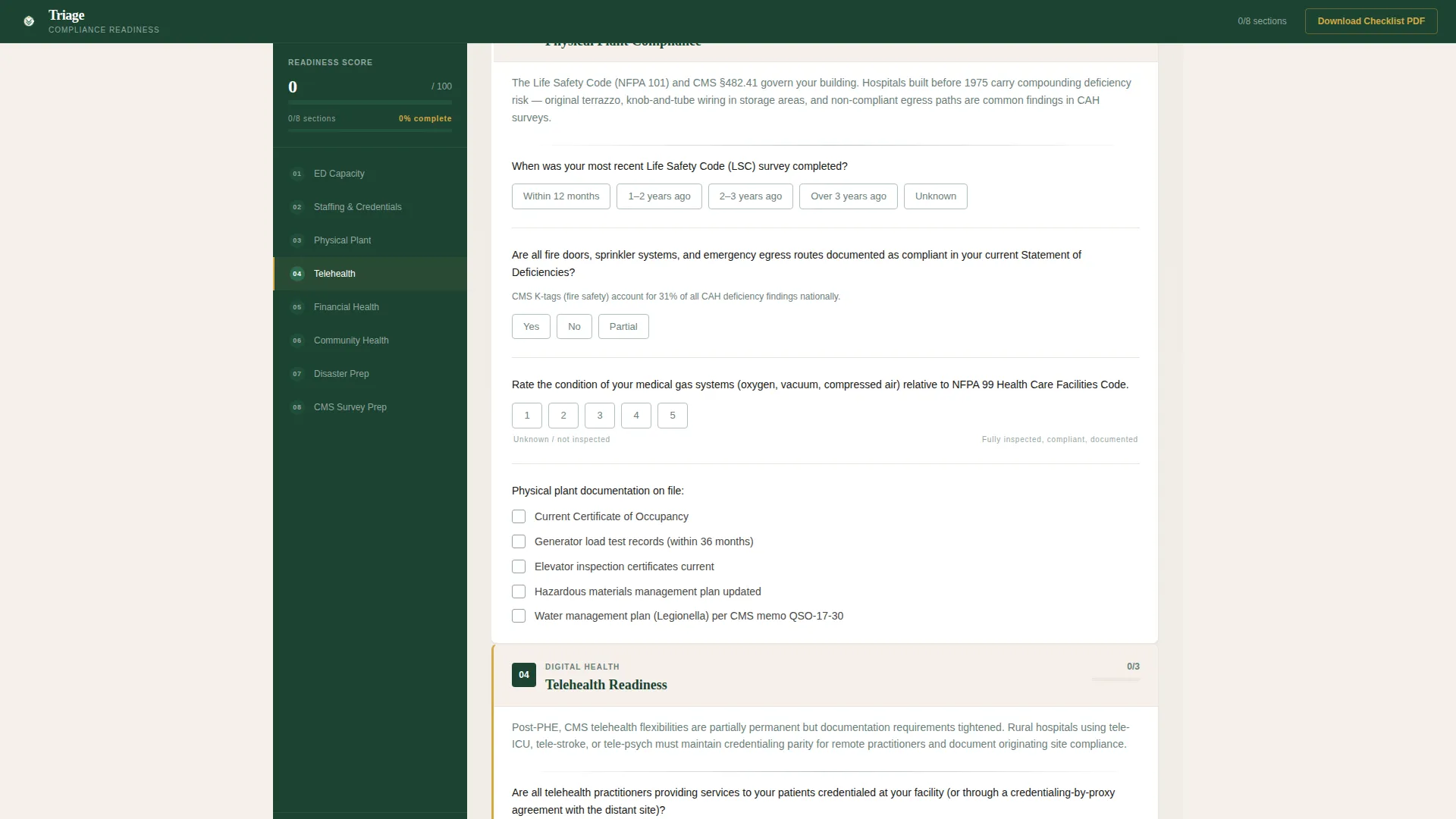
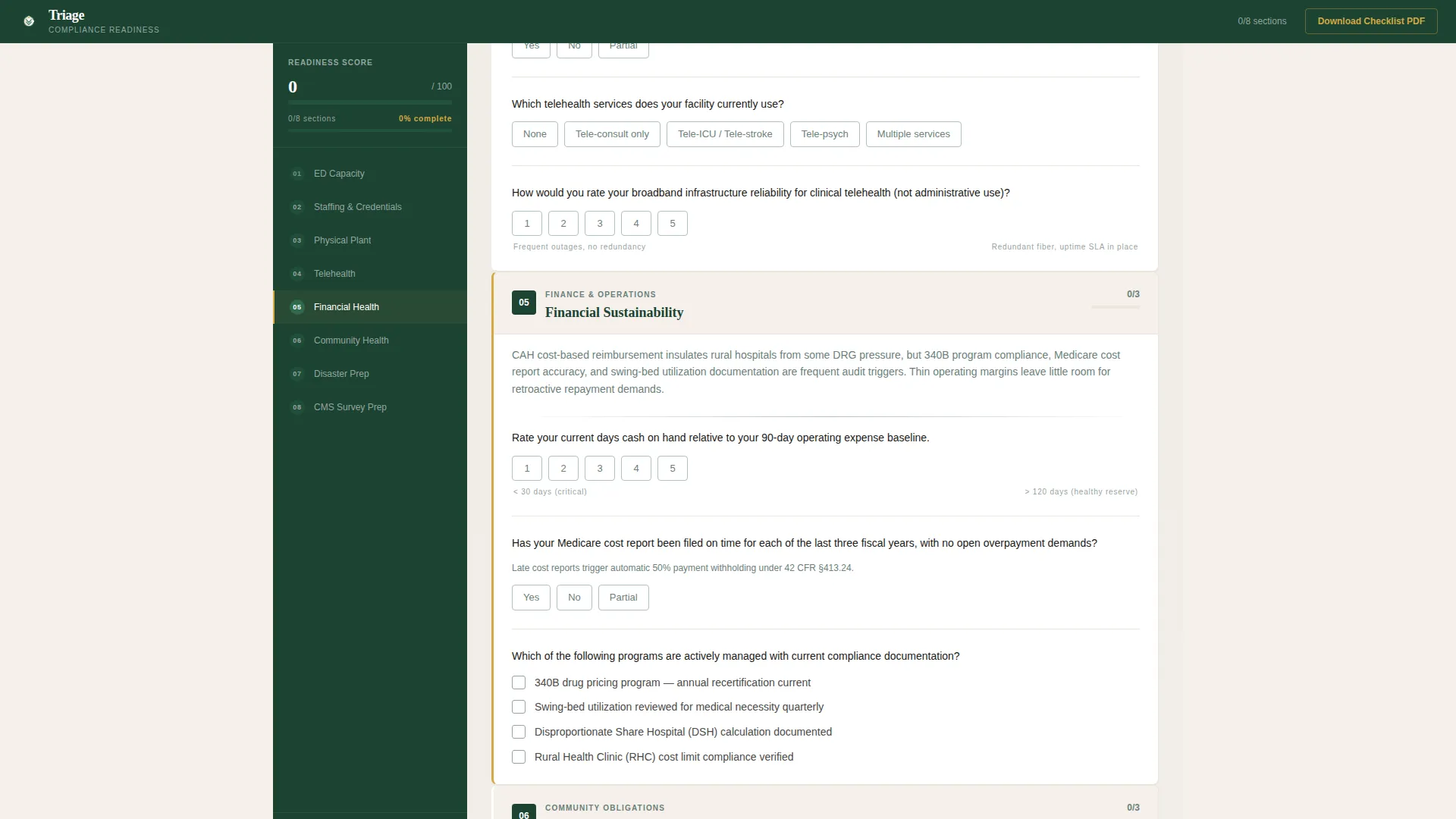
The page body covers eight compliance domains: Emergency Department Capacity, Staffing and Credentialing, Physical Plant Compliance, Telehealth Readiness, Financial Sustainability, Community Health Obligation, Disaster Preparedness, and CMS Survey Prep. Each domain opens with a structured question set visitors actively respond to.
Live-Scoring Sidebar
A persistent sidebar tracks checklist progress in real time. It displays a running score tally and a progress bar that fills as each section is completed. The sidebar outline shows all eight sections at once, so visitors always know where they stand.
Earned Score Gate Call to Action
The primary "See Your Readiness Score" call to action is locked until at least six of the eight audit sections have been touched. This builds genuine investment before the institutional lead form appears. The form collects hospital name, bed count, state, and work email only.
PDF Download Secondary Path
A secondary conversion path lets visitors download the Rural Hospital Compliance Checklist as a gated PDF. It requires only an email address. This path captures leaders who want the framework but are not yet ready to submit for a full scored assessment.
Goldenrod Progress Indicators
Every completed checklist step is marked in goldenrod against the pine sidebar. Progress indicators pulse at the active step and fill as sections are finished, giving the experience a steady, measurable forward motion that mirrors a real compliance walk-through.
Page sections overview
| Section | Purpose |
|---|---|
| Compliance Readiness Calculator | Opens with pre-filled gauge charts showing a sample rural hospital risk profile |
| Sidebar Progress Outline | Persistent eight-section navigation tracking completion state throughout the page |
| Emergency Department Capacity | First audit domain with structured yes/no and scaled compliance questions |
| Staffing and Credentialing | Reviews staffing coverage ratios, travel nurse use, and credentialing currency |
| Physical Plant Compliance | Covers facility age, infrastructure condition, and regulatory maintenance records |
| Telehealth Readiness | Assesses current telehealth capacity and connectivity for rural care delivery |
| Financial Sustainability | Reviews revenue cycle health and financial resilience indicators |
| Community Health Obligation | Evaluates community benefit commitments and population health responsibilities |
| Disaster Preparedness | Covers emergency planning, drills, and incident command readiness |
| CMS Survey Prep | Final and hardest domain, focused on survey-readiness documentation and gap identification |
| Earned Score Gate | Submission form unlocking after six sections, collecting institutional identifiers |
| PDF Download Gate | Secondary email-only conversion capturing visitors who want the checklist framework |
| Footer | Minimal footer following a developer-minimal layout pattern |
Design & branding system
The visual identity follows a Healing Space theme using a Forest Trust color system. The palette references the view from a rural hospital window: a pine tree line meeting an overcast sky, wood-paneled waiting rooms, and the particular green of faded scrubs.
- Deep pine (#1B4332) dominates the sidebar and navigation; warm birch white (#F5F0EB) opens the content area like clean linen
- Lichen gray (#95A5A0) softens secondary text and dividers; calm goldenrod (#D4A843) marks progress indicators and active states
- Typography pairs Fraunces serif for display headings with DM Sans for body text and interface labels, combining institutional weight with readable clarity
Mobile & speed optimization
This template is designed desktop-first, reflecting how hospital administrators review compliance materials at their desks. The layout is structured for focused, extended engagement rather than quick mobile browsing.
- Client-side state management handles live scoring, checkbox state, and progress bar updates without page reloads
- Scroll-reveal animations and gauge chart fills use medium animation settings to maintain a calm, clinical pace without disrupting workflow
- The sidebar companion layout is optimized for wide-screen review sessions typical of administrative workstation use
How this template helps you convert
The template is built around earned investment, a principle where the visitor commits effort before the conversion moment arrives. This approach works especially well for institutional buyers who resist premature lead forms.
- The pre-filled calculator creates instant recognition, pulling leaders into the experience before they decide whether to engage
- The live-scoring sidebar and visible progress bar make completion feel professionally obligatory, not just optional
- Two distinct conversion paths capture both high-intent visitors ready for a scored assessment and lower-intent visitors who want the PDF framework first
Other information about this template
This template sits at the intersection of healthcare compliance tooling and interactive assessment design for the rural hospital sector in the United States. It is fully focused on English-language, institutional use with no currency display and no consumer-facing language.
- The template covers the critical access hospital context specifically, including CMS survey terminology, real bed-count ranges, and survey-date references that resonate with the target audience
- Animation is set to medium intensity: scroll reveals, gauge chart fills, and sidebar tracking provide motion without clinical distraction
- The footer follows a minimal layout pattern suited to professional and institutional contexts
- No personal data fields appear in the primary form; all inputs are institutional identifiers (hospital name, bed count, state, and work email)
- The secondary PDF gate requires only an email address, making it a low-friction entry point for leaders earlier in their decision process
Theme
Healing Space
Creative direction
Checklist & Audit
Color system
Forest Trust
Style
Sidebar Companion
Direction
Quiz/Assessment
Page Sections
Pre-filled Compliance Calculator
Eight-domain Audit Checklist
Live-scoring Sidebar Tracker
Earned Score Gate Conversion
Secondary PDF Download Gate
Goldenrod Progress Indicators
Related questions
Who is this landing page template built for?
What does the compliance calculator in the header show?
How does the earned score gate call to action work?
Is there a conversion path for visitors not ready for a full assessment?
Can this template be adapted for a specific compliance service or program?



