Veterans Hospital Care Landing Page Template
Triage is a hub-and-spoke anchor-navigation landing page built for military veterans hospitals. It opens with a three-step intake form, delivers performance metrics before any narrative, and organizes six care programs into deep-dive sections. The Slate and Sky color system and fixed crisis line banner give this template the institutional authority veterans and their families expect.
by Rocket studio
Quick summary
Triage is a single-page veterans hospital landing page built around a multi-step intake form, a stats-first evidence wall, and a six-spoke program hub. Every section earns trust through verified numbers and provider credentials. A fixed crisis line banner stays visible at all times, because some visitors need that resource before anything else.
Who this template is for
This template is designed for military veterans hospitals and healthcare systems that serve post-deployment patients, transitioning service members, and military families. If your facility needs to communicate program eligibility, measurable outcomes, and care pathways in one authoritative page, this template was built for that exact purpose.
- Veterans hospitals and VA-adjacent medical facilities presenting multiple care programs
- Healthcare administrators and communications teams serving post-deployment veterans, active-duty transitioning personnel, and Gold Star families
- Veteran service officers (VSOs) and case managers who need fast access to bed availability and program eligibility on behalf of their clients
What problem this template solves
Veterans navigating healthcare face a specific and frustrating problem: too many portals, too little clarity, and no sense that anyone on the other end understands their service history. Standard hospital templates treat every visitor the same. This template does not.
- Veterans, family members, and VSOs often arrive with different needs; a single generic contact form fails all of them at once
- Hospitals with strong outcome metrics rarely present those numbers early enough to build trust before a visitor leaves the page
- Crisis-sensitive populations need a persistent, visible safety resource that cannot be accidentally scrolled past or closed
What you get with this template
You get a fully structured, single-page layout with clearly defined sections, purposeful visual hierarchy, and interactive components designed for a high-stakes healthcare context. Nothing in this template is decorative without function.
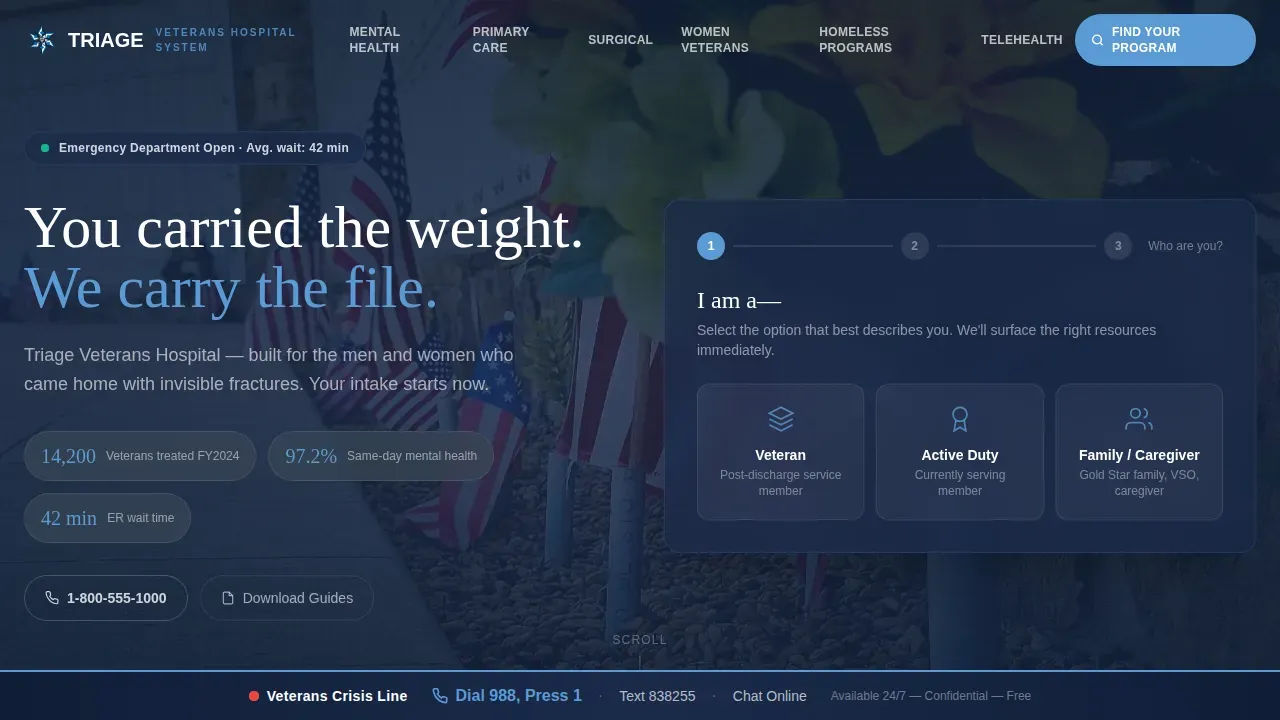
- A three-step intake form in the hero section that routes visitors by identity, service era, and branch before surfacing relevant resources
- Six anchor-linked program sections with space for provider bios, eligibility checklists, and program details, each connected to a central hub navigation bar
- Secondary conversion paths including downloadable PDF guide slots, a live bed-availability tracker panel, and a fixed Veterans Crisis Line banner locked to the bottom of every viewport
Feature list
A quick overview of what drives this template's performance in real use.
Three-Step Intake Form with State Memory
The hero opens with a role-selection screen: Veteran, Active Duty, or Family Member and Caregiver. Step two presents service era and branch via icon-driven selectors covering conflicts from Korea through Operation Enduring Freedom and Operation Iraqi Freedom (OEF and OIF). Step three surfaces relevant program resources immediately, with no submit button yet. When a visitor returns to the primary call to action, their earlier selections are remembered, and the form completes with a contact preference and ZIP code for nearest clinic routing.
Stats-First Evidence Wall
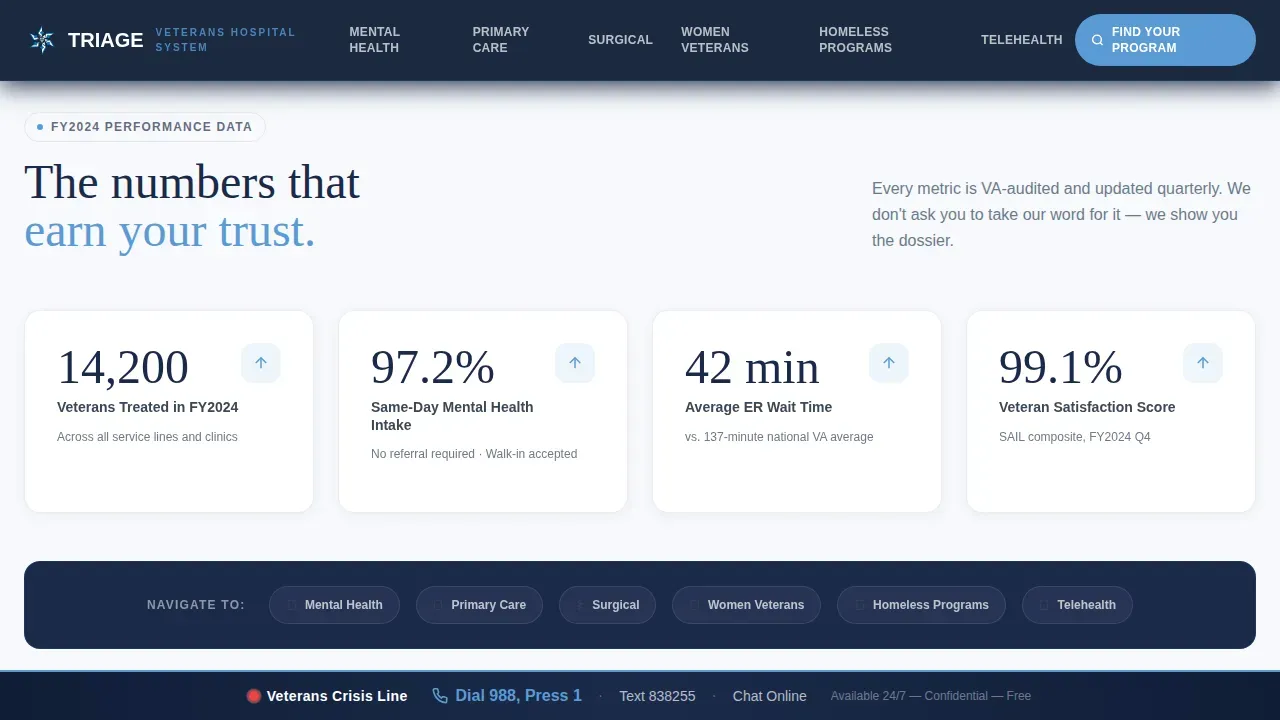
Three anchor metrics appear before any narrative prose: veterans treated in fiscal year 2024, same-day mental health intake rate, and emergency room wait time versus the national VA average. Each stat is tied to a scroll-linked counter animation and connects directly to its corresponding program spoke.
Six-Spoke Program Hub with Anchor Navigation
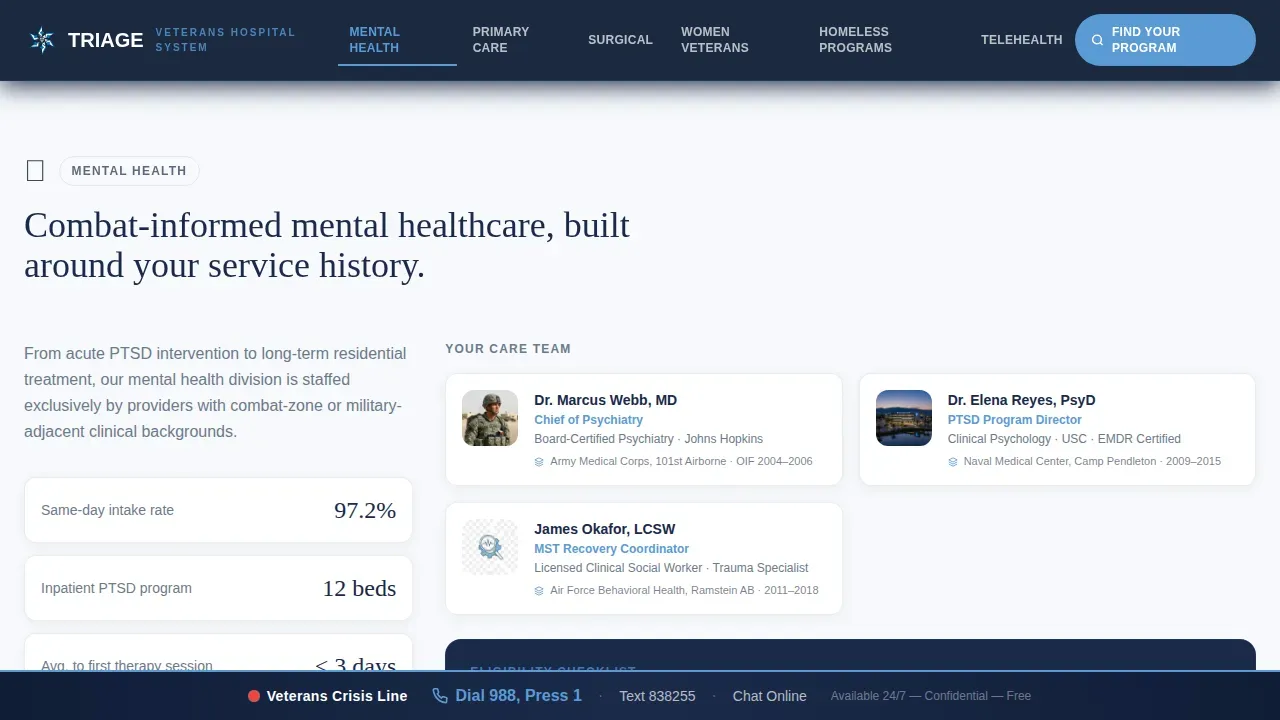
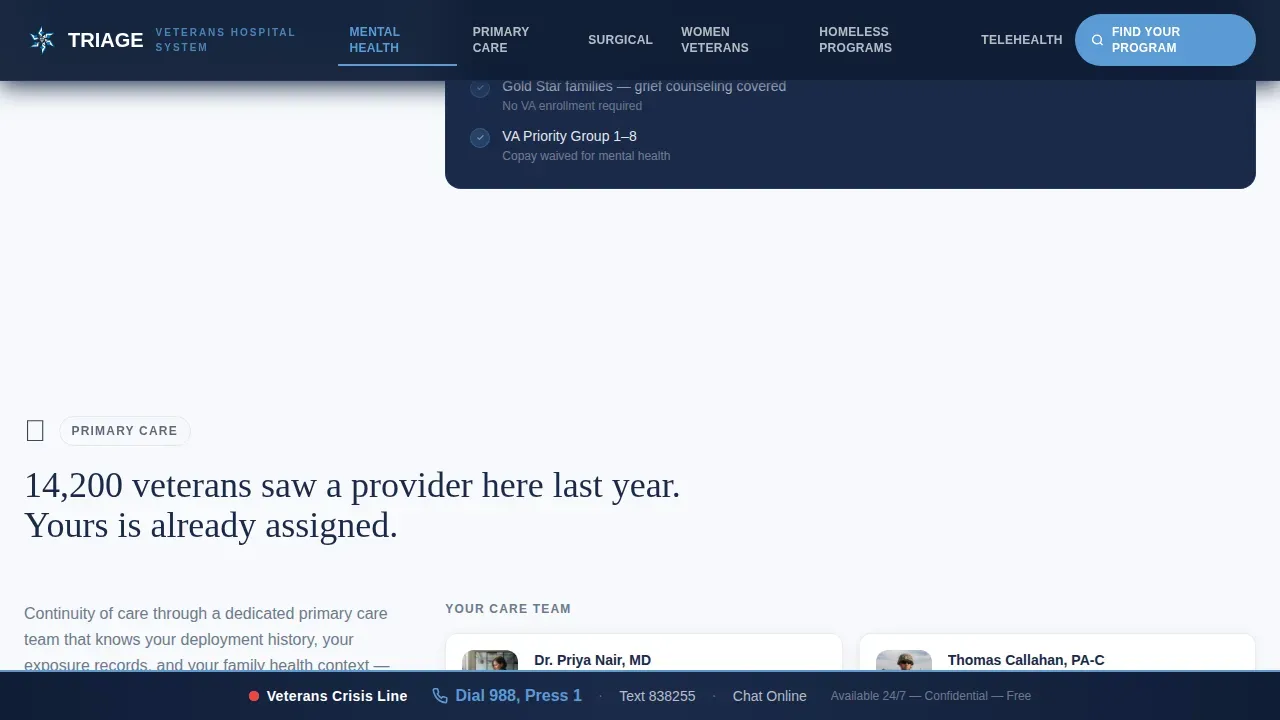
A sticky hub navigation bar links to six deep-dive sections: Mental Health, Primary Care, Surgical Services, Women Veterans Health, Homeless Veteran Programs, and Telehealth. Clicking any spoke smooth-scrolls the visitor to a full program dossier with provider bios listing military service history alongside medical credentials, plus eligibility checklists.
Fixed Veterans Crisis Line Banner
A persistent banner locked to the bottom of every viewport displays the Veterans Crisis Line: Dial 988, Press 1. It cannot be dismissed or scrolled away. This is treated as the most important element on the page, present regardless of which section the visitor is viewing.
Downloadable Resource Panel
A dedicated resources section holds slots for downloadable PDF guides such as "Your First 90 Days After Separation" and a "Caregiver Benefits Checklist." A live bed-availability tracker updated every four hours also sits in this section, alongside a telehealth call to action.
Scroll-Linked Reveal Animations
Medium-intensity scroll animations trigger staggered stat counters, form step transitions, and section reveals as the visitor moves down the page. Animations are purposeful and paced to feel institutional rather than decorative.
Page sections overview
| Section | Purpose |
|---|---|
| Hero Intake Form | Role-based three-step form routes visitors to relevant programs |
| Stats Evidence Wall | Three verified metrics build trust before narrative begins |
| Program Hub Nav | Anchor navigation links six care programs from one central bar |
| Mental Health Spoke | Program details, provider bios, and eligibility checklist |
| Primary Care Spoke | Program details, provider credentials, and care pathway info |
| Surgical Services Spoke | Surgical program overview with provider military history |
| Women Veterans Spoke | Dedicated section for Women Veterans Health program details |
| Homeless Veteran Programs | Outreach program details and eligibility information |
| Telehealth Spoke | Remote care options and contact method preferences |
| Resources Section | PDF downloads, bed tracker, and telehealth call to action |
| Page Footer | Asymmetric layout with persistent crisis line reinforcement |
Design & branding system
The Medical Clarity visual theme gives this template the look of a pressed Class-A uniform: disciplined, clean, and carrying real institutional weight. Every color decision serves function over aesthetics.
- Color system uses command-grade slate (#3B4856), sterile instrument white (#F7F9FC), medic-cross navy (#1B2A4A), and horizon sky blue (#5B9BD5) reserved for active navigation states, progress indicators, and call-to-action surfaces
- Typography pairs Manrope for body text with Fraunces for display headings, giving the page both clinical readability and the gravitas appropriate for a veterans healthcare context
- The hero background shows a muted aerial view of the hospital campus at dawn with an American flag at half-staff, keeping emotional tone understated while the form leads with function
Mobile & speed optimization
This template is built desktop-first, with full mobile support for veterans who may access the page on a phone in a waiting room, a VA office, or a community center. Performance choices reflect that reality.
- Static sections use server-rendered components to load quickly, while interactive elements such as the multi-step form, stat counters, and anchor navigation are handled client-side for responsive behavior
- The fixed crisis line banner and anchor navigation adapt cleanly to smaller viewports, so critical pathways stay accessible on any screen size
- Scroll-linked animations are paced to feel smooth on both large desktop monitors and mobile devices without causing layout shifts
How this template helps you convert
Every design and structural decision in this template pushes toward a single outcome: connecting the right visitor to the right program without confusion or friction.
- The three-step form at the top of the page personalizes the experience from the first interaction, so veterans, family members, and VSOs all see a path that feels built for them specifically rather than a generic contact page.
- The stats evidence wall places verified performance numbers before any promotional language, building the kind of institutional credibility that a military-adjacent audience requires before they will trust a facility with their healthcare.
- The "Find Your Program" primary call to action returns visitors to the form with their earlier selections intact, reducing the effort required to complete the intake and increasing the likelihood of follow-through.
Other information about this template
This template is well suited for facilities looking to present a government-adjacent healthcare hub online. It combines clinical structure with thoughtful visitor routing in a way that few general hospital templates address.
- The hub-and-spoke anchor navigation structure makes it straightforward to add or reorganize program sections as a facility's service offerings evolve
- The live bed-availability tracker slot and PDF download panel support secondary conversions for VSOs and caregivers who need reference materials rather than direct intake
- ZIP code routing built into the final form step allows multi-location systems to direct visitors to the nearest clinic or outreach point without requiring a separate location finder page
Theme
Medical Clarity
Creative direction
Stats-First Impact
Color system
Slate & Sky
Style
Hub & Spoke (Anchor Nav)
Direction
Content/Resource
Page Sections
Three-step Intake Form with State Memory
Stats-first Evidence Wall
Six-spoke Program Hub
Fixed Veterans Crisis Line Banner
Resource Downloads and Bed Tracker Panel
Related questions
Who is this landing page template designed for?
Can I customize the six program spokes for my facility's services?
What is the Veterans Crisis Line banner, and can it be removed?
Does the multi-step form remember a visitor's earlier selections?
Is this template suitable for both desktop and mobile users?



