Tools Subscription Box Landing Page Template
Unbox is a single-page landing page template built for tools and hardware subscription box businesses. It combines overlapping product cards, a scroll-reveal layout, and a pinned checkout flow to turn curious visitors into paying subscribers. The caution-tape amber palette, kraft-paper textures, and layered card design give the page the feel of cracking open a fresh toolbox.
by Rocket studio
Quick summary
Unbox is a tools subscription landing page template designed to sell monthly hardware crates. It uses a scroll-reveal structure, overlapping product cards, a mystery tool countdown, and a three-plan inline checkout to move visitors from curiosity to commitment. The warm workshop palette and layered visual depth make every section feel like digging into a well-packed box.
Who this template is for
This template is built for anyone selling a curated tools or hardware subscription. It suits businesses whose audience ranges from weekend garage enthusiasts to working tradespeople.
- Subscription box brands selling hand tools, fasteners, blades, and jobsite essentials
- Property maintenance services or trade apprenticeship programs building tool kits over time
- E-commerce operators who want a direct-sales landing page with built-in plan comparison and inline checkout
What problem this template solves
Most subscription box pages fail to answer two buyer questions fast enough: "What exactly do I get?" and "Is the price worth it?" Unbox solves both problems with visible product detail and transparent value math.
- The retail-versus-subscription price comparison makes the savings case without extra persuasion copy
- The mystery tool section and countdown timer create urgency that keeps visitors scrolling instead of leaving
- The inline checkout removes friction by letting buyers select a plan, set a size preference, and pay without leaving the page
What you get with this template
You get a fully structured single-page layout that handles every stage of the subscription sales journey. From the first scroll to the final checkout step, every section has a specific job.
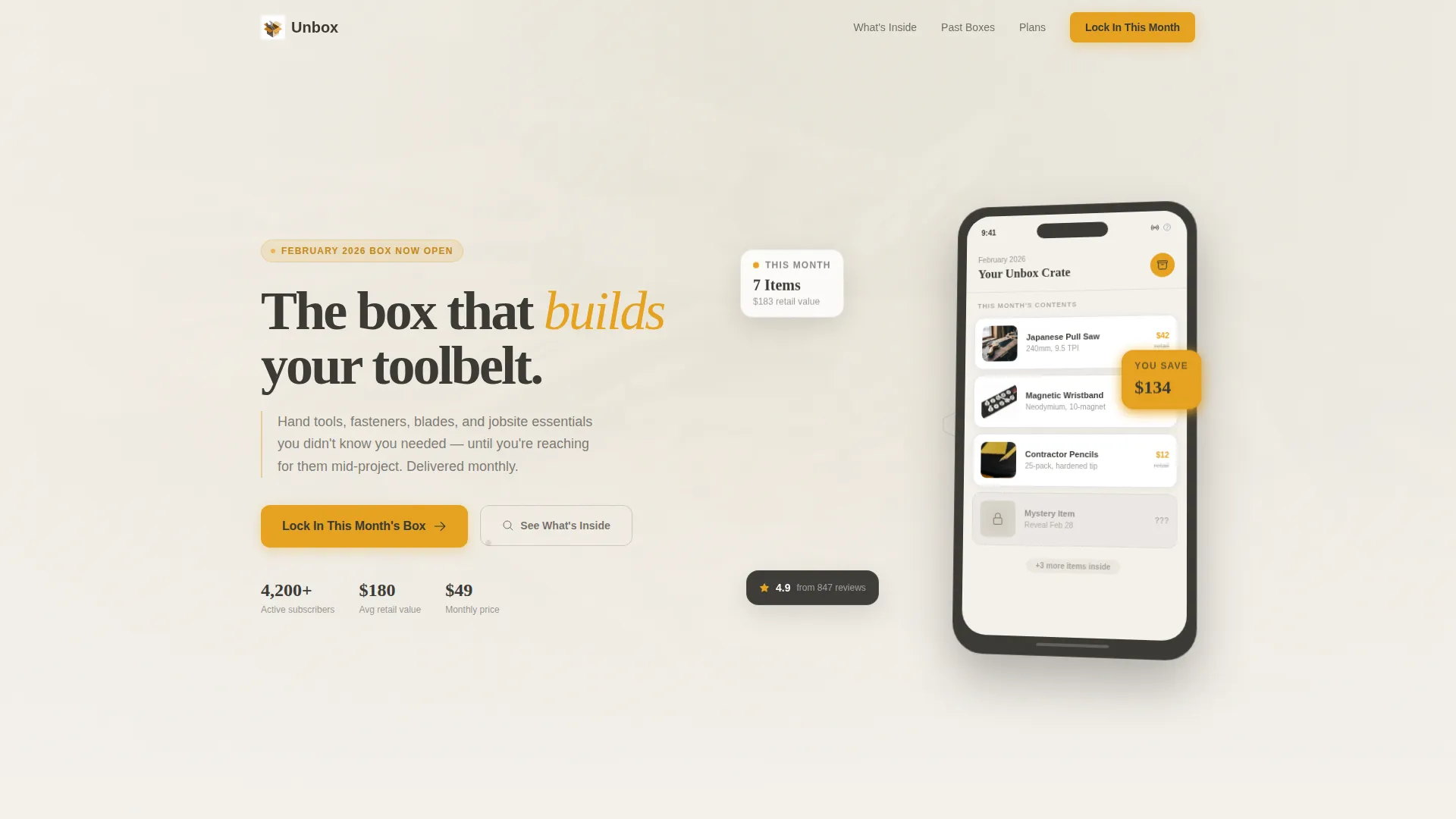
- An App Store Preview header showing the subscription dashboard in a stylized angled device frame
- A "What's Inside" product grid, a past-boxes savings carousel, a mystery tool reveal section, and a three-plan purchase card block
- A secondary "Gift a Box" path with a date picker and message field, serving buyers who want to send a box to someone else
Feature list
This section details the built-in components that make Unbox work as a complete subscription sales page.
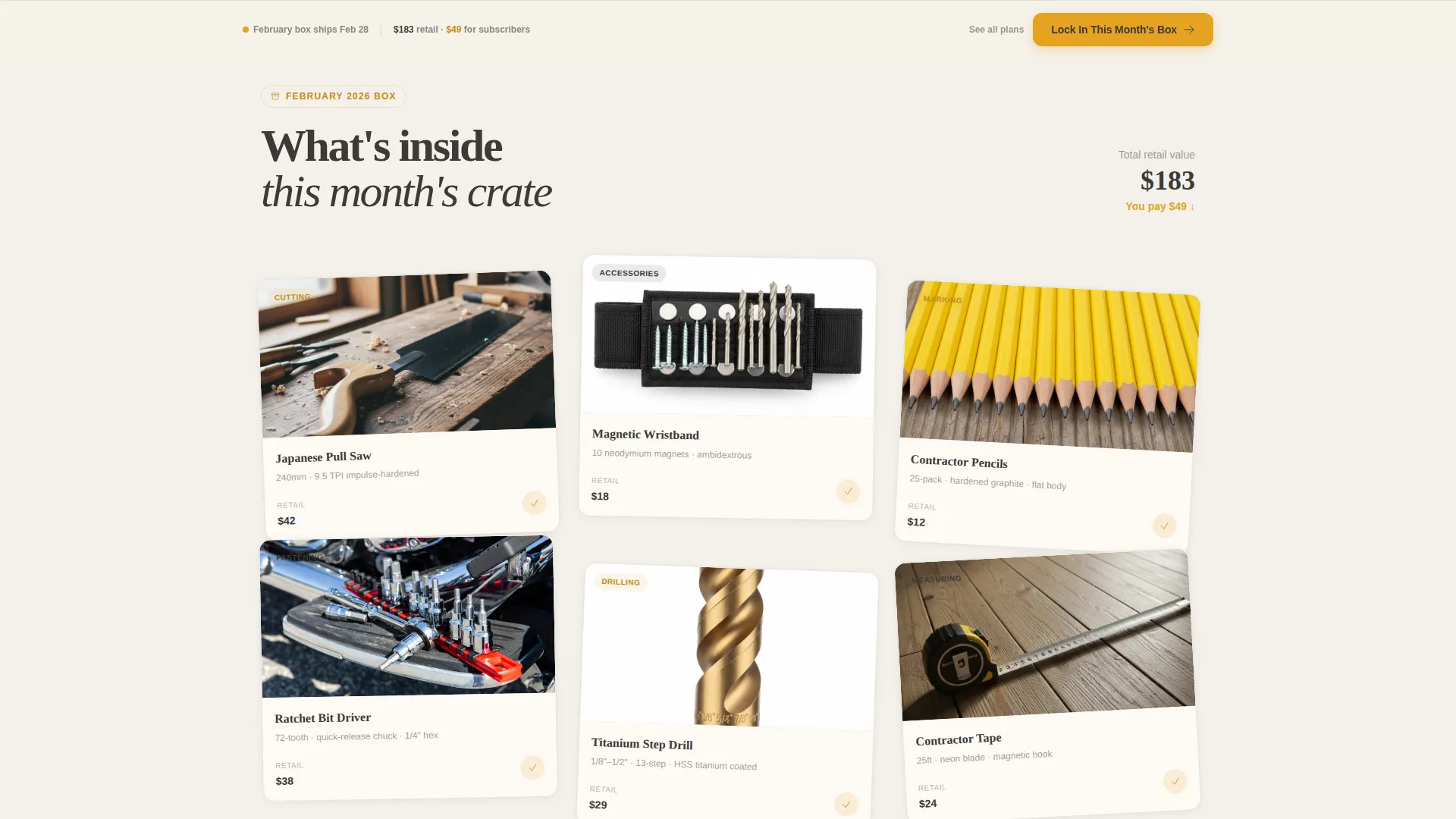
Layered Scroll-Reveal Product Grid
Product cards physically overlap and shift as the visitor scrolls, mimicking the motion of rummaging through packing material. This "What's Inside" grid shows specific items, including a Japanese pull-saw, a magnetic wristband, and contractor pencils, as tappable product tiles arranged in a natural, stacked layout.
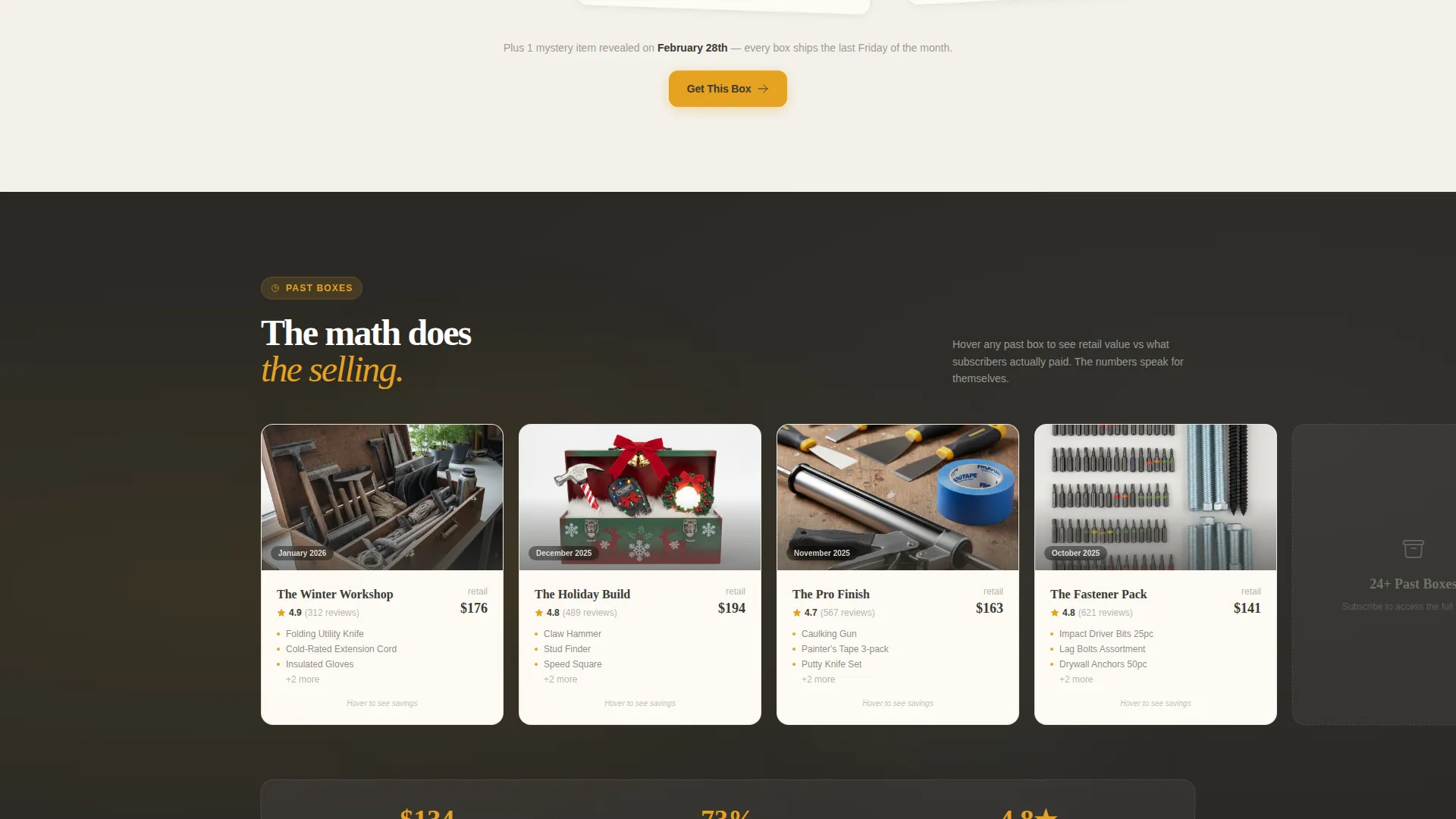
Past-Boxes Savings Carousel
A horizontal carousel displays previous monthly boxes. Hovering over each card reveals the full retail value of that box alongside the subscription price paid. The savings figure animates upward like a counter, letting the math make the case for subscribing rather than relying on copy alone.
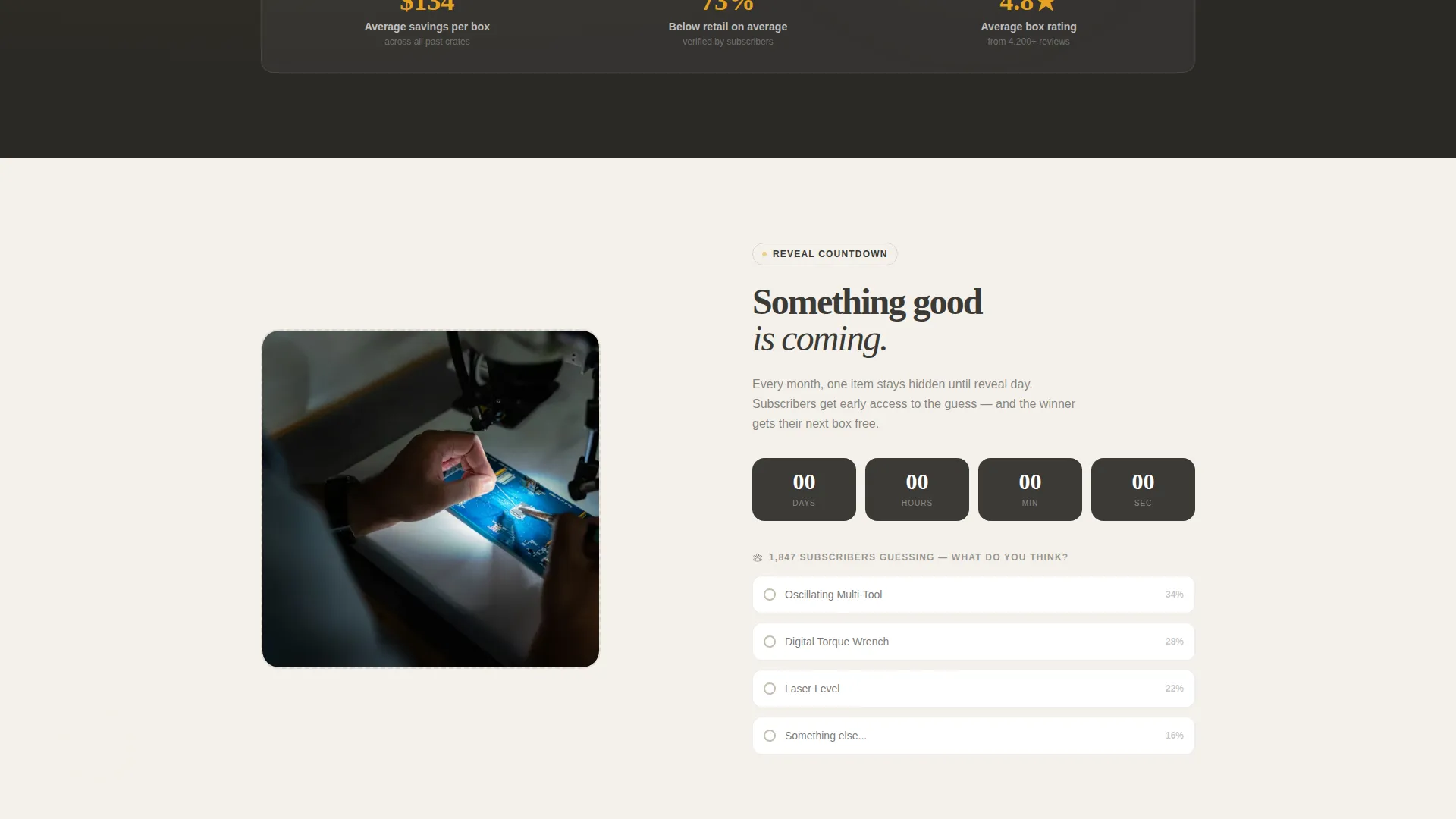
Mystery Tool Countdown Section
A blurred product image paired with a live countdown timer builds anticipation for the next box reveal. This section creates deadline-driven urgency without requiring external tools or manual copy updates beyond the timer target date.
Pinned Checkout Call-to-Action Bar
After the first scroll, a "Lock In This Month's Box" button in caution-tape amber pins to the bottom of the viewport. It stays visible throughout the page, reducing the distance between intent and action at any scroll depth.
Three-Plan Overlap Card Block
Three subscription plan cards overlap slightly at the page center: single month, three-month, and six-month. The three-month card is elevated and tagged "Most Popular, Free Multi-Tool." Clicking any card opens an inline checkout requesting size preference, shipping address, and payment details.
Gift a Box Secondary Path
Below the main plan cards, a dedicated gifting section lets buyers choose a delivery date and add a personal message. This secondary conversion path captures gift buyers without disrupting the primary subscription flow.
Page sections overview
| Section | Purpose |
|---|---|
| App Store Header | Show dashboard preview in angled device frame on kraft-paper background |
| What's Inside Grid | Display current box contents as layered, scroll-shifting product cards |
| Past Boxes Carousel | Compare retail value to subscription price with animated savings counter |
| Mystery Tool Reveal | Build urgency with blurred product image and countdown timer |
| Plan Selection Cards | Present three overlapping subscription tiers with elevated center card |
| Inline Checkout Flow | Capture size preference, shipping address, and payment without page change |
| Gift a Box | Offer gifting path with date picker and personal message field |
Design & branding system
The visual identity follows a Marketplace Grid theme built on a workshop-inspired color palette. Every design choice reinforces the physical, tactile feeling of a well-organized toolbox.
- Colors: soft workshop white (#F4F1EB), pegboard warm gray (#C4BFAE), pencil-mark graphite (#3B3A36), and caution-tape amber (#E5A220) used on buttons, badges, and price callouts
- Textures and depth: kraft-paper backgrounds scattered with wood shavings and a hex bolt, with layered cards and overlapping product photography floating above matte surfaces to create drawer-depth visual layers
- Motion and interaction: scroll-triggered card shifts, hover-activated price reveals, and an upward-counting savings animation all reinforce the Surprise and Delight creative direction
Mobile & speed optimization
The scroll-reveal interactions and layered card layout are designed to translate clearly to smaller screens. The pinned checkout bar is especially useful on mobile, where scrolling distance between sections is longer.
- The pinned amber call-to-action button stays accessible at the bottom of the viewport on both desktop and mobile viewports
- Overlapping card animations are structured to remain readable on narrow screens without collapsing into a flat, unreadable stack
- The inline checkout form fields, size preference, shipping address, and payment, are laid out to work cleanly in a single-column mobile view
How this template helps you convert
Every scroll depth in this template is designed to answer a specific objection and reward continued engagement with a new reason to subscribe.
- The retail-versus-subscription price reveal in the past-boxes carousel gives buyers a concrete savings figure, making the value case before they reach the checkout cards.
- The mystery tool countdown and blurred image create a deadline that shifts the decision from "sometime" to "before this month's box ships," pushing visitors toward the pinned amber call-to-action.
- The three-plan card block with an elevated center option guides buyers toward the highest-value commitment tier while still offering entry points at every level.
Other information about this template
This template is categorized under Retail and E-Commerce, specifically within the Tools and Hardware E-Commerce subcategory. It is built for direct sales with an upsell flow toward longer subscription commitments.
- The template style is Scroll Reveal with Progressive disclosure, meaning each page section adds new context rather than repeating the same pitch
- The header concept is an App Store Preview, showing a subscription dashboard inside a stylized angled device frame to bridge the digital interface with the physical box experience
- The Marketplace Grid theme and Cloud Canvas color system work together to keep the page feeling like a clean, well-lit workbench rather than a generic e-commerce storefront
Theme
Marketplace Grid
Creative direction
Comparison Journey
Color system
Ink & Paper
Style
Scroll Reveal (Progressive)
Direction
Upsell/Upgrade
Page Sections
Layered Scroll-reveal Product Grid
Past-boxes Savings Carousel
Mystery Tool Countdown Section
Pinned Amber Checkout Button
Three-plan Overlap Card Block
Gift a Box Secondary Path
Related questions
Who is this landing page template designed for?
Can I customize the subscription plan names and prices?
Does the template include the gift subscription option?
How does the mystery tool countdown section work?
Can I replace the product images and box contents shown on the page?



