Executive Health Insurance Landing Page Template
Underwrite is an executive-grade health insurance landing page built for mid-market companies navigating complex benefits decisions. A live three-field savings calculator anchors the hero, followed by a side-by-side plan comparison table, a regulatory compliance checklist, and a downloadable benefits audit kit. The design uses boardroom navy, linen white, and decision-point gold to project analytical authority.
by Rocket studio
Quick summary
Underwrite is a single-page health insurance landing page template designed for mid-market benefits providers. It opens with a live savings calculator, moves through a structured plan comparison table and compliance checklist, and closes with a resource download form. The template earns trust through analytical depth before asking for any contact details.
Who this template is for
This template is built for health insurance providers and benefits consultants who sell to mid-market companies. It speaks directly to the decision-makers who sit in those buying rooms.
- CFOs reviewing renewal quotes that have increased sharply and need to justify switching providers
- HR directors fielding employee complaints about narrow provider networks
- Founders at companies of fifty or more employees who are navigating Affordable Care Act (ACA) reporting requirements for the first time
What problem this template solves
Mid-market companies are caught between two worlds. Off-the-shelf group plans leave coverage gaps, while enterprise-level benefits programs assume a dedicated internal team that most growing companies simply do not have.
- Buyers arrive skeptical and price-sensitive, so the template leads with a calculator that shows estimated savings before asking for anything
- Compliance complexity around ACA rules, COBRA administration, and state-specific mandates creates confusion that the checklist section directly addresses
- Generic insurance landing pages fail to communicate analytical depth, leaving buyers unconvinced before they ever reach a form
What you get with this template
You get a fully structured, section-led landing page that moves a visitor from curiosity to commitment through a logical sequence of proof. Each section adds a layer of evidence before the primary call to action appears.
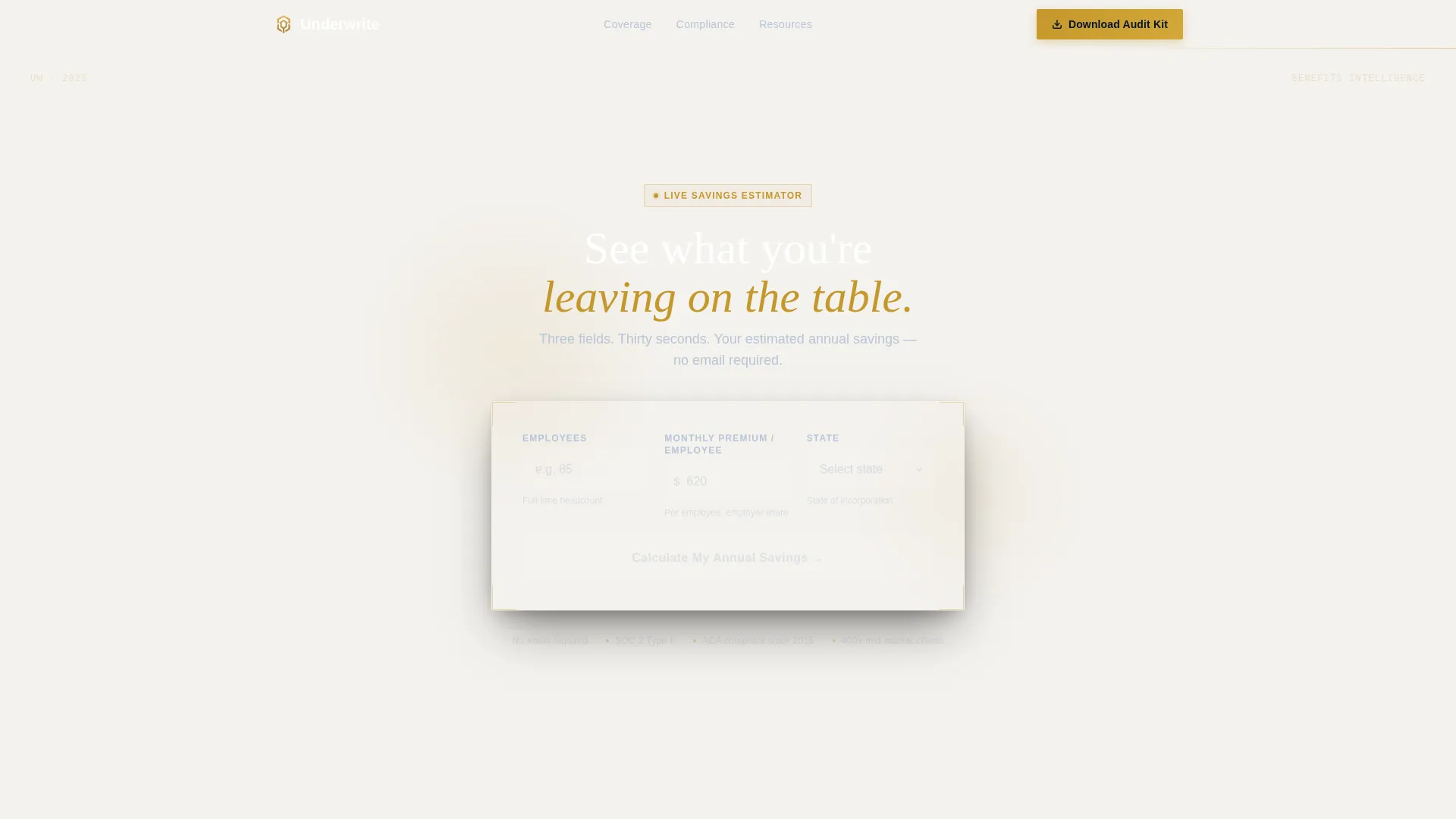
- A live three-field hero calculator that returns an estimated annual savings range in large gold numerals against deep navy
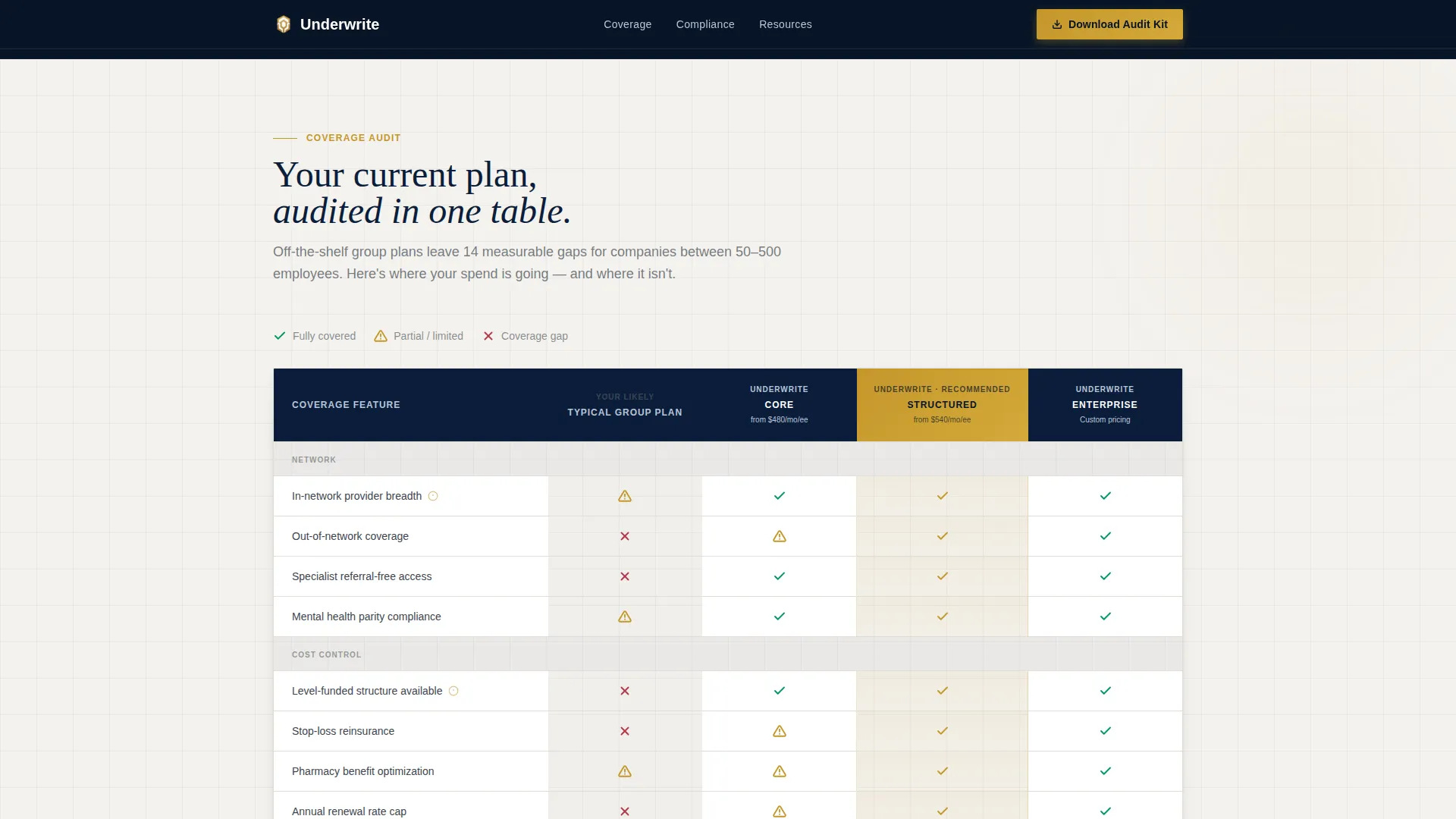
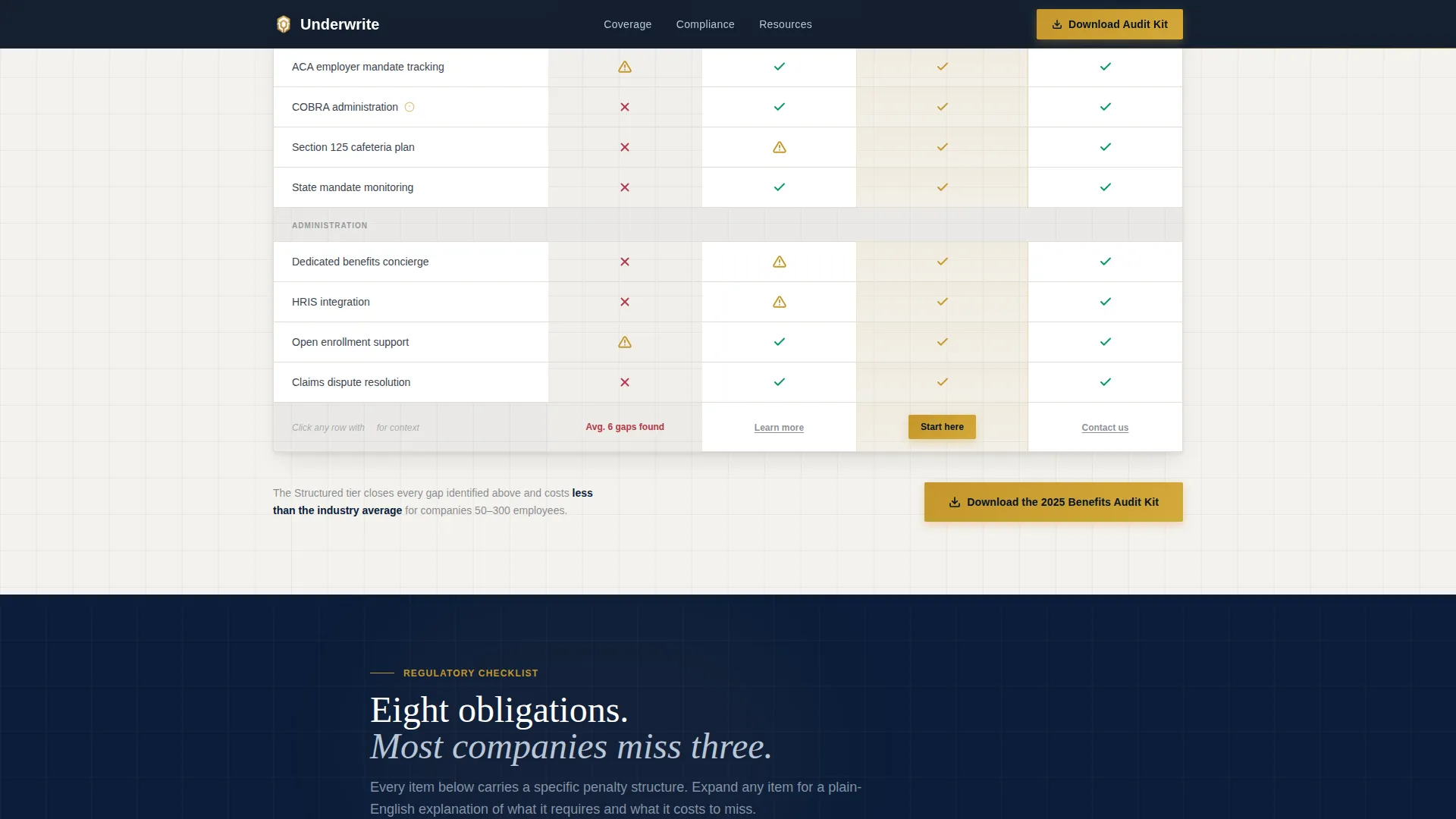
- A side-by-side plan comparison table auditing the visitor's likely current plan against three recommended coverage tiers
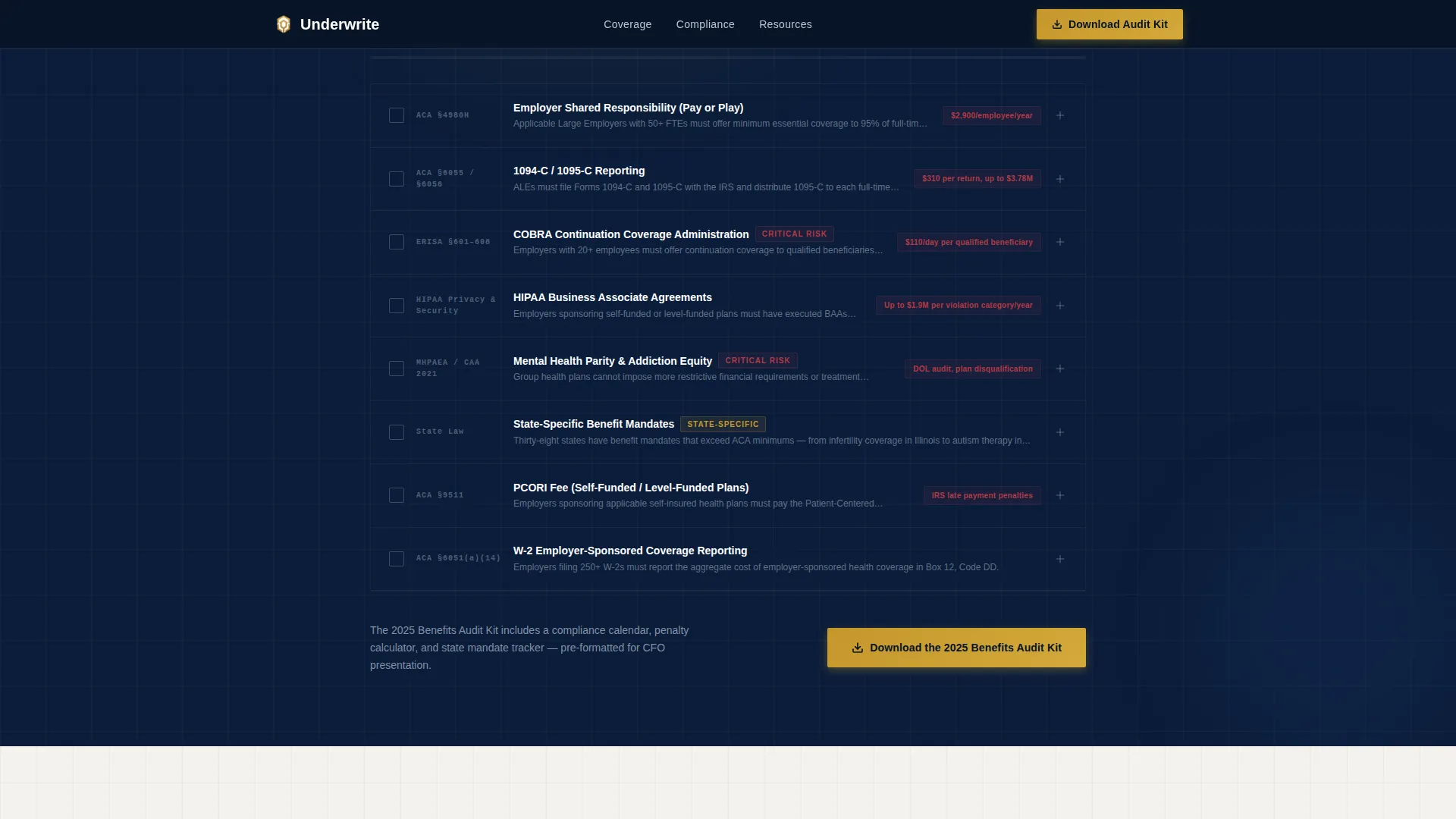
- An expandable regulatory compliance checklist covering ACA, COBRA, and state mandates, plus a gated benefits audit kit download with a three-field lead capture form
Feature list
This template is built around a specific sequence of persuasion. Every feature below serves that sequence directly.
Live Savings Calculator Hero
The hero section is a three-field estimator asking for company size, current monthly premium per employee, and state of incorporation. It returns an estimated annual savings range in large gold numerals, flanked by a benchmark line stating that companies of a similar size overpay by an average of $1,840 per employee per year. There is no stock photography and no illustration. The calculator is the entire visual focus.
Side-by-Side Plan Comparison Table
Section one of the scroll presents a structured audit table. It places the visitor's likely current plan type beside three recommended coverage tiers. Checkmarks, caution icons, and coverage gaps are highlighted in gold so the eye goes directly to the areas that need attention.
Expandable Regulatory Compliance Checklist
Section two is a line-by-line compliance review covering ACA reporting, COBRA administration, and state-specific benefit mandates. Each checklist item is expandable and reveals a two-sentence plain-English explanation of what the requirement means and why it matters.
Gated Benefits Audit Kit Download
Section three previews a downloadable benefits audit framework shown as a paginated document with visible section headers. The lead capture form asks for work email first, then company name, then employee count. No phone number is required, and no meeting is requested at this stage.
Secondary Consultation Path
After the calculator interaction, a secondary conversion option labeled "Run a Full Savings Analysis" appears. It links to a longer-form consultation request aimed at visitors who are already deep in renewal season and ready for a more detailed conversation.
Executive Suite Visual System
The template uses Fraunces display headlines paired with DM Sans for body text and interface elements. Scroll-triggered reveals, animated calculator number transitions, and staggered table row entrances give the page a measured, authoritative pace without feeling over-produced.
Page sections overview
| Section | Purpose |
|---|---|
| Hero Calculator | Delivers instant savings estimate before the visitor scrolls |
| Plan Comparison Table | Audits current plan gaps against three recommended tiers |
| Compliance Checklist | Reviews ACA, COBRA, and state mandate requirements |
| Audit Kit Download | Previews and gates the 2025 Benefits Audit Kit resource |
| Footer | Provides linear single-row navigation and legal links |
Design & branding system
The visual identity follows an Executive Suite theme. Every color and type choice reinforces the feeling of opening a prepared analysis in a boardroom setting.
- Boardroom navy (#0B1D3A) dominates headers, section backgrounds, and the persistent navigation bar; polished charcoal (#3D4550) carries body text and secondary labels; pressed-linen white (#F4F2EE) breathes across table cells and content cards
- Decision-point gold (#C5972C) appears only where a decision is being made, on active buttons, comparison table highlights, and selected plan tiers, keeping its impact sharp and purposeful
- Fraunces handles all display headlines for typographic authority; DM Sans handles body copy, form labels, and interface text for clarity and readability
Mobile & speed optimization
The template is designed desktop-first to match the context where CFOs and HR directors typically review renewal materials, a laptop during a focused work session. Responsive fallback layouts ensure the page remains functional on smaller screens.
- The calculator, comparison table, and expandable checklist each have mobile-adapted layouts so no interactive element is blocked on a smaller viewport
- Static sections are built with server-rendered components for faster initial load; the calculator and interactive checklist run as client-side components to keep interactivity isolated and efficient
How this template helps you convert
The conversion sequence is intentional and evidence-led. Each section earns the next ask rather than demanding commitment upfront.
- The calculator gives instant, personalized value before the visitor has read a single paragraph, making the benchmark figure feel earned rather than claimed
- The comparison table and compliance checklist build urgency by showing specific gaps and regulatory exposure in the visitor's current setup
- The audit kit download feels like the obvious next step because the page has already demonstrated the analytical depth behind it, so submitting three form fields carries very low friction
Other information about this template
This template is built specifically for the United States market, using USD pricing, US health insurance terminology, and regulatory references relevant to domestic compliance frameworks.
- All copy references and compliance items reflect US-specific regulations including the Affordable Care Act and COBRA continuation coverage rules
- The template style is a Comparison Table layout within a Content and Resource delivery framework, matching the creative direction of a Checklist and Audit experience
- The header concept is a Calculator and Estimator interaction, classified under the Finance and Insurance category with a Health Insurance Provider niche focus
- Animation intensity is set to medium, with scroll-triggered reveals, calculator number animation on result return, and staggered table row entrances keeping motion purposeful rather than decorative
Theme
Executive Suite
Creative direction
Checklist & Audit
Color system
Navy Authority
Style
Comparison Table
Direction
Content/Resource
Page Sections
Live Three-field Savings Calculator
Side-by-side Plan Comparison Table
Expandable Compliance Checklist
Gated Audit Kit Download Form
Secondary Consultation Conversion Path
Executive Suite Typography and Motion
Related questions
Who is the primary audience for this template?
Can the calculator fields and benchmark figures be customized?
Does the template include the actual benefits audit document?
What does the lead capture form collect?
Is this template suitable for a multi-product insurance provider?



